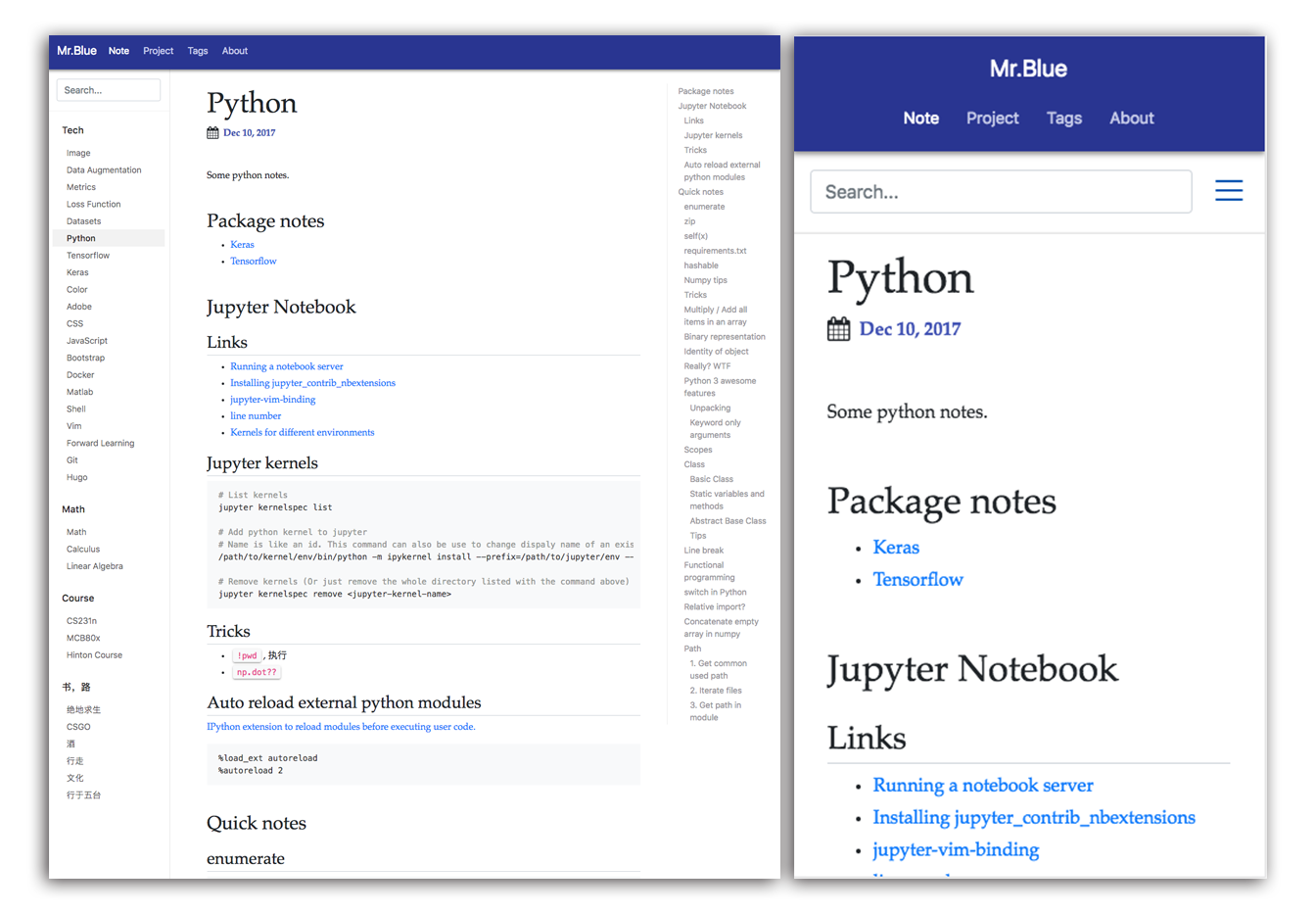
响应式布局,界面参考 Bootstrap 文档站风格
HugoHTML博客文档
blue — Hugo 博客模板
作者 memoex
基于 Hugo 的响应式博客主题,界面参考 Bootstrap 文档站,带侧边栏、目录、代码高亮与 MathJax。
看看你的网站会是什么样
浏览真实页面截图,比较内容排版与手机效果。点击下方缩略图切换,放大查看整页细节。
目前有 1 张原始预览,可打开完整图片查看设计细节。
截图用于了解视觉与布局,交互效果请以实际项目为准。
采集于 2026-10-11查看来源
值得关注的模板亮点
从已有项目资料中,快速了解它的特点。
提供侧边栏与文章目录(TOC)
代码语法高亮,支持单击复制代码块
集成 MathJax 公式与 fancybox 图片查看
支持 Disqus 评论、标签与最后修改日期显示
模板详细介绍
Blue 是面向 Hugo 博客框架的响应式主题,作者说明其视觉灵感来自 Bootstrap 的文档站点。仓库提供博客演示站与截图,README 以功能清单和快速开始为主,未给出更多设计说明。
主题在内容呈现上偏向文档式阅读:提供侧边栏与文章目录(TOC),支持语法高亮,并可单击复制代码块;同时集成 MathJax 公式与 fancybox 图片查看,字体与配色参考 Material 色板。评论使用 Disqus,内容组织支持标签,文章可显示最后修改日期。README 中博客搜索仍标记为未完成。
使用方式遵循 Hugo 主题的常规流程:在 Hugo 站点目录的 themes 下克隆仓库,然后通过 hugo -t blue 或在 config.toml 中设置 theme = "blue" 启用。README 给出了包含 baseurl、标题、副标题、favicon、作者信息与主导航菜单的 config.toml 示例,菜单项需以 / 结尾以便导航高亮生效。仓库最近更新时间为 2018 年,README 未说明与新版 Hugo 的兼容情况。
HugoHTML博客文档
适合你的项目吗?
适用场景
- 搭建以技术笔记为主的个人博客
- 撰写含代码片段与数学公式的教程类文章
- 需要侧边栏与目录辅助长文阅读的文档式站点
适合人群
- 使用 Hugo 生成静态站点的个人博主
- 需要文档式阅读体验与代码展示的技术写作者
- 希望以 MIT 许可代码为基础自行修改主题的开发者
上手与定制指南
结合仓库当前版本的说明,按下面的资料检查内容、配置与运行要求。
- 1
需先安装 Hugo 并创建站点,目录中应包含 themes 文件夹
- 2
在 themes 目录执行 git clone https://github.com/memoex/blue.git
- 3
用 hugo -t blue 或在 config.toml 中设置 theme = "blue" 启用主题
- 4
按 README 示例配置 baseurl、标题、副标题、favicon、作者与主导航菜单
- 5
菜单 url 需以 / 结尾,导航高亮才会生效
授权与来源资料
使用条件与限制
免费使用 · 保留许可声明本次收录的是公开仓库中采用 MIT 许可的免费版本;免费范围为该版本代码,不代表外部服务或第三方素材免费。
使用时需要遵守
- 允许免费使用、修改、商用和分发该版本代码。
- 分发代码副本或实质性部分时,保留原作者版权声明和完整 MIT 许可声明。
- 代码按现状提供;担保与责任限制以原许可证及适用法律为准。
额外费用与待核对事项
- 演示图片、字体、图标及其他第三方素材需按各自许可核对,不能仅凭代码的 MIT 许可判断。
- 域名、托管、数据库、支付或 AI 等外部服务可能另外收费。
- 评论功能依赖第三方 Disqus 服务,需自行注册 Disqus 站点并配置,可能受其服务条款与网络可用性限制。
- 博客搜索功能尚未实现,README 中标记为未完成,站点不包含搜索能力。
- 使用该主题需预先安装 Hugo 静态站点生成器并创建站点,非独立可运行网站。
- 安装方式为从 GitHub 克隆仓库到 Hugo 站点的 themes 目录,需具备 Git 与网络访问。
查看原文依据
Permission is hereby granted, free of charge
许可证原文
- [x] Disqus comment.
README 原文
- [ ] Blog searching.
README 原文
First you need to have hugo installed and use hugo to create a new website.
README 原文
https://github.com/memoex/blue/blob/master/LICENSE.mdhttps://github.com/memoex/blue/blob/master/README.mdgit clone https://github.com/memoex/blue.git
README 原文
DeepSeek 根据仓库许可证和 README 整理 ·2026-10-11。结果仅覆盖已读取资料,依赖、图片、字体及后续条款变更以各自原文为准。
项目核对记录与介绍依据
模板资料
- 来源平台
- GitHub
- 资料与维护参考分
- 资料一般 · 61 / 100
- 技术栈
- Hugo · HTML
- 网站类型
- 博客 · 文档
这个分数如何计算
本站按许可资料(最高30分)、演示链接(12分)、预览图(10分)、Star数(15分)、记录的维护时间(15分)、描述完整度(8分)、功能记录(5分)和分类资料(5分)计算。它不是代码、安全或性能测试,也不是 Google 评分;有链接不代表已实测可用。
这个项目需要核对什么
- 记录的仓库更新时间
- 2018-04-13
- 截图检查日期
- 2026-10-11
目前没有记录演示链接。请依据仓库说明在本地评估;仅凭截图无法确认交互行为。
目录记录的主要技术栈是 Hugo。请通过依赖清单和锁文件核对实际版本与托管要求。这些说明基于收录资料,不代表代码审计或部署实测。
查看具体选型方法 →介绍的制作与核对状态
介绍由 AI 辅助整理目录与仓库资料。仓库作者不等于这篇介绍的审核者。
审核声明: [email protected] · 2026-10-13
查看当时使用的来源资料
SHA-256: 26f868caa84bd7701af055a31cad78744a90838a6fa78efbd9793f400d44cc37
2026-10-11T18:17:08.153Z
来源文件 / 仓库# Blue A responsive theme inspired by documentation site of Bootstrap for Hugo blog framework. ## Demo Blog demo: https://memoex.github.io  ## Features - [x] Responsive. - [x] Nice and convenient sidebar. - [x] TOC (table of content). - [x] Syntax Highlighting. - [x] Copy code block to clipboard with single click. - [x] MathJax. - [x] Show images with fancybox. - [x] Beautiful [fonts](http://localhost:1313/note/tech/css/) and [material color](https://material.io/guidelines/style/color.html#color-color-palette). - [x] Disqus comment. - [x] Tags. - [x] Show last modify date after your modification. - [ ] Blog searching. ## Quick start ### Installation First you need to have hugo installed and use hugo to create a new website. See the [Quick Start](http://gohugo.io/getting-started/quick-start/) if hugo is new for you. After you have a new hugo website, the directory structure must look like this: ``` . ├── archetypes ├── config.toml ├── content ├── data ├── layouts ├── static └── themes ``` Then move to `themes` folder. If you don't have this folder, just create one. Run the commands below to install `blue` theme: ``` sh git clone https://github.com/memoex/blue.git ``` Then you could use this theme in two ways. One is to pass the `-t` flag: - building your site for deployment: `hugo -t blue` - starting a local server at http://localhost:1313 (default): `hugo server -t blue` The other one is to change your configuration file `config.toml`. Change the value of `theme` as below: ``` theme = "blue" ``` Then you don't need an extra `-t` flag anymore. ### Configuration Below is my `config.toml`, you can replace the values with your information. ``` toml baseurl = "https://memoex.github.io/" DefaultContentLanguage = "en" title = "Mr.Blue" theme = "blue" metaDataFormat = "yaml" [Params] subtitle = "Mr.Blue doesn't have a good memory." favicon = "/favicon.ico" # when build website, the files under `/static` will be moved to `/` [Author] name = "Mr.Blue" website = "https://memoex.github.io" email = "[email protected]" github = "blue-fatty" [[menu.main]] identifier = "note" name = "Note" url = "/note/" # url should end with `/` to make highlighting of navigation bar works weight = 2 # small weight go left, large weight go right [[menu.main]] identifier = "project" name = "Project" url = "/project/" weight = 2 [[menu.main]] identifier = "tags" name = "Tags" url = "/tags/" weight = 2 [[menu.main]] identifier = "about" name = "About" url = "/about/" weight = 3 ```
看看同类模板
对比同技术栈与用途的模板,找到更适合的视觉与内容结构。

hugo-PaperMod
PaperMod 是 Hugo 生态里知名度较高的主题之一,定位很明确:给博客和轻量作品集站点提供一套干净、响应式的阅读界面。
Hugo · 作品集

hugo-book
Hugo Book 是一个面向文档场景的 Hugo 主题,定位很直接:把文档站点做得像一本朴素的书。
Hugo · 文档

LoveIt
❤️A clean, elegant but advanced blog theme for Hugo 一个简洁、优雅且高效的 Hugo 主题
Hugo · 博客

hugo-coder
A minimalist blog theme for hugo.
Hugo · 博客

docsy
Hugo theme for open source documentation
Hugo · 文档

blowfish
Personal Website & Blog Theme for Hugo
Hugo · 博客