针对 AI 代理优化:内部模块不使用 barrel 文件,规则文件限制在 32 KB 以内,根目录与领域目录分层提供 AGENTS.md
Next.jsReact启动器
next-agent-template — Next.js 启动器模板
作者 moisesvalero
面向 AI 编码代理协作的 Next.js 16 启动模板,预置代理规则、Oxlint 快速校验与可选全栈模块。
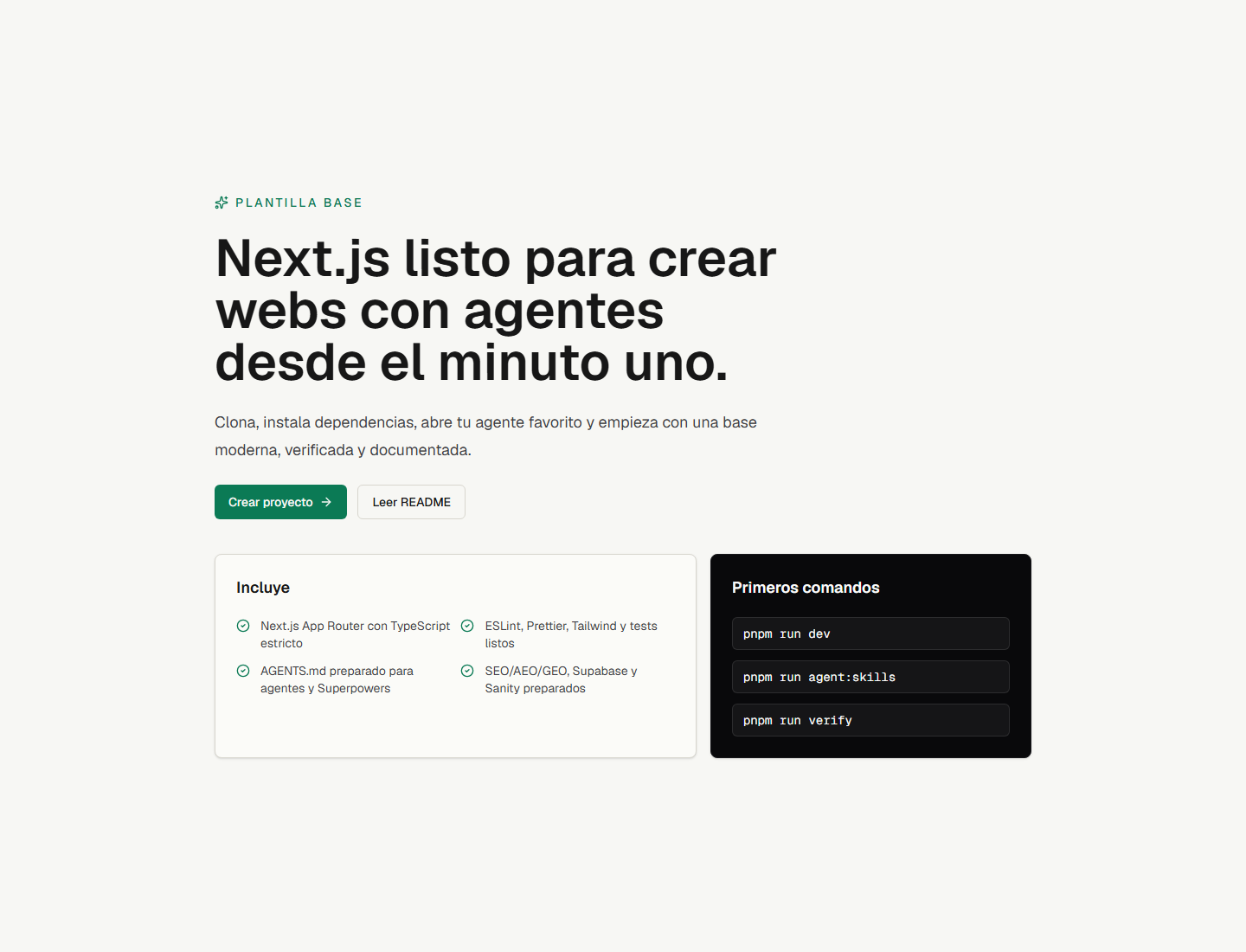
看看你的网站会是什么样
浏览真实页面截图,比较内容排版与手机效果。点击下方缩略图切换,放大查看整页细节。
目前有 1 张原始预览,可打开完整图片查看设计细节。
截图用于了解视觉与布局,交互效果请以实际项目为准。
采集于 2026-09-26查看来源
值得关注的模板亮点
从已有项目资料中,快速了解它的特点。
使用 Rust 编写的 Oxlint 做静态检查,并提供 verify 与 verify:release 两条自动校验命令
零依赖启动:不配置数据库或 Docker 即可运行并预览落地页与 UI 组件
全栈模块可选且解耦:Better Auth、Prisma 7、Polar、Stripe、Supabase、Sanity 均为预配置
预置 SEO/AEO 能力:sitemap、robots、manifest、动态 Open Graph、llms.txt 路由与 JSON-LD
包含 AutoSkills 与 Impeccable 两个代理技能安装脚本
模板详细介绍
next-agent-template 是一个基于 Next.js 16(App Router + Turbopack)与 React 19 的启动模板,定位是方便与 AI 编码代理(Claude Code、Cursor、Codex、OpenCode、Antigravity、Copilot、Gemini)协作开发。它针对 LLM 解析代码库的方式做了调整:内部模块不使用 barrel 文件(index.ts),规则文件控制在 32 KB 以内;根目录 AGENTS.md 定义全局约束,src/lib/auth、src/lib/payments、src/lib/security 等目录下另有局部 AGENTS.md 提供领域规则。模板使用 Rust 编写的 Oxlint 做静态检查以获得较快的 lint 反馈,并提供 pnpm run verify 与 pnpm run verify:release 两条自动校验命令,供代理在完成任务前自查。
技术栈方面,模板包含严格 TypeScript、Tailwind CSS v4、Knip(未使用依赖与导出检测)、Prettier(含 Tailwind 类名排序)、Vitest + jsdom + React Testing Library、Husky 与 lint-staged、Zod 环境变量校验。UI 采用 shadcn 风格基线,提供 components.json、cn() 工具函数和一个 Button 组件,可按需通过 shadcn CLI 添加组件。SEO/AEO 方面预置了 metadata、sitemap、robots、manifest、动态 Open Graph 图片、llms.txt 路由和 JSON-LD 结构化数据。
全栈模块是可选的:Better Auth(管理员角色、用户模拟、多租户组织、TOTP 2FA)、Prisma ORM(PostgreSQL 适配器与 Prisma Studio)、Polar 与 Stripe 支付及积分账本、Supabase 与 Sanity 客户端均为预配置但解耦,不配置数据库也能启动并预览落地页和 UI 组件。仓库以 MIT 许可发布,demo 部署在 Vercel。README 中未说明生产环境的具体性能数据或安全审计结论,采用前需自行评估。
Next.jsReact启动器
适合你的项目吗?
适用场景
- 使用 Claude Code、Cursor、Codex 等 AI 编码代理从零搭建新 Web 项目
- 需要为代理提供明确目录规则与自动校验流程的团队开发
- 快速预览 Next.js 16 + React 19 + Tailwind CSS v4 的落地页与 UI 组件
- 按需接入认证、数据库、支付等全栈能力的 SaaS 原型开发
- 需要 llms.txt、结构化数据等面向 AI 引擎优化配置的站点
适合人群
- 习惯用 AI 编码代理协作的开发者
- 需要 Next.js 16 与 React 19 起步项目的团队
- 希望按需启用认证、数据库或支付模块的 SaaS 项目
- 重视 lint、类型检查与测试自动化的项目
上手与定制指南
结合仓库当前版本的说明,按下面的资料检查内容、配置与运行要求。
- 1
克隆仓库后执行 pnpm install,再运行 pnpm run dev 即可在 http://localhost:3000 预览
- 2
可选执行 pnpm run agent:skills 通过 AutoSkills 配置代理技能,或 pnpm run agent:impeccable 安装 Impeccable
- 3
使用代理修改代码前,建议先让其阅读根目录 AGENTS.md,并在完成任务前运行 pnpm run verify 或 pnpm run verify:release
- 4
全栈模块为可选:需数据库时使用 pnpm run db:generate、db:push、db:migrate 或 docker:up 启动本地 PostgreSQL
- 5
自定义站点信息时更新 src/config/site.ts 并设置 NEXT_PUBLIC_APP_URL
授权与来源资料
使用条件与限制
待核对- 尚未完成使用条件评估,请先查看原仓库许可证。
项目核对记录与介绍依据
模板资料
- 来源平台
- GitHub
- 资料与维护参考分
- 资料较完整 · 82 / 100
- 技术栈
- Next.js · React
- 网站类型
- 启动器
这个分数如何计算
本站按许可资料(最高30分)、演示链接(12分)、预览图(10分)、Star数(15分)、记录的维护时间(15分)、描述完整度(8分)、功能记录(5分)和分类资料(5分)计算。它不是代码、安全或性能测试,也不是 Google 评分;有链接不代表已实测可用。
这个项目需要核对什么
- 记录的仓库更新时间
- 2026-09-26
- 截图检查日期
- 2026-09-26
已收录演示链接。请用你的内容与屏幕尺寸检查;有演示不代表表单、认证或支付已经可用。
目录记录的主要技术栈是 Next.js。请通过依赖清单和锁文件核对实际版本与托管要求。这些说明基于收录资料,不代表代码审计或部署实测。
查看具体选型方法 →介绍的制作与核对状态
介绍由 AI 辅助整理目录与仓库资料。仓库作者不等于这篇介绍的审核者。
审核声明: [email protected] · 2026-10-04
查看当时使用的来源资料
SHA-256: 0c2478addf1587d856ba883f7acc22a9b7ada3b13765440b4d0271a00755b4af
2026-09-26T18:18:12.491Z
来源文件 / 仓库<div align="center"> # Next Agent Template ⚡️ ### Production-ready Next.js 16 template engineered for collaboration with AI coding agents A lightweight, high-performance foundation built from the ground up for developer-agent workflows (Claude Code, Cursor, Codex, OpenCode, Antigravity, Copilot, Gemini). Pre-configured with strict boundaries, modular agent instructions, instant Rust tooling, and full-stack capabilities. [](https://nextjs.org/) [](https://react.dev/) [](https://www.typescriptlang.org/) [](https://tailwindcss.com/) [](https://better-auth.com) [](https://prisma.io) [](https://polar.sh) [](https://oxc.rs) [](https://vitest.dev/) [](./LICENSE) <br /> [🌐 **Live Demo**](https://next-agent-template.vercel.app) • [⚡ **Deploy on Vercel**](https://vercel.com/new/clone?repository-url=https://github.com/moisesvalero/next-agent-template) • [⭐ **Star on GitHub**](https://github.com/moisesvalero/next-agent-template) <br />  </div> --- ## 🤖 Why This Template for AI Coding Agents? Most starter templates are built solely for human developers, ignoring how LLMs parse codebases. This template is architected specifically to maximize the reasoning power, accuracy, and execution speed of AI coding assistants: - **Context-Window Optimized**: No barrel files (`index.ts`) in internal modules, preventing token waste and circular dependencies. All rule files are strictly under 32 KB. - **Hierarchical Agent Rules**: Root `AGENTS.md` establishes overarching invariants, while local domain rules (`src/lib/auth/AGENTS.md`, `src/lib/payments/AGENTS.md`, `src/lib/security/AGENTS.md`) guide agents with laser focus. - **Sub-10ms Feedback Loop**: Powered by **Oxlint** in Rust. Agents get instant linter feedback in milliseconds instead of waiting for heavy legacy tooling. - **Strict Quality Gates**: `pnpm run verify` and `pnpm run verify:release` provide agents with clear automated verification to self-audit their work before declaring a task complete. - **Agent Skill Integrations**: Built-in scripts for `autoskills` and `impeccable` to install domain-specific workflows and design auditing directly in the agent workspace. - **AEO Native (AI Engine Optimization)**: Ships with `llms.txt`, machine-readable Markdown twins, and search metadata so external AI models can discover and reason about your site. - **Zero-Bloat Boot**: Clones and boots in seconds without forcing local databases or Docker containers. Full-stack modules (Better Auth, Prisma 7, Polar/Stripe) are completely decoupled and opt-in. --- ## Quick Start Get up and running in less than 30 seconds: ```bash git clone https://github.com/moisesvalero/next-agent-template.git my-saas cd my-saas pnpm install pnpm run agent:skills pnpm run dev ``` Then open `http://localhost:3000` in your browser. The app runs immediately in **zero-bloat mode** without requiring a database to preview the landing page and UI components! --- ## Tech Stack - **Framework**: Next.js 16 (App Router + Turbopack) - **Library & Language**: React 19 & Strict TypeScript - **Styling**: Tailwind CSS v4 - **Linter**: Oxlint for lightning-fast static analysis (Rust) - **Dead Code/Dependency Detector**: Knip to catch unused dependencies, exports, and files - **Formatter**: Prettier with Tailwind CSS class sorting - **Testing**: Vitest, jsdom, and React Testing Library - **Git Hooks**: Husky & lint-staged to validate code before every commit - **Validation**: Zod for strict environment variable validation - **SaaS Auth**: Better Auth (Admin roles, user impersonation, multi-tenant organizations, TOTP 2FA) - **Database & ORM**: Prisma ORM with PostgreSQL adapter and visual web studio - **Monetization & Credits**: Polar (Merchant of Record) and Stripe with an atomic credit ledger - **UI Base**: shadcn-style component baseline with `components.json`, `cn()` utility, and a `Button` component - **Optional Integrations**: Pre-configured Supabase and Sanity clients - **SEO/AEO/GEO**: Pre-configured metadata, sitemap, robots, manifest, dynamic Open Graph, `llms.txt` route, and JSON-LD structured data ## Working with AI Agents 1. Clone this template for any new web project. 2. Open the project directory in your preferred AI-powered editor or terminal agent. 3. Prompt your agent to read [AGENTS.md](file:///AGENTS.md) before making any code modifications. 4. Run `pnpm run agent:skills` to let `autoskills` detect your environment and install helpful agent skills. 5. Before completing any task, always ask the agent to run `pnpm run verify` or `pnpm run verify:release`. ## Scripts ```bash pnpm run dev # Start the local development server pnpm run build # Build the application for production pnpm run start # Start the production build locally pnpm run lint # Run oxlint for static analysis pnpm run lint:fix # Run oxlint with automatic fixes pnpm run knip # Find unused dependencies, exports, and files pnpm run ui:add # Add new shadcn UI components pnpm run check # Run TypeScript compiler checks without emitting files pnpm run format # Format codebase using Prettier pnpm run format:check # Check formatting compliance with Prettier pnpm test # Run unit tests using Vitest pnpm run test:watch # Run unit tests in watch mode pnpm run audit # Audit dependencies for high+ vulnerability alerts pnpm run db:generate # Generate Prisma client types pnpm run db:push # Push schema changes to database pnpm run db:migrate # Run Prisma migrations in development pnpm run db:studio # Open Prisma Studio web visual database viewer pnpm run docker:up # Start optional local PostgreSQL container pnpm run docker:down # Stop local PostgreSQL container pnpm run verify # Run lint, knip, typecheck, formatting check, tests, build, and audit pnpm run verify:release # Run comprehensive release audit (agent rules size, AEO accessibility, build) pnpm run agent:skills # Run pnpm dlx autoskills to configure agent skills pnpm run agent:impeccable # Install the Impeccable skill in your workspace ``` ## AI Agent Tools This template recommends two core tools to supercharge your AI agent's performance: ### AutoSkills [AutoSkills](https://www.autoskills.sh/) is an audited command-line utility that automatically detects your project's technology stack (supporting React, Next.js, Vue, Astro, Tailwind, and over 20 other technologies) and installs the best contextual operational guidelines, custom rules, and workflow capabilities for your AI agents (such as Claude Code, Cursor, Codex, OpenCode, Antigravity, or Copilot). Instead of pulling files directly from unverified sources, AutoSkills routes all requests through a secure, reviewed, and audited registry. Selected skill files are downloaded, verified against recorded SHA-256 integrity hashes, and written locally into your project workspace. To initialize or update the recommended agent skills for this workspace: ```bash pnpm run agent:skills ``` This script executes `pnpm dlx autoskills` to automatically configure your project environment so that any AI assistant instantly understands the directory structure, styling guidelines, and verification rules defined for this stack. ### Impeccable [Impeccable](https://impeccable.style/) is a specialized AI skill that empowers agents to design, critique, polish, and audit user interfaces with superior visual judgment. It runs locally and integrates directly into your AI assistant via slash commands. To install Impeccable in your project workspace: ```bash pnpm run agent:impeccable ``` Once installed, reload your AI coding tool and interact with Impeccable directly from your agent's chat interface: - `/impeccable init`: Initialize project design context (creates `DESIGN.md` and `PRODUCT.md`). - `/impeccable polish [page]`: Refine spacing, typography, states, copy, and consistency on an existing page. - `/impeccable critique`: Audit the UI to identify the highest-priority visual and layout issues. - `/impeccable audit`: Perform a technical quality check for accessibility, responsiveness, and performance. - `/impeccable live`: Open the live visual editor to point-and-click UI elements in the browser and generate variants directly into your source code. ## Directory Structure ```text src/ app/ # Routes, layouts, sitemap, robots, and global styles components/ # Reusable components, UI, and SEO layouts config/ # Global site configurations lib/ # Utilities, env validators, SEO helpers, and Supabase integration sanity/ # Sanity client configurations and queries test/ # Testing environment configuration ``` ## SEO, AEO, and GEO This template provides a robust setup optimized for traditional search engines (SEO), Answer Engine Optimization (AEO), and Generative Engine Optimization (GEO): - `src/config/site.ts`: Houses site name, description, URL, locale, and keywords. - `src/lib/seo.ts`: Provides a `createPageMetadata()` helper and JSON-LD schema builder. - `src/components/seo/json-ld.tsx`: Safely injects structured data. - `src/app/sitemap.ts`: Dynamically generates `/sitemap.xml`. - `src/app/robots.ts`: Generates `/robots.txt`. - `src/app/manifest.ts`: Generates `/manifest.webmanifest`. - `src/app/opengraph-image.tsx`: Generates a dynamic default social sharing image. - `src/app/llms.txt/route.ts`: Serves `/llms.txt` to help web crawlers and AI answer engines easily parse the website's context. To customize it for your project, update `src/config/site.ts` and set `NEXT_PUBLIC_APP_URL`. Use the `createPageMetadata()` helper on specific pages to set custom titles, descriptions, or canonical URLs. ## UI with shadcn Rather than installing shadcn as a closed dependency, this template leaves a clean, standard-compatible foundation: - `components.json` tells the shadcn CLI where to put new components. - `src/lib/utils.ts` exports the `cn()` class merger utility. - `src/components/ui/button.tsx` is included as a starter component. - Theme colors and tailwind variables are defined in `src/app/globals.css`. You can add new components at any time: ```bash pnpm dlx shadcn@latest add card input textarea form ``` ## Supabase (Optional) Supabase is pre-configured for authentication, database access, and storage. You don't need to create an account immediately to run the app. Key Files: - `src/lib/supabase/browser.ts`: Supabase client for client-side components. - `src/lib/supabase/server.ts`: Supabase client for Server Components, Route Handlers, and Server Actions. - `src/lib/services.ts`: Utility to check if Supabase is active and configured. Environment Variables: ```env NEXT_PUBLIC_SUPABASE_URL= NEXT_PUBLIC_SUPABASE_A
看看同类模板
对比同技术栈与用途的模板,找到更适合的视觉与内容结构。

ai-website-cloner-template
Clone any website with one command using AI coding agents
Next.js · 启动器

Next.js SaaS Starter
Next.js SaaS Starter 是 Next.js 官方维护的 SaaS 起点模板,定位介于学习资源和可直接部署的脚手架之间。
Next.js · SaaS

Next.js Commerce
Next.js Commerce 是 Vercel 团队维护的电商启动模板,基于 Next.js App Router 构建,采用服务端渲染、React Server Components、Server Actions …
Next.js · 电商

Next-js-Boilerplate
Next-js-Boilerplate 是一个面向 Next.js 16、Tailwind CSS 4 和 TypeScript 的启动器,核心定位是开发者体验优先。
Next.js · 启动器

tailwind-nextjs-starter-blog
tailwind-nextjs-starter-blog 是一个面向个人技术博客的 Next.js 与 Tailwind CSS 启动模板,其 v2 版本基于 App Router 与 React Server Comp…
Next.js · 博客

next-forge
Production-grade Turborepo template for Next.js apps.
Next.js · 启动器