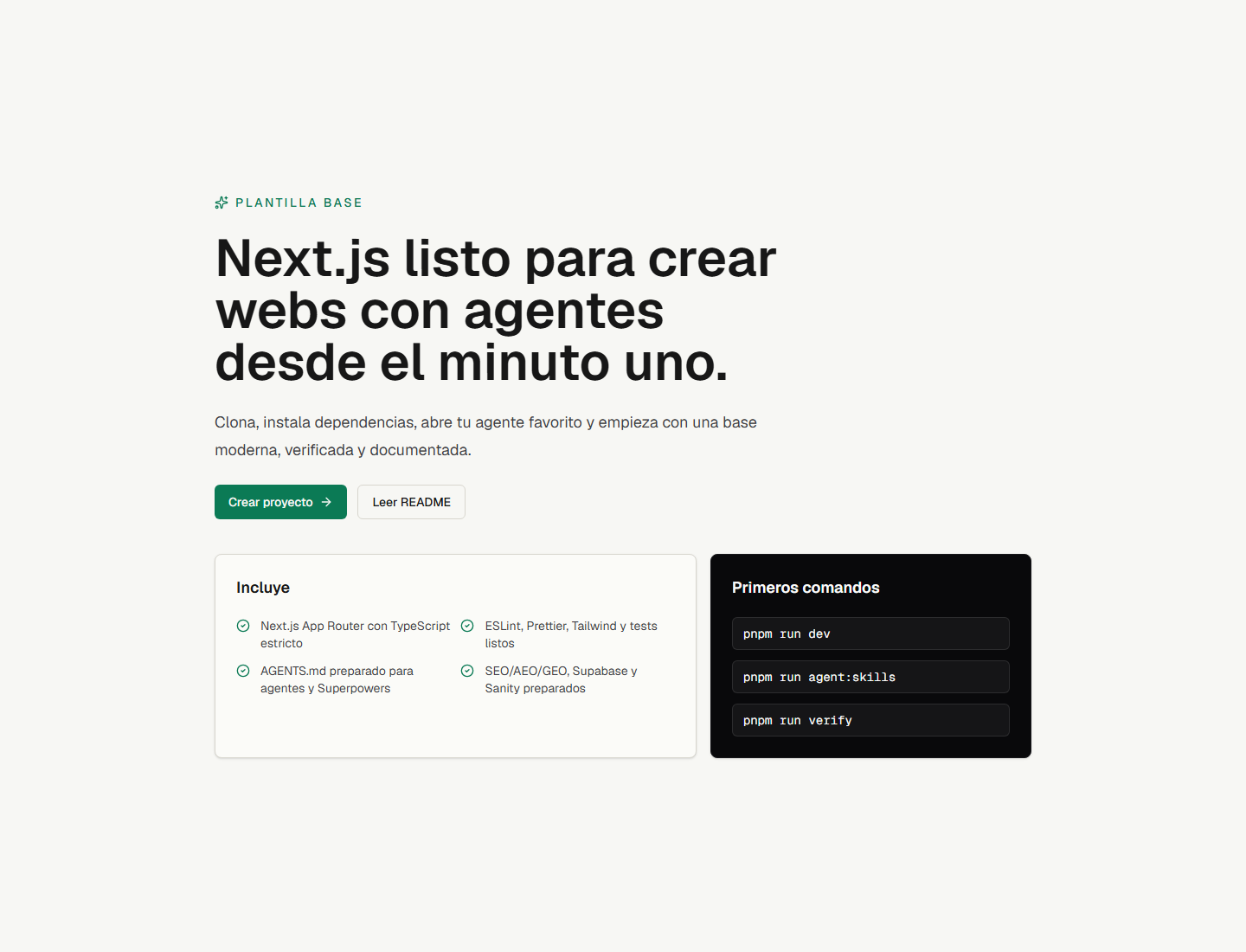
Optimized for AI agents: internal modules do not use barrel files, rule files are limited to 32 KB, and AGENTS.md is provided hierarchically at the root and domain directories
Next.jsReactStarter
next-agent-template — Next.js Starter Template
By moisesvalero
A Next.js 16 starter template for collaboration with AI coding agents, with preset agent rules, fast Oxlint checks, and optional full-stack modules.
Explore the design
Compare the page layouts and mobile experience. Open any screenshot for a closer look.
Overview
Author-provided preview
Explore the available preview. Additional pages have not been captured.
One original preview is available. Open the full image to inspect the design.
Screenshots show visual appearance; interactive behavior may differ.
Recorded 2026-09-26View source
What stands out
A quick read of the recorded project description.
Uses Oxlint, written in Rust, for static checks, and provides two automated verification commands: verify and verify:release
Zero-dependency startup: runs and previews the landing page and UI components without configuring a database or Docker
Full-stack modules are optional and decoupled: Better Auth, Prisma 7, Polar, Stripe, Supabase, and Sanity are all preconfigured
Preset SEO/AEO capabilities: sitemap, robots, manifest, dynamic Open Graph, llms.txt route, and JSON-LD
Includes two agent skill installation scripts: AutoSkills and Impeccable
Template Details
next-agent-template is a starter template based on Next.js 16 (App Router + Turbopack) and React 19, positioned to facilitate collaborative development with AI coding agents (Claude Code, Cursor, Codex, OpenCode, Antigravity, Copilot, Gemini). It is adjusted for how LLMs parse codebases: internal modules do not use barrel files (index.ts), and rule files are kept under 32 KB; the root AGENTS.md defines global constraints, while local AGENTS.md files under directories such as src/lib/auth, src/lib/payments, and src/lib/security provide domain rules. The template uses Oxlint, written in Rust, for static checks to obtain faster lint feedback, and provides two automated verification commands, pnpm run verify and pnpm run verify:release, for agents to self-check before completing tasks.
On the technical stack side, the template includes strict TypeScript, Tailwind CSS v4, Knip (unused dependency and export detection), Prettier (including Tailwind class name sorting), Vitest + jsdom + React Testing Library, Husky and lint-staged, and Zod environment variable validation. The UI uses a shadcn-style baseline, providing components.json, a cn() utility function, and a Button component, with components addable via the shadcn CLI as needed. For SEO/AEO, it presets metadata, sitemap, robots, manifest, dynamic Open Graph images, an llms.txt route, and JSON-LD structured data.
Full-stack modules are optional: Better Auth (admin role, user impersonation, multi-tenant organizations, TOTP 2FA), Prisma ORM (PostgreSQL adapter and Prisma Studio), Polar and Stripe payments with a credits ledger, and Supabase and Sanity clients are all preconfigured but decoupled; the landing page and UI components can start and be previewed without configuring a database. The repository is released under the MIT license, with a demo deployed on Vercel. The README does not state specific production performance data or security audit conclusions, so evaluation is required before adoption.
Next.jsReactStarter
Is it right for your project?
Use Cases
- Building a new web project from scratch using AI coding agents such as Claude Code, Cursor, and Codex
- Team development that needs clear directory rules and automated verification workflows for agents
- Quickly previewing the landing page and UI components of Next.js 16 + React 19 + Tailwind CSS v4
- SaaS prototype development that adds full-stack capabilities such as authentication, database, and payments as needed
- Sites that need AI-engine-oriented optimization configurations such as llms.txt and structured data
Suitable For
- Developers accustomed to collaborating with AI coding agents
- Teams needing a Next.js 16 and React 19 starter project
- SaaS projects that want to enable authentication, database, or payment modules as needed
- Projects that value lint, type checking, and test automation
Getting started & customization
Use these recorded setup notes alongside the repository instructions for your chosen version.
- 1
After cloning the repository, run pnpm install, then run pnpm run dev to preview at http://localhost:3000
- 2
Optionally run pnpm run agent:skills to configure agent skills via AutoSkills, or pnpm run agent:impeccable to install Impeccable
- 3
Before using an agent to modify code, it is recommended to have it read the root AGENTS.md first, and run pnpm run verify or pnpm run verify:release before completing tasks
- 4
Full-stack modules are optional: when a database is needed, use pnpm run db:generate, db:push, db:migrate, or docker:up to start local PostgreSQL
- 5
When customizing site information, update src/config/site.ts and set NEXT_PUBLIC_APP_URL
License & source material
Usage conditions & limitations
Pending verification- Usage condition assessment not yet completed; please check the original repository license first.
Project checks & description sources
Template Information
- Source platforms
- GitHub
- Documentation and maintenance reference score
- More documented · 82 / 100
- Technologies
- Next.js · React
- Website type
- Starter
How this score is calculated
Our heuristic uses license records (up to 30), a demo link (12), a preview (10), stars (15), recorded maintenance (15), description completeness (8), feature records (5) and classification data (5). It is not a code, security or performance test, or a Google score. A link does not establish tested functionality.
What to verify for this project
- Repository update recorded
- 2026-09-26
- Screenshot last checked
- 2026-09-26
A demo link is listed. Check it with your own content and viewport sizes; its presence does not confirm that forms, authentication or payments work.
The catalog identifies Next.js as the primary stack. Check the actual dependency manifest and lockfile for versions and hosting requirements. These notes use recorded metadata, not a code audit or a deployment test.
Use a selection guide →How this description was prepared
AI-assisted description based on catalog records and repository material. Repository authors are not automatically the reviewers of this description.
Review declaration: [email protected] · 2026-10-04
Inspect the recorded source material
SHA-256: 0c2478addf1587d856ba883f7acc22a9b7ada3b13765440b4d0271a00755b4af
2026-09-26T18:18:12.491Z
Source file / repository<div align="center"> # Next Agent Template ⚡️ ### Production-ready Next.js 16 template engineered for collaboration with AI coding agents A lightweight, high-performance foundation built from the ground up for developer-agent workflows (Claude Code, Cursor, Codex, OpenCode, Antigravity, Copilot, Gemini). Pre-configured with strict boundaries, modular agent instructions, instant Rust tooling, and full-stack capabilities. [](https://nextjs.org/) [](https://react.dev/) [](https://www.typescriptlang.org/) [](https://tailwindcss.com/) [](https://better-auth.com) [](https://prisma.io) [](https://polar.sh) [](https://oxc.rs) [](https://vitest.dev/) [](./LICENSE) <br /> [🌐 **Live Demo**](https://next-agent-template.vercel.app) • [⚡ **Deploy on Vercel**](https://vercel.com/new/clone?repository-url=https://github.com/moisesvalero/next-agent-template) • [⭐ **Star on GitHub**](https://github.com/moisesvalero/next-agent-template) <br />  </div> --- ## 🤖 Why This Template for AI Coding Agents? Most starter templates are built solely for human developers, ignoring how LLMs parse codebases. This template is architected specifically to maximize the reasoning power, accuracy, and execution speed of AI coding assistants: - **Context-Window Optimized**: No barrel files (`index.ts`) in internal modules, preventing token waste and circular dependencies. All rule files are strictly under 32 KB. - **Hierarchical Agent Rules**: Root `AGENTS.md` establishes overarching invariants, while local domain rules (`src/lib/auth/AGENTS.md`, `src/lib/payments/AGENTS.md`, `src/lib/security/AGENTS.md`) guide agents with laser focus. - **Sub-10ms Feedback Loop**: Powered by **Oxlint** in Rust. Agents get instant linter feedback in milliseconds instead of waiting for heavy legacy tooling. - **Strict Quality Gates**: `pnpm run verify` and `pnpm run verify:release` provide agents with clear automated verification to self-audit their work before declaring a task complete. - **Agent Skill Integrations**: Built-in scripts for `autoskills` and `impeccable` to install domain-specific workflows and design auditing directly in the agent workspace. - **AEO Native (AI Engine Optimization)**: Ships with `llms.txt`, machine-readable Markdown twins, and search metadata so external AI models can discover and reason about your site. - **Zero-Bloat Boot**: Clones and boots in seconds without forcing local databases or Docker containers. Full-stack modules (Better Auth, Prisma 7, Polar/Stripe) are completely decoupled and opt-in. --- ## Quick Start Get up and running in less than 30 seconds: ```bash git clone https://github.com/moisesvalero/next-agent-template.git my-saas cd my-saas pnpm install pnpm run agent:skills pnpm run dev ``` Then open `http://localhost:3000` in your browser. The app runs immediately in **zero-bloat mode** without requiring a database to preview the landing page and UI components! --- ## Tech Stack - **Framework**: Next.js 16 (App Router + Turbopack) - **Library & Language**: React 19 & Strict TypeScript - **Styling**: Tailwind CSS v4 - **Linter**: Oxlint for lightning-fast static analysis (Rust) - **Dead Code/Dependency Detector**: Knip to catch unused dependencies, exports, and files - **Formatter**: Prettier with Tailwind CSS class sorting - **Testing**: Vitest, jsdom, and React Testing Library - **Git Hooks**: Husky & lint-staged to validate code before every commit - **Validation**: Zod for strict environment variable validation - **SaaS Auth**: Better Auth (Admin roles, user impersonation, multi-tenant organizations, TOTP 2FA) - **Database & ORM**: Prisma ORM with PostgreSQL adapter and visual web studio - **Monetization & Credits**: Polar (Merchant of Record) and Stripe with an atomic credit ledger - **UI Base**: shadcn-style component baseline with `components.json`, `cn()` utility, and a `Button` component - **Optional Integrations**: Pre-configured Supabase and Sanity clients - **SEO/AEO/GEO**: Pre-configured metadata, sitemap, robots, manifest, dynamic Open Graph, `llms.txt` route, and JSON-LD structured data ## Working with AI Agents 1. Clone this template for any new web project. 2. Open the project directory in your preferred AI-powered editor or terminal agent. 3. Prompt your agent to read [AGENTS.md](file:///AGENTS.md) before making any code modifications. 4. Run `pnpm run agent:skills` to let `autoskills` detect your environment and install helpful agent skills. 5. Before completing any task, always ask the agent to run `pnpm run verify` or `pnpm run verify:release`. ## Scripts ```bash pnpm run dev # Start the local development server pnpm run build # Build the application for production pnpm run start # Start the production build locally pnpm run lint # Run oxlint for static analysis pnpm run lint:fix # Run oxlint with automatic fixes pnpm run knip # Find unused dependencies, exports, and files pnpm run ui:add # Add new shadcn UI components pnpm run check # Run TypeScript compiler checks without emitting files pnpm run format # Format codebase using Prettier pnpm run format:check # Check formatting compliance with Prettier pnpm test # Run unit tests using Vitest pnpm run test:watch # Run unit tests in watch mode pnpm run audit # Audit dependencies for high+ vulnerability alerts pnpm run db:generate # Generate Prisma client types pnpm run db:push # Push schema changes to database pnpm run db:migrate # Run Prisma migrations in development pnpm run db:studio # Open Prisma Studio web visual database viewer pnpm run docker:up # Start optional local PostgreSQL container pnpm run docker:down # Stop local PostgreSQL container pnpm run verify # Run lint, knip, typecheck, formatting check, tests, build, and audit pnpm run verify:release # Run comprehensive release audit (agent rules size, AEO accessibility, build) pnpm run agent:skills # Run pnpm dlx autoskills to configure agent skills pnpm run agent:impeccable # Install the Impeccable skill in your workspace ``` ## AI Agent Tools This template recommends two core tools to supercharge your AI agent's performance: ### AutoSkills [AutoSkills](https://www.autoskills.sh/) is an audited command-line utility that automatically detects your project's technology stack (supporting React, Next.js, Vue, Astro, Tailwind, and over 20 other technologies) and installs the best contextual operational guidelines, custom rules, and workflow capabilities for your AI agents (such as Claude Code, Cursor, Codex, OpenCode, Antigravity, or Copilot). Instead of pulling files directly from unverified sources, AutoSkills routes all requests through a secure, reviewed, and audited registry. Selected skill files are downloaded, verified against recorded SHA-256 integrity hashes, and written locally into your project workspace. To initialize or update the recommended agent skills for this workspace: ```bash pnpm run agent:skills ``` This script executes `pnpm dlx autoskills` to automatically configure your project environment so that any AI assistant instantly understands the directory structure, styling guidelines, and verification rules defined for this stack. ### Impeccable [Impeccable](https://impeccable.style/) is a specialized AI skill that empowers agents to design, critique, polish, and audit user interfaces with superior visual judgment. It runs locally and integrates directly into your AI assistant via slash commands. To install Impeccable in your project workspace: ```bash pnpm run agent:impeccable ``` Once installed, reload your AI coding tool and interact with Impeccable directly from your agent's chat interface: - `/impeccable init`: Initialize project design context (creates `DESIGN.md` and `PRODUCT.md`). - `/impeccable polish [page]`: Refine spacing, typography, states, copy, and consistency on an existing page. - `/impeccable critique`: Audit the UI to identify the highest-priority visual and layout issues. - `/impeccable audit`: Perform a technical quality check for accessibility, responsiveness, and performance. - `/impeccable live`: Open the live visual editor to point-and-click UI elements in the browser and generate variants directly into your source code. ## Directory Structure ```text src/ app/ # Routes, layouts, sitemap, robots, and global styles components/ # Reusable components, UI, and SEO layouts config/ # Global site configurations lib/ # Utilities, env validators, SEO helpers, and Supabase integration sanity/ # Sanity client configurations and queries test/ # Testing environment configuration ``` ## SEO, AEO, and GEO This template provides a robust setup optimized for traditional search engines (SEO), Answer Engine Optimization (AEO), and Generative Engine Optimization (GEO): - `src/config/site.ts`: Houses site name, description, URL, locale, and keywords. - `src/lib/seo.ts`: Provides a `createPageMetadata()` helper and JSON-LD schema builder. - `src/components/seo/json-ld.tsx`: Safely injects structured data. - `src/app/sitemap.ts`: Dynamically generates `/sitemap.xml`. - `src/app/robots.ts`: Generates `/robots.txt`. - `src/app/manifest.ts`: Generates `/manifest.webmanifest`. - `src/app/opengraph-image.tsx`: Generates a dynamic default social sharing image. - `src/app/llms.txt/route.ts`: Serves `/llms.txt` to help web crawlers and AI answer engines easily parse the website's context. To customize it for your project, update `src/config/site.ts` and set `NEXT_PUBLIC_APP_URL`. Use the `createPageMetadata()` helper on specific pages to set custom titles, descriptions, or canonical URLs. ## UI with shadcn Rather than installing shadcn as a closed dependency, this template leaves a clean, standard-compatible foundation: - `components.json` tells the shadcn CLI where to put new components. - `src/lib/utils.ts` exports the `cn()` class merger utility. - `src/components/ui/button.tsx` is included as a starter component. - Theme colors and tailwind variables are defined in `src/app/globals.css`. You can add new components at any time: ```bash pnpm dlx shadcn@latest add card input textarea form ``` ## Supabase (Optional) Supabase is pre-configured for authentication, database access, and storage. You don't need to create an account immediately to run the app. Key Files: - `src/lib/supabase/browser.ts`: Supabase client for client-side components. - `src/lib/supabase/server.ts`: Supabase client for Server Components, Route Handlers, and Server Actions. - `src/lib/services.ts`: Utility to check if Supabase is active and configured. Environment Variables: ```env NEXT_PUBLIC_SUPABASE_URL= NEXT_PUBLIC_SUPABASE_A
Explore similar templates
Compare previews and descriptions within the same stack and category.

Next.js SaaS Starter
The official Next.js SaaS starter template, integrating email/password authentication, Stripe Checkout subscriptions, a dashboard with user/team CRUD, basic Owner/Member RBAC, and activity logging.
Next.js · SaaS

Next.js Commerce
Vercel's officially maintained Next.js App Router ecommerce starter with deep Shopify integration, offering a complete product catalog, cart, and checkout flow. Core logic is modular for swapping backends, and community provider versions exist for BigCommerce, Medusa, and Saleor.
Next.js · E-commerce

Next-js-Boilerplate
A developer-first Next.js 16 starter with Tailwind CSS 4 and TypeScript, supporting both App Router and Page Router.
Next.js · Starter

tailwind-nextjs-starter-blog
A Next.js and Tailwind CSS blog starter template using Contentlayer for Markdown/MDX, with built-in SEO, code highlighting, and tags. It targets personal technical blogs and migration from Jekyll/Hugo to React, and supports one-click Vercel deployment.
Next.js · Blog

next-forge
next-forge is a Turborepo-based Next.js template maintained by Vercel, positioned as a starting point for SaaS products.
Next.js · Starter

SaaS-Boilerplate
SaaS-Boilerplate is an open-source SaaS starter template built with Next.js App Router, React 19, TypeScript, Tailwind CSS, and Shadcn UI.
Next.js · SaaS