采用 Vue 3 Composition API、Vite、TypeScript 与 Tailwind CSS 构建
VueVite后台
neobrutalism-dashboard-template — Vue 后台模板
作者 MuhArdhan
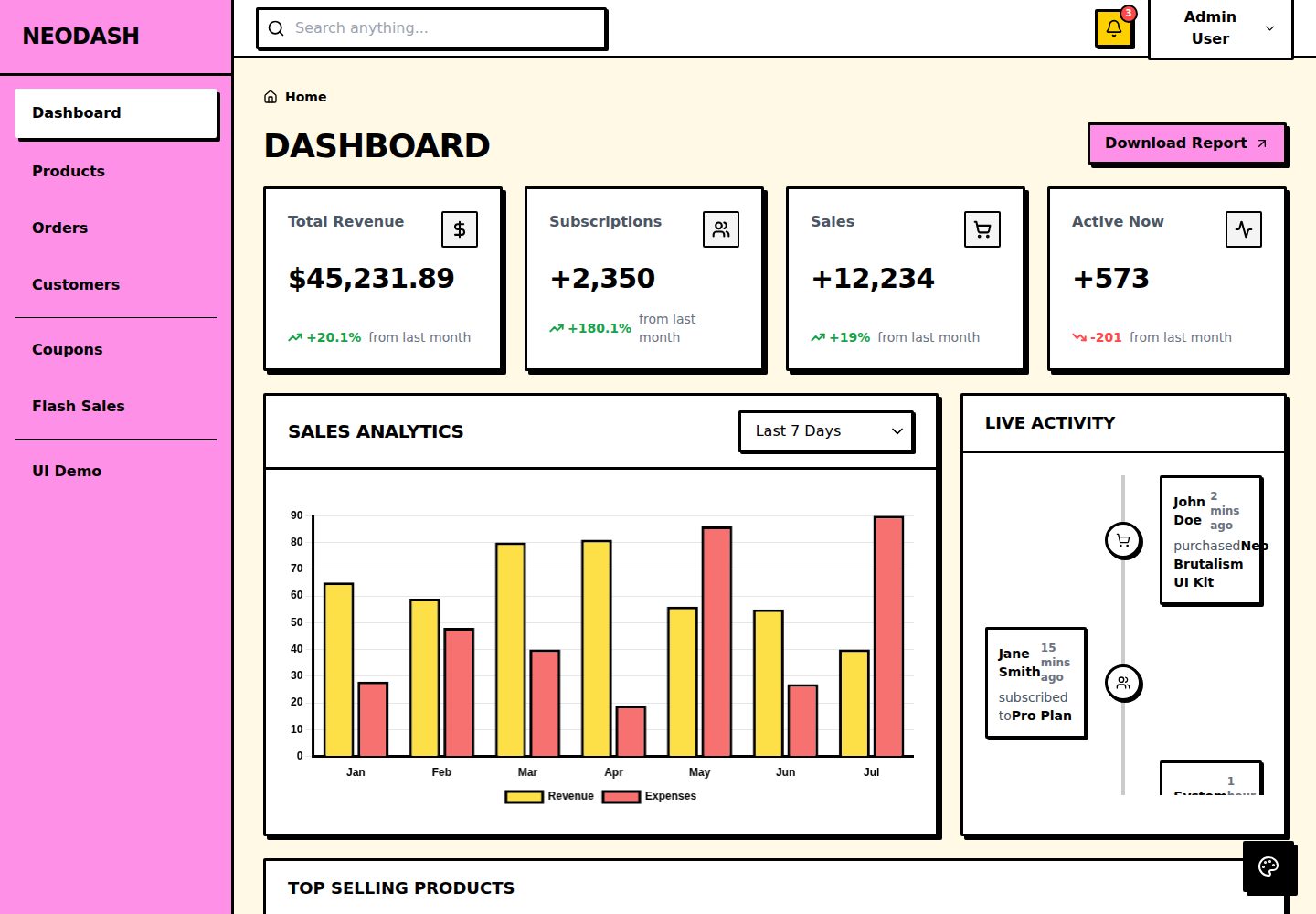
基于 Vue 3、Vite、TypeScript 与 Tailwind CSS 的 Neo-Brutalism 风格后台仪表盘模板,包含仪表盘、商品、订单、客户与营销等页面。
看看你的网站会是什么样
浏览真实页面截图,比较内容排版与手机效果。点击下方缩略图切换,放大查看整页细节。
全部页面与视图 3
截图用于了解视觉与布局,交互效果请以实际项目为准。
采集于 2026-10-15查看来源
值得关注的模板亮点
从已有项目资料中,快速了解它的特点。
提供 Neo-Brutalism 风格的自定义 UI 组件,包括按钮、输入框、卡片、表格、标签页、步骤条、徽章和模态框
包含 Dashboard、Products、Orders、Customers、Marketing(Coupons 与 Flash Sales)页面
响应式布局,移动端使用抽屉式侧边栏
内置加载动画、空状态与表单校验反馈等交互状态
通过 CSS 变量与 tailwind.config.js 集中控制颜色、边框和阴影样式
模板详细介绍
这是一个采用 Neo-Brutalism 视觉风格的后台仪表盘模板,README 描述其特点为粗体排版、高对比配色、3px 黑色粗边框与硬边投影。技术栈为 Vue 3(Composition API)、Vite、TypeScript 和 Tailwind CSS,样式通过 src/assets/index.css 中的 CSS 变量与 tailwind.config.js 配合定义。
模板提供自定义 UI 组件(按钮、输入框、卡片、表格、标签页、步骤条、徽章、模态框等),并包含 Dashboard、Products、Orders、Customers、Marketing(Coupons 与 Flash Sales)等页面,以及加载动画、空状态和表单校验反馈等交互状态。布局为响应式,移动端使用抽屉式侧边栏。
项目结构分为 assets、components(layout 与 ui)、data(模拟数据 index.ts)、router(懒加载路由)、views 等目录。README 说明可通过修改 index.css 中的 --color-primary 等变量调整主色,通过 tailwind.config.js 调整边框宽度与 shadow-neo、shadow-neo-sm 阴影偏移,并在 router/index.ts 中注册新路由、在 Sidebar.vue 中添加链接。
README 未说明数据来源如何接入真实后端、鉴权方式、测试与状态管理方案,也未提供除 Vercel、Netlify 或静态托管之外的部署细节。
VueVite后台
适合你的项目吗?
适用场景
- 搭建具有鲜明 Neo-Brutalism 视觉风格的后台管理界面
- 作为电商类后台(商品、订单、客户、营销)页面的前端起点
- 在 Vue 3 项目中参考自定义 UI 组件与 Tailwind 样式组织方式
- 通过修改 CSS 变量快速替换主题色与阴影、边框风格
适合人群
- 使用 Vue 3 与 Tailwind CSS 的前端项目
- 需要 Neo-Brutalism 视觉风格后台界面的开发者
- 希望基于现成页面结构快速搭建电商后台原型的团队
上手与定制指南
结合仓库当前版本的说明,按下面的资料检查内容、配置与运行要求。
- 1
需要安装 Node.js(README 建议 v16 及以上)
- 2
进入项目目录后执行 npm install 安装依赖
- 3
执行 npm run dev 启动开发服务器,默认访问 http://localhost:5173/
- 4
执行 npm run build 生成生产构建,输出到 dist/ 目录
- 5
README 说明可部署到 Vercel、Netlify 或任意静态托管服务
授权与来源资料
使用条件与限制
免费使用 · 保留许可声明本次收录的是公开仓库中采用 MIT 许可的免费版本;免费范围为该版本代码,不代表外部服务或第三方素材免费。
使用时需要遵守
- 允许免费使用、修改、商用和分发该版本代码。
- 分发代码副本或实质性部分时,保留原作者版权声明和完整 MIT 许可声明。
- 代码按现状提供;担保与责任限制以原许可证及适用法律为准。
额外费用与待核对事项
- 演示图片、字体、图标及其他第三方素材需按各自许可核对,不能仅凭代码的 MIT 许可判断。
- 域名、托管、数据库、支付或 AI 等外部服务可能另外收费。
查看原文依据
https://github.com/MuhArdhan/neobrutalism-dashboard-template/blob/main/LICENSEhttps://github.com/MuhArdhan/neobrutalism-dashboard-template/blob/main/README.mdPermission is hereby granted, free of charge
许可证原文
DeepSeek 根据仓库许可证和 README 整理 ·2026-10-15。结果仅覆盖已读取资料,依赖、图片、字体及后续条款变更以各自原文为准。
项目核对记录与介绍依据
模板资料
- 来源平台
- GitHub
- 资料与维护参考分
- 资料较完整 · 85 / 100
- 技术栈
- Vue · Vite
- 网站类型
- 后台
这个分数如何计算
本站按许可资料(最高30分)、演示链接(12分)、预览图(10分)、Star数(15分)、记录的维护时间(15分)、描述完整度(8分)、功能记录(5分)和分类资料(5分)计算。它不是代码、安全或性能测试,也不是 Google 评分;有链接不代表已实测可用。
这个项目需要核对什么
- 记录的仓库更新时间
- 2026-08-12
- 截图检查日期
- 2026-10-15
已收录演示链接。请用你的内容与屏幕尺寸检查;有演示不代表表单、认证或支付已经可用。
目录记录的主要技术栈是 Vue。请通过依赖清单和锁文件核对实际版本与托管要求。这些说明基于收录资料,不代表代码审计或部署实测。
查看具体选型方法 →介绍的制作与核对状态
介绍由 AI 辅助整理目录与仓库资料。仓库作者不等于这篇介绍的审核者。
审核声明: codex-user-requested-batch-review-20261017 · 2026-10-16
查看当时使用的来源资料
SHA-256: ffa2a176b63f21a3f1748ae96a553d2f50167bf05379b8cecd3c28b890585abf
2026-10-15T10:04:49.862Z
来源文件 / 仓库<div align="center">
# Neo-Brutalism Vue Dashboard Template
A striking, highly-opinionated dashboard template built for modern web applications. Designed following the **Neo-Brutalism** aesthetic: characterized by bold typography, high-contrast colors, harsh 3px black borders, and hard-edged drop shadows.
<br />
<p align="center">
<img src="https://img.shields.io/badge/Vue.js-35495E?style=for-the-badge&logo=vue.js&logoColor=4FC08D" alt="Vue.js" />
<img src="https://img.shields.io/badge/Vite-B73BFE?style=for-the-badge&logo=vite&logoColor=FFD62E" alt="Vite" />
<img src="https://img.shields.io/badge/TypeScript-007ACC?style=for-the-badge&logo=typescript&logoColor=white" alt="TypeScript" />
<img src="https://img.shields.io/badge/Tailwind_CSS-38B2AC?style=for-the-badge&logo=tailwind-css&logoColor=white" alt="Tailwind CSS" />
</p>
<br />

</div>
## Features
- **Neo-Brutalism UI Components**: Fully custom, accessible, and uniquely styled components (Buttons, Inputs, Cards, Tables, Tabs, Steppers, Badges, Modals, etc.).
- **Vite & Vue 3 (Composition API)**: Blazing fast development server and modern Vue patterns.
- **Tailwind CSS**: Strict, predefined styling following brutalist principles (via `index.css`).
- **Responsive Layout**: Works flawlessly on mobile, tablet, and desktop with a mobile-drawer sidebar.
- **Full Application Flow**: Includes pages for Dashboard, Products, Orders, Customers, and Marketing (Coupons & Flash Sales).
- **Interactive States**: Animated loading spinners, empty states, and built-in form validation feedback.
## Quick Start
### Prerequisites
Make sure you have [Node.js](https://nodejs.org/) (v16+ recommended) installed.
### Installation
1. Clone the repository and navigate into the directory:
```bash
cd neobrutalism-dashboard-template
```
2. Install dependencies:
```bash
npm install
```
3. Start the development server:
```bash
npm run dev
```
4. Open your browser and visit `http://localhost:5173/`.
### Building for Production
To create an optimized production build:
```bash
npm run build
```
This will compile the application into the `dist/` folder, ready to be deployed to Vercel, Netlify, or any static hosting service.
## Folder Structure
```
.
├── src/
│ ├── assets/ # Static assets (images, fonts, global CSS like index.css)
│ ├── components/ # Reusable Vue components
│ │ ├── layout/ # Layout elements (Sidebar, Topbar, PageHeader)
│ │ └── ui/ # Neo-Brutalism UI elements (Button, Card, Input, Table, etc.)
│ ├── data/ # Mock data files for development (index.ts)
│ ├── router/ # Vue Router configuration (lazy-loaded routes)
│ ├── views/ # Page-level components (Dashboard, Products, Orders, etc.)
│ ├── App.vue # Root component
│ └── main.ts # Application entry point
├── public/ # Public static files
├── index.html # HTML template
├── tailwind.config.js# Tailwind configuration (colors, fonts, box-shadows)
└── package.json # Dependencies and scripts
```
## How to Customize
### Modifying Colors
The template relies on CSS custom properties (variables) defined in `src/assets/index.css` and mapped in `tailwind.config.js`.
To change the primary color (default is yellow):
1. Open `src/assets/index.css`.
2. Locate the `:root` pseudo-class.
3. Change the `--color-primary` value (e.g., to a neon green: `#39ff14`).
```css
:root {
--color-primary: #39ff14; /* Your new color */
--color-secondary: #c084fc;
--color-background: #fdfbf7;
/* ... */
}
```
### Modifying the Brutalist Shadows & Borders
Neo-Brutalism heavily relies on thick borders and solid drop-shadows. These are defined globally:
- **Borders**: Most components use Tailwind's `border-3 border-black`. You can change the border width via `tailwind.config.js` or directly in component templates.
- **Shadows**: Custom shadows (`shadow-neo`, `shadow-neo-sm`) are defined in `tailwind.config.js`. You can tweak the X/Y offsets (currently `4px 4px 0px 0px rgba(0,0,0,1)`).
### Adding New Routes
1. Create a new view component in `src/views/` (e.g., `SettingsView.vue`).
2. Register it in `src/router/index.ts` using dynamic imports (lazy loading):
```typescript
{
path: '/settings',
name: 'settings',
component: () => import('../views/SettingsView.vue'),
}
```
3. Add a link to the `src/components/layout/Sidebar.vue` component.
## License
This project is open-source and available under the [MIT License](LICENSE).
看看同类模板
对比同技术栈与用途的模板,找到更适合的视觉与内容结构。

vuestic-admin
Vuestic Admin is an open-source, ready-to-use admin template suite designed for rapid development, easy mainte…
Vue · 后台

v3-admin-vite
v3-admin-vite 是一个主打 AI 编程友好体验的 Vue3 后台管理模板,基于 Vue3、Vite、TypeScript、Element Plus 构建。
Vue · 后台

vue-typescript-admin-template
vue-typescript-admin-template 是一套面向后台管理界面的前端解决方案,基于 Vue 2.6、TypeScript 和 Element UI 构建。
Vue · 后台

vue-antd-admin
Vue Antd Admin 是 Ant Design Pro 的 Vue 实现版本,目标是为中后台项目提供一套开箱即用的前端与设计解决方案。
Vue · 后台

coreui-free-vue-admin-template
Free Vue Admin & Dashboard Template Built for AI-Assisted Development
Vue · 后台
nova-admin
A simple and flexible admin template based on Vue3, Vite, TypeScript, NaiveUI
Vue · 后台