基于 Jekyll 构建,通过 bundle exec jekyll serve 本地预览
HTML启动器
website_template_2022 — HTML 启动器模板
作者 natalieagus
一个基于 Jekyll 的课程笔记与讲义网站模板,当前填充了 CSE 50.005 的示例材料,提供 Markdown 内容组织、侧边栏导航和自定义样式扩展。
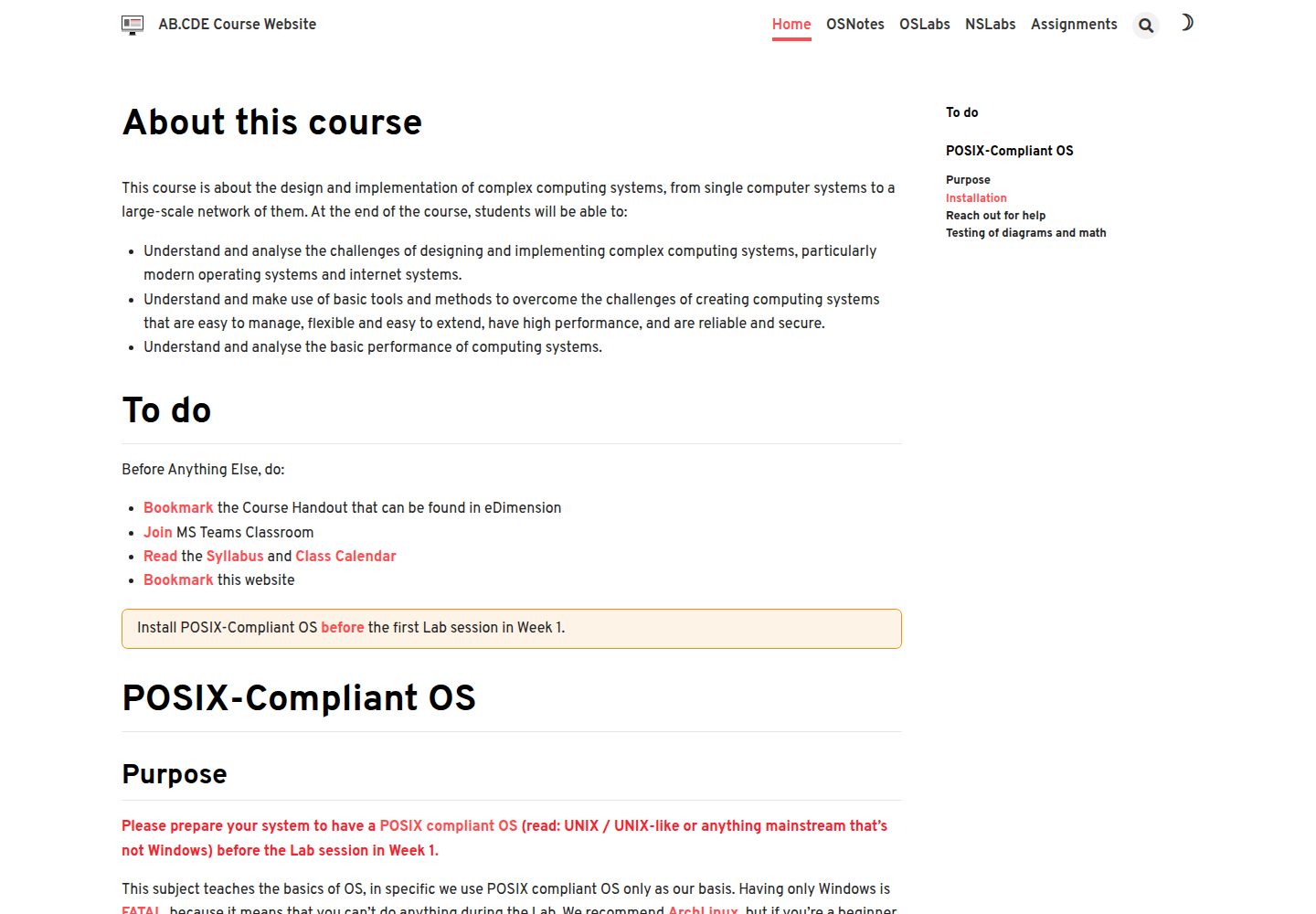
看看你的网站会是什么样
浏览真实页面截图,比较内容排版与手机效果。点击下方缩略图切换,放大查看整页细节。
全部页面与视图 2
截图用于了解视觉与布局,交互效果请以实际项目为准。
采集于 2026-10-17查看来源
值得关注的模板亮点
从已有项目资料中,快速了解它的特点。
使用 Markdown 文件与 front matter 组织课程内容,支持 article 布局和右侧目录
通过 _data/navigation.yml 配置左侧侧边栏导航,并与页面 permalink 关联
可替换 logo.svg、修改 custom.scss 和 favicon.ico 进行外观定制
提供文章顶部/底部自定义 HTML 入口,已包含返回顶部按钮和可折叠答案框
README 附有 VSCode 代码片段、快捷键和 Paste Image 扩展配置示例
模板详细介绍
该仓库是面向课程笔记和讲义托管的 Jekyll 网站模板,README 说明其当前以 CSE 50.005 的材料作为示例填充。模板通过 _config.yml 配置站点 URL、baseurl、标题、描述以及 collections 目录;内容以 Markdown 文件存放在以下划线开头的集合目录中,并使用 front matter 指定布局、侧边栏导航和右侧目录等选项。左侧导航栏通过 _data/navigation.yml 定义,需与页面 front matter 中的 sidebar.nav 和 nav_key 匹配。视觉方面可替换 logo.svg、修改 custom.scss、更换 favicon,并可在文章顶部或底部插入自定义 HTML。README 还提供了 VSCode 代码片段与快捷键配置,以及 Paste Image 扩展的设置示例。资料未说明该模板的浏览器兼容性、性能或生产环境就绪程度。
HTML启动器
适合你的项目吗?
适用场景
- 为大学课程搭建包含讲义、笔记、作业和实验说明的静态网站
- 需要左侧导航和右侧目录的 Markdown 文档站点
- 希望基于 Jekyll 快速定制课程网站外观与交互元素
- 使用 VSCode 编写 Markdown 并借助代码片段提高排版效率
适合人群
- 课程教师或助教发布课程笔记与讲义
- 熟悉 Markdown 和 Jekyll 基础配置的开发者
- 需要静态站点托管课程材料的教育场景
上手与定制指南
结合仓库当前版本的说明,按下面的资料检查内容、配置与运行要求。
- 1
按照 Jekyll 官方安装指南安装 Jekyll,然后执行 gem install jekyll bundler 和 bundle exec jekyll serve,访问 http://127.0.0.1:4000
- 2
编辑 _config.yml 中的 url、baseurl、title、description 以及 collections 目录列表
- 3
在以下划线开头的集合目录中创建 Markdown 文件,并使用示例 front matter 指定 layout、sidebar.nav、nav_key 等字段
- 4
在 _data/navigation.yml 中配置侧边栏导航,确保 url 与页面 permalink 匹配,且 sidebar-nav 与 nav-key 名称一致
- 5
替换 _includes/svg/logo.svg、assets/favicon.ico,并在 _sass/custom.scss 中添加自定义样式
授权与来源资料
使用条件与限制
免费使用 · 保留许可声明本次收录的是公开仓库中采用 MIT 许可的免费版本;免费范围为该版本代码,不代表外部服务或第三方素材免费。
使用时需要遵守
- 允许免费使用、修改、商用和分发该版本代码。
- 分发代码副本或实质性部分时,保留原作者版权声明和完整 MIT 许可声明。
- 代码按现状提供;担保与责任限制以原许可证及适用法律为准。
额外费用与待核对事项
- 演示图片、字体、图标及其他第三方素材需按各自许可核对,不能仅凭代码的 MIT 许可判断。
- 域名、托管、数据库、支付或 AI 等外部服务可能另外收费。
查看原文依据
https://github.com/natalieagus/website_template_2022/blob/master/LICENSEhttps://github.com/natalieagus/website_template_2022/blob/master/README.mdPermission is hereby granted, free of charge
许可证原文
DeepSeek 根据仓库许可证和 README 整理 ·2026-10-17。结果仅覆盖已读取资料,依赖、图片、字体及后续条款变更以各自原文为准。
项目核对记录与介绍依据
模板资料
- 来源平台
- GitHub
- 资料与维护参考分
- 资料一般 · 57 / 100
- 技术栈
- HTML
- 网站类型
- 启动器
这个分数如何计算
本站按许可资料(最高30分)、演示链接(12分)、预览图(10分)、Star数(15分)、记录的维护时间(15分)、描述完整度(8分)、功能记录(5分)和分类资料(5分)计算。它不是代码、安全或性能测试,也不是 Google 评分;有链接不代表已实测可用。
这个项目需要核对什么
- 记录的仓库更新时间
- 2023-09-21
- 截图检查日期
- 2026-10-17
已收录演示链接。请用你的内容与屏幕尺寸检查;有演示不代表表单、认证或支付已经可用。
目录记录的主要技术栈是 HTML。请通过依赖清单和锁文件核对实际版本与托管要求。这些说明基于收录资料,不代表代码审计或部署实测。
查看具体选型方法 →介绍的制作与核对状态
介绍由 AI 辅助整理目录与仓库资料。仓库作者不等于这篇介绍的审核者。
审核声明: codex-user-requested-batch-review-20261018 · 2026-10-18
查看当时使用的来源资料
SHA-256: 90390018f3dfd96509d54c66784953eb727d45e4cbbe00a157595337401e7b9f
2026-10-17T09:32:51.243Z
来源文件 / 仓库# Course Site Template 2022
This repository contains website template suitable to host course notes and handouts. Currently, it's populated with materials from CSE 50.005 as example.
## General setup
### Installation
This website is built using Jekyll. You can get it installed by [reading this guide](https://jekyllrb.com/docs/installation/). Afterwards, install the jekyll and bundler gems, and serve:
```
gem install jekyll bundler
bundle exec jekyll serve
```
You can then browse to localhost: http://127.0.0.1:4000
### `_config.yml`
Important parts to edit:
1. `url`: the site the website is hosted on
2. `baseurl`: the route to reach the `home` of the website, e.g: repo name if it's Github Pages
3. `title` and `description`
4. `collections`: directories containing markdown files that will be processed by `jekyll`. Omit the `_`.
### Creating Content
Jekyll will process any `.md` files inside any directories stated under `collections` in `_config.yml`. The name must start with an `_`. To **add** a new content, create **markdown** files in any of the folders named `_[collection_name]`.
For example we have:
- `_os_notes`
- `_ns_notes`
- `_assignments`
- `_ns_labs`
- `_os_labs`
Use the **front matter** template as given in the sample `*.md` files inside each of the directory. For instance. The layout is recommended to be `article`, and you can choose the title of the `sidebar nav` as what is stated in `_data/navigation.yml`. `Aside toc` is also recommended (right side table of content).
```
---
title: Introduction to OS
permalink: /os_notes/week1_intro
key: os-notes-week1_intro
layout: article
nav_key: os_notes
sidebar:
nav: os_notes
license: false
aside:
toc: true
show_edit_on_github: false
show_date: false
---
```
### Adding sidebar navigation (left navigation bar)
If your `.md` page uses `sidebar nav` option then edit `_data/navigation.yml`. You can set the sidebar nav to look like anything you want by matching its `url` key with each `.md` page's `permalink`.
Note that the **sidebar-nav** and **nav-key** in the front matter of the new `.md` file must match the name you declare in this navigation yaml file. For instance, `os_notes` sidenav will be shown when you're at the page `/os_notes/week1_intro` above.
```
os_notes:
- title: Basics of OS
children:
- title: Introduction to OS
url: /os_notes/week1_intro
- title: The Kernel
url: /os_notes/week1_kernel
- title: Resource Allocator and Coordinator
url: /os_notes/week1_resource
- title: Memory and Process Management
url: /os_notes/week1_mpm
```
## Aesthetics
Replace the .svg file inside `/_includes/svg/logo.svg` with the same name.
### Custom CSS
Add any custom sass styling in `/_sass/custom.scss`
### Changing Favicon
Replace `assets/favicon.ico` with your file named `favicon.ico` as well
### Custom html for articles
Add any additional elements in `/_includes/article/footer/custom.html`. You may also add it at `/_includes/article/top/custom.html` if you want it to execute first.
Current added features:
- Go to top button at `/_includes/article/top/custom.html`
- Collapsible answer box at `/_includes/article/footer/custom.html`
- All styling in `custom.scss`
## Useful Snippets and Shortcuts
### Markdown Snippets
It's useful to add HTML snippets if you're using VSCode, for instance:
````json
{
"Highlight code": {
"prefix": "highlight",
"body": [
"<span style=\"background-color:yellow; color: black\">$TM_SELECTED_TEXT${1:}</span>"
],
"description": "highlight selected text"
},
"Custom box": {
"prefix": "box",
"body": [
"<div class=\"$1\"><div class=\"custom_box\">$TM_SELECTED_TEXT$2 </div></div><br>"
],
"description": "custom box"
},
"Code block": {
"prefix": "codeblock",
"body": ["```java\n$TM_SELECTED_TEXT${1:}\n```"],
"description": "custom code block"
},
"Image block": {
"prefix": "imageblock",
"body": [
"<img src=\"{{ site.baseurl }}$1\" class=\"center_seventy$2\"/>$3"
],
"description": "custom image block"
},
"Image vanilla block": {
"prefix": "imageblock",
"body": ["<img src=\"$1\" />$2"],
"description": "custom image block"
},
"Red block": {
"prefix": "redwords",
"body": [
"<span style=\"color:#f7007f;\"><b>$TM_SELECTED_TEXT$1</b></span>"
],
"description": "custom redword block"
},
"Yellow block": {
"prefix": "yellowords",
"body": [
"<span style=\"color:#f77729;\"><b>$TM_SELECTED_TEXT$1</b></span>"
],
"description": "custom yellow block"
},
"Video block": {
"prefix": "videoblock",
"body": [
"<video width =\"100%\" height = \"100%\" controls=\"controls\" preload=\"metadata\" src=\"$1#t=0.5\"> Your browser does not support the HTML5 Video element.</video>$2"
],
"description": "custom video block"
},
"Task block": {
"prefix": "taskblock",
"body": ["### Task $1 $2`TASK $3:`{:.info} $4"],
"description": "custom task block"
},
"Break line": {
"prefix": "breakline",
"body": ["<br>"],
"description": "custom breakline"
}
}
````
### Shortcuts
...and then bind them with keyboard shortcuts:
```json
{
"key": "ctrl+alt+c",
"command": "editor.action.insertSnippet",
"args": { "name": "Highlight code" },
"when": "editorTextFocus && markdownShortcuts:enabled"
},
{
"key": "ctrl+alt+u",
"command": "editor.action.insertSnippet",
"args": { "name": "Custom box" },
"when": "editorTextFocus && markdownShortcuts:enabled"
},
{
"key": "ctrl+alt+n",
"command": "editor.action.insertSnippet",
"args": { "name": "Code block" },
"when": "editorTextFocus && markdownShortcuts:enabled"
},
{
"key": "ctrl+alt+m",
"command": "editor.action.insertSnippet",
"args": { "name": "Image block" },
"when": "editorTextFocus && markdownShortcuts:enabled"
},
{
"key": "ctrl+alt+,",
"command": "editor.action.insertSnippet",
"args": { "name": "Video block" },
"when": "editorTextFocus && markdownShortcuts:enabled"
},
{
"key": "ctrl+alt+.",
"command": "editor.action.insertSnippet",
"args": { "name": "Image vanilla block" },
"when": "editorTextFocus && markdownShortcuts:enabled"
},
{
"key": "ctrl+alt+r",
"command": "editor.action.insertSnippet",
"args": { "name": "Red block" },
"when": "editorTextFocus && markdownShortcuts:enabled"
},
{
"key": "ctrl+b",
"command": "editor.action.insertSnippet",
"args": { "name": "Yellow block" },
"when": "editorTextFocus && markdownShortcuts:enabled"
},
{
"key": "ctrl+alt+t",
"command": "editor.action.insertSnippet",
"args": { "name": "Task block" },
"when": "editorTextFocus && markdownShortcuts:enabled"
},
```
### Paste Image
To paste images conveniently, the extension [Paste Image](https://marketplace.visualstudio.com/items?itemName=mushan.vscode-paste-image) and [Markdown All in One](https://marketplace.visualstudio.com/items?itemName=yzhang.markdown-all-in-one) are particularly useful.
The settings that I use for Paste Image in my project is:
```
"pasteImage.path": "${projectRoot}/assets/images/${currentFileNameWithoutExt}",
"pasteImage.basePath": "${projectRoot}",
"pasteImage.forceUnixStyleSeparator": true,
"pasteImage.prefix": "/", // change this if we have projects that require baseURL
"pasteImage.insertPattern": "${imageFilePath}",
```
and it's bound to the shortcut:
```
{
"key": "ctrl+alt+v",
"command": "extension.pasteImage",
"when": "editorTextFocus"
},
```
看看同类模板
对比同技术栈与用途的模板,找到更适合的视觉与内容结构。

startbootstrap-simple-sidebar
An off canvas sidebar navigation Bootstrap HTML template created by Start Bootstrap
HTML · 启动器

adminkit
AdminKit is a free & open-source HTML dashboard & admin template based on Bootstrap 5
HTML · 后台

Landing-Page
Tailwind CSS Starter Template - Landing Page
HTML · 企业官网

light-bootstrap-dashboard
Light Bootstrap Dashboard is an admin dashboard template designed to be beautiful and simple.
HTML · 后台

sing-app
💥Free and open-source admin dashboard template built with Bootstrap 4.5 💥
HTML · 后台

startbootstrap-modern-business
A multipurpose Bootstrap full website template created by Start Bootstrap
HTML · 启动器