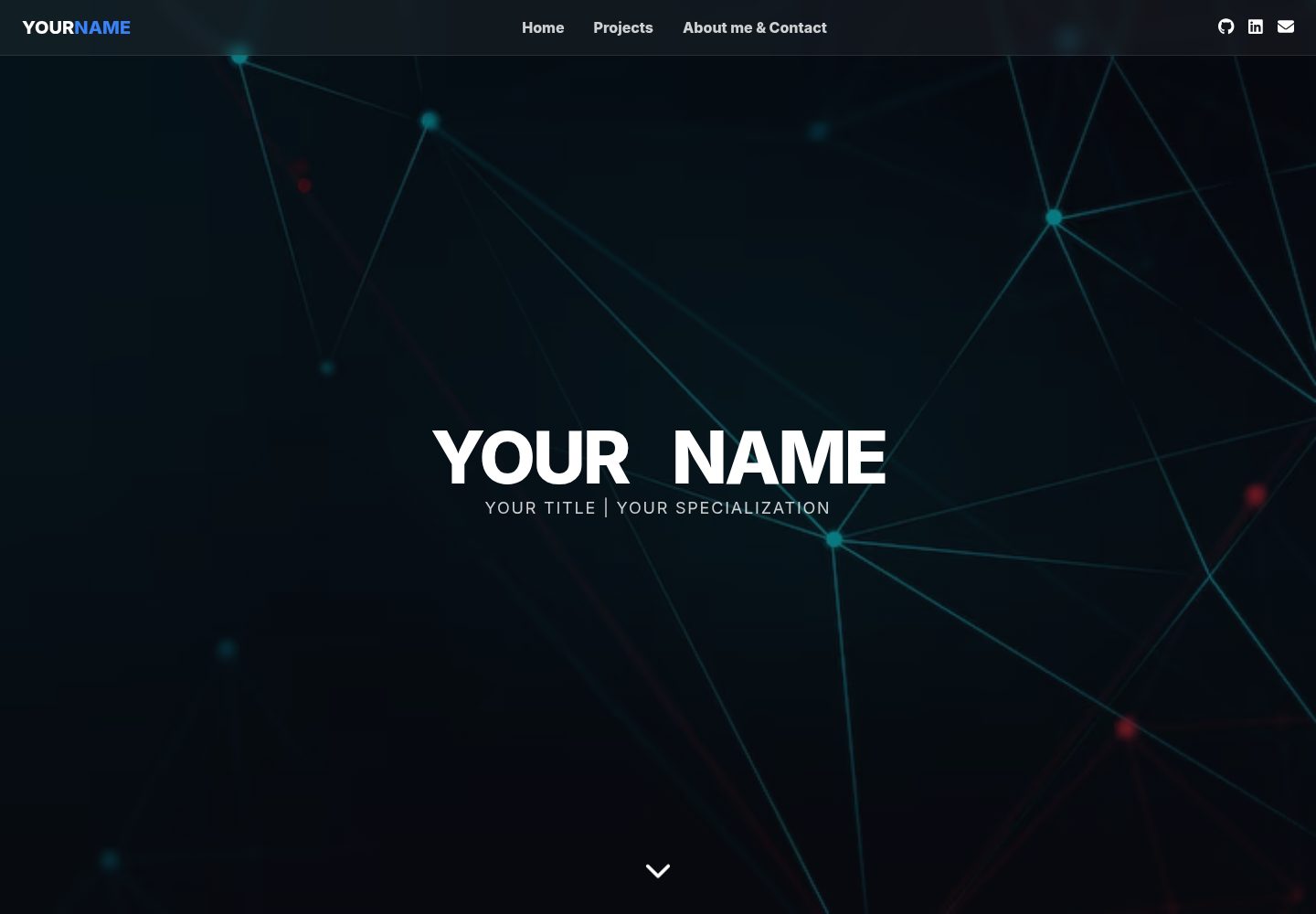
单页深色主题,包含首页、项目、关于我和联系方式区块
HTML作品集
portfolio_Template (NicholasBurgo) — HTML 作品集模板
作者 NicholasBurgo
基于 Tailwind CSS 与原生 JavaScript 的单页作品集网站模板,深色主题,含项目、关于我和联系方式区块,通过页面底部的配置对象修改个人信息。
看看你的网站会是什么样
浏览真实页面截图,比较内容排版与手机效果。点击下方缩略图切换,放大查看整页细节。
目前有 1 张原始预览,可打开完整图片查看设计细节。
截图用于了解视觉与布局,交互效果请以实际项目为准。
采集于 2026-10-02查看来源
值得关注的模板亮点
从已有项目资料中,快速了解它的特点。
首页姓名在悬停时有位移动画
通过页面底部的 JavaScript 配置对象集中修改姓名、标题、技能和项目
项目条目支持技术栈、简介、详细描述、截图、链接、状态与分类字段
Tailwind CSS 与 Font Awesome 通过 CDN 加载,无需额外安装依赖
模板详细介绍
这是一个单页作品集网站模板,采用深色主题,包含首页、项目展示、关于我和联系方式等区块。首页姓名在悬停时有位移动画。模板使用 Tailwind CSS 处理样式、Font Awesome 提供图标,两者均通过 CDN 加载,无需额外下载依赖。
使用方式为下载全部文件后直接在浏览器打开 index.html。个人信息集中在页面底部的 JavaScript 配置对象中修改,包括姓名、标题、技能列表和项目数组;项目条目支持标题、技术栈、简介、详细描述、截图、链接、状态和分类字段。邮箱、LinkedIn、GitHub、关于我段落、教育信息和简历文件名需在 HTML 中搜索替换。
模板依赖 images 目录下的 hero-bg.jpg、projects-bg.jpg、about-bg.jpg、profile.jpg 及项目截图,以及 documents 目录下的简历 PDF。配色可通过替换 HTML 中的 blue- 前缀调整,字体为 Inter,可更新 Google Fonts 链接和 CSS 更换。README 说明其部署到 GitHub Pages 的步骤,也提到 Netlify 或 Vercel 作为可选方式。
HTML作品集
适合你的项目吗?
适用场景
- 学生或开发者搭建个人作品集页面
- 在现有模板基础上修改配色、字体和内容
- 将静态文件部署到 GitHub Pages 等静态托管服务
适合人群
- 需要单页作品集展示的开发者或学生
- 能直接编辑 HTML 和 JavaScript 配置对象的用户
- 希望使用 CDN 加载样式与图标、不引入构建流程的项目
上手与定制指南
结合仓库当前版本的说明,按下面的资料检查内容、配置与运行要求。
- 1
下载全部文件后直接用浏览器打开 index.html 即可预览
- 2
在页面底部的 portfolioConfig 对象中替换姓名、标题、技能和项目信息
- 3
在 HTML 中搜索并替换邮箱、LinkedIn、GitHub、关于我段落、教育信息和简历文件名
- 4
准备 images 目录下的 hero-bg.jpg、projects-bg.jpg、about-bg.jpg、profile.jpg 及项目截图,以及 documents 目录下的简历 PDF
- 5
部署到 GitHub Pages 时,在仓库 Settings > Pages 中选择主分支
授权与来源资料
使用条件与限制
免费使用 · 保留许可声明本次收录的是公开仓库中采用 MIT 许可的免费版本;免费范围为该版本代码,不代表外部服务或第三方素材免费。
使用时需要遵守
- 允许免费使用、修改、商用和分发该版本代码。
- 分发代码副本或实质性部分时,保留原作者版权声明和完整 MIT 许可声明。
- 代码按现状提供;担保与责任限制以原许可证及适用法律为准。
额外费用与待核对事项
- 演示图片、字体、图标及其他第三方素材需按各自许可核对,不能仅凭代码的 MIT 许可判断。
- 域名、托管、数据库、支付或 AI 等外部服务可能另外收费。
查看原文依据
https://github.com/NicholasBurgo/portfolio_Template/blob/main/LICENSEhttps://github.com/NicholasBurgo/portfolio_Template/blob/main/README.mdPermission is hereby granted, free of charge
许可证原文
DeepSeek 根据仓库许可证和 README 整理 ·2026-10-02。结果仅覆盖已读取资料,依赖、图片、字体及后续条款变更以各自原文为准。
项目核对记录与介绍依据
模板资料
- 来源平台
- GitHub
- 资料与维护参考分
- 资料较完整 · 83 / 100
- 技术栈
- HTML
- 网站类型
- 作品集
这个分数如何计算
本站按许可资料(最高30分)、演示链接(12分)、预览图(10分)、Star数(15分)、记录的维护时间(15分)、描述完整度(8分)、功能记录(5分)和分类资料(5分)计算。它不是代码、安全或性能测试,也不是 Google 评分;有链接不代表已实测可用。
这个项目需要核对什么
- 记录的仓库更新时间
- 2026-02-22
- 截图检查日期
- 2026-10-02
已收录演示链接。请用你的内容与屏幕尺寸检查;有演示不代表表单、认证或支付已经可用。
目录记录的主要技术栈是 HTML。请通过依赖清单和锁文件核对实际版本与托管要求。这些说明基于收录资料,不代表代码审计或部署实测。
查看具体选型方法 →介绍的制作与核对状态
介绍由 AI 辅助整理目录与仓库资料。仓库作者不等于这篇介绍的审核者。
已完成服务器许可规则与 AI 来源核对;未经过人工编辑审核。
查看当时使用的来源资料
SHA-256: ee7628bb8646150bda3f484db1efe4a6c997c817278adcefb6838c636c6ac041
2026-10-02T17:37:46.755Z
来源文件 / 仓库# Live Version #
https://nicholasburgo.github.io/portfolio_Template/#home
# My Portfolio Template #
Hey! So I made this portfolio website template for my old portfolio and I thought other students might want to use it too, or build off of it!
## What it looks like
It's a single page website with a dark theme. Has sections for your projects, about me, and contact info. The name on the homepage moves around when you hover over it which I think is pretty neat.
## How to use it
Just download everything and open index.html in your browser. Most of the stuff you need to change is in the JavaScript part at the bottom.
## File structure (kinda important)
```
your-portfolio/
├── index.html (the main file - duh)
├── images/ (put all your pictures here)
│ ├── hero-bg.jpg (background for the top part)
│ ├── projects-bg.jpg (background for projects)
│ ├── about-bg.jpg (background for about section)
│ ├── profile.jpg (your Pov)
│ └── project screenshots go here too
└── documents/
└── your-resume.pdf (if you have one)
```
## Changing it to be about you
Ok so this part is actually pretty easy. Find this part in the HTML file:
```javascript
const portfolioConfig = {
name: {
first: "YOUR",
last: "NAME"
},
title: "Your Title | Your Specialization",
skills: ["React", "JavaScript", "Python", "Node.js", "SQL", "Git"],
projects: [
// your projects go here
]
};
```
Just replace all that stuff with your actual info. For projects, copy the format I used:
```javascript
{
title: "Cool Project Name",
tech: ["HTML", "CSS", "JavaScript"], // what you used to build it
desc: "What your project does in like one sentence",
longDesc: `More details about the project. You can use HTML tags in here.`,
images: ["images/project1.jpg"], // screenshots
links: [
{
type: "github",
url: "your github link"
}
],
status: "Completed", // or "In Progress" if you're still working on it
category: "Web Development"
}
```
## Images you need
- **hero-bg.jpg** - big background image for the top
- **projects-bg.jpg** - background for projects section
- **about-bg.jpg** - background for about section
- **profile.jpg** - a professional headshot or photo
- **project screenshots** - pictures of your projects
## Other stuff to change
Search for these in the HTML and replace with your info:
- Email addresses (there's like 3 of them)
- LinkedIn profile
- GitHub username
- The about me paragraph
- Education info
- Resume file name
## Making it live
I put mine on GitHub Pages which is free:
1. Make a GitHub repo
2. Upload all your files
3. Go to Settings > Pages in your repo
4. Pick your main branch
5. Done! You get a free website
You could also use Netlify or Vercel but GitHub Pages is the easiest IMO.
## Technical stuff
Uses Tailwind CSS for styling (it's pretty good once you get used to it) and Font Awesome for icons. Everything loads from CDNs so you don't need to download anything extra.
The animations are mostly CSS with some JavaScript for the interactive parts.
## Browser compatibility
Works on pretty much everything.
## Colors and stuff
If you want different colors, search for `blue-` in the HTML and replace with whatever color you want. Tailwind has tons of colors built in.
The font is Inter which looks clean. You can change it by updating the Google Fonts link and the CSS if you want something different.
## Credits
Made this just for fun. Used some inspiration from other portfolio sites. Feel free to use it for whatever.
## Troubleshooting
The JavaScript console in your browser will show errors if something is not working right.
---
That's pretty much it! Hope this helps someone. Took me forever to make but I'm pretty happy with how it turned out.
看看同类模板
对比同技术栈与用途的模板,找到更适合的视觉与内容结构。

simplefolio
⚡️ A minimal portfolio template for Developers
HTML · 作品集

Freelancer
Freelancer 是 Start Bootstrap 出品的单页作品集模板,专为自由职业者、设计师和小型工作室设计。 页面结构清晰,包含多个内容区块、响应式作品集网格,每个作品项目配有模态窗口展示详情。
HTML · 作品集

Resume
Resume 是 Start Bootstrap 推出的简历与 CV 主题,基于 Bootstrap 构建,采用固定侧边栏加内容区块的结构。
HTML · 作品集

Creative
Creative 是 Start Bootstrap 团队维护的一款单页营销模板,定位明确:为创意机构或产品服务提供一个以作品展示和行动号召为核心的落地页。
HTML · 企业官网

Grayscale
Grayscale 是 Start Bootstrap 出品的深色系单页 HTML 模板,基于 Bootstrap 构建。 它的视觉重心放在大尺寸首屏和清晰的内容分区上,整体氛围偏暗,适合摄影、活动或品牌叙事类网站。
HTML · 企业官网

startbootstrap-stylish-portfolio
Stylish Portfolio 是 Start Bootstrap 维护的单页作品集主题,基于 Bootstrap 构建,采用多个内容区块加离屏导航菜单的结构。
HTML · 作品集