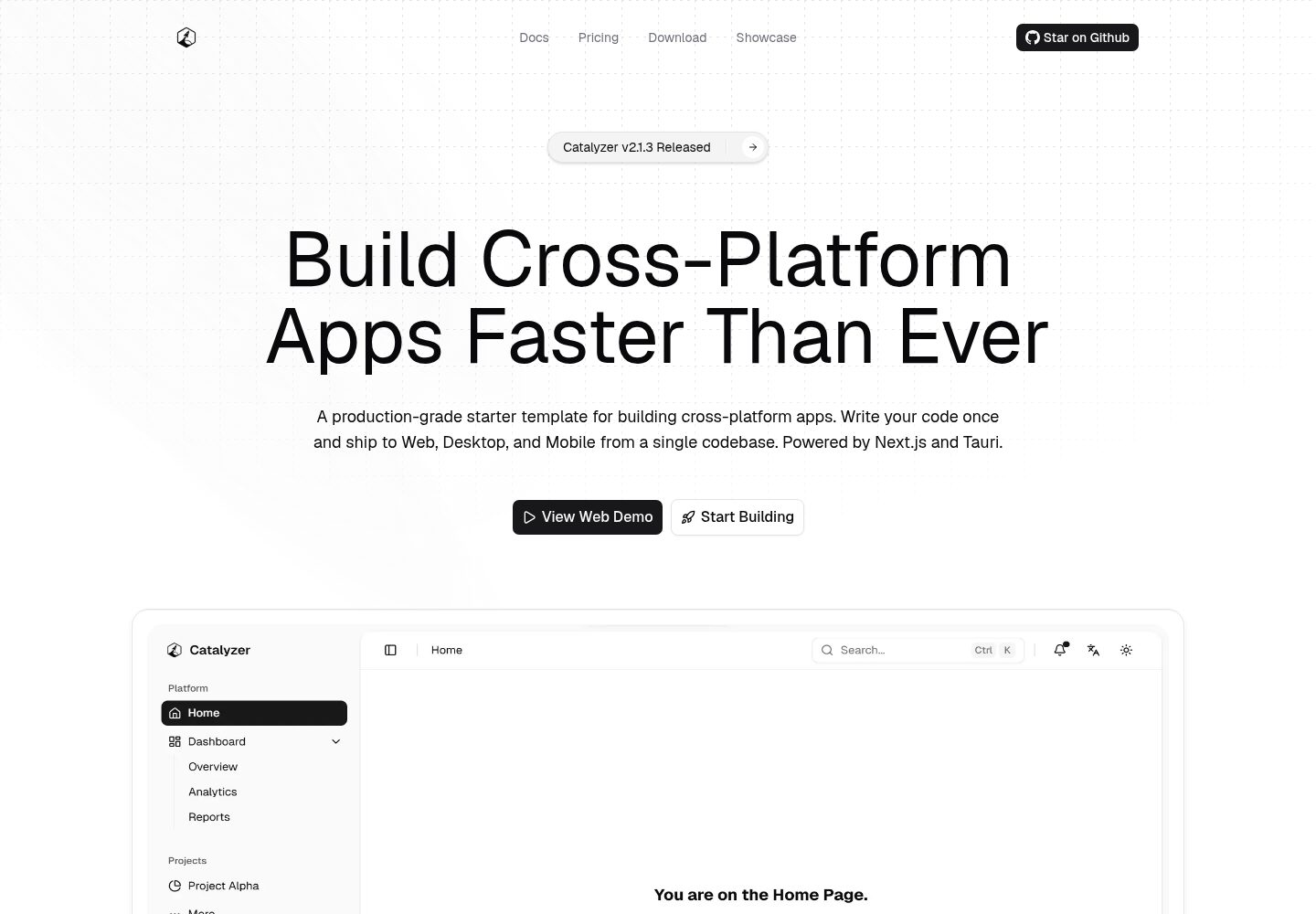
单一代码库同时覆盖 Web、桌面(Windows/macOS/Linux)与移动(Android/iOS)
Next.jsReact启动器
catalyzer — Next.js 启动器模板
作者 odest
Catalyzer 是一个基于 Next.js、Tauri 与 Turborepo 的跨平台启动器模板,用同一套代码库构建 Web、桌面和移动应用,共享 UI、主题与业务逻辑。
看看你的网站会是什么样
浏览真实页面截图,比较内容排版与手机效果。点击下方缩略图切换,放大查看整页细节。
全部页面与视图 2
截图用于了解视觉与布局,交互效果请以实际项目为准。
采集于 2026-10-03查看来源
值得关注的模板亮点
从已有项目资料中,快速了解它的特点。
apps/web 与 apps/native 共享 packages/core 的页面、状态和 packages/ui 的设计系统
内置 40 多套明暗主题和 10 种语言的类型安全 i18n,兼容 SSR 与静态导出
提供 npm create catalyzer@latest 脚手架 CLI,可配置项目名称、标识符和版本
包含 PWA 离线与缓存策略、MDX 文档页和 SEO 优化的落地页
使用 Turborepo 组织依赖感知构建,并配有 GitHub Actions 与 Release Please 发布流程
模板详细介绍
Catalyzer 是 odest 在 GitHub 上开源的跨平台应用启动器模板,采用 MIT 许可。它把 Web、桌面(Windows、macOS、Linux)和移动(Android、iOS)放在同一个 monorepo 中:apps/web 是带 SSR 与 PWA 支持的 Next.js 应用,包含落地页和文档页;apps/native 使用 Next.js 静态导出配合 Tauri 的 Rust 后端,产出桌面与移动原生应用。两端都从 packages/core 引入页面、布局、状态与配置,从 packages/ui 引入基于 shadcn/ui 的设计系统组件、主题和样式。
模板内置 40 多套明暗主题、10 种语言的类型安全 i18n(同时适配 SSR 与静态导出)、MDX 文档架构、PWA 离线与缓存策略,以及 GitHub Actions 与 Release Please 组成的 CI/CD 发布流程。项目提供 npm create catalyzer@latest 脚手架 CLI,用于配置项目名称、标识符和版本,并可初始化 git、安装依赖。
使用前需要 Node.js 20+、pnpm 8+ 和 Rust 稳定版;构建原生应用还需各平台额外工具链(如 Xcode、Android Studio、C++ Build Tools)。站点元数据需在 packages/core/src/config/site.ts 中修改,自动发布流程还要求仓库开启 Actions 读写权限并调整合并策略。
Next.jsReact启动器
适合你的项目吗?
适用场景
- 希望用同一套 React 代码同时发布 Web、桌面和移动端产品
- 需要跨平台共享设计系统、主题和业务逻辑的中大型项目
- 想快速搭建带落地页、文档页和多语言支持的跨平台应用骨架
- 需要 Tauri 桌面/移动端与 Next.js Web 端共用页面和状态管理的场景
适合人群
- 熟悉 React、TypeScript 与 Next.js,并愿意接触 Rust/Tauri 工具链的开发者
- 需要多端一致 UI 与逻辑、接受 monorepo 结构的团队
- 计划从模板起步并自行维护代码、不希望被平台锁定的项目
上手与定制指南
结合仓库当前版本的说明,按下面的资料检查内容、配置与运行要求。
- 1
环境要求:Node.js 20+、pnpm 8+ 和 Rust 稳定版;构建原生应用还需 Xcode、Android Studio 或 C++ Build Tools 等平台工具
- 2
使用 npm create catalyzer@latest(或 pnpm/yarn/bun 对应命令)生成项目,再执行 pnpm install 与 pnpm dev
- 3
部署前需修改 packages/core/src/config/site.ts 中的站点 URL、标题和描述
- 4
若启用 GitHub Actions 与 Release Please,需在仓库设置中授予 Actions 读写权限并允许创建/批准 PR,同时只保留 squash merging 以维持线性历史
- 5
演示图片、字体、图标等第三方素材需单独核对许可,域名、托管、数据库等外部服务可能另行收费
授权与来源资料
使用条件与限制
免费使用 · 保留许可声明本次收录的是公开仓库中采用 MIT 许可的免费版本;免费范围为该版本代码,不代表外部服务或第三方素材免费。
使用时需要遵守
- 允许免费使用、修改、商用和分发该版本代码。
- 分发代码副本或实质性部分时,保留原作者版权声明和完整 MIT 许可声明。
- 代码按现状提供;担保与责任限制以原许可证及适用法律为准。
额外费用与待核对事项
- 构建桌面或移动原生应用需额外安装各平台工具链,如 Xcode、Android Studio 或 C++ Build Tools,仅安装 Node.js、pnpm 与 Rust 不足以完成原生构建。
- 若需使用 GitHub Actions 与 Release Please 自动发布与生成变更日志,必须手动配置仓库设置:授予 Actions 读写权限并允许创建/批准 PR,且只保留 squash merging 以维持线性历史。
- 部署或分享项目前,必须自行修改 packages/core/src/config/site.ts 中的站点 URL、标题与描述等元数据,否则会沿用模板默认信息。
- 演示图片、字体、图标及其他第三方素材需按各自许可核对,不能仅凭代码的 MIT 许可判断。
- 域名、托管、数据库、支付或 AI 等外部服务可能另外收费。
查看原文依据
Permission is hereby granted, free of charge
许可证原文
Building native apps requires additional platform-specific tools (e.g., Xcode, Android Studio, C++ Build Tools).
README 原文
For the automated release pipelines and changelog generation to function properly, you **must** configure the following repository settings:
README 原文
https://github.com/odest/catalyzer/blob/master/LICENSEhttps://github.com/odest/catalyzer/blob/master/README.mdBefore deploying or sharing your project, make sure to update the site metadata (URLs, headline, and description) in:
README 原文
DeepSeek 根据仓库许可证和 README 整理 ·2026-10-03。结果仅覆盖已读取资料,依赖、图片、字体及后续条款变更以各自原文为准。
项目核对记录与介绍依据
模板资料
- 来源平台
- GitHub
- 资料与维护参考分
- 资料较完整 · 92 / 100
- 技术栈
- Next.js · React
- 网站类型
- 启动器
这个分数如何计算
本站按许可资料(最高30分)、演示链接(12分)、预览图(10分)、Star数(15分)、记录的维护时间(15分)、描述完整度(8分)、功能记录(5分)和分类资料(5分)计算。它不是代码、安全或性能测试,也不是 Google 评分;有链接不代表已实测可用。
这个项目需要核对什么
- 记录的仓库更新时间
- 2026-09-11
- 截图检查日期
- 2026-10-03
已收录演示链接。请用你的内容与屏幕尺寸检查;有演示不代表表单、认证或支付已经可用。
目录记录的主要技术栈是 Next.js。请通过依赖清单和锁文件核对实际版本与托管要求。这些说明基于收录资料,不代表代码审计或部署实测。
查看具体选型方法 →介绍的制作与核对状态
介绍由 AI 辅助整理目录与仓库资料。仓库作者不等于这篇介绍的审核者。
审核声明: [email protected] · 2026-10-04
查看当时使用的来源资料
SHA-256: 2ee29dd730f04dc8663c0f9b25fd54a3fb96160f451e2d63f4a7db6fbd339930
2026-10-03T13:47:33.576Z
来源文件 / 仓库<div align="center">
<picture>
<source srcset="https://raw.githubusercontent.com/odest/catalyzer/refs/heads/master/.github/assets/logo-light.svg" media="(prefers-color-scheme: dark)">
<source srcset="https://raw.githubusercontent.com/odest/catalyzer/refs/heads/master/.github/assets/logo-dark.svg" media="(prefers-color-scheme: light)">
<img src="https://raw.githubusercontent.com/odest/catalyzer/refs/heads/master/.github/assets/logo-dark.svg" alt="Catalyzer" width="120" height="120">
</picture>
<h1>Catalyzer</h1>
<p>
<strong>Build Cross-Platform Apps Faster Than Ever</strong><br>
Write your code once and build for Web, Desktop, and Mobile.<br>
Powered by Tauri and Next.js in a single monorepo.
</p>
[](https://github.com/odest/catalyzer/actions/workflows/ci.yml)
[](https://github.com/odest/catalyzer/actions/workflows/release.yml)
[](https://opensource.org/licenses/MIT)
[](https://github.com/odest/catalyzer/releases/latest)
[](https://www.npmjs.com/package/create-catalyzer)
[](https://catalyzer.dev)
[](https://catalyzer.dev/docs)
[](https://catalyzer.dev)
<br />
<picture>
<source srcset="https://raw.githubusercontent.com/odest/catalyzer/refs/heads/master/.github/assets/banner-light.webp" media="(prefers-color-scheme: light)">
<source srcset="https://raw.githubusercontent.com/odest/catalyzer/refs/heads/master/.github/assets/banner-dark.webp" media="(prefers-color-scheme: dark)">
<a href="https://catalyzer.dev" target="_blank">
<img src="https://raw.githubusercontent.com/odest/catalyzer/refs/heads/master/.github/assets/banner-dark.webp" alt="Catalyzer" width="800">
</a>
</picture>
</div>
<br>
Catalyzer is a starting point for building cross-platform apps. It covers **Web**, **Desktop** (Windows, macOS, Linux), and **Mobile** (Android, iOS) from the same shared UI, themes, and logic. Run the CLI, scaffold your project, and start building.
## 💡 Philosophy
- **Unified** - One codebase, every platform. Web and native share the same pages, components, and state through `packages/core` and `packages/ui`.
- **Ready** - 40+ themes, 10 languages, CI/CD, and a scaffolding CLI out of the box.
- **Portable** - Run `npm create catalyzer@latest`, brand your project, and own the code. No lock-in.
- **Strict** - End-to-end TypeScript, shared lint rules, and automated releases keep things solid.
## ✨ Features
- **Cross-Platform** - Single codebase deploys to web, desktop, and mobile
- **Shared Architecture** - Design system primitives in `packages/ui`, business logic and pages in `packages/core`
- **40+ Themes** - Light and dark variants of 40+ color schemes, plus custom theming support
- **10 Languages** - Type-safe i18n works with both SSR (web) and static export (native)
- **PWA** - Offline support, precaching, and runtime caching strategies for the web app
- **Landing Page** - Pre-built, SEO-optimized marketing pages designed to pitch your product
- **Docs Page** - Integrated, MDX-powered documentation architecture ready for your technical guides
- **Scaffolding CLI** - `npm create catalyzer@latest` sets up a branded, configured project
- **Turborepo** - Dependency-aware builds and caching
- **TypeScript** - Strict, end-to-end type safety with shared configs
- **CI/CD** - GitHub Actions + Release Please for automated builds and versioning
## 🚀 Quick Start
### Prerequisites
- **[Node.js](https://nodejs.org/)** v20 or higher
- **[pnpm](https://pnpm.io/installation)** v8 or higher
- **[Rust](https://www.rust-lang.org/tools/install)** (latest stable, needed for native builds)
> [!NOTE]
> Building native apps requires additional platform-specific tools (e.g., Xcode, Android Studio, C++ Build Tools).
> See our [Docs](https://catalyzer.dev/docs) or Tauri's [Prerequisites Guide](https://v2.tauri.app/start/prerequisites/) for details.
### Create a New Project
```bash
npm create catalyzer@latest
```
<details>
<summary>Using other package managers</summary>
```bash
pnpm create catalyzer@latest
yarn create catalyzer@latest
npx create-catalyzer@latest
bunx create-catalyzer@latest
```
</details>
The CLI configures your project name, identifiers, and versions. It can also initialize git and install dependencies for you.
### Start Developing
```bash
cd <your-project-name>
# Run this only if you skipped dependency installation during scaffolding
pnpm install
pnpm dev
```
This starts both the web app (http://localhost:3000) and the native desktop app in parallel.
### Configuration
Before deploying or sharing your project, make sure to update the site metadata (URLs, headline, and description) in:
`packages/core/src/config/site.ts`
> [!IMPORTANT]
> **GitHub Actions & Release Please:** For the automated release pipelines and changelog generation to function properly, you **must** configure the following repository settings:
>
> 1. **Workflow Permissions** (Settings > Actions > General): Grant **Read and write permissions** and check **Allow GitHub Actions to create and approve pull requests**.
> 2. **Pull Request Merging** (Settings > General): To maintain the required linear git history for the release bot, uncheck `Allow merge commits` and `Allow rebase merging`. Leave only **`Allow squash merging`** checked, and set the default commit message to **`Pull request title`**.
## 📦 Overview
### Monorepo Structure
```
apps/
web/ → Next.js SSR — web app, landing page, docs, PWA
native/ → Next.js (Static) + Tauri 2 — desktop & mobile
packages/
core/ → Business logic: pages, stores, hooks, providers, config
ui/ → Design system: shadcn/ui primitives, themes, styles
i18n/ → 10-language type-safe translations (SSR & static)
cli/ → Scaffolding tool (npm create catalyzer@latest)
typescript-config/ → Shared TypeScript configs
```
Both `web` and `native` import pages, layouts, and state from `packages/core`, and design system primitives from `packages/ui`. The web app runs with SSR and PWA support. The native app uses a static HTML export served by Tauri's Rust backend.
### Supported Platforms
| Platform | Status | Links |
| -------------- | ------------ | ------------------------------------------------------------------- |
| **🌐 Web** | ✅ Available | [Live Demo](https://catalyzer.dev) |
| **📱 PWA** | ✅ Available | [Live Demo](https://catalyzer.dev) |
| **🪟 Windows** | ✅ Available | [Download Demo](https://github.com/odest/catalyzer/releases/latest) |
| **🍎 macOS** | ✅ Available | [Download Demo](https://github.com/odest/catalyzer/releases/latest) |
| **🐧 Linux** | ✅ Available | [Download Demo](https://github.com/odest/catalyzer/releases/latest) |
| **🤖 Android** | ✅ Available | [Download Demo](https://github.com/odest/catalyzer/releases/latest) |
| **📱 iOS** | ✅ Available | [Download Demo](https://github.com/odest/catalyzer/releases/latest) |
## 🛠️ Tech Stack
<p>
<a href="https://nextjs.org" target="_blank">
<img src="https://img.shields.io/badge/Next.js-000000?style=for-the-badge&logo=nextdotjs&logoColor=white" alt="Next.js">
</a>
<a href="https://v2.tauri.app" target="_blank">
<img src="https://img.shields.io/badge/Tauri%202-000000?style=for-the-badge&logo=tauri&logoColor=white" alt="Tauri 2">
</a>
<a href="https://react.dev" target="_blank">
<img src="https://img.shields.io/badge/React-000000?style=for-the-badge&logo=react&logoColor=white" alt="React">
</a>
<br>
<a href="https://www.typescriptlang.org/" target="_blank">
<img src="https://img.shields.io/badge/TypeScript-000000?style=for-the-badge&logo=typescript&logoColor=white" alt="TypeScript">
</a>
<a href="https://www.rust-lang.org/" target="_blank">
<img src="https://img.shields.io/badge/Rust-000000?style=for-the-badge&logo=rust&logoColor=white" alt="Rust">
</a>
<br>
<a href="https://tailwindcss.com/" target="_blank">
<img src="https://img.shields.io/badge/Tailwind%20CSS%20v4-000000?style=for-the-badge&logo=tailwindcss&logoColor=white" alt="Tailwind CSS">
</a>
<a href="https://ui.shadcn.com/" target="_blank">
<img src="https://img.shields.io/badge/shadcn%2Fui-000000?style=for-the-badge&logo=shadcnui&logoColor=white" alt="shadcn/ui">
</a>
<br>
<a href="https://www.fumadocs.dev/" target="_blank">
<img src="https://img.shields.io/badge/Fumadocs-000000?style=for-the-badge&logoColor=white" alt="Fumadocs">
</a>
<a href="https://turborepo.dev/" target="_blank">
<img src="https://img.shields.io/badge/Turborepo-000000?style=for-the-badge&logo=turborepo&logoColor=white" alt="Turborepo">
</a>
<a href="https://pnpm.io/" target="_blank">
<img src="https://img.shields.io/badge/pnpm-000000?style=for-the-badge&logo=pnpm&logoColor=white" alt="pnpm">
</a>
</p>
## ⌨️ Core Commands
```bash
pnpm dev # Start all apps in dev mode
pnpm build # Build everything
pnpm check # Check formatting and lint rules
pnpm fix # Auto-fix formatting and lint issues
pnpm typecheck # TypeScript validation across all workspaces
pnpm web dev # Web app only
pnpm tauri dev # Desktop app only
pnpm tauri android dev # Android app
pnpm tauri ios dev # iOS app
pnpm shadcn add # Add shadcn/ui components to packages/ui
pnpm clean # Clean all build outputs
```
## 📖 Documentation
For setup guides, architecture, theming, i18n, deployment and more, see **[Documentation](https://catalyzer.dev/docs)**
## 🤝 Contributing
See [CONTRIBUTING.md](CONTRIBUTING.md).
## 📄 License
[MIT](LICENSE)
看看同类模板
对比同技术栈与用途的模板,找到更适合的视觉与内容结构。

ai-website-cloner-template
Clone any website with one command using AI coding agents
Next.js · 启动器

Next.js SaaS Starter
Next.js SaaS Starter 是 Next.js 官方维护的 SaaS 起点模板,定位介于学习资源和可直接部署的脚手架之间。
Next.js · SaaS

Next.js Commerce
Next.js Commerce 是 Vercel 团队维护的电商启动模板,基于 Next.js App Router 构建,采用服务端渲染、React Server Components、Server Actions …
Next.js · 电商

Next-js-Boilerplate
Next-js-Boilerplate 是一个面向 Next.js 16、Tailwind CSS 4 和 TypeScript 的启动器,核心定位是开发者体验优先。
Next.js · 启动器

tailwind-nextjs-starter-blog
tailwind-nextjs-starter-blog 是一个面向个人技术博客的 Next.js 与 Tailwind CSS 启动模板,其 v2 版本基于 App Router 与 React Server Comp…
Next.js · 博客

next-forge
Production-grade Turborepo template for Next.js apps.
Next.js · 启动器