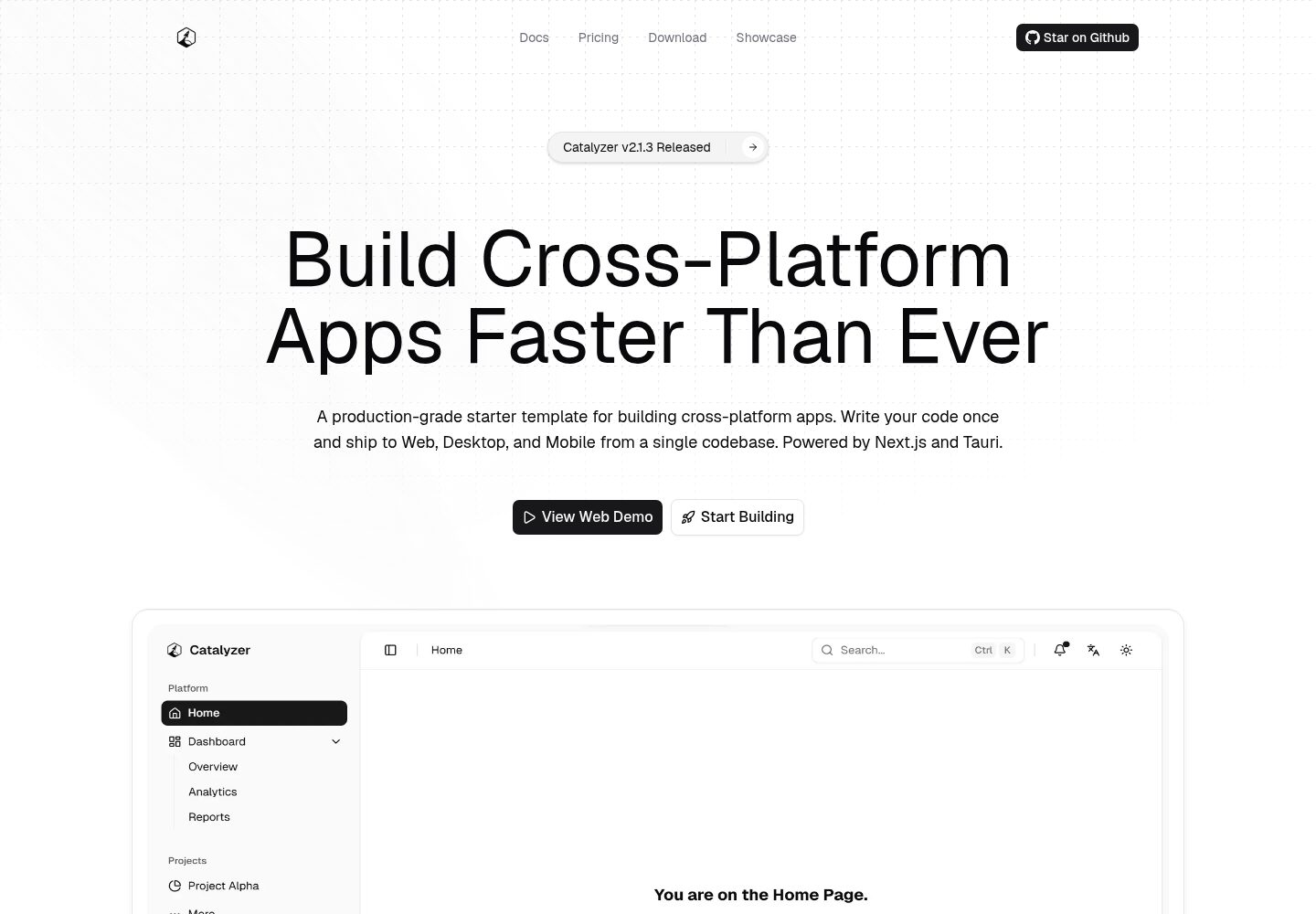
A single codebase covers Web, desktop (Windows/macOS/Linux), and mobile (Android/iOS)
Next.jsReactStarter
catalyzer — Next.js Starter Template
By odest
Catalyzer is a cross-platform starter template based on Next.js, Tauri, and Turborepo that builds Web, desktop, and mobile apps from a single codebase, sharing UI, themes, and business logic.
Explore the design
Compare the page layouts and mobile experience. Open any screenshot for a closer look.
Desktop homepage1 / 2
Desktop captureTop of page
Actual screenshot captured by the server browser.
All pages & views 2
Screenshots show visual appearance; interactive behavior may differ.
Recorded 2026-10-03View source
What stands out
A quick read of the recorded project description.
apps/web and apps/native share pages and state from packages/core and the design system from packages/ui
Includes over 40 light and dark themes and type-safe i18n for 10 languages, compatible with SSR and static export
Provides an npm create catalyzer@latest scaffolding CLI to configure project name, identifier, and version
Includes PWA offline and caching strategies, MDX documentation pages, and an SEO-optimized landing page
Uses Turborepo to organize dependency-aware builds, with a GitHub Actions and Release Please release process
Template Details
Catalyzer is an open-source cross-platform application starter template by odest on GitHub, licensed under MIT. It places Web, desktop (Windows, macOS, Linux), and mobile (Android, iOS) in a single monorepo: apps/web is a Next.js application with SSR and PWA support, including a landing page and documentation pages; apps/native uses Next.js static export with Tauri's Rust backend to produce desktop and mobile native applications. Both ends import pages, layouts, state, and configuration from packages/core, and design system components, themes, and styles based on shadcn/ui from packages/ui.
The template includes over 40 light and dark themes, type-safe i18n for 10 languages (compatible with both SSR and static export), an MDX documentation architecture, PWA offline and caching strategies, and a CI/CD release process composed of GitHub Actions and Release Please. The project provides an npm create catalyzer@latest scaffolding CLI to configure the project name, identifier, and version, and can initialize git and install dependencies.
Before use, Node.js 20+, pnpm 8+, and stable Rust are required; building native applications also requires additional toolchains per platform (such as Xcode, Android Studio, C++ Build Tools). Site metadata must be modified in packages/core/src/config/site.ts, and the automated release process also requires enabling Actions read/write permissions in the repository and adjusting the merge strategy.
Next.jsReactStarter
Is it right for your project?
Use Cases
- Want to ship Web, desktop, and mobile products from the same React codebase
- Medium-to-large projects that need to share a design system, themes, and business logic across platforms
- Want to quickly scaffold a cross-platform application skeleton with a landing page, documentation pages, and multilingual support
- Scenarios where Tauri desktop/mobile and Next.js Web need to share pages and state management
Suitable For
- Developers familiar with React, TypeScript, and Next.js who are willing to work with the Rust/Tauri toolchain
- Teams that need consistent UI and logic across platforms and accept a monorepo structure
- Projects planning to start from the template and maintain the code themselves, without wanting platform lock-in
Getting started & customization
Use these recorded setup notes alongside the repository instructions for your chosen version.
- 1
Environment requirements: Node.js 20+, pnpm 8+, and stable Rust; building native applications also requires platform tools such as Xcode, Android Studio, or C++ Build Tools
- 2
Use npm create catalyzer@latest (or the corresponding pnpm/yarn/bun command) to generate the project, then run pnpm install and pnpm dev
- 3
Before deployment, modify the site URL, title, and description in packages/core/src/config/site.ts
- 4
If enabling GitHub Actions and Release Please, grant Actions read/write permissions in the repository settings and allow creating/approving PRs, while keeping only squash merging to maintain a linear history
- 5
Third-party assets such as demo images, fonts, and icons need separate license verification; external services such as domains, hosting, and databases may incur additional charges
License & source material
Usage conditions & limitations
Free to use · keep license noticeThis entry covers the free version under the MIT license in the public repository; the free scope is the code of this version and does not imply that external services or third-party assets are free.
Must comply with when using
- Free use, modification, commercial use, and distribution of this version's code are permitted.
- When distributing copies or substantial portions of the code, retain the original author's copyright notice and the full MIT license notice.
- The code is provided as is; warranties and limitations of liability are governed by the original license and applicable law.
Additional costs & items to verify
- Building desktop or mobile native applications requires installing additional platform toolchains such as Xcode, Android Studio, or C++ Build Tools; installing only Node.js, pnpm, and Rust is insufficient for native builds.
- To use GitHub Actions and Release Please for automated releases and changelog generation, you must manually configure repository settings: grant Actions read/write permissions and allow creating/approving PRs, and keep only squash merging to maintain a linear history.
- Before deploying or sharing the project, you must modify the site URL, title, description, and other metadata in packages/core/src/config/site.ts; otherwise, the template's default information will be used.
- Demo images, fonts, icons, and other third-party assets must be verified under their respective licenses; they cannot be judged solely by the code's MIT license.
- External services such as domains, hosting, databases, payments, or AI may incur additional charges.
View Original Text Basis
Permission is hereby granted, free of charge
Original License Text
Building native apps requires additional platform-specific tools (e.g., Xcode, Android Studio, C++ Build Tools).
Original README
For the automated release pipelines and changelog generation to function properly, you **must** configure the following repository settings:
Original README
https://github.com/odest/catalyzer/blob/master/LICENSEhttps://github.com/odest/catalyzer/blob/master/README.mdBefore deploying or sharing your project, make sure to update the site metadata (URLs, headline, and description) in:
Original README
Compiled by DeepSeek based on repository license and README ·2026-10-03. Results only cover the materials read; dependencies, images, fonts, and subsequent term changes are subject to their respective original texts.
Project checks & description sources
Template Information
- Source platforms
- GitHub
- Documentation and maintenance reference score
- More documented · 92 / 100
- Technologies
- Next.js · React
- Website type
- Starter
How this score is calculated
Our heuristic uses license records (up to 30), a demo link (12), a preview (10), stars (15), recorded maintenance (15), description completeness (8), feature records (5) and classification data (5). It is not a code, security or performance test, or a Google score. A link does not establish tested functionality.
What to verify for this project
- Repository update recorded
- 2026-09-11
- Screenshot last checked
- 2026-10-03
A demo link is listed. Check it with your own content and viewport sizes; its presence does not confirm that forms, authentication or payments work.
The catalog identifies Next.js as the primary stack. Check the actual dependency manifest and lockfile for versions and hosting requirements. These notes use recorded metadata, not a code audit or a deployment test.
Use a selection guide →How this description was prepared
AI-assisted description based on catalog records and repository material. Repository authors are not automatically the reviewers of this description.
Review declaration: [email protected] · 2026-10-04
Inspect the recorded source material
SHA-256: 2ee29dd730f04dc8663c0f9b25fd54a3fb96160f451e2d63f4a7db6fbd339930
2026-10-03T13:47:33.576Z
Source file / repository<div align="center">
<picture>
<source srcset="https://raw.githubusercontent.com/odest/catalyzer/refs/heads/master/.github/assets/logo-light.svg" media="(prefers-color-scheme: dark)">
<source srcset="https://raw.githubusercontent.com/odest/catalyzer/refs/heads/master/.github/assets/logo-dark.svg" media="(prefers-color-scheme: light)">
<img src="https://raw.githubusercontent.com/odest/catalyzer/refs/heads/master/.github/assets/logo-dark.svg" alt="Catalyzer" width="120" height="120">
</picture>
<h1>Catalyzer</h1>
<p>
<strong>Build Cross-Platform Apps Faster Than Ever</strong><br>
Write your code once and build for Web, Desktop, and Mobile.<br>
Powered by Tauri and Next.js in a single monorepo.
</p>
[](https://github.com/odest/catalyzer/actions/workflows/ci.yml)
[](https://github.com/odest/catalyzer/actions/workflows/release.yml)
[](https://opensource.org/licenses/MIT)
[](https://github.com/odest/catalyzer/releases/latest)
[](https://www.npmjs.com/package/create-catalyzer)
[](https://catalyzer.dev)
[](https://catalyzer.dev/docs)
[](https://catalyzer.dev)
<br />
<picture>
<source srcset="https://raw.githubusercontent.com/odest/catalyzer/refs/heads/master/.github/assets/banner-light.webp" media="(prefers-color-scheme: light)">
<source srcset="https://raw.githubusercontent.com/odest/catalyzer/refs/heads/master/.github/assets/banner-dark.webp" media="(prefers-color-scheme: dark)">
<a href="https://catalyzer.dev" target="_blank">
<img src="https://raw.githubusercontent.com/odest/catalyzer/refs/heads/master/.github/assets/banner-dark.webp" alt="Catalyzer" width="800">
</a>
</picture>
</div>
<br>
Catalyzer is a starting point for building cross-platform apps. It covers **Web**, **Desktop** (Windows, macOS, Linux), and **Mobile** (Android, iOS) from the same shared UI, themes, and logic. Run the CLI, scaffold your project, and start building.
## 💡 Philosophy
- **Unified** - One codebase, every platform. Web and native share the same pages, components, and state through `packages/core` and `packages/ui`.
- **Ready** - 40+ themes, 10 languages, CI/CD, and a scaffolding CLI out of the box.
- **Portable** - Run `npm create catalyzer@latest`, brand your project, and own the code. No lock-in.
- **Strict** - End-to-end TypeScript, shared lint rules, and automated releases keep things solid.
## ✨ Features
- **Cross-Platform** - Single codebase deploys to web, desktop, and mobile
- **Shared Architecture** - Design system primitives in `packages/ui`, business logic and pages in `packages/core`
- **40+ Themes** - Light and dark variants of 40+ color schemes, plus custom theming support
- **10 Languages** - Type-safe i18n works with both SSR (web) and static export (native)
- **PWA** - Offline support, precaching, and runtime caching strategies for the web app
- **Landing Page** - Pre-built, SEO-optimized marketing pages designed to pitch your product
- **Docs Page** - Integrated, MDX-powered documentation architecture ready for your technical guides
- **Scaffolding CLI** - `npm create catalyzer@latest` sets up a branded, configured project
- **Turborepo** - Dependency-aware builds and caching
- **TypeScript** - Strict, end-to-end type safety with shared configs
- **CI/CD** - GitHub Actions + Release Please for automated builds and versioning
## 🚀 Quick Start
### Prerequisites
- **[Node.js](https://nodejs.org/)** v20 or higher
- **[pnpm](https://pnpm.io/installation)** v8 or higher
- **[Rust](https://www.rust-lang.org/tools/install)** (latest stable, needed for native builds)
> [!NOTE]
> Building native apps requires additional platform-specific tools (e.g., Xcode, Android Studio, C++ Build Tools).
> See our [Docs](https://catalyzer.dev/docs) or Tauri's [Prerequisites Guide](https://v2.tauri.app/start/prerequisites/) for details.
### Create a New Project
```bash
npm create catalyzer@latest
```
<details>
<summary>Using other package managers</summary>
```bash
pnpm create catalyzer@latest
yarn create catalyzer@latest
npx create-catalyzer@latest
bunx create-catalyzer@latest
```
</details>
The CLI configures your project name, identifiers, and versions. It can also initialize git and install dependencies for you.
### Start Developing
```bash
cd <your-project-name>
# Run this only if you skipped dependency installation during scaffolding
pnpm install
pnpm dev
```
This starts both the web app (http://localhost:3000) and the native desktop app in parallel.
### Configuration
Before deploying or sharing your project, make sure to update the site metadata (URLs, headline, and description) in:
`packages/core/src/config/site.ts`
> [!IMPORTANT]
> **GitHub Actions & Release Please:** For the automated release pipelines and changelog generation to function properly, you **must** configure the following repository settings:
>
> 1. **Workflow Permissions** (Settings > Actions > General): Grant **Read and write permissions** and check **Allow GitHub Actions to create and approve pull requests**.
> 2. **Pull Request Merging** (Settings > General): To maintain the required linear git history for the release bot, uncheck `Allow merge commits` and `Allow rebase merging`. Leave only **`Allow squash merging`** checked, and set the default commit message to **`Pull request title`**.
## 📦 Overview
### Monorepo Structure
```
apps/
web/ → Next.js SSR — web app, landing page, docs, PWA
native/ → Next.js (Static) + Tauri 2 — desktop & mobile
packages/
core/ → Business logic: pages, stores, hooks, providers, config
ui/ → Design system: shadcn/ui primitives, themes, styles
i18n/ → 10-language type-safe translations (SSR & static)
cli/ → Scaffolding tool (npm create catalyzer@latest)
typescript-config/ → Shared TypeScript configs
```
Both `web` and `native` import pages, layouts, and state from `packages/core`, and design system primitives from `packages/ui`. The web app runs with SSR and PWA support. The native app uses a static HTML export served by Tauri's Rust backend.
### Supported Platforms
| Platform | Status | Links |
| -------------- | ------------ | ------------------------------------------------------------------- |
| **🌐 Web** | ✅ Available | [Live Demo](https://catalyzer.dev) |
| **📱 PWA** | ✅ Available | [Live Demo](https://catalyzer.dev) |
| **🪟 Windows** | ✅ Available | [Download Demo](https://github.com/odest/catalyzer/releases/latest) |
| **🍎 macOS** | ✅ Available | [Download Demo](https://github.com/odest/catalyzer/releases/latest) |
| **🐧 Linux** | ✅ Available | [Download Demo](https://github.com/odest/catalyzer/releases/latest) |
| **🤖 Android** | ✅ Available | [Download Demo](https://github.com/odest/catalyzer/releases/latest) |
| **📱 iOS** | ✅ Available | [Download Demo](https://github.com/odest/catalyzer/releases/latest) |
## 🛠️ Tech Stack
<p>
<a href="https://nextjs.org" target="_blank">
<img src="https://img.shields.io/badge/Next.js-000000?style=for-the-badge&logo=nextdotjs&logoColor=white" alt="Next.js">
</a>
<a href="https://v2.tauri.app" target="_blank">
<img src="https://img.shields.io/badge/Tauri%202-000000?style=for-the-badge&logo=tauri&logoColor=white" alt="Tauri 2">
</a>
<a href="https://react.dev" target="_blank">
<img src="https://img.shields.io/badge/React-000000?style=for-the-badge&logo=react&logoColor=white" alt="React">
</a>
<br>
<a href="https://www.typescriptlang.org/" target="_blank">
<img src="https://img.shields.io/badge/TypeScript-000000?style=for-the-badge&logo=typescript&logoColor=white" alt="TypeScript">
</a>
<a href="https://www.rust-lang.org/" target="_blank">
<img src="https://img.shields.io/badge/Rust-000000?style=for-the-badge&logo=rust&logoColor=white" alt="Rust">
</a>
<br>
<a href="https://tailwindcss.com/" target="_blank">
<img src="https://img.shields.io/badge/Tailwind%20CSS%20v4-000000?style=for-the-badge&logo=tailwindcss&logoColor=white" alt="Tailwind CSS">
</a>
<a href="https://ui.shadcn.com/" target="_blank">
<img src="https://img.shields.io/badge/shadcn%2Fui-000000?style=for-the-badge&logo=shadcnui&logoColor=white" alt="shadcn/ui">
</a>
<br>
<a href="https://www.fumadocs.dev/" target="_blank">
<img src="https://img.shields.io/badge/Fumadocs-000000?style=for-the-badge&logoColor=white" alt="Fumadocs">
</a>
<a href="https://turborepo.dev/" target="_blank">
<img src="https://img.shields.io/badge/Turborepo-000000?style=for-the-badge&logo=turborepo&logoColor=white" alt="Turborepo">
</a>
<a href="https://pnpm.io/" target="_blank">
<img src="https://img.shields.io/badge/pnpm-000000?style=for-the-badge&logo=pnpm&logoColor=white" alt="pnpm">
</a>
</p>
## ⌨️ Core Commands
```bash
pnpm dev # Start all apps in dev mode
pnpm build # Build everything
pnpm check # Check formatting and lint rules
pnpm fix # Auto-fix formatting and lint issues
pnpm typecheck # TypeScript validation across all workspaces
pnpm web dev # Web app only
pnpm tauri dev # Desktop app only
pnpm tauri android dev # Android app
pnpm tauri ios dev # iOS app
pnpm shadcn add # Add shadcn/ui components to packages/ui
pnpm clean # Clean all build outputs
```
## 📖 Documentation
For setup guides, architecture, theming, i18n, deployment and more, see **[Documentation](https://catalyzer.dev/docs)**
## 🤝 Contributing
See [CONTRIBUTING.md](CONTRIBUTING.md).
## 📄 License
[MIT](LICENSE)
Explore similar templates
Compare previews and descriptions within the same stack and category.

Next.js SaaS Starter
The official Next.js SaaS starter template, integrating email/password authentication, Stripe Checkout subscriptions, a dashboard with user/team CRUD, basic Owner/Member RBAC, and activity logging.
Next.js · SaaS

Next.js Commerce
Vercel's officially maintained Next.js App Router ecommerce starter with deep Shopify integration, offering a complete product catalog, cart, and checkout flow. Core logic is modular for swapping backends, and community provider versions exist for BigCommerce, Medusa, and Saleor.
Next.js · E-commerce

Next-js-Boilerplate
A developer-first Next.js 16 starter with Tailwind CSS 4 and TypeScript, supporting both App Router and Page Router.
Next.js · Starter

tailwind-nextjs-starter-blog
A Next.js and Tailwind CSS blog starter template using Contentlayer for Markdown/MDX, with built-in SEO, code highlighting, and tags. It targets personal technical blogs and migration from Jekyll/Hugo to React, and supports one-click Vercel deployment.
Next.js · Blog

next-forge
next-forge is a Turborepo-based Next.js template maintained by Vercel, positioned as a starting point for SaaS products.
Next.js · Starter

SaaS-Boilerplate
SaaS-Boilerplate is an open-source SaaS starter template built with Next.js App Router, React 19, TypeScript, Tailwind CSS, and Shadcn UI.
Next.js · SaaS