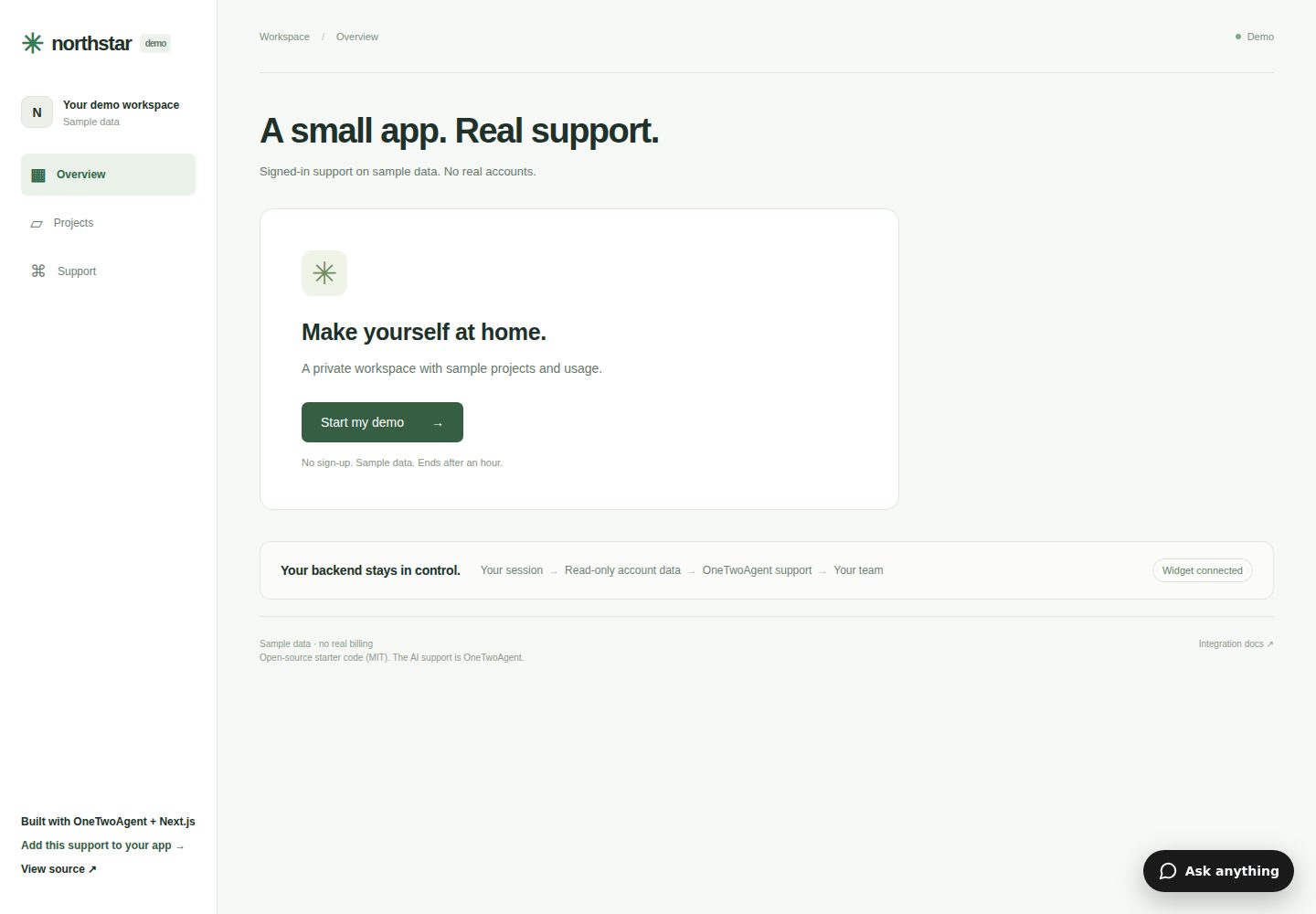
服务端会话签发登录身份,支持工作区切换与退出
Next.jsReactSaaS启动器
nextjs-ai-customer-support-starter — Next.js SaaS模板
作者 One-Two-Agent-LLC
面向 Next.js App Router 的 AI 客服启动器,演示登录用户身份、只读账户数据投影与 OneTwoAgent 实时客服组件的集成方式。
看看你的网站会是什么样
浏览真实页面截图,比较内容排版与手机效果。点击下方缩略图切换,放大查看整页细节。
全部页面与视图 2
截图用于了解视觉与布局,交互效果请以实际项目为准。
采集于 2026-10-07查看来源
值得关注的模板亮点
从已有项目资料中,快速了解它的特点。
账户数据端点仅返回有界只读投影,不暴露原始数据行
集成真实 OneTwoAgent 组件,不模拟助手回答
支持在工作区所有者已有的 OneTwoAgent Inbox 中进行人工接管
演示数据按访客隔离分配,会话一小时过期、访客数据两小时过期
提供 CLI 配置、doctor 检查与 Vercel 部署验证步骤
模板详细介绍
这是一个基于 Next.js App Router 的 SaaS 演示项目,用于展示如何把已登录用户身份与 OneTwoAgent 客服组件对接。应用自身负责认证、PostgreSQL 数据库和权限;OneTwoAgent 只接收经过签名的身份信息和明确批准的只读账户数据投影。仓库不包含共享的 OneTwoAgent 业务空间、凭据、免费 AI 额度或运营登录,要接入真实组件需要自己的 OneTwoAgent 工作区和 PostgreSQL 数据库。
项目演示了按访客隔离的合成会话、服务端会话签发的登录身份、工作区切换与退出、用量和有界 projects 支持视图,以及真实 OneTwoAgent 组件和人工接管流程。演示登录不是生产级认证,没有共享的 Alice/Bob 账号,每次开始会话会创建与其他访客隔离的不透明身份。
安全边界方面,数据库凭据、身份密钥、账户读取凭据和签名授权保留在服务端;账户端点不使用浏览器 cookie,也不重定向到登录页,而是验证读取凭据和签名授权后检查当前会话、活动工作区、成员资格和过期时间,只返回显式投影而非原始数据行。OneTwoAgent 不获得数据库连接或写入能力。
Next.jsSaaS启动器
适合你的项目吗?
适用场景
- 为 Next.js App Router 应用接入带登录态感知的 AI 客服组件
- 评估 OneTwoAgent 的签名身份交换与只读账户数据授权流程
- 在本地或 Vercel 预览环境验证客服组件与账户端点连通性
- 作为替换演示认证为真实应用会话的参考起点
适合人群
- 使用 Next.js App Router 并需要客服集成的开发团队
- 已拥有 OneTwoAgent 工作区和 PostgreSQL 数据库的开发者
- 希望了解服务端身份签名与只读数据投影边界的工程师
上手与定制指南
结合仓库当前版本的说明,按下面的资料检查内容、配置与运行要求。
- 1
需要 Node.js 22.x、npm 和专用 PostgreSQL 数据库
- 2
需要自己的 OneTwoAgent 工作区,仓库不提供共享凭据或免费 AI 额度
- 3
演示登录不是生产认证,接入真实用户前需替换 lib/auth.ts 等认证接缝
- 4
运行 npm run db:setup 初始化 ota_starter 模式,不要指向客户生产数据库
- 5
Vercel 部署时先验证 Preview 目标,再添加读取凭据并重新部署
授权与来源资料
使用条件与限制
免费使用 · 保留许可声明本次收录的是公开仓库中采用 MIT 许可的免费版本;免费范围为该版本代码,不代表外部服务或第三方素材免费。
使用时需要遵守
- 允许免费使用、修改、商用和分发该版本代码。
- 分发代码副本或实质性部分时,保留原作者版权声明和完整 MIT 许可声明。
- 代码按现状提供;担保与责任限制以原许可证及适用法律为准。
额外费用与待核对事项
- 演示图片、字体、图标及其他第三方素材需按各自许可核对,不能仅凭代码的 MIT 许可判断。
- 域名、托管、数据库、支付或 AI 等外部服务可能另外收费。
- 需要自备 OneTwoAgent 工作区与 PostgreSQL 数据库;仓库不提供共享业务空间、凭据或免费 AI 额度,接入真实组件需按服务定价付费。
- 官方 Northstar 演示由 OneTwoAgent 以其付费服务额度维护;自行部署需要自己的 OneTwoAgent 工作区和服务额度。
- 演示登录不是生产级认证,接入真实客户前必须替换为实际应用会话。
- 使用真实组件和账户数据审批需要自己的 OneTwoAgent 工作区。
- 数据库初始化脚本不得指向客户生产数据库。
- 这是有界演示存储,不构成公共服务滥用防护保证;公开演示前需自行配置平台速率限制和服务预算。
- 连接前应选择专用演示工作区,不要轮换现有生产工作区密钥。
- CLI 的 env push --to vercel 面向 Production 而非 Preview,不能想当然用于预览环境。
- 受保护的预览还需允许 OneTwoAgent 服务器访问已批准的账户端点,浏览器保护 cookie 不足;不得移除端点认证或绕过授权。
- 需在 Channels → Widget → Install & Connect 添加精确的稳定生产主机;不得使用通配符主机简化测试。
- 生产应用需移除 /login、/activity 和合成分配路径,且不对未经验证的认证提供方作兼容性承诺。
- 仓库仅包含 App Router,不捆绑第二个应用;Pages Router 需使用文档化适配器。
- PostgreSQL 测试拒绝非本地测试 URL;真实托管组件与 Inbox 检查还需额外进行。
- 该模板不授予工作人员访问访客的权限,人工接管需使用已有的已认证 Inbox。
查看原文依据
Permission is hereby granted, free of charge
许可证原文
This repository does not include a shared OneTwoAgent business, credentials, free AI allowance or operator login. A OneTwoAgent workspace and a PostgreSQL database are required to connect the real widget. See [service pricing](https://onetwoagent.com/pricing).
README 原文
[Try the maintained Northstar demo](https://ota-northstar-demo.vercel.app). OneTwoAgent maintains this synthetic demo with its own paid service allowance. Your deployment requires your own workspace and service allowance.
README 原文
This demo login is **not production authentication**. There is no shared Alice/Bob account. Starting a session creates a new opaque identity, isolated from other visitors. Replace the demo auth seam with your actual app session before integrating real customers.
README 原文
- Your own OneTwoAgent workspace for the real widget and account-data approval.
README 原文
Creates only the `ota_starter` schema/tables under an advisory lock. It does not drop, reset or seed unrelated tables. It refuses an incompatible or unversioned occupied schema. Do not point it at a customer production database.
README 原文
Sessions expire after one hour; visitor data expires after two hours. Allocation prunes expired fixture rows; `npm run demo:cleanup` removes expired fixtures explicitly. There is a 200-active-visitor allocation cap. This is bounded demo storage, not a public-service abuse protection guarantee. Configure platform rate limits and service budgets before promoting a public demo.
README 原文
Choose a **dedicated demo workspace** before connecting; approve the CLI there. Do not rotate an existing production workspace secret for this demo. The CLI creates `.onetwoagent.json`, writes the identity secret to `.env.local` and installs its coding-agent instructions. This starter consumes those existing outputs.
README 原文
The CLI `env push --to vercel` targets **Production**, not Preview. Do not use it for a preview by assumption. For this stage set secrets with Vercel's environment interface/CLI scoped to Preview; never put values into shell arguments, deploy URLs or logs.
README 原文
A protected preview must also permit the OneTwoAgent server to reach the approved account endpoint. A browser protection cookie is insufficient. Do not remove endpoint authentication or invent a grant bypass. If platform protection blocks server access, resolve the deployment access decision with the owner before claiming a connected demo.
README 原文
For a production clone, use Channels → Widget → Install & Connect and add the exact stable production host. During candidate validation explicitly add the approved Preview host instead. A new immutable preview URL requires matching domain/endpoint configuration. Do not allow wildcard unrelated hosts to simplify testing.
README 原文
Remove `/login`, `/activity` and the synthetic allocation path from your production app. Keep `identity.refresh()` after sign-in and `identity.invalidate()` **before** sign-out/workspace changes. Do not trust browser-provided user/workspace IDs. No compatibility claim is made for an auth provider not exercised by this starter.
README 原文
This repository contains only App Router. The published integration also exposes Pages Router-compatible handlers, documented in the signed-in integration guide above. Do not copy App Router cookie APIs into Pages Router; use the documented adapter. No second app is bundled here.
README 原文
The PostgreSQL tests refuse non-local test URLs. They create/remove only their own synthetic fixtures. Browser tests use two separate browser contexts and save desktop/375px screenshots to ignored `output/playwright/`. They test the app session flow; real hosted widget/Inbox checks are additionally required.
README 原文
https://github.com/One-Two-Agent-LLC/nextjs-ai-customer-support-starter/blob/main/LICENSEhttps://github.com/One-Two-Agent-LLC/nextjs-ai-customer-support-starter/blob/main/README.md- **No AI answer after handoff:** use the existing authenticated Inbox to take over/reply; this template grants no staff access to visitors.
README 原文
DeepSeek 根据仓库许可证和 README 整理 ·2026-10-07。结果仅覆盖已读取资料,依赖、图片、字体及后续条款变更以各自原文为准。
项目核对记录与介绍依据
模板资料
- 来源平台
- GitHub
- 资料与维护参考分
- 资料较完整 · 85 / 100
- 技术栈
- Next.js · React
- 网站类型
- SaaS · 启动器
这个分数如何计算
本站按许可资料(最高30分)、演示链接(12分)、预览图(10分)、Star数(15分)、记录的维护时间(15分)、描述完整度(8分)、功能记录(5分)和分类资料(5分)计算。它不是代码、安全或性能测试,也不是 Google 评分;有链接不代表已实测可用。
这个项目需要核对什么
- 记录的仓库更新时间
- 2026-10-07
- 截图检查日期
- 2026-10-07
已收录演示链接。请用你的内容与屏幕尺寸检查;有演示不代表表单、认证或支付已经可用。
目录记录的主要技术栈是 Next.js。请通过依赖清单和锁文件核对实际版本与托管要求。这些说明基于收录资料,不代表代码审计或部署实测。
查看具体选型方法 →介绍的制作与核对状态
介绍由 AI 辅助整理目录与仓库资料。仓库作者不等于这篇介绍的审核者。
审核声明: codex-user-requested-batch-review-20261017 · 2026-10-16
查看当时使用的来源资料
SHA-256: 449fc9211f626cdf97f5c47d0580cfd322816edcc9f4d8242bd3ae733aaf040b
2026-10-07T22:27:28.997Z
来源文件 / 仓库# Next.js AI customer support starter
A small App Router SaaS demo using the published OneTwoAgent integration. Your app owns authentication, its PostgreSQL database and permissions. OneTwoAgent receives signed identity and explicitly approved, read-only account projections.
[](https://vercel.com/new/clone?repository-url=https%3A%2F%2Fgithub.com%2FOne-Two-Agent-LLC%2Fnextjs-ai-customer-support-starter&repository-name=nextjs-ai-customer-support-starter&env=APP_DATABASE_URL%2CONETWOAGENT_BUSINESS_ID%2CONETWOAGENT_WIDGET_PUBLIC_ID%2CONETWOAGENT_WIDGET_IDENTITY_SECRET%2CDEMO_ACCESS_ENABLED&envDescription=Use+a+dedicated+demo+database+and+CLI-issued+server+credentials.+Set+DEMO_ACCESS_ENABLED%3Dtrue+only+for+synthetic+demo+sessions.&envLink=https%3A%2F%2Fgithub.com%2FOne-Two-Agent-LLC%2Fnextjs-ai-customer-support-starter%23environment-variables)
This repository does not include a shared OneTwoAgent business, credentials, free AI allowance or operator login. A OneTwoAgent workspace and a PostgreSQL database are required to connect the real widget. See [service pricing](https://onetwoagent.com/pricing).
[Try the maintained Northstar demo](https://ota-northstar-demo.vercel.app). OneTwoAgent maintains this synthetic demo with its own paid service allowance. Your deployment requires your own workspace and service allowance.
## What this starter demonstrates
- Per-visitor synthetic sessions and two private demo workspaces.
- Signed-in identity from a server-side session, including workspace switching and logout.
- Usage and a bounded `projects` support view, with fresh reads authorized by a signed grant, credential, live session and membership.
- A real OneTwoAgent widget. No simulated assistant answers.
- Human handoff and takeover in the workspace owner's existing OneTwoAgent Inbox.
This demo login is **not production authentication**. There is no shared Alice/Bob account. Starting a session creates a new opaque identity, isolated from other visitors. Replace the demo auth seam with your actual app session before integrating real customers.
## Architecture
```text
Browser → app session cookie → identity route → OneTwoAgent token exchange
Browser → real widget → OneTwoAgent Support
OneTwoAgent → approved HTTPS account endpoint → grant + live membership checks
→ bounded DB projection
Team member → existing OneTwoAgent Inbox → takeover → real widget reply
```
## Security boundary
`app/layout.tsx` remains a Server Component. Only the widget public ID and signed-in boolean cross into browser setup. Database credentials, identity secret, account read credential and signed account grants remain on the server. The widget identity token is intentionally issued to that customer's browser by the published integration handler; it is not the server secret or a raw account grant.
The account endpoint uses **no browser cookie** and never redirects to login. It verifies the OneTwoAgent read credential and signed grant, then checks current session, active workspace, membership and expiry. It returns explicit projections, never raw rows. OneTwoAgent gets no database connection or write capability.
## Requirements
- Node.js 22.x and npm.
- Dedicated PostgreSQL (local PostgreSQL works for development; a reachable TLS database is needed on Vercel).
- Your own OneTwoAgent workspace for the real widget and account-data approval.
- Packages pinned to `@onetwoagent/[email protected]` and `@onetwoagent/[email protected]`.
## Local setup
```bash
npm ci
cp .env.example .env.local
# Privately set APP_DATABASE_URL to your disposable database.
# Set DEMO_ACCESS_ENABLED=true only for this synthetic demo.
npm run db:setup
npm run dev
```
Open localhost:3000. Without OneTwoAgent configuration the app works, but clearly shows “Widget not connected.” A successful unconnected build does not prove the support integration.
## Environment variables
| Variable | Purpose | Browser? |
| ------------------------------------- | -------------------------------------------------------------------------------- | ---------------------------------- |
| `APP_DATABASE_URL` | App-owned dedicated PostgreSQL connection | Never |
| `DEMO_ACCESS_ENABLED` | Explicit `true` enables isolated synthetic visitor allocation; default false | Only enabled/disabled presentation |
| `ONETWOAGENT_WIDGET_IDENTITY_SECRET` | CLI-generated server identity credential | Never |
| `ONETWOAGENT_ACCOUNT_READ_CREDENTIAL` | CLI-generated approved endpoint credential | Never |
| `ONETWOAGENT_BUSINESS_ID` | Non-secret connection input for deployment packaging | Kept server-side |
| `ONETWOAGENT_WIDGET_PUBLIC_ID` | Non-secret widget installation input | Yes, intentionally |
| `ONETWOAGENT_API_BASE_URL` | Defaults to `https://api.onetwoagent.com`; this starter accepts only that origin | Public API origin |
No `NEXT_PUBLIC_*` secrets, provider API keys or administrator tokens are required. `.env.local`, `.env.preview.local`, `.onetwoagent.json` and local credentials are ignored. Never paste their contents into an issue.
`prepare-config.mjs` reads CLI connection JSON or the non-secret deployment inputs **before dev/build**, validates conflicts, and generates server-imported connection metadata. There are no request-time filesystem writes. Changing connection IDs requires a rebuild; rotating a secret requires setting the server environment and redeploying.
## Database initialization
```bash
npm run db:setup
```
Creates only the `ota_starter` schema/tables under an advisory lock. It does not drop, reset or seed unrelated tables. It refuses an incompatible or unversioned occupied schema. Do not point it at a customer production database.
Demo data is allocated on first visitor session, not globally shared: Northstar Studio has 5,000 credits, 1,240 used, 3,760 remaining and two projects. Sandbox has 100 credits, 12 used, 88 remaining and no projects. “Record demo activity” adds 10 synthetic used credits to the active workspace only.
Sessions expire after one hour; visitor data expires after two hours. Allocation prunes expired fixture rows; `npm run demo:cleanup` removes expired fixtures explicitly. There is a 200-active-visitor allocation cap. This is bounded demo storage, not a public-service abuse protection guarantee. Configure platform rate limits and service budgets before promoting a public demo.
## Connect OneTwoAgent
```bash
npx @onetwoagent/[email protected] init --browser
```
Choose a **dedicated demo workspace** before connecting; approve the CLI there. Do not rotate an existing production workspace secret for this demo. The CLI creates `.onetwoagent.json`, writes the identity secret to `.env.local` and installs its coding-agent instructions. This starter consumes those existing outputs.
Add `knowledge/demo-product.md` as approved Knowledge in that workspace. Rebuild/restart. See the [Next.js integration guide](https://onetwoagent.com/ai-customer-support-for-nextjs) and [signed-in customer/account-data contract](https://docs.onetwoagent.com/docs/widget/logged-in-users).
## Deploy to Vercel
1. Use a separate Vercel project and dedicated PostgreSQL database. Initialize the schema explicitly; database initialization is not a build hook.
2. Select Next.js, Node 22, `npm ci`, `npm run build`, default output. Set the environment variables privately for the target environment.
3. Supply the business ID/public ID from the CLI config as build inputs. An initial deployment may lack the read credential and remain fail-closed until approval.
4. Deploy Preview first (`vercel deploy --target preview`), and wait for READY. This command must not include `--prod` during candidate validation.
Check the returned deployment target: Vercel can assign a new project’s first deployment to Production. Do not treat the CLI flag alone as proof of Preview or attach real credentials before verifying the target.
5. Complete endpoint/domain approval below, add the read credential to the **same Preview environment**, then redeploy.
6. Run doctor and the browser acceptance in [docs/verification.md](docs/verification.md).
The CLI `env push --to vercel` targets **Production**, not Preview. Do not use it for a preview by assumption. For this stage set secrets with Vercel's environment interface/CLI scoped to Preview; never put values into shell arguments, deploy URLs or logs.
A protected preview must also permit the OneTwoAgent server to reach the approved account endpoint. A browser protection cookie is insufficient. Do not remove endpoint authentication or invent a grant bypass. If platform protection blocks server access, resolve the deployment access decision with the owner before claiming a connected demo.
The Deploy button imports this public repository into your own Vercel project; setup details are in [docs/vercel.md](docs/vercel.md). It provisions code, not owner approval or automatic production auth.
## Approve the account endpoint
Copy `onetwoagent.account-lookup.example.json` to `onetwoagent.account-lookup.json`; replace only its placeholder with your exact HTTPS deployment host.
```bash
npx @onetwoagent/[email protected] account-lookup configure onetwoagent.account-lookup.json
```
Approve the shown endpoint, `usage` section and `projects` support view as owner/admin. The CLI generates the read credential without printing it. Set it server-side in the selected deployment environment and redeploy. Until fully configured, the endpoint returns an explicit unavailable response; it never falls back to an unauthenticated lookup.
## Add the production domain
For a production clone, use Channels → Widget → Install & Connect and add the exact stable production host. During candidate validation explicitly add the approved Preview host instead. A new immutable preview URL requires matching domain/endpoint configuration. Do not allow wildcard unrelated hosts to simplify testing.
## Run doctor
```bash
npx @onetwoagent/[email protected] doctor --json --url https://YOUR-HOST --wait 120
```
Start a demo session in that deployment and ask a signed-in account question during verification. `manual_check` or `warning` is not a pass. Doctor checks configuration and observed integration signals; it does not prove every answer, visitor history isolation or teammate takeover.
## Replace demo auth with real auth
Replace `lib/auth.ts` / the session adapters with your existing verified session, user and workspace selection. Keep `getCurrentSession` server-only. Adapt `isSessionLive` to re-check current membership/revocation at every fresh lookup. Adapt the explicit projections in `lib/onetwoagent/account-data.ts` to your real tables, with bounded fields and records.
Remove `/login`, `/activity` and the synthetic allocation path from your production app. Keep `identity.refresh()` after sign-in and `identity.invalidate()` **before** sign-out/workspace changes. Do not trust browser-provided user/workspace IDs. No compatibility claim is made for an auth provider not exercised by this starter.
## App Router file map
| File | Responsibility |
| --------------------------------------- | ---------------------------------------------------- |
| `app/layout.tsx` | Server layout, real widget script, browser bridge |
| `components/onetwoagent-identity.tsx` | Published browser lifecycle controller |
| `app/api/onetwoagent/identity/route.ts` | Session-backed identity exchange |
| `app/api/onetwoagent/account/route.ts` | Published account handler; server-to-server |
| `lib/onetwoagent/account-data.ts` | Membership/session checks, usage/projects projection |
| `lib/session.ts`, `lib/auth.ts` | Demo-only app session seam |
| `lib/db.ts`, `db/` | App-owned PostgreSQL and safe setup |
| `scripts/prepare-config.mjs` | Build-time non-secret connection packaging |
| `tests/` | PostgreSQL authority and browser lifecycle checks |
## Pages Router note
This repository contains only App Router. The published integration also exposes Pages Router-compatible handlers, documented in the signed-in integration guide above. Do not copy App Router cookie APIs into Pages Router; use the documented adapter. No second app is bundled here.
## Tests
Use a separate localhost database with `test` in its database name:
```bash
STARTER_TEST_DATABASE_URL=postgresql://localhost/ota_starter_test npm test
npm run build
npm run typecheck
npm run check:bundle
# In one terminal: npm run start -- --hostname 127.0.0.1 --port 3417
npm run test:browser
```
The PostgreSQL tests refuse non-local test URLs. They create/remove only their own synthetic fixtures. Browser tests use two separate browser contexts and save desktop/375px screenshots to ignored `output/playwright/`. They test the app session flow; real hosted widget/Inbox checks are additionally required.
## Troubleshooting
- **Widget not connected:** run CLI init, provide both IDs, rebuild. Do not replace the widget with a mock.
- **Demo unavailable:** confirm opt-in, database reachability and schema initialization. Do not disable auth checks.
- **POST forbidden:** forms require same-origin Origin and matching Host; retain the original Host when reverse proxying. Relative redirects prevent internal-host redirects.
- **Identity 401:** no live app session. Sign in; do not make the route anonymous.
- **Account 401/403:** check credential deployment, approval, grant, session and active workspace. Never log the grant.
- **Account 503:** finish CLI connection/read credential setup and redeploy.
- **Doctor manual check:** visit the actual target, sign in and ask an account question. Local tests are insufficient.
- **No AI answer after handoff:** use the existing authenticated Inbox to take over/reply; this template grants no staff access to visitors.
## Security notes and provenance
See [SECURITY.md](SECURITY.md). Source semantics derive from the tested PostgreSQL App Router example at `fcff278403e8fe92353b709460948f2f14aea2ef`; see [docs/provenance.md](docs/provenance.md). No private backend is included.
For a separate real product demonstration, see the [Aderic walkthrough](https://onetwoagent.com/ai-customer-support-demo). For the underlying product model, see [account-aware support](https://onetwoagent.com/ai-support-with-account-data). Neither replaces validation of your own deployment.
看看同类模板
对比同技术栈与用途的模板,找到更适合的视觉与内容结构。

ai-website-cloner-template
Clone any website with one command using AI coding agents
Next.js · 启动器

Next.js SaaS Starter
Next.js SaaS Starter 是 Next.js 官方维护的 SaaS 起点模板,定位介于学习资源和可直接部署的脚手架之间。
Next.js · SaaS

Next.js Commerce
Next.js Commerce 是 Vercel 团队维护的电商启动模板,基于 Next.js App Router 构建,采用服务端渲染、React Server Components、Server Actions …
Next.js · 电商

Next-js-Boilerplate
Next-js-Boilerplate 是一个面向 Next.js 16、Tailwind CSS 4 和 TypeScript 的启动器,核心定位是开发者体验优先。
Next.js · 启动器

tailwind-nextjs-starter-blog
tailwind-nextjs-starter-blog 是一个面向个人技术博客的 Next.js 与 Tailwind CSS 启动模板,其 v2 版本基于 App Router 与 React Server Comp…
Next.js · 博客

next-forge
Production-grade Turborepo template for Next.js apps.
Next.js · 启动器