Server-side sessions issue login identity, with workspace switching and sign-out
Next.jsReactSaaSStarter
nextjs-ai-customer-support-starter — Next.js SaaS Template
By One-Two-Agent-LLC
An AI customer support starter for Next.js App Router that demonstrates how to integrate signed-in user identity, read-only account data projections, and the OneTwoAgent real-time support component.
Explore the design
Compare the page layouts and mobile experience. Open any screenshot for a closer look.
Desktop homepage1 / 2
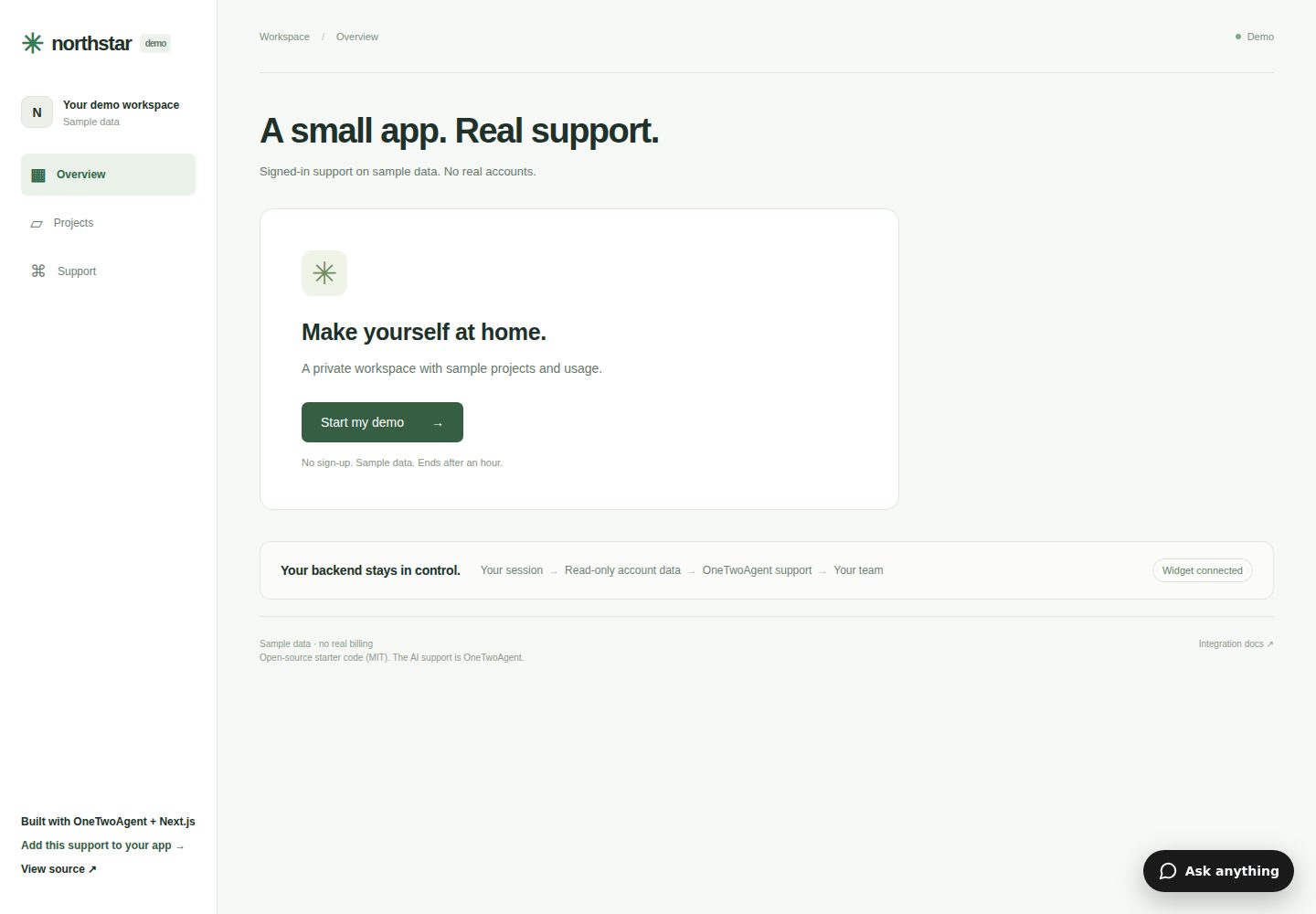
Desktop captureTop of page
Actual screenshot captured by the server browser.
All pages & views 2
Screenshots show visual appearance; interactive behavior may differ.
Recorded 2026-10-07View source
What stands out
A quick read of the recorded project description.
Account data endpoints return only bounded read-only projections, not raw data rows
Integrates the real OneTwoAgent component without simulating assistant responses
Supports human handoff in the workspace owner's existing OneTwoAgent Inbox
Demo data is allocated per visitor in isolation; sessions expire in one hour and visitor data expires in two hours
Provides CLI configuration, doctor checks, and Vercel deployment verification steps
Template Details
This is a SaaS demo project based on Next.js App Router, showing how to connect signed-in user identity with the OneTwoAgent support component. The application itself handles authentication, the PostgreSQL database, and permissions; OneTwoAgent only receives signed identity information and explicitly approved read-only account data projections. The repository does not include a shared OneTwoAgent business space, credentials, free AI credits, or operational login. To connect the real component, you need your own OneTwoAgent workspace and PostgreSQL database.
The project demonstrates synthetic sessions isolated per visitor, login identity issued by server-side sessions, workspace switching and sign-out, usage and bounded projects support views, as well as the real OneTwoAgent component and human handoff flow. The demo login is not production-grade authentication; there are no shared Alice/Bob accounts, and each session start creates an opaque identity isolated from other visitors.
Regarding security boundaries, database credentials, identity keys, account read credentials, and signed authorization remain server-side; the account endpoint does not use browser cookies or redirect to a login page. Instead, it validates read credentials and signed authorization, then checks the current session, active workspace, membership, and expiration, returning only explicit projections rather than raw data rows. OneTwoAgent does not receive database connections or write capabilities.
Next.jsSaaSStarter
Is it right for your project?
Use Cases
- Integrate a login-aware AI customer support component into a Next.js App Router application
- Evaluate OneTwoAgent's signed identity exchange and read-only account data authorization flow
- Verify connectivity between the support component and account endpoints in a local or Vercel preview environment
- Use as a reference starting point for replacing the demo authentication with real application sessions
Suitable For
- Development teams using Next.js App Router that need customer support integration
- Developers who already have a OneTwoAgent workspace and PostgreSQL database
- Engineers who want to understand server-side identity signing and read-only data projection boundaries
Getting started & customization
Use these recorded setup notes alongside the repository instructions for your chosen version.
- 1
Requires Node.js 22.x, npm, and a dedicated PostgreSQL database
- 2
Requires your own OneTwoAgent workspace; the repository does not provide shared credentials or free AI credits
- 3
The demo login is not production authentication; replace authentication seams such as lib/auth.ts before connecting real users
- 4
Run npm run db:setup to initialize the ota_starter schema; do not point it at a customer production database
- 5
When deploying to Vercel, first verify the Preview target, then add read credentials and redeploy
License & source material
Usage conditions & limitations
Free to use · keep license noticeThis entry covers the free version under the MIT license in the public repository; the free scope is the code of this version and does not mean external services or third-party assets are free.
Must comply with when using
- You may use, modify, commercialize, and distribute the code of this version for free.
- When distributing copies or substantial portions of the code, retain the original author's copyright notice and the full MIT license notice.
- The code is provided as is; warranties and limitations of liability are governed by the original license and applicable law.
Additional costs & items to verify
- Demo images, fonts, icons, and other third-party assets must be checked under their respective licenses; the code's MIT license alone cannot be used to judge them.
- External services such as domains, hosting, databases, payments, or AI may incur separate charges.
- You must provide your own OneTwoAgent workspace and PostgreSQL database; the repository does not provide a shared business space, credentials, or free AI credits, and connecting the real component requires paying according to the service's pricing.
- The official Northstar demo is maintained by OneTwoAgent using its paid service credits; self-deployment requires your own OneTwoAgent workspace and service credits.
- The demo login is not production-grade authentication; it must be replaced with actual application sessions before connecting real customers.
- Using the real component and account data approval requires your own OneTwoAgent workspace.
- Database initialization scripts must not point at a customer production database.
- This is bounded demo storage and does not constitute a guarantee against public service abuse; configure platform rate limits and service budgets yourself before making the demo public.
- Before connecting, choose a dedicated demo workspace; do not rotate existing production workspace keys.
- The CLI's env push --to vercel targets Production rather than Preview and cannot be assumed to work for preview environments.
- Protected previews also require allowing the OneTwoAgent server to access approved account endpoints; browser protection cookies are insufficient, and endpoint authentication must not be removed or authorization bypassed.
- Add the exact stable production host in Channels → Widget → Install & Connect; do not use wildcard hosts to simplify testing.
- Production applications need to remove /login, /activity, and synthetic allocation paths, and no compatibility promises are made for unverified authentication providers.
- The repository contains only the App Router and does not bundle a second application; the Pages Router requires the documented adapter.
- PostgreSQL tests reject non-local test URLs; real hosted component and Inbox checks require additional steps.
- This template does not grant staff access to visitors; human handoff requires using an existing authenticated Inbox.
View Original Text Basis
Permission is hereby granted, free of charge
Original License Text
This repository does not include a shared OneTwoAgent business, credentials, free AI allowance or operator login. A OneTwoAgent workspace and a PostgreSQL database are required to connect the real widget. See [service pricing](https://onetwoagent.com/pricing).
Original README
[Try the maintained Northstar demo](https://ota-northstar-demo.vercel.app). OneTwoAgent maintains this synthetic demo with its own paid service allowance. Your deployment requires your own workspace and service allowance.
Original README
This demo login is **not production authentication**. There is no shared Alice/Bob account. Starting a session creates a new opaque identity, isolated from other visitors. Replace the demo auth seam with your actual app session before integrating real customers.
Original README
- Your own OneTwoAgent workspace for the real widget and account-data approval.
Original README
Creates only the `ota_starter` schema/tables under an advisory lock. It does not drop, reset or seed unrelated tables. It refuses an incompatible or unversioned occupied schema. Do not point it at a customer production database.
Original README
Sessions expire after one hour; visitor data expires after two hours. Allocation prunes expired fixture rows; `npm run demo:cleanup` removes expired fixtures explicitly. There is a 200-active-visitor allocation cap. This is bounded demo storage, not a public-service abuse protection guarantee. Configure platform rate limits and service budgets before promoting a public demo.
Original README
Choose a **dedicated demo workspace** before connecting; approve the CLI there. Do not rotate an existing production workspace secret for this demo. The CLI creates `.onetwoagent.json`, writes the identity secret to `.env.local` and installs its coding-agent instructions. This starter consumes those existing outputs.
Original README
The CLI `env push --to vercel` targets **Production**, not Preview. Do not use it for a preview by assumption. For this stage set secrets with Vercel's environment interface/CLI scoped to Preview; never put values into shell arguments, deploy URLs or logs.
Original README
A protected preview must also permit the OneTwoAgent server to reach the approved account endpoint. A browser protection cookie is insufficient. Do not remove endpoint authentication or invent a grant bypass. If platform protection blocks server access, resolve the deployment access decision with the owner before claiming a connected demo.
Original README
For a production clone, use Channels → Widget → Install & Connect and add the exact stable production host. During candidate validation explicitly add the approved Preview host instead. A new immutable preview URL requires matching domain/endpoint configuration. Do not allow wildcard unrelated hosts to simplify testing.
Original README
Remove `/login`, `/activity` and the synthetic allocation path from your production app. Keep `identity.refresh()` after sign-in and `identity.invalidate()` **before** sign-out/workspace changes. Do not trust browser-provided user/workspace IDs. No compatibility claim is made for an auth provider not exercised by this starter.
Original README
This repository contains only App Router. The published integration also exposes Pages Router-compatible handlers, documented in the signed-in integration guide above. Do not copy App Router cookie APIs into Pages Router; use the documented adapter. No second app is bundled here.
Original README
The PostgreSQL tests refuse non-local test URLs. They create/remove only their own synthetic fixtures. Browser tests use two separate browser contexts and save desktop/375px screenshots to ignored `output/playwright/`. They test the app session flow; real hosted widget/Inbox checks are additionally required.
Original README
https://github.com/One-Two-Agent-LLC/nextjs-ai-customer-support-starter/blob/main/LICENSEhttps://github.com/One-Two-Agent-LLC/nextjs-ai-customer-support-starter/blob/main/README.md- **No AI answer after handoff:** use the existing authenticated Inbox to take over/reply; this template grants no staff access to visitors.
Original README
Compiled by DeepSeek based on repository license and README ·2026-10-07. Results only cover the materials read; dependencies, images, fonts, and subsequent term changes are subject to their respective original texts.
Project checks & description sources
Template Information
- Source platforms
- GitHub
- Documentation and maintenance reference score
- More documented · 85 / 100
- Technologies
- Next.js · React
- Website type
- SaaS · Starter
How this score is calculated
Our heuristic uses license records (up to 30), a demo link (12), a preview (10), stars (15), recorded maintenance (15), description completeness (8), feature records (5) and classification data (5). It is not a code, security or performance test, or a Google score. A link does not establish tested functionality.
What to verify for this project
- Repository update recorded
- 2026-10-07
- Screenshot last checked
- 2026-10-07
A demo link is listed. Check it with your own content and viewport sizes; its presence does not confirm that forms, authentication or payments work.
The catalog identifies Next.js as the primary stack. Check the actual dependency manifest and lockfile for versions and hosting requirements. These notes use recorded metadata, not a code audit or a deployment test.
Use a selection guide →How this description was prepared
AI-assisted description based on catalog records and repository material. Repository authors are not automatically the reviewers of this description.
Review declaration: codex-user-requested-batch-review-20261017 · 2026-10-16
Inspect the recorded source material
SHA-256: 449fc9211f626cdf97f5c47d0580cfd322816edcc9f4d8242bd3ae733aaf040b
2026-10-07T22:27:28.997Z
Source file / repository# Next.js AI customer support starter
A small App Router SaaS demo using the published OneTwoAgent integration. Your app owns authentication, its PostgreSQL database and permissions. OneTwoAgent receives signed identity and explicitly approved, read-only account projections.
[](https://vercel.com/new/clone?repository-url=https%3A%2F%2Fgithub.com%2FOne-Two-Agent-LLC%2Fnextjs-ai-customer-support-starter&repository-name=nextjs-ai-customer-support-starter&env=APP_DATABASE_URL%2CONETWOAGENT_BUSINESS_ID%2CONETWOAGENT_WIDGET_PUBLIC_ID%2CONETWOAGENT_WIDGET_IDENTITY_SECRET%2CDEMO_ACCESS_ENABLED&envDescription=Use+a+dedicated+demo+database+and+CLI-issued+server+credentials.+Set+DEMO_ACCESS_ENABLED%3Dtrue+only+for+synthetic+demo+sessions.&envLink=https%3A%2F%2Fgithub.com%2FOne-Two-Agent-LLC%2Fnextjs-ai-customer-support-starter%23environment-variables)
This repository does not include a shared OneTwoAgent business, credentials, free AI allowance or operator login. A OneTwoAgent workspace and a PostgreSQL database are required to connect the real widget. See [service pricing](https://onetwoagent.com/pricing).
[Try the maintained Northstar demo](https://ota-northstar-demo.vercel.app). OneTwoAgent maintains this synthetic demo with its own paid service allowance. Your deployment requires your own workspace and service allowance.
## What this starter demonstrates
- Per-visitor synthetic sessions and two private demo workspaces.
- Signed-in identity from a server-side session, including workspace switching and logout.
- Usage and a bounded `projects` support view, with fresh reads authorized by a signed grant, credential, live session and membership.
- A real OneTwoAgent widget. No simulated assistant answers.
- Human handoff and takeover in the workspace owner's existing OneTwoAgent Inbox.
This demo login is **not production authentication**. There is no shared Alice/Bob account. Starting a session creates a new opaque identity, isolated from other visitors. Replace the demo auth seam with your actual app session before integrating real customers.
## Architecture
```text
Browser → app session cookie → identity route → OneTwoAgent token exchange
Browser → real widget → OneTwoAgent Support
OneTwoAgent → approved HTTPS account endpoint → grant + live membership checks
→ bounded DB projection
Team member → existing OneTwoAgent Inbox → takeover → real widget reply
```
## Security boundary
`app/layout.tsx` remains a Server Component. Only the widget public ID and signed-in boolean cross into browser setup. Database credentials, identity secret, account read credential and signed account grants remain on the server. The widget identity token is intentionally issued to that customer's browser by the published integration handler; it is not the server secret or a raw account grant.
The account endpoint uses **no browser cookie** and never redirects to login. It verifies the OneTwoAgent read credential and signed grant, then checks current session, active workspace, membership and expiry. It returns explicit projections, never raw rows. OneTwoAgent gets no database connection or write capability.
## Requirements
- Node.js 22.x and npm.
- Dedicated PostgreSQL (local PostgreSQL works for development; a reachable TLS database is needed on Vercel).
- Your own OneTwoAgent workspace for the real widget and account-data approval.
- Packages pinned to `@onetwoagent/[email protected]` and `@onetwoagent/[email protected]`.
## Local setup
```bash
npm ci
cp .env.example .env.local
# Privately set APP_DATABASE_URL to your disposable database.
# Set DEMO_ACCESS_ENABLED=true only for this synthetic demo.
npm run db:setup
npm run dev
```
Open localhost:3000. Without OneTwoAgent configuration the app works, but clearly shows “Widget not connected.” A successful unconnected build does not prove the support integration.
## Environment variables
| Variable | Purpose | Browser? |
| ------------------------------------- | -------------------------------------------------------------------------------- | ---------------------------------- |
| `APP_DATABASE_URL` | App-owned dedicated PostgreSQL connection | Never |
| `DEMO_ACCESS_ENABLED` | Explicit `true` enables isolated synthetic visitor allocation; default false | Only enabled/disabled presentation |
| `ONETWOAGENT_WIDGET_IDENTITY_SECRET` | CLI-generated server identity credential | Never |
| `ONETWOAGENT_ACCOUNT_READ_CREDENTIAL` | CLI-generated approved endpoint credential | Never |
| `ONETWOAGENT_BUSINESS_ID` | Non-secret connection input for deployment packaging | Kept server-side |
| `ONETWOAGENT_WIDGET_PUBLIC_ID` | Non-secret widget installation input | Yes, intentionally |
| `ONETWOAGENT_API_BASE_URL` | Defaults to `https://api.onetwoagent.com`; this starter accepts only that origin | Public API origin |
No `NEXT_PUBLIC_*` secrets, provider API keys or administrator tokens are required. `.env.local`, `.env.preview.local`, `.onetwoagent.json` and local credentials are ignored. Never paste their contents into an issue.
`prepare-config.mjs` reads CLI connection JSON or the non-secret deployment inputs **before dev/build**, validates conflicts, and generates server-imported connection metadata. There are no request-time filesystem writes. Changing connection IDs requires a rebuild; rotating a secret requires setting the server environment and redeploying.
## Database initialization
```bash
npm run db:setup
```
Creates only the `ota_starter` schema/tables under an advisory lock. It does not drop, reset or seed unrelated tables. It refuses an incompatible or unversioned occupied schema. Do not point it at a customer production database.
Demo data is allocated on first visitor session, not globally shared: Northstar Studio has 5,000 credits, 1,240 used, 3,760 remaining and two projects. Sandbox has 100 credits, 12 used, 88 remaining and no projects. “Record demo activity” adds 10 synthetic used credits to the active workspace only.
Sessions expire after one hour; visitor data expires after two hours. Allocation prunes expired fixture rows; `npm run demo:cleanup` removes expired fixtures explicitly. There is a 200-active-visitor allocation cap. This is bounded demo storage, not a public-service abuse protection guarantee. Configure platform rate limits and service budgets before promoting a public demo.
## Connect OneTwoAgent
```bash
npx @onetwoagent/[email protected] init --browser
```
Choose a **dedicated demo workspace** before connecting; approve the CLI there. Do not rotate an existing production workspace secret for this demo. The CLI creates `.onetwoagent.json`, writes the identity secret to `.env.local` and installs its coding-agent instructions. This starter consumes those existing outputs.
Add `knowledge/demo-product.md` as approved Knowledge in that workspace. Rebuild/restart. See the [Next.js integration guide](https://onetwoagent.com/ai-customer-support-for-nextjs) and [signed-in customer/account-data contract](https://docs.onetwoagent.com/docs/widget/logged-in-users).
## Deploy to Vercel
1. Use a separate Vercel project and dedicated PostgreSQL database. Initialize the schema explicitly; database initialization is not a build hook.
2. Select Next.js, Node 22, `npm ci`, `npm run build`, default output. Set the environment variables privately for the target environment.
3. Supply the business ID/public ID from the CLI config as build inputs. An initial deployment may lack the read credential and remain fail-closed until approval.
4. Deploy Preview first (`vercel deploy --target preview`), and wait for READY. This command must not include `--prod` during candidate validation.
Check the returned deployment target: Vercel can assign a new project’s first deployment to Production. Do not treat the CLI flag alone as proof of Preview or attach real credentials before verifying the target.
5. Complete endpoint/domain approval below, add the read credential to the **same Preview environment**, then redeploy.
6. Run doctor and the browser acceptance in [docs/verification.md](docs/verification.md).
The CLI `env push --to vercel` targets **Production**, not Preview. Do not use it for a preview by assumption. For this stage set secrets with Vercel's environment interface/CLI scoped to Preview; never put values into shell arguments, deploy URLs or logs.
A protected preview must also permit the OneTwoAgent server to reach the approved account endpoint. A browser protection cookie is insufficient. Do not remove endpoint authentication or invent a grant bypass. If platform protection blocks server access, resolve the deployment access decision with the owner before claiming a connected demo.
The Deploy button imports this public repository into your own Vercel project; setup details are in [docs/vercel.md](docs/vercel.md). It provisions code, not owner approval or automatic production auth.
## Approve the account endpoint
Copy `onetwoagent.account-lookup.example.json` to `onetwoagent.account-lookup.json`; replace only its placeholder with your exact HTTPS deployment host.
```bash
npx @onetwoagent/[email protected] account-lookup configure onetwoagent.account-lookup.json
```
Approve the shown endpoint, `usage` section and `projects` support view as owner/admin. The CLI generates the read credential without printing it. Set it server-side in the selected deployment environment and redeploy. Until fully configured, the endpoint returns an explicit unavailable response; it never falls back to an unauthenticated lookup.
## Add the production domain
For a production clone, use Channels → Widget → Install & Connect and add the exact stable production host. During candidate validation explicitly add the approved Preview host instead. A new immutable preview URL requires matching domain/endpoint configuration. Do not allow wildcard unrelated hosts to simplify testing.
## Run doctor
```bash
npx @onetwoagent/[email protected] doctor --json --url https://YOUR-HOST --wait 120
```
Start a demo session in that deployment and ask a signed-in account question during verification. `manual_check` or `warning` is not a pass. Doctor checks configuration and observed integration signals; it does not prove every answer, visitor history isolation or teammate takeover.
## Replace demo auth with real auth
Replace `lib/auth.ts` / the session adapters with your existing verified session, user and workspace selection. Keep `getCurrentSession` server-only. Adapt `isSessionLive` to re-check current membership/revocation at every fresh lookup. Adapt the explicit projections in `lib/onetwoagent/account-data.ts` to your real tables, with bounded fields and records.
Remove `/login`, `/activity` and the synthetic allocation path from your production app. Keep `identity.refresh()` after sign-in and `identity.invalidate()` **before** sign-out/workspace changes. Do not trust browser-provided user/workspace IDs. No compatibility claim is made for an auth provider not exercised by this starter.
## App Router file map
| File | Responsibility |
| --------------------------------------- | ---------------------------------------------------- |
| `app/layout.tsx` | Server layout, real widget script, browser bridge |
| `components/onetwoagent-identity.tsx` | Published browser lifecycle controller |
| `app/api/onetwoagent/identity/route.ts` | Session-backed identity exchange |
| `app/api/onetwoagent/account/route.ts` | Published account handler; server-to-server |
| `lib/onetwoagent/account-data.ts` | Membership/session checks, usage/projects projection |
| `lib/session.ts`, `lib/auth.ts` | Demo-only app session seam |
| `lib/db.ts`, `db/` | App-owned PostgreSQL and safe setup |
| `scripts/prepare-config.mjs` | Build-time non-secret connection packaging |
| `tests/` | PostgreSQL authority and browser lifecycle checks |
## Pages Router note
This repository contains only App Router. The published integration also exposes Pages Router-compatible handlers, documented in the signed-in integration guide above. Do not copy App Router cookie APIs into Pages Router; use the documented adapter. No second app is bundled here.
## Tests
Use a separate localhost database with `test` in its database name:
```bash
STARTER_TEST_DATABASE_URL=postgresql://localhost/ota_starter_test npm test
npm run build
npm run typecheck
npm run check:bundle
# In one terminal: npm run start -- --hostname 127.0.0.1 --port 3417
npm run test:browser
```
The PostgreSQL tests refuse non-local test URLs. They create/remove only their own synthetic fixtures. Browser tests use two separate browser contexts and save desktop/375px screenshots to ignored `output/playwright/`. They test the app session flow; real hosted widget/Inbox checks are additionally required.
## Troubleshooting
- **Widget not connected:** run CLI init, provide both IDs, rebuild. Do not replace the widget with a mock.
- **Demo unavailable:** confirm opt-in, database reachability and schema initialization. Do not disable auth checks.
- **POST forbidden:** forms require same-origin Origin and matching Host; retain the original Host when reverse proxying. Relative redirects prevent internal-host redirects.
- **Identity 401:** no live app session. Sign in; do not make the route anonymous.
- **Account 401/403:** check credential deployment, approval, grant, session and active workspace. Never log the grant.
- **Account 503:** finish CLI connection/read credential setup and redeploy.
- **Doctor manual check:** visit the actual target, sign in and ask an account question. Local tests are insufficient.
- **No AI answer after handoff:** use the existing authenticated Inbox to take over/reply; this template grants no staff access to visitors.
## Security notes and provenance
See [SECURITY.md](SECURITY.md). Source semantics derive from the tested PostgreSQL App Router example at `fcff278403e8fe92353b709460948f2f14aea2ef`; see [docs/provenance.md](docs/provenance.md). No private backend is included.
For a separate real product demonstration, see the [Aderic walkthrough](https://onetwoagent.com/ai-customer-support-demo). For the underlying product model, see [account-aware support](https://onetwoagent.com/ai-support-with-account-data). Neither replaces validation of your own deployment.
Explore similar templates
Compare previews and descriptions within the same stack and category.

Next.js SaaS Starter
The official Next.js SaaS starter template, integrating email/password authentication, Stripe Checkout subscriptions, a dashboard with user/team CRUD, basic Owner/Member RBAC, and activity logging.
Next.js · SaaS

Next.js Commerce
Vercel's officially maintained Next.js App Router ecommerce starter with deep Shopify integration, offering a complete product catalog, cart, and checkout flow. Core logic is modular for swapping backends, and community provider versions exist for BigCommerce, Medusa, and Saleor.
Next.js · E-commerce

Next-js-Boilerplate
A developer-first Next.js 16 starter with Tailwind CSS 4 and TypeScript, supporting both App Router and Page Router.
Next.js · Starter

tailwind-nextjs-starter-blog
A Next.js and Tailwind CSS blog starter template using Contentlayer for Markdown/MDX, with built-in SEO, code highlighting, and tags. It targets personal technical blogs and migration from Jekyll/Hugo to React, and supports one-click Vercel deployment.
Next.js · Blog

next-forge
next-forge is a Turborepo-based Next.js template maintained by Vercel, positioned as a starting point for SaaS products.
Next.js · Starter

SaaS-Boilerplate
SaaS-Boilerplate is an open-source SaaS starter template built with Next.js App Router, React 19, TypeScript, Tailwind CSS, and Shadcn UI.
Next.js · SaaS