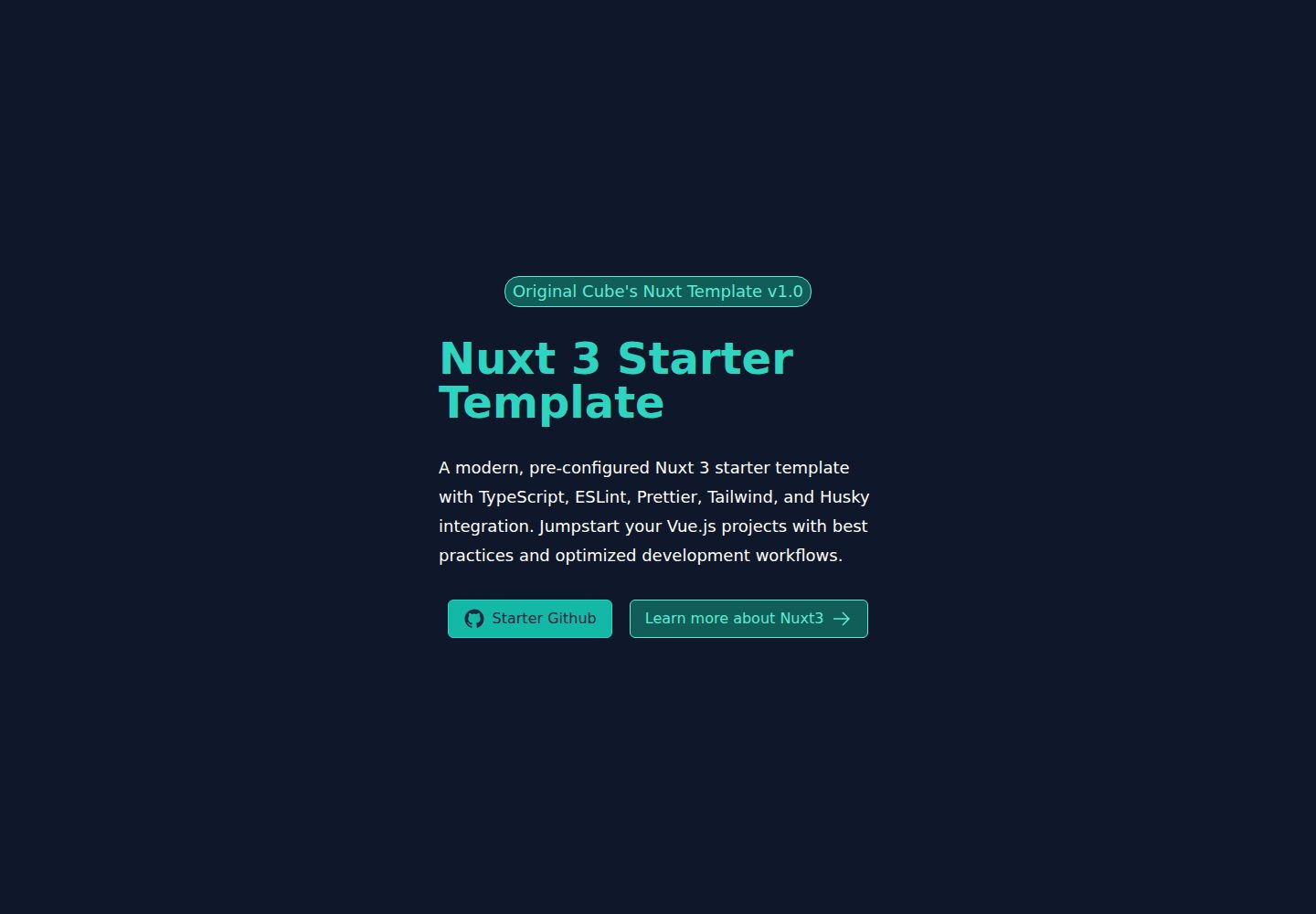
基于 Nuxt 3,支持服务端渲染、静态生成与混合应用
NuxtVue启动器
nuxt-starter — Nuxt 启动器模板
作者 OriginalCube
基于 Nuxt 3 与 TypeScript 的预配置启动模板,集成 Tailwind CSS、ESLint、Prettier、Husky 与 lint-staged,用于快速搭建 Vue 项目。
看看你的网站会是什么样
浏览真实页面截图,比较内容排版与手机效果。点击下方缩略图切换,放大查看整页细节。
全部页面与视图 2
截图用于了解视觉与布局,交互效果请以实际项目为准。
采集于 2026-10-13查看来源
值得关注的模板亮点
从已有项目资料中,快速了解它的特点。
使用 TypeScript,并集成 Tailwind CSS 与 @vueuse/core、@vueuse/nuxt
内置 ESLint 与 Prettier,配合 prettier-plugin-tailwindcss 统一类名顺序
通过 Husky 与 lint-staged 在提交前自动检查并格式化暂存文件
提供 pages、components、layouts、assets 等 Nuxt 标准目录结构
采用 MIT 许可,允许使用、修改、商用与分发
模板详细介绍
这是一个面向 Nuxt 3 的启动模板,仓库定位为「高度预设」(highly opinionated),目标是在开始写业务代码之前就把工具链和代码规范配置好。模板使用 TypeScript,并集成 Tailwind CSS 用于样式开发,同时引入 @vueuse/core 与 @vueuse/nuxt 提供 Vue 组合式工具函数。
在工程规范方面,模板配置了 ESLint 与 Prettier 负责代码检查与格式化,并通过 prettier-plugin-tailwindcss 统一 Tailwind 类名顺序;Husky 与 lint-staged 会在提交前对暂存文件执行检查与格式化。路由方面依赖 Vue Router,Nuxt 自身配置位于 nuxt.config.ts,Tailwind 配置位于 tailwind.config.js,ESLint 与 Prettier 分别有独立配置文件。
使用上,模板按 Nuxt 常规目录组织代码:pages/ 放页面与路由,components/ 放 Vue 组件,layouts/ 定义布局,assets/ 存放图片与字体等静态资源。安装依赖与启动开发服务器使用 bun 命令(bun install、bun dev),检查与格式化分别通过 bunx lint、bunx format 执行。README 未说明生产部署、测试或 CI 相关配置,这些需要使用者自行补充。
NuxtVue启动器
适合你的项目吗?
适用场景
- 需要快速开始一个 Nuxt 3 + TypeScript 项目
- 希望项目一开始就具备 ESLint、Prettier 与提交前检查
- 使用 Tailwind CSS 开发界面并希望类名排序保持一致
- 在 Vue 项目中引入 VueUse 组合式工具函数
适合人群
- 熟悉 Vue 与 Nuxt 的开发者
- 需要统一团队代码规范的前端项目
- 以 Tailwind CSS 为主要样式方案的项目
上手与定制指南
结合仓库当前版本的说明,按下面的资料检查内容、配置与运行要求。
- 1
克隆仓库后使用 bun install 安装依赖,bun dev 启动开发服务器
- 2
检查与格式化命令分别为 bunx lint 和 bunx format
- 3
主要配置位于 nuxt.config.ts、tailwind.config.js、eslint.config.js 与 prettier.config.js
- 4
MIT 许可仅覆盖本仓库代码,演示图片、字体、图标等第三方素材需单独核对许可
- 5
README 未包含测试、CI 与部署配置,需按项目需要自行添加
授权与来源资料
使用条件与限制
免费使用 · 保留许可声明本次收录的是公开仓库中采用 MIT 许可的免费版本;免费范围为该版本代码,不代表外部服务或第三方素材免费。
使用时需要遵守
- 允许免费使用、修改、商用和分发该版本代码。
- 分发代码副本或实质性部分时,保留原作者版权声明和完整 MIT 许可声明。
- 代码按现状提供;担保与责任限制以原许可证及适用法律为准。
额外费用与待核对事项
- 演示图片、字体、图标及其他第三方素材需按各自许可核对,不能仅凭代码的 MIT 许可判断。
- 域名、托管、数据库、支付或 AI 等外部服务可能另外收费。
查看原文依据
https://github.com/OriginalCube/nuxt-starter/blob/master/LICENSEhttps://github.com/OriginalCube/nuxt-starter/blob/master/README.mdPermission is hereby granted, free of charge
许可证原文
DeepSeek 根据仓库许可证和 README 整理 ·2026-10-13。结果仅覆盖已读取资料,依赖、图片、字体及后续条款变更以各自原文为准。
项目核对记录与介绍依据
模板资料
- 来源平台
- GitHub
- 资料与维护参考分
- 资料一般 · 73 / 100
- 技术栈
- Nuxt · Vue
- 网站类型
- 启动器
这个分数如何计算
本站按许可资料(最高30分)、演示链接(12分)、预览图(10分)、Star数(15分)、记录的维护时间(15分)、描述完整度(8分)、功能记录(5分)和分类资料(5分)计算。它不是代码、安全或性能测试,也不是 Google 评分;有链接不代表已实测可用。
这个项目需要核对什么
- 记录的仓库更新时间
- 2024-10-05
- 截图检查日期
- 2026-10-13
已收录演示链接。请用你的内容与屏幕尺寸检查;有演示不代表表单、认证或支付已经可用。
目录记录的主要技术栈是 Nuxt。请通过依赖清单和锁文件核对实际版本与托管要求。这些说明基于收录资料,不代表代码审计或部署实测。
查看具体选型方法 →介绍的制作与核对状态
介绍由 AI 辅助整理目录与仓库资料。仓库作者不等于这篇介绍的审核者。
审核声明: [email protected] · 2026-10-13
查看当时使用的来源资料
SHA-256: 0db3b0c6040bd4e4fe868fabde2e8d56cf0b1475c29e738a1c8d819eccdab204
2026-10-13T05:28:21.893Z
来源文件 / 仓库# 🚀 Nuxt Starter Template
This is a **highly opinionated** Nuxt starter template designed to quickly set up a Nuxt 3 application with preconfigured tools and best practices. It includes a variety of features that promote code quality, styling consistency, and modern development practices.
## ✨ Features
- 🖥️ **Nuxt 3** for server-side rendering, static site generation, and hybrid applications
- 🎨 **Tailwind CSS** integration for rapid UI development
- 🧰 **@vueuse/core** and **@vueuse/nuxt** for seamless Vue composition utilities
- 🔍 **ESLint** and **Prettier** for code linting and formatting, ensuring code consistency
- 🐶 **Husky** and **Lint-staged** for automated code linting and formatting on commit
- 🔀 **Prettier Plugin for Tailwind CSS** to enforce consistent class ordering
- 🛣️ **Vue Router** for advanced routing capabilities
## 🛠️ Installation
1. Clone the repository:
```bash
git clone <your-repo-url>
cd <your-repo-folder>
```
2. Install dependencies:
```bash
bun install
```
3. Start the development server:
```bash
bun dev
```
## 📦 Dependencies
- 🔤 **@nuxt/fonts**: Font management in Nuxt
- 🖼️ **@nuxt/icon**: Icon support in Nuxt
- ⚡ **nuxt**: The core Nuxt 3 framework
- 💚 **vue**: The latest version of Vue.js
- 🗺️ **vue-router**: Latest version of Vue Router for flexible routing
### 🛠️ Development Dependencies
- 📏 **@antfu/eslint-config**: A minimal ESLint configuration that extends popular settings
- 🌬️ **@nuxtjs/tailwindcss**: Official Tailwind CSS module for Nuxt 3
- 🧹 **eslint, prettier, eslint-config-prettier, eslint-plugin-prettier**: For linting and code formatting
- 🐶 **husky and lint-staged**: Automatically run linters on commit
- 🎨 **prettier-plugin-tailwindcss**: Automatically sorts Tailwind classes
## 🧹 Linting and Formatting
This project uses **ESLint** and **Prettier** for linting and formatting. It enforces consistent code style and helps avoid errors.
- **Lint**:
```bash
bunx lint
```
- **Format**:
```bash
bunx format
```
## 🐶 Husky & Lint-staged
Husky and lint-staged are set up to ensure that any staged files are linted and formatted before they are committed. This ensures that the code in the repository is always clean and follows the defined standards.
## 🚀 Getting Started
After installation, you can start developing your Nuxt 3 application right away. Here are some key directories and files:
- `pages/`: Add your application views and routes
- `components/`: Put your Vue components here
- `layouts/`: Define your page layouts
- `assets/`: Store your images, fonts, and other static assets
- `nuxt.config.ts`: Configure your Nuxt application
## 🎨 Customizing Tailwind
You can customize your Tailwind configuration in the `tailwind.config.js` file. This allows you to modify the default theme, add new utility classes, and more.
## 🔧 Configuration
- ESLint configuration is in `eslint.config.js`
- Prettier configuration is in `prettier.config.js`
- Nuxt configuration is in `nuxt.config.ts`
- Tailwind configuration is in `tailwind.config.js`
## 📚 Learning Resources
- [Nuxt 3 Documentation](https://nuxt.com/docs/getting-started/introduction)
- [Vue 3 Documentation](https://v3.vuejs.org/)
- [Tailwind CSS Documentation](https://tailwindcss.com/docs)
- [VueUse Documentation](https://vueuse.org/)
## 📄 License
This project is licensed under the MIT License. See the [LICENSE](LICENSE) file for details.
## 🤝 Contributing
Contributions, issues, and feature requests are welcome! Feel free to check the [issues page](link-to-your-issues-page).
## 🙏 Acknowledgements
- [Nuxt.js team](https://nuxt.com/) for the amazing framework
- [Tailwind CSS team](https://tailwindcss.com/) for the utility-first CSS framework
- [VueUse team](https://vueuse.org/) for the collection of Vue Composition Utilities
Happy coding! 🎉看看同类模板
对比同技术栈与用途的模板,找到更适合的视觉与内容结构。

laravel-nuxt
A Laravel-Nuxt starter kit.
Nuxt · 启动器

canvas
Portfolio template made with Nuxt 3, Nuxt Content v3, NuxtUI v3 and TailwindCSS v4
Nuxt · 作品集

nuxt3-starter
💚 A Better Nuxt 3 Starter Template,generate by nuxi.
Nuxt · 启动器

starter
Nuxt Starter Template for Nuxt UI.
Nuxt · 启动器

bloggrify
Run a blog from Markdown files. Themes, SEO, analytics, newsletter and comments preconfigured. Like Docus, but…
Nuxt · 博客
vitify-nuxt
🔽🏔 Vuetify + Nuxt Starter Template
Nuxt · 后台