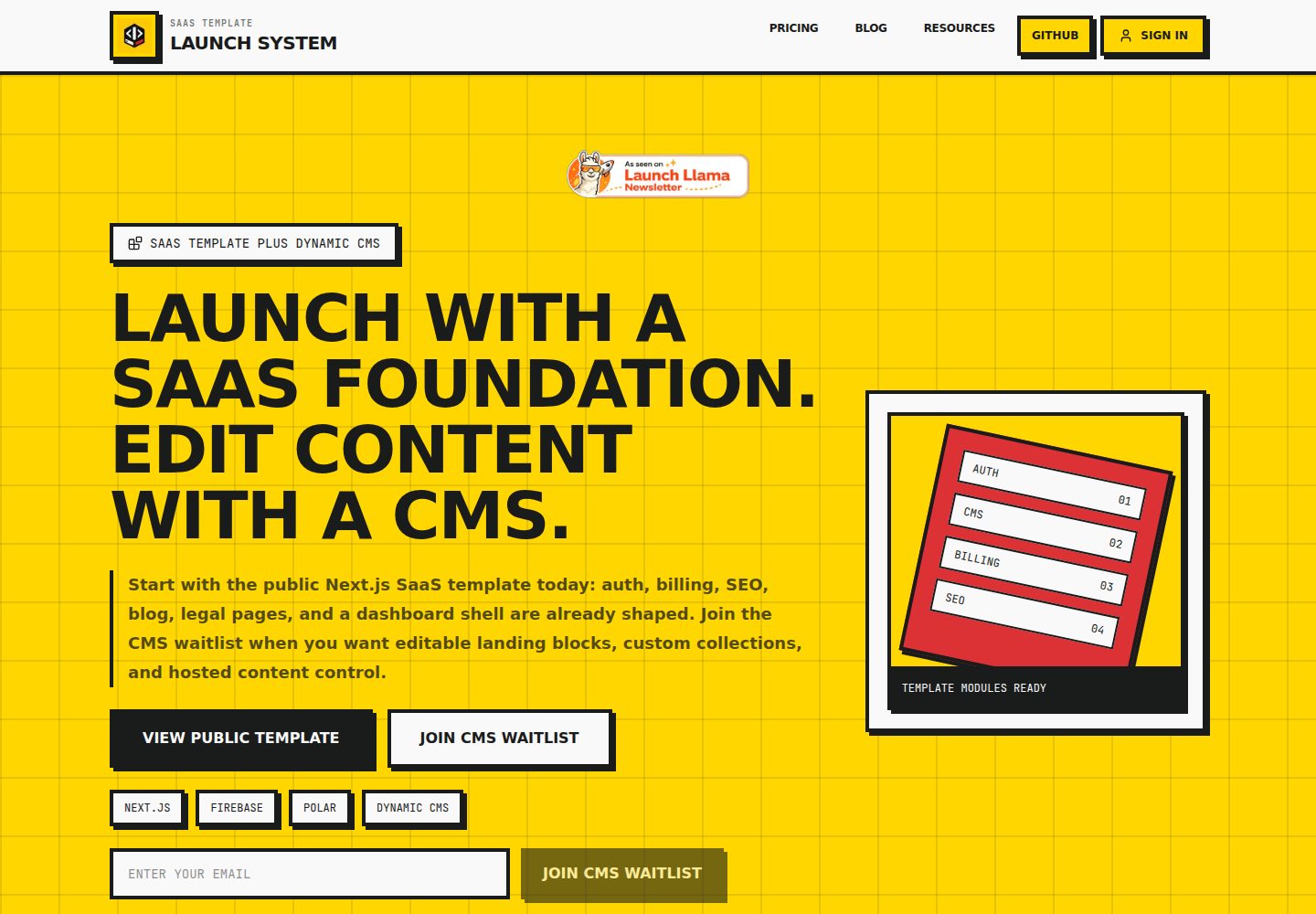
块渲染落地页,支持 hero、featureGrid、howItWorks、pricing、faq、cta 六种区块类型
Next.jsReactSaaS启动器
nextjs-saas-starter — Next.js SaaS模板
作者 P-Tung
基于 Next.js App Router 的公开 SaaS 启动模板,内置认证、订阅计费、SEO、博客、法律页面与本地回退内容,并预留托管 CMS 接入路径。
看看你的网站会是什么样
浏览真实页面截图,比较内容排版与手机效果。点击下方缩略图切换,放大查看整页细节。
全部页面与视图 3
截图用于了解视觉与布局,交互效果请以实际项目为准。
采集于 2026-10-02查看来源
值得关注的模板亮点
从已有项目资料中,快速了解它的特点。
内置 Firebase 认证与 Firestore 脚手架,博客文章从 posts 集合读取并服务端渲染
Polar 订阅计费脚手架,含服务端结账路由与签名校验的 webhook 路由
Brevo 事务邮件集成,覆盖注册欢迎邮件与等待列表确认邮件
SEO 元数据、站点地图、robots 与结构化数据已就绪
未配置 CMS 时使用本地回退内容,页面渲染器不依赖托管 CMS
模板详细介绍
该模板面向希望快速搭建 SaaS 产品基础结构的开发者,仓库采用 MIT 许可公开源码。它提供块渲染的营销落地页、本地回退内容、Firebase 认证与 Firestore 脚手架、Polar 订阅计费脚手架、Brevo 事务邮件脚手架,以及 SEO 元数据、站点地图、robots 和结构化数据。博客基于 Firestore 的 posts 集合,通过服务端渲染输出。项目同时包含仪表盘外壳和通用 CMS 集合路由,落地页区块与集合内容均以配置文件形式管理。
模板强调配置驱动:品牌信息、落地页区块顺序、定价方案、法律文本、导航链接和博客默认值分别集中在 src/config 下的对应文件中。托管 CMS 尚未作为首要构建目标,仓库通过等待列表验证需求;未配置 CMS 时,页面使用 src/config/landing.ts 与 src/config/collections.ts 中的本地回退内容渲染。
使用前需注意:Firebase、Polar、Brevo 及托管 CMS 均为可选集成,启用动态功能前需自行配置对应环境变量并核对各服务的额度与收费。演示图片、字体、图标等第三方素材需按各自许可单独核对。仓库建议 AI 代理先阅读 AGENTS.md 与 staff-task-agent 目录下的任务映射和提示库,再执行具体修改。
Next.jsSaaS启动器
适合你的项目吗?
适用场景
- 克隆仓库后修改配置、品牌与环境变量,搭建自有 SaaS 产品的营销与仪表盘基础
- 在已有 Next.js 项目中参考其落地页区块、定价配置与法律页面的组织方式
- 需要 Firebase 认证、Polar 订阅计费与 Brevo 事务邮件组合的 SaaS 起步项目
- 以 Firestore 作为博客内容存储,并希望服务端渲染以利于 SEO 的站点
- 通过 AI 代理按任务映射文件批量完成品牌替换、落地页定制或计费接入
适合人群
- 熟悉 Next.js App Router 并希望减少认证、计费、SEO 与内容管线重复搭建的开发者
- 接受以配置文件集中管理营销文案与定价方案的 SaaS 项目
- 计划使用 Firebase、Polar、Brevo 中一项或多项服务的团队
- 需要公开源码且允许修改、商用与分发的 MIT 许可使用者
上手与定制指南
结合仓库当前版本的说明,按下面的资料检查内容、配置与运行要求。
- 1
克隆仓库后执行 pnpm install,复制 .env.example 为 .env 并填写应用名称、支持邮箱、应用 URL 与仓库地址等核心标识
- 2
落地页区块、定价、集合回退内容、法律文本与导航链接分别在 src/config 下的 landing.ts、pricing.ts、collections.ts、legal.ts、navigation.ts 中修改
- 3
启用 Firebase 博客需配置服务账号 JSON 并保持其位于仓库外,博客文章需手动在 Firestore 的 posts 集合中创建文档
- 4
启用 Polar 计费需在 Polar 后台创建产品、复制产品 ID 到环境变量,并配置指向 /api/webhooks/polar 的 webhook 及签名密钥
- 5
启用 Brevo 邮件需设置 BREVO_API_KEY、BREVO_SENDER_EMAIL 与 BREVO_SENDER_NAME,密钥仅保留在服务端
授权与来源资料
使用条件与限制
免费使用 · 保留许可声明本次收录的是公开仓库中采用 MIT 许可的免费版本;免费范围为该版本代码,不代表外部服务或第三方素材免费。
使用时需要遵守
- 允许免费使用、修改、商用和分发该版本代码。
- 分发代码副本或实质性部分时,保留原作者版权声明和完整 MIT 许可声明。
- 代码按现状提供;担保与责任限制以原许可证及适用法律为准。
额外费用与待核对事项
- 托管 CMS 是持续收费的产品路径,属于付费升级项,免费源码不包含托管 CMS 服务。
- 自托管 CMS 源码被视为高价套餐,不属于默认免费提供范围。
- 需要可编辑内容时须加入托管 CMS 等待列表,该服务尚未上线。
- 托管 CMS 访问权限尚未优先构建,需先通过等待列表验证需求后才可能扩展。
- 启用 Polar 计费需在 Polar 后台创建产品、配置 webhook 端点并填写访问令牌与签名密钥。
- 启用 Firestore 博客需自行下载 Firebase 服务账号 JSON 并配置凭据,密钥须保存在仓库外。
- 启用事务邮件需自行申请 Brevo 账号并配置 API 密钥、发件邮箱与发件人名称。
- 使用自动同步模板的 GitHub Action 需自行创建并配置 SYNC_TOKEN 仓库密钥。
- README 提及 Firebase 集成;启用相关动态功能前需自行配置,并核对 Firebase 的额度与收费。
- 演示图片、字体、图标及其他第三方素材需按各自许可核对,不能仅凭代码的 MIT 许可判断。
- 域名、托管、数据库、支付或 AI 等外部服务可能另外收费。
查看原文依据
Permission is hereby granted, free of charge
许可证原文
Hosted CMS is the recurring product path.
README 原文
Self-hosted CMS source code should be treated as a high-ticket package, not the default plan.
README 原文
joining the hosted CMS waitlist when editable content is needed
README 原文
hosted CMS access is not the first build priority. The waitlist validates demand before the CMS is expanded.
README 原文
Create a webhook endpoint pointing to `/api/webhooks/polar`.
README 原文
Use `GOOGLE_APPLICATION_CREDENTIALS` pointing to your downloaded Firebase service-account JSON.
README 原文
Required Brevo env keys:
README 原文
https://github.com/P-Tung/nextjs-saas-starter/blob/main/LICENSEhttps://github.com/P-Tung/nextjs-saas-starter/blob/main/README.mdAdd a `SYNC_TOKEN` to your repository secrets.
README 原文
DeepSeek 根据仓库许可证和 README 整理 ·2026-10-02。结果仅覆盖已读取资料,依赖、图片、字体及后续条款变更以各自原文为准。
项目核对记录与介绍依据
模板资料
- 来源平台
- GitHub
- 资料与维护参考分
- 资料较完整 · 77 / 100
- 技术栈
- Next.js · React
- 网站类型
- SaaS · 启动器
这个分数如何计算
本站按许可资料(最高30分)、演示链接(12分)、预览图(10分)、Star数(15分)、记录的维护时间(15分)、描述完整度(8分)、功能记录(5分)和分类资料(5分)计算。它不是代码、安全或性能测试,也不是 Google 评分;有链接不代表已实测可用。
这个项目需要核对什么
- 记录的仓库更新时间
- 2026-05-16
- 截图检查日期
- 2026-10-02
已收录演示链接。请用你的内容与屏幕尺寸检查;有演示不代表表单、认证或支付已经可用。
目录记录的主要技术栈是 Next.js。请通过依赖清单和锁文件核对实际版本与托管要求。这些说明基于收录资料,不代表代码审计或部署实测。
查看具体选型方法 →介绍的制作与核对状态
介绍由 AI 辅助整理目录与仓库资料。仓库作者不等于这篇介绍的审核者。
已完成服务器许可规则与 AI 来源核对;未经过人工编辑审核。
查看当时使用的来源资料
SHA-256: e3f95e529416b4e4d453ef4a39a2bf49f61be81682ea375e0f781301be7d4613
2026-10-02T14:08:16.495Z
来源文件 / 仓库# Public SaaS Template
A public Next.js SaaS launch template with auth, billing, SEO, blog, legal pages, local fallback content, and a path to hosted CMS-managed landing blocks and custom collections.
## Agent-First Workflow
This template is designed for founders who prompt AI agents instead of reading every file manually.
1. **Start with `/staff-task-agent`.**
Give your AI agent this instruction:
```text
Read AGENTS.md and staff-task-agent/README.md first.
Then inspect staff-task-agent/task-map.md.
After that, help me with this task:
[PASTE TASK HERE]
```
2. **Use the task map.**
`/staff-task-agent/task-map.md` tells the agent which files control branding, landing copy, auth, billing, blog, legal pages, CMS content, email, and dashboard work.
3. **Use the prompt library.**
`/staff-task-agent/prompt-library.md` gives copy-paste prompts for rebranding, landing page changes, billing setup, Firebase setup, new pages, and public release checks.
4. **Keep agents focused.**
Ask for one outcome at a time, for example:
- **Rebrand this template for my SaaS**
- **Customize the landing page for my offer**
- **Set up Polar billing**
- **Prepare this repo for a public GitHub release**
## What Is Available Now
- **Free public source code:** clone the template and customize it for your SaaS.
- **CMS-ready structure:** landing blocks and collections already support local fallback content.
- **Waitlist-driven CMS:** hosted CMS access is not the first build priority. The waitlist validates demand before the CMS is expanded.
## Quick Start
1. **Clone and install**
```bash
git clone <your-public-template-repo-url>
cd saas-template
pnpm install
```
2. **Configure your brand**
```bash
cp .env.example .env
```
Edit `.env` and set:
- `NEXT_PUBLIC_APP_NAME` - your app name
- `NEXT_PUBLIC_SUPPORT_EMAIL` - your support email
- `NEXT_PUBLIC_APP_URL` - your domain (or keep localhost for dev)
- `NEXT_PUBLIC_GITHUB_REPO_URL` - your public template repository URL
3. **Customize landing page blocks**
Edit `src/config/landing.ts` to change:
- ordered landing blocks
- hero headline and CTA copy
- feature proof
- pricing ladder
- FAQ items
- final CTA
4. **Run locally**
```bash
pnpm dev
```
Open [http://localhost:3000](http://localhost:3000)
5. **Deploy**
- Push to GitHub
- Connect to Vercel
- Add env vars in Vercel dashboard
- Deploy!
**Optional:** Add Firebase, Polar, Brevo, and hosted CMS credentials by filling their env vars. The app works from local fallback content when CMS is not configured.
## Stack
- Next.js 16 App Router
- React 19
- TypeScript
- Tailwind CSS 4
- DaisyUI 5
- Lucide React
## What This Repo Is
This repository is a public, CMS-ready SaaS product template.
It currently provides:
- block-rendered landing page content
- local fallback content for Lite users
- Firebase auth and Firestore scaffolding
- Polar billing scaffolding
- Brevo transactional email scaffolding
- SEO metadata, sitemap, robots, and structured data
- blog, legal pages, dashboard shell, and generic CMS collection routes
It intentionally keeps these boundaries:
- the public template owns SaaS app foundation code
- the hosted CMS will own editable content and structured collections when launched
- customers still build product-specific app logic in code
- the CMS does not generate custom SaaS business logic
## Project Goals
Use this starter so a SaaS product can be launched by:
1. cloning the repo
2. updating config, branding, env values, and assets
3. joining the hosted CMS waitlist when editable content is needed
4. building only the unique product feature
5. shipping without rebuilding auth, billing, SEO, and content plumbing
## Product Strategy
- **Publish first:** the source code is the lead magnet.
- **Capture demand:** the landing page and README point CMS interest to the waitlist.
- **Build second:** deeper CMS work should wait until signups prove demand.
- **Keep reusable:** marketing copy lives in config, while components stay generic.
## Repository Principles
- Keep the starter generic.
- Move business-specific decisions into config.
- Keep provider integrations modular.
- Do not hard-code production secrets or IDs.
- Do not let one future product redefine the starter for all others.
## Current Structure
```text
src/
app/
(app)/
dashboard/page.tsx
(marketing)/
page.tsx
policy/page.tsx
tos/page.tsx
[collection]/page.tsx
[collection]/[slug]/page.tsx
globals.css
layout.tsx
manifest.ts
not-found.tsx
robots.ts
sitemap.ts
components/
cms/
layout/
legal/
marketing/
ui/
config/
features.ts
legal.ts
navigation.ts
site.ts
lib/
cms/
env.ts
metadata.ts
structured-data.ts
public/
icon.svg
```
## Local Development
Install dependencies:
```bash
pnpm install
```
Run the dev server:
```bash
pnpm dev
```
Build for production:
```bash
pnpm build
```
## Environment Variables
The starter ships with placeholder env keys in `.env.example`.
These are placeholders only. The template now reads them through **`src/lib/env.ts`** so app identity defaults stay centralized.
Core app identity keys:
- `NEXT_PUBLIC_APP_NAME`
- `NEXT_PUBLIC_APP_URL`
- `NEXT_PUBLIC_SUPPORT_EMAIL`
- `NEXT_PUBLIC_GITHUB_REPO_URL`
- `GOOGLE_SITE_VERIFICATION`
Firebase keys (optional):
- `NEXT_PUBLIC_FIREBASE_API_KEY`
- `NEXT_PUBLIC_FIREBASE_AUTH_DOMAIN`
- `NEXT_PUBLIC_FIREBASE_PROJECT_ID`
- `NEXT_PUBLIC_FIREBASE_STORAGE_BUCKET`
- `NEXT_PUBLIC_FIREBASE_MESSAGING_SENDER_ID`
- `NEXT_PUBLIC_FIREBASE_APP_ID`
- `NEXT_PUBLIC_FIREBASE_MEASUREMENT_ID`
- `NEXT_PUBLIC_GOOGLE_CLIENT_ID`
- `FIREBASE_SERVICE_ACCOUNT_JSON`
- `FIREBASE_STORAGE_BUCKET`
Hosted CMS keys (optional):
- `NEXT_PUBLIC_CMS_PROJECT_ID`
- `CMS_API_URL`
- `CMS_API_KEY`
When CMS keys are missing or CMS data is invalid, the template renders local fallback content from `src/config/landing.ts` and `src/config/collections.ts`.
## Billing with Polar
The starter now includes Polar billing scaffolding with:
- server-side checkout route at `src/app/api/billing/checkout/route.ts`
- verified webhook route at `src/app/api/webhooks/polar/route.ts`
- config-driven plans in `src/config/pricing.ts`
- dashboard checkout UI in `src/components/billing/billing-plans.tsx`
What you configure in Polar dashboard:
1. Create product entries for your plans.
2. Copy product IDs into local env.
3. Create a webhook endpoint pointing to `/api/webhooks/polar`.
4. Copy the webhook signing secret into local env.
Required billing env keys:
- `POLAR_ACCESS_TOKEN`
- `POLAR_WEBHOOK_SECRET`
- `NEXT_PUBLIC_POLAR_PRODUCT_LITE_TEMPLATE`
- `NEXT_PUBLIC_POLAR_PRODUCT_HOSTED_CMS`
- `NEXT_PUBLIC_POLAR_PRODUCT_SELF_HOSTED_CMS`
## CMS-Ready Content Model
The landing page renders ordered blocks from `src/config/landing.ts`.
Each block has:
- `id`
- `type`
- `enabled`
- `content`
Supported landing block types:
- `hero`
- `featureGrid`
- `howItWorks`
- `pricing`
- `faq`
- `cta`
Generic collections live in `src/config/collections.ts` as local fallback content. Hosted CMS content can replace these collections through the CMS adapter without changing the page renderer.
Supported field types:
- `text`
- `richText`
- `image`
- `date`
- `boolean`
- `select`
- `relation`
## Transactional Email with Brevo
The starter includes a server-side Brevo integration for transactional emails with best-effort delivery:
- first-time signup welcome email
- waitlist opt-in confirmation email
Customization points:
- templates and copy in `src/config/email.ts`
- provider sender logic in `src/lib/email/brevo.ts`
- event-specific orchestration in `src/lib/email/transactional.ts`
Required Brevo env keys:
- `BREVO_API_KEY`
- `BREVO_SENDER_EMAIL`
- `BREVO_SENDER_NAME`
Optional Brevo env keys:
- `BREVO_REPLY_TO_EMAIL`
Behavior notes:
- email sending is best-effort and does not block auth or waitlist success
- signup welcome email is idempotent per user via `users/{uid}.emailLifecycle.welcomeEmailSentAt`
- Brevo keys stay server-side only
Checkout flow:
1. User signs in with Firebase.
2. Dashboard calls `/api/billing/checkout` with Firebase ID token.
3. API verifies token, creates Polar checkout, and returns `checkoutUrl`.
4. Client redirects to Polar hosted checkout.
Webhook flow:
1. Polar sends event to `/api/webhooks/polar`.
2. Signature is validated using `POLAR_WEBHOOK_SECRET`.
3. Subscription events update `users/{uid}.billing` in Firestore.
## Blog on Firestore
The marketing blog reads from Firestore (`posts` collection) using server-side rendering for SEO.
Required document fields:
- `slug` (string)
- `title` (string)
- `description` (string)
- `content` (string)
- `date` (ISO date string)
- `author` (string)
- `published` (boolean)
Optional fields:
- `image` (string)
- `tags` (string array)
- `draft` (boolean)
Visibility logic:
- post is public only when `published == true` and `draft != true`
Manual seeding workflow (for now):
1. Open Firestore console.
2. Create collection `posts`.
3. Create one document per blog post with the fields above.
4. Set `published` to `true` when ready to go live.
Environment notes:
- Use `GOOGLE_APPLICATION_CREDENTIALS` pointing to your downloaded Firebase service-account JSON.
- Keep the JSON key file outside this repository.
- Keep all service account credentials server-side only.
Quick clipboard helper for `.env` usage:
```bash
jq -c . /absolute/path/service-account.json | pbcopy
```
Paste into `FIREBASE_SERVICE_ACCOUNT_JSON='...'` and restart your dev server.
How to get the JSON key for `GOOGLE_APPLICATION_CREDENTIALS`:
1. Firebase Console → your project → Project Settings.
2. Open `Service accounts`.
3. Click `Generate new private key`.
4. Save the JSON file outside this repo and point `GOOGLE_APPLICATION_CREDENTIALS` to its absolute path.
Seed the starter post:
```bash
GOOGLE_APPLICATION_CREDENTIALS="/absolute/path/to/service-account.json" node scripts/seed-hello-world-blog.mjs
```
## What To Customize First
1. `src/config/site.ts` for name, URL, support email, SEO keywords.
2. `src/config/landing.ts` for ordered landing blocks.
3. `src/config/pricing.ts` for plan labels and checkout mapping.
4. `src/config/collections.ts` for local fallback collections.
5. `src/config/legal.ts` for privacy policy and terms.
6. `src/config/navigation.ts` for header and footer links.
7. `src/config/blog.ts` for blog defaults.
## First 30 Minutes Setup
1. Copy env and fill app identity keys.
2. Run `pnpm install` then `pnpm dev`.
3. Verify metadata and social preview use your values.
4. Update landing blocks, pricing, collections, and legal config files.
5. If using hosted CMS, set CMS env keys and verify fallback behavior.
6. If using blog, seed first post with `scripts/seed-hello-world-blog.mjs`.
7. If using billing, connect Polar and set product IDs.
8. If using email, set Brevo keys and test waitlist/signup flow.
## Rules For Future Contributors
If you are adapting this starter for a real app:
- do not hard-code provider credentials in source
- do not reintroduce old product assets
- do not paste niche landing-page copy into shared starter files
- update both `README.md` and `AGENTS.md` when the starter architecture changes
If you are using AI tools on this repo, have them read `AGENTS.md` first.
## Verification Checklist
Before publishing this as a template release:
```bash
pnpm build
```
And run repository residue checks for personal emails, machine paths, old product names, and hard-coded placeholder domains.
## How to Update
This template is actively maintained. To pull the latest bug fixes and features into your project:
### Method 1: Manual Git Sync (Recommended)
1. **Add the template as a remote:**
```bash
git remote add template https://github.com/P-Tung/nextjs-saas-starter.git
```
2. **Fetch and merge updates:**
```bash
git fetch template
git merge template/main --allow-unrelated-histories
```
*Note: You may need to resolve conflicts in files you have heavily customized.*
### Method 2: Automated GitHub Action
We provide an example workflow in `.github/workflows/sync-template.yml.example`.
1. Rename it to `sync-template.yml`.
2. Add a `SYNC_TOKEN` to your repository secrets.
- **For Private Repos**: Use a Personal Access Token (PAT) with `repo` and `workflow` scopes.
3. The action will automatically create a Pull Request whenever the template is updated.
## Notes
- DaisyUI is intentionally kept.
- The template remains useful without CMS credentials.
- Hosted CMS is the recurring product path.
- Self-hosted CMS source code should be treated as a high-ticket package, not the default plan.
# nextjs-saas-starter
看看同类模板
对比同技术栈与用途的模板,找到更适合的视觉与内容结构。

ai-website-cloner-template
Clone any website with one command using AI coding agents
Next.js · 启动器

Next.js SaaS Starter
Next.js SaaS Starter 是 Next.js 官方维护的 SaaS 起点模板,定位介于学习资源和可直接部署的脚手架之间。
Next.js · SaaS

Next.js Commerce
Next.js Commerce 是 Vercel 团队维护的电商启动模板,基于 Next.js App Router 构建,采用服务端渲染、React Server Components、Server Actions …
Next.js · 电商

Next-js-Boilerplate
Next-js-Boilerplate 是一个面向 Next.js 16、Tailwind CSS 4 和 TypeScript 的启动器,核心定位是开发者体验优先。
Next.js · 启动器

tailwind-nextjs-starter-blog
tailwind-nextjs-starter-blog 是一个面向个人技术博客的 Next.js 与 Tailwind CSS 启动模板,其 v2 版本基于 App Router 与 React Server Comp…
Next.js · 博客

next-forge
Production-grade Turborepo template for Next.js apps.
Next.js · 启动器