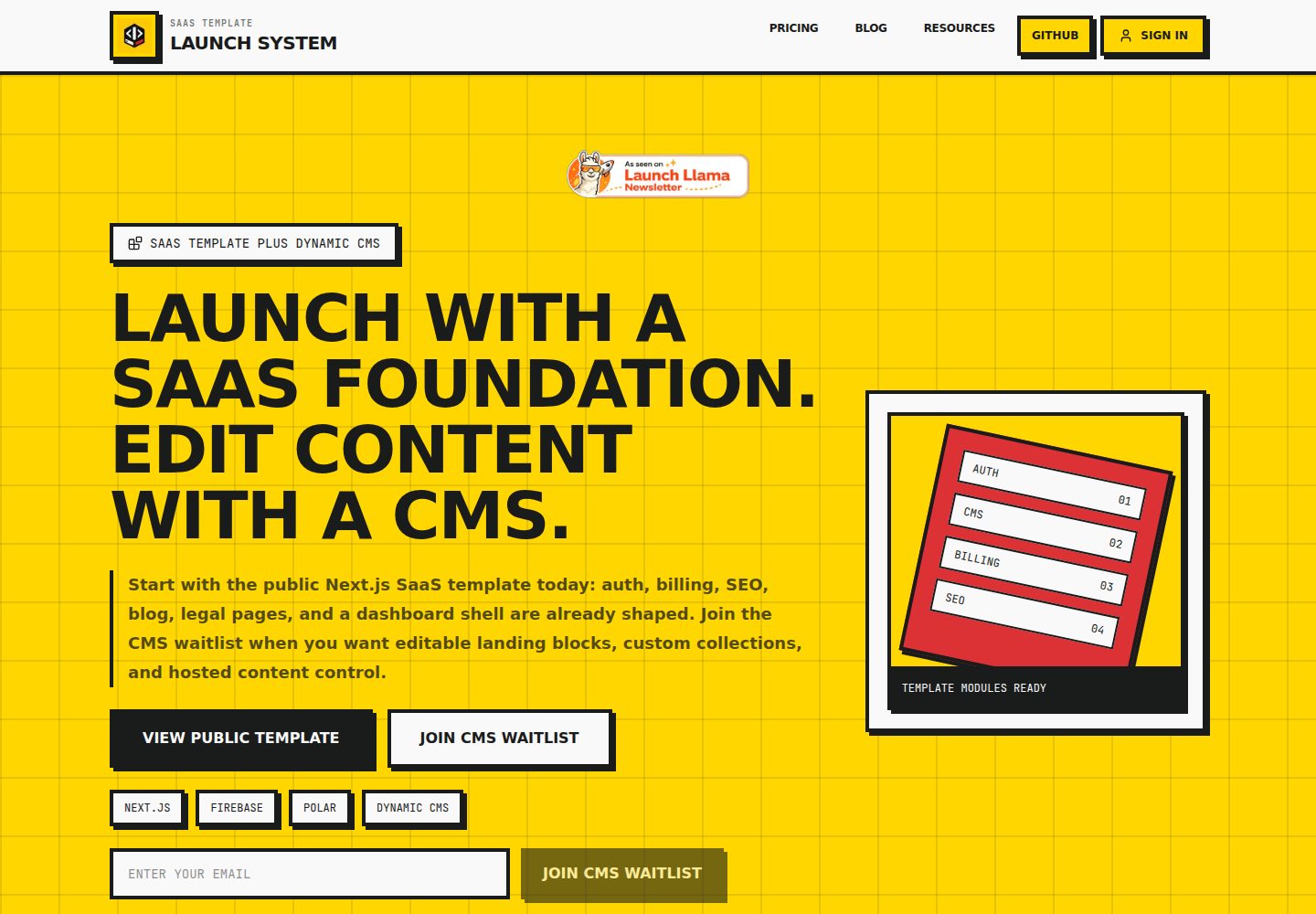
Block-rendered landing page supporting six block types: hero, featureGrid, howItWorks, pricing, faq, and cta
Next.jsReactSaaSStarter
nextjs-saas-starter — Next.js SaaS Template
By P-Tung
A public SaaS starter template built on the Next.js App Router, with built-in authentication, subscription billing, SEO, blog, legal pages, and local fallback content, plus a reserved path for hosted CMS integration.
Explore the design
Compare the page layouts and mobile experience. Open any screenshot for a closer look.
Desktop homepage1 / 3
Desktop captureTop of page
Actual screenshot captured by the server browser.
All pages & views 3
Screenshots show visual appearance; interactive behavior may differ.
Recorded 2026-10-02View source
What stands out
A quick read of the recorded project description.
Built-in Firebase authentication and Firestore scaffolding; blog posts are read from the posts collection and rendered server-side
Polar subscription billing scaffolding, including a server-side checkout route and a signature-verified webhook route
Brevo transactional email integration covering signup welcome emails and waitlist confirmation emails
SEO metadata, sitemap, robots, and structured data are ready
Uses local fallback content when no CMS is configured; the page renderer does not depend on a hosted CMS
Template Details
This template targets developers who want to quickly set up the foundational structure of a SaaS product; the repository publishes its source under the MIT license. It provides a block-rendered marketing landing page, local fallback content, Firebase authentication and Firestore scaffolding, Polar subscription billing scaffolding, Brevo transactional email scaffolding, and SEO metadata, sitemap, robots, and structured data. The blog is based on a Firestore posts collection and rendered server-side. The project also includes a dashboard shell and generic CMS collection routes; landing page blocks and collection content are managed as configuration files.
The template emphasizes configuration-driven setup: brand information, landing page block order, pricing plans, legal text, navigation links, and blog defaults are centralized in corresponding files under src/config. A hosted CMS is not yet a primary build target; the repository validates demand through a waitlist. When no CMS is configured, pages render using local fallback content from src/config/landing.ts and src/config/collections.ts.
Before use, note: Firebase, Polar, Brevo, and hosted CMS are all optional integrations; before enabling dynamic features, you must configure the corresponding environment variables yourself and verify each service's quotas and charges. Third-party assets such as demo images, fonts, and icons must be checked separately under their respective licenses. The repository recommends that AI agents first read AGENTS.md and the task mapping and prompt library under the staff-task-agent directory before making specific changes.
Next.jsSaaSStarter
Is it right for your project?
Use Cases
- Clone the repository, then modify configuration, branding, and environment variables to build the marketing and dashboard foundation for your own SaaS product
- Reference its organization of landing page blocks, pricing configuration, and legal pages in an existing Next.js project
- A SaaS starter project that needs a combination of Firebase authentication, Polar subscription billing, and Brevo transactional email
- A site that uses Firestore as blog content storage and wants server-side rendering for SEO
- Use AI agents to batch-complete brand replacement, landing page customization, or billing integration according to task mapping files
Suitable For
- Developers familiar with the Next.js App Router who want to reduce repeated work on authentication, billing, SEO, and content pipelines
- SaaS projects that accept centralized management of marketing copy and pricing plans via configuration files
- Teams planning to use one or more of Firebase, Polar, and Brevo
- Users of the MIT license who need public source code and permit modification, commercial use, and distribution
Getting started & customization
Use these recorded setup notes alongside the repository instructions for your chosen version.
- 1
After cloning the repository, run pnpm install, copy .env.example to .env, and fill in core identifiers such as app name, support email, app URL, and repository address
- 2
Landing page blocks, pricing, collection fallback content, legal text, and navigation links are modified in landing.ts, pricing.ts, collections.ts, legal.ts, and navigation.ts under src/config
- 3
To enable the Firebase blog, configure the service account JSON and keep it outside the repository; blog posts must be manually created as documents in the Firestore posts collection
- 4
To enable Polar billing, create products in the Polar dashboard, copy the product IDs into environment variables, and configure a webhook pointing to /api/webhooks/polar along with the signing secret
- 5
To enable Brevo email, set BREVO_API_KEY, BREVO_SENDER_EMAIL, and BREVO_SENDER_NAME; keep the key server-side only
License & source material
Usage conditions & limitations
Free to use · keep license noticeThis listing covers the free version in the public repository under the MIT license; the free scope is that version's code and does not mean external services or third-party assets are free.
Must comply with when using
- You may use, modify, commercialize, and distribute this version's code for free.
- When distributing copies or substantial portions of the code, retain the original author's copyright notice and the complete MIT license notice.
- The code is provided as is; warranties and limitations of liability are governed by the original license and applicable law.
Additional costs & items to verify
- The hosted CMS is a continuously charged product path and a paid upgrade; the free source code does not include the hosted CMS service.
- Self-hosting the CMS source is treated as a high-priced plan and is not included in the default free offering.
- If you need editable content, you must join the hosted CMS waitlist; the service is not yet launched.
- Hosted CMS access has not been prioritized for build; it may only be expanded after demand is validated through the waitlist.
- Enabling Polar billing requires creating products in the Polar dashboard, configuring a webhook endpoint, and filling in the access token and signing secret.
- Enabling the Firestore blog requires downloading the Firebase service account JSON and configuring credentials yourself; the key must be stored outside the repository.
- Enabling transactional email requires applying for a Brevo account and configuring the API key, sender email, and sender name.
- Using the GitHub Action that automatically syncs the template requires creating and configuring the SYNC_TOKEN repository secret yourself.
- The README mentions Firebase integration; before enabling related dynamic features, you must configure it yourself and verify Firebase's quotas and charges.
- Demo images, fonts, icons, and other third-party assets must be checked under their respective licenses and cannot be judged solely by the code's MIT license.
- External services such as domains, hosting, databases, payments, or AI may incur additional charges.
View Original Text Basis
Permission is hereby granted, free of charge
Original License Text
Hosted CMS is the recurring product path.
Original README
Self-hosted CMS source code should be treated as a high-ticket package, not the default plan.
Original README
joining the hosted CMS waitlist when editable content is needed
Original README
hosted CMS access is not the first build priority. The waitlist validates demand before the CMS is expanded.
Original README
Create a webhook endpoint pointing to `/api/webhooks/polar`.
Original README
Use `GOOGLE_APPLICATION_CREDENTIALS` pointing to your downloaded Firebase service-account JSON.
Original README
Required Brevo env keys:
Original README
https://github.com/P-Tung/nextjs-saas-starter/blob/main/LICENSEhttps://github.com/P-Tung/nextjs-saas-starter/blob/main/README.mdAdd a `SYNC_TOKEN` to your repository secrets.
Original README
Compiled by DeepSeek based on repository license and README ·2026-10-02. Results only cover the materials read; dependencies, images, fonts, and subsequent term changes are subject to their respective original texts.
Project checks & description sources
Template Information
- Source platforms
- GitHub
- Documentation and maintenance reference score
- More documented · 77 / 100
- Technologies
- Next.js · React
- Website type
- SaaS · Starter
How this score is calculated
Our heuristic uses license records (up to 30), a demo link (12), a preview (10), stars (15), recorded maintenance (15), description completeness (8), feature records (5) and classification data (5). It is not a code, security or performance test, or a Google score. A link does not establish tested functionality.
What to verify for this project
- Repository update recorded
- 2026-05-16
- Screenshot last checked
- 2026-10-02
A demo link is listed. Check it with your own content and viewport sizes; its presence does not confirm that forms, authentication or payments work.
The catalog identifies Next.js as the primary stack. Check the actual dependency manifest and lockfile for versions and hosting requirements. These notes use recorded metadata, not a code audit or a deployment test.
Use a selection guide →How this description was prepared
AI-assisted description based on catalog records and repository material. Repository authors are not automatically the reviewers of this description.
Automatically checked against source and license rules; no manual editorial review.
Inspect the recorded source material
SHA-256: e3f95e529416b4e4d453ef4a39a2bf49f61be81682ea375e0f781301be7d4613
2026-10-02T14:08:16.495Z
Source file / repository# Public SaaS Template
A public Next.js SaaS launch template with auth, billing, SEO, blog, legal pages, local fallback content, and a path to hosted CMS-managed landing blocks and custom collections.
## Agent-First Workflow
This template is designed for founders who prompt AI agents instead of reading every file manually.
1. **Start with `/staff-task-agent`.**
Give your AI agent this instruction:
```text
Read AGENTS.md and staff-task-agent/README.md first.
Then inspect staff-task-agent/task-map.md.
After that, help me with this task:
[PASTE TASK HERE]
```
2. **Use the task map.**
`/staff-task-agent/task-map.md` tells the agent which files control branding, landing copy, auth, billing, blog, legal pages, CMS content, email, and dashboard work.
3. **Use the prompt library.**
`/staff-task-agent/prompt-library.md` gives copy-paste prompts for rebranding, landing page changes, billing setup, Firebase setup, new pages, and public release checks.
4. **Keep agents focused.**
Ask for one outcome at a time, for example:
- **Rebrand this template for my SaaS**
- **Customize the landing page for my offer**
- **Set up Polar billing**
- **Prepare this repo for a public GitHub release**
## What Is Available Now
- **Free public source code:** clone the template and customize it for your SaaS.
- **CMS-ready structure:** landing blocks and collections already support local fallback content.
- **Waitlist-driven CMS:** hosted CMS access is not the first build priority. The waitlist validates demand before the CMS is expanded.
## Quick Start
1. **Clone and install**
```bash
git clone <your-public-template-repo-url>
cd saas-template
pnpm install
```
2. **Configure your brand**
```bash
cp .env.example .env
```
Edit `.env` and set:
- `NEXT_PUBLIC_APP_NAME` - your app name
- `NEXT_PUBLIC_SUPPORT_EMAIL` - your support email
- `NEXT_PUBLIC_APP_URL` - your domain (or keep localhost for dev)
- `NEXT_PUBLIC_GITHUB_REPO_URL` - your public template repository URL
3. **Customize landing page blocks**
Edit `src/config/landing.ts` to change:
- ordered landing blocks
- hero headline and CTA copy
- feature proof
- pricing ladder
- FAQ items
- final CTA
4. **Run locally**
```bash
pnpm dev
```
Open [http://localhost:3000](http://localhost:3000)
5. **Deploy**
- Push to GitHub
- Connect to Vercel
- Add env vars in Vercel dashboard
- Deploy!
**Optional:** Add Firebase, Polar, Brevo, and hosted CMS credentials by filling their env vars. The app works from local fallback content when CMS is not configured.
## Stack
- Next.js 16 App Router
- React 19
- TypeScript
- Tailwind CSS 4
- DaisyUI 5
- Lucide React
## What This Repo Is
This repository is a public, CMS-ready SaaS product template.
It currently provides:
- block-rendered landing page content
- local fallback content for Lite users
- Firebase auth and Firestore scaffolding
- Polar billing scaffolding
- Brevo transactional email scaffolding
- SEO metadata, sitemap, robots, and structured data
- blog, legal pages, dashboard shell, and generic CMS collection routes
It intentionally keeps these boundaries:
- the public template owns SaaS app foundation code
- the hosted CMS will own editable content and structured collections when launched
- customers still build product-specific app logic in code
- the CMS does not generate custom SaaS business logic
## Project Goals
Use this starter so a SaaS product can be launched by:
1. cloning the repo
2. updating config, branding, env values, and assets
3. joining the hosted CMS waitlist when editable content is needed
4. building only the unique product feature
5. shipping without rebuilding auth, billing, SEO, and content plumbing
## Product Strategy
- **Publish first:** the source code is the lead magnet.
- **Capture demand:** the landing page and README point CMS interest to the waitlist.
- **Build second:** deeper CMS work should wait until signups prove demand.
- **Keep reusable:** marketing copy lives in config, while components stay generic.
## Repository Principles
- Keep the starter generic.
- Move business-specific decisions into config.
- Keep provider integrations modular.
- Do not hard-code production secrets or IDs.
- Do not let one future product redefine the starter for all others.
## Current Structure
```text
src/
app/
(app)/
dashboard/page.tsx
(marketing)/
page.tsx
policy/page.tsx
tos/page.tsx
[collection]/page.tsx
[collection]/[slug]/page.tsx
globals.css
layout.tsx
manifest.ts
not-found.tsx
robots.ts
sitemap.ts
components/
cms/
layout/
legal/
marketing/
ui/
config/
features.ts
legal.ts
navigation.ts
site.ts
lib/
cms/
env.ts
metadata.ts
structured-data.ts
public/
icon.svg
```
## Local Development
Install dependencies:
```bash
pnpm install
```
Run the dev server:
```bash
pnpm dev
```
Build for production:
```bash
pnpm build
```
## Environment Variables
The starter ships with placeholder env keys in `.env.example`.
These are placeholders only. The template now reads them through **`src/lib/env.ts`** so app identity defaults stay centralized.
Core app identity keys:
- `NEXT_PUBLIC_APP_NAME`
- `NEXT_PUBLIC_APP_URL`
- `NEXT_PUBLIC_SUPPORT_EMAIL`
- `NEXT_PUBLIC_GITHUB_REPO_URL`
- `GOOGLE_SITE_VERIFICATION`
Firebase keys (optional):
- `NEXT_PUBLIC_FIREBASE_API_KEY`
- `NEXT_PUBLIC_FIREBASE_AUTH_DOMAIN`
- `NEXT_PUBLIC_FIREBASE_PROJECT_ID`
- `NEXT_PUBLIC_FIREBASE_STORAGE_BUCKET`
- `NEXT_PUBLIC_FIREBASE_MESSAGING_SENDER_ID`
- `NEXT_PUBLIC_FIREBASE_APP_ID`
- `NEXT_PUBLIC_FIREBASE_MEASUREMENT_ID`
- `NEXT_PUBLIC_GOOGLE_CLIENT_ID`
- `FIREBASE_SERVICE_ACCOUNT_JSON`
- `FIREBASE_STORAGE_BUCKET`
Hosted CMS keys (optional):
- `NEXT_PUBLIC_CMS_PROJECT_ID`
- `CMS_API_URL`
- `CMS_API_KEY`
When CMS keys are missing or CMS data is invalid, the template renders local fallback content from `src/config/landing.ts` and `src/config/collections.ts`.
## Billing with Polar
The starter now includes Polar billing scaffolding with:
- server-side checkout route at `src/app/api/billing/checkout/route.ts`
- verified webhook route at `src/app/api/webhooks/polar/route.ts`
- config-driven plans in `src/config/pricing.ts`
- dashboard checkout UI in `src/components/billing/billing-plans.tsx`
What you configure in Polar dashboard:
1. Create product entries for your plans.
2. Copy product IDs into local env.
3. Create a webhook endpoint pointing to `/api/webhooks/polar`.
4. Copy the webhook signing secret into local env.
Required billing env keys:
- `POLAR_ACCESS_TOKEN`
- `POLAR_WEBHOOK_SECRET`
- `NEXT_PUBLIC_POLAR_PRODUCT_LITE_TEMPLATE`
- `NEXT_PUBLIC_POLAR_PRODUCT_HOSTED_CMS`
- `NEXT_PUBLIC_POLAR_PRODUCT_SELF_HOSTED_CMS`
## CMS-Ready Content Model
The landing page renders ordered blocks from `src/config/landing.ts`.
Each block has:
- `id`
- `type`
- `enabled`
- `content`
Supported landing block types:
- `hero`
- `featureGrid`
- `howItWorks`
- `pricing`
- `faq`
- `cta`
Generic collections live in `src/config/collections.ts` as local fallback content. Hosted CMS content can replace these collections through the CMS adapter without changing the page renderer.
Supported field types:
- `text`
- `richText`
- `image`
- `date`
- `boolean`
- `select`
- `relation`
## Transactional Email with Brevo
The starter includes a server-side Brevo integration for transactional emails with best-effort delivery:
- first-time signup welcome email
- waitlist opt-in confirmation email
Customization points:
- templates and copy in `src/config/email.ts`
- provider sender logic in `src/lib/email/brevo.ts`
- event-specific orchestration in `src/lib/email/transactional.ts`
Required Brevo env keys:
- `BREVO_API_KEY`
- `BREVO_SENDER_EMAIL`
- `BREVO_SENDER_NAME`
Optional Brevo env keys:
- `BREVO_REPLY_TO_EMAIL`
Behavior notes:
- email sending is best-effort and does not block auth or waitlist success
- signup welcome email is idempotent per user via `users/{uid}.emailLifecycle.welcomeEmailSentAt`
- Brevo keys stay server-side only
Checkout flow:
1. User signs in with Firebase.
2. Dashboard calls `/api/billing/checkout` with Firebase ID token.
3. API verifies token, creates Polar checkout, and returns `checkoutUrl`.
4. Client redirects to Polar hosted checkout.
Webhook flow:
1. Polar sends event to `/api/webhooks/polar`.
2. Signature is validated using `POLAR_WEBHOOK_SECRET`.
3. Subscription events update `users/{uid}.billing` in Firestore.
## Blog on Firestore
The marketing blog reads from Firestore (`posts` collection) using server-side rendering for SEO.
Required document fields:
- `slug` (string)
- `title` (string)
- `description` (string)
- `content` (string)
- `date` (ISO date string)
- `author` (string)
- `published` (boolean)
Optional fields:
- `image` (string)
- `tags` (string array)
- `draft` (boolean)
Visibility logic:
- post is public only when `published == true` and `draft != true`
Manual seeding workflow (for now):
1. Open Firestore console.
2. Create collection `posts`.
3. Create one document per blog post with the fields above.
4. Set `published` to `true` when ready to go live.
Environment notes:
- Use `GOOGLE_APPLICATION_CREDENTIALS` pointing to your downloaded Firebase service-account JSON.
- Keep the JSON key file outside this repository.
- Keep all service account credentials server-side only.
Quick clipboard helper for `.env` usage:
```bash
jq -c . /absolute/path/service-account.json | pbcopy
```
Paste into `FIREBASE_SERVICE_ACCOUNT_JSON='...'` and restart your dev server.
How to get the JSON key for `GOOGLE_APPLICATION_CREDENTIALS`:
1. Firebase Console → your project → Project Settings.
2. Open `Service accounts`.
3. Click `Generate new private key`.
4. Save the JSON file outside this repo and point `GOOGLE_APPLICATION_CREDENTIALS` to its absolute path.
Seed the starter post:
```bash
GOOGLE_APPLICATION_CREDENTIALS="/absolute/path/to/service-account.json" node scripts/seed-hello-world-blog.mjs
```
## What To Customize First
1. `src/config/site.ts` for name, URL, support email, SEO keywords.
2. `src/config/landing.ts` for ordered landing blocks.
3. `src/config/pricing.ts` for plan labels and checkout mapping.
4. `src/config/collections.ts` for local fallback collections.
5. `src/config/legal.ts` for privacy policy and terms.
6. `src/config/navigation.ts` for header and footer links.
7. `src/config/blog.ts` for blog defaults.
## First 30 Minutes Setup
1. Copy env and fill app identity keys.
2. Run `pnpm install` then `pnpm dev`.
3. Verify metadata and social preview use your values.
4. Update landing blocks, pricing, collections, and legal config files.
5. If using hosted CMS, set CMS env keys and verify fallback behavior.
6. If using blog, seed first post with `scripts/seed-hello-world-blog.mjs`.
7. If using billing, connect Polar and set product IDs.
8. If using email, set Brevo keys and test waitlist/signup flow.
## Rules For Future Contributors
If you are adapting this starter for a real app:
- do not hard-code provider credentials in source
- do not reintroduce old product assets
- do not paste niche landing-page copy into shared starter files
- update both `README.md` and `AGENTS.md` when the starter architecture changes
If you are using AI tools on this repo, have them read `AGENTS.md` first.
## Verification Checklist
Before publishing this as a template release:
```bash
pnpm build
```
And run repository residue checks for personal emails, machine paths, old product names, and hard-coded placeholder domains.
## How to Update
This template is actively maintained. To pull the latest bug fixes and features into your project:
### Method 1: Manual Git Sync (Recommended)
1. **Add the template as a remote:**
```bash
git remote add template https://github.com/P-Tung/nextjs-saas-starter.git
```
2. **Fetch and merge updates:**
```bash
git fetch template
git merge template/main --allow-unrelated-histories
```
*Note: You may need to resolve conflicts in files you have heavily customized.*
### Method 2: Automated GitHub Action
We provide an example workflow in `.github/workflows/sync-template.yml.example`.
1. Rename it to `sync-template.yml`.
2. Add a `SYNC_TOKEN` to your repository secrets.
- **For Private Repos**: Use a Personal Access Token (PAT) with `repo` and `workflow` scopes.
3. The action will automatically create a Pull Request whenever the template is updated.
## Notes
- DaisyUI is intentionally kept.
- The template remains useful without CMS credentials.
- Hosted CMS is the recurring product path.
- Self-hosted CMS source code should be treated as a high-ticket package, not the default plan.
# nextjs-saas-starter
Explore similar templates
Compare previews and descriptions within the same stack and category.

Next.js SaaS Starter
The official Next.js SaaS starter template, integrating email/password authentication, Stripe Checkout subscriptions, a dashboard with user/team CRUD, basic Owner/Member RBAC, and activity logging.
Next.js · SaaS

Next.js Commerce
Vercel's officially maintained Next.js App Router ecommerce starter with deep Shopify integration, offering a complete product catalog, cart, and checkout flow. Core logic is modular for swapping backends, and community provider versions exist for BigCommerce, Medusa, and Saleor.
Next.js · E-commerce

Next-js-Boilerplate
A developer-first Next.js 16 starter with Tailwind CSS 4 and TypeScript, supporting both App Router and Page Router.
Next.js · Starter

tailwind-nextjs-starter-blog
A Next.js and Tailwind CSS blog starter template using Contentlayer for Markdown/MDX, with built-in SEO, code highlighting, and tags. It targets personal technical blogs and migration from Jekyll/Hugo to React, and supports one-click Vercel deployment.
Next.js · Blog

next-forge
next-forge is a Turborepo-based Next.js template maintained by Vercel, positioned as a starting point for SaaS products.
Next.js · Starter

SaaS-Boilerplate
SaaS-Boilerplate is an open-source SaaS starter template built with Next.js App Router, React 19, TypeScript, Tailwind CSS, and Shadcn UI.
Next.js · SaaS