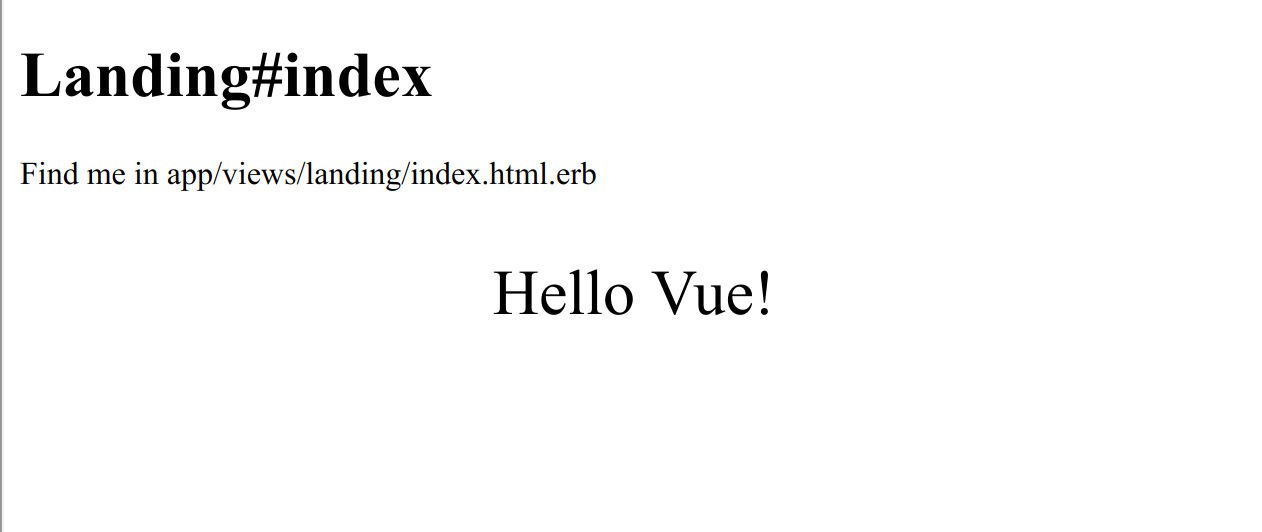
README 提供从 rails new 到运行 Vue 组件的完整命令,覆盖数据库创建、Webpacker 资源引入与本地验证。
VueRails后台启动器
vuejs-adminlte-rails-starterkit — Vue 后台模板
作者 pftg
一个把 Rails 6、Webpacker、Vue.js 2 与 Jest 组合起来的后台启动模板,README 逐步演示如何生成项目、接入 Vue 组件、配置单元测试、部署 Heroku,并额外说明 PWA 与 Turbolinks 的接入方式。
看看你的网站会是什么样
浏览真实页面截图,比较内容排版与手机效果。点击下方缩略图切换,放大查看整页细节。
目前有 1 张原始预览,可打开完整图片查看设计细节。
截图用于了解视觉与布局,交互效果请以实际项目为准。
采集于 2026-10-13查看来源
值得关注的模板亮点
从已有项目资料中,快速了解它的特点。
集成 Jest、vue-jest、@vue/test-utils 与 jest-serializer-vue,并给出组件挂载与快照测试的配置示例。
包含 Heroku 部署步骤,包括资源预编译、buildpacks 添加与环境变量设置。
额外说明 PWA(serviceworker-rails)与 Turbolinks(vue-turbolinks)的接入方式。
采用 MIT 许可,允许免费使用、修改、商用与分发,需保留版权与许可声明。
模板详细介绍
这是一个面向后台管理场景的 Rails + Vue 启动器。它基于 Ruby on Rails 6,使用 Webpacker(Webpack 4 与 Babel 7)编译前端资源,前端框架为 Vue.js 2,并用 Jest 配合 vue-jest、@vue/test-utils 做组件单元测试。README 以教程形式给出从零生成项目的命令,包括创建 PostgreSQL 数据库、在 bin/setup 中启用 yarn 安装、配置内容安全策略以支持开发环境下的 unsafe-eval 与 webpacker-dev-server、在布局中引入 Webpacker 的样式与脚本标签、生成 Landing 控制器作为 Vue 组件宿主页面,以及用 bin/webpack 和 bin/rails runner 验证构建。
测试部分说明了如何添加 Jest 依赖、在 package.json 中配置 roots、moduleDirectories、moduleNameMapper 与 transform,并给出一个基础断言测试和针对 App 组件的挂载与快照测试示例。部署部分使用 Heroku CLI,设置 RAILS_ENV、NODE_ENV 与 SECRET_KEY_BASE 后预编译资源,再通过 git push heroku master 发布。
README 还包含可选的 PWA 与 Turbolinks 接入步骤:PWA 通过 serviceworker-rails 实现,Turbolinks 通过 vue-turbolinks 与 turbolinks 两个 npm 包,在 turbolinks:load 事件中挂载 Vue 实例。模板本身没有附带后台管理界面或 AdminLTE 主题代码,仓库名称中的 AdminLTE 并未在 README 中体现为已集成的样式框架,实际界面需要使用者自行搭建。项目最后更新于 2020 年,依赖版本以 README 所列的 Ruby 2.7.0、Rails 6、Vue 2 为准。
VueRails后台启动器
适合你的项目吗?
适用场景
- 团队已决定使用 Vue 2,并希望以 Rails 6 作为后端与资源管线的后台项目起点。
- 需要一份可参照的 Webpacker + Vue + Jest 配置示例,用于搭建前端构建与组件测试流程。
- 计划把 Rails 应用部署到 Heroku,并希望参考资源预编译与 buildpacks 配置。
- 需要在 Rails 项目中评估或接入 PWA、Turbolinks 与 Vue 的配合方式。
适合人群
- 熟悉 Ruby on Rails 与 Vue.js,希望快速搭建后台项目骨架的开发者。
- 需要 PostgreSQL、Node.js、Yarn 与 Heroku CLI 本地环境的团队。
- 希望以教程式 README 作为上手参考,而非直接使用成品后台界面的使用者。
- 接受以 README 所列版本(Ruby 2.7.0、Rails 6、Vue 2)为基准进行开发的项目。
上手与定制指南
结合仓库当前版本的说明,按下面的资料检查内容、配置与运行要求。
- 1
本地需要 Ruby 2.7.0、Node.js、Yarn、PostgreSQL 与 Heroku CLI。
- 2
按 README 取消 bin/setup 与 bin/update 中 system('bin/yarn') 的注释,再执行 bin/setup 安装依赖。
- 3
开发环境需在 config/initializers/content_security_policy.rb 中允许 unsafe-eval,并放行 http://localhost:3035 与 ws://localhost:3035。
- 4
部署 Heroku 前需设置 RAILS_ENV、NODE_ENV、RAILS_SERVE_STATIC_FILES 与 SECRET_KEY_BASE,并执行 bin/rails assets:precompile。
- 5
模板未内置后台管理界面或 AdminLTE 主题,界面与页面结构需要自行实现。
授权与来源资料
使用条件与限制
免费使用 · 保留许可声明本次收录的是公开仓库中采用 MIT 许可的免费版本;免费范围为该版本代码,不代表外部服务或第三方素材免费。
使用时需要遵守
- 允许免费使用、修改、商用和分发该版本代码。
- 分发代码副本或实质性部分时,保留原作者版权声明和完整 MIT 许可声明。
- 代码按现状提供;担保与责任限制以原许可证及适用法律为准。
额外费用与待核对事项
- 演示图片、字体、图标及其他第三方素材需按各自许可核对,不能仅凭代码的 MIT 许可判断。
- 域名、托管、数据库、支付或 AI 等外部服务可能另外收费。
- 该模板面向 Rails 6;若使用 Rails 5.2,需改用仓库中 rails-5-latest 分支,而非当前主分支。
- 本地开发需自行安装 Node.js、Yarn、PostgreSQL 与 Heroku CLI 等外部系统依赖。
- 开发环境需在内容安全策略中启用 unsafe-eval,并放行 webpacker-dev-server 相关地址,否则 Vue 运行时构建无法工作。
- 部署步骤依赖 Heroku CLI 与 Heroku 平台账号,属于外部服务要求。
- PWA 功能需额外引入 serviceworker-rails 这一外部 gem,并非模板默认包含。
- Turbolinks 支持需额外安装 vue-turbolinks 与 turbolinks 两个 npm 包,属于可选附加步骤。
查看原文依据
Permission is hereby granted, free of charge
许可证原文
**NOTE:** For Rails 5.2 please check https://github.com/jetthoughts/vuejs-rails-starterkit/tree/rails-5-latest
README 原文
System dependencies: [Node.js](https://nodejs.org/en/), [Yarn](https://yarnpkg.com/en/), [PostgreSQL](https://www.postgresql.org/), [Heroku CLI](https://devcenter.heroku.com/articles/heroku-cli)
README 原文
Enable *unsafe-eval rule* to support runtime-only build and *webpacker-dev-server*
README 原文
Requirements: [Heroku CLI](https://devcenter.heroku.com/articles/heroku-cli#download-and-install).
README 原文
gem 'serviceworker-rails', github: 'rossta/serviceworker-rails'
README 原文
https://github.com/pftg/vuejs-adminlte-rails-starterkit/blob/master/LICENSEhttps://github.com/pftg/vuejs-adminlte-rails-starterkit/blob/master/README.mdyarn add vue-turbolinks turbolinks
README 原文
DeepSeek 根据仓库许可证和 README 整理 ·2026-10-13。结果仅覆盖已读取资料,依赖、图片、字体及后续条款变更以各自原文为准。
项目核对记录与介绍依据
模板资料
- 来源平台
- GitHub
- 资料与维护参考分
- 资料一般 · 70 / 100
- 技术栈
- Vue · Rails
- 网站类型
- 后台 · 启动器
这个分数如何计算
本站按许可资料(最高30分)、演示链接(12分)、预览图(10分)、Star数(15分)、记录的维护时间(15分)、描述完整度(8分)、功能记录(5分)和分类资料(5分)计算。它不是代码、安全或性能测试,也不是 Google 评分;有链接不代表已实测可用。
这个项目需要核对什么
- 记录的仓库更新时间
- 2020-04-01
- 截图检查日期
- 2026-10-13
已收录演示链接。请用你的内容与屏幕尺寸检查;有演示不代表表单、认证或支付已经可用。
目录记录的主要技术栈是 Vue。请通过依赖清单和锁文件核对实际版本与托管要求。这些说明基于收录资料,不代表代码审计或部署实测。
查看具体选型方法 →介绍的制作与核对状态
介绍由 AI 辅助整理目录与仓库资料。仓库作者不等于这篇介绍的审核者。
审核声明: [email protected] · 2026-10-13
查看当时使用的来源资料
SHA-256: 40e5d18ec3cfc990c09203654a0012f1c94c6a7f07065e20ef1ed4c75a98bade
2026-10-13T03:49:31.038Z
来源文件 / 仓库# Setting up Rails 6 with PWA, Turbolinks, Webpack(er) 4, Babel 7, Vue.js 2 and Jest.
**NOTE:** For Rails 5.2 please check
https://github.com/jetthoughts/vuejs-rails-starterkit/tree/rails-5-latest
A quick and easy way to setup Rails + PWA + Turbolinks + Webpacker + Vue + Jest.
If your team is considering, or has already decided, to use Vue, this is the right for you.
As extra review how to setup PWA, Turbolinks, CSS frameworks, Storybook.
Things you may want to cover:
* [Ruby](https://www.ruby-lang.org/en/) version: 2.7.0
* System dependencies: [Node.js](https://nodejs.org/en/), [Yarn](https://yarnpkg.com/en/), [PostgreSQL](https://www.postgresql.org/), [Heroku CLI](https://devcenter.heroku.com/articles/heroku-cli)
* Key Dependencies: [Ruby on Rails](https://rubyonrails.org/) version 6, [Vue.js](https://vuejs.org) version 2, [Webpacker](https://github.com/rails/webpacker) with Webpack 4 and Babel 7
## Generate Ruby on Rails Project with Vue.js (No Turbolinks included on this stage)
```bash
gem install rails
rails new vuejs-rails-starterkit --force --database=postgresql \
--skip-action-mailer --skip-action-cable --skip-sprockets --skip-turbolinks \
--webpack=vue
cd ./vuejs-rails-starterkit
bin/rails db:create db:migrate
```
### Setup development environment:
1. Uncomment `system('bin/yarn')` in `bin/setup` and `bin/update` to
install new node modules.
2. Install dependencies:
```bash
bin/setup
```
3. Enable *unsafe-eval rule* to support runtime-only build and
*webpacker-dev-server*
This can be done in the `config/initializers/content_security_policy.rb` with the following
configuration:
```ruby
Rails.application.config.content_security_policy do |policy|
if Rails.env.development?
policy.script_src :self, :https, :unsafe_eval
policy.connect_src :self, :https, 'http://localhost:3035', 'ws://localhost:3035'
else
policy.script_src :self, :https
end
end
```
You can learn more about this from: [Vue.js Docs](https://vuejs.org/v2/guide/installation.html#CSP-environments) and [Webpacker/Vue Docs](https://github.com/rails/webpacker#vue).
4. Verify that we have not broken anything
```bash
bin/webpack
bin/rails runner "exit"
```
### Use Webpacker assets in the application
2. Enable Webpacker by updating `app/views/layout/application.html.erb`:
Add after:
```erb
<%= stylesheet_link_tag 'application', media: 'all' %>
<%= javascript_pack_tag 'application' %>
```
inlcude of vue example:
```erb
<%= stylesheet_pack_tag 'hello_vue', media: 'all' %>
<%= javascript_pack_tag 'hello_vue' %>
```
3. Add sample page to host Vue.js component:
```bash
bin/rails generate controller Landing index --no-javascripts --no-stylesheets --no-helper --no-assets --no-fixture
```
4. Setup sample page as home page by updating `config/routes.rb`:
```ruby
root 'landing#index'
```
7. Verify locally that vue.js working
```bash
bin/rails s
open "http://localhost:3000/"
```
Expect to see 
## Install Jest for Component Unit Tests
1. Add Jest
```bash
yarn add --dev jest vue-jest babel-jest @vue/test-utils jest-serializer-vue 'babel-core@^7.0.0-bridge' @babel/core
```
2. Add to `package.json`:
```json
"scripts": {
"test": "jest"
},
"jest": {
"verbose": true,
"testURL": "http://localhost/",
"roots": [
"test/javascript"
],
"moduleDirectories": [
"node_modules",
"app/javascript"
],
"moduleNameMapper": {
"^@/(.*)$": "app/javascript/$1"
},
"moduleFileExtensions": [
"js",
"json",
"vue"
],
"transform": {
"^.+\\.js$": "<rootDir>/node_modules/babel-jest",
".*\\.(vue)$": "<rootDir>/node_modules/vue-jest"
},
"snapshotSerializers": [
"<rootDir>/node_modules/jest-serializer-vue"
]
},
```
3. Add `test/javascript/test.test.js`:
```js
test('there is no I in team', () => {
expect('team').not.toMatch(/I/);
});
```
4. Verify installation
```bash
yarn test
```
You should found 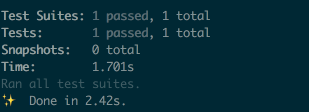
6. Add component test for App in `test/javascript/app.test.js`:
```js
import { mount, shallowMount } from '@vue/test-utils'
import App from 'app';
describe('App', () => {
test('is a Vue instance', () => {
const wrapper = mount(App)
expect(wrapper.isVueInstance()).toBeTruthy()
})
test('matches snapshot', () => {
const wrapper = shallowMount(App)
expect(wrapper.html()).toMatchSnapshot()
})
});
```
7. Verify by
```bash
yarn test
```
You should see all tests passed
## Setup Heroku and Deploy
1. Confirm compilation is working:
```bash
RAILS_ENV=production \
NODE_ENV=production \
RAILS_SERVE_STATIC_FILES=true \
SECRET_KEY_BASE="7aa51097e982f34be02abe83528c3308768dff3837b405e0907028c750d22d067367fb79e2b223e3f223fea50ddf2d5dc9b3c933cf5bc8c7f2a3d3d75f73c4a7" \
bin/rails assets:precompile
```
2. Create Heroku App and provision it
Requirements: [Heroku CLI](https://devcenter.heroku.com/articles/heroku-cli#download-and-install).
**NOTE:** Do not forget to commit all your changes: `git add . && git
commit -m "Generates Ruby on Rails application with Vue.js onboard"`
```bash
heroku create
heroku buildpacks:add heroku/ruby
heroku config:set RAILS_ENV=production NODE_ENV=production
```
5. Deploy and verify that vue.js working on Heroku
```bash
git push heroku master
heroku apps:open
```
## Setup basic PWA
1. Install `serviceworker-rails` by adding into `Gemfile`:
```ruby
gem 'serviceworker-rails', github: 'rossta/serviceworker-rails'
```
2. By following guide: https://github.com/rossta/serviceworker-rails
should get something to: https://gist.github.com/pftg/786b147eff85a6fc98bd8dc1c3c9778e
## Setup Turbolinks
1. Add node dependencies
```bash
yarn add vue-turbolinks turbolinks
yarn install
```
2. Load Turbolinks by adding
`app/javascript/initializers/turbolinks.js`:
```javascript
import Turbolinks from 'turbolinks'
Turbolinks.start()
```
3. Add to `app/javascript/packs/application.js`:
```javascript
import 'initializers/turbolinks.js'
```
4. Uncomment in `hello_vue.js`:
```javascript
import TurbolinksAdapter from 'vue-turbolinks'
import Vue from 'vue/dist/vue.esm'
import App from '../app.vue'
Vue.use(TurbolinksAdapter)
document.addEventListener('turbolinks:load', () => {
const app = new Vue({
el: '#hello',
data: () => {
return {
message: "Can you say hello?"
}
},
components: { App }
})
})
```
5. Update layout with:
```html
<div id="hello"></div>
```
6. Run tests and server to verify:
```bash
bin/rails t
bin/rails s
```
看看同类模板
对比同技术栈与用途的模板,找到更适合的视觉与内容结构。

vuestic-admin
Vuestic Admin is an open-source, ready-to-use admin template suite designed for rapid development, easy mainte…
Vue · 后台

vitesse
🏕 Opinionated Vite + Vue Starter Template
Vue · 启动器

v3-admin-vite
v3-admin-vite 是一个主打 AI 编程友好体验的 Vue3 后台管理模板,基于 Vue3、Vite、TypeScript、Element Plus 构建。
Vue · 后台

vue-typescript-admin-template
vue-typescript-admin-template 是一套面向后台管理界面的前端解决方案,基于 Vue 2.6、TypeScript 和 Element UI 构建。
Vue · 后台

vue-antd-admin
Vue Antd Admin 是 Ant Design Pro 的 Vue 实现版本,目标是为中后台项目提供一套开箱即用的前端与设计解决方案。
Vue · 后台

coreui-free-vue-admin-template
Free Vue Admin & Dashboard Template Built for AI-Assisted Development
Vue · 后台