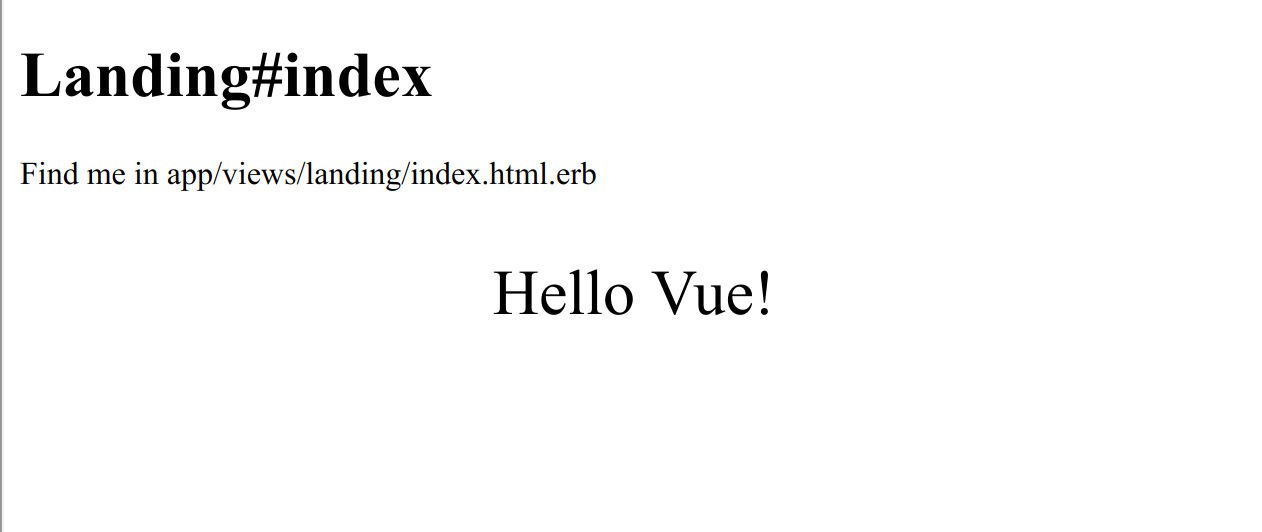
The README provides complete commands from rails new to running Vue components, covering database creation, Webpacker asset inclusion, and local verification.
VueRailsAdmin dashboardStarter
vuejs-adminlte-rails-starterkit — Vue Admin dashboard Template
By pftg
A backend starter template combining Rails 6, Webpacker, Vue.js 2, and Jest. The README walks through generating the project, integrating Vue components, configuring unit tests, deploying to Heroku, and additionally covers PWA and Turbolinks integration.
Explore the design
Compare the page layouts and mobile experience. Open any screenshot for a closer look.
Author preview
Author-provided preview
Preview provided in the project README.
One original preview is available. Open the full image to inspect the design.
Screenshots show visual appearance; interactive behavior may differ.
Recorded 2026-10-13View source
What stands out
A quick read of the recorded project description.
Integrates Jest, vue-jest, @vue/test-utils, and jest-serializer-vue, with configuration examples for component mounting and snapshot testing.
Includes Heroku deployment steps, including asset precompilation, buildpack addition, and environment variable setup.
Additionally explains how to integrate PWA (serviceworker-rails) and Turbolinks (vue-turbolinks).
Licensed under MIT, allowing free use, modification, commercial use, and distribution, provided copyright and license notices are retained.
Template Details
This is a Rails + Vue starter kit aimed at backend management scenarios. It is based on Ruby on Rails 6, uses Webpacker (Webpack 4 and Babel 7) to compile frontend assets, uses Vue.js 2 as the frontend framework, and uses Jest with vue-jest and @vue/test-utils for component unit testing. The README provides tutorial-style commands for generating the project from scratch, including creating a PostgreSQL database, enabling yarn installation in bin/setup, configuring the content security policy to support unsafe-eval and webpacker-dev-server in development, including Webpacker's stylesheet and script tags in the layout, generating a Landing controller as the host page for Vue components, and verifying the build with bin/webpack and bin/rails runner.
The testing section explains how to add Jest dependencies, configure roots, moduleDirectories, moduleNameMapper, and transform in package.json, and provides a basic assertion test plus examples of mounting and snapshot testing for the App component. The deployment section uses the Heroku CLI, setting RAILS_ENV, NODE_ENV, and SECRET_KEY_BASE before precompiling assets, then publishing via git push heroku master.
The README also includes optional PWA and Turbolinks integration steps: PWA is implemented via serviceworker-rails, and Turbolinks via the vue-turbolinks and turbolinks npm packages, mounting the Vue instance in the turbolinks:load event. The template itself does not include a backend management interface or AdminLTE theme code; the AdminLTE in the repository name is not reflected in the README as an integrated style framework, and the actual interface must be built by the user. The project was last updated in 2020, and dependency versions are based on Ruby 2.7.0, Rails 6, and Vue 2 as listed in the README.
VueRailsBackendStarter kit
Is it right for your project?
Use Cases
- Teams that have decided to use Vue 2 and want a backend project starting point with Rails 6 as the backend and asset pipeline.
- Those who need a reference Webpacker + Vue + Jest configuration example for setting up a frontend build and component testing workflow.
- Those planning to deploy a Rails application to Heroku and wanting to refer to asset precompilation and buildpack configuration.
- Those who need to evaluate or integrate PWA, Turbolinks, and Vue in a Rails project.
Suitable For
- Developers familiar with Ruby on Rails and Vue.js who want to quickly set up a backend project skeleton.
- Teams that need a local environment with PostgreSQL, Node.js, Yarn, and Heroku CLI.
- Users who want a tutorial-style README as a getting-started reference rather than a ready-made backend interface.
- Projects that accept development based on the versions listed in the README (Ruby 2.7.0, Rails 6, Vue 2).
Getting started & customization
Use these recorded setup notes alongside the repository instructions for your chosen version.
- 1
Local environment requires Ruby 2.7.0, Node.js, Yarn, PostgreSQL, and Heroku CLI.
- 2
Follow the README to uncomment system('bin/yarn') in bin/setup and bin/update, then run bin/setup to install dependencies.
- 3
In development, allow unsafe-eval in config/initializers/content_security_policy.rb and permit http://localhost:3035 and ws://localhost:3035.
- 4
Before deploying to Heroku, set RAILS_ENV, NODE_ENV, RAILS_SERVE_STATIC_FILES, and SECRET_KEY_BASE, and run bin/rails assets:precompile.
- 5
The template does not include a backend management interface or AdminLTE theme; the interface and page structure must be implemented by the user.
License & source material
Usage conditions & limitations
Free to use · keep license noticeThis entry covers the free version under the MIT license in a public repository; the free scope is the code of this version and does not imply that external services or third-party assets are free.
Must comply with when using
- Free use, modification, commercial use, and distribution of this version's code are permitted.
- When distributing copies or substantial portions of the code, retain the original author's copyright notice and the full MIT license notice.
- The code is provided as is; warranties and limitations of liability are governed by the original license and applicable law.
Additional costs & items to verify
- Demo images, fonts, icons, and other third-party assets must be checked against their respective licenses and cannot be judged solely by the code's MIT license.
- External services such as domains, hosting, databases, payments, or AI may incur additional charges.
- This template targets Rails 6; if using Rails 5.2, switch to the rails-5-latest branch in the repository instead of the current main branch.
- Local development requires installing external system dependencies such as Node.js, Yarn, PostgreSQL, and Heroku CLI.
- The development environment requires enabling unsafe-eval in the content security policy and allowing webpacker-dev-server-related addresses; otherwise the Vue runtime build will not work.
- Deployment steps depend on the Heroku CLI and a Heroku platform account, which are external service requirements.
- PWA functionality requires additionally including the external gem serviceworker-rails, which is not included by default in the template.
- Turbolinks support requires additionally installing the two npm packages vue-turbolinks and turbolinks, which is an optional add-on step.
View Original Text Basis
Permission is hereby granted, free of charge
Original License Text
**NOTE:** For Rails 5.2 please check https://github.com/jetthoughts/vuejs-rails-starterkit/tree/rails-5-latest
Original README
System dependencies: [Node.js](https://nodejs.org/en/), [Yarn](https://yarnpkg.com/en/), [PostgreSQL](https://www.postgresql.org/), [Heroku CLI](https://devcenter.heroku.com/articles/heroku-cli)
Original README
Enable *unsafe-eval rule* to support runtime-only build and *webpacker-dev-server*
Original README
Requirements: [Heroku CLI](https://devcenter.heroku.com/articles/heroku-cli#download-and-install).
Original README
gem 'serviceworker-rails', github: 'rossta/serviceworker-rails'
Original README
https://github.com/pftg/vuejs-adminlte-rails-starterkit/blob/master/LICENSEhttps://github.com/pftg/vuejs-adminlte-rails-starterkit/blob/master/README.mdyarn add vue-turbolinks turbolinks
Original README
Compiled by DeepSeek based on repository license and README ·2026-10-13. Results only cover the materials read; dependencies, images, fonts, and subsequent term changes are subject to their respective original texts.
Project checks & description sources
Template Information
- Source platforms
- GitHub
- Documentation and maintenance reference score
- Partly documented · 70 / 100
- Technologies
- Vue · Rails
- Website type
- Admin dashboard · Starter
How this score is calculated
Our heuristic uses license records (up to 30), a demo link (12), a preview (10), stars (15), recorded maintenance (15), description completeness (8), feature records (5) and classification data (5). It is not a code, security or performance test, or a Google score. A link does not establish tested functionality.
What to verify for this project
- Repository update recorded
- 2020-04-01
- Screenshot last checked
- 2026-10-13
A demo link is listed. Check it with your own content and viewport sizes; its presence does not confirm that forms, authentication or payments work.
The catalog identifies Vue as the primary stack. Check the actual dependency manifest and lockfile for versions and hosting requirements. These notes use recorded metadata, not a code audit or a deployment test.
Use a selection guide →How this description was prepared
AI-assisted description based on catalog records and repository material. Repository authors are not automatically the reviewers of this description.
Review declaration: [email protected] · 2026-10-13
Inspect the recorded source material
SHA-256: 40e5d18ec3cfc990c09203654a0012f1c94c6a7f07065e20ef1ed4c75a98bade
2026-10-13T03:49:31.038Z
Source file / repository# Setting up Rails 6 with PWA, Turbolinks, Webpack(er) 4, Babel 7, Vue.js 2 and Jest.
**NOTE:** For Rails 5.2 please check
https://github.com/jetthoughts/vuejs-rails-starterkit/tree/rails-5-latest
A quick and easy way to setup Rails + PWA + Turbolinks + Webpacker + Vue + Jest.
If your team is considering, or has already decided, to use Vue, this is the right for you.
As extra review how to setup PWA, Turbolinks, CSS frameworks, Storybook.
Things you may want to cover:
* [Ruby](https://www.ruby-lang.org/en/) version: 2.7.0
* System dependencies: [Node.js](https://nodejs.org/en/), [Yarn](https://yarnpkg.com/en/), [PostgreSQL](https://www.postgresql.org/), [Heroku CLI](https://devcenter.heroku.com/articles/heroku-cli)
* Key Dependencies: [Ruby on Rails](https://rubyonrails.org/) version 6, [Vue.js](https://vuejs.org) version 2, [Webpacker](https://github.com/rails/webpacker) with Webpack 4 and Babel 7
## Generate Ruby on Rails Project with Vue.js (No Turbolinks included on this stage)
```bash
gem install rails
rails new vuejs-rails-starterkit --force --database=postgresql \
--skip-action-mailer --skip-action-cable --skip-sprockets --skip-turbolinks \
--webpack=vue
cd ./vuejs-rails-starterkit
bin/rails db:create db:migrate
```
### Setup development environment:
1. Uncomment `system('bin/yarn')` in `bin/setup` and `bin/update` to
install new node modules.
2. Install dependencies:
```bash
bin/setup
```
3. Enable *unsafe-eval rule* to support runtime-only build and
*webpacker-dev-server*
This can be done in the `config/initializers/content_security_policy.rb` with the following
configuration:
```ruby
Rails.application.config.content_security_policy do |policy|
if Rails.env.development?
policy.script_src :self, :https, :unsafe_eval
policy.connect_src :self, :https, 'http://localhost:3035', 'ws://localhost:3035'
else
policy.script_src :self, :https
end
end
```
You can learn more about this from: [Vue.js Docs](https://vuejs.org/v2/guide/installation.html#CSP-environments) and [Webpacker/Vue Docs](https://github.com/rails/webpacker#vue).
4. Verify that we have not broken anything
```bash
bin/webpack
bin/rails runner "exit"
```
### Use Webpacker assets in the application
2. Enable Webpacker by updating `app/views/layout/application.html.erb`:
Add after:
```erb
<%= stylesheet_link_tag 'application', media: 'all' %>
<%= javascript_pack_tag 'application' %>
```
inlcude of vue example:
```erb
<%= stylesheet_pack_tag 'hello_vue', media: 'all' %>
<%= javascript_pack_tag 'hello_vue' %>
```
3. Add sample page to host Vue.js component:
```bash
bin/rails generate controller Landing index --no-javascripts --no-stylesheets --no-helper --no-assets --no-fixture
```
4. Setup sample page as home page by updating `config/routes.rb`:
```ruby
root 'landing#index'
```
7. Verify locally that vue.js working
```bash
bin/rails s
open "http://localhost:3000/"
```
Expect to see 
## Install Jest for Component Unit Tests
1. Add Jest
```bash
yarn add --dev jest vue-jest babel-jest @vue/test-utils jest-serializer-vue 'babel-core@^7.0.0-bridge' @babel/core
```
2. Add to `package.json`:
```json
"scripts": {
"test": "jest"
},
"jest": {
"verbose": true,
"testURL": "http://localhost/",
"roots": [
"test/javascript"
],
"moduleDirectories": [
"node_modules",
"app/javascript"
],
"moduleNameMapper": {
"^@/(.*)$": "app/javascript/$1"
},
"moduleFileExtensions": [
"js",
"json",
"vue"
],
"transform": {
"^.+\\.js$": "<rootDir>/node_modules/babel-jest",
".*\\.(vue)$": "<rootDir>/node_modules/vue-jest"
},
"snapshotSerializers": [
"<rootDir>/node_modules/jest-serializer-vue"
]
},
```
3. Add `test/javascript/test.test.js`:
```js
test('there is no I in team', () => {
expect('team').not.toMatch(/I/);
});
```
4. Verify installation
```bash
yarn test
```
You should found 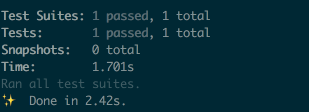
6. Add component test for App in `test/javascript/app.test.js`:
```js
import { mount, shallowMount } from '@vue/test-utils'
import App from 'app';
describe('App', () => {
test('is a Vue instance', () => {
const wrapper = mount(App)
expect(wrapper.isVueInstance()).toBeTruthy()
})
test('matches snapshot', () => {
const wrapper = shallowMount(App)
expect(wrapper.html()).toMatchSnapshot()
})
});
```
7. Verify by
```bash
yarn test
```
You should see all tests passed
## Setup Heroku and Deploy
1. Confirm compilation is working:
```bash
RAILS_ENV=production \
NODE_ENV=production \
RAILS_SERVE_STATIC_FILES=true \
SECRET_KEY_BASE="7aa51097e982f34be02abe83528c3308768dff3837b405e0907028c750d22d067367fb79e2b223e3f223fea50ddf2d5dc9b3c933cf5bc8c7f2a3d3d75f73c4a7" \
bin/rails assets:precompile
```
2. Create Heroku App and provision it
Requirements: [Heroku CLI](https://devcenter.heroku.com/articles/heroku-cli#download-and-install).
**NOTE:** Do not forget to commit all your changes: `git add . && git
commit -m "Generates Ruby on Rails application with Vue.js onboard"`
```bash
heroku create
heroku buildpacks:add heroku/ruby
heroku config:set RAILS_ENV=production NODE_ENV=production
```
5. Deploy and verify that vue.js working on Heroku
```bash
git push heroku master
heroku apps:open
```
## Setup basic PWA
1. Install `serviceworker-rails` by adding into `Gemfile`:
```ruby
gem 'serviceworker-rails', github: 'rossta/serviceworker-rails'
```
2. By following guide: https://github.com/rossta/serviceworker-rails
should get something to: https://gist.github.com/pftg/786b147eff85a6fc98bd8dc1c3c9778e
## Setup Turbolinks
1. Add node dependencies
```bash
yarn add vue-turbolinks turbolinks
yarn install
```
2. Load Turbolinks by adding
`app/javascript/initializers/turbolinks.js`:
```javascript
import Turbolinks from 'turbolinks'
Turbolinks.start()
```
3. Add to `app/javascript/packs/application.js`:
```javascript
import 'initializers/turbolinks.js'
```
4. Uncomment in `hello_vue.js`:
```javascript
import TurbolinksAdapter from 'vue-turbolinks'
import Vue from 'vue/dist/vue.esm'
import App from '../app.vue'
Vue.use(TurbolinksAdapter)
document.addEventListener('turbolinks:load', () => {
const app = new Vue({
el: '#hello',
data: () => {
return {
message: "Can you say hello?"
}
},
components: { App }
})
})
```
5. Update layout with:
```html
<div id="hello"></div>
```
6. Run tests and server to verify:
```bash
bin/rails t
bin/rails s
```
Explore similar templates
Compare previews and descriptions within the same stack and category.

vuestic-admin
Vuestic Admin is an open-source Vue 3 admin template maintained by Epicmax, built on Vuestic UI with Vite, Pinia, and Tailwind CSS. It provides a ready-to-run dashboard with a dark theme, global configuration, i18n internationalization, and responsive layout.
Vue · Admin dashboard

vitesse
Vitesse is an opinionated Vite + Vue 3 starter template maintained by antfu-collective, offering file-based routing, component and API auto-import, Pinia, UnoCSS, PWA, i18n, Markdown, vite-ssg, TypeScript, Vitest, and Cypress.
Vue · Starter

v3-admin-vite
v3-admin-vite is an AI-friendly Vue3 admin template built on Vue3, Vite, TypeScript, and Element Plus. It keeps a lean structure with detailed comments, supports backend-controlled dynamic route permissions, page-level and button-level permissions, multiple themes and layouts, and mobile compatibility.
Vue · Admin dashboard

vue-typescript-admin-template
A Vue 2.6 + TypeScript + Element UI admin template ported from vue-element-admin, offering type safety and enterprise features like permission authentication, internationalization, dynamic themes, editors, charts, Excel/PDF handling, and PWA support.
Vue · Admin dashboard

vue-antd-admin
Vue Antd Admin is the Vue implementation of Ant Design Pro, providing an out-of-the-box front-end and design solution for admin dashboards.
Vue · Admin dashboard

coreui-free-vue-admin-template
CoreUI's official free Vue admin template, MIT licensed, built on Vue 3 and the CoreUI component library with Vue Router, Pinia, and Vite.
Vue · Admin dashboard