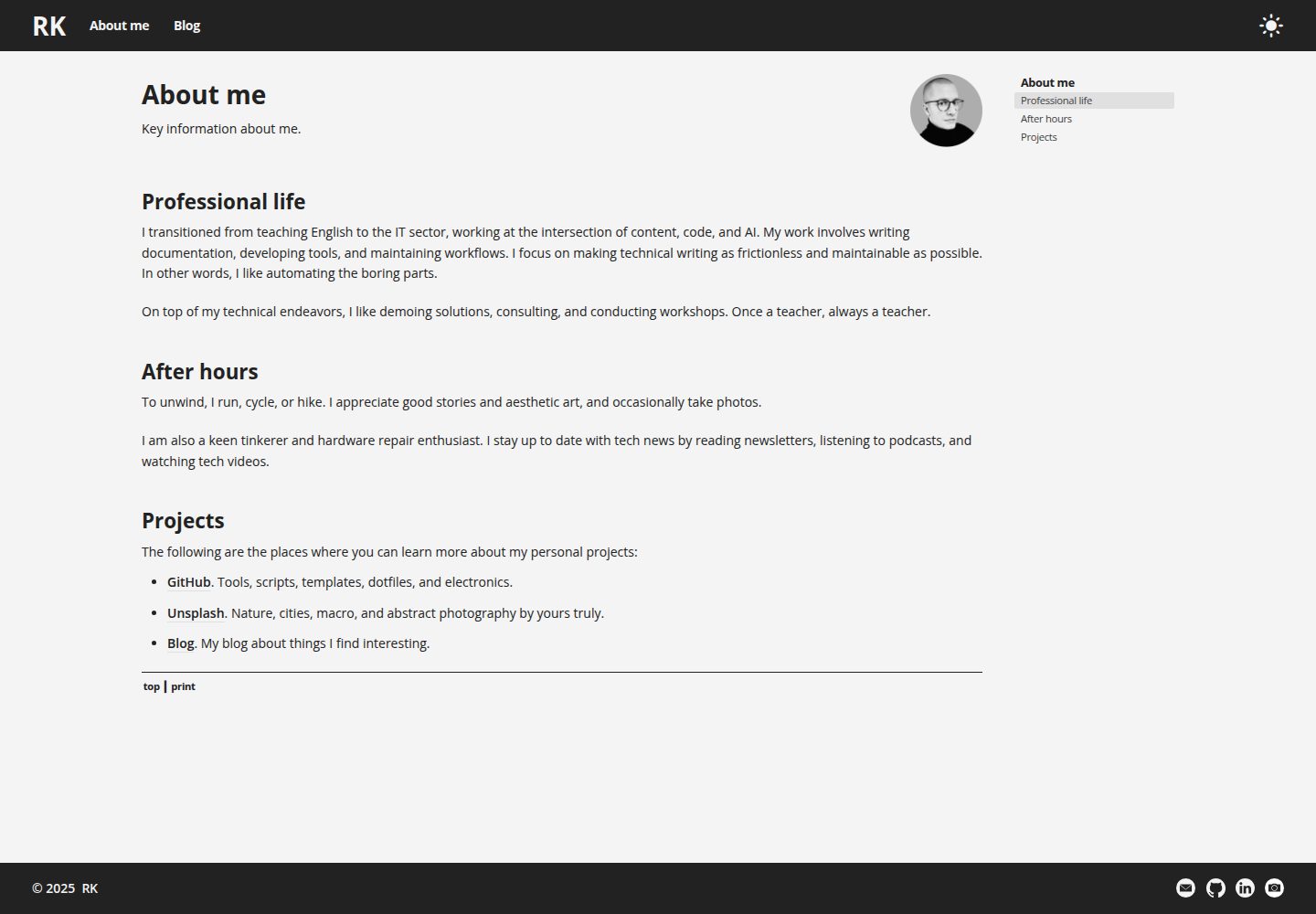
响应式布局覆盖桌面、平板、手机与打印
Hugo作品集博客文档
r-hugo-theme — Hugo 作品集模板
作者 rafalkaron
r-hugo-theme 是一个 Hugo 主题,可用于作品集、文档库或博客,提供响应式布局、明暗模式切换和自动生成的站点导航。
看看你的网站会是什么样
浏览真实页面截图,比较内容排版与手机效果。点击下方缩略图切换,放大查看整页细节。
全部页面与视图 3
截图用于了解视觉与布局,交互效果请以实际项目为准。
采集于 2026-10-01查看来源
值得关注的模板亮点
从已有项目资料中,快速了解它的特点。
提供明暗模式切换开关
自动生成章节导航、页面导航、面包屑、上下页链接与关键词相关链接
页脚联系信息可自定义
博客支持分类、标签与预计阅读时间
附带单语言与多语言示例站点目录
模板详细介绍
r-hugo-theme 是 rafalkaron 发布的 Hugo 主题,仓库描述为适合作品集、文档库或博客的简单主题。主题提供桌面、平板、手机和打印的响应式布局,并带有一个控制明暗模式的切换开关。导航方面,主题会自动生成章节导航(本节内)、页面导航(本页内)、面包屑、上一页与下一页链接,以及基于关键词的相关链接。页脚的联系信息可自行修改。博客能力包括分类、标签和预计阅读时间。仓库附带 example-site 与 example-site-multilingual 示例目录,可将其中的文件与文件夹复制到站点根目录作为起点。主题采用 MIT 许可,演示站点位于 rafalkaron.github.io。README 未列出所依赖的框架版本号,也未说明性能或生产就绪程度。
Hugo作品集博客文档
适合你的项目吗?
适用场景
- 搭建个人作品集站点
- 建立文档库并依靠自动生成的章节与页面导航组织内容
- 运营带分类和标签的博客
- 需要明暗模式切换与打印样式的内容站点
适合人群
- 使用 Hugo 构建静态站点的开发者
- 需要作品集、文档或博客三类用途之一的个人站点
- 希望导航由主题自动生成、减少手工维护的站点
- 需要单语言或多语言示例作为起点的项目
上手与定制指南
结合仓库当前版本的说明,按下面的资料检查内容、配置与运行要求。
- 1
需先安装 Git 与 Hugo
- 2
执行 hugo new site {site_name} 创建站点并进入该目录
- 3
执行 git init 初始化仓库
- 4
以 git submodule add 方式添加主题,README 中给出的地址为 https://rafalkaron.github.io/r-hugo-theme
- 5
将 example-site 或 example-site-multilingual 中的文件与文件夹移动到站点根目录,再运行 hugo server 在 http://localhost:1313/ 预览
授权与来源资料
使用条件与限制
免费使用 · 保留许可声明本次收录的是公开仓库中采用 MIT 许可的免费版本;免费范围为该版本代码,不代表外部服务或第三方素材免费。
使用时需要遵守
- 允许免费使用、修改、商用和分发该版本代码。
- 分发代码副本或实质性部分时,保留原作者版权声明和完整 MIT 许可声明。
- 代码按现状提供;担保与责任限制以原许可证及适用法律为准。
额外费用与待核对事项
- 演示图片、字体、图标及其他第三方素材需按各自许可核对,不能仅凭代码的 MIT 许可判断。
- 域名、托管、数据库、支付或 AI 等外部服务可能另外收费。
查看原文依据
https://github.com/rafalkaron/r-hugo-theme/blob/main/LICENSEhttps://github.com/rafalkaron/r-hugo-theme/blob/main/README.mdPermission is hereby granted, free of charge
许可证原文
DeepSeek 根据仓库许可证和 README 整理 ·2026-10-01。结果仅覆盖已读取资料,依赖、图片、字体及后续条款变更以各自原文为准。
项目核对记录与介绍依据
模板资料
- 来源平台
- GitHub
- 资料与维护参考分
- 资料较完整 · 88 / 100
- 技术栈
- Hugo
- 网站类型
- 作品集 · 博客 · 文档
这个分数如何计算
本站按许可资料(最高30分)、演示链接(12分)、预览图(10分)、Star数(15分)、记录的维护时间(15分)、描述完整度(8分)、功能记录(5分)和分类资料(5分)计算。它不是代码、安全或性能测试,也不是 Google 评分;有链接不代表已实测可用。
这个项目需要核对什么
- 记录的仓库更新时间
- 2025-11-03
- 截图检查日期
- 2026-10-01
已收录演示链接。请用你的内容与屏幕尺寸检查;有演示不代表表单、认证或支付已经可用。
目录记录的主要技术栈是 Hugo。请通过依赖清单和锁文件核对实际版本与托管要求。这些说明基于收录资料,不代表代码审计或部署实测。
查看具体选型方法 →介绍的制作与核对状态
介绍由 AI 辅助整理目录与仓库资料。仓库作者不等于这篇介绍的审核者。
已完成服务器许可规则与 AI 来源核对;未经过人工编辑审核。
查看当时使用的来源资料
SHA-256: 783cfcbb36b139820ed156c39e4ba2df95d53a8674b42180aff25679476f8eda
2026-10-01T01:00:35.377Z
来源文件 / 仓库# r-hugo-theme
A simple Hugo theme suitable for a portfolio, documentation library, or blog. See [r-hugo-theme-demo](https://rafalkaron.github.io/r-hugo-theme-demo).
<img width="920" alt="r-hugo-theme-desktop-light" src="https://user-images.githubusercontent.com/45826759/175793931-f7810c7e-1ce9-438c-98f7-ee9c9a75536b.png">
<img width="320" alt="r-hugo-theme-mobile-dark" src="https://user-images.githubusercontent.com/45826759/175793933-db7448a7-fd96-474c-8073-c05a09d6b7db.png"><img width="320" alt="r-hugo-theme-mobile-light" src="https://user-images.githubusercontent.com/45826759/175793934-9d00a991-8e40-4c5d-8149-540c93b462cf.png">
## Key features
* Responsive layout for desktops, tablets, mobile, and print
* A switch that controls light and dark modes
* Extensive, automatically generated site navigation that includes:
* Section navigation (in this section)
* Page navigation (on this page)
* Breadcrumbs
* Links to next and previous pages
* Related links based on keywords
* Easily customizable contact info in the footer
* Blogging capabilities:
* Categories
* Tags
* Estimated reading time
## Quick start
Set up a simple website that uses r-hug-theme with sample content.
### Prerequisites
* [Install Git](https://git-scm.com/book/en/v2/Getting-Started-Installing-Git)
* [Install Hugo](https://gohugo.io/getting-started/quick-start/#step-1-install-hugo)
### Procedure
3. In the terminal, create a new site by entering `hugo new site {site_name}`
**Where:** `{site_name}` is the name of the site that you want to create.
4. Enter the Hugo site directory by entering `cd {site_name}`
5. Initialize a Git repository by entering `git init`
6. Add the theme by entering `git submodule add https://rafalkaron.github.io/r-hugo-theme`
7. Move the files and folders from the `example-site` or `example-site-multilingual` directory into the root folder of your site.
8. Run a local Hugo webserver by entering `hugo server`
### Postrequisites
* Preview your website by opening [http://localhost:1313/](http://localhost:1313/)
## Theme customization
You can further customize the site by editing the `config.yaml` file. For more information, see the [Hugo documentation](https://gohugo.io/documentation/).
看看同类模板
对比同技术栈与用途的模板,找到更适合的视觉与内容结构。

hugo-PaperMod
PaperMod 是 Hugo 生态里知名度较高的主题之一,定位很明确:给博客和轻量作品集站点提供一套干净、响应式的阅读界面。
Hugo · 作品集

hugo-book
Hugo Book 是一个面向文档场景的 Hugo 主题,定位很直接:把文档站点做得像一本朴素的书。
Hugo · 文档

LoveIt
❤️A clean, elegant but advanced blog theme for Hugo 一个简洁、优雅且高效的 Hugo 主题
Hugo · 博客

hugo-coder
A minimalist blog theme for hugo.
Hugo · 博客

docsy
Hugo theme for open source documentation
Hugo · 文档

blowfish
Personal Website & Blog Theme for Hugo
Hugo · 博客