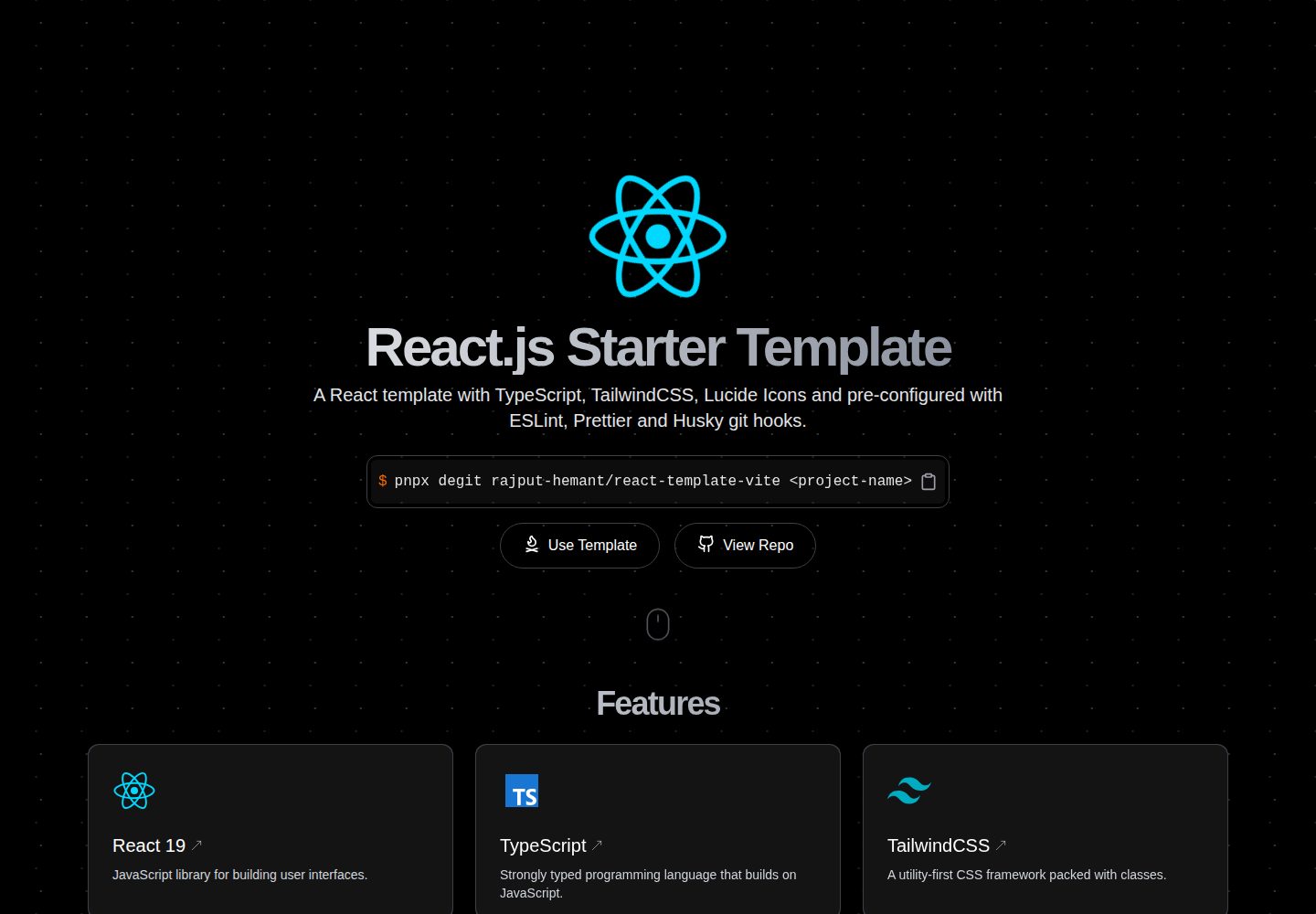
使用 Vite 作为前端构建工具,搭配 React 与 TypeScript
ViteReact启动器
react-template-vite — Vite 启动器模板
作者 rajput-hemant
基于 Vite 的 React 启动模板,预置 TailwindCSS、TypeScript、ESLint、Prettier 与 Husky,并提供 react-router、TanStack Router 和 barebone 三个分支。
看看你的网站会是什么样
浏览真实页面截图,比较内容排版与手机效果。点击下方缩略图切换,放大查看整页细节。
全部页面与视图 2
截图用于了解视觉与布局,交互效果请以实际项目为准。
采集于 2026-10-03查看来源
值得关注的模板亮点
从已有项目资料中,快速了解它的特点。
预置 TailwindCSS,可直接编写工具类样式
集成 ESLint、Prettier、Husky、lint-staged 与 commitlint 的代码检查与提交规范流程
通过 degit 提供 react-router-dom、TanStack Router 和 barebone 三种分支模板
默认使用 bun 作为包管理器,同时兼容 pnpm、npm 与 yarn
附带 dev、build、serve、preview、type-check、lint、fmt 等 npm 脚本
模板详细介绍
这是一个面向 React 项目的启动模板,使用 Vite 作为构建工具,并预先配置了 TailwindCSS、TypeScript、ESLint、Prettier、Husky、lint-staged 与 commitlint。仓库通过 degit 提供三种脚手架分支:默认分支使用 react-router-dom,tanstack-router 分支使用 TanStack Router,barebone 分支为精简版本。模板默认使用 bun 作为包管理器,也支持 pnpm、npm 或 yarn,切换时需删除 bun.lockb 并重新生成对应锁文件。项目附带 dev、build、serve、preview、type-check、lint、fmt、fmt:check、prepare 等脚本,以及一份安装后需要手动完成的清单(更新 package.json、README、LICENSE 和 index.html)。模板采用 MIT 许可,仓库包含 Vercel 与 Netlify 的部署入口。
ViteReact启动器
适合你的项目吗?
适用场景
- 需要快速搭建一个已配置好代码规范工具的 React 项目
- 在 react-router-dom 与 TanStack Router 之间选择路由方案作为项目起点
- 需要一个不含路由的 barebone 精简 React 起始结构
- 希望用 Vite 与 TailwindCSS 组合开始新前端项目
适合人群
- 熟悉 React 与 TypeScript、希望省去初始配置的开发者
- 需要统一 ESLint、Prettier 与提交信息规范的前端团队
- 准备部署到 Vercel 或 Netlify 的静态前端项目
上手与定制指南
结合仓库当前版本的说明,按下面的资料检查内容、配置与运行要求。
- 1
先全局安装 degit,再用 degit rajput-hemant/react-template-vite <project-name> 拉取模板;如需 TanStack Router 或 barebone 分支,在仓库地址后加 #tanstack-router 或 #barebone
- 2
默认使用 bun 安装依赖;改用 pnpm、npm 或 yarn 前需删除 bun.lockb 并重新生成对应锁文件
- 3
安装后按清单更新 package.json、README.md、LICENSE 与 index.html 中的项目信息
- 4
模板采用 MIT 许可,分发代码副本时需保留原作者版权声明与完整许可声明
- 5
演示图片、字体、图标等第三方素材需按各自许可单独核对
授权与来源资料
使用条件与限制
免费使用 · 保留许可声明本次收录的是公开仓库中采用 MIT 许可的免费版本;免费范围为该版本代码,不代表外部服务或第三方素材免费。
使用时需要遵守
- 允许免费使用、修改、商用和分发该版本代码。
- 分发代码副本或实质性部分时,保留原作者版权声明和完整 MIT 许可声明。
- 代码按现状提供;担保与责任限制以原许可证及适用法律为准。
额外费用与待核对事项
- 模板默认使用 bun 作为包管理器;若改用 pnpm、npm 或 yarn,必须先删除 bun.lockb 并重新生成对应锁文件,否则依赖安装可能不一致。
- 脚手架流程要求先全局安装 degit 工具,再通过 degit 拉取模板;未安装 degit 时无法按 README 步骤获取项目。
- 安装后需手动将 LICENSE 中的版权信息替换为自己的姓名与年份,以符合 MIT 许可对版权声明的要求。
- 安装后需手动更新 package.json 中的项目信息,模板默认内容不能直接作为最终项目元数据使用。
- 安装后需手动更新 README.md 中的项目信息,模板默认说明不能直接作为最终项目文档使用。
- 安装后需手动调整 index.html 内容,模板默认页面信息不能直接作为最终站点入口使用。
- 演示图片、字体、图标及其他第三方素材需按各自许可核对,不能仅凭代码的 MIT 许可判断。
- 域名、托管、数据库、支付或 AI 等外部服务可能另外收费。
查看原文依据
Permission is hereby granted, free of charge
许可证原文
This template uses [bun](https://bun.sh) as the default package manager. If you want to use `pnpm`, `npm` or `yarn`, you need to remove the `bun.lockb` file and run `pnpm i`, `npm i` or `yarn` to generate the lock file for the respective package manager.
README 原文
**Install `degit` globally:**
README 原文
- [ ] Update `LICENSE` with your name and year.
README 原文
- [ ] Update `package.json` with your project details.
README 原文
- [ ] Update `README.md` with your project details.
README 原文
https://github.com/rajput-hemant/react-template-vite/blob/master/LICENSEhttps://github.com/rajput-hemant/react-template-vite/blob/master/README.md- [ ] Update `index.html` to your liking.
README 原文
DeepSeek 根据仓库许可证和 README 整理 ·2026-10-03。结果仅覆盖已读取资料,依赖、图片、字体及后续条款变更以各自原文为准。
项目核对记录与介绍依据
模板资料
- 来源平台
- GitHub
- 资料与维护参考分
- 资料较完整 · 92 / 100
- 技术栈
- Vite · React
- 网站类型
- 启动器
这个分数如何计算
本站按许可资料(最高30分)、演示链接(12分)、预览图(10分)、Star数(15分)、记录的维护时间(15分)、描述完整度(8分)、功能记录(5分)和分类资料(5分)计算。它不是代码、安全或性能测试,也不是 Google 评分;有链接不代表已实测可用。
这个项目需要核对什么
- 记录的仓库更新时间
- 2026-10-02
- 截图检查日期
- 2026-10-03
已收录演示链接。请用你的内容与屏幕尺寸检查;有演示不代表表单、认证或支付已经可用。
目录记录的主要技术栈是 Vite。请通过依赖清单和锁文件核对实际版本与托管要求。这些说明基于收录资料,不代表代码审计或部署实测。
查看具体选型方法 →介绍的制作与核对状态
介绍由 AI 辅助整理目录与仓库资料。仓库作者不等于这篇介绍的审核者。
已完成服务器许可规则与 AI 来源核对;未经过人工编辑审核。
查看当时使用的来源资料
SHA-256: e2e325b33f8cc4f893ab8855f100b4e98f36a896ae47fb7d92a1a12f13a172bf
2026-10-03T07:14:33.896Z
来源文件 / 仓库<div align=center>
[![ntl-badge]][ntl-link] ![ci] ![views] ![stars] ![forks] ![issues] ![license] ![repo-size]
<div style="display: flex; justify-content: center; gap: 1rem;">
<img src="public/react.svg" style="width: 100px; height: 100px;">
<img src="public/vite.svg" style="width: 90px; height: 100px;">
</div>
# React Starter Template w/ Vite
### A Minimal React Starter Template with Vite, TailwindCSS, and TypeScript pre-configured with ESLint, Prettier and Husky.
</div>
## Features
- ⚡ **[Vite](https://vitejs.dev/)** - Lightning fast frontend tooling
- ⚛️ **[React 18](https://reactjs.org/)** - A JavaScript library for building user interfaces
- 🎨 **[TailwindCSS](https://tailwindcss.com/)** - A utility-first CSS framework for rapidly building custom designs
- 📦 **[TypeScript](https://www.typescriptlang.org/)** - A typed superset of JavaScript that compiles to plain JavaScript
- 📦 **[TanStack Router](https://tanstack.com/router)** - A fully type-safe React router with built-in data fetching, stale-while revalidate caching and first-class search-param APIs.
- 📦 **[react-router](https://reactrouter.com/)** - Declarative routing for React
- 📦 **[lucide-react](https://lucide.dev/)** - Beautiful & consistent icons
- 📝 **[ESLint](https://eslint.org/)** - The pluggable linting utility for JavaScript and JSX
- ✨ **[Prettier](https://prettier.io/)** - An opinionated code formatter
- 🐶 **[Husky](https://typicode.github.io/husky/#/)** - Git hooks made easy
- 🚫 **[lint-staged](https://github.com/okonet/lint-staged)** - Run linters against staged git files
- 📄 **[commitlint](https://commitlint.js.org/#/)** - Lint commit messages
- 📦 **[bun](https://bun.sh)** - A JavaScript runtime w/ Fast, disk space efficient package manager
## Getting Started
**Install `degit` globally:**
```bash
bun i -g degit || pnpm i -g degit || yarn global add degit || npm i -g degit
```
**Scaffold the project:**
```bash
# basic template w/ react-router-dom
degit rajput-hemant/react-template-vite <project-name>
cd <project-name>
```
```bash
# basic template w/ tanstack-router
degit rajput-hemant/react-template-vite#tanstack-router <project-name>
cd <project-name>
```
```bash
# barebone template
degit rajput-hemant/react-template-vite#barebone <project-name>
cd <project-name>
```
**Install dependencies:**
```bash
bun i || pnpm i || yarn || npm i
```
**Initialize a new git repository _(Optional)_:**
```bash
git init
git add .
git commit --no-verify -m "init"
```
## Available Scripts
In the project directory, you can run:
| **Script** | **Description** |
| ------------ | --------------------------------------------------------------- |
| `dev` | Runs the app in the development mode. |
| `build` | Builds the app for production to the `dist` folder. |
| `serve` | Serves the production build from the `dist` folder. |
| `preview` | Bundles and serves the production build from the `dist` folder. |
| `type-check` | Runs TypeScript type-checking. |
| `lint` | Runs ESLint with Prettier. |
| `fmt` | Formats the code with Prettier. |
| `fmt:check` | Checks if the code is formatted with Prettier. |
| `prepare` | Installs husky git hooks. |
## After Installation Checklist
- [ ] Update `package.json` with your project details.
- [ ] Update `README.md` with your project details.
- [ ] Update `LICENSE` with your name and year.
- [ ] Update `index.html` to your liking.
## Switching Package Manager
This template uses [bun](https://bun.sh) as the default package manager. If you want to use `pnpm`, `npm` or `yarn`, you need to remove the `bun.lockb` file and run `pnpm i`, `npm i` or `yarn` to generate the lock file for the respective package manager.
## Deployments
[](https://vercel.com/new/git/external?repository-url=https://github.com/rajput-hemant/react-template-vite)
[](https://app.netlify.com/start/deploy?repository=https://github.com/rajput-hemant/react-template-vite)
## License
This project is licensed under the MIT License - see the [LICENSE](LICENSE) file for details.
## Contributors:
<div align=center>
[![][contributors]][contributors-graph]
_Note: It may take up to 24h for the [contrib.rocks][contrib-rocks] plugin to update because it's refreshed once a day._
</div>
<!----------------------------------{ Labels }--------------------------------->
[views]: https://komarev.com/ghpvc/?username=react-template-vite&label=view%20counter&color=red&style=flat
[repo-size]: https://img.shields.io/github/repo-size/rajput-hemant/react-template-vite
[issues]: https://img.shields.io/github/issues-raw/rajput-hemant/react-template-vite
[license]: https://img.shields.io/github/license/rajput-hemant/react-template-vite
[forks]: https://img.shields.io/github/forks/rajput-hemant/react-template-vite?style=flat
[stars]: https://img.shields.io/github/stars/rajput-hemant/react-template-vite
[contributors]: https://contrib.rocks/image?repo=rajput-hemant/react-template-vite&max=500
[contributors-graph]: https://github.com/rajput-hemant/react-template-vite/graphs/contributors
[contrib-rocks]: https://contrib.rocks/preview?repo=rajput-hemant%2Freact-template-vite
[ci]: https://github.com/rajput-hemant/react-template-vite/actions/workflows/ci.yml/badge.svg
[ntl-badge]: https://api.netlify.com/api/v1/badges/1699cfdd-9493-4c43-97de-0ec96fa4e1a1/deploy-status
[ntl-link]: https://app.netlify.com/sites/react-template-vite/deploys
看看同类模板
对比同技术栈与用途的模板,找到更适合的视觉与内容结构。

react-starter-kit
Modern React starter kit with Bun, TypeScript, Tailwind CSS, tRPC, Stripe, and Cloudflare Workers. Production-…
Vite · SaaS

cove
The Cove Stack: 🏝️ minimal TanStack Start template with Vite+, Better Auth, Drizzle ORM, shadcn/ui
Vite · SaaS

vite-react-boilerplate
A production ready, scalable starter template for Vite + React
Vite · 启动器

react-vite-admin
This Starter utilizes React, Recoil, React Query, React Hooks, Typescript, Axios And Vite. 全新技术栈的后台管理系统
Vite · 后台

typescript-react_best_practices-vite_template
<⚡⚛️> Start your React project with Vite following code best practices (TypeScript, Linting, testing, CI/CD…)
Vite · 启动器

cloudflare-starter-kit
Template (boilerplate) repository for scaffolding Cloudflare Workers projects
Vite · 启动器