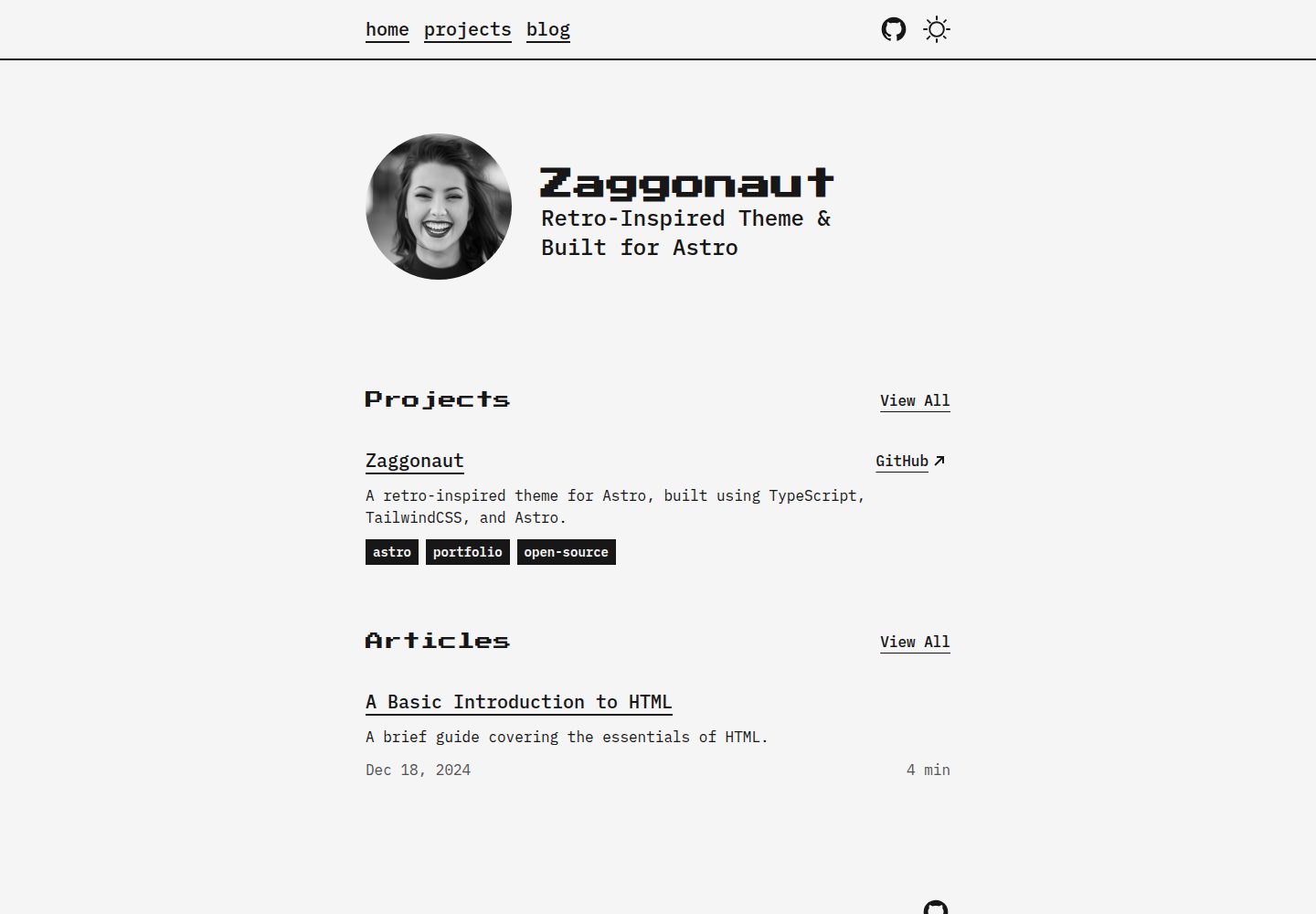
黑白复古视觉风格,基于 Astro 与 TailwindCSS 构建
Astro启动器
zaggonaut — Astro 启动器模板
作者 RATIU5
Zaggonaut 是一个基于 Astro 的黑白复古风格主题,使用 TypeScript 与 TailwindCSS 构建,提供内容集合、明暗模式与可定制配色。
看看你的网站会是什么样
浏览真实页面截图,比较内容排版与手机效果。点击下方缩略图切换,放大查看整页细节。
全部页面与视图 3
截图用于了解视觉与布局,交互效果请以实际项目为准。
采集于 2026-10-03查看来源
值得关注的模板亮点
从已有项目资料中,快速了解它的特点。
使用 Astro 内容集合管理博客文章与项目条目
内置明暗模式切换,配色通过 CSS 变量集中调整
站点元数据、社交链接与文案集中在 configuration.toml 配置
代码使用 TypeScript,内容结构类型安全
模板详细介绍
Zaggonaut 是 RATIU5 为 Astro 开发的复古风格主题,采用黑白配色,代码使用 TypeScript 与 TailwindCSS 编写。它属于启动器类模板,适合直接作为个人站点或作品集项目的起点。
主题通过 Astro 内容集合管理博客文章与项目条目,两者均为带 frontmatter 的 Markdown 文件,站点元数据、社交链接与文案集中在 content/configuration.toml 中配置。配色在 src/styles/global.css 中通过 Tailwind CSS 与一组 CSS 变量定义,可分别调整明暗模式下的主色、弱化色与强调色。
功能方面,主题内置明暗模式切换、响应式布局与类型安全的内容结构,并声明对 SEO 友好。README 提到当前仅支持 pnpm 作为包管理器,因为 npm 会出现 peer-dependency 冲突;README 中关于 Astro 版本与 Lighthouse 分数的表述属于项目自述,未在依赖清单中逐项核对。
Astro启动器
适合你的项目吗?
适用场景
- 搭建个人博客并发布 Markdown 格式文章
- 展示个人项目或作品集页面
- 作为 Astro 项目的起始模板进行二次开发
- 需要明暗模式切换与可定制配色的站点
适合人群
- 偏好黑白复古视觉风格的开发者
- 使用 Astro 与 TailwindCSS 技术栈的前端开发者
- 希望通过 Markdown 与内容集合管理内容的个人站点作者
- 需要可定制配色与明暗模式的模板使用者
上手与定制指南
结合仓库当前版本的说明,按下面的资料检查内容、配置与运行要求。
- 1
可使用 pnpm create astro@latest --template RATIU5/zaggonaut 创建项目
- 2
README 说明当前仅支持 pnpm,npm 会出现 peer-dependency 冲突
- 3
站点配置位于 content/configuration.toml,博客与项目分别放在 content/blogs/ 与 content/projects/
- 4
配色在 src/styles/global.css 中通过 CSS 变量调整
- 5
演示图片、字体、图标等第三方素材需按各自许可单独核对
授权与来源资料
使用条件与限制
免费使用 · 保留许可声明本次收录的是公开仓库中采用 MIT 许可的免费版本;免费范围为该版本代码,不代表外部服务或第三方素材免费。
使用时需要遵守
- 允许免费使用、修改、商用和分发该版本代码。
- 分发代码副本或实质性部分时,保留原作者版权声明和完整 MIT 许可声明。
- 代码按现状提供;担保与责任限制以原许可证及适用法律为准。
额外费用与待核对事项
- 项目当前仅支持使用 pnpm 作为包管理器,因为 npm 会出现 peer-dependency 冲突;使用 npm 或 yarn 等其他包管理器可能无法正常安装依赖。
- 演示图片、字体、图标及其他第三方素材需按各自许可核对,不能仅凭代码的 MIT 许可判断。
- 域名、托管、数据库、支付或 AI 等外部服务可能另外收费。
查看原文依据
Permission is hereby granted, free of charge
许可证原文
https://github.com/RATIU5/zaggonaut/blob/main/LICENSE.mdhttps://github.com/RATIU5/zaggonaut/blob/main/README.mdCurrently, `pnpm` is the only supported package manager due to `npm` throwing peer-dependency conflicts.
README 原文
DeepSeek 根据仓库许可证和 README 整理 ·2026-10-03。结果仅覆盖已读取资料,依赖、图片、字体及后续条款变更以各自原文为准。
项目核对记录与介绍依据
模板资料
- 来源平台
- Astro Themes
- 资料与维护参考分
- 资料较完整 · 87 / 100
- 技术栈
- Astro
- 网站类型
- 启动器
这个分数如何计算
本站按许可资料(最高30分)、演示链接(12分)、预览图(10分)、Star数(15分)、记录的维护时间(15分)、描述完整度(8分)、功能记录(5分)和分类资料(5分)计算。它不是代码、安全或性能测试,也不是 Google 评分;有链接不代表已实测可用。
这个项目需要核对什么
- 记录的仓库更新时间
- 2026-06-22
- 截图检查日期
- 2026-10-03
已收录演示链接。请用你的内容与屏幕尺寸检查;有演示不代表表单、认证或支付已经可用。
目录记录的主要技术栈是 Astro。请通过依赖清单和锁文件核对实际版本与托管要求。这些说明基于收录资料,不代表代码审计或部署实测。
查看具体选型方法 →介绍的制作与核对状态
介绍由 AI 辅助整理目录与仓库资料。仓库作者不等于这篇介绍的审核者。
审核声明: [email protected] · 2026-10-04
查看当时使用的来源资料
SHA-256: e43872e416dedf7d88619e20cc468bfa552529a6321b25904be08584ee40a422
2026-10-03T16:40:28.096Z
来源文件 / 仓库 Zaggonaut is a retro-inspired black & white theme for Astro, built using TypeScript, TailwindCSS, and of course, Astro. > [!IMPORTANT] > Now using Astro 7! If you are looking for the original Zaggonaut theme, you can find it [on the v1 branch](https://github.com/RATIU5/zaggonaut/tree/v1). ## Getting Started [View the demo](https://zaggonaut.dev) or [view the source code](https://github.com/RATIU5/zaggonaut). Alternatively, you can create a new Astro project with Zaggonaut like this: ```bash # pnpm pnpm create astro@latest --template RATIU5/zaggonaut ``` > [!IMPORTANT] > Currently, `pnpm` is the only supported package manager due to `npm` throwing peer-dependency conflicts. ## Features - Content Collections - Dark & light mode - Customizable colors - 100 / 100 Lighthouse score - Fully accessible - Fully responsive - Type-safe - SEO-friendly ## Customization The entire theme is fully customizable. The theme is setup a specific way to make it easy to customize. ### Colors You can customize the colors of the theme by editing the `src/styles/global.css` file. This file uses Tailwind CSS and CSS variables to customize the colors of the theme. Zaggonaut uses the following CSS variables: - `--color-zag-dark`: The dark color of the theme - `--color-zag-light`: The light color of the theme - `--color-zag-dark-muted`: The dark color of the theme with a slight opacity - `--color-zag-light-muted`: The light color of the theme with a slight opacity - `--color-zag-accent-light`: The light accent color of the theme - `--color-zag-accent-light-muted`: The light accent color of the theme with a slight opacity - `--color-zag-accent-dark`: The dark accent color of the theme - `--color-zag-accent-dark-muted`: The dark accent color of the theme with a slight opacity ### Content Customization 95% of the content you'll want to customize will be located inside the `content` directory. Let's break down the specific files/directories you may want to edit: - `content/configuration.toml`: This file contains the site configuration, such as metadata, social links, and text content. - `content/blogs/`: This directory contains your blog posts. Each post is a Markdown file with metadata in the frontmatter at the top. - `content/projects/`: This directory contains your projects. Each project is a Markdown file also with metadata in the frontmatter. ## Ready To Try? Check out [the theme website](https://zaggonaut.dev) to give it a spin!
看看同类模板
对比同技术栈与用途的模板,找到更适合的视觉与内容结构。

astrowind
⭕️ AstroWind: A free template using Astro v7 and Tailwind CSS v4. Astro starter theme.
Astro · 博客
accessible-astro-starter
Accessible Astro Starter 是一个以无障碍为核心理念的 Astro 6 启动模板,由 incluud 团队维护。
Astro · 博客

astro-erudite
An opinionated, unstyled static blogging template built with Astro and native CSS.
Astro · 作品集

astro-shopify
astro-shopify 是一个面向开发者的轻量级电商启动模板,用于构建基于 Shopify 的无头店面。
Astro · 电商

brutal
A neobrutalism Astro starter theme
Astro · 启动器

qwind
⭕️ Qwind: A template to make your website using Qwik + Tailwind CSS.
Astro · 工具站