README 称其为完整应用而非模板,用户只需提供数据
Next.jsReact后台
nextjs-windmill-ui — Next.js 后台模板
作者 restinbeat
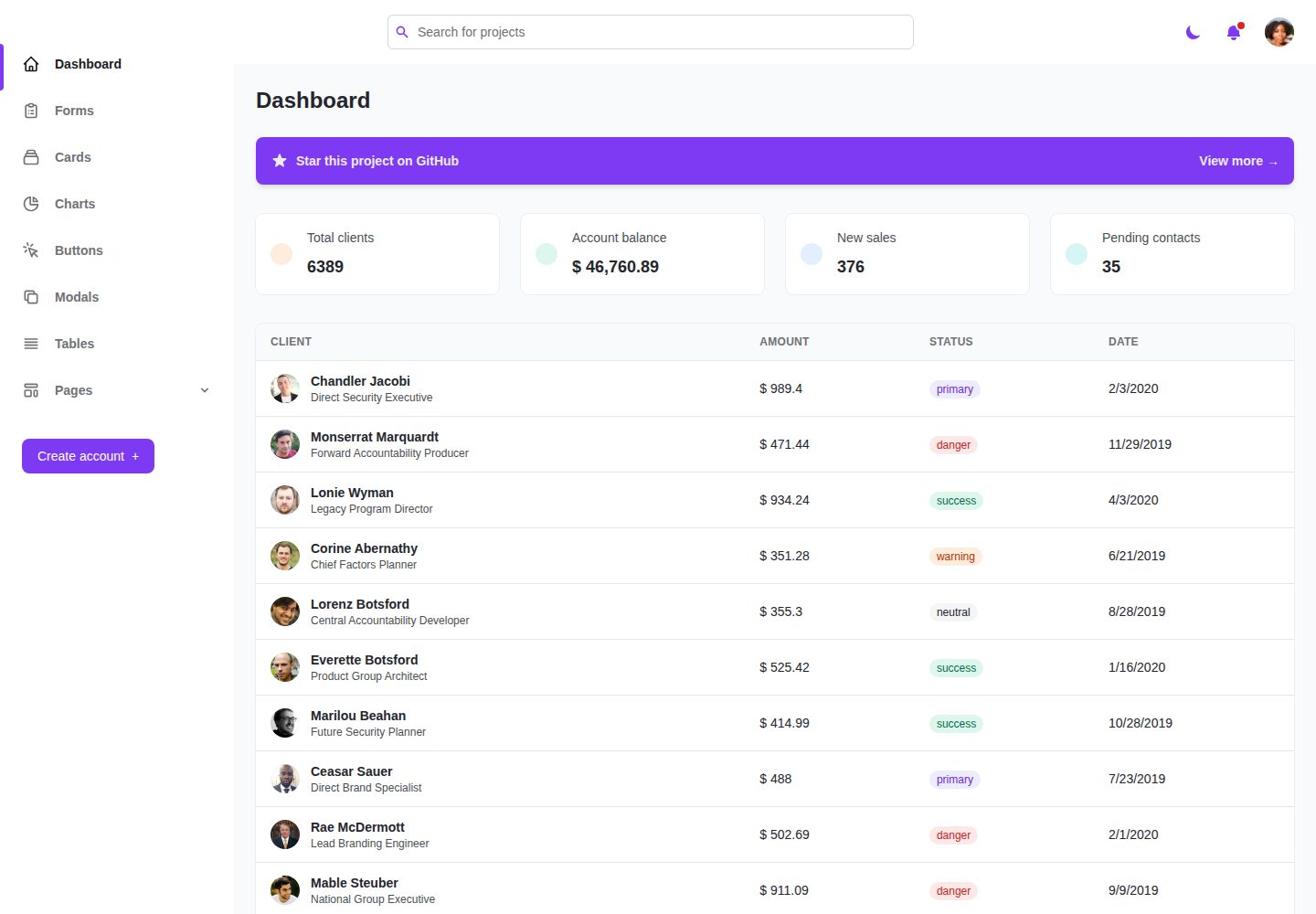
基于 Next.js 与 TypeScript 的 Windmill 仪表盘应用,集成 Windmill React UI、Tailwind CSS、Heroicons 与 Chart.js,README 称其为完整应用而非模板。
看看你的网站会是什么样
浏览真实页面截图,比较内容排版与手机效果。点击下方缩略图切换,放大查看整页细节。
全部页面与视图 2
截图用于了解视觉与布局,交互效果请以实际项目为准。
采集于 2026-10-14查看来源
值得关注的模板亮点
从已有项目资料中,快速了解它的特点。
通过屏幕阅读器开发,支持焦点陷阱与键盘导航
支持暗色主题,可按主题加载不同图片
使用 Tailwind CSS、Windmill React UI、Heroicons 与 Chart.js
组件与容器集中在 example 文件夹,侧边栏路由在 routes/sidebar.tsx 配置
模板详细介绍
该项目是 Windmill Dashboard 的 Next.js + TypeScript 版本,README 说明它源自 @estevanmaito 的原始 React 项目,并参考了 @neutralboy 的 TypeScript 版本与 @Aldhanekaa 的 Next.js 版本。作者明确表示这不是模板,而是构建在 React 之上的完整应用,用户只需提供数据即可使用。
功能方面,README 列出:通过屏幕阅读器开发的可访问性支持、焦点陷阱与键盘导航、暗色主题(可按主题加载不同图片)、多个自定义组件、代码分割、Tailwind CSS、Windmill React UI、Heroicons 与 Chart.js。所有组件和容器存放在 example 文件夹中。
路由配置上,默认重定向在 next.config.js 中修改,侧边栏菜单在 routes/sidebar.tsx 中配置,菜单项需要 path、name、icon 三个属性,下拉菜单项不需要 path 但需要 routes 数组。项目使用 create-next-app 引导,依赖通过 npm install 或 yarn install 安装,开发服务器通过 npm run dev 或 yarn dev 启动,默认访问 localhost:3000。README 未提供数据接入方式、后端接口约定或生产环境部署以外的具体配置说明。
Next.js后台
适合你的项目吗?
适用场景
- 需要一个带侧边栏导航与图表展示的 Next.js 仪表盘界面
- 希望基于 Windmill React UI 组件库搭建管理后台页面
- 需要暗色主题与键盘导航、屏幕阅读器可访问性支持的界面
- 想参考 Next.js + TypeScript 的仪表盘路由与重定向配置方式
适合人群
- 使用 Next.js 与 TypeScript 开发管理后台的开发者
- 需要可访问性支持(屏幕阅读器、焦点陷阱、键盘导航)的项目
- 希望复用 Windmill React UI 组件与 Tailwind CSS 样式的团队
- 需要图表展示(Chart.js)与暗色主题的仪表盘场景
上手与定制指南
结合仓库当前版本的说明,按下面的资料检查内容、配置与运行要求。
- 1
安装依赖:npm install 或 yarn install
- 2
启动开发服务器:npm run dev 或 yarn dev,默认访问 http://localhost:3000
- 3
修改 pages/index.tsx 编辑页面,文件保存后自动更新
- 4
默认重定向在 next.config.js 中配置,侧边栏菜单在 routes/sidebar.tsx 中配置
- 5
部署可使用 Vercel,README 指向 Next.js 部署文档
授权与来源资料
使用条件与限制
免费使用 · 保留许可声明本次收录的是公开仓库中采用 MIT 许可的免费版本;免费范围为该版本代码,不代表外部服务或第三方素材免费。
使用时需要遵守
- 允许免费使用、修改、商用和分发该版本代码。
- 分发代码副本或实质性部分时,保留原作者版权声明和完整 MIT 许可声明。
- 代码按现状提供;担保与责任限制以原许可证及适用法律为准。
额外费用与待核对事项
- 演示图片、字体、图标及其他第三方素材需按各自许可核对,不能仅凭代码的 MIT 许可判断。
- 域名、托管、数据库、支付或 AI 等外部服务可能另外收费。
查看原文依据
https://github.com/restinbeat/nextjs-windmill-ui/blob/main/LICENSEhttps://github.com/restinbeat/nextjs-windmill-ui/blob/main/README.mdPermission is hereby granted, free of charge
许可证原文
DeepSeek 根据仓库许可证和 README 整理 ·2026-10-14。结果仅覆盖已读取资料,依赖、图片、字体及后续条款变更以各自原文为准。
项目核对记录与介绍依据
模板资料
- 来源平台
- GitHub
- 资料与维护参考分
- 资料一般 · 57 / 100
- 技术栈
- Next.js · React
- 网站类型
- 后台
这个分数如何计算
本站按许可资料(最高30分)、演示链接(12分)、预览图(10分)、Star数(15分)、记录的维护时间(15分)、描述完整度(8分)、功能记录(5分)和分类资料(5分)计算。它不是代码、安全或性能测试,也不是 Google 评分;有链接不代表已实测可用。
这个项目需要核对什么
- 记录的仓库更新时间
- 2024-09-05
- 截图检查日期
- 2026-10-14
已收录演示链接。请用你的内容与屏幕尺寸检查;有演示不代表表单、认证或支付已经可用。
目录记录的主要技术栈是 Next.js。请通过依赖清单和锁文件核对实际版本与托管要求。这些说明基于收录资料,不代表代码审计或部署实测。
查看具体选型方法 →介绍的制作与核对状态
介绍由 AI 辅助整理目录与仓库资料。仓库作者不等于这篇介绍的审核者。
审核声明: codex-user-requested-batch-review-20261017 · 2026-10-16
查看当时使用的来源资料
SHA-256: b6f9139ce7f484d639bb848b9acca08ce53097e08c9f86b296397dd294ba5187
2026-10-14T02:58:29.233Z
来源文件 / 仓库<p align="center">
<h1>Windmill Dashboard Next.js Typescript</h1>
<a href="https://windmill-dashboard-nextjs-typescript.vercel.app/example">
<img alt="Windmill Dashboard React" width="600" src=".github/windmill-dashboard-thumbnail.jpg">
</a><br>
</p>
See the [Original Project by @estevanmaito](https://github.com/estevanmaito/windmill-dashboard-react/)
With help from other contributors :
- [Typescript version by @neutralboy](https://github.com/neutralboy/windmill-dashboard-react-ts)
- [Nextjs version by @Aldhanekaa](https://github.com/Aldhanekaa/windmill-dashboard-nextjs)
🚀 [See it live](https://windmill-dashboard-nextjs-typescript.vercel.app/example)
This is not a template. This is a complete application, built on top of React, with all tiny details taken care of so you just need to bring the data to feed it.
Accessibility is a priority in my projects and I think it should be in yours too, so this was developed listening to real screen readers, focus traps and keyboard navigation are available everywhere.
## 📦 Features
- 🦮 Throughly accessible (developed using screen readers)
- 🌗 Dark theme enabled (load even different images based on theme)
- 🧩 Multiple (custom) components
- ⚡ Code splitting
- Tailwind CSS
- [Windmill React UI](https://windmillui.com/react-ui)
- Heroicons
- Chart.js
## 📚 Docs
### General components
Windmill Dashboard React is built on top of [Windmill React UI](https://windmillui.com/react-ui). You will find the documentation for every small component there.
### Example Boilerplate
All components and containers are saved in folder [example](example)
### Routing
Change default redirecting when hit the `/` or `home` in file [next.config.js](next.config.js)
```js
async redirects() {
return [
{
source: '/',
destination: '/example/login',
permanent: false,
},
]
}
```
#### Sidebar routes
To configure sidebar menus, see file ([routes/sidebar.tsx](routes/sidebar.tsx)).
These are the routes that will show in the sidebar. They expect three properties:
- `path`: the destination;
- `name`: the name to be shown;
- `icon`: an icon to illustrate the item
Item that are used as dropdowns, like the Pages option, don't need a `path`, but expect a `routes` array of objects with `path` and `name`:
```js
// sidebar.js
{
path: '/example/tables',
icon: 'TablesIcon',
name: 'Tables',
},
{
icon: 'PagesIcon', // <-- this is used as a submenu, so no path
name: 'Pages',
routes: [
// submenu
{
path: '/example/login',
name: 'Login', // <-- these don't have icons
},
{
path: '/example/create-account',
name: 'Create account',
},
```
This is a [Next.js](https://nextjs.org/) project bootstrapped with [`create-next-app`](https://github.com/vercel/next.js/tree/canary/packages/create-next-app).
## Getting Started
First, install dependencies :
```bash
npm install
# or
yarn install
```
then, you can run the development server:
```bash
npm run dev
# or
yarn dev
```
Open [http://localhost:3000](http://localhost:3000) with your browser to see the result.
You can start editing the page by modifying `pages/index.tsx`. The page auto-updates as you edit the file.
[API routes](https://nextjs.org/docs/api-routes/introduction) can be accessed on [http://localhost:3000/api/hello](http://localhost:3000/api/hello). This endpoint can be edited in `pages/api/hello.ts`.
The `pages/api` directory is mapped to `/api/*`. Files in this directory are treated as [API routes](https://nextjs.org/docs/api-routes/introduction) instead of React pages.
## Learn More
To learn more about Next.js, take a look at the following resources:
- [Next.js Documentation](https://nextjs.org/docs) - learn about Next.js features and API.
- [Learn Next.js](https://nextjs.org/learn) - an interactive Next.js tutorial.
You can check out [the Next.js GitHub repository](https://github.com/vercel/next.js/) - your feedback and contributions are welcome!
## Deploy on Vercel
The easiest way to deploy your Next.js app is to use the [Vercel Platform](https://vercel.com/new?utm_medium=default-template&filter=next.js&utm_source=create-next-app&utm_campaign=create-next-app-readme) from the creators of Next.js.
Check out our [Next.js deployment documentation](https://nextjs.org/docs/deployment) for more details.
看看同类模板
对比同技术栈与用途的模板,找到更适合的视觉与内容结构。

next-shadcn-dashboard-starter
Free, open source, AI-friendly admin dashboard template built with Next.js 16, shadcn/ui, Tailwind CSS, and Ty…
Next.js · 后台

Studio Admin · Radix UI
Modern Admin Dashboard Template built with Shadcn UI and Next.js 16
Next.js · 后台

free-nextjs-admin-dashboard
TailAdmin is a Next.js and Tailwind CSS free, open-source admin dashboard template. Provides developers with t…
Next.js · 后台

materio-mui-nextjs-admin-template-free
An enterprise-grade Next.js admin dashboard template. Made with developer experience first: Next.js v14 (App R…
Next.js · 后台
nextjs-postgres-nextauth-tailwindcss-template
Admin dashboard template.
Next.js · 后台

shadcn-dashboard-landing-template
Accelerate your development with a sleek, open-source admin dashboard and landing page built on Vite-React, Ne…
Next.js · 后台