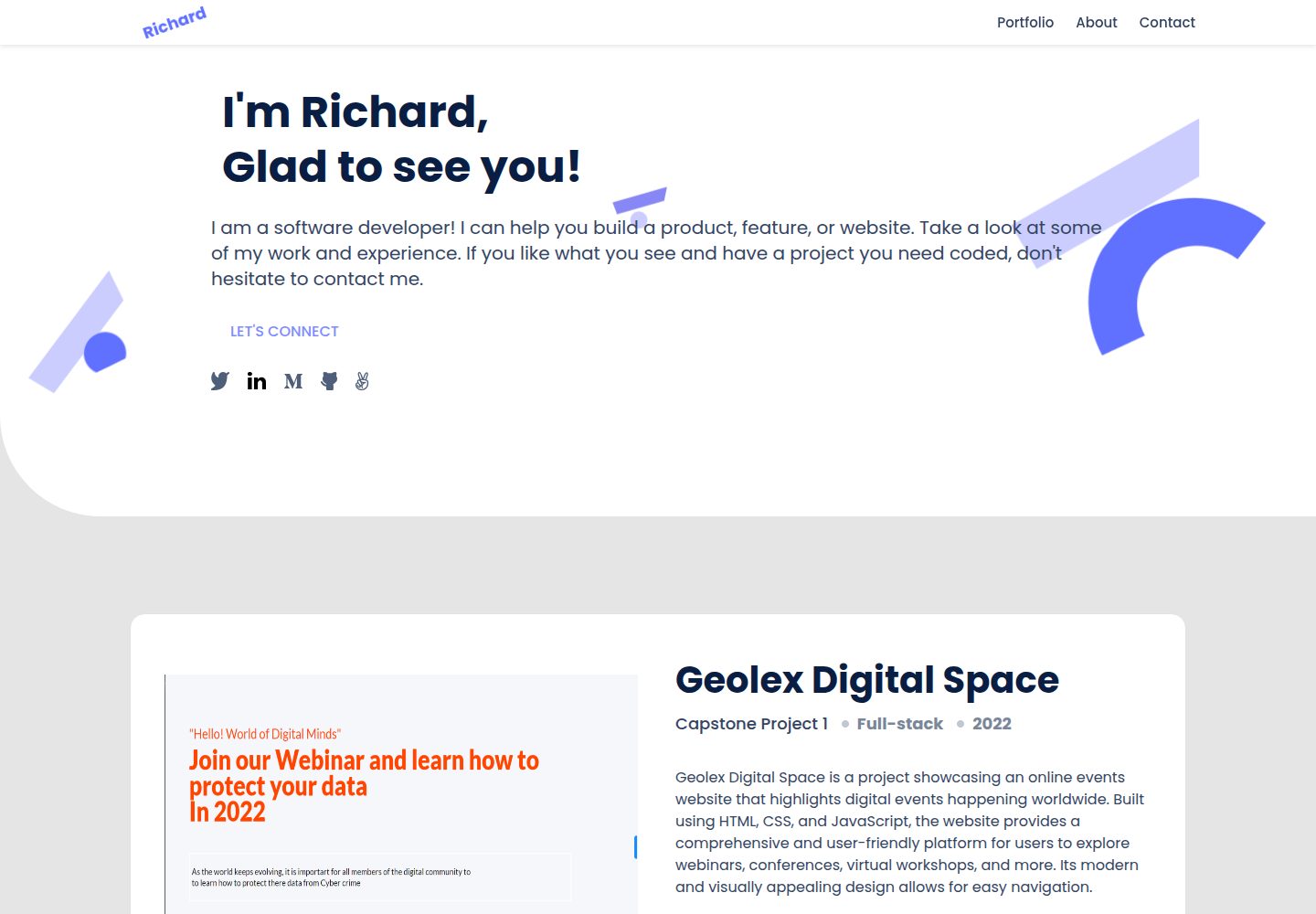
按 Figma 设计稿实现的静态作品集页面,使用 HTML、CSS 与 JavaScript
HTML作品集
my-portfolio — HTML 作品集模板
作者 RichardChileya
基于 Figma 设计稿实现的个人作品集静态模板,使用 HTML、CSS 与 JavaScript 构建,包含页头、作品展示、关于我和联系表单等区块。
看看你的网站会是什么样
浏览真实页面截图,比较内容排版与手机效果。点击下方缩略图切换,放大查看整页细节。
全部页面与视图 2
截图用于了解视觉与布局,交互效果请以实际项目为准。
采集于 2026-10-02查看来源
值得关注的模板亮点
从已有项目资料中,快速了解它的特点。
页面包含页头与主标题、作品展示、关于我、联系表单四个主要区块
作品区按 README 记录放置了 3 个作品条目,当前为待替换的占位内容
仓库配置了 HTML 与 CSS 的 linter,并提供 .gitignore 与说明文档
提供 GitHub Pages 在线演示,可直接查看页面效果
采用 MIT 许可,可免费使用、修改和分发该版本代码
模板详细介绍
这是一个个人作品集网页模板,作者按照 Figma 设计稿用 HTML、CSS 和 JavaScript 编写,仓库描述中提到使用 Modal 框架进行动态编码。页面结构按区块推进:先是页头与主标题区,接着是作品展示区(README 记录添加了 3 个作品区块),随后是「关于我」区块,最后是与 @jash-debug 协作完成的联系表单区块,包含 HTML 结构与 CSS 样式。
模板本身是作者个人作品集的骨架,README 说明后续会把自己实际完成的项目补充进去,因此当前作品区展示的是占位内容而非真实项目。仓库配有 HTML 与 CSS 的 linter 配置、.gitignore 和 README,并提供 GitHub Pages 在线演示。
使用限制方面:项目为纯静态页面,没有后端或数据层;联系表单只有前端结构与样式,README 未说明提交逻辑或服务端处理;README 中给出的克隆命令指向 portfolioskeleton1 仓库,与当前仓库名不一致,本地获取代码时需以实际仓库地址为准。
HTML作品集
适合你的项目吗?
适用场景
- 个人开发者搭建自己的作品集页面时作为结构参考或起点
- 前端初学者练习 HTML、CSS 与 JavaScript 布局和区块划分
- 需要按设计稿还原页面的练习场景
- 作为静态站点部署到 GitHub Pages 的示例
适合人群
- 希望快速获得作品集页面骨架的个人开发者
- 正在学习 HTML 与 CSS 的前端入门者
- 需要静态页面模板并自行替换内容的人
- 想参考 Figma 设计稿转 HTML 实现方式的开发者
上手与定制指南
结合仓库当前版本的说明,按下面的资料检查内容、配置与运行要求。
- 1
需要 Node.js 与 npm 环境,以及 VS Code 或其他代码编辑器
- 2
README 中的克隆命令指向 portfolioskeleton1 仓库,请改用当前仓库地址克隆
- 3
进入项目目录后用 code . 在 VS Code 中打开
- 4
可用 npx hint . 与 npx stylelint 运行代码检查
- 5
联系表单仅包含前端结构与样式,提交处理需自行实现
授权与来源资料
使用条件与限制
免费使用 · 保留许可声明本次收录的是公开仓库中采用 MIT 许可的免费版本;免费范围为该版本代码,不代表外部服务或第三方素材免费。
使用时需要遵守
- 允许免费使用、修改、商用和分发该版本代码。
- 分发代码副本或实质性部分时,保留原作者版权声明和完整 MIT 许可声明。
- 代码按现状提供;担保与责任限制以原许可证及适用法律为准。
额外费用与待核对事项
- 演示图片、字体、图标及其他第三方素材需按各自许可核对,不能仅凭代码的 MIT 许可判断。
- 域名、托管、数据库、支付或 AI 等外部服务可能另外收费。
查看原文依据
https://github.com/RichardChileya/my-portfolio/blob/main/LICENSEhttps://github.com/RichardChileya/my-portfolio/blob/main/README.mdPermission is hereby granted, free of charge
许可证原文
DeepSeek 根据仓库许可证和 README 整理 ·2026-10-02。结果仅覆盖已读取资料,依赖、图片、字体及后续条款变更以各自原文为准。
项目核对记录与介绍依据
模板资料
- 来源平台
- GitHub
- 资料与维护参考分
- 资料一般 · 68 / 100
- 技术栈
- HTML
- 网站类型
- 作品集
这个分数如何计算
本站按许可资料(最高30分)、演示链接(12分)、预览图(10分)、Star数(15分)、记录的维护时间(15分)、描述完整度(8分)、功能记录(5分)和分类资料(5分)计算。它不是代码、安全或性能测试,也不是 Google 评分;有链接不代表已实测可用。
这个项目需要核对什么
- 记录的仓库更新时间
- 2023-04-07
- 截图检查日期
- 2026-10-02
已收录演示链接。请用你的内容与屏幕尺寸检查;有演示不代表表单、认证或支付已经可用。
目录记录的主要技术栈是 HTML。请通过依赖清单和锁文件核对实际版本与托管要求。这些说明基于收录资料,不代表代码审计或部署实测。
查看具体选型方法 →介绍的制作与核对状态
介绍由 AI 辅助整理目录与仓库资料。仓库作者不等于这篇介绍的审核者。
已完成服务器许可规则与 AI 来源核对;未经过人工编辑审核。
查看当时使用的来源资料
SHA-256: 188b0c1e69072ced1b2ba2fd805bdaebee180ef6c1a0339aef41ae66c93bb621
2026-10-02T21:29:44.867Z
来源文件 / 仓库This is project is my based on building my personal Portfolio Template following Figma Design Template.
This project was built with HTML-CSS-JAVASCRIPT using dynamic coding based on Modal framework.
As a template. this project with other projects that i work on to complete my portfolio.
# Project Name:My Portfolio Project
## Section 1: Header and Headline Section
> header and and headline section
> Created new branch according to GitHub flow rules
> Added a .gitignore file
> setup a linters for html and css and made sure that files not relevant are ignored by git.
> Added a descriptive README file
> Added a header and headline section in the index.html file of the project
> Added css styling to the html sections
> 
## Section 2: Work Section
## In this section we:
worked on the work section on the page
added 3 work sections on the design page
added an about me section
Updated the readme file as the code has been updated
## Section 4: Contact Me Sectin
## in this section we collaborated with @jash-debug:
we added a contact section
we added an html structure for the contact form section
we added css style for the form section
added an about me section
## Built With
- HTML and CSS
- Visual Studio Code -Electron framework
- Technologies used
## Live Demo (if available)
[Live Demo Link](https://richardchileya.github.io/my-portfolio/)
## Getting Started
## Getting Started
**This project include linters for HTML,CSS, and Open Source Document
.**
To get a local copy up and running follow these simple example steps.
### Prerequisites
Node package Manager(NPM)
Follow set up instructions from Node Official Website https://nodejs.org/en/download/
Text Editor: VS-Code or any other Code editor
### Setup
To get a local copy up and running follow these simple example steps.
-Clone this repository with
git clone https://github.com/RichardChileya/portfolioskeleton1.git using your terminal or command line.
-Change to the project directory by entering :
cd The-portfolioskeleton1 in the terminal.
-run code . to open it in vscode
### Install
### Usage
npx hint .
npx stylelint "\*_/_.{css,scss}"
### Run tests
### Deployment
## Authors
👤 **Richard W.K Chileya**
- GitHub: [@richardchileya](https://github.com/richardchileya)
- Twitter: [@Richard Chileya](https://twitter.com/richardchileya)
- LinkedIn: [Richard Chileya](https://linkedin.com/in/richardchileya)
Contributions, issues, and feature requests are welcome!
## Contributors
@jash-debug
Feel free to check the [issues page](https://github.com/RichardChileya/portfolioskeleton1/issues).
## Show your support
Give a ⭐️ if you like this project!
## Acknowledgments
- Thanks to my coding partners floring and Justice for the help rendered when coding this project
## 📝 License
This project is [MIT](/LICENSE) licensed.
看看同类模板
对比同技术栈与用途的模板,找到更适合的视觉与内容结构。

simplefolio
⚡️ A minimal portfolio template for Developers
HTML · 作品集

Freelancer
Freelancer 是 Start Bootstrap 出品的单页作品集模板,专为自由职业者、设计师和小型工作室设计。 页面结构清晰,包含多个内容区块、响应式作品集网格,每个作品项目配有模态窗口展示详情。
HTML · 作品集

Resume
Resume 是 Start Bootstrap 推出的简历与 CV 主题,基于 Bootstrap 构建,采用固定侧边栏加内容区块的结构。
HTML · 作品集

Creative
Creative 是 Start Bootstrap 团队维护的一款单页营销模板,定位明确:为创意机构或产品服务提供一个以作品展示和行动号召为核心的落地页。
HTML · 企业官网

Grayscale
Grayscale 是 Start Bootstrap 出品的深色系单页 HTML 模板,基于 Bootstrap 构建。 它的视觉重心放在大尺寸首屏和清晰的内容分区上,整体氛围偏暗,适合摄影、活动或品牌叙事类网站。
HTML · 企业官网

startbootstrap-stylish-portfolio
Stylish Portfolio 是 Start Bootstrap 维护的单页作品集主题,基于 Bootstrap 构建,采用多个内容区块加离屏导航菜单的结构。
HTML · 作品集