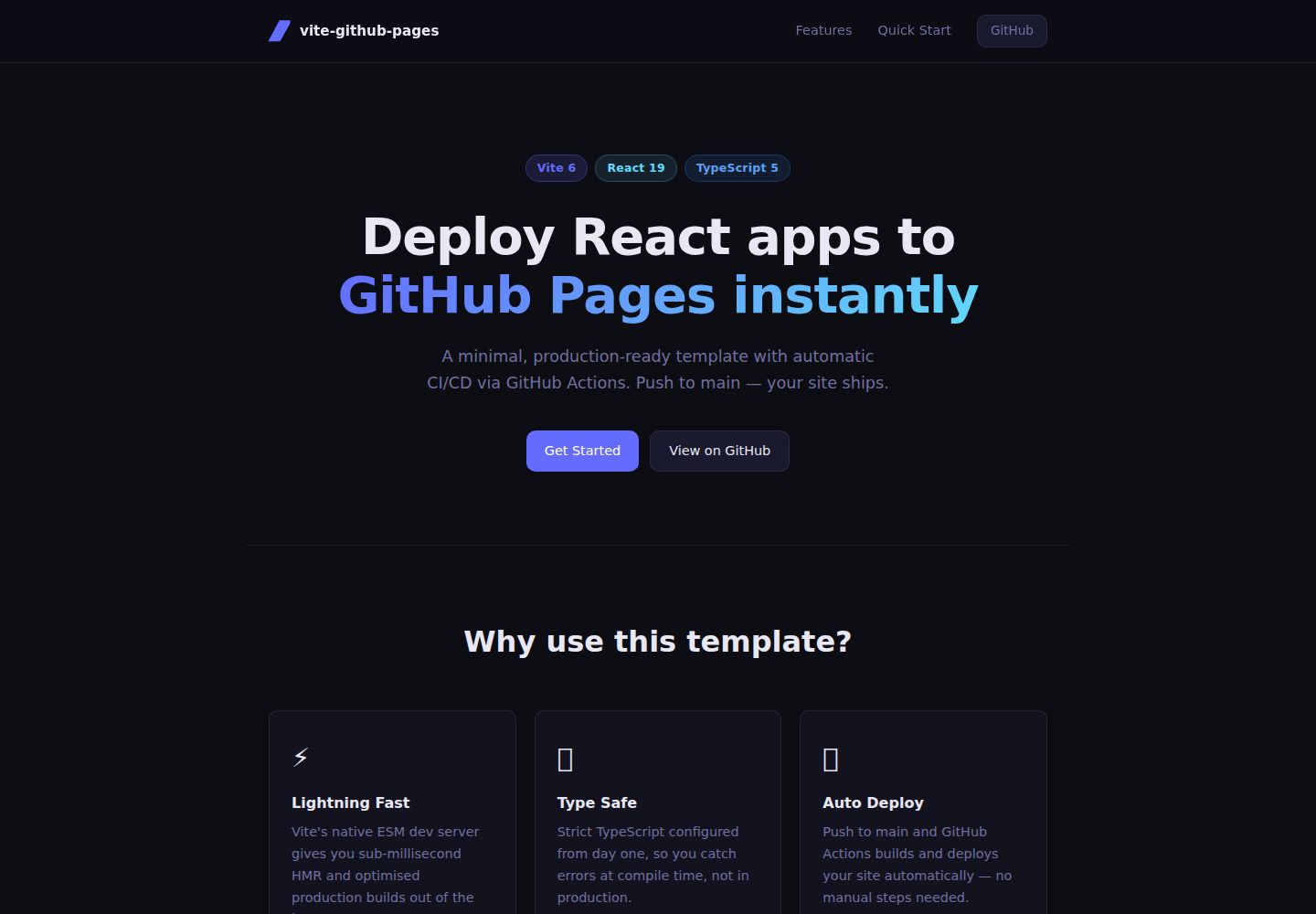
基于 Vite 构建与开发服务器,README 称支持原生 ESM 的即时 HMR
ViteReact启动器
vite-github-pages-template — Vite 启动器模板
作者 RickBr0wn
一个用于把 React 应用部署到 GitHub Pages 的 Vite 模板,内置 GitHub Actions 自动构建与发布流程。
看看你的网站会是什么样
浏览真实页面截图,比较内容排版与手机效果。点击下方缩略图切换,放大查看整页细节。
全部页面与视图 2
截图用于了解视觉与布局,交互效果请以实际项目为准。
采集于 2026-10-14查看来源
值得关注的模板亮点
从已有项目资料中,快速了解它的特点。
使用严格模式的 TypeScript 配置
包含 .github/workflows/main.yml,推送到 main 分支后由 GitHub Actions 自动构建并部署到 GitHub Pages
项目结构简洁,源码集中在 src 目录,入口为 main.tsx,根组件为 App.tsx
README 说明部署前需在 vite.config.ts 中把 base 改为仓库名
模板详细介绍
该模板基于 Vite、React 与 TypeScript,目标是把 React 单页应用发布到 GitHub Pages。README 说明它提供 Vite 开发服务器、严格 TypeScript 配置,以及一条在推送到 main 分支后自动构建并部署的 GitHub Actions 工作流。
使用流程为:在 GitHub 上通过 “Use this template” 创建仓库,克隆后修改 vite.config.ts 中的 base 为仓库名,在仓库 Settings → Pages 中把构建来源设为 GitHub Actions,然后安装依赖并推送。站点地址形如 https://<用户名>.github.io/<仓库名>/。本地开发命令为 npm run dev、npm run build 和 npm run preview。
README 未说明路由方式、自定义域名、多环境部署或构建产物的具体配置,也未提供依赖清单之外的工具版本要求,这些需要查看仓库中的 REQUIREMENTS.md 等文件确认。README 中“production-ready”“minimal footprint”等表述属于项目自述,未给出可核实的依据。
ViteReact启动器
适合你的项目吗?
适用场景
- 为 React 单页应用搭建可发布到 GitHub Pages 的起步项目
- 希望用 GitHub Actions 在推送 main 分支后自动构建并部署静态站点
- 需要一个包含 Vite、React、TypeScript 基础配置的最小项目骨架
适合人群
- 使用 GitHub 托管代码并计划用 GitHub Pages 发布 React 应用的开发者
- 接受 Vite 与 TypeScript 工具链、希望从模板快速起步的团队
- 需要参考 GitHub Actions 部署静态站点工作流配置的用户
上手与定制指南
结合仓库当前版本的说明,按下面的资料检查内容、配置与运行要求。
- 1
通过 GitHub 的 “Use this template” 创建新仓库后克隆到本地
- 2
修改 vite.config.ts 中的 base 值,使其与仓库名一致
- 3
在仓库 Settings → Pages 中把 Build and deployment 的来源设为 GitHub Actions
- 4
执行 npm install 后提交并推送到 main 分支,由工作流自动构建部署
- 5
本地开发使用 npm run dev,构建使用 npm run build,预览构建产物使用 npm run preview
授权与来源资料
使用条件与限制
免费使用 · 保留许可声明本次收录的是公开仓库中采用 MIT 许可的免费版本;免费范围为该版本代码,不代表外部服务或第三方素材免费。
使用时需要遵守
- 允许免费使用、修改、商用和分发该版本代码。
- 分发代码副本或实质性部分时,保留原作者版权声明和完整 MIT 许可声明。
- 代码按现状提供;担保与责任限制以原许可证及适用法律为准。
额外费用与待核对事项
- 演示图片、字体、图标及其他第三方素材需按各自许可核对,不能仅凭代码的 MIT 许可判断。
- 域名、托管、数据库、支付或 AI 等外部服务可能另外收费。
- 使用前需在 GitHub 上通过 “Use this template” 从该仓库创建自己的新仓库,不能直接作为成品站点使用。
- 部署前必须修改 vite.config.ts 中的 base 值,使其与你的仓库名一致,否则资源路径会出错。
- 需要在仓库 Settings → Pages 中把 Build and deployment 的来源手动设置为 GitHub Actions,自动部署才能生效。
- 站点依赖 GitHub Actions 与 GitHub Pages 服务,需使用 GitHub 账号并推送代码到 main 分支才会自动构建部署。
查看原文依据
Permission is hereby granted, free of charge
许可证原文
Click **"Use this template"** on the GitHub repository page to create a new repository from this one.
README 原文
Open `vite.config.ts` and change the `base` value to match your repository name:
README 原文
3. Under **Build and deployment**, set the source to **GitHub Actions**
README 原文
https://github.com/RickBr0wn/vite-github-pages-template/blob/main/LICENSEhttps://github.com/RickBr0wn/vite-github-pages-template/blob/main/README.mdGitHub Actions will build and deploy your site automatically. Your site will be live at:
README 原文
DeepSeek 根据仓库许可证和 README 整理 ·2026-10-14。结果仅覆盖已读取资料,依赖、图片、字体及后续条款变更以各自原文为准。
项目核对记录与介绍依据
模板资料
- 来源平台
- GitHub
- 资料与维护参考分
- 资料较完整 · 88 / 100
- 技术栈
- Vite · React
- 网站类型
- 启动器
这个分数如何计算
本站按许可资料(最高30分)、演示链接(12分)、预览图(10分)、Star数(15分)、记录的维护时间(15分)、描述完整度(8分)、功能记录(5分)和分类资料(5分)计算。它不是代码、安全或性能测试,也不是 Google 评分;有链接不代表已实测可用。
这个项目需要核对什么
- 记录的仓库更新时间
- 2026-05-04
- 截图检查日期
- 2026-10-14
已收录演示链接。请用你的内容与屏幕尺寸检查;有演示不代表表单、认证或支付已经可用。
目录记录的主要技术栈是 Vite。请通过依赖清单和锁文件核对实际版本与托管要求。这些说明基于收录资料,不代表代码审计或部署实测。
查看具体选型方法 →介绍的制作与核对状态
介绍由 AI 辅助整理目录与仓库资料。仓库作者不等于这篇介绍的审核者。
审核声明: codex-user-requested-batch-review-20261015 · 2026-10-15
查看当时使用的来源资料
SHA-256: 5e8e1b4e4afa6d98aff7e24d4c2e62b1a4be900eea0f3c5db49284902106bb54
2026-10-14T08:46:33.281Z
来源文件 / 仓库# vite-github-pages-template
> A minimal, production-ready template for deploying React applications to GitHub Pages with automatic CI/CD via GitHub Actions.
[](https://github.com/RickBr0wn/vite-github-pages-template/actions/workflows/main.yml)





## Features
- **Instant HMR** — Vite's native ESM dev server for a fast feedback loop
- **Type safe** — Strict TypeScript configured out of the box
- **Auto deploy** — Push to `main` and GitHub Actions builds and deploys automatically
- **Minimal footprint** — No unnecessary dependencies; easy to extend
## Prerequisites
See [REQUIREMENTS.md](./REQUIREMENTS.md) for a full list of tools and versions required.
## Quick Start
### 1. Use this template
Click **"Use this template"** on the GitHub repository page to create a new repository from this one.
### 2. Clone your new repository
```bash
git clone https://github.com/<your-username>/<your-repo-name>.git
cd <your-repo-name>
```
### 3. Update the base path
Open `vite.config.ts` and change the `base` value to match your repository name:
```ts
// vite.config.ts
export default defineConfig({
base: '/your-repo-name/',
plugins: [react()],
})
```
### 4. Enable GitHub Pages
1. Go to your repository on GitHub
2. Navigate to **Settings → Pages**
3. Under **Build and deployment**, set the source to **GitHub Actions**
### 5. Install dependencies and push
```bash
npm install
git add .
git commit -m "initial commit"
git push origin main
```
GitHub Actions will build and deploy your site automatically. Your site will be live at:
```
https://<your-username>.github.io/<your-repo-name>/
```
## Development
```bash
# Start the dev server
npm run dev
# Build for production
npm run build
# Preview the production build locally
npm run preview
```
## Project Structure
```
├── .github/
│ └── workflows/
│ └── main.yml # GitHub Actions deploy workflow
├── public/
│ ├── screenshot.png
│ └── vite.svg
├── src/
│ ├── App.tsx # Root component
│ ├── main.tsx # Entry point
│ ├── styles.css # Global styles
│ └── vite-env.d.ts # Vite type declarations
├── index.html
├── tsconfig.json
├── tsconfig.node.json
└── vite.config.ts # ← update base here
```
## Tech Stack
| Tool | Version | Purpose |
|------|---------|---------|
| [Vite](https://vitejs.dev) | 6.x | Build tool and dev server |
| [React](https://react.dev) | 19.x | UI library |
| [TypeScript](https://www.typescriptlang.org) | 5.x | Static type checking |
| [GitHub Actions](https://docs.github.com/en/actions) | — | CI/CD pipeline |
## Contributing
Contributions, issues, and feature requests are welcome. Please read [CONTRIBUTING.md](./CONTRIBUTING.md) before opening a pull request.
## License
This project is licensed under the MIT License. See [LICENSE](./LICENSE) for details.
看看同类模板
对比同技术栈与用途的模板,找到更适合的视觉与内容结构。

cove
The Cove Stack: 🏝️ minimal TanStack Start template with Vite+, Better Auth, Drizzle ORM, shadcn/ui
Vite · SaaS

vite-react-boilerplate
A production ready, scalable starter template for Vite + React
Vite · 启动器

vital
Starter template for Vite with React (TypeScript). Supports Tailwind. Vitest and @react/testing-library config…
Vite · 启动器

react-vite-admin
This Starter utilizes React, Recoil, React Query, React Hooks, Typescript, Axios And Vite. 全新技术栈的后台管理系统
Vite · 后台

typescript-react_best_practices-vite_template
<⚡⚛️> Start your React project with Vite following code best practices (TypeScript, Linting, testing, CI/CD…)
Vite · 启动器

cloudflare-starter-kit
Template (boilerplate) repository for scaffolding Cloudflare Workers projects
Vite · 启动器