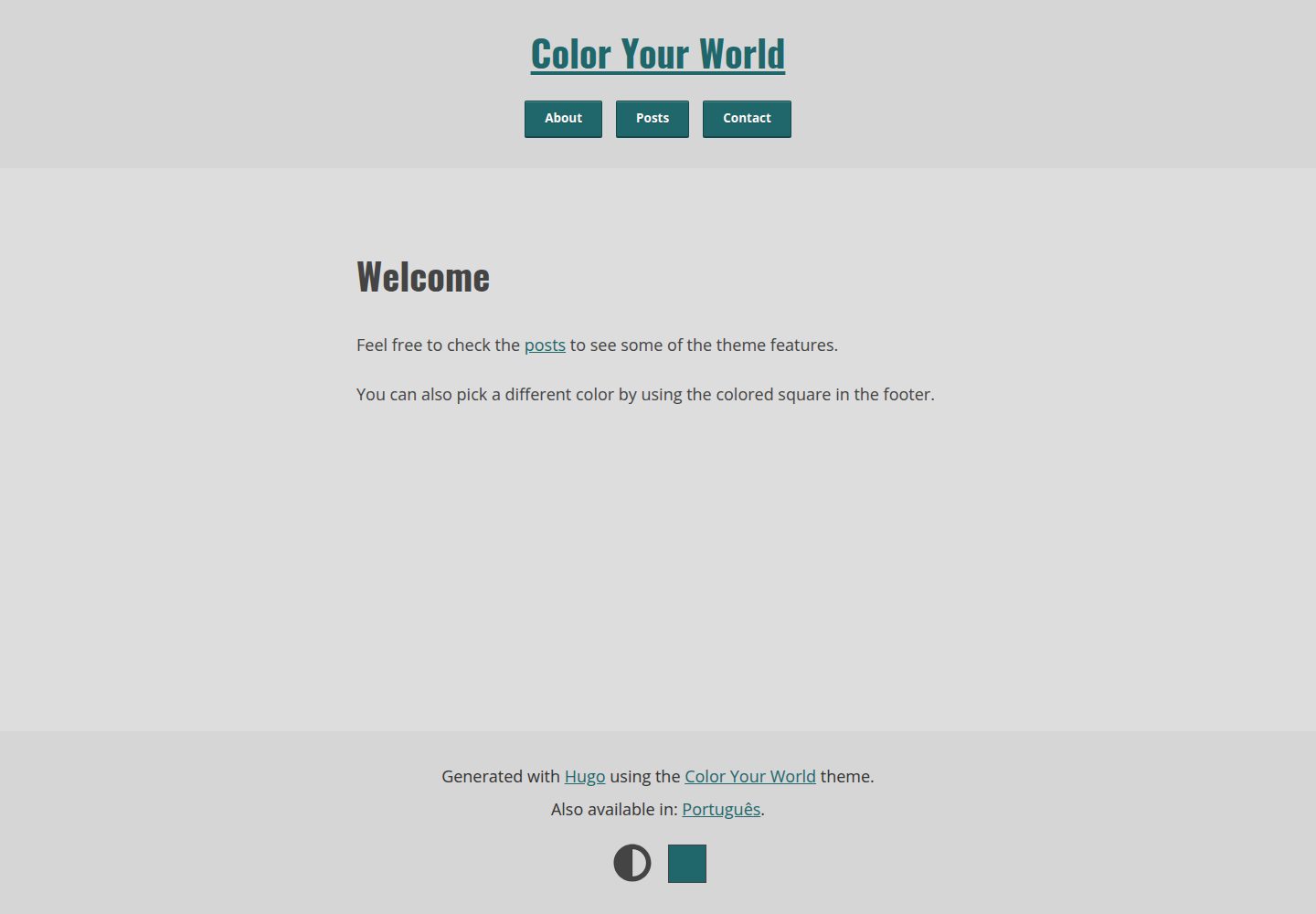
内置 HTML 取色器,访客可在浏览器端切换强调色
Hugo博客
hugo-theme-color-your-world — Hugo 博客模板
作者 rmaguiar
Hugo 极简博客主题,内置 HTML 取色器让访客在浏览器端切换强调色,支持深色/浅色模式。
看看你的网站会是什么样
浏览真实页面截图,比较内容排版与手机效果。点击下方缩略图切换,放大查看整页细节。
全部页面与视图 2
截图用于了解视觉与布局,交互效果请以实际项目为准。
采集于 2026-10-02查看来源
值得关注的模板亮点
从已有项目资料中,快速了解它的特点。
深色与浅色两套配色,默认模式与强调色可在配置中指定
通过 Hugo Pipes 处理 SCSS 与图片,支持响应式图片与懒加载
输出 Open Graph、Twitter Cards 与 Schema.org 结构化数据
提供社交短代码,区分中心化与去中心化平台并支持多实例
基于 Pagefind 的基础搜索,不引入 Google Analytics、Google Fonts、Disqus
模板详细介绍
Color Your World 是一个面向个人博客的 Hugo 主题,其核心特点是把一个 HTML 取色器做进了页面:访客可以通过它调整界面中的强调色(accent color),该颜色主要用于交互元素。主题同时提供深色与浅色两套配色,并允许在配置中指定默认模式与默认强调色。
主题在构建上依赖 Hugo Pipes,README 建议构建时使用 --minify。它需要 Hugo Extended,并要求最低版本 0.128.0。功能层面包含响应式图片处理、图片懒加载、Open Graph / Twitter Cards / Schema.org 结构化数据、基于 Pagefind 的基础搜索、社交短代码以及通过 Formspree 的留言表单短代码。主题在隐私方面做了有限处理,不引入 Google Analytics、Google Fonts、Disqus 等第三方服务。
使用前需要注意若干限制:搜索依赖 Pagefind,KaTeX 与搜索功能在禁用 JavaScript 时不可用;留言表单需要自行配置 Formspree 的 Form ID,其额度与费用需单独核对;主题默认只内置 Oswald 与 Open Sans 的拉丁字符集 woff2 字体,其他字符集需自行生成;富文本内容样式需要自行编写。代码采用 MIT 许可,但演示图片、字体、图标等第三方素材需按各自许可核对。
Hugo博客
适合你的项目吗?
适用场景
- 搭建以文字为主的个人博客,并希望访客能自定义界面强调色
- 需要一个同时提供深色与浅色模式、且默认模式可配置的 Hugo 站点
- 希望博客自带基础搜索、社交链接与结构化数据,而不接入第三方统计与评论服务
- 需要在文章中插入响应式图片,并自动生成 Open Graph 与 Twitter Cards 封面图
适合人群
- 使用 Hugo Extended 且版本不低于 0.128.0 的站点
- 偏好极简排版、以阅读体验为主的个人博客
- 愿意通过配置文件调整配色、字体与社交链接的开发者
- 接受自行准备字体子集与富文本样式、并自行配置 Formspree 的用户
上手与定制指南
结合仓库当前版本的说明,按下面的资料检查内容、配置与运行要求。
- 1
需要 Hugo Extended,最低版本 0.128.0;README 建议构建时使用 --minify。
- 2
可通过 git clone 到 themes/color-your-world 安装,或按 Hugo 官方指南以其他方式引入。
- 3
默认字体仅含 Oswald 与 Open Sans 的拉丁字符集 woff2,其他字符集需用 google-webfonts-helper 等工具自行生成并放入 assets/fonts。
- 4
留言表单短代码依赖 Formspree,需在配置中填写 formspreeFormId,服务额度与费用需单独核对。
- 5
搜索功能依赖 Pagefind,KaTeX 与搜索在禁用 JavaScript 时不可用;富文本样式需自行创建 assets/scss/rich-content.scss。
授权与来源资料
使用条件与限制
免费使用 · 保留许可声明本次收录的是公开仓库中采用 MIT 许可的免费版本;免费范围为该版本代码,不代表外部服务或第三方素材免费。
使用时需要遵守
- 允许免费使用、修改、商用和分发该版本代码。
- 分发代码副本或实质性部分时,保留原作者版权声明和完整 MIT 许可声明。
- 代码按现状提供;担保与责任限制以原许可证及适用法律为准。
额外费用与待核对事项
- 留言表单短代码依赖第三方服务 Formspree,需自行注册并配置 formspreeFormId;该服务的免费额度、发送上限与费用需单独核对,不属于主题代码本身。
- 搜索功能依赖 Pagefind,需在构建流程中额外集成;禁用 JavaScript 时搜索不可用。
- 在禁用 JavaScript 的环境下,KaTeX 公式渲染与搜索功能不可用,其余功能仅有限度地可用。
- 默认仅内置 Oswald 与 Open Sans 的拉丁字符集 woff2 字体;如需其他字符集或格式,须自行生成并替换字体文件。
- 富文本内容样式未完整提供,需自行创建 assets/scss/rich-content.scss 进行定制。
- 贡献者被要求保持字体文件不被修改;若需其他字符集,应由使用者自行选择并生成。
- 保密提交的 issue 会被忽略,问题反馈需通过公开渠道进行。
- README 提及 Formspree 表单服务;真实提交需配置服务端点,其使用额度与费用需单独核对。
- 演示图片、字体、图标及其他第三方素材需按各自许可核对,不能仅凭代码的 MIT 许可判断。
- 域名、托管、数据库、支付或 AI 等外部服务可能另外收费。
查看原文依据
Permission is hereby granted, free of charge
许可证原文
Contact form shortcode (via [Formspree](https://formspree.io/))
README 原文
Basic search functionality via [Pagefind](https://pagefind.app/)
README 原文
**noscript** capable to an extent (except for KaTeX and search functionality).
README 原文
By default, this theme uses *Oswald* and *Open Sans* fonts. Latin charset only and `woff2` format
README 原文
Minimal effort was put here, since I don't use this feature. I recommend that you create your own `assets/scss/rich-content.scss`.
README 原文
I just ask that the font files are kept unmodified.
README 原文
https://github.com/rmaguiar/hugo-theme-color-your-world/blob/master/LICENSEhttps://github.com/rmaguiar/hugo-theme-color-your-world/blob/master/README.mdConfidential issues will be ignored.
README 原文
DeepSeek 根据仓库许可证和 README 整理 ·2026-10-02。结果仅覆盖已读取资料,依赖、图片、字体及后续条款变更以各自原文为准。
项目核对记录与介绍依据
模板资料
- 来源平台
- GitHub
- 资料与维护参考分
- 资料较完整 · 77 / 100
- 技术栈
- Hugo
- 网站类型
- 博客
这个分数如何计算
本站按许可资料(最高30分)、演示链接(12分)、预览图(10分)、Star数(15分)、记录的维护时间(15分)、描述完整度(8分)、功能记录(5分)和分类资料(5分)计算。它不是代码、安全或性能测试,也不是 Google 评分;有链接不代表已实测可用。
这个项目需要核对什么
- 记录的仓库更新时间
- 2024-12-10
- 截图检查日期
- 2026-10-02
已收录演示链接。请用你的内容与屏幕尺寸检查;有演示不代表表单、认证或支付已经可用。
目录记录的主要技术栈是 Hugo。请通过依赖清单和锁文件核对实际版本与托管要求。这些说明基于收录资料,不代表代码审计或部署实测。
查看具体选型方法 →介绍的制作与核对状态
介绍由 AI 辅助整理目录与仓库资料。仓库作者不等于这篇介绍的审核者。
已完成服务器许可规则与 AI 来源核对;未经过人工编辑审核。
查看当时使用的来源资料
SHA-256: df3c7f9a977c43d2f286857bf09262c1ba424ebd448387ca37101b9b3b40b2e3
2026-10-02T10:19:19.142Z
来源文件 / 仓库# Color Your World
[](https://gohugo.io/)
[](https://gitlab.com/rmaguiar/hugo-theme-color-your-world/-/blob/master/LICENSE)
[](https://themes.gohugo.io/hugo-theme-color-your-world/)
[](https://ko-fi.com/rmaguiar)
* [Live demo (on Netlify)](https://color-your-world-demo.netlify.app)
* [Demo repo](https://gitlab.com/rmaguiar/hugo-theme-color-your-world-demo/)
**Color Your World** is a [Hugo](https://gohugo.io/) theme developed around a single experiment that led me to this:

It's a HTML color picker. Along with some vanilla JS, it allows anyone to change what I'll be calling here... the **accent color**, a color used mostly in interactive elements.
I liked the result so much that I decided to use it on my main site, but I also want to share it, in case anyone wants to tinker with it.
It makes heavy use of [Hugo Pipes](https://gohugo.io/hugo-pipes) and I highly recommend using `--minify` when building!
I've been working on this theme for so long that there are features I don't even remember anymore... But here are *some*:
* Customizable dark/light mode;
* Customizable "accent color" (in an user-level);
* Keyboard-friendly;
* Privacy-aware to an extent (no Google Analytics/Fonts, Disqus, etc);
* Social shortcode including centralized and decentralized platforms;
* Contact form shortcode (via [Formspree](https://formspree.io/));
* Open Graph, Twitter Cards and structured data (Schema.org) meta tags;
* Responsive images via image processing;
* Basic search functionality via [Pagefind](https://pagefind.app/);
* Image lazy loading;
* **noscript** capable to an extent (except for KaTeX and search functionality).
## Screenshots


## Requirements
* Hugo Extended
* Minimum version: 0.128.0
## Installation
If you have git installed, you can do the following at the CLI within the Hugo directory:
```bash
git clone https://gitlab.com/rmaguiar/hugo-theme-color-your-world.git themes/color-your-world
```
For more information read the [Hugo official setup guide](https://gohugo.io/overview/installing/).
## Customization
### Dark/light mode colors
Both color palettes can be found in `assets/scss/colors/variables.scss`.
### Accent color
By default, there are 2 accent colors plus 10 on the demo site, distributed into pairs.
You can change the default mode and accent colors in the config:
```toml
[params.style]
# Dark mode as default
# User preferences (site/system settings) will still have priority over it
# The default is false
isDark = true
# Accent colors for dark and light mode respectively
darkAccent = "#1dbc91" # Default is "#1dbc91"
lightAccent = "#1f676b" # Default is "#1f676b"
# More colors, pick as many as you want (not really sure if there's a limit)
# Apparently these may not show up on every modern browser (ie.: Firefox)
# There's no default value. Used here just as example
presets = [ "#1f676b", "#f3a530", "#902b37", "#1dbc91", "#754e85", "#7fc121", "#a8314a", "#ff7433", "#3e6728", "#c063bd" ]
```
### Fonts
By default, this theme uses *Oswald* and *Open Sans* fonts. Latin charset only and `woff2` format, which is supported by most modern browsers.
If that's not enough for your use case, you'll have to generate a new set yourself.
Fortunately, it's fairly easy thanks to this tool: [google-webfonts-helper](https://gwfh.mranftl.com/fonts).
In your project folder, add the font files to a folder named `/assets/fonts` and the CSS content to a file named `/assets/scss/fonts/font-face.scss`.
Also make sure to copy the file `/assets/scss/fonts/variables.scss` into your project folder and change the font names accordingly.
### Syntax highlighting
This theme comes with two chroma styles, meant to be used with dark and light mode respectively. These are **Monokai** for dark mode and **Solarized Dark** for light mode.

It's worth noting that I'm not using the original stylesheets, but modified stylesheets based on the [pygments-high-contrast-stylesheets](https://github.com/mpchadwick/pygments-high-contrast-stylesheets) (aka "WCAG AA passing Pygments stylesheets").
In case you want to change it, it can be found in `assets/scss/colors/chroma` as `dark.scss` and `light.scss`.
The lines below are **required** in your config file to make use of this feature:
```toml
[markup.highlight]
noClasses = false
```
To disable it, you can just remove the `noClasses = false` (as its default value is `true`) and add the lines below:
```toml
[params]
[params.style]
useCustomChroma = false
```
## Image processing
By default, images are responsive. This is achieved through image processing, where images are resized depending on their width.
For example, images with width equal or greater than 1280 pixels are processed (resized) into 3 sizes: `1280x`, `960x` and `640x`.
If using Hugo v0.83 or above, a set of WEBP files will be generated as well.
Cover images will *also* be resized (using the [Fill](https://gohugo.io/content-management/image-processing/#fill) method) for Open Graph (`1200x630`) and Twitter Cards (`1280x640`).
You can change this behavior via config. Below you can find the default params:
```toml
[imageProcessing]
# Enable auto resize
# Includes "img" and "figure" shortcodes
autoResize = true
# Convert "tiff" files to the format below
# since the most used browsers don't support it
fallbackOptions = "jpeg"
# Fill options for Open Graph and Twitter card images
# These images are also used in the Schema.org structured data
openGraphFillOptions = "1200x630"
twitterFillOptions = "1280x640"
# Extra formats (along JPEG/PNG)
[[imageProcessing.extraFormats]]
formatOptions = "webp"
mediaType = "image/webp"
minVersion = "0.83"
# Sizes at which images are resized
# Keep the sizes in descending order
# The smallest size will be used as the default image
[[imageProcessing.sizes]]
resizeOptions = "1280x"
descriptor = "1280w"
minWidth = 1280
[[imageProcessing.sizes]]
resizeOptions = "960x"
descriptor = "960w"
minWidth = 960
[[imageProcessing.sizes]]
resizeOptions = "640x q90"
descriptor = "640w"
minWidth = 640
```
When using the shortcodes `img` and `figure`, image processing can also be disabled by setting the `resize` param as `false`.
## Shortcodes
The most complex shortcodes here are the `social` and `contact-form`. They can be used to inject a list of social platform links and a contact form, respectively.
### Social
Here I make a distinction between centralized and decentralized platforms.
Since decentralized platforms introduced the concept of "instances". It's not uncommon that a single person owns multiple accounts, in multiple instances, in the same platform.
This distinction should make the setup easier.
Here's an example of config file:
```toml
[params.social.centralized]
facebook = [ "<username>", "Zuckerburg" ]
flickr = [ "<username>" ]
github = [ "<username>" ]
gitlab = [ "<username>" ]
instagram = [ "<username>" ]
keybase = [ "<username>" ]
linkedin = [ "<username>" ]
medium = [ "<username>" ]
reddit = [ "<username>" ]
snapchat = [ "<username>" ]
soundcloud = [ "<username>" ]
stackOverflow = [ "<username>" ]
strava = [ "<username>" ]
telegram = [ "<username>" ]
twitch = [ "<username>" ]
vimeo = [ "<username>" ]
whatsapp = [ "<number>" ]
x = [ "<username>", "@birb" ]
xing = [ "<username>" ]
youtube = [ "<username>" ]
#entry = [ "username", "label (optional)" ]
# The "entry" here IS important. It's used to load the data.
[params.social.decentralized]
[params.social.decentralized.bsky]
1 = [ "https://bsky.app/profile/<username>.bsky.social", "bsky.social" ]
#entry = [ "full url", "label (required)" ]
[params.social.decentralized.element]
1 = [ "https://app.element.io/#/user/<username>:matrix.org", "matrix.org" ]
[params.social.decentralized.funkwhale]
1 = [ "https://open.audio/<username>", "open.audio" ]
[params.social.decentralized.mastodon]
1 = [ "https://mastodon.social/<username>", "mastodon.social" ]
2 = [ "https://mastodon.too/<username>", "mastodon.too" ]
3 = [ "https://yet.another.one/<username>", "yet.another.one" ]
[params.social.decentralized.matrix]
1 = [ "https://matrix.to/#/<username>:matrix.org", "matrix.org" ]
2 = [ "https://matrix.to/#/<username>:other.org", "other.org" ]
[params.social.decentralized.peertube]
1 = [ "https://peertube.something/accounts/<username>", "peertube.something" ]
[params.social.decentralized.pixelfed]
1 = [ "https://pixelfed.social/<username>", "pixelfed.social" ]
# The "entry" here ISN'T important. It's used for nothing.
```
This information will also be used to generate social meta tags (ie.: rel="me" and Schema.org).
### Contact form
```toml
# Contact form shortcode
[params.contact]
# formspree.io Form ID
formspreeFormId = "example"
# Autocomplete [on/off] and min character length for message
autoComplete = false # Default is false
messageMinLength = 140 # Default is 140
# Subject
# You can set a single value below (and it will cease to be a dropdown),
# BUT KEEP IT AS AN ARRAY
# It can also be disabled entirely (and it will turn into a text field)
subject = [ 'Just saying "hi"', "I know what you did last winter", "... Is that a sloth?", "お前はもう死んでいる。" ]
# Text placeholders. As usual, comment the lines if you don't want use them
# The "subject" below will only be used if the "subject" above doesn't exist (ie.: commented/deleted)
[params.contact.placeholder]
name = "Jane Doe"
email = "[email protected]"
subject = 'Just saying "hi"'
message = "Aenean lacinia bibendum nulla sed consectetur. Vivamus sagittis lacus vel augue laoreet rutrum faucibus dolor auctor. Donec ullamcorper nulla non metus auctor fringilla nullam quis risus."
```
## Miscellaneous
### Rich content
Minimal effort was put here, since I don't use this feature. I recommend that you create your own `assets/scss/rich-content.scss`.
### 404
A **really** basic 404 page can be generated via config file by using:
```toml
[params.notFound]
title = "Page not found"
description = "This page was not found."
paragraph = "Nothing to see here, buddy."
```
### Custom front matter params
* `mainTitle` (string): Can be used to replace the `<title>` meta tag, if you wish it to be different from the `<h1>` (which will still use the `title` param);
* `sitemapExclude` (true|false): Can be used to exclude a page/section from the sitemap;
* `noindex` (true|false): Similar to the above. Can be used to exclude a page/section from being indexed (by bots or your own site). It will change the meta tag `robots` to `noindex` and the page(s) will not be added to the site's search index.
### Custom partials
* The site title can be replaced by creating a file named `layouts/partials/custom/site-title.html`;
* Custom favicons can be used by creating a file named `layouts/partials/custom/head-append.html`;
* Custom CSS can be imported into the main CSS file by creating a file named `static/css/custom.css` or `assets/scss/custom.scss`;
* The `footerText` param can be replaced by creating a file named `layouts/partials/custom/footer-text.html`.
### More params
More possible params for your config file (or front matter):
```toml
# Used only in the RSS file
copyright = "Copyright © 2008–2021, Steve Francia and the Hugo Authors; All rights reserved."
[params]
# Site description
description = "John Doe's personal website"
# Author
author = "John Doe"
authorDesc = "Some indescribable horror."
# Footer text
# Each value will become a paragraph
# Keep it as an array
footerText = [ "Generated with [Hugo](https://gohugo.io) using the [Color Your World](https://gitlab.com/rmaguiar/hugo-theme-color-your-world) theme." ]
# Site cover, for Open Graph, Twitter Cards and Schema.org
# It will be used if the current page doesn't have an image cover
# File will be picked from the "assets" directory
# Comment the lines if you don't want to use it
cover = "img/cover.jpg"
coverAlt = "A placeholder that doesn't deserve to be described."
# Shows a message in the footer about JavaScript being disabled
# The default is false
hasNoscriptNotice = true
# Default path for images in posts
# ie.: "content/some-post/img"
# Can also be set PER PAGE
# It can be used to reduce repetition
# There's no default value
imgPath = "img"
# Default classes for markup image
# Modifies the default behavior of images placed via markdown
# Can also be set PER PAGE via front matter
# Available classes are: border and borderless
# There's no default value
markupImgClass = "borderless"
# This will append a separator (of your choice) along the site title to your <title>
# ie.: | ❚ - – — • ⚫
# You can disabled it PER PAGE by using "disableTitleSeparator" at front
# matter or disable it entirely by commenting the line below
titleSeparator = "|"
[params.search]
# Enable search form (at the post list)
# The default value is false
enable = true
# Limit search results
# The default value is 30
maxResults = 15
# Limit seach field input and pattern matching
minLength = 2 # Default is 3
maxLength = 42 # Default is 32
# Optional placeholder for search field
placeholder = "ie.: lorem ipsum"
# Results per page
pageResults = 3
[params.style]
# Disable the use of system settings (prefers-color-scheme)
# Can be used as a workaround for Chrome on Linux
# (Issue 998903: Dark Gtk theme does not affect prefers-color-scheme media query)
# The default is false
ignoreSystemSettings = false
# Use an icon or text for footnote return links
# The default is false
hasIconAsFootnoteReturnLink = true
# For the social shortcode
# Use flexbox (with flex-grow) or grid (equal width)
# The default is false
socialIsFlex = false
# Keep anchor links hidden until it's focused/hovered
# They will always be visible in mobile devices, regardless the option
# The default is false
hideAnchors = true
# CSS animation transition when changing colors
# The default is ".5s ease"
changeTransition = ".3s ease"
```
## Contributing
Translations are welcome. I just ask that the font files are kept unmodified. If the Latin charset isn't enough, it's up to the users to choose which charsets they might need.
If you have any question or suggestion, please feel free to [open an issue](https://gitlab.com/rmaguiar/hugo-theme-color-your-world/-/issues).
Confidential issues will be ignored.
## Acknowledgements
* [Font Awesome](https://fontawesome.com/) and [Fork Awesome](https://forkaweso.me/) for the icons;
* [@nickpunt](https://gist.github.com/nickpunt) and [@regpaq](https://gist.github.com/regpaq) for the [dark/light mode switcher](https://gist.github.com/regpaq/04c67e8aceecbf0fd819945835412d1f) idea;
* Glenn McComb and [his article](https://glennmccomb.com/articles/how-to-build-custom-hugo-pagination/) about custom pagination with Hugo;
* JeffProd and [his article](https://en.jeffprod.com/blog/2018/build-your-own-Hugo-website-search-engine/) about building a custom search engine for Hugo;
* Many people [on this forked gist](https://gist.github.com/eddiewebb/735feb48f50f0ddd65ae5606a1cb41ae) for their takes on Fuse.js + Hugo;
* Philip Walton and [his sticky footer solution](https://philipwalton.github.io/solved-by-flexbox/demos/sticky-footer/) with Flexbox;
* [Fuse.js](https://github.com/krisk/Fuse) (now replaced with Pagefind);
* [Pagefind](https://pagefind.app/);
* [KaTeX](https://katex.org/);
* [@britonad](https://gitlab.com/britonad) for the Ukranian translation;
* [@moanos](https://gitlab.com/moanos) for the German translation;
* Hugo and [its community](https://discourse.gohugo.io/).
## Sponsoring
If this repo was useful or helpful to you in any way, please consider buying me a coffee:
[](https://ko-fi.com/rmaguiar)
看看同类模板
对比同技术栈与用途的模板,找到更适合的视觉与内容结构。

hugo-PaperMod
PaperMod 是 Hugo 生态里知名度较高的主题之一,定位很明确:给博客和轻量作品集站点提供一套干净、响应式的阅读界面。
Hugo · 作品集

LoveIt
❤️A clean, elegant but advanced blog theme for Hugo 一个简洁、优雅且高效的 Hugo 主题
Hugo · 博客

hugo-coder
A minimalist blog theme for hugo.
Hugo · 博客

blowfish
Personal Website & Blog Theme for Hugo
Hugo · 博客

hugo-paper
🪺 A simple, clean, customizable Hugo theme
Hugo · 博客

hextra
Hextra 是一个 Hugo 主题,定位在文档站与博客之间:既提供侧边栏导航、目录、面包屑、分页这类文档站结构,也能承载博客内容。
Hugo · 文档