使用 Next.js App Router、Server Components 与 TypeScript
Next.jsReact博客启动器
nextjs-mdx-intl-blog-starter — Next.js 博客模板
作者 rodrigo-miranda18
基于 Next.js App Router 与 MDX 的多语言博客起始模板,使用 next-intl 管理国际化路由,文章内容以 MDX 文件维护,README 说明其仍在持续开发中。
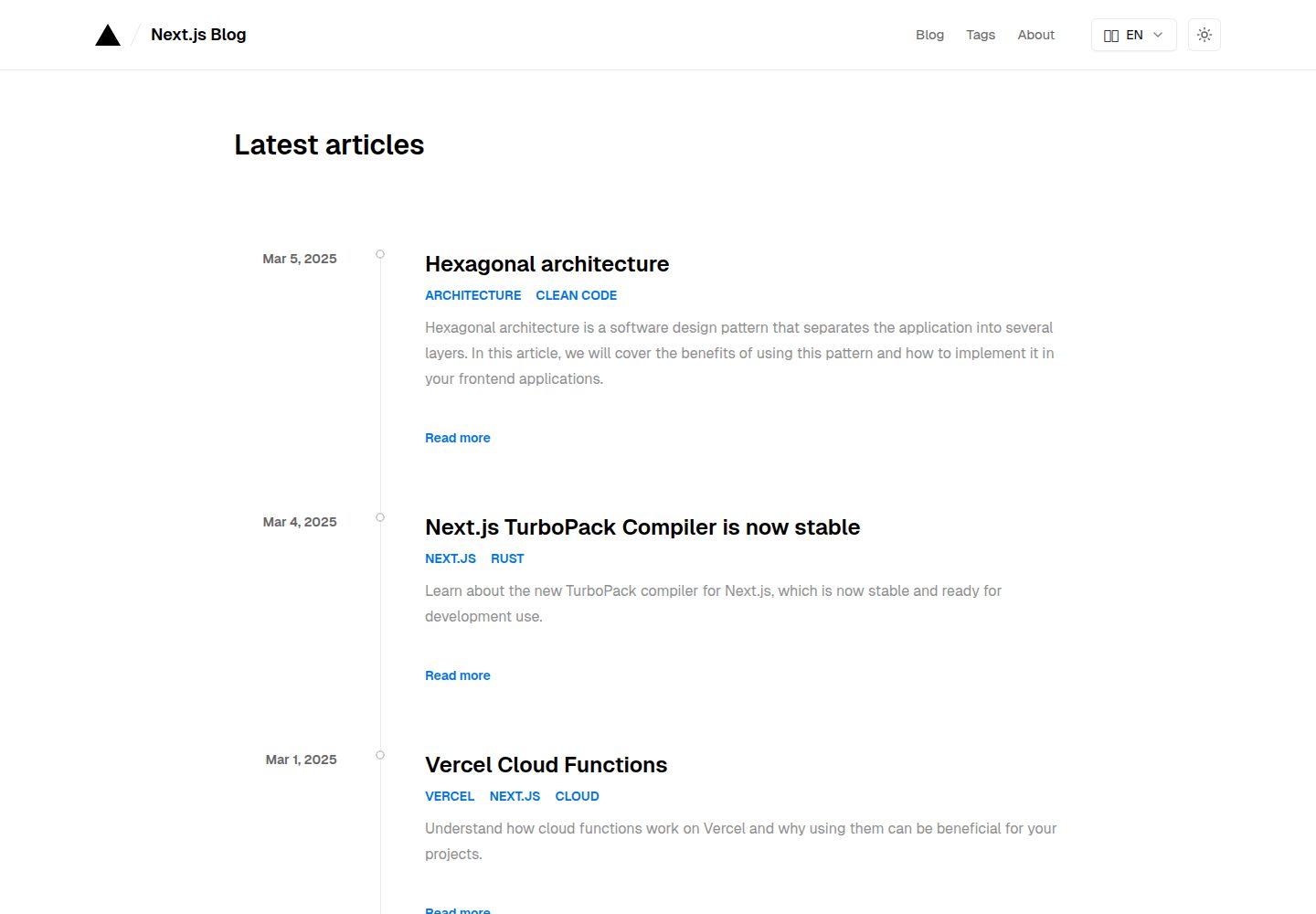
看看你的网站会是什么样
浏览真实页面截图,比较内容排版与手机效果。点击下方缩略图切换,放大查看整页细节。
全部页面与视图 3
截图用于了解视觉与布局,交互效果请以实际项目为准。
采集于 2026-10-14查看来源
值得关注的模板亮点
从已有项目资料中,快速了解它的特点。
通过 @next/mdx 以 MDX 文件管理文章内容,支持自定义 MDX 组件
使用 next-intl 实现国际化,默认支持 en 与 pt-BR,并提供多语言 URL
提供明暗模式、文章标签、目录与代码块样式
包含基于 Next.js metadata 的文章 SEO、分页、sitemap 与 robots.txt
使用 Tailwind 3.0 与 Tailwind Typography 进行样式与排版定制
模板详细介绍
这是一个 Next.js 博客起始模板,README 说明其基于 Next.js 15 与 React 19,使用 App Router 和 Server Components,并通过 @next/mdx 模块以 MDX 文件管理全部文章内容。国际化部分使用 next-intl,支持多语言 URL,默认语言为 en 与 pt-BR。模板提供 Tailwind 3.0 样式定制、Tailwind Typography 排版、MDX 组件、明暗模式、文章标签、目录、代码块样式,以及基于 Next.js metadata 的文章 SEO、分页、sitemap 与 robots.txt。README 同时说明该项目仍处于开发中,作者会自行持续更新与升级模板。
使用前需要按 README 的步骤完成配置:克隆仓库并安装依赖,在根目录创建 .env 并设置 NEXT_PUBLIC_BASE_URL;在 src/i18n/routing.ts 中选择支持的 locales 与 defaultLocale,并同步修改 src/middleware.ts 中 matcher 的语言匹配规则;更新 src/components/language-selector.tsx 中的可选语言与图标;重命名 translations 目录下的 .json 文件并翻译内容;删除 translations/posts 中的示例文章,按 {locale}.mdx 命名规则撰写自己的文章。README 提醒不要随意修改 localePrefix,否则可能破坏动态页面的静态构建。
部署方面,README 推荐使用 Vercel,并说明源码默认包含 Vercel Analytics,需按 Vercel 文档启用;也可使用 Netlify、AWS 等其他托管服务,其中 Netlify 通常无需额外配置,其他平台可能需要自行配置以支持 SSR、ISR 和图片优化。README 未提供关于性能基准、内容量级或生产环境适用性的具体说明。
Next.jsReact博客启动器
适合你的项目吗?
适用场景
- 搭建需要多语言 URL 与 MDX 文章内容的个人博客
- 以现有 Next.js App Router 项目为基础定制国际化博客
- 需要文章标签、目录、分页与基础 SEO 配置的博客站点
适合人群
- 熟悉 Next.js App Router 与 MDX 的开发者
- 需要自行配置多语言内容与翻译文件的博客作者
- 计划部署在 Vercel 或 Netlify 等平台的用户
上手与定制指南
结合仓库当前版本的说明,按下面的资料检查内容、配置与运行要求。
- 1
克隆仓库后使用 npm、yarn 或 pnpm 安装依赖
- 2
在根目录创建 .env 并设置 NEXT_PUBLIC_BASE_URL
- 3
在 src/i18n/routing.ts 配置 locales 与 defaultLocale,并同步修改 src/middleware.ts 的 matcher;README 提醒修改 localePrefix 可能破坏动态页面静态构建
- 4
重命名 translations 下的 .json 文件并翻译内容,删除 translations/posts 中的示例文章,按 {locale}.mdx 命名撰写文章
- 5
README 说明部署推荐 Vercel,源码默认包含 Vercel Analytics 需手动启用;其他平台可能需要自行配置 SSR、ISR 与图片优化
授权与来源资料
使用条件与限制
免费使用 · 保留许可声明本次收录的是公开仓库中采用 MIT 许可的免费版本;免费范围为该版本代码,不代表外部服务或第三方素材免费。
使用时需要遵守
- 允许免费使用、修改、商用和分发该版本代码。
- 分发代码副本或实质性部分时,保留原作者版权声明和完整 MIT 许可声明。
- 代码按现状提供;担保与责任限制以原许可证及适用法律为准。
额外费用与待核对事项
- 演示图片、字体、图标及其他第三方素材需按各自许可核对,不能仅凭代码的 MIT 许可判断。
- 域名、托管、数据库、支付或 AI 等外部服务可能另外收费。
- 使用前必须在项目根目录创建 .env 文件并设置 NEXT_PUBLIC_BASE_URL 环境变量,否则站点无法正确配置基础 URL。
- README 提醒不要随意修改 localePrefix 属性,因为更改它可能破坏动态页面的静态构建。
- 模板源码默认包含 Vercel Analytics,需按 Vercel 文档手动启用;部署推荐使用 Vercel,其他平台可能需要额外配置。
- 使用 Netlify、AWS 等其他托管服务时,部分平台可能需要自行配置以支持 SSR、ISR 和图片优化等 Next.js 功能。
查看原文依据
Permission is hereby granted, free of charge
许可证原文
3. Create `.env` file in root dir, and set the BASE_URL
README 原文
5. Choose your default locale in `defaultLocale` attribute. You may wish not to change the `localePrefix` attribute, as changing it can break the static build of dynamic pages.
README 原文
The easiest way to deploy this template is on [Vercel](https://vercel.com/). Check out the [Next.js deployment documentation](https://nextjs.org/docs/app/building-your-application/deploying) for more details. This template has Vercel Analytics in source code by default. To enable the analytics, follow this [simple guide](https://vercel.com/docs/analytics/quickstart#enable-web-analytics-in-vercel).
README 原文
https://github.com/rodrigo-miranda18/nextjs-mdx-intl-blog-starter/blob/master/LICENSEhttps://github.com/rodrigo-miranda18/nextjs-mdx-intl-blog-starter/blob/master/README.mdYou can also use another host providers, like [Netlify](https://www.netlify.com/), [AWS](https://aws.amazon.com/), etc. Netlify usually doesn't require any additional configurations for Next.js projects, but another providers may require custom configuration and setup to support Next.js functionalities, such as SSR, ISR, and image optimization.
README 原文
DeepSeek 根据仓库许可证和 README 整理 ·2026-10-14。结果仅覆盖已读取资料,依赖、图片、字体及后续条款变更以各自原文为准。
项目核对记录与介绍依据
模板资料
- 来源平台
- GitHub
- 资料与维护参考分
- 资料较完整 · 82 / 100
- 技术栈
- Next.js · React
- 网站类型
- 博客 · 启动器
这个分数如何计算
本站按许可资料(最高30分)、演示链接(12分)、预览图(10分)、Star数(15分)、记录的维护时间(15分)、描述完整度(8分)、功能记录(5分)和分类资料(5分)计算。它不是代码、安全或性能测试,也不是 Google 评分;有链接不代表已实测可用。
这个项目需要核对什么
- 记录的仓库更新时间
- 2025-03-11
- 截图检查日期
- 2026-10-14
已收录演示链接。请用你的内容与屏幕尺寸检查;有演示不代表表单、认证或支付已经可用。
目录记录的主要技术栈是 Next.js。请通过依赖清单和锁文件核对实际版本与托管要求。这些说明基于收录资料,不代表代码审计或部署实测。
查看具体选型方法 →介绍的制作与核对状态
介绍由 AI 辅助整理目录与仓库资料。仓库作者不等于这篇介绍的审核者。
审核声明: codex-user-requested-batch-review-20261015 · 2026-10-15
查看当时使用的来源资料
SHA-256: d24175a5f38e45ba4c48f4d950b3a9f0d27510a6e3b5183abff6c0b49e1e210a
2026-10-14T05:45:59.379Z
来源文件 / 仓库# Next.js Starter Blog with MDX and i18n This is a [Next.js](https://nextjs.org/) starter blog template, with [i18n](https://next-intl.dev/). It's made upon Next.js 15 and React 19, using App Router and Server Components! All posts content is managed by MDX files, using [@next/mdx](https://www.npmjs.com/package/@next/mdx) module. This template is easily configurable, customizable, and also full optimized for SEO. Checkout the documentation below to get started. Otherwise, feel free to open issues reporting bugs or suggesting new features. This is still a work in progress project, so I will updating and upgrading the template by myself, with the new features, and fixes/updates. You can visit the [Blog Demo](https://nextjs-mdx-intl-blog-starter.vercel.app/). ## Features - Latest version of Next.js with App Router and Typescript - Easy styling customization with [Tailwind 3.0](https://tailwindcss.com/blog/tailwindcss-v3) - Easy post content styling customization using [Tailwind Typography](https://github.com/tailwindlabs/tailwindcss-typography) - Easily Internationalization setup - Internationalized URLs optimized for SEO - MDX components - Light/Dark mode - SEO Friendly - SEO Friendly pagination - Post SEO using Next.js metadata - Sitemap and robots.txt - Perfect Lighthouse score - Analytics (if you deployed on [Vercel](https://vercel.com/)) - Post tagging - Table of Contents - Styled code blocks ## Quick Start Guide 1. Clone the repo ```bash git clone [email protected]:rodrigo-miranda18/nextjs-mdx-intl-blog-starter.git ``` 2. Install dependencies ```bash # Install the dependencies npm install # or yarn # or pnpm i ``` 3. Create `.env` file in root dir, and set the BASE_URL ```bash NEXT_PUBLIC_BASE_URL="Your base url comes here" ``` 4. Setup the i18n by opening the file `src/i18n/routing.ts`. Choose what locales your project will support in locales attribute. The default are `locales: ['en', 'pt-BR']`. 5. Choose your default locale in `defaultLocale` attribute. You may wish not to change the `localePrefix` attribute, as changing it can break the static build of dynamic pages. 6. Open `src/middleware.ts` file and switch the locales part of `matcher` attribute with your chosen locales. For example, if you chose `fr` and `en-GB` locales, switch `/(en|pt-BR)/:path*` to `/(fr|en-GB)/:path*`. 7. Open the `/src/components/language-selector.tsx` component and change the available languages, as well as the icons too. 8. Rename all the `.json` files from `translations` folder for your chosen languages, and translate all the content within it. 9. Remove all mocked posts from `translations/posts` folder and write your own posts, using the `{locale}.mdx` syntax for file names. 10. You may want to add your own avatar image in `public` folder. This image will be used in `/about` page as your profile image. ## Customize - `src/i18n/routing.ts` - contains the core configuration for your internationalization setup, including supported locales and default locale. - `src/components/language-selector.tsx` - update available languages and their display format. - `translations/*.json` - change the site content, and basic metadata for pages seo, like titles and descriptions, for each locale you support. - `translations/posts/*.mdx` - write your own posts using the `{locale}.mdx` syntax for file names, and also define post metadata (that will be used to build seo too). - `src/app/globals.css` - contains global CSS variables including the color scheme for both light and dark modes, and the color scheme for code blocks. - `tailwind.config.ts` - customize Tailwind settings, typography plugin configuration, and extend theme colors. - `src/app/[locale]/layout.tsx` - modify the font family using [next/font](https://nextjs.org/docs/app/building-your-application/optimizing/fonts). - `public/logo.svg` - replace with your own logo. - `public/avatar.webp` - replace with your own avatar. - `src/app/favicon.ico` - replace with your favicon. - `src/mdx-components.tsx` - customize the rendering of MDX elements and add custom components for your blog posts. - `src/app/[locale]/tags/[tag]/tag-archive-template.tsx` - adjust the `POSTS_PER_PAGE` constant to control pagination. - `src/middleware.ts` - adjust internationalization path matching rules. - `next.config.ts` - modify MDX plugins configuration and Next.js settings. ## Deploy The easiest way to deploy this template is on [Vercel](https://vercel.com/). Check out the [Next.js deployment documentation](https://nextjs.org/docs/app/building-your-application/deploying) for more details. This template has Vercel Analytics in source code by default. To enable the analytics, follow this [simple guide](https://vercel.com/docs/analytics/quickstart#enable-web-analytics-in-vercel). You can also use another host providers, like [Netlify](https://www.netlify.com/), [AWS](https://aws.amazon.com/), etc. Netlify usually doesn't require any additional configurations for Next.js projects, but another providers may require custom configuration and setup to support Next.js functionalities, such as SSR, ISR, and image optimization. ## Support Support this effort by giving a star on GitHub. If you are using this template, let me know by sending me a message on [Linkedin](https://www.linkedin.com/in/rodrigoamiranda/). ## License [MIT](https://github.com/rodrigo-miranda18/nextjs-mdx-intl-blog-starter/blob/master/LICENSE) © [Rodrigo Miranda](https://rodrigoamiranda.dev)
看看同类模板
对比同技术栈与用途的模板,找到更适合的视觉与内容结构。

ai-website-cloner-template
Clone any website with one command using AI coding agents
Next.js · 启动器

Next.js SaaS Starter
Next.js SaaS Starter 是 Next.js 官方维护的 SaaS 起点模板,定位介于学习资源和可直接部署的脚手架之间。
Next.js · SaaS

Next.js Commerce
Next.js Commerce 是 Vercel 团队维护的电商启动模板,基于 Next.js App Router 构建,采用服务端渲染、React Server Components、Server Actions …
Next.js · 电商

Next-js-Boilerplate
Next-js-Boilerplate 是一个面向 Next.js 16、Tailwind CSS 4 和 TypeScript 的启动器,核心定位是开发者体验优先。
Next.js · 启动器

tailwind-nextjs-starter-blog
tailwind-nextjs-starter-blog 是一个面向个人技术博客的 Next.js 与 Tailwind CSS 启动模板,其 v2 版本基于 App Router 与 React Server Comp…
Next.js · 博客

next-forge
Production-grade Turborepo template for Next.js apps.
Next.js · 启动器