Uses Next.js App Router, Server Components, and TypeScript
Next.jsReactBlogStarter
nextjs-mdx-intl-blog-starter — Next.js Blog Template
By rodrigo-miranda18
A multilingual blog starter template based on Next.js App Router and MDX, using next-intl to manage internationalized routing, with post content maintained as MDX files; the README states it is still under active development.
Explore the design
Compare the page layouts and mobile experience. Open any screenshot for a closer look.
Desktop homepage1 / 3
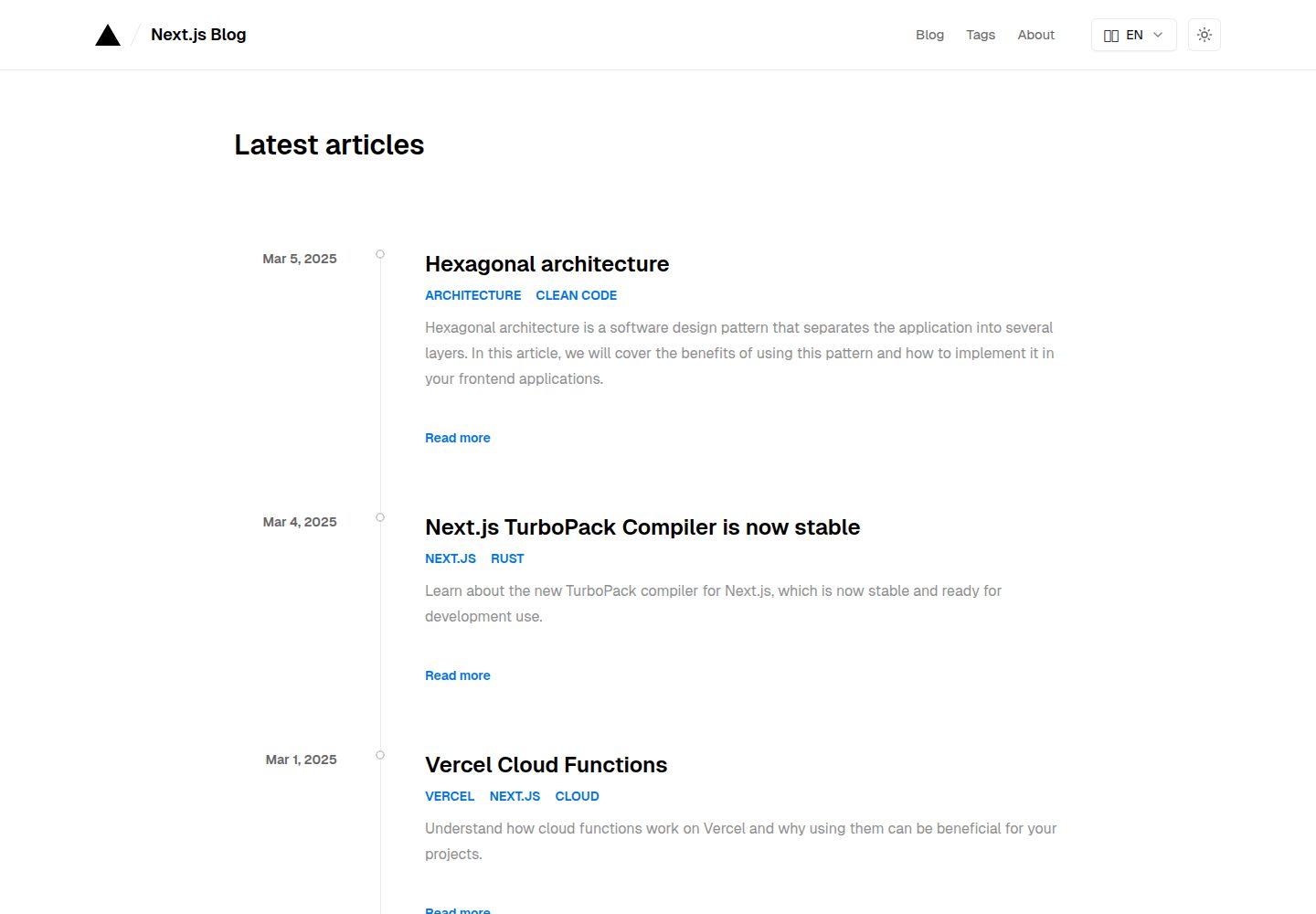
Desktop captureTop of page
Actual screenshot captured by the server browser.
All pages & views 3
Screenshots show visual appearance; interactive behavior may differ.
Recorded 2026-10-14View source
What stands out
A quick read of the recorded project description.
Manages post content as MDX files via @next/mdx, with support for custom MDX components
Uses next-intl for internationalization, supports en and pt-BR by default, and provides multilingual URLs
Provides light and dark modes, post tags, a table of contents, and code block styling
Includes post SEO based on Next.js metadata, pagination, sitemap, and robots.txt
Uses Tailwind 3.0 and Tailwind Typography for style and typography customization
Template Details
This is a Next.js blog starter template. The README states it is based on Next.js 15 and React 19, uses the App Router and Server Components, and manages all post content as MDX files via the @next/mdx module. For internationalization, it uses next-intl, supports multilingual URLs, and defaults to the en and pt-BR locales. The template provides Tailwind 3.0 style customization, Tailwind Typography typography, MDX components, light and dark modes, post tags, a table of contents, code block styling, as well as post SEO based on Next.js metadata, pagination, sitemap, and robots.txt. The README also states that the project is still under development and that the author will continue to update and upgrade the template on their own.
Before use, you need to complete configuration according to the README steps: clone the repository and install dependencies, create .env in the root directory and set NEXT_PUBLIC_BASE_URL; select the supported locales and defaultLocale in src/i18n/routing.ts, and update the language matching rules for the matcher in src/middleware.ts accordingly; update the selectable languages and icons in src/components/language-selector.tsx; rename the .json files under the translations directory and translate their content; delete the sample posts in translations/posts and write your own posts following the {locale}.mdx naming convention. The README warns not to modify localePrefix arbitrarily, otherwise it may break the static build of dynamic pages.
For deployment, the README recommends Vercel and notes that the source code includes Vercel Analytics by default, which needs to be enabled according to the Vercel documentation; other hosting services such as Netlify and AWS can also be used, among which Netlify usually requires no additional configuration, while other platforms may need to be configured to support SSR, ISR, and image optimization. The README does not provide specific information about performance benchmarks, content scale, or production suitability.
Next.jsReactBlogStarter
Is it right for your project?
Use Cases
- Building a personal blog that needs multilingual URLs and MDX post content
- Customizing an internationalized blog based on an existing Next.js App Router project
- Blog sites that need post tags, a table of contents, pagination, and basic SEO configuration
Suitable For
- Developers familiar with Next.js App Router and MDX
- Blog authors who need to configure multilingual content and translation files themselves
- Users planning to deploy on platforms such as Vercel or Netlify
Getting started & customization
Use these recorded setup notes alongside the repository instructions for your chosen version.
- 1
After cloning the repository, install dependencies using npm, yarn, or pnpm
- 2
Create .env in the root directory and set NEXT_PUBLIC_BASE_URL
- 3
Configure locales and defaultLocale in src/i18n/routing.ts, and update the matcher in src/middleware.ts accordingly; the README warns that modifying localePrefix may break the static build of dynamic pages
- 4
Rename the .json files under translations and translate their content, delete the sample posts in translations/posts, and write posts following the {locale}.mdx naming convention
- 5
The README states that Vercel is recommended for deployment, and the source code includes Vercel Analytics by default, which must be enabled manually; other platforms may need to be configured for SSR, ISR, and image optimization
License & source material
Usage conditions & limitations
Free to use · keep license noticeThis entry covers the free version under the MIT license in the public repository; the free scope is the code of this version and does not mean that external services or third-party assets are free.
Must comply with when using
- Allows free use, modification, commercial use, and distribution of this version's code.
- When distributing copies or substantial portions of the code, retain the original author's copyright notice and the complete MIT license notice.
- The code is provided as is; warranties and limitations of liability are governed by the original license and applicable law.
Additional costs & items to verify
- Demo images, fonts, icons, and other third-party assets must be checked against their respective licenses and cannot be judged solely by the code's MIT license.
- External services such as domains, hosting, databases, payments, or AI may incur additional charges.
- Before use, you must create a .env file in the project root directory and set the NEXT_PUBLIC_BASE_URL environment variable, otherwise the site cannot correctly configure the base URL.
- The README warns not to modify the localePrefix property arbitrarily, because changing it may break the static build of dynamic pages.
- The template source code includes Vercel Analytics by default, which must be enabled manually according to the Vercel documentation; Vercel is recommended for deployment, and other platforms may require additional configuration.
- When using other hosting services such as Netlify or AWS, some platforms may need to be configured to support Next.js features such as SSR, ISR, and image optimization.
View Original Text Basis
Permission is hereby granted, free of charge
Original License Text
3. Create `.env` file in root dir, and set the BASE_URL
Original README
5. Choose your default locale in `defaultLocale` attribute. You may wish not to change the `localePrefix` attribute, as changing it can break the static build of dynamic pages.
Original README
The easiest way to deploy this template is on [Vercel](https://vercel.com/). Check out the [Next.js deployment documentation](https://nextjs.org/docs/app/building-your-application/deploying) for more details. This template has Vercel Analytics in source code by default. To enable the analytics, follow this [simple guide](https://vercel.com/docs/analytics/quickstart#enable-web-analytics-in-vercel).
Original README
https://github.com/rodrigo-miranda18/nextjs-mdx-intl-blog-starter/blob/master/LICENSEhttps://github.com/rodrigo-miranda18/nextjs-mdx-intl-blog-starter/blob/master/README.mdYou can also use another host providers, like [Netlify](https://www.netlify.com/), [AWS](https://aws.amazon.com/), etc. Netlify usually doesn't require any additional configurations for Next.js projects, but another providers may require custom configuration and setup to support Next.js functionalities, such as SSR, ISR, and image optimization.
Original README
Compiled by DeepSeek based on repository license and README ·2026-10-14. Results only cover the materials read; dependencies, images, fonts, and subsequent term changes are subject to their respective original texts.
Project checks & description sources
Template Information
- Source platforms
- GitHub
- Documentation and maintenance reference score
- More documented · 82 / 100
- Technologies
- Next.js · React
- Website type
- Blog · Starter
How this score is calculated
Our heuristic uses license records (up to 30), a demo link (12), a preview (10), stars (15), recorded maintenance (15), description completeness (8), feature records (5) and classification data (5). It is not a code, security or performance test, or a Google score. A link does not establish tested functionality.
What to verify for this project
- Repository update recorded
- 2025-03-11
- Screenshot last checked
- 2026-10-14
A demo link is listed. Check it with your own content and viewport sizes; its presence does not confirm that forms, authentication or payments work.
The catalog identifies Next.js as the primary stack. Check the actual dependency manifest and lockfile for versions and hosting requirements. These notes use recorded metadata, not a code audit or a deployment test.
Use a selection guide →How this description was prepared
AI-assisted description based on catalog records and repository material. Repository authors are not automatically the reviewers of this description.
Review declaration: codex-user-requested-batch-review-20261015 · 2026-10-15
Inspect the recorded source material
SHA-256: d24175a5f38e45ba4c48f4d950b3a9f0d27510a6e3b5183abff6c0b49e1e210a
2026-10-14T05:45:59.379Z
Source file / repository# Next.js Starter Blog with MDX and i18n This is a [Next.js](https://nextjs.org/) starter blog template, with [i18n](https://next-intl.dev/). It's made upon Next.js 15 and React 19, using App Router and Server Components! All posts content is managed by MDX files, using [@next/mdx](https://www.npmjs.com/package/@next/mdx) module. This template is easily configurable, customizable, and also full optimized for SEO. Checkout the documentation below to get started. Otherwise, feel free to open issues reporting bugs or suggesting new features. This is still a work in progress project, so I will updating and upgrading the template by myself, with the new features, and fixes/updates. You can visit the [Blog Demo](https://nextjs-mdx-intl-blog-starter.vercel.app/). ## Features - Latest version of Next.js with App Router and Typescript - Easy styling customization with [Tailwind 3.0](https://tailwindcss.com/blog/tailwindcss-v3) - Easy post content styling customization using [Tailwind Typography](https://github.com/tailwindlabs/tailwindcss-typography) - Easily Internationalization setup - Internationalized URLs optimized for SEO - MDX components - Light/Dark mode - SEO Friendly - SEO Friendly pagination - Post SEO using Next.js metadata - Sitemap and robots.txt - Perfect Lighthouse score - Analytics (if you deployed on [Vercel](https://vercel.com/)) - Post tagging - Table of Contents - Styled code blocks ## Quick Start Guide 1. Clone the repo ```bash git clone [email protected]:rodrigo-miranda18/nextjs-mdx-intl-blog-starter.git ``` 2. Install dependencies ```bash # Install the dependencies npm install # or yarn # or pnpm i ``` 3. Create `.env` file in root dir, and set the BASE_URL ```bash NEXT_PUBLIC_BASE_URL="Your base url comes here" ``` 4. Setup the i18n by opening the file `src/i18n/routing.ts`. Choose what locales your project will support in locales attribute. The default are `locales: ['en', 'pt-BR']`. 5. Choose your default locale in `defaultLocale` attribute. You may wish not to change the `localePrefix` attribute, as changing it can break the static build of dynamic pages. 6. Open `src/middleware.ts` file and switch the locales part of `matcher` attribute with your chosen locales. For example, if you chose `fr` and `en-GB` locales, switch `/(en|pt-BR)/:path*` to `/(fr|en-GB)/:path*`. 7. Open the `/src/components/language-selector.tsx` component and change the available languages, as well as the icons too. 8. Rename all the `.json` files from `translations` folder for your chosen languages, and translate all the content within it. 9. Remove all mocked posts from `translations/posts` folder and write your own posts, using the `{locale}.mdx` syntax for file names. 10. You may want to add your own avatar image in `public` folder. This image will be used in `/about` page as your profile image. ## Customize - `src/i18n/routing.ts` - contains the core configuration for your internationalization setup, including supported locales and default locale. - `src/components/language-selector.tsx` - update available languages and their display format. - `translations/*.json` - change the site content, and basic metadata for pages seo, like titles and descriptions, for each locale you support. - `translations/posts/*.mdx` - write your own posts using the `{locale}.mdx` syntax for file names, and also define post metadata (that will be used to build seo too). - `src/app/globals.css` - contains global CSS variables including the color scheme for both light and dark modes, and the color scheme for code blocks. - `tailwind.config.ts` - customize Tailwind settings, typography plugin configuration, and extend theme colors. - `src/app/[locale]/layout.tsx` - modify the font family using [next/font](https://nextjs.org/docs/app/building-your-application/optimizing/fonts). - `public/logo.svg` - replace with your own logo. - `public/avatar.webp` - replace with your own avatar. - `src/app/favicon.ico` - replace with your favicon. - `src/mdx-components.tsx` - customize the rendering of MDX elements and add custom components for your blog posts. - `src/app/[locale]/tags/[tag]/tag-archive-template.tsx` - adjust the `POSTS_PER_PAGE` constant to control pagination. - `src/middleware.ts` - adjust internationalization path matching rules. - `next.config.ts` - modify MDX plugins configuration and Next.js settings. ## Deploy The easiest way to deploy this template is on [Vercel](https://vercel.com/). Check out the [Next.js deployment documentation](https://nextjs.org/docs/app/building-your-application/deploying) for more details. This template has Vercel Analytics in source code by default. To enable the analytics, follow this [simple guide](https://vercel.com/docs/analytics/quickstart#enable-web-analytics-in-vercel). You can also use another host providers, like [Netlify](https://www.netlify.com/), [AWS](https://aws.amazon.com/), etc. Netlify usually doesn't require any additional configurations for Next.js projects, but another providers may require custom configuration and setup to support Next.js functionalities, such as SSR, ISR, and image optimization. ## Support Support this effort by giving a star on GitHub. If you are using this template, let me know by sending me a message on [Linkedin](https://www.linkedin.com/in/rodrigoamiranda/). ## License [MIT](https://github.com/rodrigo-miranda18/nextjs-mdx-intl-blog-starter/blob/master/LICENSE) © [Rodrigo Miranda](https://rodrigoamiranda.dev)
Explore similar templates
Compare previews and descriptions within the same stack and category.

Next.js SaaS Starter
The official Next.js SaaS starter template, integrating email/password authentication, Stripe Checkout subscriptions, a dashboard with user/team CRUD, basic Owner/Member RBAC, and activity logging.
Next.js · SaaS

Next.js Commerce
Vercel's officially maintained Next.js App Router ecommerce starter with deep Shopify integration, offering a complete product catalog, cart, and checkout flow. Core logic is modular for swapping backends, and community provider versions exist for BigCommerce, Medusa, and Saleor.
Next.js · E-commerce

Next-js-Boilerplate
A developer-first Next.js 16 starter with Tailwind CSS 4 and TypeScript, supporting both App Router and Page Router.
Next.js · Starter

tailwind-nextjs-starter-blog
A Next.js and Tailwind CSS blog starter template using Contentlayer for Markdown/MDX, with built-in SEO, code highlighting, and tags. It targets personal technical blogs and migration from Jekyll/Hugo to React, and supports one-click Vercel deployment.
Next.js · Blog

next-forge
next-forge is a Turborepo-based Next.js template maintained by Vercel, positioned as a starting point for SaaS products.
Next.js · Starter

SaaS-Boilerplate
SaaS-Boilerplate is an open-source SaaS starter template built with Next.js App Router, React 19, TypeScript, Tailwind CSS, and Shadcn UI.
Next.js · SaaS