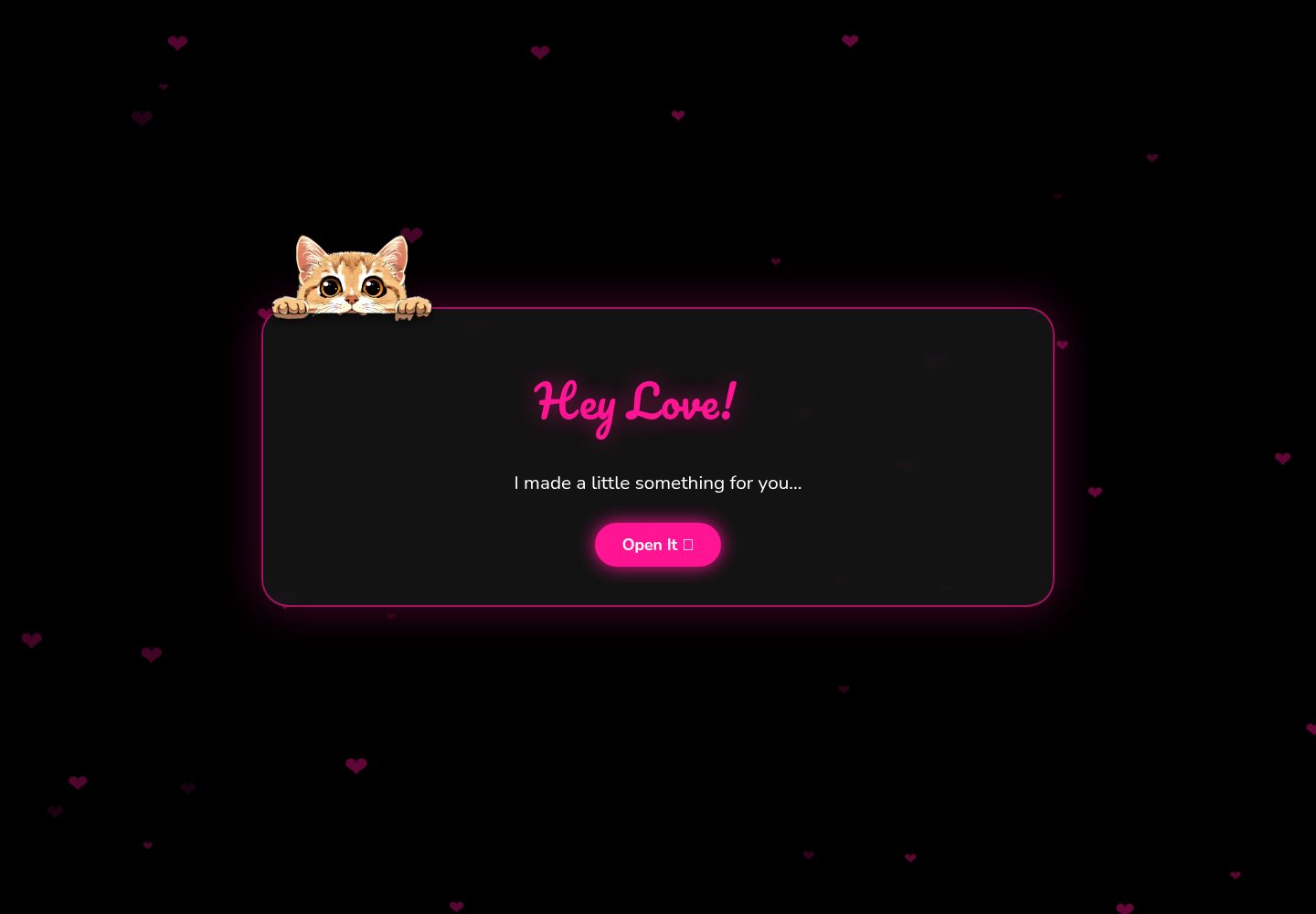
包含 Welcome、Memories、Ask、Success 四个页面组件,构成完整的邀请流程
ViteReact启动器
galentines-valentines-template — Vite 启动器模板
作者 sandhyashiwakoti
一个基于 React 的互动式情人节/闺蜜节邀请页面模板,包含欢迎页、回忆幻灯片、提问页和成功页,并提供可自定义的文案、图片与动画。
看看你的网站会是什么样
浏览真实页面截图,比较内容排版与手机效果。点击下方缩略图切换,放大查看整页细节。
全部页面与视图 2
截图用于了解视觉与布局,交互效果请以实际项目为准。
采集于 2026-10-17查看来源
值得关注的模板亮点
从已有项目资料中,快速了解它的特点。
“No”按钮在点击时会移动位置,并轮换显示自定义提示文字
接受邀请后触发彩纸庆祝效果
回忆幻灯片支持替换照片与个人文字,图片可放在 public 目录或使用外部链接
使用 Framer Motion 实现页面动画,并提供心跳背景与漂浮爱心效果
README 给出文案、图片、GIF 和按钮文字的具体修改位置
模板详细介绍
该模板用于制作向某人发出 Valentine 或 Galentine 邀请的互动网页。README 说明页面包含一个在每页出现的探头猫、带漂浮爱心的心跳动画背景、可自定义的照片与文字回忆幻灯片、点击后会移动的“No”按钮,以及接受邀请后的彩纸庆祝效果。项目结构由 Welcome、Memories、Ask、Success 四个组件组成,入口为 App.jsx,样式集中在 App.css 与 index.css。
技术栈方面,README 标注使用 React 与 Framer Motion 实现平滑动画,开发服务器通过 npm run dev 启动,默认地址为 localhost:5173;构建命令为 npm run build,产物目录为 dist。模板采用 MIT 许可证。
自定义方式在 README 中有具体说明:在 Memories.jsx 的 memoriesData 数组中替换回忆文字与图片地址;在 Ask.jsx 中切换 Valentine/Galentine 标题文案;将图片放入 public 目录并按 memory1.jpg 等命名后更新路径;替换 Ask 页与 Success 页中的 Tenor GIF 链接;修改 Ask.jsx 中 noTexts 数组来更换“No”按钮的提示文字。README 未提供关于无障碍支持、浏览器兼容范围或自动化测试的说明。
ViteReact启动器
适合你的项目吗?
适用场景
- 情人节向伴侣发出互动式邀请
- 闺蜜节与好友分享回忆并发出邀请
- 纪念日或生日时制作带照片回忆的惊喜页面
- 异地关系中用网页形式表达心意
适合人群
- 具备基础 React 与 npm 使用经验、希望快速修改文案和图片的用户
- 需要现成互动邀请页面结构并愿意按 README 手动替换素材的人
- 计划将静态站点部署到 Netlify 等平台的前端开发者
上手与定制指南
结合仓库当前版本的说明,按下面的资料检查内容、配置与运行要求。
- 1
需要预先安装 Node.js 与 npm,然后执行 npm install 安装依赖
- 2
使用 npm run dev 启动开发服务器,默认访问 http://localhost:5173
- 3
构建命令为 npm run build,输出目录为 dist
- 4
部署到 Netlify 时选择 GitHub 仓库,构建命令填 npm run build,发布目录填 dist
- 5
自定义内容需按 README 指引编辑 src/components 下的 Memories.jsx、Ask.jsx 与 Success.jsx
授权与来源资料
使用条件与限制
免费使用 · 保留许可声明本次收录的是公开仓库中采用 MIT 许可的免费版本;免费范围为该版本代码,不代表外部服务或第三方素材免费。
使用时需要遵守
- 允许免费使用、修改、商用和分发该版本代码。
- 分发代码副本或实质性部分时,保留原作者版权声明和完整 MIT 许可声明。
- 代码按现状提供;担保与责任限制以原许可证及适用法律为准。
额外费用与待核对事项
- 演示图片、字体、图标及其他第三方素材需按各自许可核对,不能仅凭代码的 MIT 许可判断。
- 域名、托管、数据库、支付或 AI 等外部服务可能另外收费。
- Ask 页默认使用 Tenor 托管的哭泣猫 GIF(外部资源),README 建议自行替换为其他 GIF;该外部素材的授权需自行核实。
- Success 页默认使用 Tenor 托管的亲吻猫 GIF(外部资源),README 建议自行替换;该外部素材的授权需自行核实。
- README 推荐 Freepik 等图片资源站,但未说明这些站点素材的授权条件,使用前需自行确认许可。
- README 推荐 Pngtree 作为图片资源站,其素材可能需付费或受额外条款约束,使用前需自行核实。
- 部署步骤依赖 Netlify 托管服务,需注册/登录 Netlify 账号;这是可选的外部服务,不改变代码本身的免费可复用性。
查看原文依据
Permission is hereby granted, free of charge
许可证原文
src="https://media1.tenor.com/m/vTD78ehLKFMAAAAd/sad-cat.gif"
README 原文
src="https://media1.tenor.com/m/hzHq0f829b4AAAAd/cat-kiss.gif"
README 原文
- [Freepik](https://www.freepik.com)
README 原文
- [Pngtree](https://pngtree.com)
README 原文
https://github.com/sandhyashiwakoti/galentines-valentines-template/blob/main/LICENSEhttps://github.com/sandhyashiwakoti/galentines-valentines-template/blob/main/README.md- Go to [Netlify](https://www.netlify.com/)
README 原文
DeepSeek 根据仓库许可证和 README 整理 ·2026-10-17。结果仅覆盖已读取资料,依赖、图片、字体及后续条款变更以各自原文为准。
项目核对记录与介绍依据
模板资料
- 来源平台
- GitHub
- 资料与维护参考分
- 资料较完整 · 88 / 100
- 技术栈
- Vite · React
- 网站类型
- 启动器
这个分数如何计算
本站按许可资料(最高30分)、演示链接(12分)、预览图(10分)、Star数(15分)、记录的维护时间(15分)、描述完整度(8分)、功能记录(5分)和分类资料(5分)计算。它不是代码、安全或性能测试,也不是 Google 评分;有链接不代表已实测可用。
这个项目需要核对什么
- 记录的仓库更新时间
- 2026-02-13
- 截图检查日期
- 2026-10-17
已收录演示链接。请用你的内容与屏幕尺寸检查;有演示不代表表单、认证或支付已经可用。
目录记录的主要技术栈是 Vite。请通过依赖清单和锁文件核对实际版本与托管要求。这些说明基于收录资料,不代表代码审计或部署实测。
查看具体选型方法 →介绍的制作与核对状态
介绍由 AI 辅助整理目录与仓库资料。仓库作者不等于这篇介绍的审核者。
审核声明: codex-user-requested-batch-review-20261018 · 2026-10-18
查看当时使用的来源资料
SHA-256: 8f3dcf0f93edd64bb8fb956f0bbde672a3f3bd008e95ffaccba737afbf82557a
2026-10-17T05:50:24.843Z
来源文件 / 仓库# 💖 Valentine's/Galentine's Day Interactive Template
[](https://opensource.org/licenses/MIT)
[](https://reactjs.org/)
[](https://www.framer.com/motion/)
A cute, customizable, and interactive website template to ask someone special to be your Valentine or Galentine! Features animated hearts, an adorable peeking cat, a personalized memory slideshow, and a playful proposal page where the "No" button runs away when clicked.
---
## Live Demo
**[View Live Site](https://be-my-galentine.netlify.app/)**
## Features
- **Adorable peeking cat** that appears on every page
- **Animated heartbeat background** with floating hearts
- **Customizable memory slideshow** with photos and personal messages
- **Interactive "No" button** that moves around the screen when clicked
- **Confetti celebration** on acceptance
- **Fully responsive** design for mobile and desktop
- **Smooth animations** powered by Framer Motion
- **Easy to customize** - change text, images, and colors
---
## Quick Start
### Prerequisites
- **Node.js** - [Download here](https://nodejs.org/)
- **npm** package manager
### Installation
1. **Clone the repository**
```bash
git clone https://github.com/YOUR-USERNAME/galentines-valentines-template.git
cd galentines-valentines-template
```
2. **Install dependencies**
```bash
npm install
```
3. **Run the development server**
```bash
npm run dev
```
4. **Open in browser**
[http://localhost:5173](http://localhost:5173)
---
## Project Structure
```
galentines-valentines-template/
├── public/
│ └── peeking-cat.png
├── src/
│ ├── components/
│ │ ├── Welcome.jsx
│ │ ├── Memories.jsx
│ │ ├── Ask.jsx
│ │ └── Success.jsx
│ ├── App.jsx
│ ├── App.css
│ ├── index.css
│ └── main.jsx
├── package.json
└── README.md
```
---
## Customization Guide
### 1. **Update Memory Slideshow**
Edit the `memoriesData` array in `src/components/Memories.jsx`:
```javascript
const memoriesData = [
{
id: 1,
text: "Your first memory text here...",
img: "https://your-image-url.com/photo1.jpg"
},
{
id: 2,
text: "Your second memory text here...",
img: "https://your-image-url.com/photo2.jpg"
},
// Add more memories...
];
```
### 2. **Change Valentine's ↔ Galentine's**
In `src/components/Ask.jsx`, update line 63:
**For Valentine's Day:**
```javascript
<h1 style={{ marginBottom: '20px' }}>Will you be my Valentine? 💕</h1>
```
**For Galentine's Day:**
```javascript
<h1 style={{ marginBottom: '20px' }}>Will you be my Galentine? 🌹</h1>
```
### 3. **Add Your Image**
1. Add your images to the `public/` folder
2. Name them: `memory1.jpg`, `memory2.jpg`, etc.
3. Update paths in `Memories.jsx`:
```javascript
img: "/memory1.jpg"
```
**Free image resources:**
- [Freepik](https://www.freepik.com)
- [Flaticon](https://www.flaticon.com)
- [Pngtree](https://pngtree.com)
### 4. **Customize GIFs**
**Crying Cat (Ask page)** - Line 51 in `Ask.jsx`:
```javascript
src="https://media1.tenor.com/m/vTD78ehLKFMAAAAd/sad-cat.gif"
```
**Kissing Cat (Success page)** - Line 24 in `Success.jsx`:
```javascript
src="https://media1.tenor.com/m/hzHq0f829b4AAAAd/cat-kiss.gif"
```
Find GIFs on:
- [Tenor](https://tenor.com)
- [Giphy](https://giphy.com)
### 5. **Change Button Text**
**"No" button variations** in `Ask.jsx` (lines 9-11):
```javascript
const noTexts = [
"Are you sure?",
"Please?",
"Don't do this!",
"I'll cry...",
"Click Yes!",
"Try again!"
];
```
Add your own funny/cute messages!
---
## Deployment
1. **Build your project**
```bash
npm run build
```
2. **Deploy to Netlify**
- Go to [Netlify](https://www.netlify.com/)
- Sign up/Login with GitHub
- Click "Add new site" → "Import an existing project"
- Choose your GitHub repository
- Build settings:
- **Build command:** `npm run build`
- **Publish directory:** `dist`
- Click "Deploy site"
Your site will be live in 1-2 minutes! 🎉
---
## Usage Ideas
This template is perfect for:
- 💕 **Valentine's Day** proposals
- 💖 **Galentine's Day** celebrations with best friends
- 🌹 **Anniversary** surprises
- 💝 **Birthday** greetings
- 🎂 **Special occasions** to show appreciation
- 💌 **Long-distance** relationship gestures
---
## Contributing
1. Fork the project
2. Create your feature branch (`git checkout -b feature/AmazingFeature`)
3. Commit your changes (`git commit -m 'Add some AmazingFeature'`)
4. Push to the branch (`git push origin feature/AmazingFeature`)
5. Open a Pull Request
---
## License
This project is licensed under the **MIT License** - see the [LICENSE](LICENSE) file for details.
---
## Show Your Support
If you like this template, please give it a ⭐️ on GitHub!
---
## 📧 Contact
**Sandhya Shiwakoti**
- GitHub: [@sandhyashiwakoti](https://github.com/sandhyashiwakoti)
- Project Link: [https://github.com/sandhyashiwakoti/galentines-valentines-template](https://github.com/sandhyashiwakoti/galentines-valentines-template)
---
<div align="center">
**Made with 💖 and lots of ☕**
*Give someone a reason to smile today!* 🌹
</div>
看看同类模板
对比同技术栈与用途的模板,找到更适合的视觉与内容结构。

cove
The Cove Stack: 🏝️ minimal TanStack Start template with Vite+, Better Auth, Drizzle ORM, shadcn/ui
Vite · SaaS

vite-react-boilerplate
A production ready, scalable starter template for Vite + React
Vite · 启动器

vital
Starter template for Vite with React (TypeScript). Supports Tailwind. Vitest and @react/testing-library config…
Vite · 启动器

react-vite-admin
This Starter utilizes React, Recoil, React Query, React Hooks, Typescript, Axios And Vite. 全新技术栈的后台管理系统
Vite · 后台

typescript-react_best_practices-vite_template
<⚡⚛️> Start your React project with Vite following code best practices (TypeScript, Linting, testing, CI/CD…)
Vite · 启动器

cloudflare-starter-kit
Template (boilerplate) repository for scaffolding Cloudflare Workers projects
Vite · 启动器