集成 DaisyUI 组件库与 Tailwind CSS
Laravel启动器
laravel-daisyui-starter — Laravel 启动器模板
作者 sanjayacloud
基于 Laravel 的启动器模板,集成 DaisyUI 组件与 Tailwind CSS,提供深色模式、认证页面和示例仪表盘。
看看你的网站会是什么样
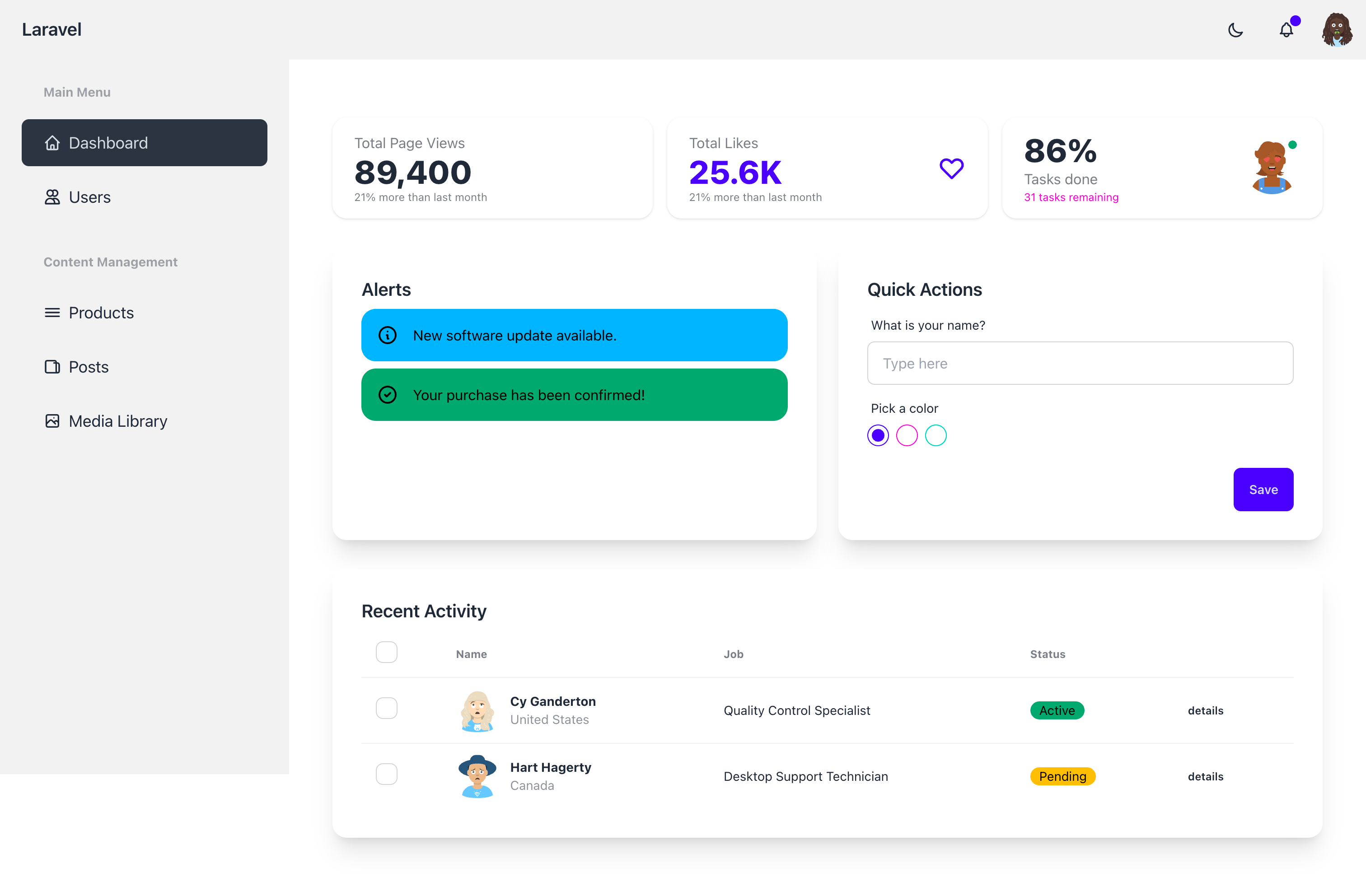
浏览真实页面截图,比较内容排版与手机效果。点击下方缩略图切换,放大查看整页细节。
目前有 1 张原始预览,可打开完整图片查看设计细节。
截图用于了解视觉与布局,交互效果请以实际项目为准。
采集于 2026-10-03查看来源
值得关注的模板亮点
从已有项目资料中,快速了解它的特点。
提供深色模式切换,主题通过 localStorage 持久化
包含响应式导航栏、用户下拉菜单等基础布局
附带仪表盘示例,含统计卡片、提示框、表单和数据表格
认证页面基于 Laravel Breeze,覆盖登录、注册、密码重置与资料页
主题颜色通过 CSS 变量配置,支持 data-theme 切换
模板详细介绍
这是一个面向 Laravel 项目的启动器模板,将 DaisyUI 组件库与 Tailwind CSS 集成到 Laravel 应用中,提供可直接使用的界面基础。项目通过 Composer 包形式分发,安装命令会发布资源文件、示例页面并配置 Vite 与主题。
模板包含基础布局(响应式导航栏、主题切换器、用户下拉菜单),主题通过 localStorage 持久化。示例页面覆盖仪表盘,展示统计卡片、提示框、表单元素和数据表格;通用组件示例包括按钮、卡片、徽章、头像和下拉菜单。认证部分基于 Laravel Breeze,提供登录、注册、密码重置和资料页面路由。
主题配置采用 CSS 变量方式写在 resources/css/app.css 中,可调整 primary、secondary、accent、neutral、base-100 以及 info、success、warning、error 等颜色变量,并通过 data-theme 属性切换明暗主题。
使用前需注意:仓库 README 要求 PHP ^8.2、Laravel ^12.0 以及 Node.js 与 NPM 环境;安装流程依赖 Laravel Breeze 并需在提示时选择 Blade with Alpine。模板代码采用 MIT 许可,但示例图片、字体、图标等第三方素材需单独核对许可,域名、托管、数据库等外部服务可能另行收费。
Laravel启动器
适合你的项目吗?
适用场景
- 为新的 Laravel 项目快速搭建带 DaisyUI 样式的界面基础
- 在已有 Laravel 应用中引入 DaisyUI 组件与明暗主题切换
- 参考示例页面和组件代码编写统计卡片、表格、表单等界面
- 为 Laravel Breeze 认证页面套用统一的 DaisyUI 视觉风格
适合人群
- 使用 Laravel 并希望采用 DaisyUI 作为 UI 组件库的开发者
- 需要现成认证页面与仪表盘示例的 Laravel 项目
- 偏好通过 CSS 变量而非 JavaScript 配置主题的团队
上手与定制指南
结合仓库当前版本的说明,按下面的资料检查内容、配置与运行要求。
- 1
环境要求:PHP ^8.2、Laravel ^12.0、Node.js 与 NPM
- 2
需先安装 Laravel Breeze,并在提示时选择 Blade with Alpine 选项
- 3
通过 Composer 安装包后运行 php artisan daisyui-starter:install 发布资源并构建前端
- 4
开发时需分别运行 php artisan serve 与 npm run dev
- 5
若安装出现稳定性错误,README 建议改用 dev-main 版本;第三方素材许可需单独核对
授权与来源资料
使用条件与限制
免费使用 · 保留许可声明本次收录的是公开仓库中采用 MIT 许可的免费版本;免费范围为该版本代码,不代表外部服务或第三方素材免费。
使用时需要遵守
- 允许免费使用、修改、商用和分发该版本代码。
- 分发代码副本或实质性部分时,保留原作者版权声明和完整 MIT 许可声明。
- 代码按现状提供;担保与责任限制以原许可证及适用法律为准。
额外费用与待核对事项
- 使用该模板需具备 PHP 8.2 及以上、Laravel 12.0 及以上,以及 Node.js 与 NPM 环境,否则无法安装和构建。
- 安装流程依赖 Laravel Breeze,需先通过 Composer 安装 Breeze 并执行 breeze:install,且需在提示时选择 Blade with Alpine 选项。
- 模板以 Composer 包形式分发,需通过该命令安装指定版本,并依赖 Composer 与 Packagist 网络访问。
- 安装后必须运行该 Artisan 命令来发布资源、安装 NPM 包、配置 Vite 与主题并构建前端资源。
- 开发运行需启动 Laravel 内置服务器,另需在单独终端运行 npm run dev 以启用 Vite 开发服务器。
- 若安装时出现稳定性错误,README 建议改用 dev-main 开发分支版本,该分支可能不稳定。
- 演示图片、字体、图标及其他第三方素材需按各自许可核对,不能仅凭代码的 MIT 许可判断。
- 域名、托管、数据库、支付或 AI 等外部服务可能另外收费。
查看原文依据
Permission is hereby granted, free of charge
许可证原文
PHP ^8.2 - Laravel ^12.0 - Node.js & NPM
README 原文
composer require laravel/breeze --dev php artisan breeze:install
README 原文
composer require sanjaya/laravel-daisyui-starter:v1.0
README 原文
php artisan daisyui-starter:install
README 原文
php artisan serve
README 原文
https://github.com/sanjayacloud/laravel-daisyui-starter/blob/main/LICENSE.mdhttps://github.com/sanjayacloud/laravel-daisyui-starter/blob/main/README.mdcomposer require sanjaya/laravel-daisyui-starter:dev-main
README 原文
DeepSeek 根据仓库许可证和 README 整理 ·2026-10-03。结果仅覆盖已读取资料,依赖、图片、字体及后续条款变更以各自原文为准。
项目核对记录与介绍依据
模板资料
- 来源平台
- GitHub
- 资料与维护参考分
- 资料一般 · 65 / 100
- 技术栈
- Laravel
- 网站类型
- 启动器
这个分数如何计算
本站按许可资料(最高30分)、演示链接(12分)、预览图(10分)、Star数(15分)、记录的维护时间(15分)、描述完整度(8分)、功能记录(5分)和分类资料(5分)计算。它不是代码、安全或性能测试,也不是 Google 评分;有链接不代表已实测可用。
这个项目需要核对什么
- 记录的仓库更新时间
- 2025-07-16
- 截图检查日期
- 2026-10-03
目前没有记录演示链接。请依据仓库说明在本地评估;仅凭截图无法确认交互行为。
目录记录的主要技术栈是 Laravel。请通过依赖清单和锁文件核对实际版本与托管要求。这些说明基于收录资料,不代表代码审计或部署实测。
查看具体选型方法 →介绍的制作与核对状态
介绍由 AI 辅助整理目录与仓库资料。仓库作者不等于这篇介绍的审核者。
审核声明: [email protected] · 2026-10-04
查看当时使用的来源资料
SHA-256: a558721cfce5497fdc575a5cfe79f7bae63f3248e32ca13d8d81aacbb3666745
2026-10-03T19:30:30.823Z
来源文件 / 仓库# Laravel DaisyUI Starter Kit
A beautiful Laravel starter kit with DaisyUI integration, providing a modern and responsive UI framework for your Laravel applications. Built with Tailwind CSS v4 and the latest DaisyUI.
## Features
- 🎨 DaisyUI components integration
- 🌓 Dark mode support with theme persistence
- 📱 Responsive design
- 🎯 CSS-first theme configuration
- 🚀 Easy to customize
- 📦 Simple installation
- 🔐 Authentication with Laravel Breeze
- ⚡ Tailwind CSS v4 integration
- 📱 Ready-to-use example pages and components
## Requirements
- PHP ^8.2
- Laravel ^12.0
- Node.js & NPM
## Installation
1. Create a new Laravel project:
```bash
laravel new my-project
cd my-project
```
2. Install Laravel Breeze:
```bash
composer require laravel/breeze --dev
php artisan breeze:install
```
When prompted, select the "Blade with Alpine" option.
3. Install the package via composer:
```bash
composer require sanjaya/laravel-daisyui-starter:v1.0
```
4. Run the installation command:
```bash
php artisan daisyui-starter:install
```
This will:
- Publish the package assets and example pages
- Install required NPM packages
- Configure Vite with Tailwind CSS
- Set up the theme configuration
- Build the assets
5. Start your development server:
```bash
php artisan serve
```
6. In a separate terminal, start the Vite development server:
```bash
npm run dev
```
## Example Pages and Components
The package comes with pre-built example pages showcasing various DaisyUI components:
### Layout Structure
The base layout (`resources/views/vendor/layouts/app.blade.php`) includes:
- Responsive navigation bar
- Theme switcher (light/dark mode)
- User dropdown menu
- Automatic theme persistence using localStorage
To use the layout in your views:
```php
<x-app-layout>
<!-- Your content here -->
</x-app-layout>
```
### Dashboard Example
The dashboard example (`resources/views/vendor/dashboard.blade.php`) demonstrates:
1. **Stats Cards**:
```html
<div class="stats shadow">
<div class="stat">
<div class="stat-title">Total Page Views</div>
<div class="stat-value">89,400</div>
<div class="stat-desc">21% more than last month</div>
</div>
</div>
```
2. **Alert Components**:
```html
<div class="alert alert-info">
<svg xmlns="http://www.w3.org/2000/svg" fill="none" viewBox="0 0 24 24" class="stroke-current shrink-0 w-6 h-6">
<path stroke-linecap="round" stroke-linejoin="round" stroke-width="2" d="M13 16h-1v-4h-1m1-4h.01M21 12a9 9 0 11-18 0 9 9 0 0118 0z"></path>
</svg>
<span>New software update available.</span>
</div>
```
3. **Form Elements**:
```html
<div class="form-control w-full">
<label class="label">
<span class="label-text">What is your name?</span>
</label>
<input type="text" placeholder="Type here" class="input input-bordered w-full" />
</div>
```
4. **Data Tables**:
```html
<div class="overflow-x-auto">
<table class="table">
<thead>
<tr>
<th>Name</th>
<th>Job</th>
<th>Status</th>
</tr>
</thead>
<tbody>
<tr>
<td>John Doe</td>
<td>Developer</td>
<td><div class="badge badge-success">Active</div></td>
</tr>
</tbody>
</table>
</div>
```
### Common Components
1. **Buttons**:
```html
<button class="btn">Button</button>
<button class="btn btn-primary">Primary</button>
<button class="btn btn-secondary">Secondary</button>
<button class="btn btn-accent">Accent</button>
<button class="btn btn-ghost">Ghost</button>
```
2. **Cards**:
```html
<div class="card bg-base-100 shadow-xl">
<div class="card-body">
<h2 class="card-title">Card Title</h2>
<p>Content</p>
<div class="card-actions justify-end">
<button class="btn btn-primary">Action</button>
</div>
</div>
</div>
```
3. **Badges**:
```html
<div class="badge">Default</div>
<div class="badge badge-primary">Primary</div>
<div class="badge badge-secondary">Secondary</div>
<div class="badge badge-accent">Accent</div>
```
4. **Avatars**:
```html
<div class="avatar">
<div class="w-24 rounded-full">
<img src="user-avatar.jpg" />
</div>
</div>
```
5. **Dropdowns**:
```html
<div class="dropdown">
<label tabindex="0" class="btn m-1">Click</label>
<ul tabindex="0" class="dropdown-content menu p-2 shadow bg-base-100 rounded-box w-52">
<li><a>Item 1</a></li>
<li><a>Item 2</a></li>
</ul>
</div>
```
## Screenshots
### Dashboard

### Login Page

## Theme Configuration
Themes are now configured directly in your CSS using CSS variables, following Tailwind CSS v4's CSS-first approach. The configuration is located in `resources/css/app.css`:
```css
@layer theme {
:root {
--theme: "light";
--color-primary: oklch(0.6569 0.196 275.75);
--color-secondary: oklch(0.7176 0.158 342.55);
--color-accent: oklch(0.7059 0.169 183.61);
/* ... other color variables ... */
}
[data-theme="dark"] {
--theme: "dark";
--color-base-100: oklch(0.2 0 0);
}
}
```
### Customizing Colors
To customize your theme colors, modify the CSS variables in `resources/css/app.css`. Available color variables:
- `--color-primary`: Main brand color
- `--color-secondary`: Secondary brand color
- `--color-accent`: Accent color
- `--color-neutral`: Neutral color
- `--color-base-100`: Background color
- `--color-info`: Information color
- `--color-success`: Success color
- `--color-warning`: Warning color
- `--color-error`: Error color
### Switching Themes
To switch themes in your Blade templates:
```html
<html data-theme="light">
<!-- For light theme -->
</html>
<!-- OR -->
<html data-theme="dark">
<!-- For dark theme -->
</html>
```
For dynamic theme switching:
```php
<html data-theme="{{ $theme }}">
<!-- Your content -->
</html>
```
## Usage
After installation, you can use DaisyUI components in your views:
```html
<button class="btn btn-primary">Primary Button</button>
<div class="card">
<div class="card-body">
<h2 class="card-title">Card Title</h2>
<p>Card content</p>
</div>
</div>
```
### Authentication
The package integrates with Laravel Breeze for authentication. All auth views are styled with DaisyUI components. Available routes:
- Login: `/login`
- Register: `/register`
- Password Reset: `/forgot-password`
- Profile: `/profile`
## Troubleshooting
### Common Issues
1. If you get a stability error when installing, use:
```bash
composer require sanjaya/laravel-daisyui-starter:dev-main
```
2. If assets are not showing up correctly:
- Make sure you've published all assets
- Clear your Laravel cache: `php artisan cache:clear`
- Rebuild your npm assets: `npm run build`
3. If themes are not applying:
- Ensure the `data-theme` attribute is properly set on your HTML elements
- Check that your CSS variables are correctly defined in `resources/css/app.css`
- Make sure Vite is properly building your assets
## Security
If you discover any security related issues, please create a issue using the issue tracker.
## License
The MIT License (MIT). Please see [License File](LICENSE.md) for more information.看看同类模板
对比同技术栈与用途的模板,找到更适合的视觉与内容结构。

sage
WordPress starter theme with Laravel Blade components and templates, Tailwind CSS, and block editor support
Laravel · 启动器

wave
Wave - The Software as a Service Starter Kit, designed to help you build the SAAS of your dreams 🚀 💰
Laravel · SaaS

filament-starter
A beautiful starting point for your next TALL stack project using Filament. ⚡
Laravel · 启动器

electrik
Laravel SaaS starter kit: auth, teams, Stripe billing, and Slate 3 — Composer package for Laravel 12
Laravel · SaaS

php-saas
The everything-included starter kit for your next idea
Laravel · SaaS

filament-jetstream
A Laravel starter kit built with Filament inspired by Jetstream.
Laravel · 启动器