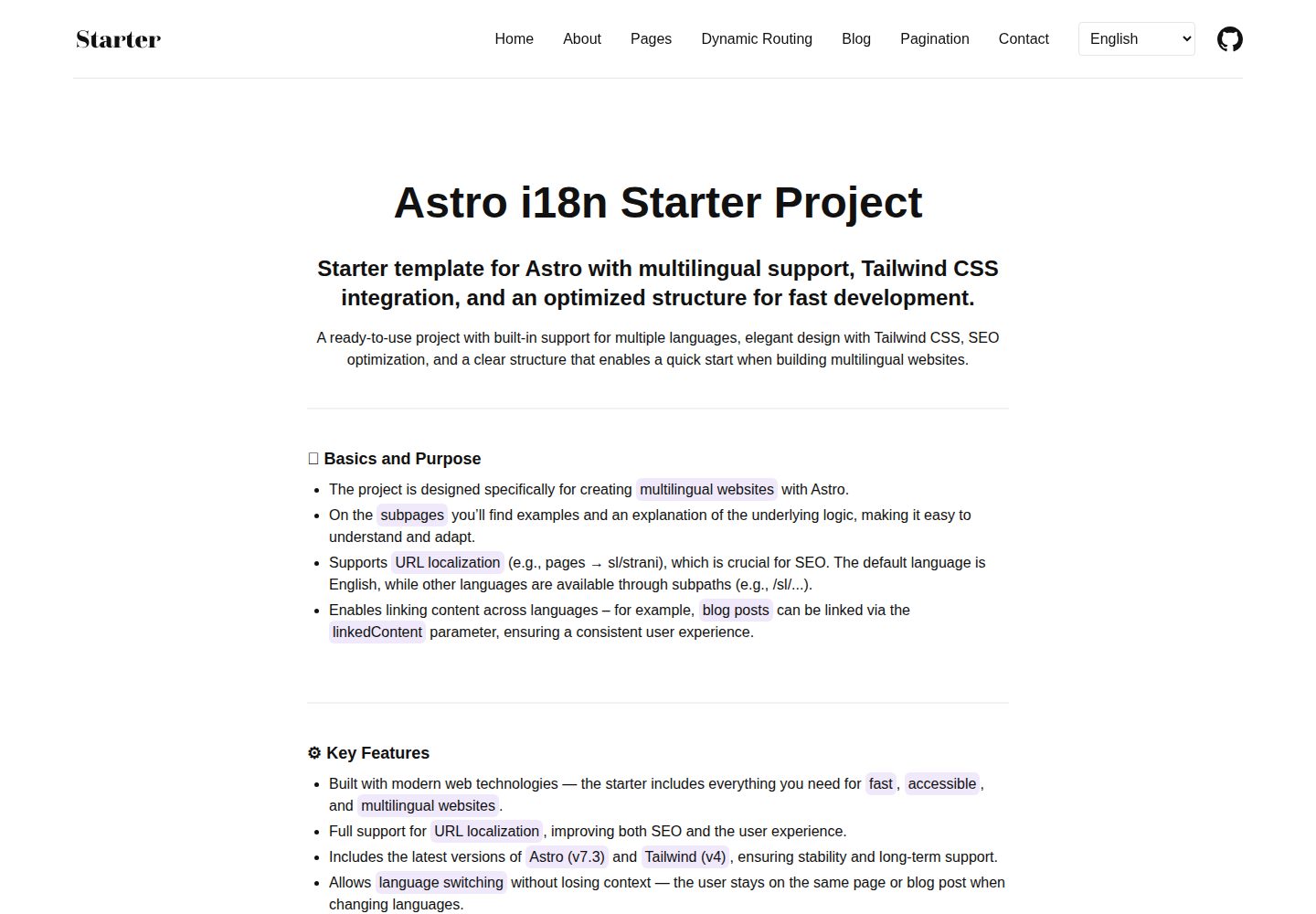
演示多语言 SEO 友好 URL,如 /about 与 /sl/o-projektu 各自本地化
Astro启动器
astro-i18n-starter — Astro 启动器模板
作者 Scorpio3310
基于 Astro 的多语言网站启动模板,重点演示 URL 本地化与内容翻译的完整实现,附带博客、表单与组件示例。
看看你的网站会是什么样
浏览真实页面截图,比较内容排版与手机效果。点击下方缩略图切换,放大查看整页细节。
全部页面与视图 3
截图用于了解视觉与布局,交互效果请以实际项目为准。
采集于 2026-10-02查看来源
值得关注的模板亮点
从已有项目资料中,快速了解它的特点。
集中式路由配置(src/i18n/routes.ts)管理各语言路径映射
带命名空间的翻译系统与保留上下文的语言切换
多语言博客系统,含文章与分页
联系页表单示例,使用 Astro Actions 做本地化校验
Svelte 5 交互组件示例与 ARIA 无障碍属性
模板详细介绍
这是一个面向多语言站点的 Astro 启动模板。Astro 本身不内置 URL 本地化,该模板通过动态路由与集中式路由配置演示了如何让不同语言拥有各自本地化的 URL,例如英文 /about 对应斯洛文尼亚语 /sl/o-projektu。
模板包含语言专属内容加载、带命名空间的翻译系统、保留上下文的语言切换、多语言博客与分页、基于 Astro Actions 的联系表单本地化校验示例,以及 Svelte 组件示例和 ARIA 无障碍属性。内容使用 Astro Content Collections 管理,样式使用 Tailwind CSS,图片通过 Astro Assets 处理。
默认使用 Cloudflare 适配器以支持动态路由的按需渲染,构建产物包含 Cloudflare Worker 与静态资源;README 说明可替换为其他适配器。仓库另有一个基于 helper 的分支,提供动态默认语言与可选语言前缀,属于更进阶的变体。
使用前需复制环境变量文件并设置 PRODUCTION_DOMAIN,该变量用于生成 Open Graph 图片、规范链接和 robots.txt。模板默认包含英文与斯洛文尼亚语两种语言,新增页面需同步更新路由配置、翻译文件与导航数据。
Astro启动器
适合你的项目吗?
适用场景
- 需要为不同语言提供本地化 URL 而非仅翻译内容的网站
- 以 Astro 构建、需要多语言博客与分页的项目
- 希望参考 Astro 中 i18n 路由、翻译文件与导航数据组织方式的开发者
- 需要表单本地化校验与交互组件示例的多语言站点
适合人群
- 使用 Astro 构建多语言站点的开发者
- 需要 URL 本地化方案参考的团队
- 计划在 Cloudflare 上部署并需要动态路由的项目
- 希望以 MIT 许可代码作为起点的个人或商业项目
上手与定制指南
结合仓库当前版本的说明,按下面的资料检查内容、配置与运行要求。
- 1
克隆仓库后使用 pnpm install 安装依赖
- 2
复制 .env.example 为 .env,并设置 PRODUCTION_DOMAIN 为你的生产域名
- 3
pnpm run dev 启动开发服务器,默认访问 http://localhost:4321
- 4
构建产物为 Cloudflare Worker(dist/server)与静态资源(dist/client),可用 pnpm exec wrangler deploy 部署;换主机需替换 astro.config.mjs 中的适配器
- 5
新增页面需同时更新 src/i18n/routes.ts、src/locales/ 下的翻译文件与 src/data/navigationData.ts
授权与来源资料
使用条件与限制
免费使用 · 保留许可声明本次收录的是公开仓库中采用 MIT 许可的免费版本;免费范围为该版本代码,不代表外部服务或第三方素材免费。
使用时需要遵守
- 允许免费使用、修改、商用和分发该版本代码。
- 分发代码副本或实质性部分时,保留原作者版权声明和完整 MIT 许可声明。
- 代码按现状提供;担保与责任限制以原许可证及适用法律为准。
额外费用与待核对事项
- 默认使用 Cloudflare 适配器以支持动态路由的按需渲染;可替换为其他适配器,但换主机需自行修改 astro.config.mjs 配置。
- 使用前必须复制 .env.example 为 .env 并设置 PRODUCTION_DOMAIN 为你的生产域名,该变量用于生成 Open Graph 图片、规范链接与 robots.txt。
- 构建产物为 Cloudflare Worker 与静态资源,默认部署方式依赖 Cloudflare 的 wrangler 工具链。
- 动态默认语言与可选语言前缀等进阶功能位于另一个 helper 分支,不在默认分支中提供。
- 演示图片、字体、图标及其他第三方素材需按各自许可核对,不能仅凭代码的 MIT 许可判断。
- 域名、托管、数据库、支付或 AI 等外部服务可能另外收费。
查看原文依据
Permission is hereby granted, free of charge
许可证原文
Adapter**: [Cloudflare](https://docs.astro.build/en/guides/integrations-guide/cloudflare/) - SSR adapter for dynamic routes (you can use any other adapter)
README 原文
Edit .env with your production domain PRODUCTION_DOMAIN = "https://your-domain.com"
README 原文
`pnpm run build` produces a Cloudflare Worker (`dist/server`) plus static assets (`dist/client`), as configured in `wrangler.jsonc`. Deploy it with `pnpm exec wrangler deploy`.
README 原文
https://github.com/Scorpio3310/astro-i18n-starter/blob/main/LICENSEhttps://github.com/Scorpio3310/astro-i18n-starter/blob/main/README.mdThese items are maintained in the advanced helper‑based branch:
README 原文
DeepSeek 根据仓库许可证和 README 整理 ·2026-10-02。结果仅覆盖已读取资料,依赖、图片、字体及后续条款变更以各自原文为准。
项目核对记录与介绍依据
模板资料
- 来源平台
- GitHub
- 资料与维护参考分
- 资料较完整 · 87 / 100
- 技术栈
- Astro
- 网站类型
- 启动器
这个分数如何计算
本站按许可资料(最高30分)、演示链接(12分)、预览图(10分)、Star数(15分)、记录的维护时间(15分)、描述完整度(8分)、功能记录(5分)和分类资料(5分)计算。它不是代码、安全或性能测试,也不是 Google 评分;有链接不代表已实测可用。
这个项目需要核对什么
- 记录的仓库更新时间
- 2026-09-13
- 截图检查日期
- 2026-10-02
已收录演示链接。请用你的内容与屏幕尺寸检查;有演示不代表表单、认证或支付已经可用。
目录记录的主要技术栈是 Astro。请通过依赖清单和锁文件核对实际版本与托管要求。这些说明基于收录资料,不代表代码审计或部署实测。
查看具体选型方法 →介绍的制作与核对状态
介绍由 AI 辅助整理目录与仓库资料。仓库作者不等于这篇介绍的审核者。
已完成服务器许可规则与 AI 来源核对;未经过人工编辑审核。
查看当时使用的来源资料
SHA-256: 42f8b638fa0dad92a99f015dfa6f53b94474d13a14ead4dbf451acedd873e952
2026-10-02T16:09:10.446Z
来源文件 / 仓库# Astro i18n Starter


**Keywords:** `astro` • `i18n` • `internationalization` • `multilingual` • `url localization` • `seo` • `typescript` • `tailwind css` • `static site generation`
## 🌐 [Live Demo](https://astro-i18n-starter.klemenc.dev)
> Multilingual Astro starter with URL localization support. Complete documentation available at the demo link.
Since Astro doesn't have built-in URL localization out of the box, this starter demonstrates how to implement a complete i18n solution for multilingual projects.
---
> [!TIP]
>
> ## 🚀 Advanced Variant
>
> Looking for a more advanced setup? Check the helper‑based branch (slightly more complex):
>
> - Dynamic default language
> - Optional language prefix
> Link: [https://github.com/Scorpio3310/astro-i18n-starter/tree/feat/i18n-routing-helper](https://github.com/Scorpio3310/astro-i18n-starter/tree/feat/i18n-routing-helper)
---
## ✨ Features
This project implements a comprehensive internationalization (i18n) system that includes:
- ✅ **SEO-friendly URLs** in multiple languages (`/about` → `/sl/o-projektu`)
- ✅ **Static + on-demand rendering** - Static generation at build time with on-demand rendering for dynamic routes
- ✅ **Language-specific content** loading and management
- ✅ **Translation system** integration with namespace support
- ✅ **Smart language switching** with context preservation
- ✅ **Blog system** with multilingual posts and pagination
- ✅ **Form handling example** - Contact page demonstrates Astro Actions with localized validation
- ✅ **Component examples** with Svelte 5 integration
- ✅ **Accessibility features** with proper ARIA attributes
- ✅ **SEO optimization** with meta tags and keywords
**Perfect for:** Projects requiring complete URL localization alongside content translation

---
## 🛠️ Tech Stack
- **Framework**: [Astro 7.3](https://astro.build/) - Static site generator
- **Adapter**: [Cloudflare](https://docs.astro.build/en/guides/integrations-guide/cloudflare/) - SSR adapter for dynamic routes (you can use any other adapter)
- **Components**: [Svelte 5](https://svelte.dev/) - Interactive components with runes
- **Styling**: [Tailwind CSS](https://tailwindcss.com/) - Utility-first CSS
- **Content**: Astro Content Collections - Type-safe markdown content
- **Images**: Astro Assets - Optimized image processing
---
## 🚀 Quick Start
### 1. Clone & Install
```bash
# Clone the repository
git clone https://github.com/Scorpio3310/astro-i18n-starter.git
cd astro-i18n-starter
# Install dependencies
pnpm install
```
### 2. Environment Setup
```bash
# Copy environment file
cp .env.example .env
# Edit .env with your production domain
PRODUCTION_DOMAIN = "https://your-domain.com"
```
### 3. Development Server
```bash
# Start development server
pnpm run dev
```
Visit `http://localhost:4321` to see your multilingual site!
---
## 📁 Project Structure
```
/
├── public/ # Static assets
├── src/
│ ├── assets/ # Assets
│ ├── components/ # Reusable components
│ ├── content/ # Content collections (blog, authors)
│ ├── data/ # Navigation and configuration
│ ├── i18n/ # Translation utilities and routes
│ ├── layouts/ # Page layouts
│ ├── locales/ # Translation files (en, sl)
│ ├── pages/ # File-based routing with [dynamic] params
│ ├── styles/ # Global styles
│ └── utils/ # Utility functions
```
---
## 🌍 How URL Localization Works
The system uses dynamic routing with file-based structure:
```
English: /about → src/pages/[about]/[...index].astro
Slovenian: /sl/o-projektu → src/pages/[about]/[...index].astro
```
**Route Configuration:**
```typescript
// src/i18n/routes.ts
// The default language (en) keeps the original route names and is not listed here
export const routes = {
sl: { about: "o-projektu", blog: "spletni-dnevnik" },
};
```
**Dynamic Path Generation:**
```astro
export function getStaticPaths() {
return [
{ params: { about: "about", index: undefined }, props: { lang: "en" } },
{ params: { about: "sl", index: "o-projektu" }, props: { lang: "sl" } },
];
}
```
---
## 📝 Adding New Pages
1. **Create page file**: `src/pages/[your-route]/[...index].astro`
2. **Add route translations**: Update `src/i18n/routes.ts`
3. **Add translations**: Create files in `src/locales/en/` and `src/locales/sl/`
4. **Update navigation**: Modify `src/data/navigationData.ts`
Detailed documentation with examples is available in the demo site.
---
## 🔧 Environment Variables
```bash
# .env
PRODUCTION_DOMAIN = "https://your-domain.com" # Used to enable robots.txt
```
**Important:** Set your production domain for proper:
- Open Graph images in social media
- Canonical URLs for SEO
- Search engine indexing control
---
## 🚢 Deployment
### Build for Production
```bash
pnpm run build
```
### Preview Build
```bash
pnpm run preview
```
`pnpm run build` produces a Cloudflare Worker (`dist/server`) plus static assets (`dist/client`), as configured in `wrangler.jsonc`. Deploy it with `pnpm exec wrangler deploy`. To target another host, swap the adapter in `astro.config.mjs`.
---
## 📋 Roadmap
These items are maintained in the advanced helper‑based branch:
- [x] ~~Dynamic default language~~
- [x] ~~Optional language prefix~~
updates: https://github.com/Scorpio3310/astro-i18n-starter/tree/feat/i18n-routing-helper
---
## 🤝 Contributing
1. Fork the repository
2. Create a feature branch (`git checkout -b feature/amazing-feature`)
3. Make your changes
4. Test locally with `pnpm run build && pnpm run preview`
5. Commit your changes (`git commit -m 'Add amazing feature'`)
6. Push to the branch (`git push origin feature/amazing-feature`)
7. Open a Pull Request
---
## 📄 License
This project is licensed under the MIT License - see the [LICENSE](LICENSE) file for details.
---
## 🙏 Acknowledgments
- [Astro](https://astro.build/) - Amazing static site generator
- [Svelte](https://svelte.dev/) - Excellent component framework
- [Tailwind CSS](https://tailwindcss.com/) - Great utility CSS framework
看看同类模板
对比同技术栈与用途的模板,找到更适合的视觉与内容结构。

astrowind
⭕️ AstroWind: A free template using Astro v7 and Tailwind CSS v4. Astro starter theme.
Astro · 博客
accessible-astro-starter
Accessible Astro Starter 是一个以无障碍为核心理念的 Astro 6 启动模板,由 incluud 团队维护。
Astro · 博客

astro-erudite
An opinionated, unstyled static blogging template built with Astro and native CSS.
Astro · 作品集

astro-shopify
astro-shopify 是一个面向开发者的轻量级电商启动模板,用于构建基于 Shopify 的无头店面。
Astro · 电商

brutal
A neobrutalism Astro starter theme
Astro · 启动器

qwind
⭕️ Qwind: A template to make your website using Qwik + Tailwind CSS.
Astro · 工具站