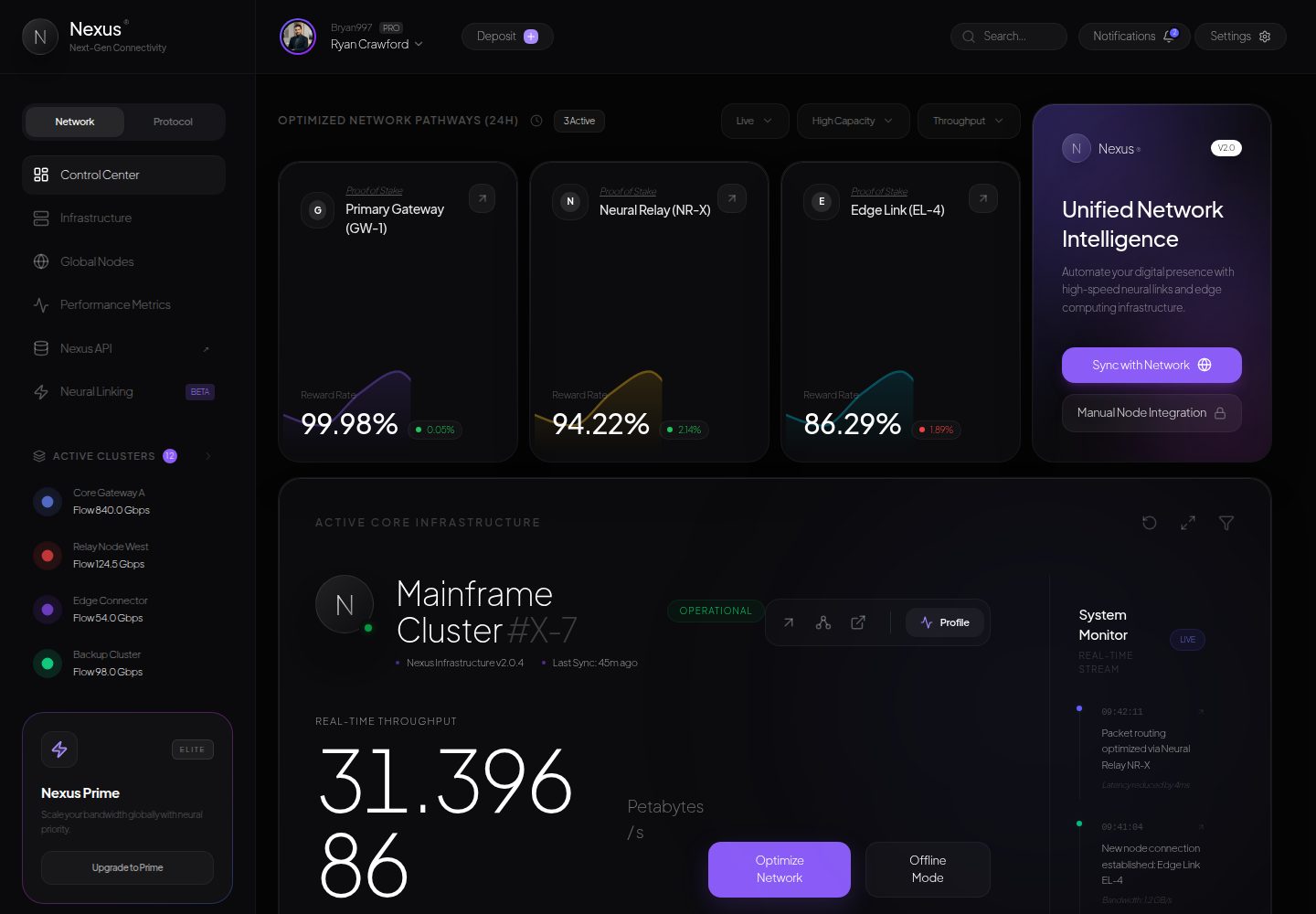
基于 Next.js App Router 与 Tailwind CSS v4 构建,使用自定义主题变量与 .glass 玻璃拟态样式类
Next.jsReact后台启动器
nexus — Next.js 后台模板
作者 sebastianvasquezechavarria1234
Nexus 是一个基于 Next.js 与 Tailwind CSS 的赛博朋克风格仪表盘前端模板,包含玻璃拟态布局、Recharts 图表、Framer Motion 动画与全球流量地图等组件。
看看你的网站会是什么样
浏览真实页面截图,比较内容排版与手机效果。点击下方缩略图切换,放大查看整页细节。
全部页面与视图 2
截图用于了解视觉与布局,交互效果请以实际项目为准。
采集于 2026-10-14查看来源
值得关注的模板亮点
从已有项目资料中,快速了解它的特点。
包含 Primary Gateway、Neural Relay、Edge Link 三类网关遥测卡片,使用 Recharts 渐变面积图展示延迟与奖励率历史
DigitSlider 组件以 Framer Motion 实现滑动数字动画,展示吞吐量等实时流数据
主集群遥测模块覆盖 CPU 架构、线程、内存分配、能耗与风扇转速等硬件诊断指标
NetworkMap 组件以脉动 SVG 节点网格呈现北美、亚太、欧洲数据中心的流量饱和度
采用 TanStack React Query v5 管理异步端点与缓存,Lucide React 提供图标
模板详细介绍
Nexus 是一个赛博朋克与神经网络遥测主题的前端模板与 UI 组件样板,构建在 Next.js 与 Tailwind CSS v4 之上。README 说明其用途是供开发者复制、克隆和研究玻璃拟态布局、未来感配色、流式排版以及仪表盘设计令牌。
模板包含四个主要模块:统一网络智能与网关遥测(Primary Gateway GW-1、Neural Relay NR-X、Edge Link EL-4 的监控数据,以及基于 Recharts 的渐变面积图);主集群遥测 #X-7(DigitSlider 吞吐量计数器、四核硬件诊断、分布式 SLA 监控);实时系统流(动画活动日志);以及全球流量分布图(脉动世界节点网格)。
技术栈方面,README 列出 Next.js App Router、React 19、Tailwind CSS v4、Framer Motion、Recharts、TanStack React Query v5、Lucide React 图标与 TypeScript。目录结构包含 app 路由、providers、dashboard 组件(AssetCard、NetworkMap)与 layout 组件(DashboardLayout、Sidebar、TopBar)。
需要说明的是,README 未提供数据来源、后端接口、真实遥测数据接入方式或生产部署配置的说明;页面中展示的网关、集群与流量数据在文档中未说明其来源与真实性。
Next.js后台启动器
适合你的项目吗?
适用场景
- 作为仪表盘 UI 模板,用于学习或复用玻璃拟态卡片、渐变面积图与侧边栏布局
- 作为赛博朋克视觉风格的组件参考,提取配色、排版与动画实现
- 用于搭建监控类仪表盘的前端外壳,再接入自有数据源
- 作为 Next.js App Router 与 Tailwind CSS v4 结合的项目结构示例
适合人群
- 需要赛博朋克或未来感仪表盘视觉参考的前端开发者
- 希望研究玻璃拟态布局与 Framer Motion 微动画实现方式的开发者
- 准备基于 Next.js 与 Tailwind CSS 搭建监控面板外壳的团队
- 需要可复制 CSS 类与响应式布局组件的 UI 工程师
上手与定制指南
结合仓库当前版本的说明,按下面的资料检查内容、配置与运行要求。
- 1
README 要求 Node.js 18+ 与 npm,进入项目目录后执行 npm install 安装依赖
- 2
开发模式运行 npm run dev,并在浏览器访问 http://localhost:3000
- 3
生产构建执行 npm run build,随后用 npm run start 启动本地生产服务器
- 4
README 未说明环境变量、后端接口或真实数据源的配置方式
授权与来源资料
使用条件与限制
免费使用 · 保留许可声明本次收录的是公开仓库中采用 MIT 许可的免费版本;免费范围为该版本代码,不代表外部服务或第三方素材免费。
使用时需要遵守
- 允许免费使用、修改、商用和分发该版本代码。
- 分发代码副本或实质性部分时,保留原作者版权声明和完整 MIT 许可声明。
- 代码按现状提供;担保与责任限制以原许可证及适用法律为准。
额外费用与待核对事项
- 演示图片、字体、图标及其他第三方素材需按各自许可核对,不能仅凭代码的 MIT 许可判断。
- 域名、托管、数据库、支付或 AI 等外部服务可能另外收费。
查看原文依据
https://github.com/sebastianvasquezechavarria1234/nexus/blob/main/LICENSEhttps://github.com/sebastianvasquezechavarria1234/nexus/blob/main/README.mdPermission is hereby granted, free of charge
许可证原文
DeepSeek 根据仓库许可证和 README 整理 ·2026-10-14。结果仅覆盖已读取资料,依赖、图片、字体及后续条款变更以各自原文为准。
项目核对记录与介绍依据
模板资料
- 来源平台
- GitHub
- 资料与维护参考分
- 资料较完整 · 85 / 100
- 技术栈
- Next.js · React
- 网站类型
- 后台 · 启动器
这个分数如何计算
本站按许可资料(最高30分)、演示链接(12分)、预览图(10分)、Star数(15分)、记录的维护时间(15分)、描述完整度(8分)、功能记录(5分)和分类资料(5分)计算。它不是代码、安全或性能测试,也不是 Google 评分;有链接不代表已实测可用。
这个项目需要核对什么
- 记录的仓库更新时间
- 2026-05-21
- 截图检查日期
- 2026-10-14
已收录演示链接。请用你的内容与屏幕尺寸检查;有演示不代表表单、认证或支付已经可用。
目录记录的主要技术栈是 Next.js。请通过依赖清单和锁文件核对实际版本与托管要求。这些说明基于收录资料,不代表代码审计或部署实测。
查看具体选型方法 →介绍的制作与核对状态
介绍由 AI 辅助整理目录与仓库资料。仓库作者不等于这篇介绍的审核者。
审核声明: codex-user-requested-batch-review-20261015 · 2026-10-15
查看当时使用的来源资料
SHA-256: 20c0ad3de0188590f5fb0175e8176203d29592e4b0b46061117d09abb7b0f854
2026-10-14T20:51:43.863Z
来源文件 / 仓库 # 🌐 NEXUS | Cybernetic & Neural Network Telemetry Dashboard [](https://nextjs.org) [](https://tailwindcss.com) [](https://www.framer.com/motion/) [](https://www.typescriptlang.org/) [](LICENSE) **Nexus** is an ultra-premium, high-fidelity cybernetic frontend style template and UI component boilerplate built on top of Next.js and Tailwind CSS v4. It was specifically designed and engineered for developers to copy, clone, and study state-of-the-art glassmorphic layouts, futuristic color palettes, fluid typography, and premium dashboard design tokens. --- ## ✨ Features ### 1. 🌌 Unified Network Intelligence & Gateway Telemetry - **Proof-of-Stake Gateways**: Monitored telemetry for **Primary Gateway (GW-1)**, **Neural Relay (NR-X)**, and **Edge Link (EL-4)**. - **Dynamic Yield Charts**: Beautiful gradient-filled Area Charts powered by **Recharts** visualizing latency and reward-rate history. - **Auto-Routing Handshake**: One-click integrations to sync edge infrastructure or verify network parameters with identity handshakes. ### 2. 🖥️ Mainframe Cluster Telemetry (#X-7) - **Fluid Slider Telemetry**: High-precision throughput counter (`DigitSlider`) rendering real-time stream data (in Petabytes per second) with physics-based sliding digit animations using **Framer Motion**. - **Quad-Core Hardware Diagnostics**: Granular telemetry on CPU Architecture (128-bit Quad Neural Core V3), active Threads, RAM allocation, Energy Draw (kW/h), and micro-fan cooling speeds. - **Distributed SLA Monitoring**: Real-time evaluation of signal dynamics (Neural Flow, Topology, and Latency indices). ### 3. 📜 Live System Stream - **Animated Activity Logs**: Chronological log stream updating on-the-fly, documenting security handshake validations, mainframe cluster auto-scalings, and packet optimization via Neural Relays. ### 4. 🗺️ Global Traffic Distribution Map - **Vector Mesh Visualization**: Dynamic visual interface featuring a pulsating world-node grid detailing traffic saturation across global datacenters (North America, Asia-Pacific, Europe). --- ## 🛠️ Technology Stack Nexus utilizes the latest modern frontend stack designed for fluid interactivity, modular architecture, and extreme visual polish: * **Core Framework**: [Next.js 16 (App Router)](https://nextjs.org/) utilizing React 19 server-side rendering advantages and route optimizations. * **Styling**: [Tailwind CSS v4](https://tailwindcss.com) with native PostCSS imports, utilizing customized themes, variables (`--color-nexus-purple`, `--color-nexus-cyan`), and custom CSS glassmorphism layers (`.glass`) with glowing top-edge lighting gradients. * **Animations**: [Framer Motion 12](https://www.framer.com/motion/) handling fluid sliding telemetry text, micro-animations, and slide-in entries. * **Data Visualization**: [Recharts 3](https://recharts.org/) for highly responsive gradient area charts. * **Server State**: [TanStack React Query v5](https://tanstack.com/query) for asynchronous endpoint management and cache optimizations. * **Icons**: [Lucide React](https://lucide.dev/) for crisp, scalable svg cybernetic graphics. --- ## 📁 Directory Structure ```bash nexus/ ├── public/ # Static assets and icons │ ├── preview.png # Main dashboard preview image │ └── avatar.png # User avatar asset ├── src/ │ ├── app/ # Next.js App Router root & metadata │ │ ├── globals.css # Global CSS, typography (Google Sans Flex), glass classes │ │ ├── layout.tsx # Base layout context │ │ ├── providers.tsx # React Query & Framer Motion provider layers │ │ └── page.tsx # Main telemetry dashboard view & DigitSlider component │ └── components/ # Reusable dashboard modules │ ├── dashboard/ │ │ ├── AssetCard.tsx # Gateway cards with Recharts gradients │ │ └── NetworkMap.tsx # Pulsating SVG global traffic map │ └── layout/ │ ├── DashboardLayout.tsx │ ├── Sidebar.tsx # Fully-featured left side cybernetic navigation bar │ └── TopBar.tsx # System header with quick searches and notifications ├── next.config.ts # Build configuration settings ├── package.json # Script runs and dependencies listing └── tsconfig.json # Type definitions mapping ``` --- ## 🚀 Getting Started ### Prerequisites Make sure you have Node.js (version 18+ recommended) and npm installed. ### Installation 1. Clone the repository and navigate into it: ```bash cd nexus ``` 2. Install the system dependencies: ```bash npm install ``` 3. Run the application locally in development mode: ```bash npm run dev ``` 4. Open your browser and navigate to: ```url http://localhost:3000 ``` ### Production Build To compile a highly optimized production bundle of the application, run: ```bash npm run build ``` Then start the production server locally: ```bash npm run start ``` --- ## 🎨 Visual Design Guidelines Nexus features a custom glassmorphism design language tailored for terminal/high-fidelity screens: * **Backgrounds**: High-contrast dark void (`#0a0a0c`) combined with custom high-blur glass containers (`#111114/60`). * **Mesh Gradients**: Colorful glowing blobs blur-mapped around key interactives to draw natural focus. * **Typography**: Clean hierarchy relying on *Google Sans Flex* and *Plus Jakarta Sans* to elevate metrics and numeric details. --- ## 📄 License & Open-Source Usage This project is fully open-source and released under the **MIT License**. Anyone is free to clone this repository, copy the CSS classes, reuse the responsive layouts, extract components, or adapt the entire visual design language for their own dashboards and websites without restriction. See the [LICENSE](LICENSE) file for the full legal text.
看看同类模板
对比同技术栈与用途的模板,找到更适合的视觉与内容结构。

ai-website-cloner-template
Clone any website with one command using AI coding agents
Next.js · 启动器

Next.js SaaS Starter
Next.js SaaS Starter 是 Next.js 官方维护的 SaaS 起点模板,定位介于学习资源和可直接部署的脚手架之间。
Next.js · SaaS

Next.js Commerce
Next.js Commerce 是 Vercel 团队维护的电商启动模板,基于 Next.js App Router 构建,采用服务端渲染、React Server Components、Server Actions …
Next.js · 电商

Next-js-Boilerplate
Next-js-Boilerplate 是一个面向 Next.js 16、Tailwind CSS 4 和 TypeScript 的启动器,核心定位是开发者体验优先。
Next.js · 启动器

tailwind-nextjs-starter-blog
tailwind-nextjs-starter-blog 是一个面向个人技术博客的 Next.js 与 Tailwind CSS 启动模板,其 v2 版本基于 App Router 与 React Server Comp…
Next.js · 博客

next-forge
Production-grade Turborepo template for Next.js apps.
Next.js · 启动器