Built with Next.js App Router and Tailwind CSS v4, using custom theme variables and the .glass glassmorphism style class
Next.jsReactAdmin dashboardStarter
nexus — Next.js Admin dashboard Template
By sebastianvasquezechavarria1234
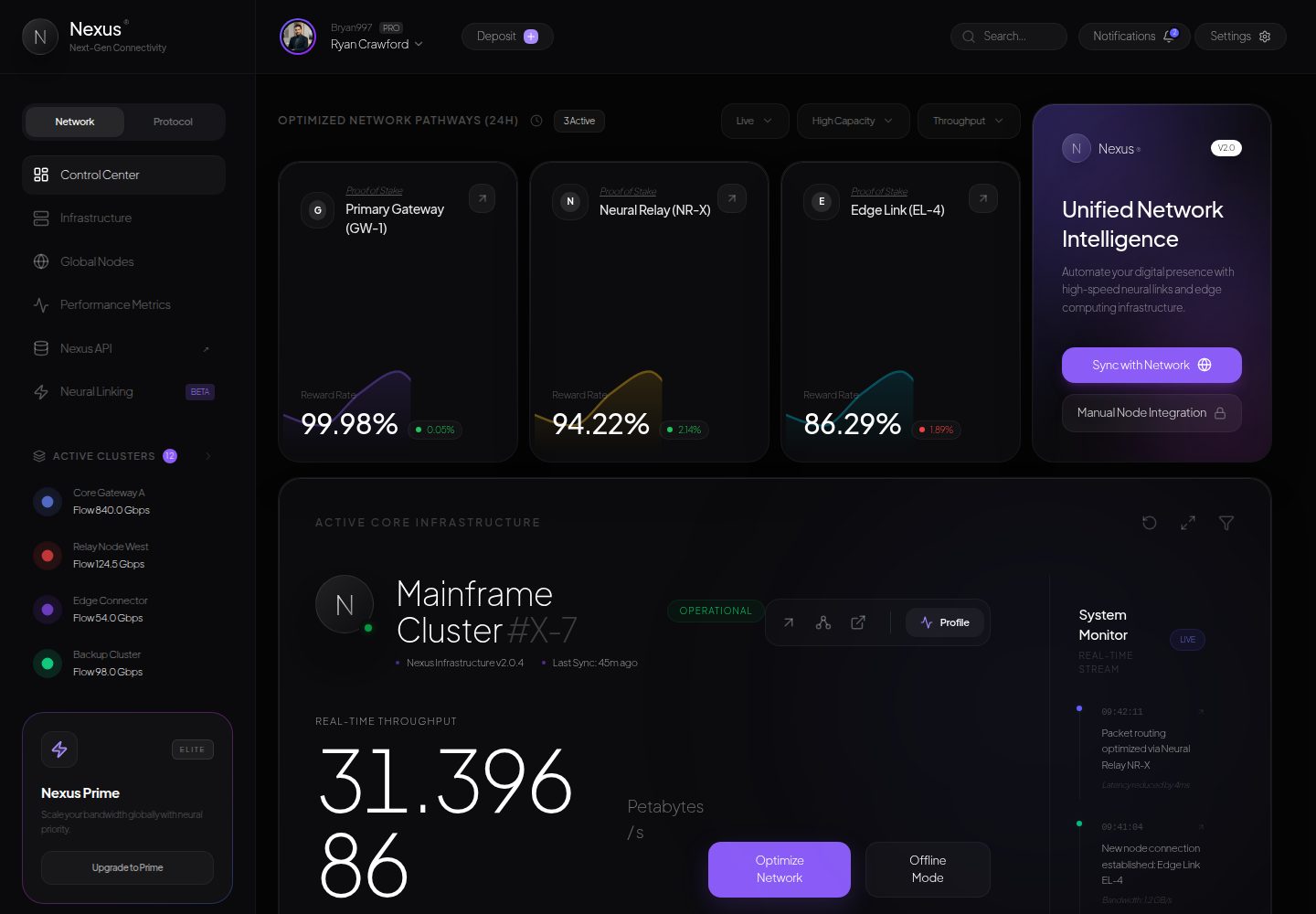
Nexus is a cyberpunk-style dashboard frontend template built on Next.js and Tailwind CSS, including glassmorphism layouts, Recharts charts, Framer Motion animations, and a global traffic map component.
Explore the design
Compare the page layouts and mobile experience. Open any screenshot for a closer look.
Desktop homepage1 / 2
Desktop captureTop of page
Actual screenshot captured by the server browser.
All pages & views 2
Screenshots show visual appearance; interactive behavior may differ.
Recorded 2026-10-14View source
What stands out
A quick read of the recorded project description.
Includes three types of gateway telemetry cards—Primary Gateway, Neural Relay, Edge Link—using Recharts gradient area charts to display latency and reward rate history
The DigitSlider component uses Framer Motion for sliding number animations, displaying real-time stream data such as throughput
The primary cluster telemetry module covers hardware diagnostic metrics including CPU architecture, threads, memory allocation, power consumption, and fan speed
The NetworkMap component presents traffic saturation for North America, Asia-Pacific, and Europe data centers as a pulsing SVG node grid
Uses TanStack React Query v5 for managing asynchronous endpoints and caching, with Lucide React providing icons
Template Details
Nexus is a frontend template and UI component boilerplate with a cyberpunk and neural network telemetry theme, built on Next.js and Tailwind CSS v4. The README states its purpose is for developers to copy, clone, and study glassmorphism layouts, futuristic color schemes, fluid typography, and dashboard design tokens.
The template contains four main modules: Unified Network Intelligence & Gateway Telemetry (monitoring data for Primary Gateway GW-1, Neural Relay NR-X, Edge Link EL-4, plus Recharts-based gradient area charts); Primary Cluster Telemetry #X-7 (DigitSlider throughput counters, quad-core hardware diagnostics, distributed SLA monitoring); Real-time System Stream (animated activity log); and Global Traffic Distribution Map (pulsing world node grid).
On the tech stack side, the README lists Next.js App Router, React 19, Tailwind CSS v4, Framer Motion, Recharts, TanStack React Query v5, Lucide React icons, and TypeScript. The directory structure includes app routes, providers, dashboard components (AssetCard, NetworkMap), and layout components (DashboardLayout, Sidebar, TopBar).
It should be noted that the README does not provide information on data sources, backend interfaces, how real telemetry data is connected, or production deployment configuration; the gateway, cluster, and traffic data displayed on the page are not documented as to their source or authenticity.
Next.jsDashboardStarter
Is it right for your project?
Use Cases
- As a dashboard UI template, for learning or reusing glassmorphism cards, gradient area charts, and sidebar layouts
- As a component reference for cyberpunk visual style, to extract color schemes, typography, and animation implementations
- For building the frontend shell of a monitoring dashboard, then connecting your own data sources
- As a project structure example combining Next.js App Router with Tailwind CSS v4
Suitable For
- Frontend developers who need cyberpunk or futuristic dashboard visual references
- Developers who want to study glassmorphism layouts and Framer Motion micro-animation implementations
- Teams preparing to build a monitoring panel shell based on Next.js and Tailwind CSS
- UI engineers who need reusable CSS classes and responsive layout components
Getting started & customization
Use these recorded setup notes alongside the repository instructions for your chosen version.
- 1
The README requires Node.js 18+ and npm; after entering the project directory, run npm install to install dependencies
- 2
Run npm run dev for development mode, and visit http://localhost:3000 in the browser
- 3
Run npm run build for a production build, then use npm run start to launch the local production server
- 4
The README does not explain how to configure environment variables, backend interfaces, or real data sources
License & source material
Usage conditions & limitations
Free to use · keep license noticeThis entry covers the free version under the MIT license in the public repository; the free scope is the code of this version and does not mean external services or third-party assets are free.
Must comply with when using
- Free use, modification, commercial use, and distribution of this version's code are permitted.
- When distributing copies or substantial portions of the code, retain the original author's copyright notice and the full MIT license notice.
- The code is provided as-is; warranties and limitations of liability are governed by the original license and applicable law.
Additional costs & items to verify
- Demo images, fonts, icons, and other third-party assets must be checked against their respective licenses and cannot be judged solely by the code's MIT license.
- External services such as domains, hosting, databases, payments, or AI may incur separate charges.
View Original Text Basis
https://github.com/sebastianvasquezechavarria1234/nexus/blob/main/LICENSEhttps://github.com/sebastianvasquezechavarria1234/nexus/blob/main/README.mdPermission is hereby granted, free of charge
Original License Text
Compiled by DeepSeek based on repository license and README ·2026-10-14. Results only cover the materials read; dependencies, images, fonts, and subsequent term changes are subject to their respective original texts.
Project checks & description sources
Template Information
- Source platforms
- GitHub
- Documentation and maintenance reference score
- More documented · 85 / 100
- Technologies
- Next.js · React
- Website type
- Admin dashboard · Starter
How this score is calculated
Our heuristic uses license records (up to 30), a demo link (12), a preview (10), stars (15), recorded maintenance (15), description completeness (8), feature records (5) and classification data (5). It is not a code, security or performance test, or a Google score. A link does not establish tested functionality.
What to verify for this project
- Repository update recorded
- 2026-05-21
- Screenshot last checked
- 2026-10-14
A demo link is listed. Check it with your own content and viewport sizes; its presence does not confirm that forms, authentication or payments work.
The catalog identifies Next.js as the primary stack. Check the actual dependency manifest and lockfile for versions and hosting requirements. These notes use recorded metadata, not a code audit or a deployment test.
Use a selection guide →How this description was prepared
AI-assisted description based on catalog records and repository material. Repository authors are not automatically the reviewers of this description.
Review declaration: codex-user-requested-batch-review-20261015 · 2026-10-15
Inspect the recorded source material
SHA-256: 20c0ad3de0188590f5fb0175e8176203d29592e4b0b46061117d09abb7b0f854
2026-10-14T20:51:43.863Z
Source file / repository # 🌐 NEXUS | Cybernetic & Neural Network Telemetry Dashboard [](https://nextjs.org) [](https://tailwindcss.com) [](https://www.framer.com/motion/) [](https://www.typescriptlang.org/) [](LICENSE) **Nexus** is an ultra-premium, high-fidelity cybernetic frontend style template and UI component boilerplate built on top of Next.js and Tailwind CSS v4. It was specifically designed and engineered for developers to copy, clone, and study state-of-the-art glassmorphic layouts, futuristic color palettes, fluid typography, and premium dashboard design tokens. --- ## ✨ Features ### 1. 🌌 Unified Network Intelligence & Gateway Telemetry - **Proof-of-Stake Gateways**: Monitored telemetry for **Primary Gateway (GW-1)**, **Neural Relay (NR-X)**, and **Edge Link (EL-4)**. - **Dynamic Yield Charts**: Beautiful gradient-filled Area Charts powered by **Recharts** visualizing latency and reward-rate history. - **Auto-Routing Handshake**: One-click integrations to sync edge infrastructure or verify network parameters with identity handshakes. ### 2. 🖥️ Mainframe Cluster Telemetry (#X-7) - **Fluid Slider Telemetry**: High-precision throughput counter (`DigitSlider`) rendering real-time stream data (in Petabytes per second) with physics-based sliding digit animations using **Framer Motion**. - **Quad-Core Hardware Diagnostics**: Granular telemetry on CPU Architecture (128-bit Quad Neural Core V3), active Threads, RAM allocation, Energy Draw (kW/h), and micro-fan cooling speeds. - **Distributed SLA Monitoring**: Real-time evaluation of signal dynamics (Neural Flow, Topology, and Latency indices). ### 3. 📜 Live System Stream - **Animated Activity Logs**: Chronological log stream updating on-the-fly, documenting security handshake validations, mainframe cluster auto-scalings, and packet optimization via Neural Relays. ### 4. 🗺️ Global Traffic Distribution Map - **Vector Mesh Visualization**: Dynamic visual interface featuring a pulsating world-node grid detailing traffic saturation across global datacenters (North America, Asia-Pacific, Europe). --- ## 🛠️ Technology Stack Nexus utilizes the latest modern frontend stack designed for fluid interactivity, modular architecture, and extreme visual polish: * **Core Framework**: [Next.js 16 (App Router)](https://nextjs.org/) utilizing React 19 server-side rendering advantages and route optimizations. * **Styling**: [Tailwind CSS v4](https://tailwindcss.com) with native PostCSS imports, utilizing customized themes, variables (`--color-nexus-purple`, `--color-nexus-cyan`), and custom CSS glassmorphism layers (`.glass`) with glowing top-edge lighting gradients. * **Animations**: [Framer Motion 12](https://www.framer.com/motion/) handling fluid sliding telemetry text, micro-animations, and slide-in entries. * **Data Visualization**: [Recharts 3](https://recharts.org/) for highly responsive gradient area charts. * **Server State**: [TanStack React Query v5](https://tanstack.com/query) for asynchronous endpoint management and cache optimizations. * **Icons**: [Lucide React](https://lucide.dev/) for crisp, scalable svg cybernetic graphics. --- ## 📁 Directory Structure ```bash nexus/ ├── public/ # Static assets and icons │ ├── preview.png # Main dashboard preview image │ └── avatar.png # User avatar asset ├── src/ │ ├── app/ # Next.js App Router root & metadata │ │ ├── globals.css # Global CSS, typography (Google Sans Flex), glass classes │ │ ├── layout.tsx # Base layout context │ │ ├── providers.tsx # React Query & Framer Motion provider layers │ │ └── page.tsx # Main telemetry dashboard view & DigitSlider component │ └── components/ # Reusable dashboard modules │ ├── dashboard/ │ │ ├── AssetCard.tsx # Gateway cards with Recharts gradients │ │ └── NetworkMap.tsx # Pulsating SVG global traffic map │ └── layout/ │ ├── DashboardLayout.tsx │ ├── Sidebar.tsx # Fully-featured left side cybernetic navigation bar │ └── TopBar.tsx # System header with quick searches and notifications ├── next.config.ts # Build configuration settings ├── package.json # Script runs and dependencies listing └── tsconfig.json # Type definitions mapping ``` --- ## 🚀 Getting Started ### Prerequisites Make sure you have Node.js (version 18+ recommended) and npm installed. ### Installation 1. Clone the repository and navigate into it: ```bash cd nexus ``` 2. Install the system dependencies: ```bash npm install ``` 3. Run the application locally in development mode: ```bash npm run dev ``` 4. Open your browser and navigate to: ```url http://localhost:3000 ``` ### Production Build To compile a highly optimized production bundle of the application, run: ```bash npm run build ``` Then start the production server locally: ```bash npm run start ``` --- ## 🎨 Visual Design Guidelines Nexus features a custom glassmorphism design language tailored for terminal/high-fidelity screens: * **Backgrounds**: High-contrast dark void (`#0a0a0c`) combined with custom high-blur glass containers (`#111114/60`). * **Mesh Gradients**: Colorful glowing blobs blur-mapped around key interactives to draw natural focus. * **Typography**: Clean hierarchy relying on *Google Sans Flex* and *Plus Jakarta Sans* to elevate metrics and numeric details. --- ## 📄 License & Open-Source Usage This project is fully open-source and released under the **MIT License**. Anyone is free to clone this repository, copy the CSS classes, reuse the responsive layouts, extract components, or adapt the entire visual design language for their own dashboards and websites without restriction. See the [LICENSE](LICENSE) file for the full legal text.
Explore similar templates
Compare previews and descriptions within the same stack and category.

Next.js SaaS Starter
The official Next.js SaaS starter template, integrating email/password authentication, Stripe Checkout subscriptions, a dashboard with user/team CRUD, basic Owner/Member RBAC, and activity logging.
Next.js · SaaS

Next.js Commerce
Vercel's officially maintained Next.js App Router ecommerce starter with deep Shopify integration, offering a complete product catalog, cart, and checkout flow. Core logic is modular for swapping backends, and community provider versions exist for BigCommerce, Medusa, and Saleor.
Next.js · E-commerce

Next-js-Boilerplate
A developer-first Next.js 16 starter with Tailwind CSS 4 and TypeScript, supporting both App Router and Page Router.
Next.js · Starter

tailwind-nextjs-starter-blog
A Next.js and Tailwind CSS blog starter template using Contentlayer for Markdown/MDX, with built-in SEO, code highlighting, and tags. It targets personal technical blogs and migration from Jekyll/Hugo to React, and supports one-click Vercel deployment.
Next.js · Blog

next-forge
next-forge is a Turborepo-based Next.js template maintained by Vercel, positioned as a starting point for SaaS products.
Next.js · Starter

SaaS-Boilerplate
SaaS-Boilerplate is an open-source SaaS starter template built with Next.js App Router, React 19, TypeScript, Tailwind CSS, and Shadcn UI.
Next.js · SaaS