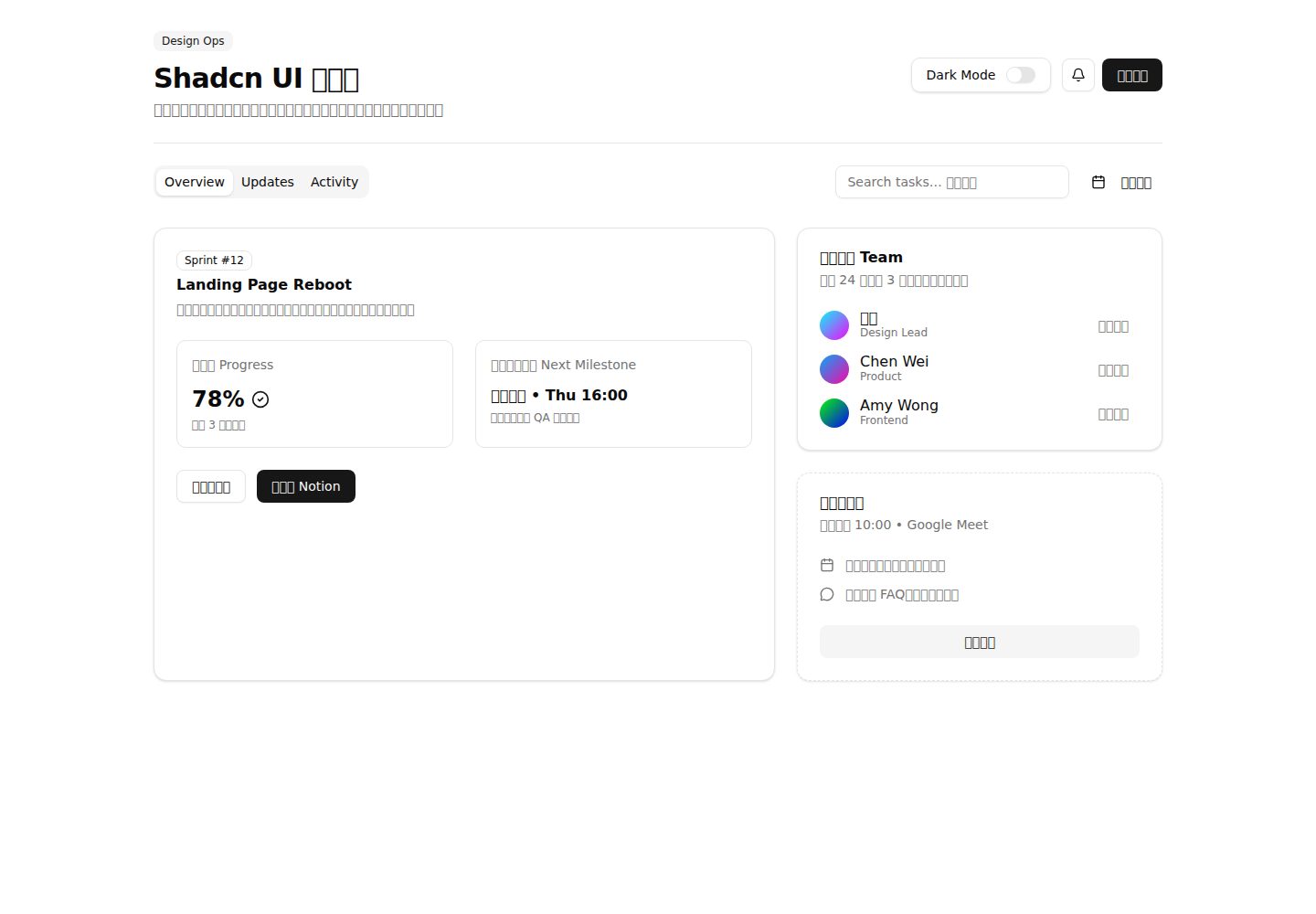
内置 shadcn-ui 仪表盘演示,包含多列卡片、标签页视图与状态时间线
ViteReact后台启动器
MyFrontendTemplate — Vite 后台模板
作者 ShinoharaHaruna
MyFrontendTemplate 是一个基于 React、TypeScript、Vite、Tailwind CSS v4 与 shadcn-ui 的前端模板,使用 Yarn Berry PnP 管理依赖,内置一个仪表盘演示页面,并附带 fork 重命名脚本与 Vercel 部署说明。
看看你的网站会是什么样
浏览真实页面截图,比较内容排版与手机效果。点击下方缩略图切换,放大查看整页细节。
全部页面与视图 2
截图用于了解视觉与布局,交互效果请以实际项目为准。
采集于 2026-10-15查看来源
值得关注的模板亮点
从已有项目资料中,快速了解它的特点。
Switch 组件切换主题并将偏好同步到 localStorage
React 19、严格模式 TypeScript、Vite 7、Tailwind CSS v4 与 shadcn-ui 组合
使用 Yarn Berry PnP 管理依赖,并提供 VS Code SDK 生成命令
提供 scripts/setup-fork.sh 自动化 fork 后的重命名与 remote 调整
README 给出 Vercel 部署所需的安装命令覆盖与环境变量配置
模板详细介绍
该仓库定位为开箱即用的前端项目起始模板,README 说明其内置一个由 shadcn-ui 组件构建的仪表盘演示:src/App.tsx 渲染多列卡片、标签页视图和状态时间线,Switch 组件用于切换主题并将偏好写入 localStorage,团队名单、里程碑与活动流用于展示如何组合较复杂的界面。技术栈方面,README 列出 React 19、严格模式 TypeScript、Vite 7、Tailwind CSS v4 与 shadcn-ui、Yarn Berry(PnP)、ESLint 与 Prettier、@/ 路径别名,以及面向 Vercel 的部署说明。
使用限制与注意事项:项目依赖 Yarn Berry 的 Plug'n'Play,README 要求先启用 corepack 再执行 yarn install,并为 VS Code 提供生成 SDK 的命令;在 Vercel 上需要覆盖默认安装命令并设置 YARN_CACHE_FOLDER 与 YARN_ENABLE_GLOBAL_CACHE 两个环境变量,否则构建可能无法正常工作。仓库还提供 scripts/setup-fork.sh,用于 fork 后重命名 package.json 的 name 字段、更新 README 中的标题、徽章链接与克隆说明,并重新指向 git remote。
README 未说明测试方案、浏览器兼容范围、可访问性支持、状态管理或路由方案,也未提供除 Vercel 之外其他平台的部署步骤;模板的实际可用性需以仓库当前代码为准。
ViteReact后台启动器
适合你的项目吗?
适用场景
- 需要以 React、TypeScript、Vite 与 Tailwind CSS 快速启动新前端项目
- 希望直接复用 shadcn-ui 组件与仪表盘式布局示例
- 在 fork 后需要批量更新包名、README 链接与 git remote 配置
- 计划将项目部署到 Vercel 并需要处理 Yarn PnP 缓存问题
- 使用 VS Code 开发并需要为 Yarn PnP 配置类型检查与模块解析
适合人群
- 熟悉 React、TypeScript 与 Tailwind CSS 的前端开发者
- 接受 Yarn Berry PnP 工作流的团队
- 需要仪表盘类界面起点而非完整业务系统的项目
- 以 Vercel 为主要部署目标的项目
上手与定制指南
结合仓库当前版本的说明,按下面的资料检查内容、配置与运行要求。
- 1
先执行 corepack enable,再运行 yarn install 安装依赖
- 2
使用 yarn dev 启动 Vite 开发服务器,yarn build 打包,yarn lint 执行 ESLint
- 3
VS Code 中运行 yarn dlx @yarnpkg/sdks vscode 生成 SDK,必要时重启 TS 服务
- 4
在 Vercel 覆盖安装命令为 YARN_CACHE_FOLDER=node_modules/.yarn-cache YARN_ENABLE_GLOBAL_CACHE=false yarn install,并设置同名环境变量
- 5
fork 后可用 ./scripts/setup-fork.sh --repo-owner ... --repo-name ... 更新名称与 remote,无执行权限时改用 bash 调用
授权与来源资料
使用条件与限制
免费使用 · 保留许可声明本次收录的是公开仓库中采用 MIT 许可的免费版本;免费范围为该版本代码,不代表外部服务或第三方素材免费。
使用时需要遵守
- 允许免费使用、修改、商用和分发该版本代码。
- 分发代码副本或实质性部分时,保留原作者版权声明和完整 MIT 许可声明。
- 代码按现状提供;担保与责任限制以原许可证及适用法律为准。
额外费用与待核对事项
- 演示图片、字体、图标及其他第三方素材需按各自许可核对,不能仅凭代码的 MIT 许可判断。
- 域名、托管、数据库、支付或 AI 等外部服务可能另外收费。
- 项目使用 Yarn Berry,需先启用 corepack 才能正常安装依赖。
- 使用 Yarn Plug'n'Play,VS Code 等 IDE 需额外生成 SDK 才能获得正确的类型检查与模块解析。
- 在 Vercel 部署时需覆盖默认安装命令,否则 Yarn v4+ 缓存机制可能导致构建失败。
- Vercel 部署还需额外设置 YARN_CACHE_FOLDER 与 YARN_ENABLE_GLOBAL_CACHE 两个环境变量。
- 模板的部署说明仅针对 Vercel,其他平台未提供部署步骤。
查看原文依据
Permission is hereby granted, free of charge
许可证原文
2. **Install Dependencies**: This project uses Yarn Berry. Make sure you have enabled `corepack`.
README 原文
This template uses Yarn's Plug'n'Play (PnP) feature, which requires a small setup for IDEs like VS Code to provide correct type-checking and module resolution.
README 原文
Due to how Yarn v4+ handles caching, you need to override the default install command in your Vercel project settings.
README 原文
2. Go to **Settings > Environment Variables** and add the following two variables:
README 原文
https://github.com/ShinoharaHaruna/MyFrontendTemplate/blob/main/LICENSEhttps://github.com/ShinoharaHaruna/MyFrontendTemplate/blob/main/README.mdThis template is optimized for deployment on [Vercel](https://vercel.com/).
README 原文
DeepSeek 根据仓库许可证和 README 整理 ·2026-10-15。结果仅覆盖已读取资料,依赖、图片、字体及后续条款变更以各自原文为准。
项目核对记录与介绍依据
模板资料
- 来源平台
- GitHub
- 资料与维护参考分
- 资料较完整 · 85 / 100
- 技术栈
- Vite · React
- 网站类型
- 后台 · 启动器
这个分数如何计算
本站按许可资料(最高30分)、演示链接(12分)、预览图(10分)、Star数(15分)、记录的维护时间(15分)、描述完整度(8分)、功能记录(5分)和分类资料(5分)计算。它不是代码、安全或性能测试,也不是 Google 评分;有链接不代表已实测可用。
这个项目需要核对什么
- 记录的仓库更新时间
- 2025-12-05
- 截图检查日期
- 2026-10-15
已收录演示链接。请用你的内容与屏幕尺寸检查;有演示不代表表单、认证或支付已经可用。
目录记录的主要技术栈是 Vite。请通过依赖清单和锁文件核对实际版本与托管要求。这些说明基于收录资料,不代表代码审计或部署实测。
查看具体选型方法 →介绍的制作与核对状态
介绍由 AI 辅助整理目录与仓库资料。仓库作者不等于这篇介绍的审核者。
审核声明: codex-user-requested-batch-review-20261015 · 2026-10-15
查看当时使用的来源资料
SHA-256: a726f7b2efcbc3dcac732b971c134138d351c64eb614eaefdbc29ebda8319182
2026-10-15T00:55:10.837Z
来源文件 / 仓库# My Frontend Template
[中文](README_cn.md)
[](https://github.com/ShinoharaHaruna/MyFrontendTemplate)
[](https://opensource.org/licenses/MIT)
A modern, opinionated, and out-of-the-box frontend template designed for rapid project initiation. It now showcases a shadcn-ui powered dashboard demo, built with React, TypeScript, Tailwind CSS v4, and managed by Yarn Berry.
## ✨ Features
- **React 19**: Latest React runtime with modern concurrency improvements.
- **TypeScript (strict)**: Static typing for a safer, faster feedback loop.
- **Vite 7**: Instant dev server startup and lightning-fast HMR.
- **Tailwind CSS v4 + shadcn-ui**: Pre-styled components (`Tabs`, `Card`, `Switch`, etc.) with design tokens ready out of the box.
- **Yarn Berry (PnP)**: Modern, reliable, zero-install friendly package management.
- **ESLint & Prettier**: Opinionated linting and formatting configured with `.editorconfig`.
- **Path Aliases**: `@/` points to the `src` directory for ergonomic imports.
- **Vercel Ready**: Deployment notes tailored for Yarn PnP powered builds.
## 🎨 Demo Overview
- **Dashboard layout**: `src/App.tsx` renders multi-column cards, tabbed views, and a status timeline using shadcn-ui primitives.
- **Dark mode persistence**: A `Switch` component toggles the theme while syncing preference to `localStorage`.
- **Collaboration focus**: Team roster, milestones, and activity feed illustrate how to compose complex UI quickly.
## 🚀 Getting Started
1. **Use the Template**: Click the "Use this template" button on GitHub or clone the repository.
```bash
git clone https://github.com/ShinoharaHaruna/MyFrontendTemplate.git
cd MyFrontendTemplate
```
2. **Install Dependencies**: This project uses Yarn Berry. Make sure you have enabled `corepack`.
```bash
corepack enable
yarn install
```
3. **Run the Development Server**: Start the Vite development server.
```bash
yarn dev
```
## 🔁 Fork Setup Helper
Automate common renaming steps after forking this repository with `scripts/setup-fork.sh`.
```bash
./scripts/setup-fork.sh --repo-owner your-github --repo-name awesome-template
```
- **What it does**
- **package.json**: Renames the `name` field.
- **README files**: Updates titles, badge links, and clone instructions to point at your fork.
- **Git remotes**: Re-points `origin` to your fork and ensures `upstream` references the original template (configurable).
- **Key flags**
- `--project-title "Awesome Template"` to customize README headings.
- `--package-name awesome-template` to override the npm name.
- `--skip-remote` if you prefer to manage git remotes manually.
Run `./scripts/setup-fork.sh --help` for the full option list. You can also invoke it with `bash scripts/setup-fork.sh ...` if execution permissions are not set.
## 🔧 IDE Integration (VS Code)
This template uses Yarn's Plug'n'Play (PnP) feature, which requires a small setup for IDEs like VS Code to provide correct type-checking and module resolution.
Run the following command to generate the necessary SDK files for VS Code:
```bash
yarn dlx @yarnpkg/sdks vscode
```
After running this, you may need to restart VS Code or run the `TypeScript: Restart TS server` command from the command palette.
## 📁 Project Structure
```text
.
├── .yarn/ # Yarn Berry files
├── src/
│ ├── App.tsx # Main React component
│ ├── components/
│ │ └── ui/ # shadcn-ui components (button, card, tabs, ...)
│ ├── index.css # Global styles
│ ├── lib/utils.ts # Utility helpers (e.g., cn)
│ └── main.tsx # Application entry point
├── .editorconfig # Editor configuration
├── .eslintrc.cjs # ESLint configuration
├── .gitignore # Git ignore rules
├── index.html # Vite entry HTML
├── LICENSE # Project license
├── package.json # Project metadata and dependencies
├── README.md # This file
├── tsconfig.json # TypeScript configuration
└── vite.config.ts # Vite configuration
```
### 📦 Available Scripts
- `yarn dev`: Starts the development server.
- `yarn build`: Bundles the app for production.
- `yarn lint`: Lints the codebase using ESLint.
- `yarn install`: Installs project dependencies.
- `yarn up`: Interactively updates dependencies.
## Deployment
This template is optimized for deployment on [Vercel](https://vercel.com/).
### Vercel Integration
Due to how Yarn v4+ handles caching, you need to override the default install command in your Vercel project settings.
1. Go to **Settings > General** and override the **Install Command** with:
```bash
YARN_CACHE_FOLDER=node_modules/.yarn-cache YARN_ENABLE_GLOBAL_CACHE=false yarn install
```
2. Go to **Settings > Environment Variables** and add the following two variables:
```text
YARN_CACHE_FOLDER=node_modules/.yarn-cache
YARN_ENABLE_GLOBAL_CACHE=false
```
> **Note**: This ensures that Vercel uses the local cache within your project's `node_modules` directory instead of a global cache, which is necessary for the build process to work correctly.
## 🧩 Extending the UI Library
Use the official shadcn-ui CLI to scaffold additional components on demand:
```bash
yarn dlx shadcn@latest add accordion dialog form
```
Components are placed under `src/components/ui/` and wired to Tailwind CSS variables automatically.
## 📄 License
This project is licensed under the MIT License. See the [LICENSE](LICENSE) file for details.
看看同类模板
对比同技术栈与用途的模板,找到更适合的视觉与内容结构。

cove
The Cove Stack: 🏝️ minimal TanStack Start template with Vite+, Better Auth, Drizzle ORM, shadcn/ui
Vite · SaaS

vite-react-boilerplate
A production ready, scalable starter template for Vite + React
Vite · 启动器

kiaalap
Free admin dashboard template focused on education, online course and school management. Build using Bootstrap…
Vite · 后台

vital
Starter template for Vite with React (TypeScript). Supports Tailwind. Vitest and @react/testing-library config…
Vite · 启动器

react-vite-admin
This Starter utilizes React, Recoil, React Query, React Hooks, Typescript, Axios And Vite. 全新技术栈的后台管理系统
Vite · 后台

typescript-react_best_practices-vite_template
<⚡⚛️> Start your React project with Vite following code best practices (TypeScript, Linting, testing, CI/CD…)
Vite · 启动器