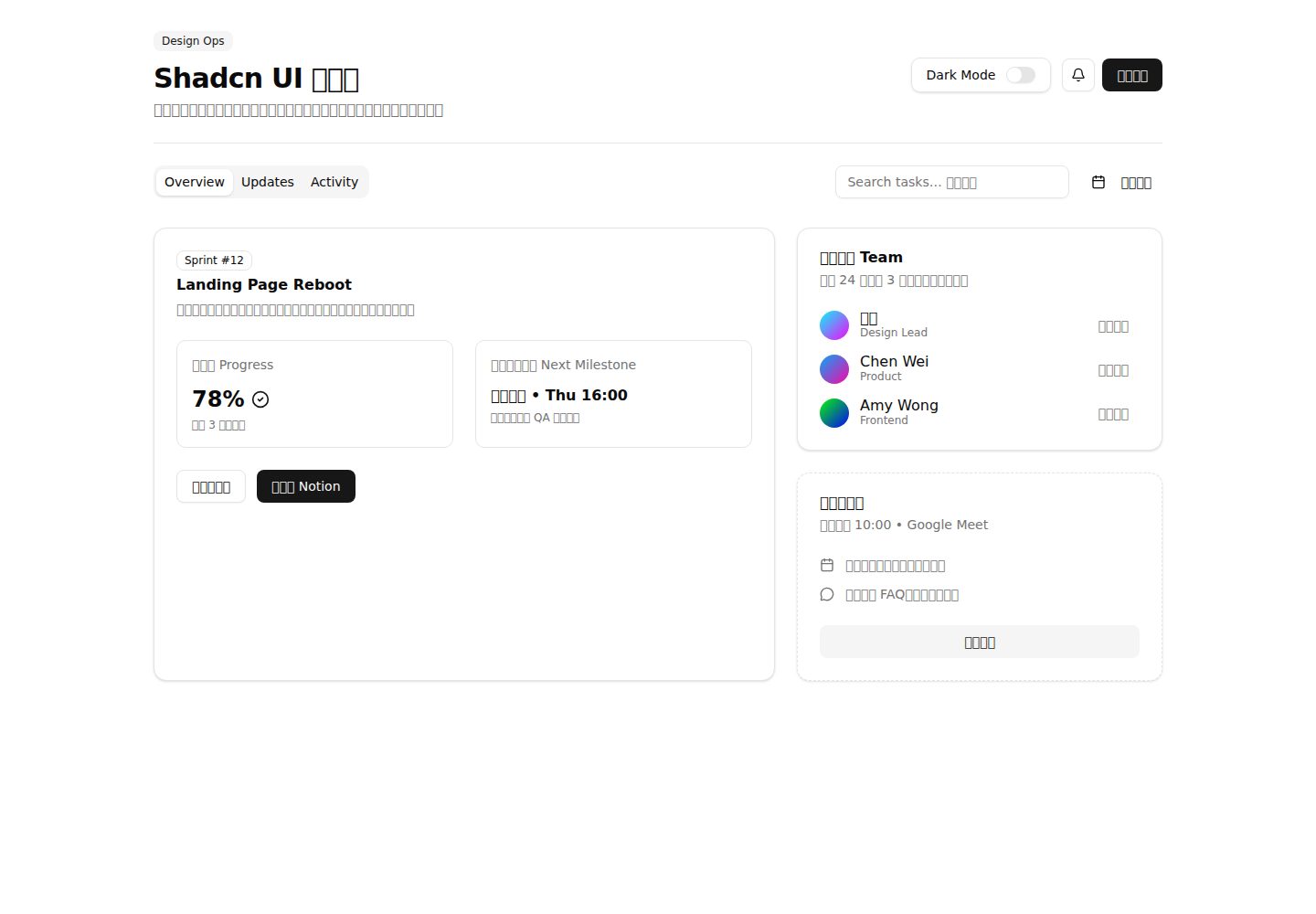
Built-in shadcn-ui dashboard demo with multi-column cards, tabbed views, and a status timeline
ViteReactAdmin dashboardStarter
MyFrontendTemplate — Vite Admin dashboard Template
By ShinoharaHaruna
MyFrontendTemplate is a frontend template based on React, TypeScript, Vite, Tailwind CSS v4, and shadcn-ui, using Yarn Berry PnP for dependency management, with a built-in dashboard demo page, a fork rename script, and Vercel deployment instructions.
Explore the design
Compare the page layouts and mobile experience. Open any screenshot for a closer look.
Desktop homepage1 / 2
Desktop captureTop of page
Actual screenshot captured by the server browser.
All pages & views 2
Screenshots show visual appearance; interactive behavior may differ.
Recorded 2026-10-15View source
What stands out
A quick read of the recorded project description.
Switch component toggles theme and syncs preference to localStorage
Combines React 19, strict-mode TypeScript, Vite 7, Tailwind CSS v4, and shadcn-ui
Uses Yarn Berry PnP for dependency management and provides a VS Code SDK generation command
Provides scripts/setup-fork.sh to automate renaming and remote adjustments after forking
README gives the install command override and environment variable configuration required for Vercel deployment
Template Details
This repository is positioned as an out-of-the-box frontend project starter template. The README states that it includes a dashboard demo built with shadcn-ui components: src/App.tsx renders multi-column cards, tabbed views, and a status timeline; a Switch component toggles the theme and writes the preference to localStorage; team roster, milestones, and activity feed demonstrate how to compose more complex interfaces. On the tech stack side, the README lists React 19, strict-mode TypeScript, Vite 7, Tailwind CSS v4 with shadcn-ui, Yarn Berry (PnP), ESLint and Prettier, the @/ path alias, and Vercel-oriented deployment instructions.
Usage limitations and notes: the project relies on Yarn Berry's Plug'n'Play; the README requires enabling corepack before running yarn install, and provides a command to generate the SDK for VS Code; on Vercel, the default install command must be overridden and the two environment variables YARN_CACHE_FOLDER and YARN_ENABLE_GLOBAL_CACHE must be set, otherwise the build may not work properly. The repository also provides scripts/setup-fork.sh to rename the name field in package.json after forking, update the title, badge links, and clone instructions in the README, and repoint the git remote.
The README does not cover testing approach, browser compatibility range, accessibility support, state management, or routing, nor does it provide deployment steps for platforms other than Vercel; the template's actual usability should be based on the repository's current code.
ViteReactDashboardStarter
Is it right for your project?
Use Cases
- Quickly starting a new frontend project with React, TypeScript, Vite, and Tailwind CSS
- Reusing shadcn-ui components and a dashboard-style layout example directly
- Batch-updating package name, README links, and git remote configuration after forking
- Planning to deploy the project to Vercel and needing to handle Yarn PnP cache issues
- Developing with VS Code and needing to configure type checking and module resolution for Yarn PnP
Suitable For
- Frontend developers familiar with React, TypeScript, and Tailwind CSS
- Teams that accept the Yarn Berry PnP workflow
- Projects that need a dashboard-style interface starting point rather than a complete business system
- Projects with Vercel as the primary deployment target
Getting started & customization
Use these recorded setup notes alongside the repository instructions for your chosen version.
- 1
Run corepack enable first, then yarn install to install dependencies
- 2
Use yarn dev to start the Vite dev server, yarn build to bundle, and yarn lint to run ESLint
- 3
In VS Code, run yarn dlx @yarnpkg/sdks vscode to generate the SDK, and restart the TS server if necessary
- 4
On Vercel, override the install command to YARN_CACHE_FOLDER=node_modules/.yarn-cache YARN_ENABLE_GLOBAL_CACHE=false yarn install, and set environment variables with the same names
- 5
After forking, use ./scripts/setup-fork.sh --repo-owner ... --repo-name ... to update the name and remote; if not executable, invoke it with bash instead
License & source material
Usage conditions & limitations
Free to use · keep license noticeThis entry covers the free version under the MIT license in the public repository; the free scope is the code of that version and does not mean external services or third-party assets are free.
Must comply with when using
- Free use, modification, commercial use, and distribution of that version's code are permitted.
- When distributing copies or substantial portions of the code, retain the original author's copyright notice and the full MIT license notice.
- The code is provided as-is; warranties and limitations of liability are governed by the original license and applicable law.
Additional costs & items to verify
- Demo images, fonts, icons, and other third-party assets must be checked against their respective licenses; the code's MIT license alone cannot be used to judge them.
- External services such as domains, hosting, databases, payments, or AI may incur separate charges.
- The project uses Yarn Berry, and corepack must be enabled first for dependencies to install properly.
- It uses Yarn Plug'n'Play, so IDEs such as VS Code require additional SDK generation to get correct type checking and module resolution.
- When deploying to Vercel, the default install command must be overridden; otherwise, Yarn v4+ caching may cause the build to fail.
- Vercel deployment also requires setting the two environment variables YARN_CACHE_FOLDER and YARN_ENABLE_GLOBAL_CACHE.
- The template's deployment instructions only cover Vercel; no deployment steps are provided for other platforms.
View Original Text Basis
Permission is hereby granted, free of charge
Original License Text
2. **Install Dependencies**: This project uses Yarn Berry. Make sure you have enabled `corepack`.
Original README
This template uses Yarn's Plug'n'Play (PnP) feature, which requires a small setup for IDEs like VS Code to provide correct type-checking and module resolution.
Original README
Due to how Yarn v4+ handles caching, you need to override the default install command in your Vercel project settings.
Original README
2. Go to **Settings > Environment Variables** and add the following two variables:
Original README
https://github.com/ShinoharaHaruna/MyFrontendTemplate/blob/main/LICENSEhttps://github.com/ShinoharaHaruna/MyFrontendTemplate/blob/main/README.mdThis template is optimized for deployment on [Vercel](https://vercel.com/).
Original README
Compiled by DeepSeek based on repository license and README ·2026-10-15. Results only cover the materials read; dependencies, images, fonts, and subsequent term changes are subject to their respective original texts.
Project checks & description sources
Template Information
- Source platforms
- GitHub
- Documentation and maintenance reference score
- More documented · 85 / 100
- Technologies
- Vite · React
- Website type
- Admin dashboard · Starter
How this score is calculated
Our heuristic uses license records (up to 30), a demo link (12), a preview (10), stars (15), recorded maintenance (15), description completeness (8), feature records (5) and classification data (5). It is not a code, security or performance test, or a Google score. A link does not establish tested functionality.
What to verify for this project
- Repository update recorded
- 2025-12-05
- Screenshot last checked
- 2026-10-15
A demo link is listed. Check it with your own content and viewport sizes; its presence does not confirm that forms, authentication or payments work.
The catalog identifies Vite as the primary stack. Check the actual dependency manifest and lockfile for versions and hosting requirements. These notes use recorded metadata, not a code audit or a deployment test.
Use a selection guide →How this description was prepared
AI-assisted description based on catalog records and repository material. Repository authors are not automatically the reviewers of this description.
Review declaration: codex-user-requested-batch-review-20261015 · 2026-10-15
Inspect the recorded source material
SHA-256: a726f7b2efcbc3dcac732b971c134138d351c64eb614eaefdbc29ebda8319182
2026-10-15T00:55:10.837Z
Source file / repository# My Frontend Template
[中文](README_cn.md)
[](https://github.com/ShinoharaHaruna/MyFrontendTemplate)
[](https://opensource.org/licenses/MIT)
A modern, opinionated, and out-of-the-box frontend template designed for rapid project initiation. It now showcases a shadcn-ui powered dashboard demo, built with React, TypeScript, Tailwind CSS v4, and managed by Yarn Berry.
## ✨ Features
- **React 19**: Latest React runtime with modern concurrency improvements.
- **TypeScript (strict)**: Static typing for a safer, faster feedback loop.
- **Vite 7**: Instant dev server startup and lightning-fast HMR.
- **Tailwind CSS v4 + shadcn-ui**: Pre-styled components (`Tabs`, `Card`, `Switch`, etc.) with design tokens ready out of the box.
- **Yarn Berry (PnP)**: Modern, reliable, zero-install friendly package management.
- **ESLint & Prettier**: Opinionated linting and formatting configured with `.editorconfig`.
- **Path Aliases**: `@/` points to the `src` directory for ergonomic imports.
- **Vercel Ready**: Deployment notes tailored for Yarn PnP powered builds.
## 🎨 Demo Overview
- **Dashboard layout**: `src/App.tsx` renders multi-column cards, tabbed views, and a status timeline using shadcn-ui primitives.
- **Dark mode persistence**: A `Switch` component toggles the theme while syncing preference to `localStorage`.
- **Collaboration focus**: Team roster, milestones, and activity feed illustrate how to compose complex UI quickly.
## 🚀 Getting Started
1. **Use the Template**: Click the "Use this template" button on GitHub or clone the repository.
```bash
git clone https://github.com/ShinoharaHaruna/MyFrontendTemplate.git
cd MyFrontendTemplate
```
2. **Install Dependencies**: This project uses Yarn Berry. Make sure you have enabled `corepack`.
```bash
corepack enable
yarn install
```
3. **Run the Development Server**: Start the Vite development server.
```bash
yarn dev
```
## 🔁 Fork Setup Helper
Automate common renaming steps after forking this repository with `scripts/setup-fork.sh`.
```bash
./scripts/setup-fork.sh --repo-owner your-github --repo-name awesome-template
```
- **What it does**
- **package.json**: Renames the `name` field.
- **README files**: Updates titles, badge links, and clone instructions to point at your fork.
- **Git remotes**: Re-points `origin` to your fork and ensures `upstream` references the original template (configurable).
- **Key flags**
- `--project-title "Awesome Template"` to customize README headings.
- `--package-name awesome-template` to override the npm name.
- `--skip-remote` if you prefer to manage git remotes manually.
Run `./scripts/setup-fork.sh --help` for the full option list. You can also invoke it with `bash scripts/setup-fork.sh ...` if execution permissions are not set.
## 🔧 IDE Integration (VS Code)
This template uses Yarn's Plug'n'Play (PnP) feature, which requires a small setup for IDEs like VS Code to provide correct type-checking and module resolution.
Run the following command to generate the necessary SDK files for VS Code:
```bash
yarn dlx @yarnpkg/sdks vscode
```
After running this, you may need to restart VS Code or run the `TypeScript: Restart TS server` command from the command palette.
## 📁 Project Structure
```text
.
├── .yarn/ # Yarn Berry files
├── src/
│ ├── App.tsx # Main React component
│ ├── components/
│ │ └── ui/ # shadcn-ui components (button, card, tabs, ...)
│ ├── index.css # Global styles
│ ├── lib/utils.ts # Utility helpers (e.g., cn)
│ └── main.tsx # Application entry point
├── .editorconfig # Editor configuration
├── .eslintrc.cjs # ESLint configuration
├── .gitignore # Git ignore rules
├── index.html # Vite entry HTML
├── LICENSE # Project license
├── package.json # Project metadata and dependencies
├── README.md # This file
├── tsconfig.json # TypeScript configuration
└── vite.config.ts # Vite configuration
```
### 📦 Available Scripts
- `yarn dev`: Starts the development server.
- `yarn build`: Bundles the app for production.
- `yarn lint`: Lints the codebase using ESLint.
- `yarn install`: Installs project dependencies.
- `yarn up`: Interactively updates dependencies.
## Deployment
This template is optimized for deployment on [Vercel](https://vercel.com/).
### Vercel Integration
Due to how Yarn v4+ handles caching, you need to override the default install command in your Vercel project settings.
1. Go to **Settings > General** and override the **Install Command** with:
```bash
YARN_CACHE_FOLDER=node_modules/.yarn-cache YARN_ENABLE_GLOBAL_CACHE=false yarn install
```
2. Go to **Settings > Environment Variables** and add the following two variables:
```text
YARN_CACHE_FOLDER=node_modules/.yarn-cache
YARN_ENABLE_GLOBAL_CACHE=false
```
> **Note**: This ensures that Vercel uses the local cache within your project's `node_modules` directory instead of a global cache, which is necessary for the build process to work correctly.
## 🧩 Extending the UI Library
Use the official shadcn-ui CLI to scaffold additional components on demand:
```bash
yarn dlx shadcn@latest add accordion dialog form
```
Components are placed under `src/components/ui/` and wired to Tailwind CSS variables automatically.
## 📄 License
This project is licensed under the MIT License. See the [LICENSE](LICENSE) file for details.
Explore similar templates
Compare previews and descriptions within the same stack and category.

cove
Cove is a minimal TanStack Start starter template maintained by mugnavo, integrating React, TanStack Router/Query, Tailwind CSS, shadcn/ui, Drizzle ORM with PostgreSQL, Better Auth, Vite Plus, and Nitro.
Vite · SaaS

vite-react-boilerplate
A production-ready Vite + React starter template with TypeScript, Tailwind CSS, TanStack Router/Query/Table, Storybook, React Hook Form + Zod, Vitest and Playwright testing, plus Husky/Commitizen/Commitlint commit conventions.
Vite · Starter

kiaalap
Kiaalap is a free, open-source admin template from Colorlib for education, online courses, and school management.
Vite · Admin dashboard

vital
Vital is a Vite-based React starter template using TypeScript and Tailwind CSS, with an Atomic Design component directory, path aliases and Hero Icons.
Vite · Starter

react-vite-admin
A backend management starter built on Vite and React, integrating Recoil, React Query, TypeScript, and Axios, with Ant Design-style interface screenshots. Suitable as a starting point for management-side projects, licensed under MIT, with Chinese documentation and common scripts.
Vite · Admin dashboard

typescript-react_best_practices-vite_template
A Vite + React + TypeScript starter template by CodelyTV, preconfigured with Jest and React Testing Library unit tests, Cypress end-to-end tests, ESLint and Prettier using Codely's shared configuration, GitHub Actions workflows, a Makefile, and Sass.
Vite · Starter