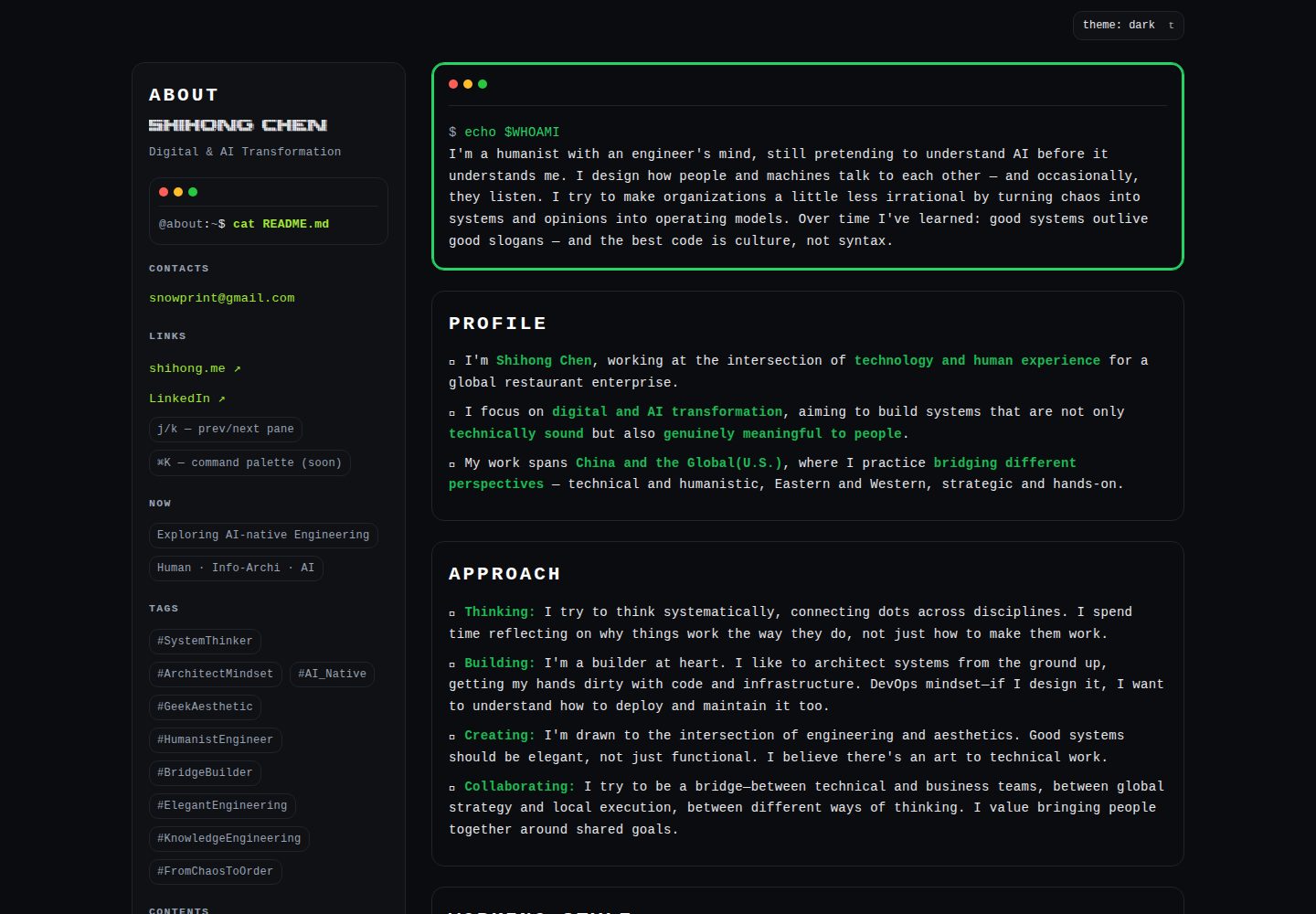
终端/CLI 视觉风格,使用等宽字体与终端式界面元素
HTML作品集
shihong.me — HTML 作品集模板
作者 snowprint
shihong.me 是一个终端风格的个人作品集网站模板,使用纯 HTML/CSS/JS 编写,支持键盘导航与深浅主题切换,无构建步骤。
看看你的网站会是什么样
浏览真实页面截图,比较内容排版与手机效果。点击下方缩略图切换,放大查看整页细节。
全部页面与视图 2
截图用于了解视觉与布局,交互效果请以实际项目为准。
采集于 2026-10-13查看来源
值得关注的模板亮点
从已有项目资料中,快速了解它的特点。
键盘驱动导航:j/k 切换区块,t 切换深色/浅色主题
纯 HTML/CSS/JS 单文件实现,无框架、无构建工具
包含响应式布局、当前区块高亮与平滑滚动
附带 GitHub Actions 部署工作流,通过 rsync over SSH 同步到服务器
模板详细介绍
该模板是作者个人网站 shihong.me 的源码,采用 CLI/终端视觉风格,使用等宽字体与终端式界面元素,整体为单页结构。页面内容与样式、脚本集中在 index.html 中,不依赖框架或构建工具。
交互方面提供键盘操作:j 键跳到下一节,k 键返回上一节,t 键切换深色/浅色主题,默认深色。页面包含当前区块高亮与平滑滚动,并声明为响应式,可适配桌面与移动端。
仓库包含 GitHub Actions 工作流 deploy.yml,用于在推送到 main 分支后通过 SSH 上的 rsync 将文件同步到服务器。README 还规定每次改动需同步递增 index.html 页脚与 README 头部中的版本号,仅在重大发布时打 Git 标签。
使用限制:模板为个人站点用途,未提供内容管理或后台;部署流程依赖作者自己的服务器与 SSH 配置,直接复用需替换为自有环境。代码以 MIT 许可发布,但演示图片、字体、图标等第三方素材需另行核对许可。
HTML作品集
适合你的项目吗?
适用场景
- 作为个人作品集或简历型单页网站的起点
- 用于展示终端风格界面与键盘交互的静态页面示例
- 在无构建工具的环境中直接打开 index.html 预览与修改
- 参考其 GitHub Actions 部署配置,改造为自有服务器的发布流程
适合人群
- 希望用纯 HTML/CSS/JS 搭建个人站点的开发者
- 偏好终端美学与键盘操作的前端学习者
- 需要单文件静态页面、不引入框架或依赖的使用者
上手与定制指南
结合仓库当前版本的说明,按下面的资料检查内容、配置与运行要求。
- 1
克隆仓库后直接用浏览器打开 index.html 即可,无需安装依赖或构建
- 2
键盘快捷键:j 下一节、k 上一节、t 切换深浅主题
- 3
部署前需将 .github/workflows/deploy.yml 中的服务器与 SSH 配置替换为自己的环境
- 4
按仓库约定,每次改动需同时递增 index.html 页脚与 README 头部的版本号
- 5
使用前请核对图片、字体、图标等第三方素材的许可,MIT 许可仅覆盖代码
授权与来源资料
使用条件与限制
免费使用 · 保留许可声明本次收录的是公开仓库中采用 MIT 许可的免费版本;免费范围为该版本代码,不代表外部服务或第三方素材免费。
使用时需要遵守
- 允许免费使用、修改、商用和分发该版本代码。
- 分发代码副本或实质性部分时,保留原作者版权声明和完整 MIT 许可声明。
- 代码按现状提供;担保与责任限制以原许可证及适用法律为准。
额外费用与待核对事项
- 演示图片、字体、图标及其他第三方素材需按各自许可核对,不能仅凭代码的 MIT 许可判断。
- 域名、托管、数据库、支付或 AI 等外部服务可能另外收费。
- 仓库自带的 GitHub Actions 部署流程默认发布到作者自己的站点 shihong.me,并通过 rsync over SSH 同步到作者服务器;直接复用需替换为自有服务器与 SSH 配置。
- 部署依赖 rsync 与 SSH 连接外部服务器,属于外部服务/环境要求,并非纯静态托管即可完成。
- 仓库约定每次代码改动都必须同步递增 index.html 页脚与 README 头部的版本号,两处版本号必须始终一致,属于项目特定的维护要求。
查看原文依据
Permission is hereby granted, free of charge
许可证原文
The site automatically deploys to [shihong.me](https://shihong.me) via GitHub Actions when changes are pushed to the `main` branch.
README 原文
Files are synced to server via rsync over SSH
README 原文
https://github.com/snowprint/shihong.me/blob/main/LICENSEhttps://github.com/snowprint/shihong.me/blob/main/README.md**IMPORTANT:** Every code change MUST increment the version number in BOTH files:
README 原文
DeepSeek 根据仓库许可证和 README 整理 ·2026-10-13。结果仅覆盖已读取资料,依赖、图片、字体及后续条款变更以各自原文为准。
项目核对记录与介绍依据
模板资料
- 来源平台
- GitHub
- 资料与维护参考分
- 资料较完整 · 80 / 100
- 技术栈
- HTML
- 网站类型
- 作品集
这个分数如何计算
本站按许可资料(最高30分)、演示链接(12分)、预览图(10分)、Star数(15分)、记录的维护时间(15分)、描述完整度(8分)、功能记录(5分)和分类资料(5分)计算。它不是代码、安全或性能测试,也不是 Google 评分;有链接不代表已实测可用。
这个项目需要核对什么
- 记录的仓库更新时间
- 2026-03-01
- 截图检查日期
- 2026-10-13
已收录演示链接。请用你的内容与屏幕尺寸检查;有演示不代表表单、认证或支付已经可用。
目录记录的主要技术栈是 HTML。请通过依赖清单和锁文件核对实际版本与托管要求。这些说明基于收录资料,不代表代码审计或部署实测。
查看具体选型方法 →介绍的制作与核对状态
介绍由 AI 辅助整理目录与仓库资料。仓库作者不等于这篇介绍的审核者。
审核声明: [email protected] · 2026-10-13
查看当时使用的来源资料
SHA-256: 0a56b32c77de81938dc5428e3bf52ec79ddd39c30786504cfec94631d12669b8
2026-10-13T06:52:29.975Z
来源文件 / 仓库# 🥷 shihong.me Personal website with CLI-inspired design and geek aesthetic. **Live:** [shihong.me](https://shihong.me) | **Version:** v1.22 ## ✨ Features - 🖥️ **CLI/Terminal aesthetic** - Monospace fonts, terminal-style UI elements - 🌓 **Dark/Light theme** - Toggle between dark and light modes (default: dark) - ⌨️ **Keyboard navigation** - Navigate sections with `j`/`k`, toggle theme with `t` - 📱 **Fully responsive** - Works seamlessly on desktop and mobile - ⚡ **Zero dependencies** - Pure HTML/CSS/JS, no build tools required - 🎯 **Smooth interactions** - Active section highlighting, smooth scrolling ## ⌨️ Keyboard Shortcuts | Key | Action | |-----|--------| | `j` | Next section | | `k` | Previous section | | `t` | Toggle dark/light theme | ## 🚀 Quick Start ```bash # Clone the repository git clone https://github.com/snowprint/shihong.me.git # Open in browser open index.html ``` No build process needed - just open `index.html` in your browser! ## 🎨 Design Philosophy - **Minimalist** - Clean, distraction-free interface - **Geek-friendly** - Terminal-inspired design with monospace fonts - **Accessible** - Semantic HTML, keyboard navigation, proper ARIA labels - **Fast** - Single HTML file, no external dependencies ## 📁 Project Structure ``` shihong.me/ ├── .github/ │ └── workflows/ │ └── deploy.yml # Auto-deployment to server ├── index.html # Main page (includes CSS & JS) ├── README.md # This file ├── LICENSE # MIT License └── .gitignore # Git ignore rules ``` ## 🛠️ Tech Stack - **HTML5** - Semantic markup - **CSS3** - Custom properties, Grid, Flexbox - **Vanilla JavaScript** - No frameworks ## 🚢 Deployment The site automatically deploys to [shihong.me](https://shihong.me) via GitHub Actions when changes are pushed to the `main` branch. **Deployment workflow:** 1. Push changes to `main` branch 2. GitHub Actions triggers deployment 3. Files are synced to server via rsync over SSH 4. Site is live at https://shihong.me ## 🏷️ Version Management **Versioning Strategy:** - Website footer displays version number (e.g., v1.19, v1.20, v1.21...) - Version number increments with each update - Git tags are created **only for major releases** (e.g., v1.13, v2.0) - Daily updates increment version number but don't create tags **Version Sync Rule:** - **IMPORTANT:** Every code change MUST increment the version number in BOTH files: - `index.html` footer: `v1.XX` → `v1.XX+1` - `README.md` header: `**Version:** v1.XX` → `**Version:** v1.XX+1` - Both version numbers MUST always match - This rule applies to ALL changes (content, style, functionality) **When to create a Git tag:** - Major feature additions - Significant design changes - Architecture refactoring - Other milestone updates **Update workflow:** ```bash # Regular update (no tag) # 1. Update version in index.html footer (v1.XX → v1.XX+1) # 2. Update version in README.md header (v1.XX → v1.XX+1) # 3. Commit and push git commit -m "feat: description" git push # Major release (with tag) # 1. Update version in both files # 2. Create tag and push git commit -m "feat: major update" git tag -a v2.0 -m "Release v2.0: description" git push && git push origin v2.0 ``` ## 📄 License MIT License - see [LICENSE](LICENSE) file for details
看看同类模板
对比同技术栈与用途的模板,找到更适合的视觉与内容结构。

simplefolio
⚡️ A minimal portfolio template for Developers
HTML · 作品集

Freelancer
Freelancer 是 Start Bootstrap 出品的单页作品集模板,专为自由职业者、设计师和小型工作室设计。 页面结构清晰,包含多个内容区块、响应式作品集网格,每个作品项目配有模态窗口展示详情。
HTML · 作品集

Resume
Resume 是 Start Bootstrap 推出的简历与 CV 主题,基于 Bootstrap 构建,采用固定侧边栏加内容区块的结构。
HTML · 作品集

Creative
Creative 是 Start Bootstrap 团队维护的一款单页营销模板,定位明确:为创意机构或产品服务提供一个以作品展示和行动号召为核心的落地页。
HTML · 企业官网

Grayscale
Grayscale 是 Start Bootstrap 出品的深色系单页 HTML 模板,基于 Bootstrap 构建。 它的视觉重心放在大尺寸首屏和清晰的内容分区上,整体氛围偏暗,适合摄影、活动或品牌叙事类网站。
HTML · 企业官网

startbootstrap-stylish-portfolio
Stylish Portfolio 是 Start Bootstrap 维护的单页作品集主题,基于 Bootstrap 构建,采用多个内容区块加离屏导航菜单的结构。
HTML · 作品集