Jekyll 静态站点模板,内容集中在 _pages/about.md,站点设置集中在 _config.yml
Jekyll作品集
academic-homepage-template — Jekyll 作品集模板
作者 steven068zzy
面向学术个人主页的 Jekyll 模板,提供侧边栏作者简介、论文卡片、阅读书单与分区锚点,可部署到 GitHub Pages。
看看你的网站会是什么样
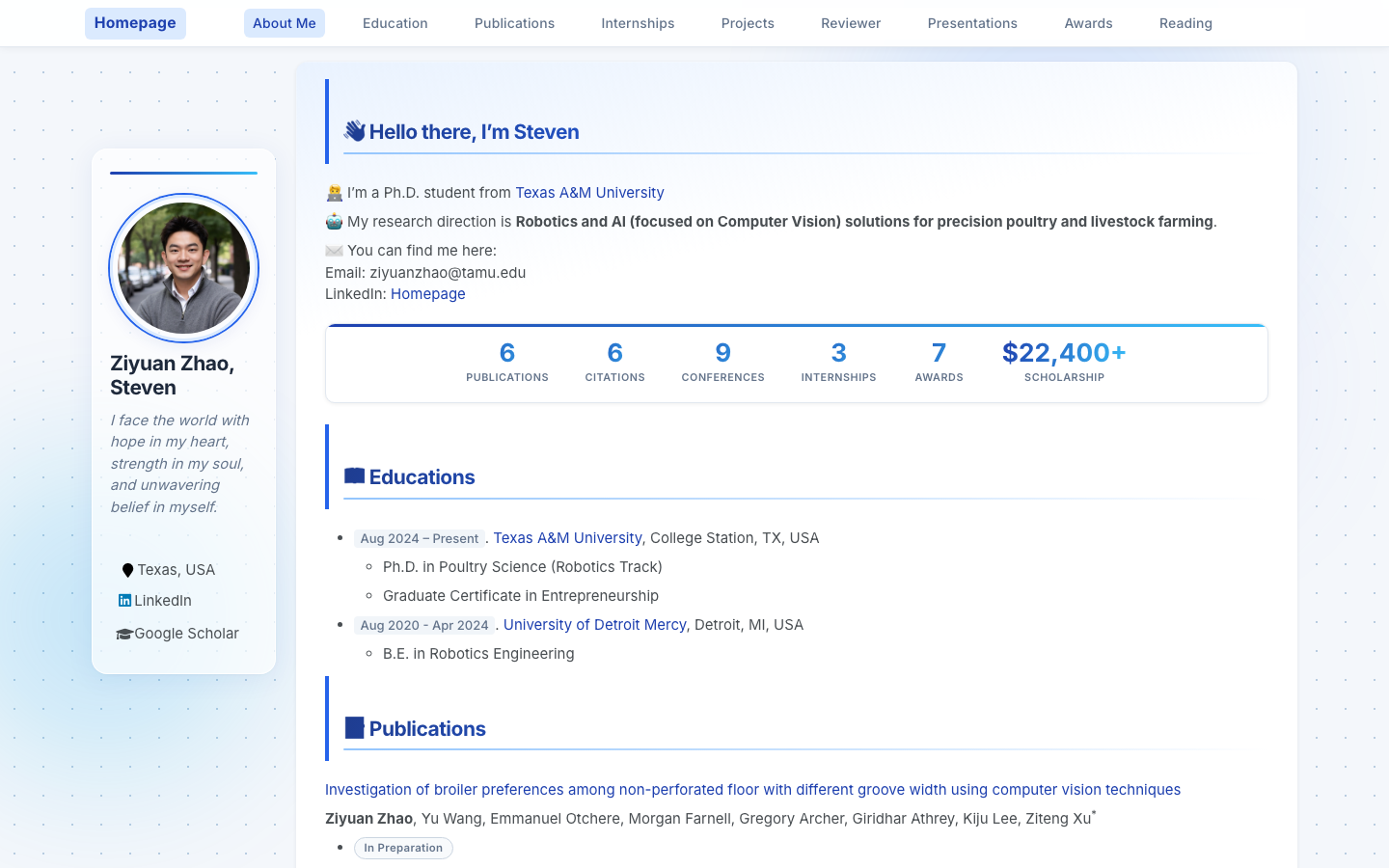
浏览真实页面截图,比较内容排版与手机效果。点击下方缩略图切换,放大查看整页细节。
目前有 1 张原始预览,可打开完整图片查看设计细节。
截图用于了解视觉与布局,交互效果请以实际项目为准。
采集于 2026-10-04查看来源
值得关注的模板亮点
从已有项目资料中,快速了解它的特点。
侧边栏作者简介支持头像、简介、位置与 40 多个社交平台字段,留空即隐藏
paper-box 论文卡片组件,可展示配图、徽章、标题、作者与一句话摘要
book-card 阅读书单组件,支持封面图、书名、作者与标签,缺图时显示占位
内置 GitHub Actions 工作流,可定时抓取 Google Scholar 引用数并更新徽章
通过 CSS 自定义属性调整主色、强调色与页面背景色
模板详细介绍
这是一个基于 Jekyll 的学术个人网站模板,作者为得克萨斯农工大学博士生 Ziyuan Zhao。模板在 AcadHomepage 与 Minimal Mistakes 主题基础上做了移动端适配和视觉调整,页面内容集中写在 _pages/about.md 中,站点级设置放在 _config.yml。
页面结构以分区锚点组织,涵盖 About、Education、Publications、Experience、Projects、Awards 以及阅读书单等板块,论文条目使用 paper-box 组件展示图片、徽章、标题与摘要,书单使用 book-card 展示封面、书名、作者与标签。侧边栏提供头像、简介与社交链接,README 称支持 40 多个平台字段,留空即隐藏。模板附带 GitHub Actions 工作流,可定时抓取 Google Scholar 引用数并更新页面徽章,需要自行配置仓库名与 Scholar 主页地址。
使用方式有两种:在 GitHub 上点击 Use this template 创建以用户名命名的仓库并开启 Pages,或直接 Fork 后重命名;本地运行需要先安装 Ruby 与 Bundler,再执行 bundle install 与 run_server.sh。模板采用 MIT 许可,可免费使用、修改与分发,但演示图片、字体、图标等第三方素材需单独核对许可。
Jekyll作品集
适合你的项目吗?
适用场景
- 研究人员、博士生或学者搭建个人学术主页,集中展示论文、项目与经历
- 在 GitHub Pages 上以用户名仓库形式发布静态个人网站
- 用 paper-box 组件按统一格式整理论文列表并附配图与摘要
- 用 book-card 组件维护带封面与标签的个人阅读书单
- 通过 GitHub Actions 定时更新 Google Scholar 引用数徽章
适合人群
- 希望用 Jekyll 与 GitHub Pages 发布学术主页的研究人员与博士生
- 需要论文卡片、项目展示与阅读书单等分区结构的学术个人站点
- 愿意编辑 Markdown 与 YAML 配置文件来维护内容的用户
- 需要侧边栏作者简介与多平台社交链接的学术主页
上手与定制指南
结合仓库当前版本的说明,按下面的资料检查内容、配置与运行要求。
- 1
推荐在 GitHub 上点击 Use this template 创建名为 YOUR_GITHUB_USERNAME.github.io 的仓库,并在 Settings → Pages 中将 Source 设为 main 分支
- 2
本地运行需先安装 Ruby 与 Bundler,再执行 bundle install 与 bash run_server.sh,访问 http://localhost:4000
- 3
修改 _config.yml 后需重启 jekyll serve 才能生效
- 4
Google Scholar 引用数自动更新需在 _config.yml 中填写 repository 与 googlescholar,并在仓库设置中启用 GitHub Actions
- 5
演示图片、字体、图标等第三方素材需按各自许可单独核对,不能仅凭代码的 MIT 许可判断
授权与来源资料
使用条件与限制
免费使用 · 保留许可声明本次收录的是公开仓库中采用 MIT 许可的免费版本;免费范围为该版本代码,不代表外部服务或第三方素材免费。
使用时需要遵守
- 允许免费使用、修改、商用和分发该版本代码。
- 分发代码副本或实质性部分时,保留原作者版权声明和完整 MIT 许可声明。
- 代码按现状提供;担保与责任限制以原许可证及适用法律为准。
额外费用与待核对事项
- 演示图片、字体、图标及其他第三方素材需按各自许可核对,不能仅凭代码的 MIT 许可判断。
- 域名、托管、数据库、支付或 AI 等外部服务可能另外收费。
- Google Scholar 引用数自动更新依赖 GitHub Actions 工作流,需在仓库设置中启用 Actions,并在 _config.yml 中填写 repository 与 googlescholar 主页地址,属于外部服务配置要求。
- 引用数抓取工作流每日运行并向 google-scholar-stats 分支提交更新,需要仓库具备 Actions 权限与相应分支写入能力。
- 使用引用数自动更新功能前,必须在 _config.yml 中把 repository 设置为自己的 GitHub 用户名仓库地址。
- 需在 _config.yml 中填写自己的 Google Scholar 主页 URL,否则无法抓取引用数。
- 必须在仓库设置中启用 GitHub Actions,自动更新引用数的功能才能运行。
- 本地运行模板前需先安装 Ruby 与 Bundler,再执行 bundle install 与 run_server.sh。
- 修改 _config.yml 后必须重启 jekyll serve,否则配置变更不会生效。
查看原文依据
Permission is hereby granted, free of charge
许可证原文
Google Scholar Citation Auto-update
README 原文
The workflow runs daily and commits updated stats to a `google-scholar-stats` branch
README 原文
Set `repository` in `_config.yml` to `YOUR_GITHUB_USERNAME/YOUR_GITHUB_USERNAME.github.io`
README 原文
Set `googlescholar` to your Google Scholar profile URL
README 原文
Enable **GitHub Actions** in your repo settings
README 原文
Install Ruby + Bundler first, then:
README 原文
https://github.com/steven068zzy/academic-homepage-template/blob/main/LICENSEhttps://github.com/steven068zzy/academic-homepage-template/blob/main/README.md**Restart** `jekyll serve` after editing `_config.yml`.
README 原文
DeepSeek 根据仓库许可证和 README 整理 ·2026-10-05。结果仅覆盖已读取资料,依赖、图片、字体及后续条款变更以各自原文为准。
项目核对记录与介绍依据
模板资料
- 来源平台
- GitHub
- 资料与维护参考分
- 资料较完整 · 83 / 100
- 技术栈
- Jekyll
- 网站类型
- 作品集
这个分数如何计算
本站按许可资料(最高30分)、演示链接(12分)、预览图(10分)、Star数(15分)、记录的维护时间(15分)、描述完整度(8分)、功能记录(5分)和分类资料(5分)计算。它不是代码、安全或性能测试,也不是 Google 评分;有链接不代表已实测可用。
这个项目需要核对什么
- 记录的仓库更新时间
- 2026-05-16
- 截图检查日期
- 2026-10-05
已收录演示链接。请用你的内容与屏幕尺寸检查;有演示不代表表单、认证或支付已经可用。
目录记录的主要技术栈是 Jekyll。请通过依赖清单和锁文件核对实际版本与托管要求。这些说明基于收录资料,不代表代码审计或部署实测。
查看具体选型方法 →介绍的制作与核对状态
介绍由 AI 辅助整理目录与仓库资料。仓库作者不等于这篇介绍的审核者。
审核声明: [email protected] · 2026-10-05
查看当时使用的来源资料
SHA-256: 8bfc2eebee0dd1fcd5d12494caf5388c4626bdfe3a7544743ff1235248a7c663
2026-10-05T03:15:22.426Z
来源文件 / 仓库<h1 align="center">Academic Homepage Template</h1> <p align="center"> A clean, modern, mobile-friendly Jekyll template for academic personal websites.<br> Designed for researchers, Ph.D. students, and academics who want a polished online presence with minimal effort. </p> <p align="center"> <a href="https://steven068zzy.github.io/stevenZYzhao.github.io/" target="_blank"><strong>🌐 Live Demo →</strong></a> · <a href="#quick-start">Quick Start</a> · <a href="#configuration">Configuration</a> · <a href="#adding-content">Adding Content</a> </p> <p align="center"> <sub>Template created by <a href="https://steven068zzy.github.io/stevenZYzhao.github.io/">Ziyuan Zhao (Steven)</a> — Ph.D. student at Texas A&M University</sub> </p> --- ## Preview ### Desktop  ### Publications section  ### Mobile <p align="center"> <img src="docs/screenshot-mobile.png" alt="Mobile view" width="320"> </p> --- ## Features - **Responsive design** — looks great on desktop, tablet, and mobile - **Sidebar author profile** — avatar, bio, and social links (40+ platforms supported) - **Publication cards** — `paper-box` component with image, badge, title, and abstract - **Section anchors** — About, Education, Publications, Experience, Projects, Awards, and more - **Book shelf** — visual reading list with cover images and tags - **Auto citation stats** — Google Scholar citation count via GitHub Actions crawler - **Frosted-glass navigation** — sticky header with smooth scroll - **Card animations** — staggered entrance animations, hover lift effects - **Gradient design layer** — polished UI with dot-grid background and gradient text headings - **Back-to-top button** — smooth scroll with visibility toggle - **SEO ready** — sitemap, Open Graph, and verification tag support - **Google Analytics** — plug in your ID to enable --- ## Quick Start ### Option 1 — Use as a GitHub Template (recommended) 1. Click **"Use this template"** → **"Create a new repository"** 2. Name your repo `YOUR_GITHUB_USERNAME.github.io` 3. Go to **Settings → Pages** and set Source to `main` branch 4. Your site will be live at `https://YOUR_GITHUB_USERNAME.github.io` within 2 minutes ### Option 2 — Fork 1. Fork this repository 2. Rename it to `YOUR_GITHUB_USERNAME.github.io` 3. Enable GitHub Pages as above ### Run locally ```bash # Install Ruby + Bundler first, then: bundle install bash run_server.sh # Visit http://localhost:4000 ``` --- ## Configuration All site-wide settings live in `_config.yml`. Open it and fill in the placeholders: ```yaml title : "Jane Smith" repository : "janesmith/janesmith.github.io" author: name : "Jane Smith" avatar : "images/avatar.jpg" # ← add your photo here bio : "Ph.D. candidate in Computer Vision @ MIT" location : "Cambridge, MA, USA" googlescholar : "https://scholar.google.com/citations?user=XXXX" linkedin : "jane-smith" github : "janesmith" email : "[email protected]" ``` > **Restart** `jekyll serve` after editing `_config.yml`. ### Social links Supported platforms include Google Scholar, LinkedIn, GitHub, Twitter/X, ORCID, ResearchGate, DBLP, Email, and 30+ more. Simply fill in the corresponding field in `_config.yml`; leave it blank to hide it. ### Timezone Change `timezone` in `_config.yml` to your local timezone (e.g., `Asia/Shanghai`, `Europe/London`). Full list: [Wikipedia — tz database time zones](https://en.wikipedia.org/wiki/List_of_tz_database_time_zones) --- ## Adding Content All page content lives in `_pages/about.md`. Edit it with any text editor or directly in GitHub's web editor. ### Add a publication (with image) ```html <div class='paper-box'> <div class='paper-box-image'> <div> <div class="badge">Nature 2024</div> <img src='images/paper-fig.png' alt="paper preview" width="100%"> </div> </div> <div class='paper-box-text' markdown="1"> [Your Paper Title](https://doi.org/your-doi) **Jane Smith**, Co-author A, Corresponding Author<sup>*</sup> - One-sentence summary of the key contribution. </div> </div> ``` ### Add a publication (text only) ```markdown [Paper Title](https://link-to-paper) **Jane Smith**, Co-author A, Co-author B - *Under Review* / *Journal Name, Year* ``` ### Add an experience or project entry Use the same `paper-box` structure — place a company logo or project screenshot in `images/` and fill in the text side. ### Add a news item ```markdown # 🔥 News - *Jan 2025* — Paper accepted at CVPR 2025! - *Sep 2024* — Started Ph.D. at MIT. ``` ### Add a book to the reading list Copy any `.book-card` block in the Reading List section and fill in: - `img src` — path to cover image in `images/` (optional; a color placeholder shows if the image is missing) - `book-ph-initial` — 2-letter initials (shown as fallback) - `book-title`, `book-author`, `book-tag` spans --- ## Google Scholar Citation Auto-update This template includes a GitHub Actions workflow that automatically fetches your citation count from Google Scholar and updates a badge on your page. **Setup:** 1. Set `repository` in `_config.yml` to `YOUR_GITHUB_USERNAME/YOUR_GITHUB_USERNAME.github.io` 2. Set `googlescholar` to your Google Scholar profile URL 3. Enable **GitHub Actions** in your repo settings 4. The workflow runs daily and commits updated stats to a `google-scholar-stats` branch --- ## Project Structure ``` . ├── _config.yml ← Site settings & author profile ├── _pages/ │ └── about.md ← All your page content goes here ├── _layouts/ ← Page templates (no need to edit) ├── _includes/ ← Reusable HTML components ├── _sass/ ← Stylesheet source files ├── assets/ │ ├── css/main.scss ← Custom styles (edit to customize look) │ └── js/ ← JavaScript enhancements ├── images/ ← Your photos, paper figures, project screenshots │ └── avatar.jpg ← ← ← Put your profile photo here ├── google_scholar_crawler/ ← Citation crawler (auto-runs via GitHub Actions) └── Gemfile ← Ruby dependencies ``` --- ## Customization ### Colors Edit the CSS custom properties at the top of `assets/css/main.scss`: ```css :root { --accent-1: #1e40af; /* primary blue */ --accent-2: #2563eb; /* secondary blue */ --accent-sky: #38bdf8; /* highlight */ --bg-page: #f4f7fb; /* page background */ } ``` ### Sections Each section has an anchor ID (e.g., `<span class='anchor' id='publications'></span>`). To **hide a section**, simply delete it from `about.md`. To **reorder sections**, cut and paste the blocks. --- ## Credits - Built on [AcadHomepage](https://github.com/RayeRen/acad-homepage.github.io) by [Yi Ren](https://github.com/RayeRen) - Based on [Minimal Mistakes](https://github.com/mmistakes/minimal-mistakes) Jekyll theme by [Michael Rose](https://mademistakes.com/) - Mobile optimization, design layer, and template by [Ziyuan Zhao (Steven)](https://steven068zzy.github.io/stevenZYzhao.github.io/) --- ## License MIT License — free to use for personal and academic purposes. If you find this template helpful, a ⭐ star is appreciated!
看看同类模板
对比同技术栈与用途的模板,找到更适合的视觉与内容结构。

al-folio
al-folio 是一个面向学者与研究人员的 Jekyll 作品集主题,设计简洁、响应式,适合搭建个人学术主页。
Jekyll · 作品集

minimal-mistakes
:triangular_ruler: Jekyll theme for building a personal site, blog, project documentation, or portfolio.
Jekyll · 作品集

Beautiful Jekyll
Beautiful Jekyll 是一个在 Jekyll 生态中经过长期打磨的博客主题,由 Dean Attali 维护,自 2015 年起积累了超过 5 万用户。
Jekyll · 博客

So Simple
So Simple 是 Michael Rose 开发的 Jekyll 主题,定位清晰:为文字和图片提供一个干净、可读性强的展示框架。
Jekyll · 博客
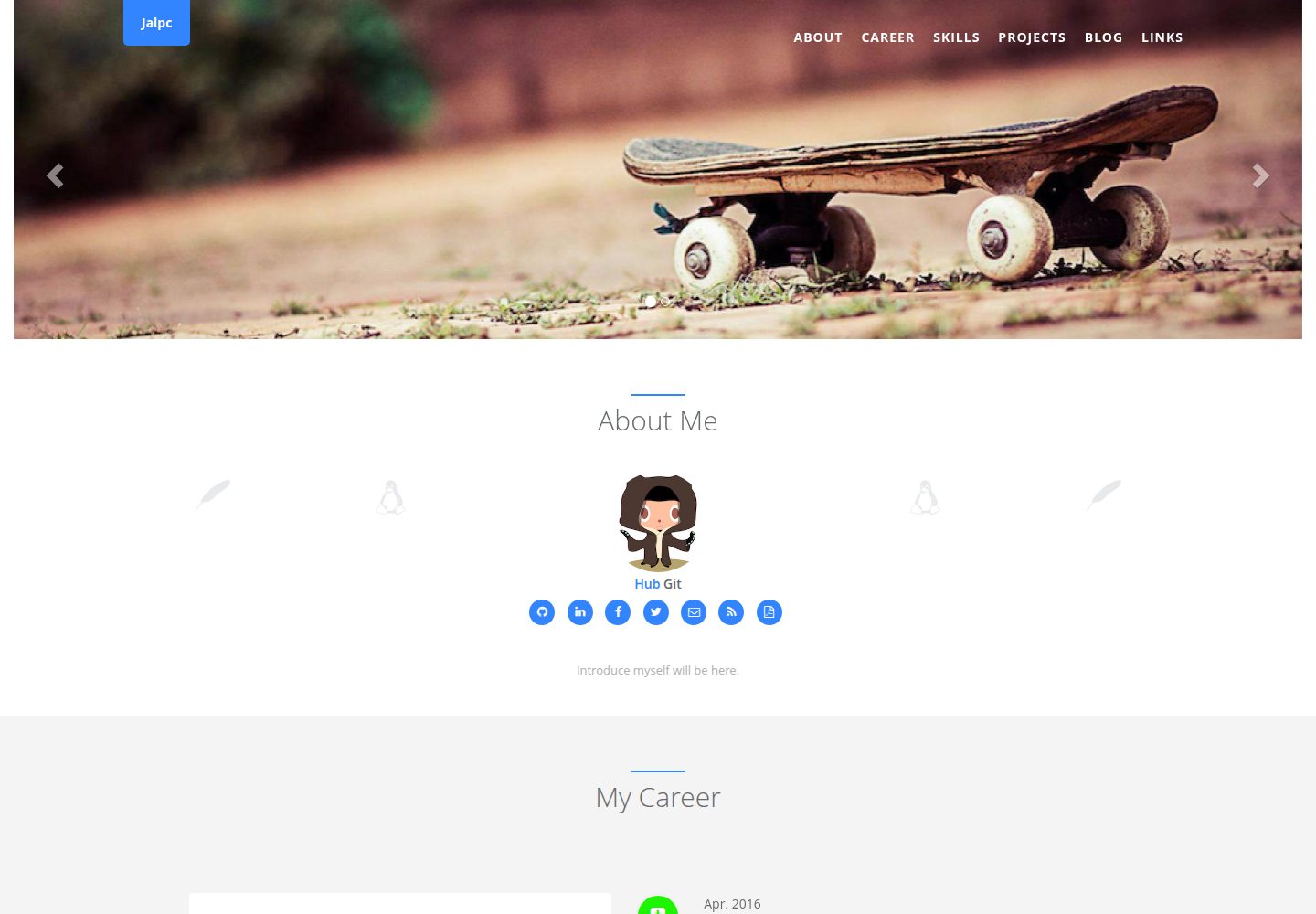
Jalpc
🍎Jalpc -- A flexible Jekyll theme, 3 steps to build your website.
Jekyll · 作品集
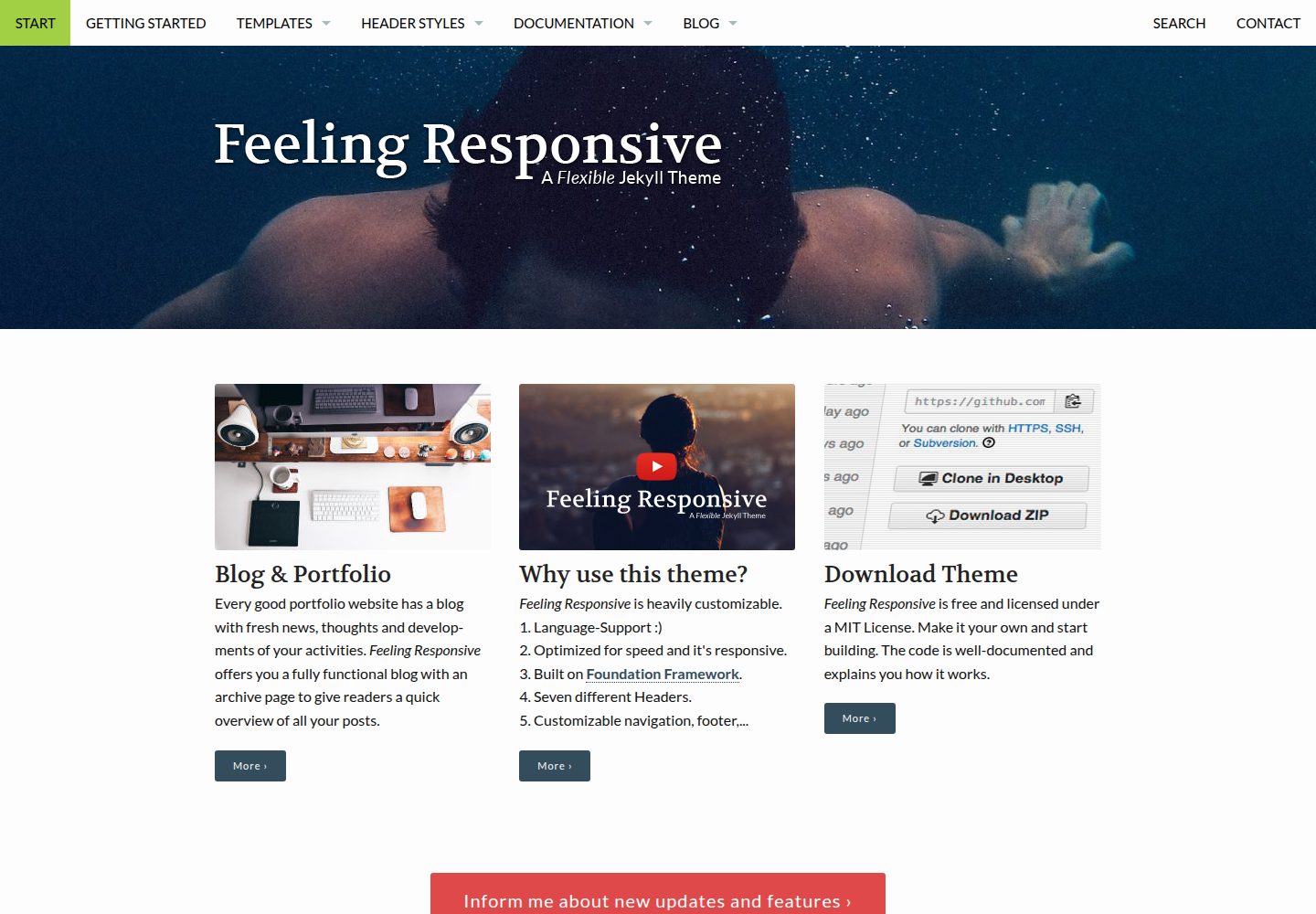
feeling-responsive
»Feeling Responsive« is a free flexible theme for Jekyll built on Foundation framework. You can use it for you…
Jekyll · 作品集