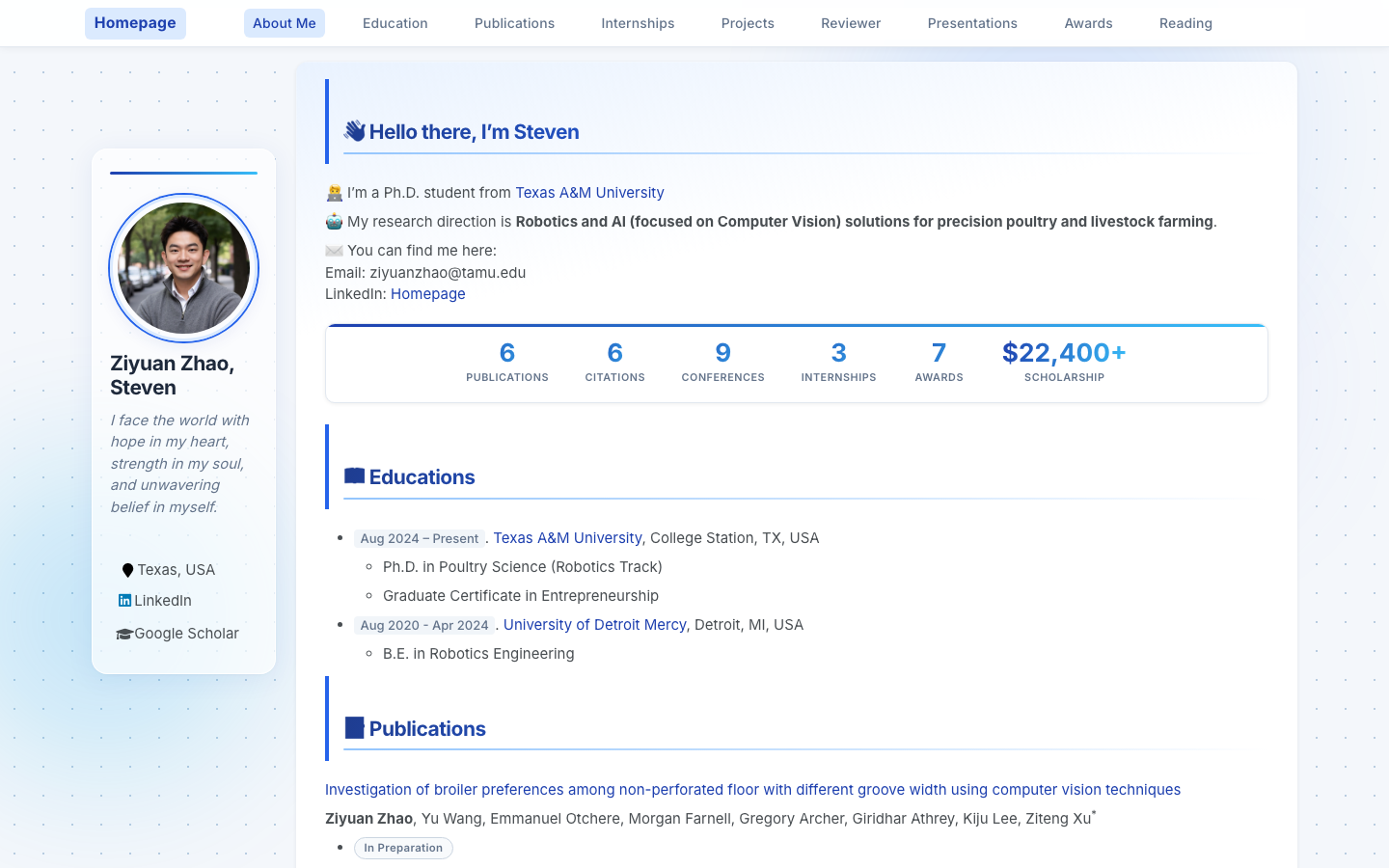
Jekyll static site template with content centralized in _pages/about.md and site settings in _config.yml
JekyllPortfolio
academic-homepage-template — Jekyll Portfolio Template
By steven068zzy
A Jekyll template for academic personal homepages, offering a sidebar author bio, paper cards, a reading list, and section anchors, deployable to GitHub Pages.
Explore the design
Compare the page layouts and mobile experience. Open any screenshot for a closer look.
Author preview
Author-provided preview
Preview provided in the project README.
One original preview is available. Open the full image to inspect the design.
Screenshots show visual appearance; interactive behavior may differ.
Recorded 2026-10-04View source
What stands out
A quick read of the recorded project description.
Sidebar author bio supports avatar, bio, location, and over 40 social platform fields, hidden when left empty
paper-box paper card component can display images, badges, titles, authors, and one-sentence summaries
book-card reading list component supports cover images, titles, authors, and tags, showing a placeholder when no image is available
Built-in GitHub Actions workflow can periodically fetch Google Scholar citation counts and update badges
Adjust primary color, accent color, and page background color via CSS custom properties
Template Details
This is a Jekyll-based academic personal website template, created by Ziyuan Zhao, a PhD student at Texas A&M University. The template builds on the AcadHomepage and Minimal Mistakes themes with mobile adaptations and visual adjustments. Page content is centralized in _pages/about.md, while site-level settings are placed in _config.yml.
The page structure is organized with section anchors, covering sections such as About, Education, Publications, Experience, Projects, Awards, and a reading list. Paper entries use the paper-box component to display images, badges, titles, and abstracts, while the reading list uses book-card to show covers, titles, authors, and tags. The sidebar provides an avatar, bio, and social links; the README states it supports over 40 platform fields, which are hidden when left empty. The template includes a GitHub Actions workflow that can periodically fetch Google Scholar citation counts and update page badges, requiring you to configure the repository name and Scholar homepage URL yourself.
There are two ways to use it: click "Use this template" on GitHub to create a repository named after your username and enable Pages, or fork it directly and rename it. Running locally requires installing Ruby and Bundler first, then executing bundle install and run_server.sh. The template is under the MIT license, allowing free use, modification, and distribution, but third-party assets such as demo images, fonts, and icons need separate license verification.
JekyllPortfolio
Is it right for your project?
Use Cases
- Researchers, PhD students, or scholars building a personal academic homepage to showcase papers, projects, and experience
- Publishing a static personal website on GitHub Pages as a username repository
- Using the paper-box component to organize a paper list in a consistent format with images and abstracts
- Using the book-card component to maintain a personal reading list with covers and tags
- Periodically updating Google Scholar citation count badges via GitHub Actions
Suitable For
- Researchers and PhD students who want to publish an academic homepage using Jekyll and GitHub Pages
- Academic personal sites needing section structures such as paper cards, project showcases, and reading lists
- Users willing to edit Markdown and YAML configuration files to maintain content
- Academic homepages requiring a sidebar author bio and multi-platform social links
Getting started & customization
Use these recorded setup notes alongside the repository instructions for your chosen version.
- 1
Recommended: click "Use this template" on GitHub to create a repository named YOUR_GITHUB_USERNAME.github.io, and set Source to the main branch in Settings → Pages
- 2
Running locally requires installing Ruby and Bundler first, then executing bundle install and bash run_server.sh, and visiting http://localhost:4000
- 3
After modifying _config.yml, restart jekyll serve for changes to take effect
- 4
Automatic Google Scholar citation count updates require filling in repository and googlescholar in _config.yml, and enabling GitHub Actions in the repository settings
- 5
Third-party assets such as demo images, fonts, and icons need separate license verification according to their respective licenses; do not judge solely by the code's MIT license
License & source material
Usage conditions & limitations
Free to use · keep license noticeThis entry covers the free version under the MIT license in the public repository; the free scope applies to that version's code and does not imply that external services or third-party assets are free.
Must comply with when using
- Free use, modification, commercial use, and distribution of this version's code are permitted.
- When distributing copies or substantial portions of the code, retain the original author's copyright notice and the full MIT license notice.
- The code is provided as is; warranties and limitations of liability are governed by the original license and applicable law.
Additional costs & items to verify
- Demo images, fonts, icons, and other third-party assets need separate license verification according to their respective licenses; do not judge solely by the code's MIT license.
- External services such as domains, hosting, databases, payments, or AI may incur additional charges.
- Automatic Google Scholar citation count updates depend on a GitHub Actions workflow, requiring Actions to be enabled in the repository settings and repository and googlescholar homepage URL to be filled in _config.yml; this is an external service configuration requirement.
- The citation count fetching workflow runs daily and commits updates to the google-scholar-stats branch, requiring the repository to have Actions permissions and the ability to write to the corresponding branch.
- Before using the automatic citation count update feature, you must set repository in _config.yml to your own GitHub username repository URL.
- You must fill in your own Google Scholar homepage URL in _config.yml, otherwise citation counts cannot be fetched.
- GitHub Actions must be enabled in the repository settings for the automatic citation count update feature to run.
- Before running the template locally, install Ruby and Bundler first, then execute bundle install and run_server.sh.
- After modifying _config.yml, you must restart jekyll serve, otherwise configuration changes will not take effect.
View Original Text Basis
Permission is hereby granted, free of charge
Original License Text
Google Scholar Citation Auto-update
Original README
The workflow runs daily and commits updated stats to a `google-scholar-stats` branch
Original README
Set `repository` in `_config.yml` to `YOUR_GITHUB_USERNAME/YOUR_GITHUB_USERNAME.github.io`
Original README
Set `googlescholar` to your Google Scholar profile URL
Original README
Enable **GitHub Actions** in your repo settings
Original README
Install Ruby + Bundler first, then:
Original README
https://github.com/steven068zzy/academic-homepage-template/blob/main/LICENSEhttps://github.com/steven068zzy/academic-homepage-template/blob/main/README.md**Restart** `jekyll serve` after editing `_config.yml`.
Original README
Compiled by DeepSeek based on repository license and README ·2026-10-05. Results only cover the materials read; dependencies, images, fonts, and subsequent term changes are subject to their respective original texts.
Project checks & description sources
Template Information
- Source platforms
- GitHub
- Documentation and maintenance reference score
- More documented · 83 / 100
- Technologies
- Jekyll
- Website type
- Portfolio
How this score is calculated
Our heuristic uses license records (up to 30), a demo link (12), a preview (10), stars (15), recorded maintenance (15), description completeness (8), feature records (5) and classification data (5). It is not a code, security or performance test, or a Google score. A link does not establish tested functionality.
What to verify for this project
- Repository update recorded
- 2026-05-16
- Screenshot last checked
- 2026-10-05
A demo link is listed. Check it with your own content and viewport sizes; its presence does not confirm that forms, authentication or payments work.
The catalog identifies Jekyll as the primary stack. Check the actual dependency manifest and lockfile for versions and hosting requirements. These notes use recorded metadata, not a code audit or a deployment test.
Use a selection guide →How this description was prepared
AI-assisted description based on catalog records and repository material. Repository authors are not automatically the reviewers of this description.
Review declaration: [email protected] · 2026-10-05
Inspect the recorded source material
SHA-256: 8bfc2eebee0dd1fcd5d12494caf5388c4626bdfe3a7544743ff1235248a7c663
2026-10-05T03:15:22.426Z
Source file / repository<h1 align="center">Academic Homepage Template</h1> <p align="center"> A clean, modern, mobile-friendly Jekyll template for academic personal websites.<br> Designed for researchers, Ph.D. students, and academics who want a polished online presence with minimal effort. </p> <p align="center"> <a href="https://steven068zzy.github.io/stevenZYzhao.github.io/" target="_blank"><strong>🌐 Live Demo →</strong></a> · <a href="#quick-start">Quick Start</a> · <a href="#configuration">Configuration</a> · <a href="#adding-content">Adding Content</a> </p> <p align="center"> <sub>Template created by <a href="https://steven068zzy.github.io/stevenZYzhao.github.io/">Ziyuan Zhao (Steven)</a> — Ph.D. student at Texas A&M University</sub> </p> --- ## Preview ### Desktop  ### Publications section  ### Mobile <p align="center"> <img src="docs/screenshot-mobile.png" alt="Mobile view" width="320"> </p> --- ## Features - **Responsive design** — looks great on desktop, tablet, and mobile - **Sidebar author profile** — avatar, bio, and social links (40+ platforms supported) - **Publication cards** — `paper-box` component with image, badge, title, and abstract - **Section anchors** — About, Education, Publications, Experience, Projects, Awards, and more - **Book shelf** — visual reading list with cover images and tags - **Auto citation stats** — Google Scholar citation count via GitHub Actions crawler - **Frosted-glass navigation** — sticky header with smooth scroll - **Card animations** — staggered entrance animations, hover lift effects - **Gradient design layer** — polished UI with dot-grid background and gradient text headings - **Back-to-top button** — smooth scroll with visibility toggle - **SEO ready** — sitemap, Open Graph, and verification tag support - **Google Analytics** — plug in your ID to enable --- ## Quick Start ### Option 1 — Use as a GitHub Template (recommended) 1. Click **"Use this template"** → **"Create a new repository"** 2. Name your repo `YOUR_GITHUB_USERNAME.github.io` 3. Go to **Settings → Pages** and set Source to `main` branch 4. Your site will be live at `https://YOUR_GITHUB_USERNAME.github.io` within 2 minutes ### Option 2 — Fork 1. Fork this repository 2. Rename it to `YOUR_GITHUB_USERNAME.github.io` 3. Enable GitHub Pages as above ### Run locally ```bash # Install Ruby + Bundler first, then: bundle install bash run_server.sh # Visit http://localhost:4000 ``` --- ## Configuration All site-wide settings live in `_config.yml`. Open it and fill in the placeholders: ```yaml title : "Jane Smith" repository : "janesmith/janesmith.github.io" author: name : "Jane Smith" avatar : "images/avatar.jpg" # ← add your photo here bio : "Ph.D. candidate in Computer Vision @ MIT" location : "Cambridge, MA, USA" googlescholar : "https://scholar.google.com/citations?user=XXXX" linkedin : "jane-smith" github : "janesmith" email : "[email protected]" ``` > **Restart** `jekyll serve` after editing `_config.yml`. ### Social links Supported platforms include Google Scholar, LinkedIn, GitHub, Twitter/X, ORCID, ResearchGate, DBLP, Email, and 30+ more. Simply fill in the corresponding field in `_config.yml`; leave it blank to hide it. ### Timezone Change `timezone` in `_config.yml` to your local timezone (e.g., `Asia/Shanghai`, `Europe/London`). Full list: [Wikipedia — tz database time zones](https://en.wikipedia.org/wiki/List_of_tz_database_time_zones) --- ## Adding Content All page content lives in `_pages/about.md`. Edit it with any text editor or directly in GitHub's web editor. ### Add a publication (with image) ```html <div class='paper-box'> <div class='paper-box-image'> <div> <div class="badge">Nature 2024</div> <img src='images/paper-fig.png' alt="paper preview" width="100%"> </div> </div> <div class='paper-box-text' markdown="1"> [Your Paper Title](https://doi.org/your-doi) **Jane Smith**, Co-author A, Corresponding Author<sup>*</sup> - One-sentence summary of the key contribution. </div> </div> ``` ### Add a publication (text only) ```markdown [Paper Title](https://link-to-paper) **Jane Smith**, Co-author A, Co-author B - *Under Review* / *Journal Name, Year* ``` ### Add an experience or project entry Use the same `paper-box` structure — place a company logo or project screenshot in `images/` and fill in the text side. ### Add a news item ```markdown # 🔥 News - *Jan 2025* — Paper accepted at CVPR 2025! - *Sep 2024* — Started Ph.D. at MIT. ``` ### Add a book to the reading list Copy any `.book-card` block in the Reading List section and fill in: - `img src` — path to cover image in `images/` (optional; a color placeholder shows if the image is missing) - `book-ph-initial` — 2-letter initials (shown as fallback) - `book-title`, `book-author`, `book-tag` spans --- ## Google Scholar Citation Auto-update This template includes a GitHub Actions workflow that automatically fetches your citation count from Google Scholar and updates a badge on your page. **Setup:** 1. Set `repository` in `_config.yml` to `YOUR_GITHUB_USERNAME/YOUR_GITHUB_USERNAME.github.io` 2. Set `googlescholar` to your Google Scholar profile URL 3. Enable **GitHub Actions** in your repo settings 4. The workflow runs daily and commits updated stats to a `google-scholar-stats` branch --- ## Project Structure ``` . ├── _config.yml ← Site settings & author profile ├── _pages/ │ └── about.md ← All your page content goes here ├── _layouts/ ← Page templates (no need to edit) ├── _includes/ ← Reusable HTML components ├── _sass/ ← Stylesheet source files ├── assets/ │ ├── css/main.scss ← Custom styles (edit to customize look) │ └── js/ ← JavaScript enhancements ├── images/ ← Your photos, paper figures, project screenshots │ └── avatar.jpg ← ← ← Put your profile photo here ├── google_scholar_crawler/ ← Citation crawler (auto-runs via GitHub Actions) └── Gemfile ← Ruby dependencies ``` --- ## Customization ### Colors Edit the CSS custom properties at the top of `assets/css/main.scss`: ```css :root { --accent-1: #1e40af; /* primary blue */ --accent-2: #2563eb; /* secondary blue */ --accent-sky: #38bdf8; /* highlight */ --bg-page: #f4f7fb; /* page background */ } ``` ### Sections Each section has an anchor ID (e.g., `<span class='anchor' id='publications'></span>`). To **hide a section**, simply delete it from `about.md`. To **reorder sections**, cut and paste the blocks. --- ## Credits - Built on [AcadHomepage](https://github.com/RayeRen/acad-homepage.github.io) by [Yi Ren](https://github.com/RayeRen) - Based on [Minimal Mistakes](https://github.com/mmistakes/minimal-mistakes) Jekyll theme by [Michael Rose](https://mademistakes.com/) - Mobile optimization, design layer, and template by [Ziyuan Zhao (Steven)](https://steven068zzy.github.io/stevenZYzhao.github.io/) --- ## License MIT License — free to use for personal and academic purposes. If you find this template helpful, a ⭐ star is appreciated!
Explore similar templates
Compare previews and descriptions within the same stack and category.

al-folio
A Jekyll academic homepage theme for scholars and researchers, with a clean responsive design and out-of-the-box support for publication lists, project showcases, CVs, and blogs.
Jekyll · Portfolio

minimal-mistakes
Minimal Mistakes is a two-column Jekyll theme for personal sites, blogs, project documentation, or portfolios.
Jekyll · Portfolio

Beautiful Jekyll
Beautiful Jekyll is a mature, easy-to-use Jekyll blog theme maintained by Dean Attali since 2015, with over 50,000 users.
Jekyll · Blog

So Simple
A minimal reading-oriented Jekyll theme by Michael Rose for personal blogs, portfolios, and long-form reading. It offers multiple layouts, microformat markup, Disqus comments, Google Analytics, Jekyll SEO Tag, three skins, and aggregation by year, category, and tag with a grid view.
Jekyll · Blog
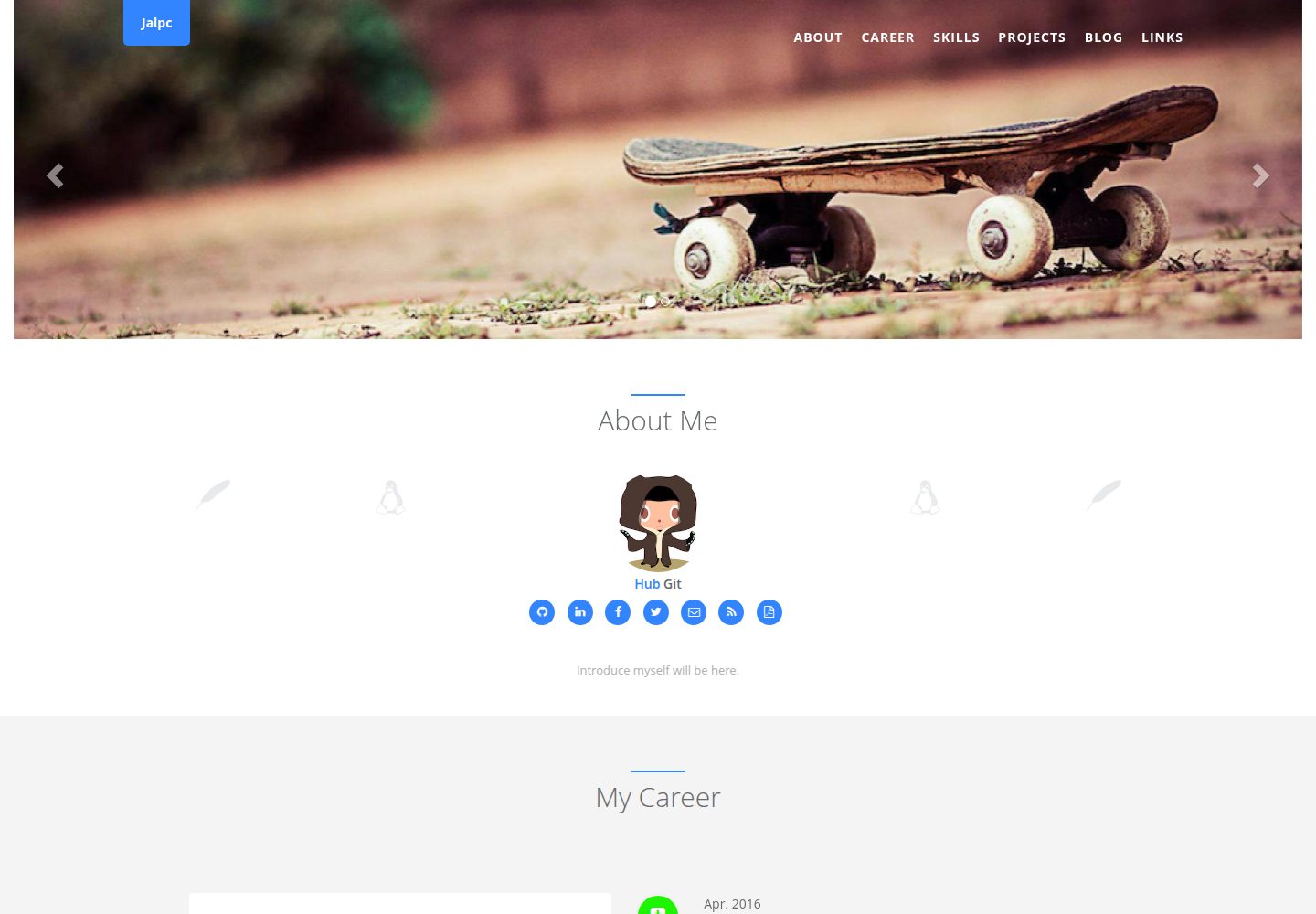
Jalpc
Jalpc is a Jekyll theme for a combined personal homepage and blog. The homepage is split into sections driven by YAML files under _data, so content changes usually do not require editing HTML.
Jekyll · Portfolio
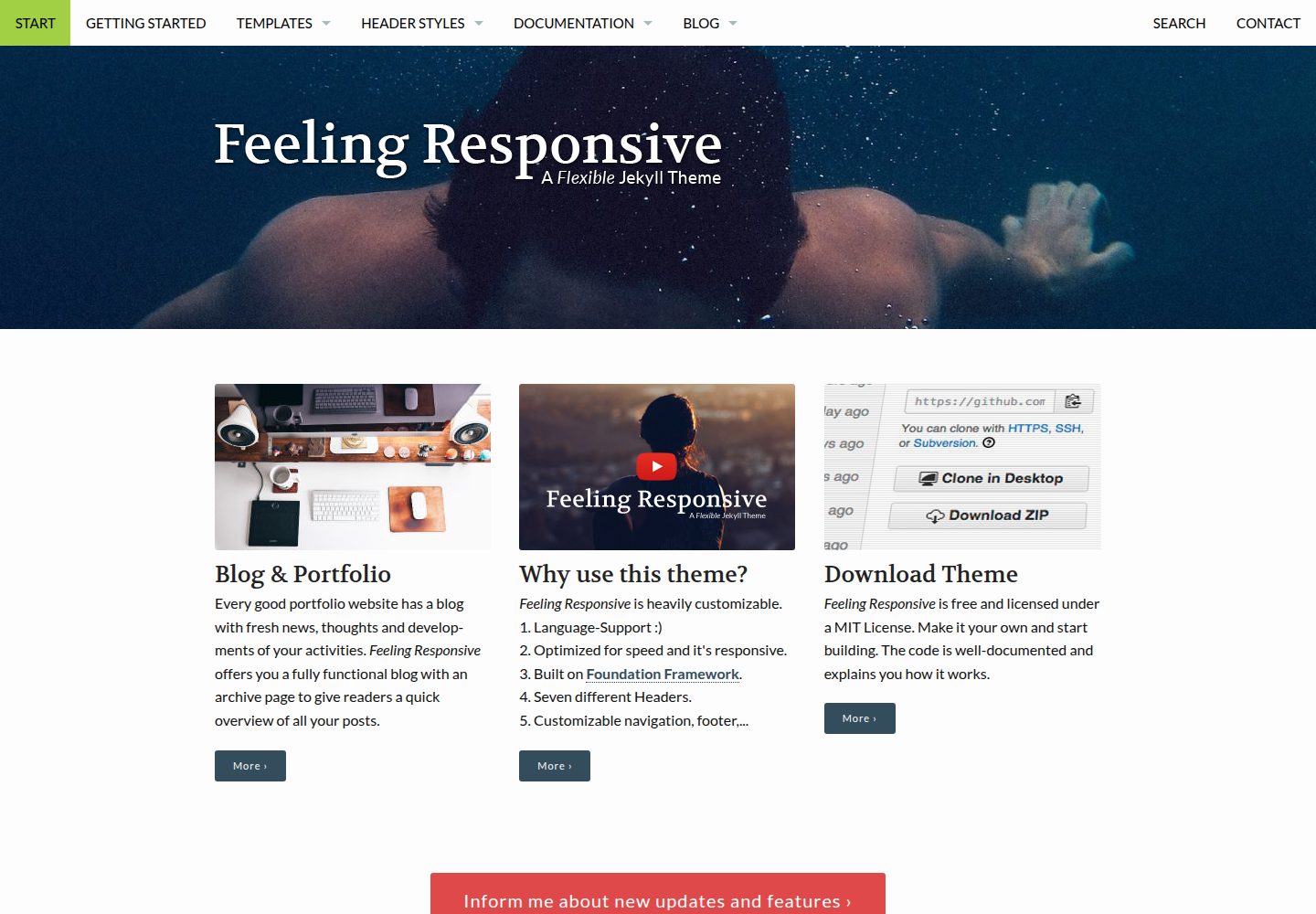
feeling-responsive
A free responsive Jekyll theme built on the Foundation framework, suitable for company sites, portfolios, or blogs. It offers language support, six header styles, customizable navigation and footer, plus documentation and an online demo.
Jekyll · Portfolio