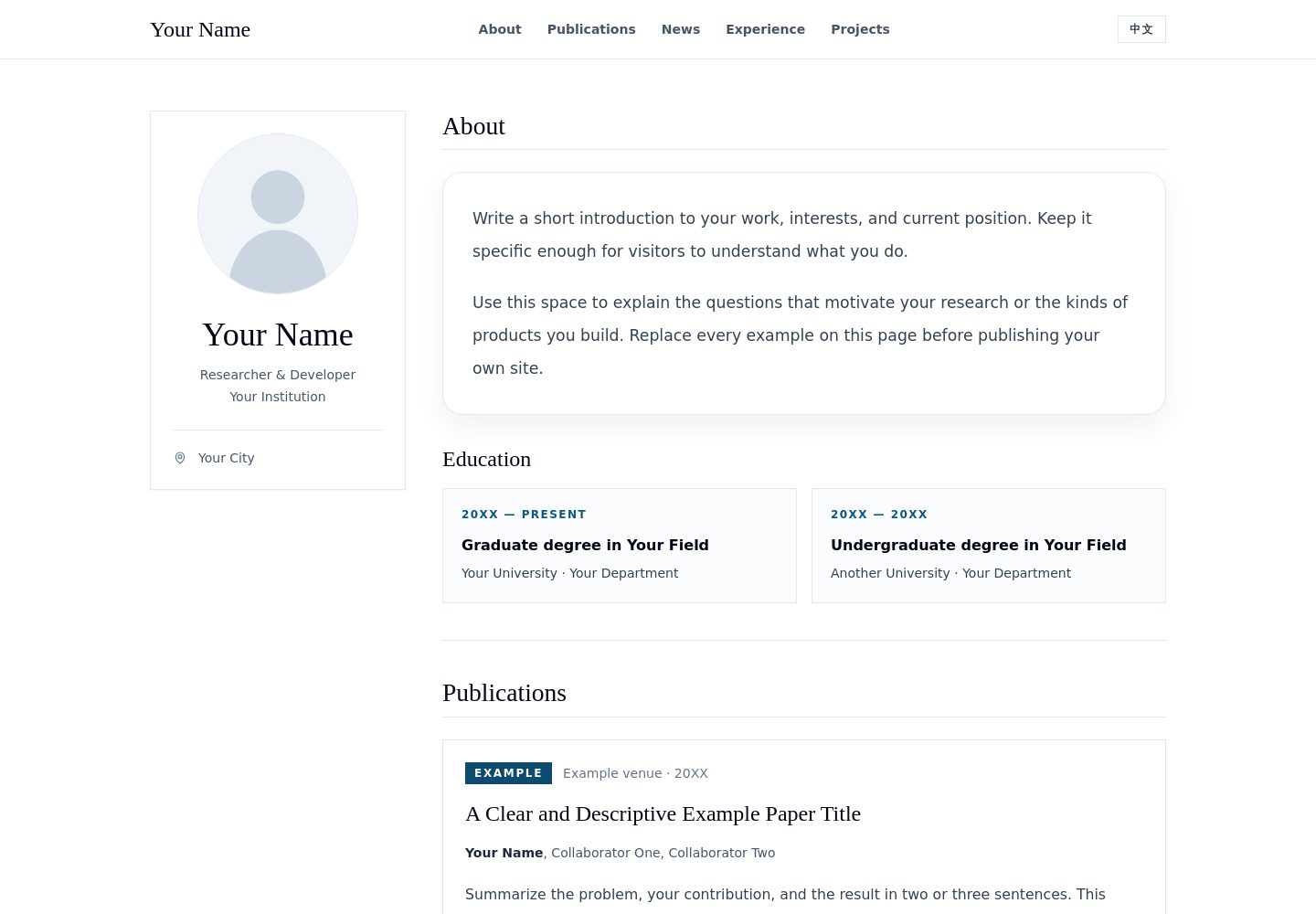
中英文内容写在同一个内容文件中,页面支持即时切换语言
React作品集
academic-portfolio-template — React 作品集模板
作者 SunnyYWD
面向研究人员、学生与开发者的中英双语学术作品集模板,基于 React、Vite 与 Tailwind CSS,包含个人资料卡、教育经历、论文发表、动态、经历、项目与联系方式等板块,并附带 GitHub Pages 部署工作流。
看看你的网站会是什么样
浏览真实页面截图,比较内容排版与手机效果。点击下方缩略图切换,放大查看整页细节。
全部页面与视图 2
截图用于了解视觉与布局,交互效果请以实际项目为准。
采集于 2026-09-29查看来源
值得关注的模板亮点
从已有项目资料中,快速了解它的特点。
论文条目可标注主要作者,并可选填指标、论文链接与代码链接
板块由数据驱动,将对应数组设为空即可隐藏该板块及其导航链接
内置 GitHub Pages 部署工作流,Vite base 路径自动跟随仓库名
不包含分析统计、追踪脚本、外部字体、图片 CDN 或运行时 API 调用
提供桌面端与移动端页面截图,可先查看实际布局效果
模板详细介绍
这是一个学术个人主页模板,内容以数据驱动方式组织。所有文案集中在一个内容文件中,英文与中文各一份,可在页面上即时切换语言。页面包含编辑式个人资料卡,以及教育、论文发表、动态、经历、项目、联系方式等相互分隔的板块。论文条目支持标注主要作者、可选的指标数据,以及可选的论文与代码链接。
模板默认展示的姓名、机构、论文、职位与项目均为虚构示例,头像为通用矢量占位图。各板块可通过把对应数组设为空来隐藏,`about` 板块始终显示。构建产物不包含分析统计、追踪脚本、外部加载字体、图片 CDN 或运行时 API 调用。
仓库提供 GitHub Pages 部署工作流,Vite 的 base 路径会根据仓库名自动推导,因此 fork 或基于模板新建的仓库无需手动改路径;使用自定义域名时需要另行配置。项目采用 MIT 许可证。
React作品集
适合你的项目吗?
适用场景
- 研究人员搭建个人学术主页,集中展示论文发表与教育经历
- 学生制作双语个人网站,用于求职或申请时介绍项目与经历
- 开发者以该模板为起点,改造成带论文与项目列表的个人作品集
- 需要部署到 GitHub Pages 且不希望引入外部字体与追踪脚本的个人站点
适合人群
- 有论文发表记录、需要按作者顺序展示的研究人员
- 需要中英双语页面的学生与开发者
- 希望用单一内容文件维护整站文案的使用者
- 计划通过 GitHub Actions 部署到 GitHub Pages 的用户
上手与定制指南
结合仓库当前版本的说明,按下面的资料检查内容、配置与运行要求。
- 1
需要 Node.js 20.19+ 或 22.12+ 与 npm,部署工作流使用 Node.js 24
- 2
本地运行使用 npm ci 与 npm run dev,生产构建使用 npm run build 与 npm run preview
- 3
主要编辑 src/content.js,需同时替换 en 与 zh 两个语言块中的虚构内容
- 4
头像替换 public/avatar.svg,若文件名变化需同步更新 site.avatar
- 5
发布前替换 index.html 中的标题与描述,并检查两种语言下的所有页面与导航链接
授权与来源资料
使用条件与限制
免费使用 · 保留许可声明本次收录的是公开仓库中的免费 MIT 版本;免费范围为该版本代码,不代表外部服务或第三方素材免费。
使用时需要遵守
- 使用、修改或分发代码时,保留原作者版权声明和完整 MIT 许可证。
- 允许免费使用、修改及商用,也允许分发代码;分发时仍需随附版权与许可声明。
- 代码按现状提供,作者不承诺担保或承担使用责任。
额外费用与待核对事项
- 模板自带的头像仅为通用矢量占位图,发布前必须替换为你本人拥有发布权限的图片,并相应更新替代文本;示例中的姓名、机构、论文、职位与项目均为虚构内容,需全部替换。
- 示例数据中的 example.org 链接仅为占位,不能作为真实项目链接使用,发布前需替换为你自己的有效链接。
- 使用自定义域名时,需自行额外配置 GitHub Pages 的域名设置,模板不会自动处理。
- 演示图片、字体、图标及其他第三方素材需按各自许可核对,不能仅凭代码的 MIT 许可判断。
- 域名、托管、数据库、支付或 AI 等外部服务可能另外收费。
查看原文依据
Permission is hereby granted, free of charge
许可证原文
Replace the placeholder avatar with an image you have permission to publish; update its alternative text if needed.
README 原文
Do not use `example.org` URLs as real project links.
README 原文
https://github.com/SunnyYWD/academic-portfolio-template/blob/main/LICENSEhttps://github.com/SunnyYWD/academic-portfolio-template/blob/main/README.mdIf you use a custom domain, add its usual GitHub Pages configuration separately.
README 原文
依据完整 MIT 许可证与仓库 README 核对 · 2026-09-29。结果仅覆盖已读取资料,依赖、图片、字体及后续条款变更以各自原文为准。
项目核对记录与介绍依据
模板资料
- 来源平台
- GitHub
- 资料与维护参考分
- 资料较完整 · 80 / 100
- 技术栈
- React
- 网站类型
- 作品集
这个分数如何计算
本站按许可资料(最高30分)、演示链接(12分)、预览图(10分)、Star数(15分)、记录的维护时间(15分)、描述完整度(8分)、功能记录(5分)和分类资料(5分)计算。它不是代码、安全或性能测试,也不是 Google 评分;有链接不代表已实测可用。
这个项目需要核对什么
- 记录的仓库更新时间
- 2026-09-28
- 截图检查日期
- 2026-09-29
已收录演示链接。请用你的内容与屏幕尺寸检查;有演示不代表表单、认证或支付已经可用。
目录记录的主要技术栈是 React。请通过依赖清单和锁文件核对实际版本与托管要求。这些说明基于收录资料,不代表代码审计或部署实测。
查看具体选型方法 →介绍的制作与核对状态
介绍由 AI 辅助整理目录与仓库资料。仓库作者不等于这篇介绍的审核者。
已完成服务器许可规则与 AI 来源核对;未经过人工编辑审核。
查看当时使用的来源资料
SHA-256: 863f9178d299e0d88ffea07e9e269ff1503509550592d23d260256a1203c4648
2026-09-29T01:10:46.933Z
来源文件 / 仓库# Academic Portfolio Template
A clean, responsive, bilingual (English / 中文) personal website template for researchers, students, and developers. Built with React, Vite, and Tailwind CSS. It includes an editorial profile card, education, publications, news, experience, projects, and contact sections.
[中文文档](README.zh-CN.md)

> All names, institutions, publications, positions, and projects shown in the starter site are fictional examples. The included avatar is a generic vector placeholder.
## Features
- English and Chinese content in one file, with an instant language switch.
- Publications with an emphasized primary author, optional metrics, and optional paper and code links.
- Responsive layout with a profile card and clearly separated sections.
- Optional sections: set a section's array to `[]` to hide it.
- GitHub Pages workflow included. The Vite base path automatically follows the repository name, including forks and repositories created from this template.
- No analytics, trackers, externally loaded fonts, image CDNs, or runtime API calls.
## Quick start
Requirements: Node.js 20.19+ or 22.12+ and npm. The deployment workflow uses Node.js 24.
```bash
npm ci
npm run dev
```
Open the local URL printed by Vite. To create a production build:
```bash
npm run build
npm run preview
```
## Make it yours
Most edits happen in [src/content.js](src/content.js). Replace the fictional entries in **both** `en` and `zh` with your own content.
| What to change | Where |
| --- | --- |
| Name, role, institution, location, biography | `content.en` and `content.zh` in `src/content.js` |
| Email and GitHub profile URL | `site.email` and `site.github` in `src/content.js` |
| Avatar | Replace `public/avatar.svg` and update `site.avatar` if the filename changes |
| Education, publications, news, experience, projects | The corresponding arrays in each language block |
| Default language | `site.defaultLanguage` (`"en"` or `"zh"`) |
| Browser title and search description | `index.html` |
| Colors, spacing, typography | Tailwind classes in `src/Portfolio.jsx` and `src/styles.css` |
Each section is data driven. For example, add a publication like this in each language block:
```js
{
status: "Preprint",
title: "Your Paper Title",
authorName: "Your Name",
coauthors: ", Collaborator Name",
venue: "Venue · 20XX",
summary: "What problem did the paper solve?",
metrics: [{ value: "00", label: "Example metric" }],
paperUrl: "https://example.org/paper",
codeUrl: "https://example.org/code"
}
```
Set a URL to `""` to hide its button. Set `metrics` to `[]` to hide the metric row. Set the `publications`, `news`, `experience`, or `projects` array to `[]` to hide that section and its navigation link. The `about` section always appears; education can be hidden with `education: []`.
Before publishing, replace the sample copy, remove entries you do not need, add your own links, and check every page in both languages. Do not use `example.org` URLs as real project links.
## Publish with GitHub Pages
1. Click **Use this template** on GitHub and create a new repository.
2. In your new repository, open **Settings → Pages** and choose **GitHub Actions** as the build and deployment source.
3. Edit `src/content.js`, `public/avatar.svg`, and `index.html`; commit and push to `main`.
4. Wait for **Actions → Deploy portfolio to GitHub Pages** to succeed. The public URL will normally be `https://<username>.github.io/<repository>/`.
The build derives its base path from GitHub Actions' `GITHUB_REPOSITORY`. A repository named `<username>.github.io` uses `/`. To override the path for another host, set `VITE_BASE_PATH` during build (for example, `VITE_BASE_PATH=/ npm run build`). If you use a custom domain, add its usual GitHub Pages configuration separately.
## Project structure
```text
src/content.js bilingual example data and site settings
src/Portfolio.jsx reusable page components
src/styles.css Tailwind imports and font stacks
public/avatar.svg generic placeholder avatar
vite.config.js automatic GitHub Pages base path
.github/workflows/ build and deployment workflow
```
## Search and accessibility checklist
- Replace the `<title>` and description in `index.html` with a concise description of your own page.
- Add accurate repository description and topics on GitHub, such as `academic-portfolio`, `personal-website`, `researcher-portfolio`, `react`, `vite`, and `github-pages`.
- Replace the placeholder avatar with an image you have permission to publish; update its alternative text if needed.
- Check the desktop and mobile layout, all navigation links, and both language versions before sharing the URL.
The starter site is crawlable (`public/robots.txt` allows indexing). Search engines decide when and whether to index a deployed copy; a repository description and topics help people find the source on GitHub.
## License
MIT. See [LICENSE](LICENSE).
Contributions are welcome; see [CONTRIBUTING.md](CONTRIBUTING.md) for the workflow and privacy guidelines.
看看同类模板
对比同技术栈与用途的模板,找到更适合的视觉与内容结构。

react-portfolio-template
React powered portfolio website template for developers
React · 作品集

personal-website-react
personal-website-react 是一个面向开发者的个人作品集单页模板,由 React 和 Material-UI 构建,并通过 Create React App 初始化。
React · 作品集

karngyan.com
karngyan.com 是一个面向开发者的个人网站与博客模板,作者用它搭建了自己的站点,并公开了完整代码。 模板的核心定位很明确:让写作者专注于内容,而不是花时间搭建基础设施。
React · 作品集

react-portfolio-template
react-portfolio-template 是一个由 Ryan Balieiro 开发的 React 作品集模板,定位为“sleek, futuristic”,适合开发者展示个人履历。
React · 作品集

portfolio
Personal website, Data scientist portfolio template
React · 作品集

react-portfolio
react-portfolio 是一个面向开发者的个人作品集模板,基于 React 16 和 Create React App 构建,界面样式采用 Material-UI。
React · 作品集