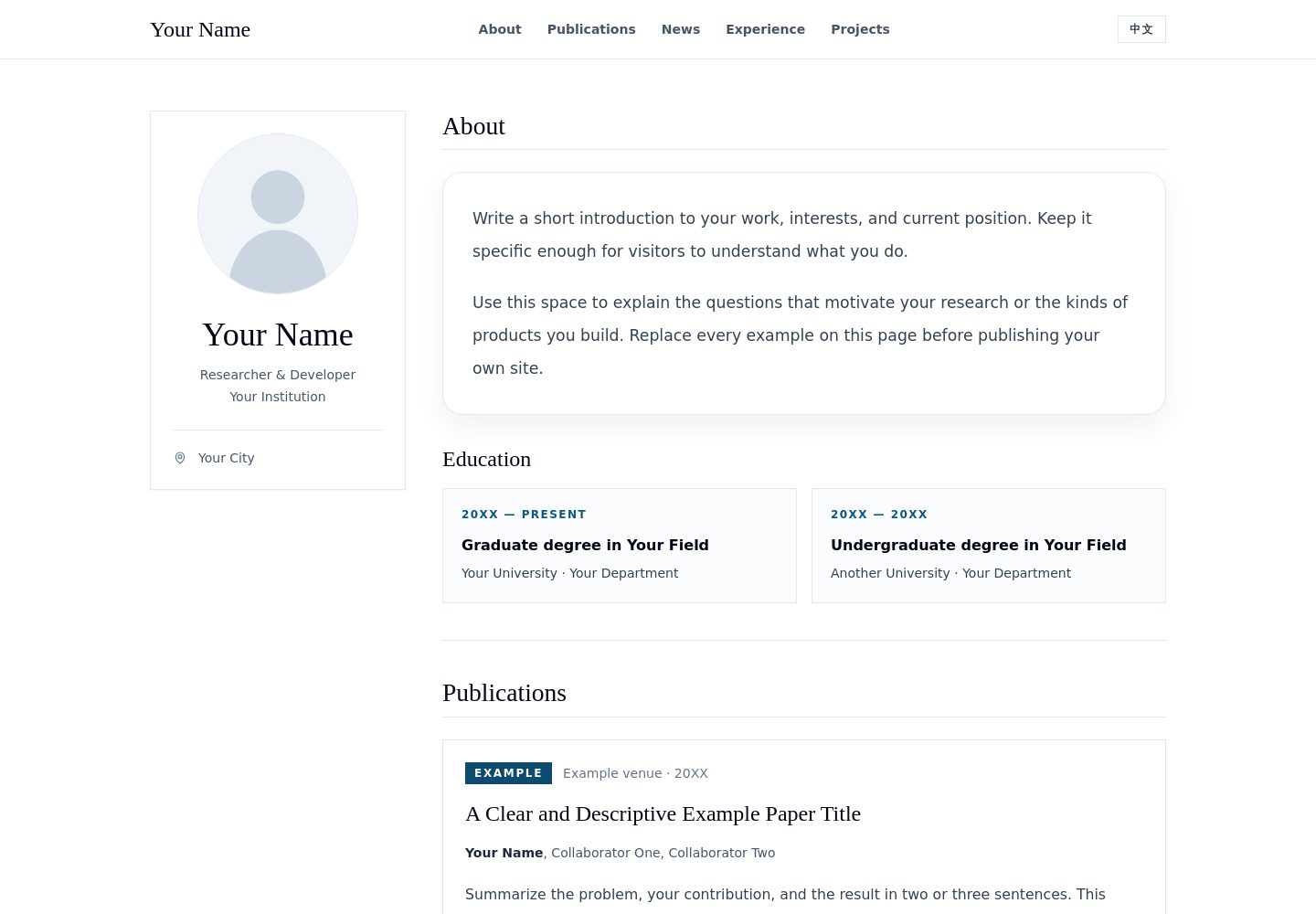
English and Chinese content are written in the same content file, and the page supports instant language switching
ReactPortfolio
academic-portfolio-template — React Portfolio Template
By SunnyYWD
A bilingual academic portfolio template for researchers, students, and developers, built with React, Vite, and Tailwind CSS. It includes sections for a profile card, education, publications, updates, experience, projects, and contact, along with a GitHub Pages deployment workflow.
Explore the design
Compare the page layouts and mobile experience. Open any screenshot for a closer look.
Desktop homepage1 / 2
Desktop captureTop of page
Actual screenshot captured by the server browser.
All pages & views 2
Screenshots show visual appearance; interactive behavior may differ.
Recorded 2026-09-29View source
What stands out
A quick read of the recorded project description.
Publication entries can mark primary authors and optionally include metrics, paper links, and code links
Sections are data-driven; setting the corresponding array to empty hides that section and its navigation link
Built-in GitHub Pages deployment workflow, with Vite base path automatically following the repository name
No analytics, tracking scripts, external fonts, image CDNs, or runtime API calls
Desktop and mobile page screenshots are provided so you can preview the actual layout
Template Details
This is an academic personal homepage template with content organized in a data-driven way. All copy is centralized in a single content file, with separate English and Chinese versions, and the language can be switched instantly on the page. The page includes an editorial-style profile card and distinct sections for education, publications, updates, experience, projects, and contact. Publication entries support marking primary authors, optional metrics, and optional links to papers and code.
The template's default names, institutions, publications, positions, and projects are fictional examples, and the avatar is a generic vector placeholder. Sections can be hidden by setting the corresponding array to empty; the `about` section is always displayed. The build output contains no analytics, tracking scripts, externally loaded fonts, image CDNs, or runtime API calls.
The repository provides a GitHub Pages deployment workflow, and Vite's base path is automatically derived from the repository name, so forks or repositories created from the template do not need manual path changes; using a custom domain requires separate configuration. The project is under the MIT license.
ReactPortfolio
Is it right for your project?
Use Cases
- Researchers building a personal academic homepage to centrally display publications and education
- Students creating a bilingual personal website to introduce projects and experience for job applications or admissions
- Developers using this template as a starting point to adapt into a personal portfolio with publication and project lists
- Personal sites that need to be deployed to GitHub Pages and do not want external fonts or tracking scripts
Suitable For
- Researchers with publication records who need to display author order
- Students and developers who need bilingual English-Chinese pages
- Users who want to maintain all site copy in a single content file
- Users planning to deploy to GitHub Pages via GitHub Actions
Getting started & customization
Use these recorded setup notes alongside the repository instructions for your chosen version.
- 1
Requires Node.js 20.19+ or 22.12+ and npm; the deployment workflow uses Node.js 24
- 2
For local development use npm ci and npm run dev; for production build use npm run build and npm run preview
- 3
Mainly edit src/content.js, and replace the fictional content in both the en and zh language blocks
- 4
Replace the avatar at public/avatar.svg; if the filename changes, update site.avatar accordingly
- 5
Before publishing, replace the title and description in index.html and check all pages and navigation links in both languages
License & source material
Usage conditions & limitations
Free to use · keep license noticeThis entry covers the free MIT-licensed version in the public repository; the free scope applies to that version's code and does not imply that external services or third-party assets are free.
Must comply with when using
- When using, modifying, or distributing the code, retain the original author's copyright notice and the full MIT license.
- Free use, modification, and commercial use are permitted, as is distribution of the code; distribution must still include the copyright and license notice.
- The code is provided as is, and the author does not promise warranties or accept liability for use.
Additional costs & items to verify
- The template's avatar is only a generic vector placeholder; before publishing you must replace it with an image you have permission to publish and update the alt text accordingly. The example names, institutions, publications, positions, and projects are all fictional and must be replaced.
- The example.org links in the sample data are placeholders only and cannot be used as real project links; replace them with your own valid links before publishing.
- When using a custom domain, you must configure GitHub Pages domain settings separately; the template does not handle this automatically.
- Demo images, fonts, icons, and other third-party assets must be checked against their respective licenses and cannot be judged solely by the code's MIT license.
- External services such as domains, hosting, databases, payments, or AI may incur additional charges.
View Original Text Basis
Permission is hereby granted, free of charge
Original License Text
Replace the placeholder avatar with an image you have permission to publish; update its alternative text if needed.
Original README
Do not use `example.org` URLs as real project links.
Original README
https://github.com/SunnyYWD/academic-portfolio-template/blob/main/LICENSEhttps://github.com/SunnyYWD/academic-portfolio-template/blob/main/README.mdIf you use a custom domain, add its usual GitHub Pages configuration separately.
Original README
Based on the full MIT license and the repository README · 2026-09-29. Results only cover the materials read; dependencies, images, fonts, and subsequent term changes are subject to their respective original texts.
Project checks & description sources
Template Information
- Source platforms
- GitHub
- Documentation and maintenance reference score
- More documented · 80 / 100
- Technologies
- React
- Website type
- Portfolio
How this score is calculated
Our heuristic uses license records (up to 30), a demo link (12), a preview (10), stars (15), recorded maintenance (15), description completeness (8), feature records (5) and classification data (5). It is not a code, security or performance test, or a Google score. A link does not establish tested functionality.
What to verify for this project
- Repository update recorded
- 2026-09-28
- Screenshot last checked
- 2026-09-29
A demo link is listed. Check it with your own content and viewport sizes; its presence does not confirm that forms, authentication or payments work.
The catalog identifies React as the primary stack. Check the actual dependency manifest and lockfile for versions and hosting requirements. These notes use recorded metadata, not a code audit or a deployment test.
Use a selection guide →How this description was prepared
AI-assisted description based on catalog records and repository material. Repository authors are not automatically the reviewers of this description.
Automatically checked against source and license rules; no manual editorial review.
Inspect the recorded source material
SHA-256: 863f9178d299e0d88ffea07e9e269ff1503509550592d23d260256a1203c4648
2026-09-29T01:10:46.933Z
Source file / repository# Academic Portfolio Template
A clean, responsive, bilingual (English / 中文) personal website template for researchers, students, and developers. Built with React, Vite, and Tailwind CSS. It includes an editorial profile card, education, publications, news, experience, projects, and contact sections.
[中文文档](README.zh-CN.md)

> All names, institutions, publications, positions, and projects shown in the starter site are fictional examples. The included avatar is a generic vector placeholder.
## Features
- English and Chinese content in one file, with an instant language switch.
- Publications with an emphasized primary author, optional metrics, and optional paper and code links.
- Responsive layout with a profile card and clearly separated sections.
- Optional sections: set a section's array to `[]` to hide it.
- GitHub Pages workflow included. The Vite base path automatically follows the repository name, including forks and repositories created from this template.
- No analytics, trackers, externally loaded fonts, image CDNs, or runtime API calls.
## Quick start
Requirements: Node.js 20.19+ or 22.12+ and npm. The deployment workflow uses Node.js 24.
```bash
npm ci
npm run dev
```
Open the local URL printed by Vite. To create a production build:
```bash
npm run build
npm run preview
```
## Make it yours
Most edits happen in [src/content.js](src/content.js). Replace the fictional entries in **both** `en` and `zh` with your own content.
| What to change | Where |
| --- | --- |
| Name, role, institution, location, biography | `content.en` and `content.zh` in `src/content.js` |
| Email and GitHub profile URL | `site.email` and `site.github` in `src/content.js` |
| Avatar | Replace `public/avatar.svg` and update `site.avatar` if the filename changes |
| Education, publications, news, experience, projects | The corresponding arrays in each language block |
| Default language | `site.defaultLanguage` (`"en"` or `"zh"`) |
| Browser title and search description | `index.html` |
| Colors, spacing, typography | Tailwind classes in `src/Portfolio.jsx` and `src/styles.css` |
Each section is data driven. For example, add a publication like this in each language block:
```js
{
status: "Preprint",
title: "Your Paper Title",
authorName: "Your Name",
coauthors: ", Collaborator Name",
venue: "Venue · 20XX",
summary: "What problem did the paper solve?",
metrics: [{ value: "00", label: "Example metric" }],
paperUrl: "https://example.org/paper",
codeUrl: "https://example.org/code"
}
```
Set a URL to `""` to hide its button. Set `metrics` to `[]` to hide the metric row. Set the `publications`, `news`, `experience`, or `projects` array to `[]` to hide that section and its navigation link. The `about` section always appears; education can be hidden with `education: []`.
Before publishing, replace the sample copy, remove entries you do not need, add your own links, and check every page in both languages. Do not use `example.org` URLs as real project links.
## Publish with GitHub Pages
1. Click **Use this template** on GitHub and create a new repository.
2. In your new repository, open **Settings → Pages** and choose **GitHub Actions** as the build and deployment source.
3. Edit `src/content.js`, `public/avatar.svg`, and `index.html`; commit and push to `main`.
4. Wait for **Actions → Deploy portfolio to GitHub Pages** to succeed. The public URL will normally be `https://<username>.github.io/<repository>/`.
The build derives its base path from GitHub Actions' `GITHUB_REPOSITORY`. A repository named `<username>.github.io` uses `/`. To override the path for another host, set `VITE_BASE_PATH` during build (for example, `VITE_BASE_PATH=/ npm run build`). If you use a custom domain, add its usual GitHub Pages configuration separately.
## Project structure
```text
src/content.js bilingual example data and site settings
src/Portfolio.jsx reusable page components
src/styles.css Tailwind imports and font stacks
public/avatar.svg generic placeholder avatar
vite.config.js automatic GitHub Pages base path
.github/workflows/ build and deployment workflow
```
## Search and accessibility checklist
- Replace the `<title>` and description in `index.html` with a concise description of your own page.
- Add accurate repository description and topics on GitHub, such as `academic-portfolio`, `personal-website`, `researcher-portfolio`, `react`, `vite`, and `github-pages`.
- Replace the placeholder avatar with an image you have permission to publish; update its alternative text if needed.
- Check the desktop and mobile layout, all navigation links, and both language versions before sharing the URL.
The starter site is crawlable (`public/robots.txt` allows indexing). Search engines decide when and whether to index a deployed copy; a repository description and topics help people find the source on GitHub.
## License
MIT. See [LICENSE](LICENSE).
Contributions are welcome; see [CONTRIBUTING.md](CONTRIBUTING.md) for the workflow and privacy guidelines.
Explore similar templates
Compare previews and descriptions within the same stack and category.

react-portfolio-template
A React-based developer portfolio template for showcasing projects, work history, and skills. It offers a multi-component layout, dark and light modes, and responsive mobile adaptation, with text and images editable in src/components.
React · Portfolio

personal-website-react
A single-page developer portfolio template built with React and Material-UI, driven by a JSON Resume-compliant resume.json. It offers light/dark theme switching with localStorage persistence, a clean responsive layout, and Create React App tooling for simple builds and static deployment.
React · Portfolio

karngyan.com
A personal website and blog template for developers, built with TanStack Start, React 19, Tailwind CSS v4, and shadcn/ui. It uses MDX for articles with Shiki highlighting and GFM tables, and automatically generates RSS, sitemap, robots.txt, llms.txt, and OG images.
React · Portfolio

react-portfolio-template
A React portfolio template by Ryan Balieiro with a fixed sidebar and page-turn transitions on desktop, bottom navigation on mobile, multilingual support, light/dark themes, and content components for experience, education, skills, projects, and testimonials.
React · Portfolio

portfolio
A data scientist personal portfolio template built with React and MUI, with content centrally managed through configuration files in the assets directory.
React · Portfolio

react-portfolio
A React 16 and Material-UI developer portfolio template that centralizes personal information in a JSON Resume-compliant resume.json, with light/dark theme switching saved to local storage. It currently provides portfolio display only; resume page templates and structured data enhancements are still planned.
React · Portfolio