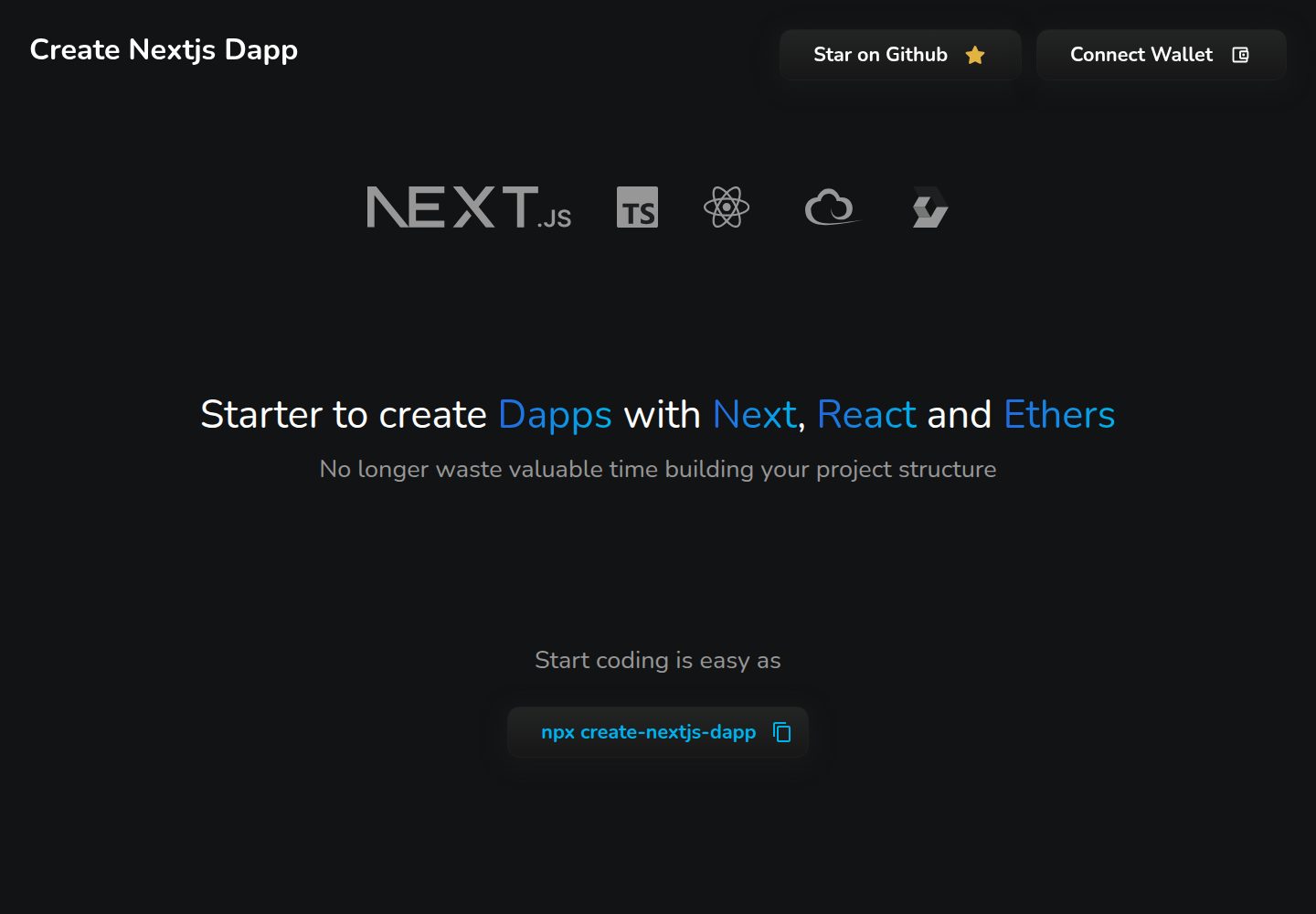
通过 npx create-nextjs-dapp 在终端选择项目名称与模板生成项目
Next.jsReact启动器
create-nextjs-dapp — Next.js 启动器模板
作者 swiiny
create-nextjs-dapp 是一个基于 Next.js、React 与 ethers 的 Dapp 启动器,通过 npx create-nextjs-dapp 在终端选择项目名与模板生成项目。
看看你的网站会是什么样
浏览真实页面截图,比较内容排版与手机效果。点击下方缩略图切换,放大查看整页细节。
全部页面与视图 2
截图用于了解视觉与布局,交互效果请以实际项目为准。
采集于 2026-10-02查看来源
值得关注的模板亮点
从已有项目资料中,快速了解它的特点。
提供 Base、MUI、Styled Components、Stylex、Tailwind 五种模板
技术栈为 Next.js、React、ethers 与 TypeScript
使用 Playwright 进行端到端测试,覆盖桌面与移动端模板
支持通过 Act 在本地模拟 GitHub Actions 工作流
采用 MIT 许可,允许免费使用、修改、商用和分发该版本代码
模板详细介绍
create-nextjs-dapp 是一个用于搭建去中心化应用(Dapp)的启动器,技术栈为 Next.js、React 与 ethers,通过命令行 `npx create-nextjs-dapp` 在终端中选择项目名称和模板来生成项目。仓库 README 列出了五种可选模板:Base(不配置 UI 框架,默认样式基于 .scss 并附使用示例)、MUI(基于 MUI 框架,配置了 MUI System 与 MUI Base,并说明可安装 @mui/material)、Styled Components(配置 Styled Components,提供响应式 padding、margin 与 frame 的基础函数,相关接口见 ./interfaces/layout.ts)、Stylex(使用 Stylex 进行样式处理,采用原子 CSS)以及 Tailwind(基于 Tailwind CSS,附带 tailwind.config.js 基础配置文件)。项目使用 TypeScript,README 中记录的工作配置为 node 16.16.0 与 npm 8.11.0。测试方面使用 Playwright 进行端到端测试,配置了 chromium_desktop 与 safari_mobile(iPhone 13 模拟)两个项目,并可通过 Act 在本地模拟 GitHub Actions 工作流;npm 脚本区分本地桌面/移动模板测试与 CI 模拟测试,报告输出到 playwright-report-desktop 与 playwright-report-mobile。仓库采用 MIT 许可,本次收录的是该公开仓库中的免费版本,免费范围仅限该版本代码,不涵盖外部服务或第三方素材。
Next.jsReact启动器
适合你的项目吗?
适用场景
- 在终端快速生成一个包含 ethers 的 Next.js Dapp 项目骨架
- 按样式方案选择模板:Base、MUI、Styled Components、Stylex 或 Tailwind
- 为模板编写或运行 Playwright 端到端测试,覆盖桌面与移动端
- 在本地用 Act 模拟 GitHub Actions 的模板测试工作流
适合人群
- 需要快速搭建 Next.js + React + ethers Dapp 起步项目的开发者
- 希望在 MUI、Styled Components、Stylex、Tailwind 等样式方案间选择模板的团队
- 需要为 Dapp 模板配置桌面与移动端端到端测试的项目
上手与定制指南
结合仓库当前版本的说明,按下面的资料检查内容、配置与运行要求。
- 1
使用 npx create-nextjs-dapp 命令启动,按终端提示选择项目名称与模板
- 2
README 记录的工作配置为 node 16.16.0 与 npm 8.11.0
- 3
MUI 模板需另行运行 npm install @mui/material
- 4
本地测试命令:npm run test:desktop:templates 与 npm run test:mobile:templates
- 5
CI 模拟测试命令:npm run test:gh:test:desktop:templates 与 npm run test:gh:test:mobile:templates
授权与来源资料
使用条件与限制
免费使用 · 保留许可声明本次收录的是公开仓库中采用 MIT 许可的免费版本;免费范围为该版本代码,不代表外部服务或第三方素材免费。
使用时需要遵守
- 允许免费使用、修改、商用和分发该版本代码。
- 分发代码副本或实质性部分时,保留原作者版权声明和完整 MIT 许可声明。
- 代码按现状提供;担保与责任限制以原许可证及适用法律为准。
额外费用与待核对事项
- 演示图片、字体、图标及其他第三方素材需按各自许可核对,不能仅凭代码的 MIT 许可判断。
- 域名、托管、数据库、支付或 AI 等外部服务可能另外收费。
查看原文依据
https://github.com/swiiny/create-nextjs-dapp/blob/main/LICENSEhttps://github.com/swiiny/create-nextjs-dapp/blob/main/README.mdPermission is hereby granted, free of charge
许可证原文
DeepSeek 根据仓库许可证和 README 整理 ·2026-10-02。结果仅覆盖已读取资料,依赖、图片、字体及后续条款变更以各自原文为准。
项目核对记录与介绍依据
模板资料
- 来源平台
- GitHub
- 资料与维护参考分
- 资料较完整 · 86 / 100
- 技术栈
- Next.js · React
- 网站类型
- 启动器
这个分数如何计算
本站按许可资料(最高30分)、演示链接(12分)、预览图(10分)、Star数(15分)、记录的维护时间(15分)、描述完整度(8分)、功能记录(5分)和分类资料(5分)计算。它不是代码、安全或性能测试,也不是 Google 评分;有链接不代表已实测可用。
这个项目需要核对什么
- 记录的仓库更新时间
- 2025-02-03
- 截图检查日期
- 2026-10-02
已收录演示链接。请用你的内容与屏幕尺寸检查;有演示不代表表单、认证或支付已经可用。
目录记录的主要技术栈是 Next.js。请通过依赖清单和锁文件核对实际版本与托管要求。这些说明基于收录资料,不代表代码审计或部署实测。
查看具体选型方法 →介绍的制作与核对状态
介绍由 AI 辅助整理目录与仓库资料。仓库作者不等于这篇介绍的审核者。
已完成服务器许可规则与 AI 来源核对;未经过人工编辑审核。
查看当时使用的来源资料
SHA-256: 2263f44f6ff002a742836f93b17360c7704e767b7c5780ff0f1b77c1ca16e47e
2026-10-02T20:46:56.198Z
来源文件 / 仓库# Create Nextjs Dapp [](https://www.npmjs.com/package/create-nextjs-dapp) [](https://www.npmjs.com/package/create-nextjs-dapp) [](https://www.npmjs.com/package/create-nextjs-dapp)    ## Table of Contents - [Introduction](#introduction) - [Quick start](#quick-start) - [Technologies](#technologies) - [Templates](#templates) - [Tests](#tests) ## Introduction This is a starter for building Dapps with Nextjs, React and ethers. By running `npx create-nextjs-dapp` you will be able to choose a **_project name_** and the **_template_** you want to use directly **_from your terminal_**. Here is the list of the available templates: - [Base](#base) (No UI kit) - [MUI](#mui) - [Styled Components](#styled-components) - [Stylex](#stylex) - [Tailwind](#tailwind) ## Quick start You can quickly start a new project with this starter by using the following command: ``` npx create-nextjs-dapp ``` ## Technologies The project has been built using the following technologies:     Working configuration: - node 16.16.0 - npm 8.11.0 ## Templates - [base](#base) - [MUI](#mui) - [Styled Components](#styled-components) - [Stylex](#stylex) - [Tailwind](#tailwind) ### Base The base template has no UI framework configured. The default style is based on `.scss` with examples of how to use it. ### MUI The MUI template is based on the [MUI](https://mui.com/) framework. It is configured with the [MUI System](https://mui.com/system/getting-started/overview/) and the [MUI Base](https://mui.com/base/getting-started/overview/). All is configured to work with the [Material UI](https://mui.com/material-ui/getting-started/overview/). You can run the following command to install it: ``` npm install @mui/material ``` ### Styled Components Styled components is a popular CSS-in-JS library developed for React. It is configured with the [Styled Components](https://styled-components.com/) library. There are already base functions to add responsive padding, margin, and frames to your components. > See IPadding, IMargin, and IFrames available at `./interfaces/layout.ts` --- ### Stylex The Stylex template leverages [Stylex](https://stylexjs.com/) for styling, blending the benefits of inline styles and CSS without their limitations. It provides a simple JavaScript syntax and compiler for defining component-scoped styles, avoiding specificity issues while supporting media queries. Stylex utilizes atomic CSS to minimize output size, ensuring scalability and maintainability of styles in large projects. Please refer to the [Stylex documentation](https://stylexjs.com/docs/learn/) for more information on how to use the library. ### Tailwind The Tailwind template is based on the [Tailwind CSS](https://tailwindcss.com/) framework. It is configured with the [Tailwind CSS](https://tailwindcss.com/docs/installation) library. This template utilizes the utility-first approach to styling, providing a highly customizable and efficient way to build your Dapp. This template includes a base configuration file (`tailwind.config.js`) to get you started with customizing your styles. You can refer to the [Tailwind CSS documentation](https://tailwindcss.com/docs/configuration) for more information on how to extend and modify the default configuration. ## Tests The testing setup uses **Playwright** for end-to-end tests and supports both local and CI testing workflows. Below are the details of the test implementation and available commands. ### Test Implementation The project tests are designed to: 1. Validate that all templates render correctly on both desktop and mobile environments. 2. Compare snapshots to detect unintended UI changes. 3. Verify template-specific logic to ensure functionality. The tests are configured in the `playwright.config.ts` file with the following projects: - **`chromium_desktop`**: Tests templates on a desktop environment using Chromium. - **`safari_mobile`**: Tests templates on a mobile environment using Safari emulation (iPhone 13). Additionally, the project uses **Act** to simulate GitHub Actions workflows for testing in CI-like environments locally. --- ### Test Commands Here are the available test commands in `package.json`: #### **Local Testing** 1. **Run Desktop Template Tests** ```bash npm run test:desktop:templates ``` - Runs all template tests for the desktop environment using Playwright. - Saves the HTML report in `playwright-report-desktop`. 2. **Run Mobile Template Tests** ```bash npm run test:mobile:templates ``` - Runs all template tests for the mobile environment using Playwright. - Saves the HTML report in `playwright-report-mobile`. #### **GitHub Actions Simulation** 1. **Run Desktop Template Tests in CI-like Environment** ```bash npm run test:gh:test:desktop:templates ``` - Uses Act to simulate the `test-desktop-templates` job from the GitHub Actions workflow. - Runs the tests using the `ubuntu-24.04` environment with `linux/amd64` architecture. 2. **Run Mobile Template Tests in CI-like Environment** ```bash npm run test:gh:test:mobile:templates ``` - Uses Act to simulate the `test-mobile-templates` job from the GitHub Actions workflow. - Runs the tests using the `ubuntu-24.04` environment with `linux/amd64` architecture. --- ### Reports - Each test generates an HTML report for detailed insights into test results. The report paths are defined by the `PLAYWRIGHT_HTML_REPORT` environment variable: - **Desktop Report**: `playwright-report-desktop` - **Mobile Report**: `playwright-report-mobile` - In CI-like environments, logs and outputs are captured by Act and displayed in the terminal for debugging. --- ### Example Usage #### Running All Desktop Tests Locally ```bash npm run test:desktop:templates ``` #### Simulating GitHub Actions for Mobile Templates ```bash npm run test:gh:test:mobile:templates ``` --- This setup ensures consistency and reliability across different environments, enabling you to test templates effectively during local development and CI workflows.
看看同类模板
对比同技术栈与用途的模板,找到更适合的视觉与内容结构。

ai-website-cloner-template
Clone any website with one command using AI coding agents
Next.js · 启动器

Next.js SaaS Starter
Next.js SaaS Starter 是 Next.js 官方维护的 SaaS 起点模板,定位介于学习资源和可直接部署的脚手架之间。
Next.js · SaaS

Next.js Commerce
Next.js Commerce 是 Vercel 团队维护的电商启动模板,基于 Next.js App Router 构建,采用服务端渲染、React Server Components、Server Actions …
Next.js · 电商

Next-js-Boilerplate
Next-js-Boilerplate 是一个面向 Next.js 16、Tailwind CSS 4 和 TypeScript 的启动器,核心定位是开发者体验优先。
Next.js · 启动器

tailwind-nextjs-starter-blog
tailwind-nextjs-starter-blog 是一个面向个人技术博客的 Next.js 与 Tailwind CSS 启动模板,其 v2 版本基于 App Router 与 React Server Comp…
Next.js · 博客

next-forge
Production-grade Turborepo template for Next.js apps.
Next.js · 启动器