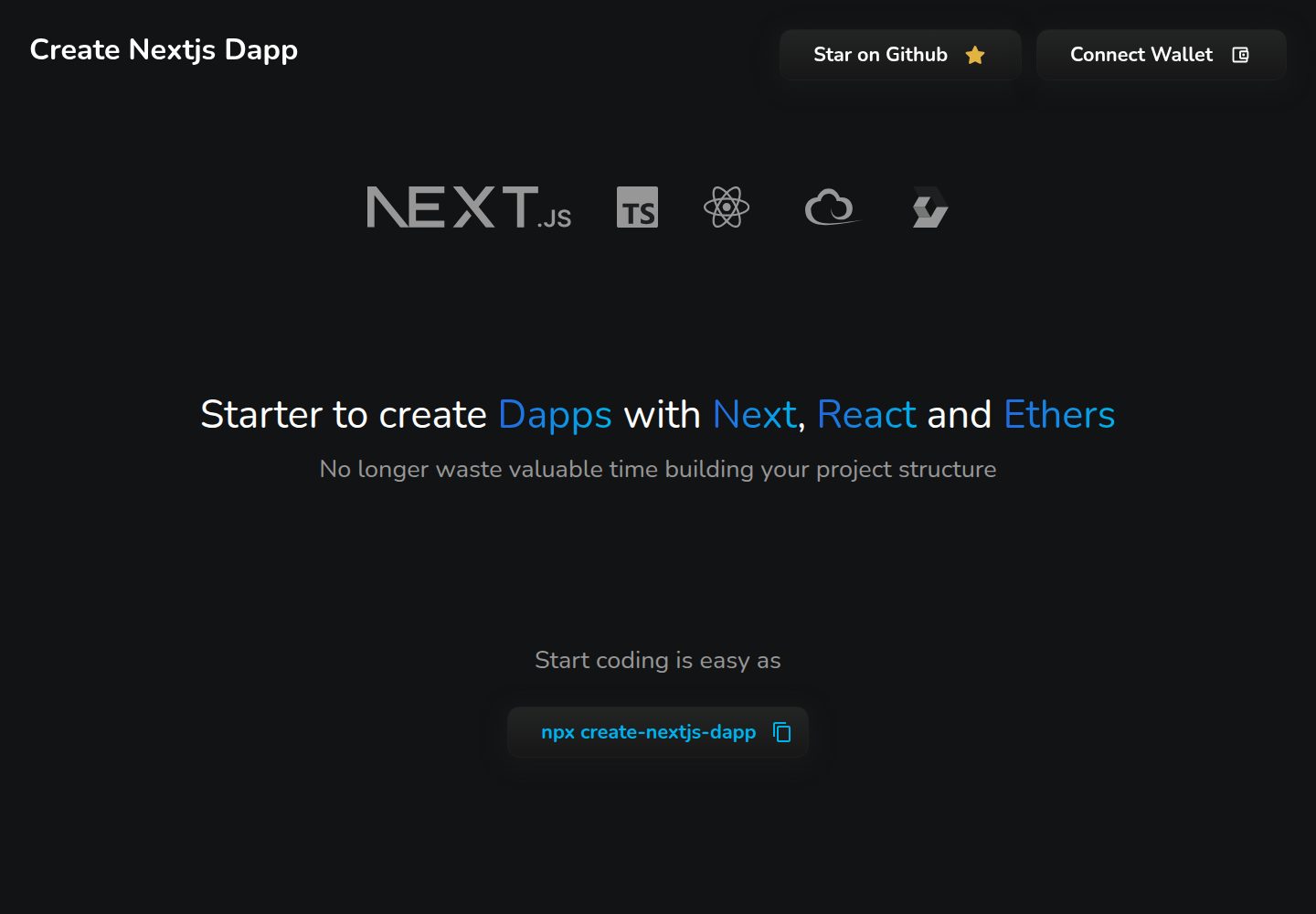
Generate a project by selecting a project name and template in the terminal via npx create-nextjs-dapp
Next.jsReactStarter
create-nextjs-dapp — Next.js Starter Template
By swiiny
create-nextjs-dapp is a Dapp starter built on Next.js, React, and ethers. It generates a project by selecting a project name and template in the terminal via npx create-nextjs-dapp.
Explore the design
Compare the page layouts and mobile experience. Open any screenshot for a closer look.
Desktop homepage1 / 2
Desktop captureTop of page
Actual screenshot captured by the server browser.
All pages & views 2
Screenshots show visual appearance; interactive behavior may differ.
Recorded 2026-10-02View source
What stands out
A quick read of the recorded project description.
Provides five templates: Base, MUI, Styled Components, Stylex, and Tailwind
Tech stack is Next.js, React, ethers, and TypeScript
Uses Playwright for end-to-end tests, covering desktop and mobile templates
Supports simulating GitHub Actions workflows locally via Act
Under the MIT license, permitting free use, modification, commercial use, and distribution of that version's code
Template Details
create-nextjs-dapp is a starter for building decentralized applications (Dapps), with a tech stack of Next.js, React, and ethers. It generates a project by selecting a project name and template in the terminal via the command line `npx create-nextjs-dapp`. The repository README lists five selectable templates: Base (no UI framework configured, default styles based on .scss with usage examples), MUI (based on the MUI framework, configured with MUI System and MUI Base, and notes that @mui/material can be installed), Styled Components (configured with Styled Components, providing base functions for responsive padding, margin, and frame; related interfaces are in ./interfaces/layout.ts), Stylex (uses Stylex for styling with atomic CSS), and Tailwind (based on Tailwind CSS, with a basic tailwind.config.js configuration file). The project uses TypeScript, and the working configuration documented in the README is node 16.16.0 and npm 8.11.0. For testing, it uses Playwright for end-to-end tests, with two configured projects: chromium_desktop and safari_mobile (iPhone 13 simulation), and it can simulate GitHub Actions workflows locally via Act; npm scripts distinguish local desktop/mobile template tests from CI simulation tests, with reports output to playwright-report-desktop and playwright-report-mobile. The repository is under the MIT license. This listing covers the free version in the public repository; the free scope is limited to that version's code and does not cover external services or third-party assets.
Next.jsReactStarter
Is it right for your project?
Use Cases
- Quickly generate a Next.js Dapp project skeleton that includes ethers in the terminal
- Choose a template by styling approach: Base, MUI, Styled Components, Stylex, or Tailwind
- Write or run Playwright end-to-end tests for templates, covering desktop and mobile
- Simulate the template test workflow of GitHub Actions locally with Act
Suitable For
- Developers who need to quickly set up a Next.js + React + ethers Dapp starter project
- Teams that want to choose a template among styling approaches such as MUI, Styled Components, Stylex, and Tailwind
- Projects that need to configure desktop and mobile end-to-end tests for Dapp templates
Getting started & customization
Use these recorded setup notes alongside the repository instructions for your chosen version.
- 1
Start with the npx create-nextjs-dapp command and follow the terminal prompts to select a project name and template
- 2
The working configuration documented in the README is node 16.16.0 and npm 8.11.0
- 3
The MUI template requires separately running npm install @mui/material
- 4
Local test commands: npm run test:desktop:templates and npm run test:mobile:templates
- 5
CI simulation test commands: npm run test:gh:test:desktop:templates and npm run test:gh:test:mobile:templates
License & source material
Usage conditions & limitations
Free to use · keep license noticeThis listing covers the free version under the MIT license in the public repository; the free scope is that version's code and does not mean external services or third-party assets are free.
Must comply with when using
- Permits free use, modification, commercial use, and distribution of that version's code.
- When distributing copies or substantial portions of the code, retain the original author's copyright notice and the full MIT license notice.
- The code is provided as is; warranties and limitations of liability are governed by the original license and applicable law.
Additional costs & items to verify
- Demo images, fonts, icons, and other third-party assets must be checked against their respective licenses and cannot be judged solely by the code's MIT license.
- External services such as domains, hosting, databases, payments, or AI may incur separate charges.
View Original Text Basis
https://github.com/swiiny/create-nextjs-dapp/blob/main/LICENSEhttps://github.com/swiiny/create-nextjs-dapp/blob/main/README.mdPermission is hereby granted, free of charge
Original License Text
Compiled by DeepSeek based on repository license and README ·2026-10-02. Results only cover the materials read; dependencies, images, fonts, and subsequent term changes are subject to their respective original texts.
Project checks & description sources
Template Information
- Source platforms
- GitHub
- Documentation and maintenance reference score
- More documented · 86 / 100
- Technologies
- Next.js · React
- Website type
- Starter
How this score is calculated
Our heuristic uses license records (up to 30), a demo link (12), a preview (10), stars (15), recorded maintenance (15), description completeness (8), feature records (5) and classification data (5). It is not a code, security or performance test, or a Google score. A link does not establish tested functionality.
What to verify for this project
- Repository update recorded
- 2025-02-03
- Screenshot last checked
- 2026-10-02
A demo link is listed. Check it with your own content and viewport sizes; its presence does not confirm that forms, authentication or payments work.
The catalog identifies Next.js as the primary stack. Check the actual dependency manifest and lockfile for versions and hosting requirements. These notes use recorded metadata, not a code audit or a deployment test.
Use a selection guide →How this description was prepared
AI-assisted description based on catalog records and repository material. Repository authors are not automatically the reviewers of this description.
Automatically checked against source and license rules; no manual editorial review.
Inspect the recorded source material
SHA-256: 2263f44f6ff002a742836f93b17360c7704e767b7c5780ff0f1b77c1ca16e47e
2026-10-02T20:46:56.198Z
Source file / repository# Create Nextjs Dapp [](https://www.npmjs.com/package/create-nextjs-dapp) [](https://www.npmjs.com/package/create-nextjs-dapp) [](https://www.npmjs.com/package/create-nextjs-dapp)    ## Table of Contents - [Introduction](#introduction) - [Quick start](#quick-start) - [Technologies](#technologies) - [Templates](#templates) - [Tests](#tests) ## Introduction This is a starter for building Dapps with Nextjs, React and ethers. By running `npx create-nextjs-dapp` you will be able to choose a **_project name_** and the **_template_** you want to use directly **_from your terminal_**. Here is the list of the available templates: - [Base](#base) (No UI kit) - [MUI](#mui) - [Styled Components](#styled-components) - [Stylex](#stylex) - [Tailwind](#tailwind) ## Quick start You can quickly start a new project with this starter by using the following command: ``` npx create-nextjs-dapp ``` ## Technologies The project has been built using the following technologies:     Working configuration: - node 16.16.0 - npm 8.11.0 ## Templates - [base](#base) - [MUI](#mui) - [Styled Components](#styled-components) - [Stylex](#stylex) - [Tailwind](#tailwind) ### Base The base template has no UI framework configured. The default style is based on `.scss` with examples of how to use it. ### MUI The MUI template is based on the [MUI](https://mui.com/) framework. It is configured with the [MUI System](https://mui.com/system/getting-started/overview/) and the [MUI Base](https://mui.com/base/getting-started/overview/). All is configured to work with the [Material UI](https://mui.com/material-ui/getting-started/overview/). You can run the following command to install it: ``` npm install @mui/material ``` ### Styled Components Styled components is a popular CSS-in-JS library developed for React. It is configured with the [Styled Components](https://styled-components.com/) library. There are already base functions to add responsive padding, margin, and frames to your components. > See IPadding, IMargin, and IFrames available at `./interfaces/layout.ts` --- ### Stylex The Stylex template leverages [Stylex](https://stylexjs.com/) for styling, blending the benefits of inline styles and CSS without their limitations. It provides a simple JavaScript syntax and compiler for defining component-scoped styles, avoiding specificity issues while supporting media queries. Stylex utilizes atomic CSS to minimize output size, ensuring scalability and maintainability of styles in large projects. Please refer to the [Stylex documentation](https://stylexjs.com/docs/learn/) for more information on how to use the library. ### Tailwind The Tailwind template is based on the [Tailwind CSS](https://tailwindcss.com/) framework. It is configured with the [Tailwind CSS](https://tailwindcss.com/docs/installation) library. This template utilizes the utility-first approach to styling, providing a highly customizable and efficient way to build your Dapp. This template includes a base configuration file (`tailwind.config.js`) to get you started with customizing your styles. You can refer to the [Tailwind CSS documentation](https://tailwindcss.com/docs/configuration) for more information on how to extend and modify the default configuration. ## Tests The testing setup uses **Playwright** for end-to-end tests and supports both local and CI testing workflows. Below are the details of the test implementation and available commands. ### Test Implementation The project tests are designed to: 1. Validate that all templates render correctly on both desktop and mobile environments. 2. Compare snapshots to detect unintended UI changes. 3. Verify template-specific logic to ensure functionality. The tests are configured in the `playwright.config.ts` file with the following projects: - **`chromium_desktop`**: Tests templates on a desktop environment using Chromium. - **`safari_mobile`**: Tests templates on a mobile environment using Safari emulation (iPhone 13). Additionally, the project uses **Act** to simulate GitHub Actions workflows for testing in CI-like environments locally. --- ### Test Commands Here are the available test commands in `package.json`: #### **Local Testing** 1. **Run Desktop Template Tests** ```bash npm run test:desktop:templates ``` - Runs all template tests for the desktop environment using Playwright. - Saves the HTML report in `playwright-report-desktop`. 2. **Run Mobile Template Tests** ```bash npm run test:mobile:templates ``` - Runs all template tests for the mobile environment using Playwright. - Saves the HTML report in `playwright-report-mobile`. #### **GitHub Actions Simulation** 1. **Run Desktop Template Tests in CI-like Environment** ```bash npm run test:gh:test:desktop:templates ``` - Uses Act to simulate the `test-desktop-templates` job from the GitHub Actions workflow. - Runs the tests using the `ubuntu-24.04` environment with `linux/amd64` architecture. 2. **Run Mobile Template Tests in CI-like Environment** ```bash npm run test:gh:test:mobile:templates ``` - Uses Act to simulate the `test-mobile-templates` job from the GitHub Actions workflow. - Runs the tests using the `ubuntu-24.04` environment with `linux/amd64` architecture. --- ### Reports - Each test generates an HTML report for detailed insights into test results. The report paths are defined by the `PLAYWRIGHT_HTML_REPORT` environment variable: - **Desktop Report**: `playwright-report-desktop` - **Mobile Report**: `playwright-report-mobile` - In CI-like environments, logs and outputs are captured by Act and displayed in the terminal for debugging. --- ### Example Usage #### Running All Desktop Tests Locally ```bash npm run test:desktop:templates ``` #### Simulating GitHub Actions for Mobile Templates ```bash npm run test:gh:test:mobile:templates ``` --- This setup ensures consistency and reliability across different environments, enabling you to test templates effectively during local development and CI workflows.
Explore similar templates
Compare previews and descriptions within the same stack and category.

Next.js SaaS Starter
The official Next.js SaaS starter template, integrating email/password authentication, Stripe Checkout subscriptions, a dashboard with user/team CRUD, basic Owner/Member RBAC, and activity logging.
Next.js · SaaS

Next.js Commerce
Vercel's officially maintained Next.js App Router ecommerce starter with deep Shopify integration, offering a complete product catalog, cart, and checkout flow. Core logic is modular for swapping backends, and community provider versions exist for BigCommerce, Medusa, and Saleor.
Next.js · E-commerce

Next-js-Boilerplate
A developer-first Next.js 16 starter with Tailwind CSS 4 and TypeScript, supporting both App Router and Page Router.
Next.js · Starter

tailwind-nextjs-starter-blog
A Next.js and Tailwind CSS blog starter template using Contentlayer for Markdown/MDX, with built-in SEO, code highlighting, and tags. It targets personal technical blogs and migration from Jekyll/Hugo to React, and supports one-click Vercel deployment.
Next.js · Blog

next-forge
next-forge is a Turborepo-based Next.js template maintained by Vercel, positioned as a starting point for SaaS products.
Next.js · Starter

SaaS-Boilerplate
SaaS-Boilerplate is an open-source SaaS starter template built with Next.js App Router, React 19, TypeScript, Tailwind CSS, and Shadcn UI.
Next.js · SaaS