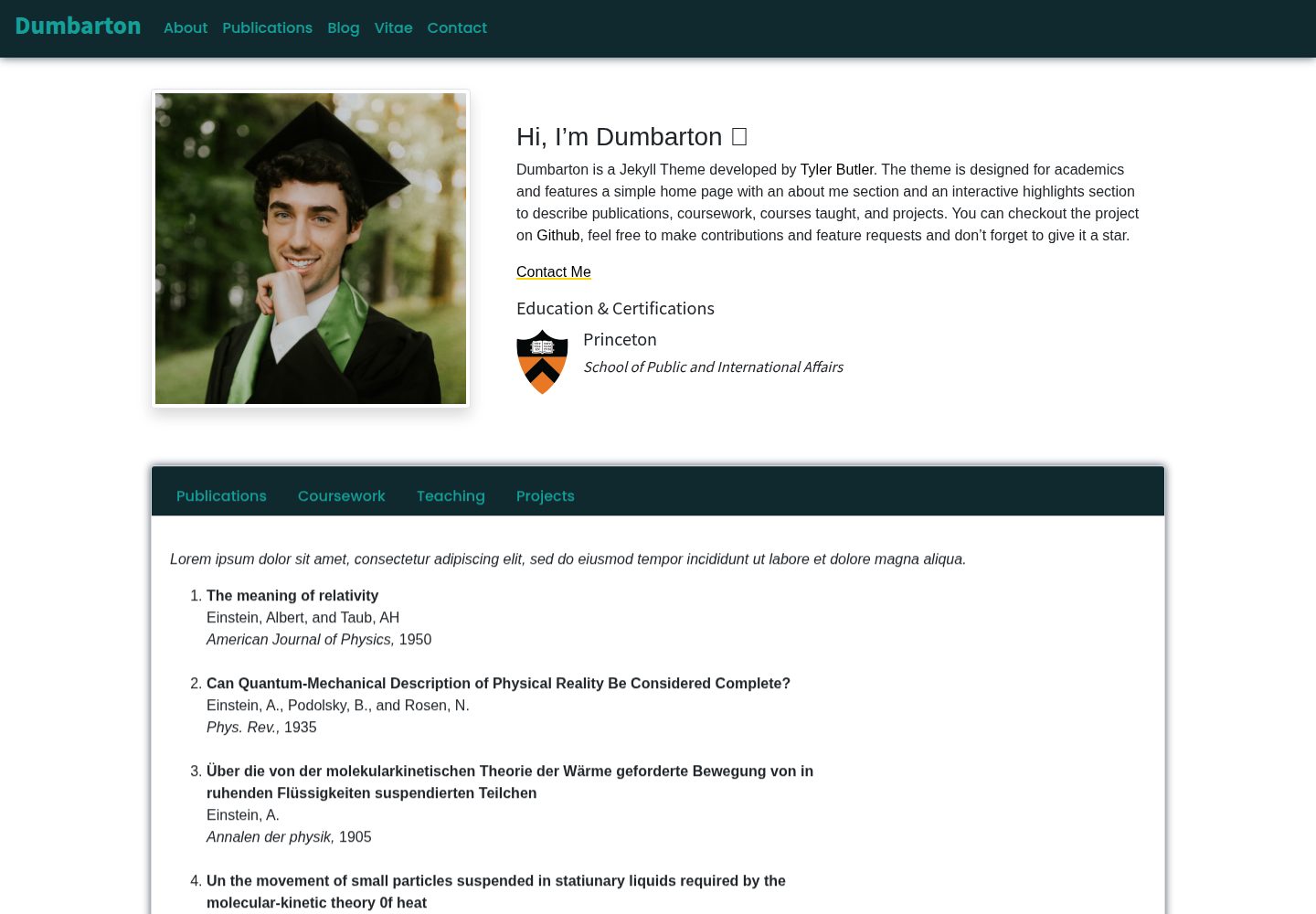
面向学术人员的首页结构:about me、博客与可交互的 highlights 展示区
JekyllHTML博客
Jekyll-Theme-Dumbarton — Jekyll 博客模板
作者 tcbutler320
面向学术人员的 Jekyll 主题,包含个人简介、博客与可交互的成果展示区,用 Bootstrap 与 Animate CSS 构建界面。
看看你的网站会是什么样
浏览真实页面截图,比较内容排版与手机效果。点击下方缩略图切换,放大查看整页细节。
全部页面与视图 3
截图用于了解视觉与布局,交互效果请以实际项目为准。
采集于 2026-09-30查看来源
值得关注的模板亮点
从已有项目资料中,快速了解它的特点。
highlights 区域可用于描述论文发表、课程作业、所授课程与项目
通过 _config.yml 的 ui-theme 切换配色方案,并可在 _data/themes.yml 中新增自定义主题
使用 jekyll-scholar 插件渲染论文发表页与首页发表展示区
界面基于 Bootstrap 与 Animate CSS,首页动画可通过 animate 开关控制
README 注明与 GitHub Pages 不兼容,因为 GitHub Pages 不支持 jekyll-scholar
模板详细介绍
Dumbarton 是由 Tyler Butler 开发的 Jekyll 主题,定位为学术人员使用。首页结构简单:一段 about me 自我介绍,一个博客入口,以及一个可交互的 highlights 区域,用于描述论文发表、课程作业、所授课程和项目。界面基于 Bootstrap 与 Animate CSS 构建。
主题通过 _config.yml 集中配置。站点设置包含首页头像 profile_image 与社交链接(如 twitter),用于生成导航栏和页脚链接;博客设置包含 tags(以空格分隔,用于生成博客页标签组件)与 comments(基于 gitalk,README 标注为当前不可用)。主题设置提供 ui-theme 配色方案切换,可在 _data/themes.yml 中新增条目自定义导航颜色、字体、字号、按钮与高亮区配色等;nav-dIcon 控制移动端导航下拉图标,animate 控制首页加载动画开关,home_option 切换首页 about me 下方区块,README 注明目前仅 education 选项可用。此外还有 help_tips(仅用于演示的首页弹窗)、font_awesome_id(导航栏图标所需的 Font Awesome 账号 ID)、一组可选的搜索引擎与社交平台验证 meta 标签,以及位于 /assets/img/icons 的 favicon。
论文发表页与首页发表展示区依赖 jekyll-scholar 插件,配置项包括样式(如 apa)、语言、文献目录与 bib 文件名等。README 明确说明:由于 GitHub Pages 不支持 jekyll-scholar,该主题目前与 GitHub Pages 不兼容。
安装方式为克隆仓库、用 Bundler 安装依赖、运行 jekyll serve 启动本地开发服务器;修改 _config.yml 后需停止并重启开发服务器才能看到变化。代码采用 MIT 许可,演示图片、字体、图标等第三方素材需按各自许可单独核对。
JekyllHTML博客
适合你的项目吗?
适用场景
- 搭建个人学术主页,集中展示简介、论文与教学信息
- 用 Jekyll 写博客并配合标签组件组织文章
- 在首页以交互方式列出论文发表、课程作业、所授课程与项目
- 通过自定义配色方案调整导航、字体与高亮区外观
适合人群
- 需要展示论文、课程与项目的学术人员
- 使用 Jekyll 并自行部署(非 GitHub Pages)的用户
- 希望通过配置文件而非改代码来调整外观与内容的用户
上手与定制指南
结合仓库当前版本的说明,按下面的资料检查内容、配置与运行要求。
- 1
克隆仓库后执行 bundle install 安装依赖,再用 bundle exec jekyll serve 启动本地开发服务器
- 2
修改 _config.yml 后必须停止并重启开发服务器才能生效
- 3
论文发表功能依赖 jekyll-scholar,需按官方文档配置 scholar 相关选项
- 4
GitHub Pages 不支持 jekyll-scholar,因此该主题目前无法部署在 GitHub Pages 上
- 5
导航栏 Font Awesome 图标需在 fontawesome.com 注册免费账号获取 font_awesome_id
授权与来源资料
使用条件与限制
免费使用 · 保留许可声明本次收录的是公开仓库中采用 MIT 许可的免费版本;免费范围为该版本代码,不代表外部服务或第三方素材免费。
使用时需要遵守
- 允许免费使用、修改、商用和分发该版本代码。
- 分发代码副本或实质性部分时,保留原作者版权声明和完整 MIT 许可声明。
- 代码按现状提供;担保与责任限制以原许可证及适用法律为准。
额外费用与待核对事项
- 该主题与 GitHub Pages 不兼容,因为 GitHub Pages 不支持 jekyll-scholar 插件,无法直接部署在 GitHub Pages 上。
- 导航栏 Font Awesome 图标需要先在 fontawesome.com 注册(免费)账号并获取 font_awesome_id 才能正常生成。
- 博客评论功能基于 gitalk,README 明确标注当前不可用,无法启用。
- 首页 about me 下方区块的 home_option 设置目前仅 education 选项可用,其他选项不可用。
- help_tips 仅用于演示目的,启用后会在首页弹出介绍主题信息的弹窗。
- 演示图片、字体、图标及其他第三方素材需按各自许可核对,不能仅凭代码的 MIT 许可判断。
- 域名、托管、数据库、支付或 AI 等外部服务可能另外收费。
查看原文依据
Permission is hereby granted, free of charge
许可证原文
this theme is not compatible with GitHub pages because GitHub does not support jekyll-scholar
README 原文
Register free to get your id at https://fontawesome.com/
README 原文
Enable comments on blog posts using gitalk. **Not Currently Working**
README 原文
**Note that only option `education` is currently working**
README 原文
https://github.com/tcbutler320/Jekyll-Theme-Dumbarton/blob/dev/LICENSE.txthttps://github.com/tcbutler320/Jekyll-Theme-Dumbarton/blob/dev/README.mdUsed for demo purposes only. When enabled, a popup occurs on the homepage detailing information about the theme
README 原文
DeepSeek 根据仓库许可证和 README 整理 ·2026-09-30。结果仅覆盖已读取资料,依赖、图片、字体及后续条款变更以各自原文为准。
项目核对记录与介绍依据
模板资料
- 来源平台
- GitHub
- 资料与维护参考分
- 资料较完整 · 77 / 100
- 技术栈
- Jekyll · HTML
- 网站类型
- 博客
这个分数如何计算
本站按许可资料(最高30分)、演示链接(12分)、预览图(10分)、Star数(15分)、记录的维护时间(15分)、描述完整度(8分)、功能记录(5分)和分类资料(5分)计算。它不是代码、安全或性能测试,也不是 Google 评分;有链接不代表已实测可用。
这个项目需要核对什么
- 记录的仓库更新时间
- 2024-07-15
- 截图检查日期
- 2026-09-30
已收录演示链接。请用你的内容与屏幕尺寸检查;有演示不代表表单、认证或支付已经可用。
目录记录的主要技术栈是 Jekyll。请通过依赖清单和锁文件核对实际版本与托管要求。这些说明基于收录资料,不代表代码审计或部署实测。
查看具体选型方法 →介绍的制作与核对状态
介绍由 AI 辅助整理目录与仓库资料。仓库作者不等于这篇介绍的审核者。
已完成服务器许可规则与 AI 来源核对;未经过人工编辑审核。
查看当时使用的来源资料
SHA-256: ddb1ebbb599e16895d79f6841b59c17be7019cd9dce7de354f68d5b14410207b
2026-09-30T11:28:51.517Z
来源文件 / 仓库<!-- PROJECT LOGO -->
<p align="center">
<h1 align="center">Dumbarton</h1>
<p align="center">
A simple Jekyll theme for academics
<br />
<a href="#table-of-contents"><strong>Explore the docs »</strong></a>
<br />
<br />
<a href="https://dumbarton.netlify.app/">View Demo</a>
·
<a href="https://github.com/tcbutler320/Jekyll-Theme-Dumbarton/issues">Report Bug</a>
·
<a href="https://github.com/tcbutler320/Jekyll-Theme-Dumbarton/issues">Request Feature</a>
</p>
</p>
<div align="center">
[![Contributors][contributors-shield]][contributors-url]
[![Forks][forks-shield]][forks-url]
[![Issues][issues-shield]][issues-url]
[![LinkedIn][linkedin-shield]][linkedin-url]
[](https://app.netlify.com/sites/admiring-bassi-e955ad/deploys)

</div>
[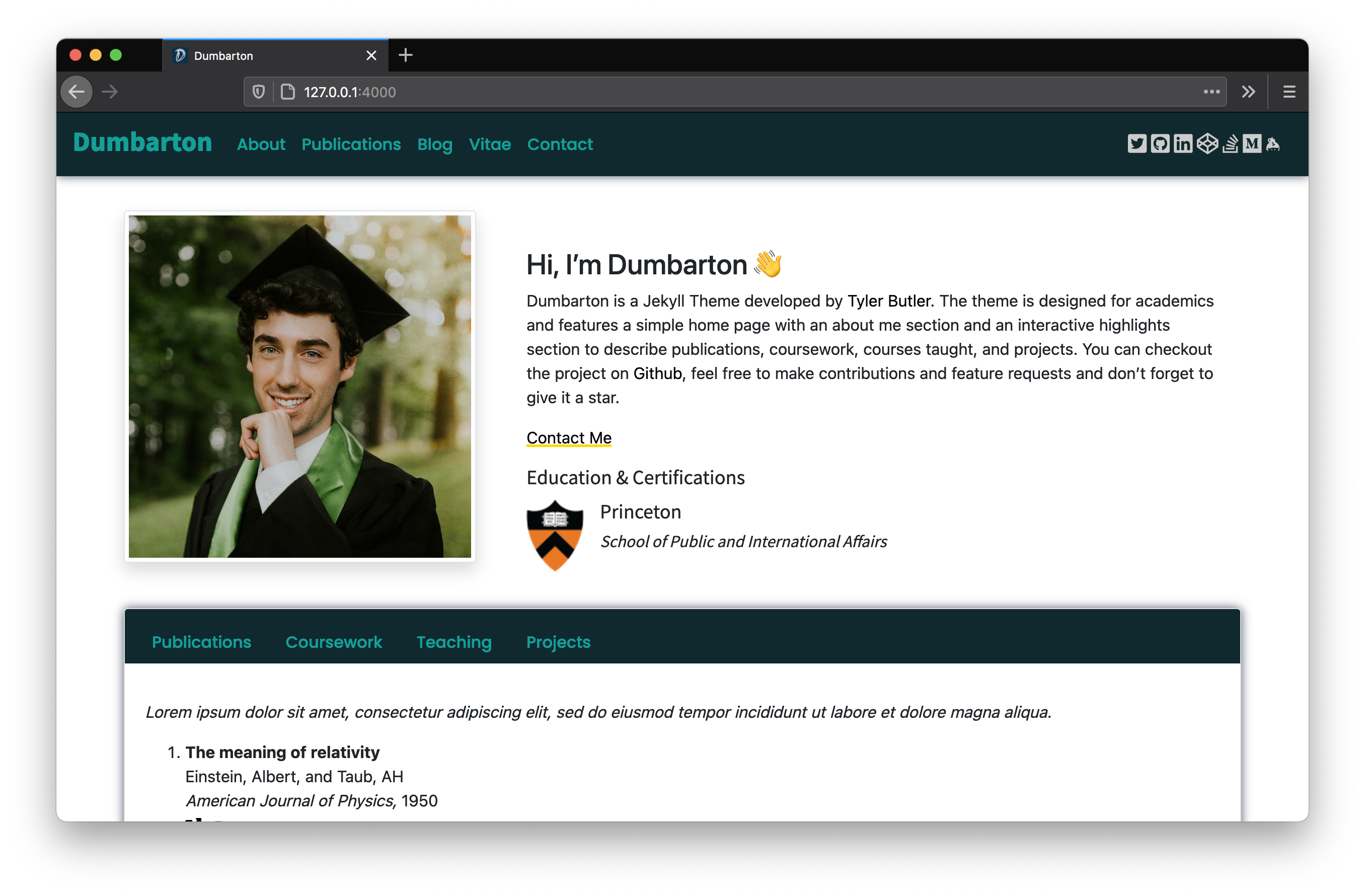](https://dumbarton.netlify.app/)
[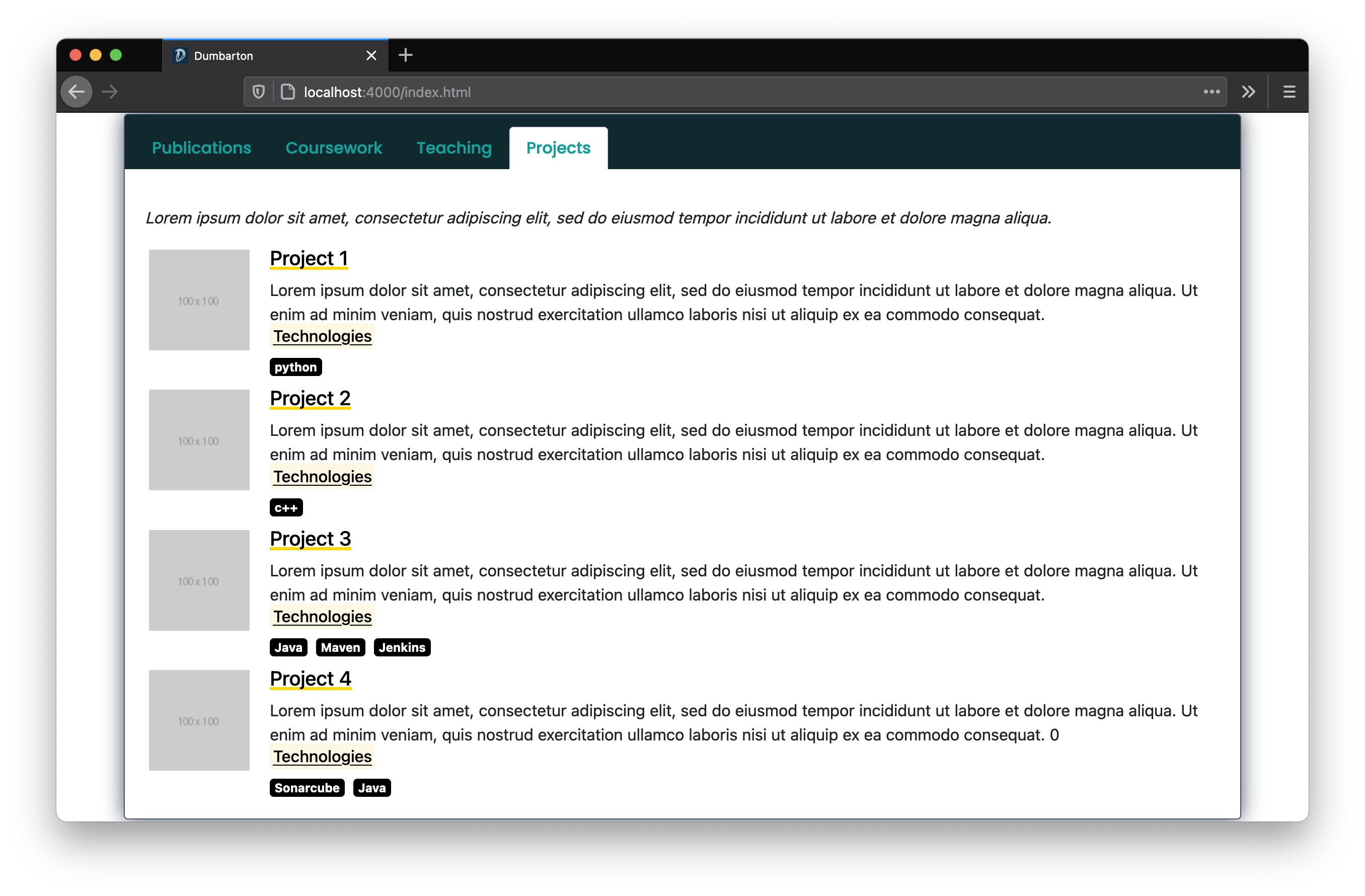](https://dumbarton.netlify.app/)
## Table of Contents
- [Table of Contents](#table-of-contents)
- [About](#about)
- [Installation](#installation)
- [Setting Options](#setting-options)
- [Base Settings](#base--settings)
- [Site Settings](#site-settings)
- [Blog Settings](#blog-settings)
- [Theme Settings](#theme-settings)
- [Help Settings](#help-settings)
- [Jekyll Scholar Settings](#jekyll-scholar-settings)
- [CDN Settings](#cdn-settings)
- [Meta Tag Settings](#meta-tag-settings)
- [Favicon](#favicon)
- [Thanks](#thanks)
- [Code](#code)
- [Images](#images)
## About
Dumbarton is a Jekyll Theme developed by Tyler Butler. The theme is designed for academics and features a simple home page with an about me section, a blog, and an interactive highlights section to describe publications, coursework, courses taught, and projects. UI design with Bootstrap and Animate CSS.
**A Note on Compatability**
_At this time, this theme is not compatible with GitHub pages because GitHub does not support jekyll-scholar._
## Installation
Follow the following instructions to install the Dumbarton theme:
1. Clone the repo.
```bash
git clone https://github.com/tcbutler320/Jekyll-Theme-Dumbarton.git
cd Jekyll-Theme-Dumbarton
```
2. Use Bundler to install dependancies
```bash
bundle install
```
3. Start the Jekyll development server
```bash
bundle exec jekyll serve
```
## Setting Options
There are many settings available to users to change how the theme looks. These settings can be changed in `_config.yml`. It's important to note that unlike previewing changes in other areas of the site, you must stop and restart the development server in order to see changes made in the config file.
### Base Settings
| Field | Description | Options |
|--- |--- |--- |
| `image` | Used in metatag as sites link preview | https://example.com or /assets/path/to/image.png |
### Site Settings
| Field | Description | Options |
|--- |--- |--- |
| `profile_image` | Used on home page as authors profile image | https://example.com or /assets/path/to/image.png |
| social links, ex `twitter` | Used to generate links in the nav and footer | e.g. `twitter: tbutler0x90` |
### Blog Settings
| Field | Description | Options |
|--- |--- |--- |
| `tags` | Used to generate tags widget on blogs page, seperated by spaces | e.g. `tags: post jekyll` |
| `comments` | Enable comments on blog posts using gitalk. **Not Currently Working** | `comments: false` |
### Theme Settings
**UI 2.0 Color Schemes 🌈**
The recent Dumbarton release supports Color Schemes! To pick a pre-configured color theme, change the `ui-theme` option in `_config.yml` . To create a new theme add a new entry in `_data/themes.yml`
```yml
abyss:
name: abyss
nav-color: "#10292e"
nav-text: "#149f98"
title-font: "Noto Sans JP"
link-font: "#272343"
link-color: "#272343"
link-font: "Poppins"
font: "Poppins"
font-color: "Black"
social-color: "#CCCCCC"
footer-social-color: "Black"
button-color: "black"
home-highlight-background: "#10292e"
home-highlight-header-text: "#149f98"
education-title-font: "Noto Sans JP"
education-title-size: "18px"
education-entry-font: "Noto Sans JP"
education-entry-size: "18px"
education-section-size: "15px"
certification-title-font: "Noto Sans JP"
certification-title-size: "18px"
certification-entry-font: "Noto Sans JP"
certification-entry-size: "18px"
certification-section-size: "15px"
highlights-tab-color: "White"
projects-color: "Black"
border-style: ""
post-tag-size: "20px"
post-title-size: "36px"
post-author-size: "15px"
post-font-weight: "700"
default-button-color: ""
```
| Field | Description | Options |
|--- |--- |--- |
| `nav-dIcon` | Used as the nav bar drop down icon on mobile or small screen view | Select any fontawesome icon, e.g. `"fas fa-caret-down"` |
| `animate` | When enabled, home page animations will be turned on and used upon first loading the page | e.g. `true`, `false` |
| `home_option` | Used to change the section below the 'about me' on the home page. **Note that only option `education` is currently working** | e.g. `education` |
### Help Settings
| Field | Description | Options |
|--- |--- |--- |
| `help_tips` | Used for demo purposes only. When enabled, a popup occurs on the homepage detailing information about the theme | e.g. `true`, `false` |
### Jekyll Scholar Settings
_Excerpt from [Jekyll-Scholar](https://github.com/inukshuk/jekyll-scholar)_
> Jekyll-Scholar is for all the academic bloggers out there. It is a set of extensions to Jekyll, the awesome, blog aware, static site generator; it formats your bibliographies and reading lists for the web and gives your blog posts citation super-powers.
The [Jekyll Scholar](https://github.com/inukshuk/jekyll-scholar) plugin is used on the publications page and the home page publications highlight section. Refer to the [official documentation](https://github.com/inukshuk/jekyll-scholar) for setting options.
```yml
scholar:
last_name: Dumbarton
style: apa
locale: en
source: /_bibliography/
bibliography: papers.bib
bibliography_template: bib
replace_strings: true
join_strings: true
details_dir: bibliography
details_layout: bibtex.html
details_link:
query: "@*"
```
### CDN Settings
| Field | Description | Options |
|--- |--- |--- |
| font_awesome_id | Used to generate fontawesome icons in the navbar. Register free to get your id at https://fontawesome.com/ | N/A |
### Meta Tag Settings
Several meta tag settings are optional. Refer to [htmlhead.dev](https://htmlhead.dev/) for a full list of options and explanations for the below configurations.
```yml
google-site-verification: #<meta name="google-site-verification" content="verification_token"><!-- Google Search Console -->
yandex-verification: #<meta name="yandex-verification" content="verification_token"><!-- Yandex Webmasters -->
msvalidate: # meta name="msvalidate.01" content="verification_token"><!-- Bing Webmaster Center -->
alexaVerifyID: # <meta name="alexaVerifyID" content="verification_token"><!-- Alexa Console -->
pinterestdomain_verify: #<meta name="p:domain_verify" content="code_from_pinterest"><!-- Pinterest Console-->
norton-safeweb: # <meta name="norton-safeweb-site-verification" content="norton_code"><!-- Norton Safe Web -->
detectphone: yes # yes or no. Disable automatic detection and formatting of possible phone numbers
x-dns-prefetch-control: on # on or off. Completely opt out of DNS prefetching by setting to "off"
fbappid: # Facebook OpenGraph
```
### Favicon
Site favicons are located at `/assets/img/icons`. You can use a [Favicon Generator](https://realfavicongenerator.net/) to create a new set of icons using any image you'd like. Simply create a package from the aboved linked generator and replace the icons folder.
## Thanks
I borrowed concepts and assets from various other open source projects. A special thanks for everyone who contributed to Jekyll-Theme-Dumbarton.
### Code
- [Corey](https://codepen.io/Corsurath/pen/abbxNpj)
- Used as a concept for the blog layout v 2.0
- [Masresha](https://codepen.io/masresha)
- [Decision Making App](https://codepen.io/masresha/pen/KyLrbK): Used as a concept for the blog layout v 1.0
-
### Images
Special thanks to the following individuals for their images
- [Cole Keister](https://unsplash.com/@coleito)
<!-- MARKDOWN LINKS AND IMAGES --->
[contributors-shield]: https://img.shields.io/github/contributors/tcbutler320/Jekyll-Theme-Dumbarton.svg?style=flat-square
[contributors-url]: https://github.com/tcbutler320/Jekyll-Theme-Dumbarton/graphs/contributors
[forks-shield]: https://img.shields.io/github/forks/tcbutler320/Jekyll-Theme-Dumbarton.svg?style=flat-square
[forks-url]: https://github.com/tcbutler320/Jekyll-Theme-Dumbarton/network/members
[stars-shield]: https://img.shields.io/github/stars/tcbutler320/Jekyll-Theme-Dumbartonsvg?style=flat-square
[stars-url]: https://github.com/tcbutler320/Jekyll-Theme-Dumbarton/stargazers
[issues-shield]: https://img.shields.io/github/issues/tcbutler320/Jekyll-Theme-Dumbarton.svg?style=flat-square
[issues-url]: https://github.com/tcbutler320/Jekyll-Theme-Dumbarton/issues
[license-shield]: https://img.shields.io/github/license/tcbutler320Jekyll-Theme-Dumbarton.svg?style=flat-square
[license-url]: https://github.com/tcbutler320/Jekyll-Theme-Dumbarton/blob/master/LICENSE.txt
[linkedin-shield]: https://img.shields.io/badge/-LinkedIn-black.svg?style=flat-square&logo=linkedin&colorB=555
[linkedin-url]: https://linkedin.com/in/tyler-b-a700a1aa
看看同类模板
对比同技术栈与用途的模板,找到更适合的视觉与内容结构。

al-folio
al-folio 是一个面向学者与研究人员的 Jekyll 作品集主题,设计简洁、响应式,适合搭建个人学术主页。
Jekyll · 作品集

minimal-mistakes
:triangular_ruler: Jekyll theme for building a personal site, blog, project documentation, or portfolio.
Jekyll · 作品集

Beautiful Jekyll
Beautiful Jekyll 是一个在 Jekyll 生态中经过长期打磨的博客主题,由 Dean Attali 维护,自 2015 年起积累了超过 5 万用户。
Jekyll · 博客

jekyll-TeXt-theme
💎 🐳 A super customizable Jekyll theme for personal site, team site, blog, project, documentation, etc.
Jekyll · 博客

startbootstrap-clean-blog-jekyll
A Jekyll version of the Clean Blog theme by Start Bootstrap
Jekyll · 博客

So Simple
So Simple 是 Michael Rose 开发的 Jekyll 主题,定位清晰:为文字和图片提供一个干净、可读性强的展示框架。
Jekyll · 博客