以 Nextra 作为文档框架,构建在 Next.js 之上
Next.jsReact文档启动器
nextra-tailwind-shadcn-starter — Next.js 文档模板
作者 thehimel
基于 Nextra、Tailwind CSS、shadcn/ui、Aceternity UI 与 Iconify 的文档站点起步模板,使用 MDX 编写内容,支持暗色模式与内置搜索。
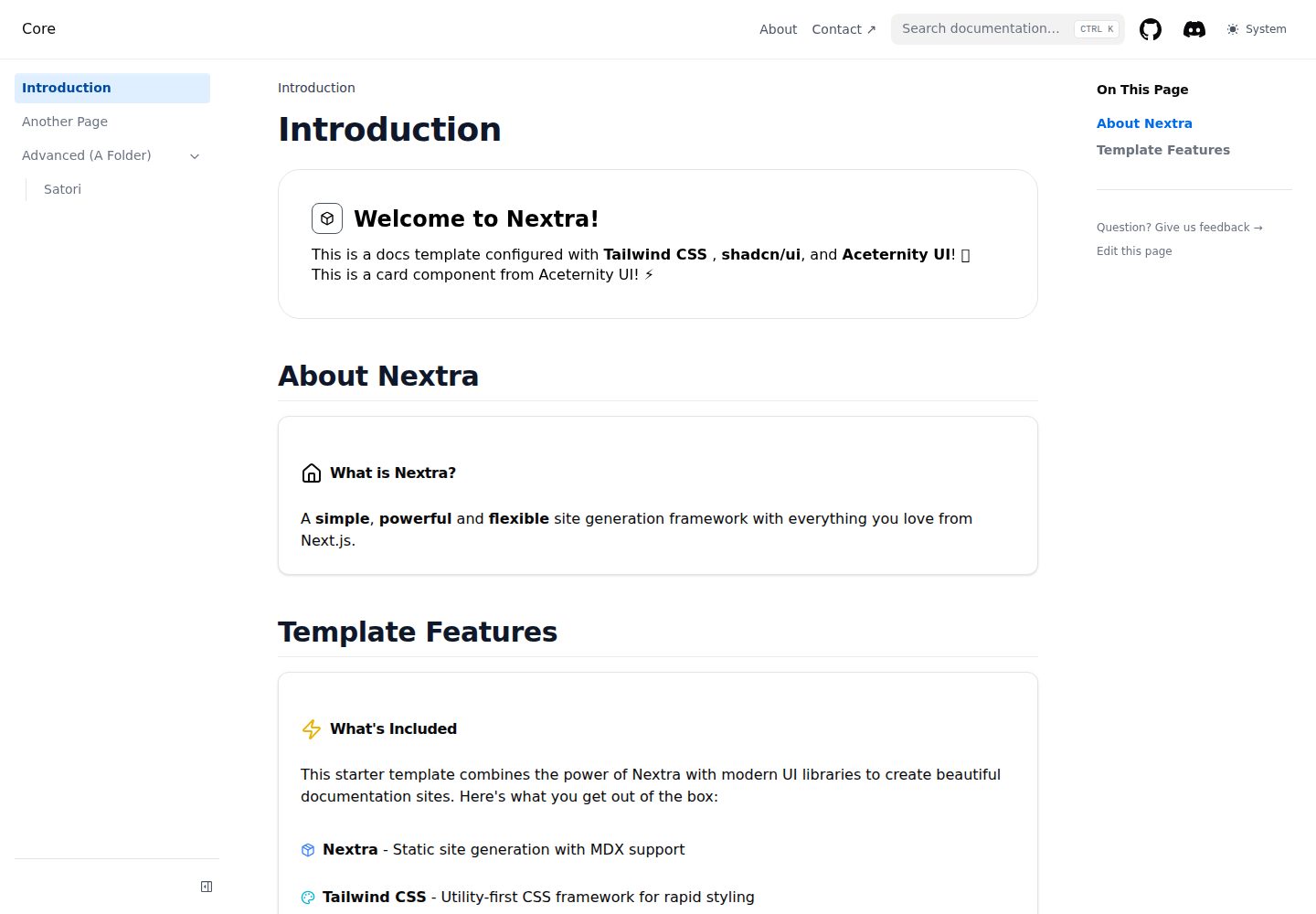
看看你的网站会是什么样
浏览真实页面截图,比较内容排版与手机效果。点击下方缩略图切换,放大查看整页细节。
全部页面与视图 3
截图用于了解视觉与布局,交互效果请以实际项目为准。
采集于 2026-10-14查看来源
值得关注的模板亮点
从已有项目资料中,快速了解它的特点。
使用 Tailwind CSS 进行样式编写,主题颜色通过 CSS 变量调整
集成 shadcn/ui 组件,并可通过命令行继续添加组件
集成 Aceternity UI 动画组件,需从官网复制到 components/ui/ 目录
提供 Iconify 与 Lucide React 两套图标方案
支持 MDX 内容、暗色模式与内置搜索
模板详细介绍
该模板是一个文档站点起步项目,README 说明其以 Nextra(构建在 Next.js 之上的静态站点生成器)为核心,搭配 Tailwind CSS 做样式、shadcn/ui 提供 React 组件、Aceternity UI 提供基于 Framer Motion 的动画组件,并通过 Iconify 与 Lucide React 提供图标。内容以 .mdx 文件写在 pages/ 目录中,可在 Markdown 中内联使用 React 组件。README 列出的特性包括暗色/亮色主题切换、响应式设计、内置搜索、MDX 支持与 TypeScript 支持。
定制方面,README 指出全局样式位于 styles/globals.css,Tailwind 配置位于 tailwind.config.js,主题颜色通过 globals.css 中的 CSS 变量调整;站点标题、描述、导航、页脚、Logo 与社交链接在 theme.config.tsx 中配置。新增 shadcn/ui 组件使用 npx shadcn-ui@latest add 命令,Aceternity UI 组件需从官网复制到 components/ui/ 目录。
部署方面,README 给出 Vercel(导入仓库后零配置部署)、Netlify(构建后部署 out/ 目录)与 GitHub Pages(配置 next.config.js 静态导出,运行构建与导出命令后部署 out/ 目录)三种方式。README 未提供关于性能基准、可访问性审计、测试覆盖或生产环境验证的具体说明,也未给出依赖清单中的具体版本号。
Next.jsReact文档启动器
适合你的项目吗?
适用场景
- 搭建以 MDX 编写内容的文档站点
- 在文档页面中内联使用 React 组件与 shadcn/ui 组件
- 为文档站点添加 Aceternity UI 的动画组件
- 通过 theme.config.tsx 配置站点标题、导航、页脚与社交链接
- 将静态站点部署到 Vercel、Netlify 或 GitHub Pages
适合人群
- 需要 Nextra 文档框架起步模板的开发者
- 希望在文档中混用 Markdown 与 React 组件的团队
- 需要暗色模式与内置搜索的文档项目
- 使用 Tailwind CSS 与 shadcn/ui 技术栈的前端开发者
上手与定制指南
结合仓库当前版本的说明,按下面的资料检查内容、配置与运行要求。
- 1
可通过 npx create-next-app@latest 使用该模板,或直接克隆仓库
- 2
安装依赖支持 npm、yarn 或 pnpm,随后运行 npm run dev 启动开发服务器,默认访问 http://localhost:3000
- 3
新增 shadcn/ui 组件使用 npx shadcn-ui@latest add [component-name]
- 4
Aceternity UI 组件需从 ui.aceternity.com 复制并粘贴到 components/ui/ 目录
- 5
部署到 Netlify 或 GitHub Pages 需构建并部署 out/ 目录,GitHub Pages 还需先配置 next.config.js 进行静态导出
授权与来源资料
使用条件与限制
免费使用 · 保留许可声明本次收录的是公开仓库中采用 MIT 许可的免费版本;免费范围为该版本代码,不代表外部服务或第三方素材免费。
使用时需要遵守
- 允许免费使用、修改、商用和分发该版本代码。
- 分发代码副本或实质性部分时,保留原作者版权声明和完整 MIT 许可声明。
- 代码按现状提供;担保与责任限制以原许可证及适用法律为准。
额外费用与待核对事项
- 演示图片、字体、图标及其他第三方素材需按各自许可核对,不能仅凭代码的 MIT 许可判断。
- 域名、托管、数据库、支付或 AI 等外部服务可能另外收费。
- Aceternity UI 组件需从官网手动复制到 components/ui/ 目录,模板本身不包含这些动画组件。
- Aceternity UI 组件需从 ui.aceternity.com 复制并粘贴到 components/ui/ 目录,属于外部来源。
- 部署到 GitHub Pages 前需先配置 next.config.js 以启用静态导出。
- GitHub Pages 部署需运行 npm run build && npm run export 生成 out/ 目录。
查看原文依据
Permission is hereby granted, free of charge
许可证原文
Aceternity UI provides beautiful animated components built with Framer Motion and Tailwind CSS. Copy components directly
README 原文
from [ui.aceternity.com](https://ui.aceternity.com/components) and paste them into your `components/ui/` directory.
README 原文
1. Configure `next.config.js` for static export
README 原文
https://github.com/thehimel/nextra-tailwind-shadcn-starter/blob/main/LICENSEhttps://github.com/thehimel/nextra-tailwind-shadcn-starter/blob/main/README.md2. Run `npm run build && npm run export`
README 原文
DeepSeek 根据仓库许可证和 README 整理 ·2026-10-14。结果仅覆盖已读取资料,依赖、图片、字体及后续条款变更以各自原文为准。
项目核对记录与介绍依据
模板资料
- 来源平台
- GitHub
- 资料与维护参考分
- 资料较完整 · 82 / 100
- 技术栈
- Next.js · React
- 网站类型
- 文档 · 启动器
这个分数如何计算
本站按许可资料(最高30分)、演示链接(12分)、预览图(10分)、Star数(15分)、记录的维护时间(15分)、描述完整度(8分)、功能记录(5分)和分类资料(5分)计算。它不是代码、安全或性能测试,也不是 Google 评分;有链接不代表已实测可用。
这个项目需要核对什么
- 记录的仓库更新时间
- 2025-08-16
- 截图检查日期
- 2026-10-14
已收录演示链接。请用你的内容与屏幕尺寸检查;有演示不代表表单、认证或支付已经可用。
目录记录的主要技术栈是 Next.js。请通过依赖清单和锁文件核对实际版本与托管要求。这些说明基于收录资料,不代表代码审计或部署实测。
查看具体选型方法 →介绍的制作与核对状态
介绍由 AI 辅助整理目录与仓库资料。仓库作者不等于这篇介绍的审核者。
审核声明: codex-user-requested-batch-review-20261015 · 2026-10-15
查看当时使用的来源资料
SHA-256: 7024bab022f79819e4ee5f85a3d9b91eca47d0516e0dcd322d8f8b30d8edfa43
2026-10-14T10:19:25.556Z
来源文件 / 仓库# Nextra Tailwind shadcn/ui Starter 🚀
A modern documentation starter built with [Nextra](https://nextra.site/), [Tailwind CSS](https://tailwindcss.com/), [shadcn/ui](https://ui.shadcn.com/),
**[Aceternity UI](https://ui.aceternity.com/)**, and **[Iconify](https://iconify.design/)**. Perfect for creating
beautiful, responsive documentation sites with excellent developer experience and stunning animations.
## ✨ Features
- **📚 Nextra** - Static site generator built on Next.js for documentation
- **🎨 Tailwind CSS** - Utility-first CSS framework for rapid styling
- **🧩 shadcn/ui** - Beautiful, accessible React components
- **✨ Aceternity UI** - Stunning animated components with Framer Motion
- **🎯 Iconify** - Access to 200,000+ icons from 150+ icon sets
- **🎨 Lucide React** - Beautiful, consistent icon set with React components
- **🌙 Dark Mode** - Built-in dark/light theme switching
- **📱 Responsive** - Mobile-first design that works on all devices
- **⚡ Fast** - Optimized for performance with Next.js
- **🔍 Search** - Built-in search functionality
- **📖 MDX Support** - Write content in Markdown with React components
- **🎯 TypeScript** - Full TypeScript support out of the box
## 🚀 Quick Start
1. **Use this template**
```bash
npx create-next-app@latest my-docs --example https://github.com/thehimel/nextra-tailwind-shadcn-starter
```
2. **Or clone the repository**
```bash
git clone https://github.com/thehimel/nextra-tailwind-shadcn-starter.git
cd nextra-tailwind-shadcn-starter
```
3. **Install dependencies**
```bash
npm install
# or
yarn install
# or
pnpm install
```
4. **Start the development server**
```bash
npm run dev
# or
yarn dev
# or
pnpm dev
```
5. **Open your browser** and navigate to `http://localhost:3000`
## 🎨 Customization
### Adding New Components
#### shadcn/ui Components
This starter includes shadcn/ui components. To add more components:
```bash
npx shadcn-ui@latest add [component-name]
```
#### Aceternity UI Components
Aceternity UI provides beautiful animated components built with Framer Motion and Tailwind CSS. Copy components directly
from [ui.aceternity.com](https://ui.aceternity.com/components) and paste them into your `components/ui/` directory.
Popular Aceternity UI components include:
- **Moving Cards** - Infinite scrolling card animations
- **Lamp Effect** - Stunning lamp lighting effects for headers
- **Meteors** - Animated background beam effects
- **Moving Border** - Animated borders for buttons and containers
- **Spotlight** - Dynamic spotlight effects
- **Timeline** - Animated timeline components with scroll effects
#### Lucide React Icons
Lucide React provides a beautiful, consistent set of SVG icons designed specifically for React. These icons are used
throughout shadcn/ui components and offer excellent performance:
```tsx
import { Home, User, Settings, Heart } from 'lucide-react';
// Basic usage
<Home className="w-6 h-6" />
<User size={24} />
<Settings color="blue" />
// With styling
<Heart className="w-4 h-4 text-red-500 fill-current" />
```
**Benefits of Lucide React:**
- Designed specifically for React with TypeScript support
- Consistent design language across all icons
- Tree-shakeable - only bundle icons you use
- Highly customizable with className, size, and color props
- Used by shadcn/ui components for consistency
#### Iconify Icons
Iconify provides access to over 200,000 icons from 150+ icon sets with one unified syntax. Use icons in your components:
```tsx
import { Icon } from '@iconify/react';
// Using icon names (loads on demand)
<Icon icon="mdi:home" />
<Icon icon="heroicons:academic-cap" />
<Icon icon="logos:react" />
// Or import specific icons for better performance
import homeIcon from '@iconify-icons/mdi/home';
<Icon icon={homeIcon} />
```
**Benefits of Iconify:**
- Loads icons on demand - no need to bundle icons
- Renders pixel-perfect SVG instead of icon fonts
- One syntax for 200,000+ icons from popular sets like Material Design, Heroicons, Font Awesome, and more
### Styling
- **Global styles**: Edit `styles/globals.css`
- **Tailwind config**: Modify `tailwind.config.js`
- **Theme colors**: Update the CSS variables in `styles/globals.css`
### Theme Configuration
Edit `theme.config.tsx` to customize:
- Site title and description
- Navigation
- Footer
- Logo
- Social links
## 📝 Writing Content
Create `.mdx` files in the `pages/` directory. You can use:
- **Markdown syntax** for content
- **React components** inline
- **shadcn/ui components** for enhanced UI
- **Aceternity UI components** for stunning animations
- **Iconify icons** for beautiful iconography
Example:
```markdown
import { Alert, AlertDescription } from '@/components/ui/alert'
import { Icon } from '@iconify/react'
import { Home, Heart, Info } from 'lucide-react'
import { Spotlight } from '@/components/ui/spotlight'
# My Page Title
This is regular markdown content with different icon options:
- Iconify icon: <Icon icon="mdi:heart" className="inline" />
- Lucide icon: <Heart className="inline w-4 h-4 text-red-500" />
<Alert>
<Info className="w-4 h-4" />
<AlertDescription>
This alert uses a Lucide React icon and shadcn/ui components!
</AlertDescription>
</Alert>
<Spotlight className="top-40 left-0 md:left-60 md:-top-20">
<div className="p-8">
<h2>Stunning Spotlight Effect</h2>
<p>This content is highlighted with Aceternity UI's Spotlight component!</p>
<Home className="w-8 h-8 mt-4" />
</div>
</Spotlight>
```
## 🎭 Component Libraries Usage
### shadcn/ui
A set of beautifully-designed, accessible components perfect for building consistent UI elements.
```bash
# Add specific components
npx shadcn-ui@latest add button
npx shadcn-ui@latest add card
npx shadcn-ui@latest add dialog
```
### Lucide React
Beautiful, consistent SVG icons designed specifically for React applications:
```tsx
import { Home, User, Settings, Mail, Calendar } from 'lucide-react';
// Standard usage
<Home className="w-6 h-6" />
<User size={24} color="currentColor" />
// In components
<Button>
<Mail className="w-4 h-4 mr-2" />
Send Email
</Button>
// Custom styling
<Calendar className="w-5 h-5 text-blue-600 hover:text-blue-800" />
```
### Aceternity UI
Beautiful Tailwind CSS and Framer Motion components built with Next.js and TypeScript. Copy-paste animated components for modern interfaces:
- **Background Effects**: Meteors, Aurora, Grid patterns
- **Interactive Elements**: Moving borders, Direction-aware hover
- **Layout Components**: Bento grids, Sticky scroll reveal
- **Navigation**: Floating navbar, Sidebar
- **Typography**: Text reveal, Typewriter effect
### Iconify
Access to all popular icon sets with unified syntax:
```tsx
// Material Design Icons
<Icon icon="mdi:account" />
// Heroicons
<Icon icon="heroicons:home" />
// Brand icons
<Icon icon="logos:github-icon" />
// Custom styling
<Icon icon="mdi:heart" style={{ color: 'red', fontSize: '24px' }} />
```
## 🚀 Deployment
### Vercel (Recommended)
1. Push your code to GitHub
2. Import your repository on [Vercel](https://vercel.com)
3. Deploy with zero configuration
### Netlify
1. Build the project: `npm run build`
2. Deploy the `out/` folder to Netlify
### GitHub Pages
1. Configure `next.config.js` for static export
2. Run `npm run build && npm run export`
3. Deploy the `out/` folder
## 🛠️ Built With
- [Nextra](https://nextra.site/) - Documentation framework
- [Next.js](https://nextjs.org/) - React framework
- [Tailwind CSS](https://tailwindcss.com/) - CSS framework
- [shadcn/ui](https://ui.shadcn.com/) - UI components
- [Aceternity UI](https://ui.aceternity.com/) - Animated components
- [Iconify](https://iconify.design/) - Icon framework
- [Framer Motion](https://www.framer.com/motion/) - Animation library
- [Lucide React](https://lucide.dev/) - Additional icons
## 📚 Resources
- [Nextra Documentation](https://nextra.site/docs)
- [Tailwind CSS Documentation](https://tailwindcss.com/docs)
- [shadcn/ui Documentation](https://ui.shadcn.com/docs)
- [Aceternity UI Components](https://ui.aceternity.com/components)
- [Iconify Icon Sets](https://iconify.design/icon-sets/)
- [Iconify for React Documentation](https://iconify.design/docs/icon-components/react/)
- [Next.js Documentation](https://nextjs.org/docs)
## 🤝 Contributing
Contributions are welcome! Please feel free to submit a Pull Request.
1. Fork the repository
2. Create your feature branch (`git checkout -b feature/amazing-feature`)
3. Commit your changes (`git commit -m 'Add some amazing feature'`)
4. Push to the branch (`git push origin feature/amazing-feature`)
5. Open a Pull Request
## 📄 License
This project is licensed under the MIT License - see the [LICENSE](LICENSE) file for details.
## 🙏 Acknowledgments
- [Nextra](https://nextra.site/) team for the amazing documentation framework
- [shadcn](https://twitter.com/shadcn) for the beautiful UI components
- [Tailwind CSS](https://tailwindcss.com/) team for the utility-first CSS framework
- [Aceternity UI](https://ui.aceternity.com/) for the stunning animated components
- [Iconify](https://iconify.design/) for the comprehensive icon solution
---
**⭐ If you found this starter helpful, please give it a star!**
Made with ❤️ by [thehimel](https://github.com/thehimel)
看看同类模板
对比同技术栈与用途的模板,找到更适合的视觉与内容结构。

ai-website-cloner-template
Clone any website with one command using AI coding agents
Next.js · 启动器

Next.js SaaS Starter
Next.js SaaS Starter 是 Next.js 官方维护的 SaaS 起点模板,定位介于学习资源和可直接部署的脚手架之间。
Next.js · SaaS

Next.js Commerce
Next.js Commerce 是 Vercel 团队维护的电商启动模板,基于 Next.js App Router 构建,采用服务端渲染、React Server Components、Server Actions …
Next.js · 电商

Next-js-Boilerplate
Next-js-Boilerplate 是一个面向 Next.js 16、Tailwind CSS 4 和 TypeScript 的启动器,核心定位是开发者体验优先。
Next.js · 启动器

tailwind-nextjs-starter-blog
tailwind-nextjs-starter-blog 是一个面向个人技术博客的 Next.js 与 Tailwind CSS 启动模板,其 v2 版本基于 App Router 与 React Server Comp…
Next.js · 博客

next-forge
Production-grade Turborepo template for Next.js apps.
Next.js · 启动器