Uses Nextra as the documentation framework, built on top of Next.js
Next.jsReactDocumentationStarter
nextra-tailwind-shadcn-starter — Next.js Documentation Template
By thehimel
A documentation site starter template based on Nextra, Tailwind CSS, shadcn/ui, Aceternity UI, and Iconify, with content written in MDX, dark mode support, and built-in search.
Explore the design
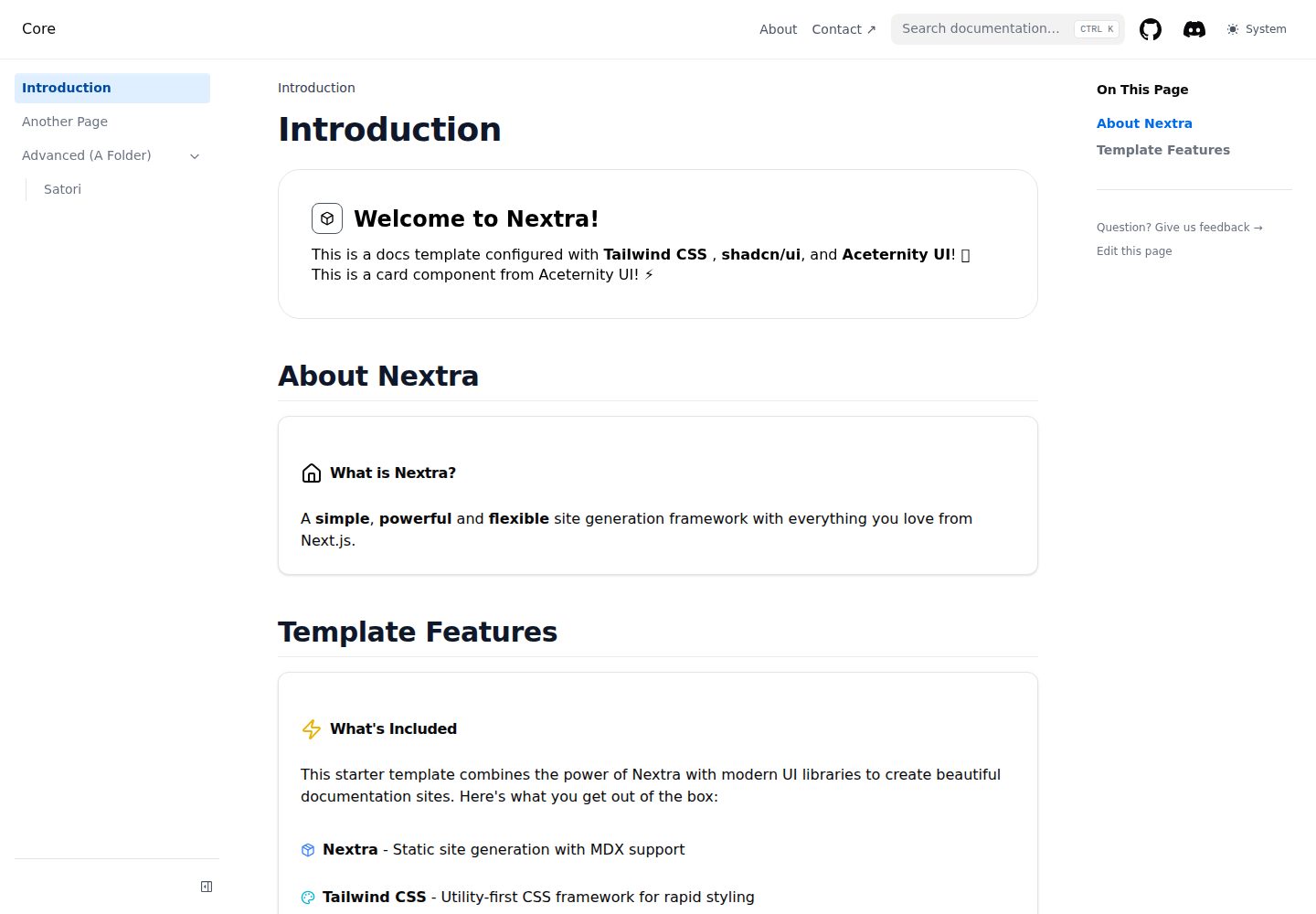
Compare the page layouts and mobile experience. Open any screenshot for a closer look.
Desktop homepage1 / 3
Desktop captureTop of page
Actual screenshot captured by the server browser.
All pages & views 3
Screenshots show visual appearance; interactive behavior may differ.
Recorded 2026-10-14View source
What stands out
A quick read of the recorded project description.
Uses Tailwind CSS for styling, with theme colors adjusted via CSS variables
Integrates shadcn/ui components, and additional components can be added via the command line
Integrates Aceternity UI animation components, which must be copied from the official website into the components/ui/ directory
Provides two icon solutions: Iconify and Lucide React
Supports MDX content, dark mode, and built-in search
Template Details
This template is a documentation site starter project. The README states that it is centered on Nextra (a static site generator built on top of Next.js), paired with Tailwind CSS for styling, shadcn/ui for React components, Aceternity UI for animation components based on Framer Motion, and Iconify and Lucide React for icons. Content is written as .mdx files in the pages/ directory, and React components can be used inline in Markdown. Features listed in the README include dark/light theme switching, responsive design, built-in search, MDX support, and TypeScript support.
For customization, the README notes that global styles are located in styles/globals.css, Tailwind configuration is in tailwind.config.js, and theme colors are adjusted via CSS variables in globals.css; the site title, description, navigation, footer, logo, and social links are configured in theme.config.tsx. To add shadcn/ui components, use the npx shadcn-ui@latest add command; Aceternity UI components must be copied from the official website into the components/ui/ directory.
For deployment, the README provides three methods: Vercel (import the repository and deploy with zero configuration), Netlify (build and deploy the out/ directory), and GitHub Pages (configure static export in next.config.js, run the build and export commands, then deploy the out/ directory). The README does not provide specific information about performance benchmarks, accessibility audits, test coverage, or production environment validation, nor does it give specific version numbers in the dependency list.
Next.jsReactDocumentationStarter
Is it right for your project?
Use Cases
- Building a documentation site with content written in MDX
- Using React components and shadcn/ui components inline in documentation pages
- Adding Aceternity UI animation components to a documentation site
- Configuring the site title, navigation, footer, and social links via theme.config.tsx
- Deploying the static site to Vercel, Netlify, or GitHub Pages
Suitable For
- Developers who need a Nextra documentation framework starter template
- Teams that want to mix Markdown and React components in documentation
- Documentation projects that need dark mode and built-in search
- Front-end developers using the Tailwind CSS and shadcn/ui technology stack
Getting started & customization
Use these recorded setup notes alongside the repository instructions for your chosen version.
- 1
You can use this template via npx create-next-app@latest, or clone the repository directly
- 2
Dependency installation supports npm, yarn, or pnpm, then run npm run dev to start the development server, accessible by default at http://localhost:3000
- 3
To add shadcn/ui components, use npx shadcn-ui@latest add [component-name]
- 4
Aceternity UI components must be copied from ui.aceternity.com and pasted into the components/ui/ directory
- 5
Deploying to Netlify or GitHub Pages requires building and deploying the out/ directory; GitHub Pages also requires configuring next.config.js for static export first
License & source material
Usage conditions & limitations
Free to use · keep license noticeThis entry covers the free version under the MIT license in a public repository; the free scope is the code of this version and does not mean that external services or third-party assets are free.
Must comply with when using
- Free use, modification, commercial use, and distribution of this version's code are permitted.
- When distributing copies or substantial portions of the code, retain the original author's copyright notice and the complete MIT license notice.
- The code is provided as is; warranties and limitations of liability are governed by the original license and applicable law.
Additional costs & items to verify
- Demo images, fonts, icons, and other third-party assets must be checked against their respective licenses and cannot be judged solely by the code's MIT license.
- External services such as domains, hosting, databases, payments, or AI may incur additional charges.
- Aceternity UI components must be manually copied from the official website into the components/ui/ directory; the template itself does not include these animation components.
- Aceternity UI components must be copied from ui.aceternity.com and pasted into the components/ui/ directory, which is an external source.
- Before deploying to GitHub Pages, next.config.js must first be configured to enable static export.
- GitHub Pages deployment requires running npm run build && npm run export to generate the out/ directory.
View Original Text Basis
Permission is hereby granted, free of charge
Original License Text
Aceternity UI provides beautiful animated components built with Framer Motion and Tailwind CSS. Copy components directly
Original README
from [ui.aceternity.com](https://ui.aceternity.com/components) and paste them into your `components/ui/` directory.
Original README
1. Configure `next.config.js` for static export
Original README
https://github.com/thehimel/nextra-tailwind-shadcn-starter/blob/main/LICENSEhttps://github.com/thehimel/nextra-tailwind-shadcn-starter/blob/main/README.md2. Run `npm run build && npm run export`
Original README
Compiled by DeepSeek based on repository license and README ·2026-10-14. Results only cover the materials read; dependencies, images, fonts, and subsequent term changes are subject to their respective original texts.
Project checks & description sources
Template Information
- Source platforms
- GitHub
- Documentation and maintenance reference score
- More documented · 82 / 100
- Technologies
- Next.js · React
- Website type
- Documentation · Starter
How this score is calculated
Our heuristic uses license records (up to 30), a demo link (12), a preview (10), stars (15), recorded maintenance (15), description completeness (8), feature records (5) and classification data (5). It is not a code, security or performance test, or a Google score. A link does not establish tested functionality.
What to verify for this project
- Repository update recorded
- 2025-08-16
- Screenshot last checked
- 2026-10-14
A demo link is listed. Check it with your own content and viewport sizes; its presence does not confirm that forms, authentication or payments work.
The catalog identifies Next.js as the primary stack. Check the actual dependency manifest and lockfile for versions and hosting requirements. These notes use recorded metadata, not a code audit or a deployment test.
Use a selection guide →How this description was prepared
AI-assisted description based on catalog records and repository material. Repository authors are not automatically the reviewers of this description.
Review declaration: codex-user-requested-batch-review-20261015 · 2026-10-15
Inspect the recorded source material
SHA-256: 7024bab022f79819e4ee5f85a3d9b91eca47d0516e0dcd322d8f8b30d8edfa43
2026-10-14T10:19:25.556Z
Source file / repository# Nextra Tailwind shadcn/ui Starter 🚀
A modern documentation starter built with [Nextra](https://nextra.site/), [Tailwind CSS](https://tailwindcss.com/), [shadcn/ui](https://ui.shadcn.com/),
**[Aceternity UI](https://ui.aceternity.com/)**, and **[Iconify](https://iconify.design/)**. Perfect for creating
beautiful, responsive documentation sites with excellent developer experience and stunning animations.
## ✨ Features
- **📚 Nextra** - Static site generator built on Next.js for documentation
- **🎨 Tailwind CSS** - Utility-first CSS framework for rapid styling
- **🧩 shadcn/ui** - Beautiful, accessible React components
- **✨ Aceternity UI** - Stunning animated components with Framer Motion
- **🎯 Iconify** - Access to 200,000+ icons from 150+ icon sets
- **🎨 Lucide React** - Beautiful, consistent icon set with React components
- **🌙 Dark Mode** - Built-in dark/light theme switching
- **📱 Responsive** - Mobile-first design that works on all devices
- **⚡ Fast** - Optimized for performance with Next.js
- **🔍 Search** - Built-in search functionality
- **📖 MDX Support** - Write content in Markdown with React components
- **🎯 TypeScript** - Full TypeScript support out of the box
## 🚀 Quick Start
1. **Use this template**
```bash
npx create-next-app@latest my-docs --example https://github.com/thehimel/nextra-tailwind-shadcn-starter
```
2. **Or clone the repository**
```bash
git clone https://github.com/thehimel/nextra-tailwind-shadcn-starter.git
cd nextra-tailwind-shadcn-starter
```
3. **Install dependencies**
```bash
npm install
# or
yarn install
# or
pnpm install
```
4. **Start the development server**
```bash
npm run dev
# or
yarn dev
# or
pnpm dev
```
5. **Open your browser** and navigate to `http://localhost:3000`
## 🎨 Customization
### Adding New Components
#### shadcn/ui Components
This starter includes shadcn/ui components. To add more components:
```bash
npx shadcn-ui@latest add [component-name]
```
#### Aceternity UI Components
Aceternity UI provides beautiful animated components built with Framer Motion and Tailwind CSS. Copy components directly
from [ui.aceternity.com](https://ui.aceternity.com/components) and paste them into your `components/ui/` directory.
Popular Aceternity UI components include:
- **Moving Cards** - Infinite scrolling card animations
- **Lamp Effect** - Stunning lamp lighting effects for headers
- **Meteors** - Animated background beam effects
- **Moving Border** - Animated borders for buttons and containers
- **Spotlight** - Dynamic spotlight effects
- **Timeline** - Animated timeline components with scroll effects
#### Lucide React Icons
Lucide React provides a beautiful, consistent set of SVG icons designed specifically for React. These icons are used
throughout shadcn/ui components and offer excellent performance:
```tsx
import { Home, User, Settings, Heart } from 'lucide-react';
// Basic usage
<Home className="w-6 h-6" />
<User size={24} />
<Settings color="blue" />
// With styling
<Heart className="w-4 h-4 text-red-500 fill-current" />
```
**Benefits of Lucide React:**
- Designed specifically for React with TypeScript support
- Consistent design language across all icons
- Tree-shakeable - only bundle icons you use
- Highly customizable with className, size, and color props
- Used by shadcn/ui components for consistency
#### Iconify Icons
Iconify provides access to over 200,000 icons from 150+ icon sets with one unified syntax. Use icons in your components:
```tsx
import { Icon } from '@iconify/react';
// Using icon names (loads on demand)
<Icon icon="mdi:home" />
<Icon icon="heroicons:academic-cap" />
<Icon icon="logos:react" />
// Or import specific icons for better performance
import homeIcon from '@iconify-icons/mdi/home';
<Icon icon={homeIcon} />
```
**Benefits of Iconify:**
- Loads icons on demand - no need to bundle icons
- Renders pixel-perfect SVG instead of icon fonts
- One syntax for 200,000+ icons from popular sets like Material Design, Heroicons, Font Awesome, and more
### Styling
- **Global styles**: Edit `styles/globals.css`
- **Tailwind config**: Modify `tailwind.config.js`
- **Theme colors**: Update the CSS variables in `styles/globals.css`
### Theme Configuration
Edit `theme.config.tsx` to customize:
- Site title and description
- Navigation
- Footer
- Logo
- Social links
## 📝 Writing Content
Create `.mdx` files in the `pages/` directory. You can use:
- **Markdown syntax** for content
- **React components** inline
- **shadcn/ui components** for enhanced UI
- **Aceternity UI components** for stunning animations
- **Iconify icons** for beautiful iconography
Example:
```markdown
import { Alert, AlertDescription } from '@/components/ui/alert'
import { Icon } from '@iconify/react'
import { Home, Heart, Info } from 'lucide-react'
import { Spotlight } from '@/components/ui/spotlight'
# My Page Title
This is regular markdown content with different icon options:
- Iconify icon: <Icon icon="mdi:heart" className="inline" />
- Lucide icon: <Heart className="inline w-4 h-4 text-red-500" />
<Alert>
<Info className="w-4 h-4" />
<AlertDescription>
This alert uses a Lucide React icon and shadcn/ui components!
</AlertDescription>
</Alert>
<Spotlight className="top-40 left-0 md:left-60 md:-top-20">
<div className="p-8">
<h2>Stunning Spotlight Effect</h2>
<p>This content is highlighted with Aceternity UI's Spotlight component!</p>
<Home className="w-8 h-8 mt-4" />
</div>
</Spotlight>
```
## 🎭 Component Libraries Usage
### shadcn/ui
A set of beautifully-designed, accessible components perfect for building consistent UI elements.
```bash
# Add specific components
npx shadcn-ui@latest add button
npx shadcn-ui@latest add card
npx shadcn-ui@latest add dialog
```
### Lucide React
Beautiful, consistent SVG icons designed specifically for React applications:
```tsx
import { Home, User, Settings, Mail, Calendar } from 'lucide-react';
// Standard usage
<Home className="w-6 h-6" />
<User size={24} color="currentColor" />
// In components
<Button>
<Mail className="w-4 h-4 mr-2" />
Send Email
</Button>
// Custom styling
<Calendar className="w-5 h-5 text-blue-600 hover:text-blue-800" />
```
### Aceternity UI
Beautiful Tailwind CSS and Framer Motion components built with Next.js and TypeScript. Copy-paste animated components for modern interfaces:
- **Background Effects**: Meteors, Aurora, Grid patterns
- **Interactive Elements**: Moving borders, Direction-aware hover
- **Layout Components**: Bento grids, Sticky scroll reveal
- **Navigation**: Floating navbar, Sidebar
- **Typography**: Text reveal, Typewriter effect
### Iconify
Access to all popular icon sets with unified syntax:
```tsx
// Material Design Icons
<Icon icon="mdi:account" />
// Heroicons
<Icon icon="heroicons:home" />
// Brand icons
<Icon icon="logos:github-icon" />
// Custom styling
<Icon icon="mdi:heart" style={{ color: 'red', fontSize: '24px' }} />
```
## 🚀 Deployment
### Vercel (Recommended)
1. Push your code to GitHub
2. Import your repository on [Vercel](https://vercel.com)
3. Deploy with zero configuration
### Netlify
1. Build the project: `npm run build`
2. Deploy the `out/` folder to Netlify
### GitHub Pages
1. Configure `next.config.js` for static export
2. Run `npm run build && npm run export`
3. Deploy the `out/` folder
## 🛠️ Built With
- [Nextra](https://nextra.site/) - Documentation framework
- [Next.js](https://nextjs.org/) - React framework
- [Tailwind CSS](https://tailwindcss.com/) - CSS framework
- [shadcn/ui](https://ui.shadcn.com/) - UI components
- [Aceternity UI](https://ui.aceternity.com/) - Animated components
- [Iconify](https://iconify.design/) - Icon framework
- [Framer Motion](https://www.framer.com/motion/) - Animation library
- [Lucide React](https://lucide.dev/) - Additional icons
## 📚 Resources
- [Nextra Documentation](https://nextra.site/docs)
- [Tailwind CSS Documentation](https://tailwindcss.com/docs)
- [shadcn/ui Documentation](https://ui.shadcn.com/docs)
- [Aceternity UI Components](https://ui.aceternity.com/components)
- [Iconify Icon Sets](https://iconify.design/icon-sets/)
- [Iconify for React Documentation](https://iconify.design/docs/icon-components/react/)
- [Next.js Documentation](https://nextjs.org/docs)
## 🤝 Contributing
Contributions are welcome! Please feel free to submit a Pull Request.
1. Fork the repository
2. Create your feature branch (`git checkout -b feature/amazing-feature`)
3. Commit your changes (`git commit -m 'Add some amazing feature'`)
4. Push to the branch (`git push origin feature/amazing-feature`)
5. Open a Pull Request
## 📄 License
This project is licensed under the MIT License - see the [LICENSE](LICENSE) file for details.
## 🙏 Acknowledgments
- [Nextra](https://nextra.site/) team for the amazing documentation framework
- [shadcn](https://twitter.com/shadcn) for the beautiful UI components
- [Tailwind CSS](https://tailwindcss.com/) team for the utility-first CSS framework
- [Aceternity UI](https://ui.aceternity.com/) for the stunning animated components
- [Iconify](https://iconify.design/) for the comprehensive icon solution
---
**⭐ If you found this starter helpful, please give it a star!**
Made with ❤️ by [thehimel](https://github.com/thehimel)
Explore similar templates
Compare previews and descriptions within the same stack and category.

Next.js SaaS Starter
The official Next.js SaaS starter template, integrating email/password authentication, Stripe Checkout subscriptions, a dashboard with user/team CRUD, basic Owner/Member RBAC, and activity logging.
Next.js · SaaS

Next.js Commerce
Vercel's officially maintained Next.js App Router ecommerce starter with deep Shopify integration, offering a complete product catalog, cart, and checkout flow. Core logic is modular for swapping backends, and community provider versions exist for BigCommerce, Medusa, and Saleor.
Next.js · E-commerce

Next-js-Boilerplate
A developer-first Next.js 16 starter with Tailwind CSS 4 and TypeScript, supporting both App Router and Page Router.
Next.js · Starter

tailwind-nextjs-starter-blog
A Next.js and Tailwind CSS blog starter template using Contentlayer for Markdown/MDX, with built-in SEO, code highlighting, and tags. It targets personal technical blogs and migration from Jekyll/Hugo to React, and supports one-click Vercel deployment.
Next.js · Blog

next-forge
next-forge is a Turborepo-based Next.js template maintained by Vercel, positioned as a starting point for SaaS products.
Next.js · Starter

SaaS-Boilerplate
SaaS-Boilerplate is an open-source SaaS starter template built with Next.js App Router, React 19, TypeScript, Tailwind CSS, and Shadcn UI.
Next.js · SaaS