基于 LeaveIt 与 Ink 主题衍生,定位为简洁的 Hugo 博客主题
Hugo博客
hugo-kairos — Hugo 博客模板
作者 tiaguinho
Kairós 是一个基于 LeaveIt 与 Ink 主题衍生的 Hugo 博客主题,提供多语言、分页、评论系统与深色模式等博客常用功能。
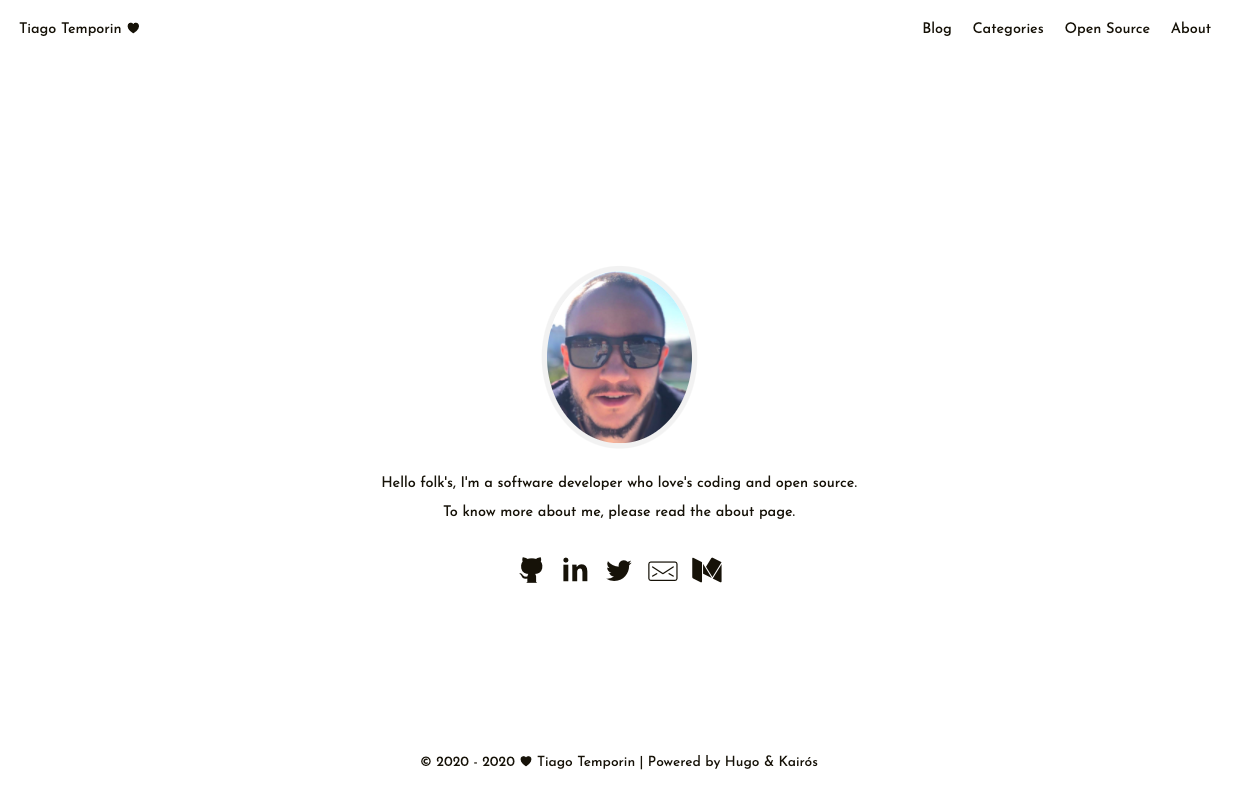
看看你的网站会是什么样
浏览真实页面截图,比较内容排版与手机效果。点击下方缩略图切换,放大查看整页细节。
目前有 1 张原始预览,可打开完整图片查看设计细节。
截图用于了解视觉与布局,交互效果请以实际项目为准。
采集于 2026-10-04查看来源
值得关注的模板亮点
从已有项目资料中,快速了解它的特点。
支持多语言、分页与深色/浅色模式切换
内置 Disqus、Gitalk、Valine、Gitment、Utterances 五种评论系统
支持 Gravatar 与本地头像、文章分享、搜索引擎验证
首页可在个人资料与文章列表两种模式间切换(home_mode)
样式使用 SCSS 编写,需 Hugo extended 版本
模板详细介绍
Kairós 是作者 tiaguinho 为个人博客开发的 Hugo 主题,README 说明其基于 LiuZhichao 的 LeaveIt 与 Kailash Nadh 的 Ink 两个主题衍生而来,定位是简洁的博客主题。主题提供多语言支持、分页、深色/浅色模式切换,并内置多种评论系统(Disqus、Gitalk、Valine、Gitment、Utterances)与 Gravatar、本地头像、文章分享、搜索引擎验证等配置项。首页支持两种展示模式:默认展示个人资料,也可通过 config.toml 中的 home_mode = "post" 改为直接展示文章列表。样式使用 SCSS 编写,因此需要 Hugo 的 extended Sass/SCSS 版本;生成站点时需设置 HUGO_ENV=production 环境变量,因为部分功能仅在 production 模式下生效。主题附带 exampleSite 目录,内含示例配置与演示内容,可作为配置参考。仓库中还包含 Netlify 配置文件,以及 lazysizes、lightGallery、code-prettify 等第三方资源。
Hugo博客
适合你的项目吗?
适用场景
- 搭建个人技术博客或写作站点
- 需要多语言与分页功能的 Hugo 博客
- 希望使用 Disqus、Utterances 等评论系统的博客
- 需要深色/浅色模式切换的阅读型站点
适合人群
- 使用 Hugo 构建博客的开发者
- 需要多语言博客站点的作者
- 偏好简洁阅读体验的个人博客
- 希望快速复用示例配置的 Hugo 用户
上手与定制指南
结合仓库当前版本的说明,按下面的资料检查内容、配置与运行要求。
- 1
将仓库克隆到 Hugo 站点的 themes 目录,并在 config.toml 中设置 theme = "kairos"
- 2
需要安装 Hugo 的 extended Sass/SCSS 版本,因为主题样式使用 SCSS 编写
- 3
生成站点时需设置 HUGO_ENV=production 环境变量,部分功能仅在 production 模式生效
- 4
可参考 exampleSite 目录中的 config.toml 与示例内容进行配置
- 5
建议将自定义 favicon 等图标文件放入 /static 目录,并按 README 说明配置 browserconfig.xml 与 site.webmanifest
授权与来源资料
使用条件与限制
免费使用 · 保留许可声明本次收录的是公开仓库中采用 MIT 许可的免费版本;免费范围为该版本代码,不代表外部服务或第三方素材免费。
使用时需要遵守
- 允许免费使用、修改、商用和分发该版本代码。
- 分发代码副本或实质性部分时,保留原作者版权声明和完整 MIT 许可声明。
- 代码按现状提供;担保与责任限制以原许可证及适用法律为准。
额外费用与待核对事项
- 生成站点时必须设置 HUGO_ENV=production 环境变量,因为部分功能仅在 production 模式下生效,否则这些功能不会正常工作。
- 必须安装 Hugo 的 extended Sass/SCSS 版本,因为主题样式使用 SCSS 编写,普通版本无法正确编译样式。
- 启用 Google Analytics 需自行配置 Google Analytics 账号与跟踪 ID,属于外部服务。
- 使用 Disqus 评论系统需注册 Disqus 账号并配置站点短名,评论数据托管于第三方服务。
- 使用 Gitalk 评论系统需创建 GitHub OAuth 应用并提供 clientID、clientSecret 等凭据,依赖 GitHub 账号。
- 使用 Valine 评论系统需配置 LeanCloud 应用 ID 与 Key,依赖外部 LeanCloud 服务。
- 使用 Gitment 评论系统需注册 GitHub OAuth 应用并配置相关凭据,依赖 GitHub 账号。
- 使用 Utterances 评论系统需指定一个公开的 GitHub 仓库并安装 Utterances 应用,依赖 GitHub 账号。
- 搜索引擎验证功能需自行在 Google、Bing、Yandex、Baidu 等平台注册站点并获取验证码,属于外部服务。
- favicon 等图标建议通过第三方网站 realfavicongenerator.net 生成,属于外部服务。
- 主题内置 lazysizes、lightGallery、code-prettify 等第三方资源,这些资源各自遵循其原始许可证,使用前应自行核实其许可条款。
- 演示图片、字体、图标及其他第三方素材需按各自许可核对,不能仅凭代码的 MIT 许可判断。
- 域名、托管、数据库、支付或 AI 等外部服务可能另外收费。
查看原文依据
Permission is hereby granted, free of charge
许可证原文
you **need to add a production** environment variables when generating your site
README 原文
you must download and install the “extended” Sass/SCSS version
README 原文
Google Analytics support
README 原文
Disqus Comment System
README 原文
Gitalk Comment System
README 原文
Valine Comment System
README 原文
Gitment Comment System
README 原文
Utterances Comment System
README 原文
Search engine verification support (Google, Bind, Yandex and Baidu)
README 原文
They’re easily created via https://realfavicongenerator.net/
README 原文
https://github.com/tiaguinho/hugo-kairos/blob/master/LICENSEhttps://github.com/tiaguinho/hugo-kairos/blob/master/README.md* lazysizes - https://github.com/aFarkas/lazysizes * lightGallery - https://github.com/sachinchoolur/lightGallery * code-prettify - https://github.com/google/code-prettify
README 原文
DeepSeek 根据仓库许可证和 README 整理 ·2026-10-04。结果仅覆盖已读取资料,依赖、图片、字体及后续条款变更以各自原文为准。
项目核对记录与介绍依据
模板资料
- 来源平台
- GitHub
- 资料与维护参考分
- 资料一般 · 68 / 100
- 技术栈
- Hugo
- 网站类型
- 博客
这个分数如何计算
本站按许可资料(最高30分)、演示链接(12分)、预览图(10分)、Star数(15分)、记录的维护时间(15分)、描述完整度(8分)、功能记录(5分)和分类资料(5分)计算。它不是代码、安全或性能测试,也不是 Google 评分;有链接不代表已实测可用。
这个项目需要核对什么
- 记录的仓库更新时间
- 2020-07-06
- 截图检查日期
- 2026-10-04
已收录演示链接。请用你的内容与屏幕尺寸检查;有演示不代表表单、认证或支付已经可用。
目录记录的主要技术栈是 Hugo。请通过依赖清单和锁文件核对实际版本与托管要求。这些说明基于收录资料,不代表代码审计或部署实测。
查看具体选型方法 →介绍的制作与核对状态
介绍由 AI 辅助整理目录与仓库资料。仓库作者不等于这篇介绍的审核者。
审核声明: [email protected] · 2026-10-04
查看当时使用的来源资料
SHA-256: dc176f806496d74434734123257da0ca6f2483176daa0e479aa29257a08a92df
2026-10-04T00:38:35.597Z
来源文件 / 仓库Kairós Hugo Theme ======================== Kairós is a clean, elegant, simple but not simpler blog theme for Hugo based on the original [LeaveIt Theme](https://raw.githubusercontent.com/liuzc/LeaveIt/) developed by [LiuZhichao](https://raw.githubusercontent.com/liuzc/) and [Ink Theme](https://github.com/knadh/hugo-ink) developed by [Kailash Nadh](https://github.com/knadh).  # Features * Optimized for performance: 99/100 on mobile and 100/100 on desktop in Google PageSpeed Insights * Optimized SEO performance with a correct SEO SCHEMA based on JSON-LD * A More coerent style beetwen page and sections * Multilanguage support * Pagination support * Google Analytics support * Disqus Comment System * Gitalk Comment System * Valine Comment System * Gitment Comment System * Utterances Comment System * Gravatar Support * Local Avatar Support * Share post support * Search engine verification support (Google, Bind, Yandex and Baidu) * Added configuration file for use on [Netlify](https://www.netlify.com) * Dark/Light mode * Up to 54 social sites supported out-of-the-box [see the list here](https://github.com/Fastbyte01/KeepIt/wiki/List-of-social-platforms-supported-out-of-box) * Translation ready * Wrap Image with Figure Tag without Shortcode. Thanks [Junian.Net](https://www.junian.net/hugo-image-figure-wrap/) * Load images with Lazy Load By [lazysizes](https://github.com/aFarkas/lazysizes) * Automatically highlighting code By [Google code-prettify](https://github.com/google/code-prettify), Customizable styles via CSS. See the [themes gallery](https://rawgit.com/google/code-prettify/master/styles/index.html). * Automagical image gallery with [lightGallery](https://github.com/sachinchoolur/lightGallery) * ... # Getting Started Clone this repository to your hugo theme directory. ```bash cd themes git clone https://github.com/tiaguinho/hugo-kairos.git ``` Next, open config.toml in the base of the Hugo site and ensure the theme option is set to Kairós: ```bash theme = "kairos" ``` For more information read the [official setup guide](https://gohugo.io/documentation/) of Hugo. # Site Configuration Take a look in the `exampleSite` folder. This directory contains an example config file and the content for the demo. It serves as an example setup for your documentation. Copy the `config.toml` in the root directory of your website. Overwrite the existing config file if necessary. # Content Suggestions A few suggestions to help you get a good looking site quickly: * Keep blog posts in the content/posts directory, for example: content/posts/my-first-post.md * Keep static pages in the content directory, for example: content/about.md * Keep media like images in the static directory, for example: static/images/2019/10/screenshot.png # Customizing styles for your website If you want to change some styling to fit your own website needs, you can edit them: * `assets/css/_varibales/default.scss`: You can override the variables in `_variables.scss` to customize the style * `assets/css/_custom.scss` : You can put your custom css in this file # Favicons, Browserconfig, Manifest It is recommended to put your own favicons * apple-touch-icon.png (180x180) * favicon-32x32.png (32x32) * favicon-16x16.png (16x16) * mstile-150x150.png (150x150) * android-chrome-192x192.png (192x192) * android-chrome-512x512.png (512x512) into `/static`. They’re easily created via https://realfavicongenerator.net/. Customize browserconfig.xml and site.webmanifest to set theme-color and background-color for example. # Tips #### Set production environment when generating site Because some functions are only in production mode, So you **need to add a production** environment variables when generating your site. ```bash HUGO_ENV=production hugo --gc --minify ``` #### Hugo “extended” Sass/SCSS version required This theme write style with scss, So you must download and install the “extended” Sass/SCSS version #### How to toggle dark-light mode * You can click the sun logo to toggle dark-light mode. In the desktop version the sun logo is to the right and in the mobile version is positioned to the left, close to the site title. * If you want to make your own theme toggle-able element, you can create an element with a class `.theme-switch`. See [here](https://github.com/tiaguinho/kairos/blob/master/assets/js/main.js#L32) # Home Post model If you want to show posts on index instead of a personal profile, just open config.toml in the base of the Hugo site, add the following line to config.toml ```toml [params] home_mode = "post" # post or other ``` # Add logo and cover for SEO Add a logo image (127x40) and a cover image (800x600). This images are used for SEO. # Questions, ideas, bugs, pull requests? All feedback is welcome! Head over to the [issue tracker](https://github.com/tiaguinho/hugo-kairos/issues). For more configuration info or other tips you can see the [wiki](https://github.com/tiaguinho/hugo-kairos/wiki). # License Kairós is licensed under the MIT license. Check the LICENSE file for details. The following resources are included in the theme: * lazysizes - https://github.com/aFarkas/lazysizes * lightGallery - https://github.com/sachinchoolur/lightGallery * code-prettify - https://github.com/google/code-prettify # Author [tiaguinho](https://github.com/tiaguinho) # See Also * [Hugo-Ink](https://github.com/knadh/hugo-ink) * [LeaveIt](https://github.com/liuzc/LeaveIt)
看看同类模板
对比同技术栈与用途的模板,找到更适合的视觉与内容结构。

hugo-PaperMod
PaperMod 是 Hugo 生态里知名度较高的主题之一,定位很明确:给博客和轻量作品集站点提供一套干净、响应式的阅读界面。
Hugo · 作品集

LoveIt
❤️A clean, elegant but advanced blog theme for Hugo 一个简洁、优雅且高效的 Hugo 主题
Hugo · 博客

hugo-coder
A minimalist blog theme for hugo.
Hugo · 博客

blowfish
Personal Website & Blog Theme for Hugo
Hugo · 博客

hugo-paper
🪺 A simple, clean, customizable Hugo theme
Hugo · 博客

hextra
Hextra 是一个 Hugo 主题,定位在文档站与博客之间:既提供侧边栏导航、目录、面包屑、分页这类文档站结构,也能承载博客内容。
Hugo · 文档