通过 ./vendor/bin/jigsaw init blog 一条命令初始化博客项目
Laravel博客工具站启动器
jigsaw-blog-template — Laravel 博客模板
作者 tighten
Tighten 维护的 Jigsaw 博客起始模板,提供响应式导航、Tailwind CSS、Prism 语法高亮、自动 sitemap、404 页、联系表单与 Fuse.js + Alpine.js 搜索,用 config.php 和 Markdown 内容快速搭建静态博客。
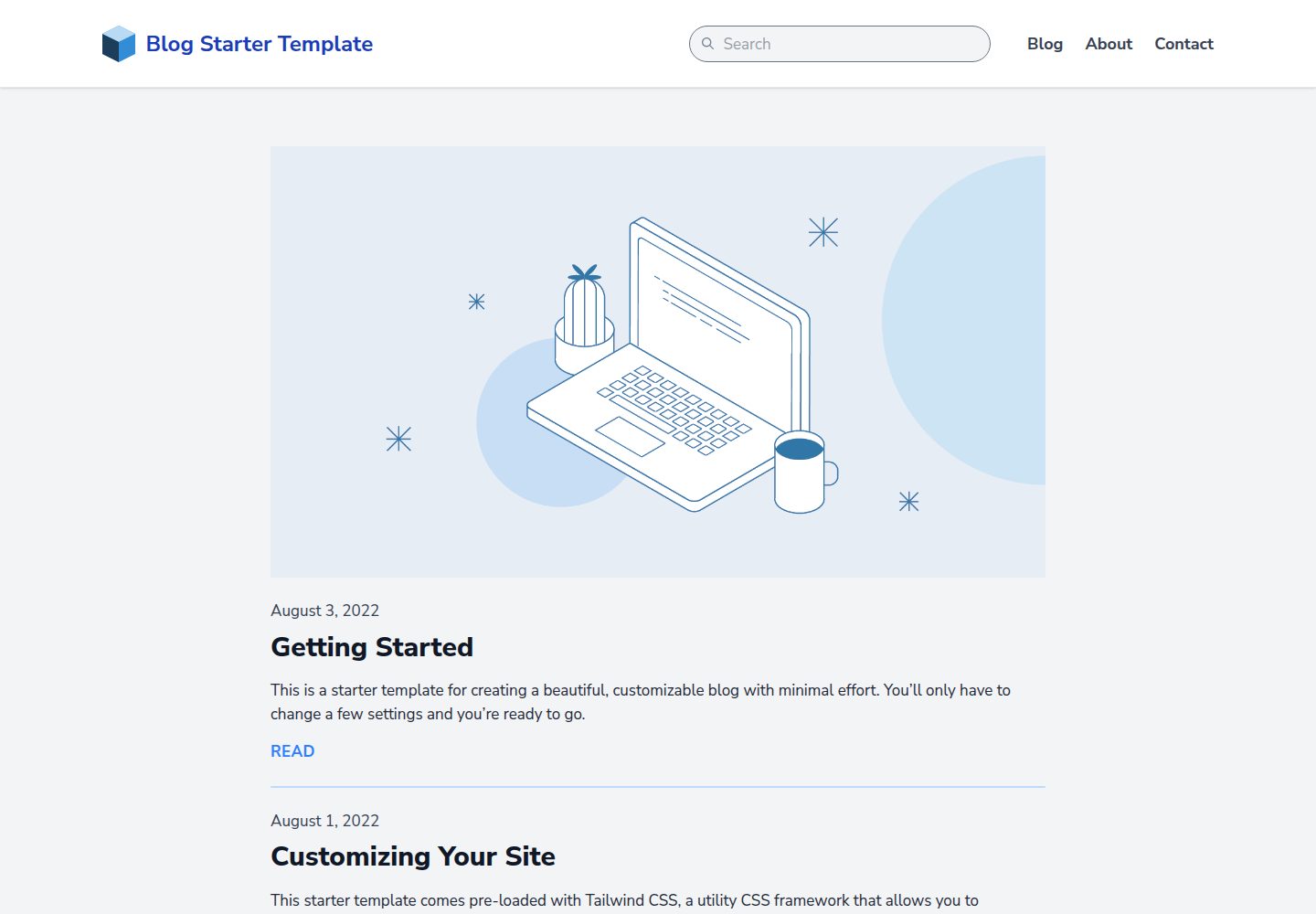
看看你的网站会是什么样
浏览真实页面截图,比较内容排版与手机效果。点击下方缩略图切换,放大查看整页细节。
全部页面与视图 3
截图用于了解视觉与布局,交互效果请以实际项目为准。
采集于 2026-10-01查看来源
值得关注的模板亮点
从已有项目资料中,快速了解它的特点。
预置响应式导航栏、自定义 404 页与示例联系表单
Tailwind CSS 工具类定制设计,Prism 提供代码语法高亮
Fuse.js 与 Alpine.js 实现自动索引、零配置的搜索栏
脚本自动生成 sitemap.xml,Vite 编译 source/_assets/ 中的资源
模板详细介绍
这是 Tighten 为 Jigsaw 静态站点生成器提供的博客起始模板,仓库采用 MIT 许可。安装 Jigsaw 后,在项目目录执行 ./vendor/bin/jigsaw init blog 即可把模板初始化到当前项目,随后修改 config.php 中的 baseUrl、siteName、siteDescription 等变量完成站点配置。
内容默认放在 source/_posts/ 目录,支持多种文件类型;每篇内容顶部的 YAML 头用 title 生成 HTML title 与 OpenGraph 标签,用 extends 指定父级 Blade 布局(如 _layouts.post 对应 source/_layouts/post.blade.php),用 section 指定内容插入的 Blade section。需要编译的 JavaScript 或 Tailwind CSS 放在 source/_assets/,由 Vite 在 npm run dev 或 npm run build 时处理,产物分别进入 build_local 或 build_production;图片、字体等无需处理的文件直接放入 source/assets/。
模板已预置响应式导航栏、Tailwind CSS、Prism 语法高亮、自动生成 sitemap.xml 的脚本、自定义 404 页、示例联系表单,以及由 Fuse.js 与 Alpine.js 驱动、自动索引内容且无需配置的搜索栏。config.php 同时用于定义 collections(例如按主题组织的文章集合)。
限制方面:这是静态博客起始模板,不包含后端数据库或服务端运行时;联系表单仅为示例,实际提交需要自行接入外部服务;演示图片、字体、图标等第三方素材需按各自许可核对,不能仅凭代码的 MIT 许可判断。
Laravel博客工具站启动器
适合你的项目吗?
适用场景
- 用 Markdown 与 Blade 布局快速搭建个人或团队静态博客
- 作为 Jigsaw 项目的起始骨架,在此基础上增删页面类型与集合
- 需要站内搜索、代码高亮和 sitemap 的静态内容站点
适合人群
- 熟悉或愿意使用 Jigsaw 与 PHP 的开发者
- 希望用 Markdown 写作、以静态文件部署的博客作者
- 需要可定制前端样式(Tailwind CSS)的静态站点项目
上手与定制指南
结合仓库当前版本的说明,按下面的资料检查内容、配置与运行要求。
- 1
先安装 Jigsaw,再在项目目录执行 ./vendor/bin/jigsaw init blog 初始化模板
- 2
在 config.php 中设置 baseUrl、siteName、siteDescription 等站点变量,并按需定义 collections
- 3
文章默认放在 source/_posts/,YAML 头中的 extends 与 section 决定渲染布局和插入位置
- 4
需编译的资源放入 source/_assets/ 并用 npm run dev 或 npm run build 处理;图片字体等直接放 source/assets/
- 5
示例联系表单需要自行接入外部提交服务,第三方素材需单独核对许可
授权与来源资料
使用条件与限制
免费使用 · 保留许可声明本次收录的是公开仓库中采用 MIT 许可的免费版本;免费范围为该版本代码,不代表外部服务或第三方素材免费。
使用时需要遵守
- 允许免费使用、修改、商用和分发该版本代码。
- 分发代码副本或实质性部分时,保留原作者版权声明和完整 MIT 许可声明。
- 代码按现状提供;担保与责任限制以原许可证及适用法律为准。
额外费用与待核对事项
- 联系表单仅为示例,实际提交需自行接入外部服务,模板本身不提供后端处理。
- 演示图片、字体等第三方素材需按各自许可单独核对,不能仅凭代码的 MIT 许可判断其授权。
- 演示图片、字体、图标及其他第三方素材需按各自许可核对,不能仅凭代码的 MIT 许可判断。
- 域名、托管、数据库、支付或 AI 等外部服务可能另外收费。
查看原文依据
Permission is hereby granted, free of charge
许可证原文
A sample contact form
README 原文
https://github.com/tighten/jigsaw-blog-template/blob/main/LICENSE.txthttps://github.com/tighten/jigsaw-blog-template/blob/main/readme.mdFiles that don't require processing (such as images and fonts) can be added directly to `/source/assets/`.
README 原文
DeepSeek 根据仓库许可证和 README 整理 ·2026-10-02。结果仅覆盖已读取资料,依赖、图片、字体及后续条款变更以各自原文为准。
项目核对记录与介绍依据
模板资料
- 来源平台
- GitHub
- 资料与维护参考分
- 资料较完整 · 92 / 100
- 技术栈
- Laravel
- 网站类型
- 博客 · 工具站 · 启动器
这个分数如何计算
本站按许可资料(最高30分)、演示链接(12分)、预览图(10分)、Star数(15分)、记录的维护时间(15分)、描述完整度(8分)、功能记录(5分)和分类资料(5分)计算。它不是代码、安全或性能测试,也不是 Google 评分;有链接不代表已实测可用。
这个项目需要核对什么
- 记录的仓库更新时间
- 2025-11-21
- 截图检查日期
- 2026-10-02
已收录演示链接。请用你的内容与屏幕尺寸检查;有演示不代表表单、认证或支付已经可用。
目录记录的主要技术栈是 Laravel。请通过依赖清单和锁文件核对实际版本与托管要求。这些说明基于收录资料,不代表代码审计或部署实测。
查看具体选型方法 →介绍的制作与核对状态
介绍由 AI 辅助整理目录与仓库资料。仓库作者不等于这篇介绍的审核者。
已完成服务器许可规则与 AI 来源核对;未经过人工编辑审核。
查看当时使用的来源资料
SHA-256: 102600c9e8087d1aa87528e84f077b57e5e5f0a7d691d6d9b86aa4546abccdf0
2026-10-02T03:15:34.427Z
来源文件 / 仓库# Jigsaw Blog Starter Template
This is a starter template for creating a beautiful, customizable blog in Jigsaw with minimal effort. You’ll only have to change a few settings and you’re ready to go.
[View a preview of the blog template.](http://jigsaw-blog-template.tighten.co/)
## Installation
After installing Jigsaw, run the following command from your project directory:
```bash
./vendor/bin/jigsaw init blog
```
This starter template includes samples of common page types, and comes pre-configured with:
- A fully responsive navigation bar
- [Tailwind CSS](https://tailwindcss.com/), a utility CSS framework that allows you to customize your design without touching a line of CSS
- Syntax highlighting using [Prism](https://prismjs.com/)
- A script that automatically generates a `sitemap.xml` file
- A custom 404 page
- A sample contact form
- A search bar powered by [Fuse.js](http://fusejs.io/) and [Alpine.js](https://alpinejs.dev/), which indexes your content automatically and requires zero configuration
---

---
### Configuring your new site
As with all Jigsaw sites, configuration settings can be found in `config.php`; you can update the variables in that file with settings specific to your site. You can also add new configuration variables there to use across your site; take a look at the [Jigsaw documentation](http://jigsaw.tighten.co/docs/site-variables/) to learn more.
```php
// config.php
return [
'baseUrl' => 'https://my-awesome-jigsaw-site.com/',
'production' => false,
'siteName' => 'My Site',
'siteDescription' => 'Give your blog a boost with Jigsaw.',
...
];
```
> Tip: This configuration file is also where you’ll define any "collections" (for example, a collection of the contributors to your site, or a collection of blog posts organized by topic). Check out the official [Jigsaw documentation](https://jigsaw.tighten.co/docs/collections/) to learn more.
---
### Adding Content
You can write your content using a [variety of file types](http://jigsaw.tighten.co/docs/content-other-file-types/). By default, this starter template expects your content to be located in the `source/_posts/` folder.
The top of each content page contains a YAML header that specifies how it should be rendered. The `title` attribute is used to dynamically generate HTML `title` and OpenGraph tags for each page. The `extends` attribute defines which parent Blade layout this content file will render with (e.g. `_layouts.post` will render with `source/_layouts/post.blade.php`), and the `section` attribute defines the Blade "section" that expects this content to be placed into it.
```yaml
---
extends: _layouts.post
section: content
title: Getting Started
date: 2022-08-02
description: Getting started with the Jigsaw blog starter template
cover_image: /assets/img/post-cover-image-2.png
featured: true
---
```
---
### Adding Assets
Any assets that need to be compiled, such as JavaScript or CSS using Tailwind, can be added to the `source/_assets/` directory. Vite will process them when running `npm run dev` or `npm run build`, and the processed assets will be stored in `/build_local` or `/build_production`, respectively.
Files that don't require processing (such as images and fonts) can be added directly to `/source/assets/`.
[Read more about compiling assets in Jigsaw using Vite.](http://jigsaw.tighten.co/docs/compiling-assets/)
---
## Building Your Site
Now that you’ve edited your configuration variables and know how to customize your styles and content, let’s build the site.
```bash
# run development server
npm run dev
# build static files with Vite
npm run build
```
看看同类模板
对比同技术栈与用途的模板,找到更适合的视觉与内容结构。

sage
WordPress starter theme with Laravel Blade components and templates, Tailwind CSS, and block editor support
Laravel · 启动器

wave
Wave - The Software as a Service Starter Kit, designed to help you build the SAAS of your dreams 🚀 💰
Laravel · SaaS

filament-starter
A beautiful starting point for your next TALL stack project using Filament. ⚡
Laravel · 启动器

electrik
Laravel SaaS starter kit: auth, teams, Stripe billing, and Slate 3 — Composer package for Laravel 12
Laravel · SaaS

php-saas
The everything-included starter kit for your next idea
Laravel · SaaS

filament-jetstream
A Laravel starter kit built with Filament inspired by Jetstream.
Laravel · 启动器