使用原生 HTML5、CSS3 和 JavaScript(ES6)构建,不依赖前端框架
HTML企业官网
friendly-FreshBite — HTML 企业官网模板
作者 UdaraIrunika
FreshBite 是一个使用原生 HTML、CSS 和 JavaScript 构建的外卖平台前端模板,提供菜单浏览、购物车、登录注册和商家入驻等界面,不含后端与数据库。
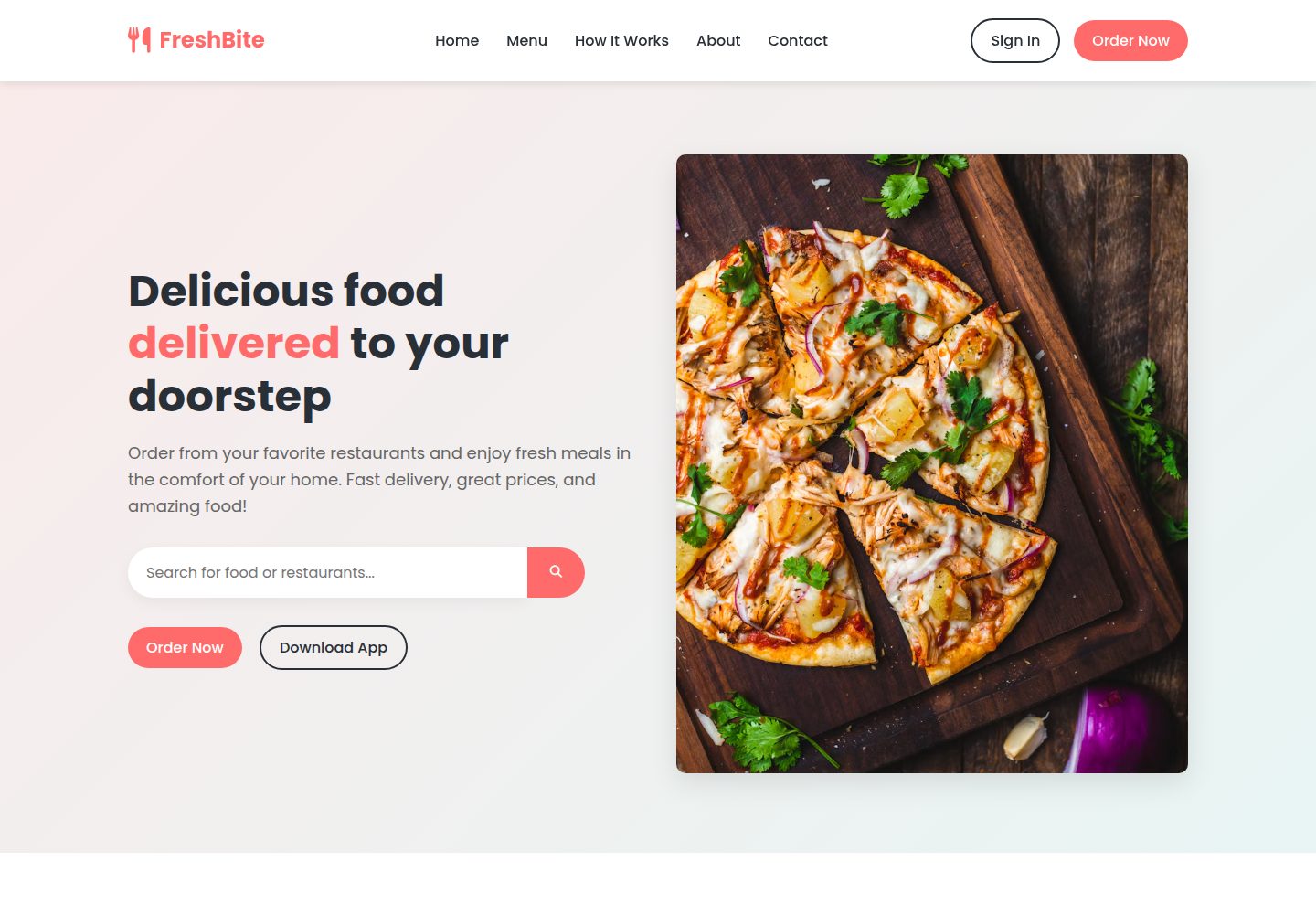
看看你的网站会是什么样
浏览真实页面截图,比较内容排版与手机效果。点击下方缩略图切换,放大查看整页细节。
全部页面与视图 3
截图用于了解视觉与布局,交互效果请以实际项目为准。
采集于 2026-10-14查看来源
值得关注的模板亮点
从已有项目资料中,快速了解它的特点。
包含菜单浏览、购物车、登录、注册和商家入驻等页面
购物车与用户会话数据通过浏览器 localStorage 在客户端持久化
提供响应式设计,适配移动端、平板和桌面设备
README 明确说明这是前端模板,不包含后端与数据库集成
模板详细介绍
FreshBite 是一个外卖平台前端模板,使用原生 HTML、CSS 和 JavaScript 编写,不依赖前端框架。README 说明它提供顾客浏览菜单、下单、管理账户的界面,以及餐厅合作伙伴注册表单。模板包含多个独立页面:首页、登录、注册、商家入驻、菜单、工作流程、关于和联系页面,并配有对应的 CSS 与 JS 文件。
该模板明确标注为前端 UI 设计,不包含后端功能与数据库集成。购物车和用户会话数据通过浏览器本地存储(localStorage)在客户端持久化。README 的“未来增强”部分列出了后端集成、真实认证、支付网关、GPS 追踪、订单跟踪、评分评论、推送通知、邮件确认、优惠码、订单历史、多语言和 API 集成等尚未实现的功能。
README 还提到已知问题:购物车数据目前存储在本地存储中(计划迁移至后端)、支付集成待完成、邮箱验证未实现、移动端优化仍在进行中。
HTML企业官网
适合你的项目吗?
适用场景
- 学习 HTML、CSS 和 JavaScript 基础,参考多页面结构与交互实现
- 作为外卖或餐饮类项目的前端起点,在此基础上添加后端逻辑
- 用于作品集展示或客户演示的界面原型
- 为自有外卖业务定制前端界面,替换品牌与内容
适合人群
- 希望学习原生 Web 技术并参考完整多页面模板的开发者
- 需要外卖平台前端界面原型用于演示或作品集的人
- 计划自行接入后端、支付等服务的项目起步者
- 需要快速定制外卖类网站前端的个人或团队
上手与定制指南
结合仓库当前版本的说明,按下面的资料检查内容、配置与运行要求。
- 1
克隆仓库:git clone https://github.com/UdaraIrunika/friendly-FreshBite.git
- 2
可直接双击 index.html 在浏览器中打开,或使用本地服务器(如 python3 -m http.server 8000 或 npx http-server)
- 3
在 VS Code 中安装 Live Server 扩展后,右键 index.html 选择 Open with Live Server
- 4
README 未提供构建步骤或依赖安装说明,因为项目不依赖包管理器
授权与来源资料
使用条件与限制
免费使用 · 保留许可声明本次收录的是公开仓库中采用 MIT 许可的免费版本;免费范围为该版本代码,不代表外部服务或第三方素材免费。
使用时需要遵守
- 允许免费使用、修改、商用和分发该版本代码。
- 分发代码副本或实质性部分时,保留原作者版权声明和完整 MIT 许可声明。
- 代码按现状提供;担保与责任限制以原许可证及适用法律为准。
额外费用与待核对事项
- 演示图片、字体、图标及其他第三方素材需按各自许可核对,不能仅凭代码的 MIT 许可判断。
- 域名、托管、数据库、支付或 AI 等外部服务可能另外收费。
查看原文依据
https://github.com/UdaraIrunika/friendly-FreshBite/blob/main/LICENSEhttps://github.com/UdaraIrunika/friendly-FreshBite/blob/main/README.mdPermission is hereby granted, free of charge
许可证原文
DeepSeek 根据仓库许可证和 README 整理 ·2026-10-14。结果仅覆盖已读取资料,依赖、图片、字体及后续条款变更以各自原文为准。
项目核对记录与介绍依据
模板资料
- 来源平台
- GitHub
- 资料与维护参考分
- 资料较完整 · 77 / 100
- 技术栈
- HTML
- 网站类型
- 企业官网
这个分数如何计算
本站按许可资料(最高30分)、演示链接(12分)、预览图(10分)、Star数(15分)、记录的维护时间(15分)、描述完整度(8分)、功能记录(5分)和分类资料(5分)计算。它不是代码、安全或性能测试,也不是 Google 评分;有链接不代表已实测可用。
这个项目需要核对什么
- 记录的仓库更新时间
- 2025-10-09
- 截图检查日期
- 2026-10-14
已收录演示链接。请用你的内容与屏幕尺寸检查;有演示不代表表单、认证或支付已经可用。
目录记录的主要技术栈是 HTML。请通过依赖清单和锁文件核对实际版本与托管要求。这些说明基于收录资料,不代表代码审计或部署实测。
查看具体选型方法 →介绍的制作与核对状态
介绍由 AI 辅助整理目录与仓库资料。仓库作者不等于这篇介绍的审核者。
审核声明: codex-user-requested-batch-review-20261017 · 2026-10-16
查看当时使用的来源资料
SHA-256: 8970967163ffdd13bd247a972a6ecfca9295456de655384b649acb9270bc6c8c
2026-10-14T17:58:14.321Z
来源文件 / 仓库# FreshBite 🍔  A modern and user-friendly food delivery web application **template** built with vanilla **HTML**, **CSS**, and **JavaScript**. FreshBite provides a ready-to-use interface for customers to browse menus, order food, and manage their accounts, while also offering partner registration for restaurants. > **Note:** This is a frontend template/UI design. Backend functionality and database integration are not included. --- ## Table of Contents - [Overview](#overview) - [Features](#features) - [Tech Stack](#tech-stack) - [Installation & Run Locally](#installation--run-locally) - [Project Structure](#project-structure) - [Features in Detail](#features-in-detail) - [User Authentication](#user-authentication) - [Shopping Cart](#shopping-cart) - [Search Functionality](#search-functionality) - [Partner Registration](#partner-registration) - [Screenshots](#screenshots) - [Future Enhancements](#future-enhancements) - [Contributing](#contributing) - [License](#license) - [Author / Contact](#author--contact) --- ## Overview FreshBite is a comprehensive food delivery platform **template** that provides a ready-to-use frontend interface connecting customers with restaurants. Built with core web technologies, this template demonstrates modern web development practices including responsive design, form layouts, and interactive UI components. Visit Demo Site : https://friendly-fresh-bite.vercel.app/ **Perfect for:** - Learning web development fundamentals - Starting a food delivery project - Portfolio demonstration - Client presentation mockups - Customizing for your own food delivery business --- ## Features - 🍕 **Browse Menu Interface** - Clean layout to display food items and restaurants - 🛒 **Add to Cart UI** - Shopping cart interface with add/remove functionality - 👤 **Authentication Pages** - Pre-built login and signup forms - 🔍 **Search Bar** - Functional search interface for filtering items - 🤝 **Partner Registration Form** - Complete form for restaurant partner applications - 📱 **Responsive Design** - Fully optimized for all devices (mobile, tablet, desktop) - 🎨 **Modern UI/UX** - Clean, professional, and intuitive interface design - ⚡ **Lightweight** - Pure HTML/CSS/JS without heavy frameworks - 🎯 **Ready to Customize** - Easy to modify and extend for your needs --- ## Tech Stack - **HTML5** - Semantic markup and structure - **CSS3** - Modern styling, animations, and responsive layouts - **JavaScript (ES6)** - Interactive functionality and dynamic content - **Local Storage** - Client-side data persistence for cart and user sessions --- ## Installation & Run Locally 1. **Clone the repository:** ```bash git clone https://github.com/UdaraIrunika/friendly-FreshBite.git cd friendly-FreshBite ``` 2. **Open in browser:** **Option A** - Direct file open: - Simply double-click `index.html` or open it in your browser **Option B** - Using a local server (recommended): ```bash # Using Python 3 python3 -m http.server 8000 # Then navigate to http://localhost:8000 # OR using Node.js npx http-server ``` 3. **Using VS Code Live Server:** - Install the "Live Server" extension - Right-click on `index.html` - Select "Open with Live Server" --- ## Project Structure ``` friendly-FreshBite/ ├── index.html # Main landing page ├── signin.html # User login page ├── signup.html # User registration page ├── patner.html # Restaurant partner registration ├── menu.html # Food menu/catalog page ├── how-it-works.html # instruction page ├── about.html # about page ├── contact.html # about page ├── assest/css/ │ ├── main.css # Main stylesheet │ ├── about.css # about stylsheet │ └── contactus.css # contatc styles │ └── hero.css # hero styles │ └── howitwork.css # howitwork styles │ └── menu.css # menu styles │ └── patner.css # patner styles │ └── signin.css # signin styles │ └── signup.css # signup styles ├── assest/js/ │ ├── contct.js # contct │ ├── howwork.js │ ├── partner.js # partner │ └── script.js # main │ └── signin.js # signin function │ └── signup.js # signup function ├── assest/img/ # Image assets │ ├── img/ # Food app images │ ├── logo.jpg └── README.md # Project documentation ``` --- ## Features in Detail ### User Authentication - **Sign Up**: New users can create an account with email validation - **Login**: Secure login system with session management - **Password Security**: Client-side validation and secure storage - **Session Management**: Persistent login using local storage ### Shopping Cart - **Add Items**: Click to add food items to cart - **Update Quantity**: Increase or decrease item quantities - **Remove Items**: Delete items from cart - **Price Calculation**: Automatic total price calculation - **Cart Persistence**: Cart data saved in local storage - **View Cart**: Dedicated cart page with full order summary ### Search Functionality - **Real-time Search**: Instant search results as you type - **Filter Options**: Search by food name, category, or restaurant - **Smart Suggestions**: Auto-complete and search suggestions - **Responsive Results**: Dynamic display of search results ### Partner Registration - **Restaurant Sign-up**: Dedicated form for restaurant partners - **Business Details**: Capture restaurant information and contact details - **Menu Uploaded**: Option to add initial menu items - **Verification Process**: Partner application submission system --- ## Screenshots --- ### 💻 Desktop View |  |  |  | |:---:|:---:|:---:| | **Hero Section** | **Features & Dishes** | **Testimonials Section** | --- |  |  |  | |:---:|:---:|:---:| | **Navigation Bar** | **Hero Section** | **Menu Section** | |  |  | |:---:|:---:| | **Dishes Section** | **Footer Section** | --- ## Future Enhancements To turn this template into a fully functional application, consider adding: - 🔐 Backend integration with database (MongoDB/MySQL) (Not added yet) - 🔒 Real authentication and user management system (Not added yet) - 💳 Payment gateway integration (Stripe/PayPal) (Not added yet) - 📍 GPS location tracking for delivery (Not added yet) - 🚚 Real-time order tracking system (Not added yet) - ⭐ Restaurant ratings and reviews functionality (Not added yet) - 🔔 Push notifications for order updates (Not added yet) - 📧 Email confirmation and receipt system (Not added yet) - 🎁 Promo codes and discount system (Not added yet) - 📊 User order history dashboard (Not added yet) - 🌐 Multi-language support (Not added yet) - 🔄 API integration for dynamic data (Not added yet) --- ## Usage Guide ### For Customers: 1. **Sign Up/Login** - Create an account or login to existing account 2. **Browse Menu** - Explore available restaurants and food items 3. **Search** - Use the search bar to find specific dishes 4. **Add to Cart** - Click on items to add them to your cart 5. **Checkout** - Review your cart and place your order ### For Restaurant Partners: 1. **Register** - Fill out the partner registration form 2. **Submit Details** - Provide restaurant information and documentation 3. **Wait for Approval** - Your application will be reviewed 4. **Start Accepting Orders** - Once approved, start receiving orders --- ## Browser Support - ✅ Chrome (latest) - ✅ Firefox (latest) - ✅ Safari (latest) - ✅ Edge (latest) - ⚠️ Internet Explorer (not supported) --- ## Contributing Contributions are welcome! If you'd like to improve FreshBite, please follow these steps: 1. Fork the repository 2. Create a feature branch (`git checkout -b feature/AmazingFeature`) 3. Commit your changes (`git commit -m 'Add some AmazingFeature'`) 4. Push to the branch (`git push origin feature/AmazingFeature`) 5. Open a Pull Request ### Contribution Guidelines: - Write clean, readable code - Follow existing code style and conventions - Test your changes thoroughly - Update documentation as needed - Add comments for complex logic --- ## Known Issues - Cart data currently stored in local storage (will be moved to backend) - Payment integration pending - Email verification not yet implemented - Mobile optimization in progress --- ## License This project is licensed under the MIT License - see the [LICENSE](LICENSE) file for details. --- ## Author / Contact **D. Udara Irunika De Zoysa** 🌟 Creative Designer | Web Developer | Cybersecurity Enthusiast 🌟 ### Connect with me: - 🌐 **Portfolio:** [https://uidd-protfilo.vercel.app/](https://uidd-protfilo.vercel.app/) - 💼 **GitHub:** [@UdaraIrunika](https://github.com/UdaraIrunika) - 📧 **Email:** [[email protected]](mailto:[email protected]) - 📍 **Location:** Galewela, Sri Lanka --- ## Acknowledgments - Thanks to all contributors and testers - Inspired by popular food delivery platforms - Icons and images from various open-source resources --- ⭐️ **If you like this project, please give it a star on GitHub!** 🍔 **Hungry for collaboration?** Feel free to reach out for suggestions, bug reports, or feature requests!
看看同类模板
对比同技术栈与用途的模板,找到更适合的视觉与内容结构。

mazer
Free and Open-source Bootstrap 5 Admin Dashboard Template and Landing Page
HTML · 后台

Freelancer
Freelancer 是 Start Bootstrap 出品的单页作品集模板,专为自由职业者、设计师和小型工作室设计。 页面结构清晰,包含多个内容区块、响应式作品集网格,每个作品项目配有模态窗口展示详情。
HTML · 作品集

Creative
Creative 是 Start Bootstrap 团队维护的一款单页营销模板,定位明确:为创意机构或产品服务提供一个以作品展示和行动号召为核心的落地页。
HTML · 企业官网

startbootstrap-agency
Agency 是 Start Bootstrap 维护的单页代理商作品集主题,基于 Bootstrap 构建,MIT 许可。
HTML · 企业官网

startbootstrap-landing-page
这是 Start Bootstrap 系列中一款通用型落地页模板,基于 Bootstrap 构建,定位是给产品或服务做单页推广。
HTML · 企业官网

Landing-Page
Tailwind CSS Starter Template - Landing Page
HTML · 企业官网