基于 Bear Blog 与 Hugo Bear Blog 的轻量博客主题,页面以文字内容为主
Hugo博客
hugo-bearcub — Hugo 博客模板
作者 VallariAg
Bear Cub 是一个基于 Bear Blog 与 Hugo Bear Blog 的 Hugo 博客主题,强调无脚本、无内联样式与多语言支持,适合以文字为主的个人博客。
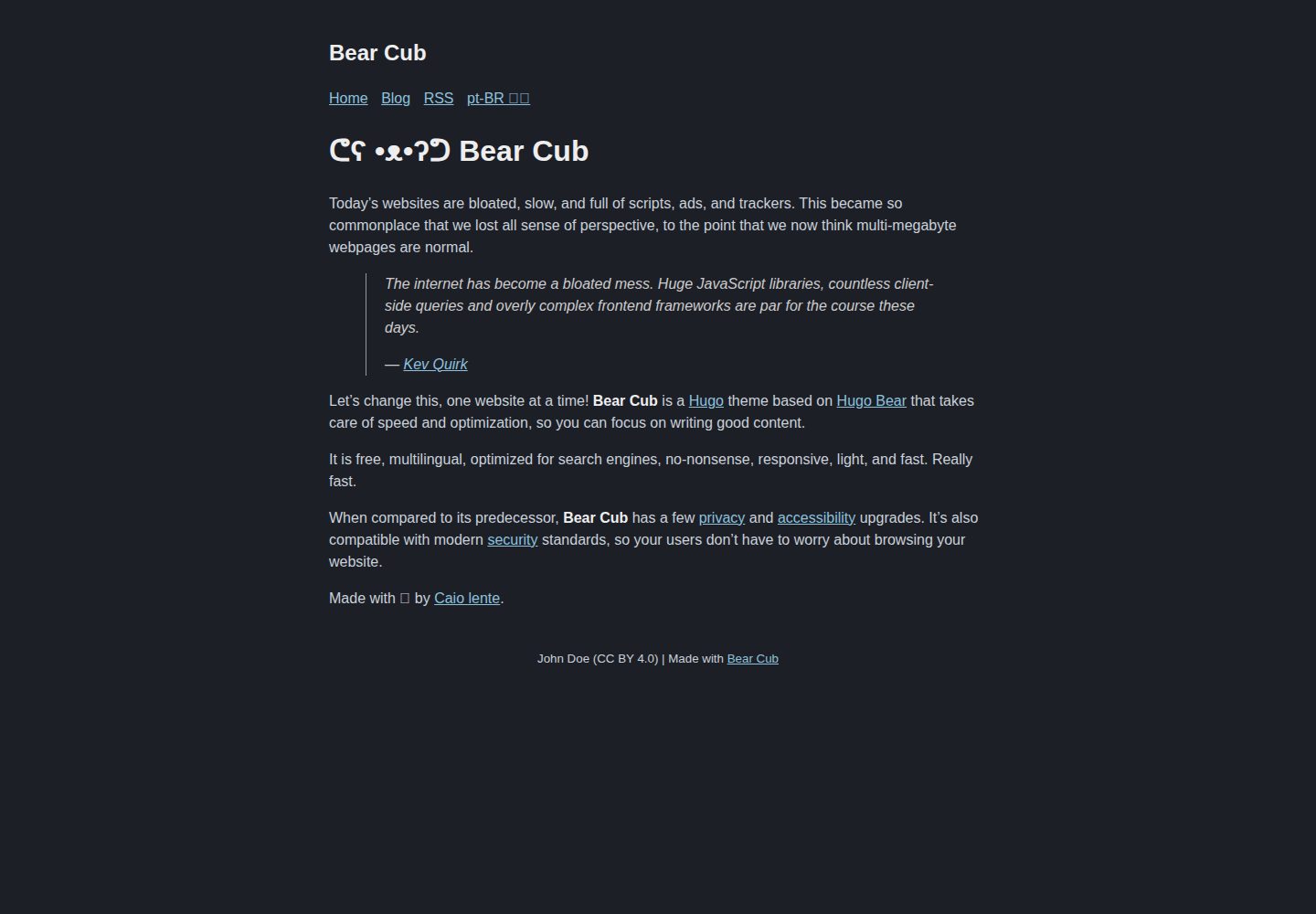
看看你的网站会是什么样
浏览真实页面截图,比较内容排版与手机效果。点击下方缩略图切换,放大查看整页细节。
全部页面与视图 3
截图用于了解视觉与布局,交互效果请以实际项目为准。
采集于 2026-10-02查看来源
值得关注的模板亮点
从已有项目资料中,快速了解它的特点。
不使用 JavaScript,也没有内联样式,语法高亮样式按页面是否含代码块加载
支持多语言站点,可为不同语言配置独立内容目录,并处理未翻译页面的切换按钮
提供全文 RSS 模板、skip link、邮件回复按钮与 absfigure 短代码等功能
包含实验性选项:单页 CSS、herman 替代样式、动态社交卡片生成
模板详细介绍
Bear Cub 是一个 Hugo 博客主题,其设计参考了 Bear Blog 与 Hugo Bear Blog。主题本身不使用 JavaScript,也没有内联样式,页面结构以文字内容为主,并提供 RSS 订阅输出。
在内容组织上,主题支持多语言站点:可以为不同语言配置独立的内容目录,并生成翻译切换按钮;当某个页面缺少对应译文时,可以将其显示为禁用状态,或通过 hideUntranslated 参数直接隐藏。此外,主题支持在文章 front matter 中通过 link 字段把空文章作为指向静态文件的链接,并可用 render: false 避免渲染空白文章。
主题还包含若干可选功能:全文 RSS 模板、跳转到正文的 skip link、在文章末尾生成“通过邮件回复”按钮(可在单篇文章中用 hideReply 关闭)、absfigure 短代码,以及实验性的单页 CSS、按需加载语法高亮样式、名为 herman 的替代样式和基于标题动态生成社交卡片。这些实验性功能的行为以仓库说明为准,是否适合正式站点需自行评估。
主题通过 hugo.toml 进行配置,可设置站点描述、favicon、分享图片、日期格式、社交元数据与作者信息等。仓库采用 MIT 许可,演示站点托管在 GitHub Pages 上。
Hugo博客
适合你的项目吗?
适用场景
- 搭建以文章为主的个人文字博客
- 需要为同一站点提供多语言内容的博客
- 希望页面不依赖 JavaScript 的静态站点
- 需要全文 RSS 输出供读者订阅的博客
适合人群
- 使用 Hugo 构建静态博客的开发者
- 偏好无脚本、无内联样式页面的站点作者
- 需要多语言博客与 RSS 订阅的写作者
- 希望以 hugo.toml 集中配置站点参数的用户
上手与定制指南
结合仓库当前版本的说明,按下面的资料检查内容、配置与运行要求。
- 1
先按 Hugo 快速开始创建空站点,再将主题以 Git 子模块方式克隆到 themes 目录
- 2
在站点配置文件中添加 theme = "hugo-bearcub"
- 3
参考仓库 exampleSite 中的 hugo.toml 配置多语言、社交元数据与作者信息
- 4
演示图片、字体、图标等第三方素材需按各自许可单独核对
- 5
实验性功能(单页 CSS、herman 样式、动态社交卡片)使用前请先阅读仓库说明
授权与来源资料
使用条件与限制
免费使用 · 保留许可声明本次收录的是公开仓库中采用 MIT 许可的免费版本;免费范围为该版本代码,不代表外部服务或第三方素材免费。
使用时需要遵守
- 允许免费使用、修改、商用和分发该版本代码。
- 分发代码副本或实质性部分时,保留原作者版权声明和完整 MIT 许可声明。
- 代码按现状提供;担保与责任限制以原许可证及适用法律为准。
额外费用与待核对事项
- 演示图片、字体、图标及其他第三方素材需按各自许可核对,不能仅凭代码的 MIT 许可判断。
- 域名、托管、数据库、支付或 AI 等外部服务可能另外收费。
- 若想进一步提升 Mozilla Observatory 评分,需要自行在托管服务(如 Netlify 或 Cloudflare Pages)的配置中添加若干 HTTP 响应头,这属于部署方自行完成的额外配置,并非主题开箱即用。
- 官方演示站点托管在 GitHub Pages 上,作者无法控制其 Content Security Policy,因此演示站点的 CSP 表现不代表自托管部署时的实际安全策略。
- 邮件回复按钮功能需要你在配置中提供邮箱地址才会生成;未提供邮箱时该按钮不会出现,且该按钮可在单篇文章中通过 hideReply 关闭。
- 动态社交卡片生成属于实验性功能,仅在文章未添加预览图片时才会基于标题生成,行为可能随版本变化,正式使用前需自行评估。
- 单页 CSS 为实验性功能,需要自行在 assets 目录编写 CSS 文件并在文章 front matter 中通过 style 字段引用,使用前应阅读仓库说明。
- herman 替代样式为实验性功能,需将 themeStyle 参数设为 "herman" 才会启用,且该样式源自 Herman Martinus 为 Astro 制作的 Blogster Minimal 主题。
- 条件加载语法高亮样式为实验性功能,仅当当前页面确实存在代码块时才会加载 syntax.css,否则不会加载该样式文件。
查看原文依据
Permission is hereby granted, free of charge
许可证原文
If you want to improve your [Mozilla Observatory](https://observatory.mozilla.org/) score even further, you should be able to simply add a few headers to your hosting service's configuration (e.g. [Netlify](https://docs.netlify.com/routing/headers/) or [Cloudflare Pages](https://developers.cloudflare.com/pages/platform/headers/)) and never have to think about it again.
README 原文
[**Bear Cub**'s demo](https://clente.github.io/hugo-bearcub/) is hosted on GitHub and therefore I'm not in control of its [Content Security Policy](https://infosec.mozilla.org/guidelines/web_security#content-security-policy).
README 原文
Reply by email: if you supply an email address, the theme creates a "Reply to this post by email" button at the end of every post
README 原文
Dynamic social card generation (EXPERIMENTAL): if you don't add preview images to a post, this template will generate one based on the title.
README 原文
Single-use CSS (EXPERIMENTAL): you can add some styles to a single page by writing the CSS you need in `assets/{custom_css}.css` and then including `style: "{custom_css}.css"` in the [front matter](https://gohugo.io/content-management/front-matter/) of said page.
README 原文
Alternative "Herman" style (EXPERIMENTAL): if you want to check out a more modern CSS style, you can change the `themeStyle` parameter to `"herman"` in order to activate [Herman Martinus's](https://herman.bearblog.dev/) version of the [Blogster Minimal](https://blogster-minimal.netlify.app/) theme for [Astro](https://astro.build/).
README 原文
https://github.com/VallariAg/hugo-bearcub/blob/main/LICENSEhttps://github.com/VallariAg/hugo-bearcub/blob/main/README.mdConditional CSS (EXPERIMENTAL): since **Bear Cub** does syntax highlighting without inline styles (see `hugo.toml` for more information), it only load its `syntax.css` if, and only if, a code block is actually present in the current page.
README 原文
DeepSeek 根据仓库许可证和 README 整理 ·2026-10-04。结果仅覆盖已读取资料,依赖、图片、字体及后续条款变更以各自原文为准。
项目核对记录与介绍依据
模板资料
- 来源平台
- GitHub
- 资料与维护参考分
- 资料一般 · 66 / 100
- 技术栈
- Hugo
- 网站类型
- 博客
这个分数如何计算
本站按许可资料(最高30分)、演示链接(12分)、预览图(10分)、Star数(15分)、记录的维护时间(15分)、描述完整度(8分)、功能记录(5分)和分类资料(5分)计算。它不是代码、安全或性能测试,也不是 Google 评分;有链接不代表已实测可用。
这个项目需要核对什么
- 记录的仓库更新时间
- 2025-02-22
- 截图检查日期
- 2026-10-04
已收录演示链接。请用你的内容与屏幕尺寸检查;有演示不代表表单、认证或支付已经可用。
目录记录的主要技术栈是 Hugo。请通过依赖清单和锁文件核对实际版本与托管要求。这些说明基于收录资料,不代表代码审计或部署实测。
查看具体选型方法 →介绍的制作与核对状态
介绍由 AI 辅助整理目录与仓库资料。仓库作者不等于这篇介绍的审核者。
审核声明: [email protected] · 2026-10-05
查看当时使用的来源资料
SHA-256: 5c7c50ccadf458b40deae50fa2842a04e275b76fd62d9b298d7959ba233761a6
2026-10-04T21:25:35.667Z
来源文件 / 仓库# ᕦʕ •ᴥ•ʔᕤ Bear Cub
[](https://github.com/clente/hugo-bearcub/actions/workflows/gh-pages.yml)
[](https://github.com/clente/hugo-bearcub/blob/main/LICENSE)
## Overview
🐻 A lightweight [Hugo](https://gohugo.io/) theme based on [Bear
Blog](https://bearblog.dev) and [Hugo Bear
Blog](https://github.com/janraasch/hugo-bearblog).
**Bear Cub** takes care of speed and optimization, so you can focus on writing
good content. It is free, multilingual, optimized for search engines,
no-nonsense, responsive, light, and fast. Really fast.
## Installation
Follow Hugo's [quick start](https://gohugo.io/getting-started/quick-start/) to
create an empty website and then clone **Bear Cub** into the themes directory as
a [Git submodule](https://git-scm.com/book/en/v2/Git-Tools-Submodules):
```sh
git submodule add https://github.com/clente/hugo-bearcub themes/hugo-bearcub
```
To finish off, append a line to the site configuration file:
```sh
echo 'theme = "hugo-bearcub"' >> hugo.toml
```
## Features
Like [Bear Blog](https://bearblog.dev), this theme:
- Is free and open source
- Looks great on any device
- Makes tiny (~5kb), optimized, and awesome pages
- Has no trackers, ads, or scripts
- Automatically generates an RSS feed
But that's not all! **Bear Cub** is also...
### Accessible
**Bear Cub** has a few accessibility upgrades when compared to its predecessors.
The color palette has been overhauled to make sure everything is
[readable](https://web.dev/color-and-contrast-accessibility/) for users with low
vision impairments or color deficiencies, and some interactive elements were
made bigger to facilitate [clicking](https://web.dev/accessible-tap-targets/)
for users with a motor impairment.
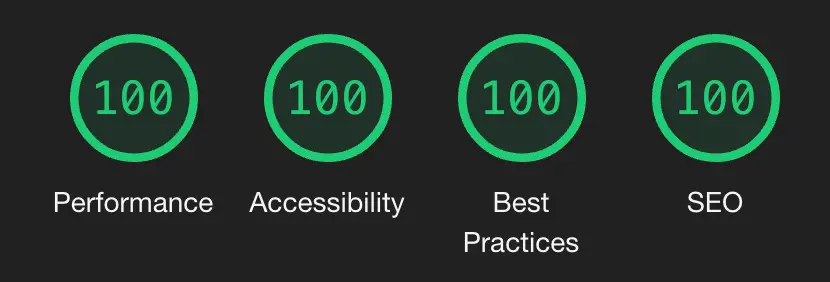
These small changes mean that **Bear Cub** passes Google's [PageSpeed
test](https://pagespeed.web.dev/report?url=https%3A%2F%2Fclente.github.io%2Fhugo-bearcub%2F)
with flying colors.
### Secure
[**Bear Cub**'s demo](https://clente.github.io/hugo-bearcub/) is hosted on GitHub
and therefore I'm not in control of its [Content Security
Policy](https://infosec.mozilla.org/guidelines/web_security#content-security-policy).
However, the theme itself was made with security in mind: there are no inline
styles and it uses no JavaScript at all.
If you want to improve your [Mozilla
Observatory](https://observatory.mozilla.org/) score even further, you should be
able to simply add a few headers to your hosting service's configuration (e.g.
[Netlify](https://docs.netlify.com/routing/headers/) or [Cloudflare
Pages](https://developers.cloudflare.com/pages/platform/headers/)) and never
have to think about it again. My `_headers` file, for example, looks like this:
```
/*
X-Content-Type-Options: nosniff
Strict-Transport-Security: "max-age=31536000; includeSubDomains; preload" env=HTTPS
Cache-Control: max-age=31536000, public
X-Frame-Options: deny
Referrer-Policy: no-referrer
Feature-Policy: microphone 'none'; payment 'none'; geolocation 'none'; midi 'none'; sync-xhr 'none'; camera 'none'; magnetometer 'none'; gyroscope 'none'
Content-Security-Policy: default-src 'none'; manifest-src 'self'; font-src 'self'; img-src 'self'; style-src 'self'; form-action 'none'; frame-ancestors 'none'; base-uri 'none'
X-XSS-Protection: 1; mode=block
```
### Multilingual
If you need to write a blog that supports more than one language, **Bear Cub**
has you covered! Check out the demo's [`hugo.toml`
file](https://github.com/clente/hugo-bearcub/blob/main/exampleSite/hugo.toml)
for a sample of how you can setup multilingual support.
By default, the theme creates a translation button that gets disabled when the
current page is only available in any other language. You can also choose to
hide this button (instead of disabling it) by setting `hideUntranslated =
true`.
### More
Every once in a while, as I keep using **Bear Cub**, I notice that there is some
functionality missing. Currently, these are the "advanced features" that I have
already implemented:
- Full-text RSS feed: an enhanced RSS feed template that includes the (properly
encoded) full content of your posts in the feed itself.
- Static content: you can create empty blog entries that act as links to static
files by including `link: "{url}"` in a post's [front
matter](https://gohugo.io/content-management/front-matter/). You can also add
`render: false` to your [build
options](https://gohugo.io/content-management/build-options/#readout) to avoid
rendering blank posts.
- Skip link: a "skip to main content" link that is temporarily invisible, but
can be focused by people who need a keyboard to navigate the web (see [PR
#5](https://github.com/clente/hugo-bearcub/pull/5) by
[@2kool4idkwhat](https://github.com/2kool4idkwhat) for more information).
- Reply by email: if you supply an email address, the theme creates a "Reply to
this post by email" button at the end of every post (see Kev Quirk's [original
implementation](https://kevquirk.com/adding-the-post-title-to-my-reply-by-email-button)).
This button can be suppressed on a case-by-case by setting `hideReply: true`
in a post's [front matter](https://gohugo.io/content-management/front-matter/)
(see [PR #18](https://github.com/clente/hugo-bearcub/pull/18) by
[@chrsmutti](https://github.com/chrsmutti)).
- `absfigure` shortcode: a shortcut to use the `figure` shortcode that also
converts relative URLs into absolute URLs by using the `absURL` function.
- Single-use CSS (EXPERIMENTAL): you can add some styles to a single page by
writing the CSS you need in `assets/{custom_css}.css` and then including
`style: "{custom_css}.css"` in the [front
matter](https://gohugo.io/content-management/front-matter/) of said page.
- Conditional CSS (EXPERIMENTAL): since **Bear Cub** does syntax highlighting
without inline styles (see `hugo.toml` for more information), it only load its
`syntax.css` if, and only if, a code block is actually present in the current
page.
- Alternative "Herman" style (EXPERIMENTAL): if you want to check out a more
modern CSS style, you can change the `themeStyle` parameter to `"herman"` in
order to activate [Herman Martinus's](https://herman.bearblog.dev/) version of
the [Blogster Minimal](https://blogster-minimal.netlify.app/) theme for
[Astro](https://astro.build/).
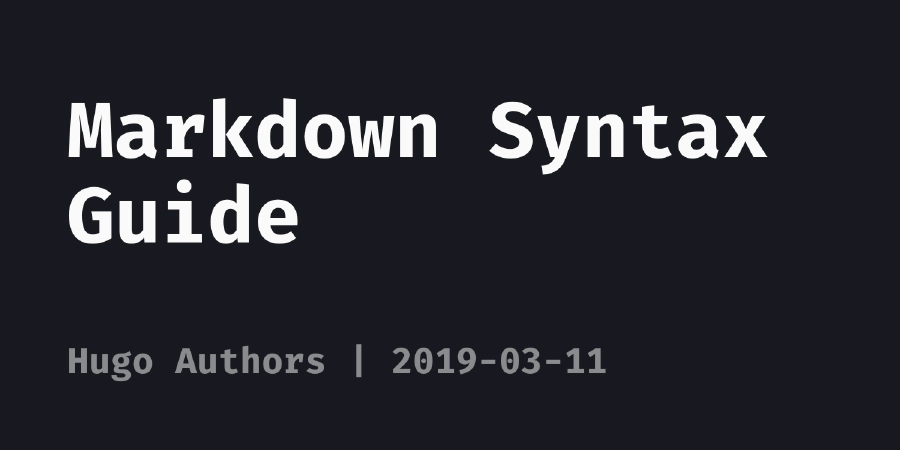
- Dynamic social card generation (EXPERIMENTAL): if you don't add preview images
to a post, this template will generate one based on the title. You can see an
example below.
## Configuration
**Bear Cub** can be customized with a `hugo.toml` file. Check out the
[configuration](https://github.com/clente/hugo-bearcub/blob/main/exampleSite/hugo.toml)
of the [demo](https://clente.github.io/hugo-bearcub/) for more information.
```toml
# Basic config
baseURL = "https://example.com"
theme = "hugo-bearcub"
copyright = "John Doe (CC BY 4.0)"
defaultContentLanguage = "en"
# Generate a nice robots.txt for SEO
enableRobotsTXT = true
# Setup syntax highlighting without inline styles. For more information about
# why you'd want to avoid inline styles, see
# https://developer.mozilla.org/en-US/docs/Web/HTTP/Headers/Content-Security-Policy/style-src#unsafe_inline_styles
[markup]
[markup.highlight]
lineNos = true
lineNumbersInTable = false
# This allows Bear Cub to use a variation of Dracula that is more accessible
# to people with poor eyesight. For more information about color contrast
# and accessibility, see https://web.dev/color-and-contrast-accessibility/
noClasses = false
# Multilingual mode config. More for information about how to setup translation,
# see https://gohugo.io/content-management/multilingual/
[languages]
[languages.en]
title = "Bear Cub"
languageName = "en-US 🇺🇸"
LanguageCode = "en-US"
contentDir = "content"
[languages.en.params]
madeWith = "Made with [Bear Cub](https://github.com/clente/hugo-bearcub)"
[languages.pt]
title = "Bear Cub"
languageName = "pt-BR 🇧🇷"
LanguageCode = "pt-BR"
contentDir = "content.pt"
[languages.pt.params]
madeWith = "Feito com [Bear Cub](https://github.com/clente/hugo-bearcub)"
[params]
# The description of your website
description = "Bear Cub Demo"
# The path to your favicon
favicon = "images/favicon.png"
# These images will show up when services want to generate a preview of a link
# to your site. Ignored if `generateSocialCard = true`. For more information
# about previews, see https://gohugo.io/templates/internal#twitter-cards and
# https://gohugo.io/templates/internal#open-graph
images = ["images/share.webp"]
# This title is used as the site_name on the Hugo's internal opengraph
# structured data template
title = "Bear Cub"
# Dates are displayed following the format below. For more information about
# formatting, see https://gohugo.io/functions/format/
dateFormat = "2006-01-02"
# If your blog is multilingual but you haven't translated a page, this theme
# will create a disabled link. By setting `hideUntranslated` to true, you can
# have the theme simply not show any link
hideUntranslated = false
# (EXPERIMENTAL) This theme has two options for its CSS styles: "original" and
# "herman". The former is what you see on Bear Cub's demo (an optimized
# version of Hugo Bear Blog), while the latter has a more modern look based on
# Herman Martinus's version of the Blogster Minimal theme for Astro.
themeStyle = "original"
# (EXPERIMENTAL) This theme is capable of dynamically generating social cards
# for posts that don't have `images` defined in their front matter; By setting
# `generateSocialCard` to false, you can prevent this behavior. For more
# information see layouts/partials/social_card.html
generateSocialCard = true
# Social media. Delete any item you aren't using to make sure it won't show up
# in your website's metadata.
[params.social]
twitter = "example" # Twitter handle (without '@')
facebook_admin = "0000000000" # Facebook Page Admin ID
# Author metadata. This is mostly used for the RSS feed of your site, but the
# email is also added to the footer of each post. You can hide the "reply to"
# link by using a `hideReply` param in front matter.
[params.author]
name = "John Doe" # Your name as shown in the RSS feed metadata
email = "[email protected]" # Added to the footer so readers can reply to posts
```
## Contributing
If you come across any problems while using **Bear Cub**, you can file an
[issue](https://github.com/clente/hugo-bearcub/issues) or create a [pull
request](https://github.com/clente/hugo-bearcub/pulls).
看看同类模板
对比同技术栈与用途的模板,找到更适合的视觉与内容结构。

hugo-PaperMod
PaperMod 是 Hugo 生态里知名度较高的主题之一,定位很明确:给博客和轻量作品集站点提供一套干净、响应式的阅读界面。
Hugo · 作品集

LoveIt
❤️A clean, elegant but advanced blog theme for Hugo 一个简洁、优雅且高效的 Hugo 主题
Hugo · 博客

hugo-coder
A minimalist blog theme for hugo.
Hugo · 博客

blowfish
Personal Website & Blog Theme for Hugo
Hugo · 博客

hugo-paper
🪺 A simple, clean, customizable Hugo theme
Hugo · 博客

hextra
Hextra 是一个 Hugo 主题,定位在文档站与博客之间:既提供侧边栏导航、目录、面包屑、分页这类文档站结构,也能承载博客内容。
Hugo · 文档