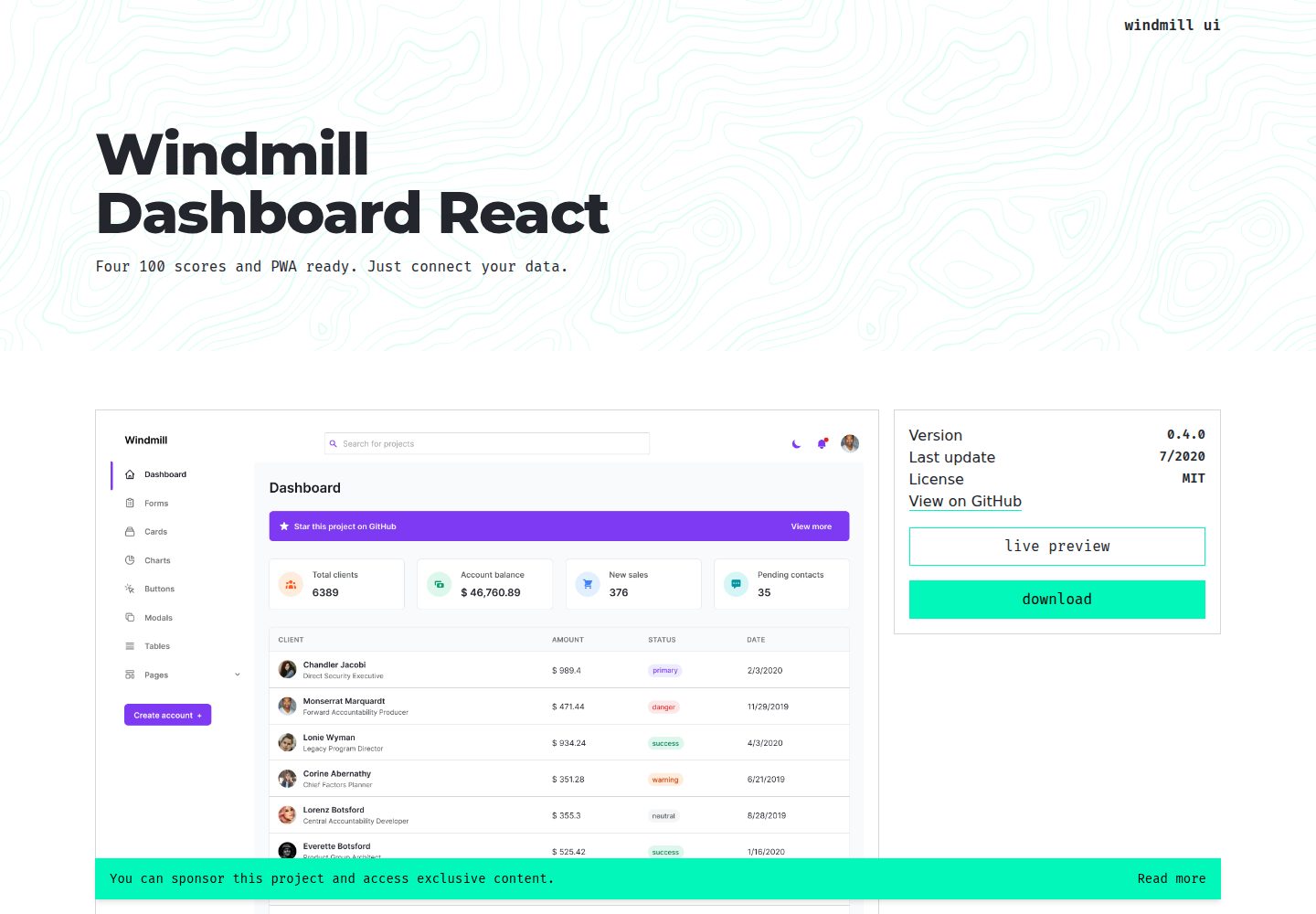
侧边栏与内部路由分离,支持下拉子菜单配置
HTML后台
template_dashboard — HTML 后台模板
作者 veenlorivz
基于 React 的后台管理面板模板,包含侧边栏路由、深色主题、图表与 PWA 支持,需自行接入数据。
看看你的网站会是什么样
浏览真实页面截图,比较内容排版与手机效果。点击下方缩略图切换,放大查看整页细节。
全部页面与视图 3
截图用于了解视觉与布局,交互效果请以实际项目为准。
采集于 2026-10-13查看来源
值得关注的模板亮点
从已有项目资料中,快速了解它的特点。
内置深色主题,可按主题加载不同图片
使用 Tailwind CSS 与 Windmill React UI 组件
集成 Chart.js 图表与 Heroicons 图标
支持代码分割,由 Create React App 引导
模板详细介绍
该模板是一个基于 React 构建的后台管理界面应用,仓库名为 template_dashboard,采用 MIT 许可发布。它并非空壳模板,而是包含完整页面结构与交互细节的应用骨架,使用者只需接入自己的数据即可运行。
界面方面,模板提供侧边栏导航与内部路由两套路由体系:侧边栏路由定义在 routes/sidebar.js,支持普通条目与下拉子菜单;内部私有路由定义在 routes/index.js,渲染在默认的 Layout 容器内。新增页面需在 src/pages 下创建组件,再注册到全局路由,并可选地加入侧边栏。
技术组成上,模板使用 Tailwind CSS 与 Windmill React UI 组件库,图标来自 Heroicons,图表使用 Chart.js,路由由 React Router 负责,并支持代码分割与深色主题。项目由 Create React App 引导,提供 npm start、npm test、npm run build 与 npm run eject 等脚本。
需要留意的是,仓库资料中的功能描述(如无障碍、PWA、性能评分)来自项目 README 自述,未在本次整理中逐项核验;演示图片、字体、图标等第三方素材的许可需单独确认,不能仅凭代码的 MIT 许可判断。
HTML后台
适合你的项目吗?
适用场景
- 搭建需要侧边栏导航与图表展示的后台管理界面
- 作为 React 后台项目的起始骨架,接入自有数据源
- 需要深色主题与多组件复用能力的内部管理系统
适合人群
- 熟悉 React 与 React Router 的前端开发者
- 需要现成后台布局与路由结构、自行接入数据的项目
- 使用 Tailwind CSS 技术栈的团队
上手与定制指南
结合仓库当前版本的说明,按下面的资料检查内容、配置与运行要求。
- 1
项目由 Create React App 引导,使用 npm start 启动开发模式,npm run build 生成生产构建
- 2
新增页面需在 src/pages 创建组件,并在 src/routes/index.js 注册路由
- 3
侧边栏条目在 src/routes/sidebar.js 配置,下拉菜单使用 routes 数组而非 path
- 4
演示图片、字体、图标等第三方素材需按各自许可单独核对
- 5
README 中的无障碍、PWA 与性能描述为项目自述,使用前建议自行验证
授权与来源资料
使用条件与限制
免费使用 · 保留许可声明本次收录的是公开仓库中采用 MIT 许可的免费版本;免费范围为该版本代码,不代表外部服务或第三方素材免费。
使用时需要遵守
- 允许免费使用、修改、商用和分发该版本代码。
- 分发代码副本或实质性部分时,保留原作者版权声明和完整 MIT 许可声明。
- 代码按现状提供;担保与责任限制以原许可证及适用法律为准。
额外费用与待核对事项
- 演示图片、字体、图标及其他第三方素材需按各自许可核对,不能仅凭代码的 MIT 许可判断。
- 域名、托管、数据库、支付或 AI 等外部服务可能另外收费。
查看原文依据
https://github.com/veenlorivz/template_dashboard/blob/main/LICENSEhttps://github.com/veenlorivz/template_dashboard/blob/main/README.mdPermission is hereby granted, free of charge
许可证原文
DeepSeek 根据仓库许可证和 README 整理 ·2026-10-13。结果仅覆盖已读取资料,依赖、图片、字体及后续条款变更以各自原文为准。
项目核对记录与介绍依据
模板资料
- 来源平台
- GitHub
- 资料与维护参考分
- 资料一般 · 57 / 100
- 技术栈
- HTML
- 网站类型
- 后台
这个分数如何计算
本站按许可资料(最高30分)、演示链接(12分)、预览图(10分)、Star数(15分)、记录的维护时间(15分)、描述完整度(8分)、功能记录(5分)和分类资料(5分)计算。它不是代码、安全或性能测试,也不是 Google 评分;有链接不代表已实测可用。
这个项目需要核对什么
- 记录的仓库更新时间
- 2022-09-08
- 截图检查日期
- 2026-10-13
已收录演示链接。请用你的内容与屏幕尺寸检查;有演示不代表表单、认证或支付已经可用。
目录记录的主要技术栈是 HTML。请通过依赖清单和锁文件核对实际版本与托管要求。这些说明基于收录资料,不代表代码审计或部署实测。
查看具体选型方法 →介绍的制作与核对状态
介绍由 AI 辅助整理目录与仓库资料。仓库作者不等于这篇介绍的审核者。
审核声明: [email protected] · 2026-10-13
查看当时使用的来源资料
SHA-256: 485cf520d3dc033a74a05ab659b8b04037439e3aa4dbcd9a35705db18ba9aa63
2026-10-13T09:29:52.939Z
来源文件 / 仓库# Windmill Dashboard React
Four 100 scores and PWA ready. Just connect your data.
🚀 [See it live](https://windmillui.com/dashboard-react)
This is not a template. This is a complete application, built on top of React, with all tiny details taken care of so you just need to bring the data to feed it.
Accessibility is a priority in my projects and I think it should be in yours too, so this was developed listening to real screen readers, focus traps and keyboard navigation are available everywhere.
## 📦 Features
- 🦮 Throughly accessible (developed using screen readers)
- 🌗 Dark theme enabled (load even different images based on theme)
- 🧩 Multiple (custom) components
- ⚡ Code splitting
- Tailwind CSS
- [Windmill React UI](https://windmillui.com/react-ui)
- React Router
- Heroicons
- Chart.js
- PWA delivering offline-first and app-like experience
## 📚 Docs
### General components
Windmill Dashboard React is built on top of [Windmill React UI](https://windmillui.com/react-ui). You will find the documentation for every small component there.
### Routing
Routes in Windmill Dashboard are separated into two categories, sidebar ([routes/sidebar.js](src/routes/sidebar.js)) and general ([routes/index.js](src/routes/index.js)).
#### Sidebar routes
These are the routes that will show in the sidebar. They expect three properties:
- `path`: the destination;
- `name`: the name to be shown;
- `icon`: an icon to illustrate the item
Item that are used as dropdowns, like the Pages option, don't need a `path`, but expect a `routes` array of objects with `path` and `name`:
```js
// sidebar.js
{
path: '/app/tables',
icon: 'TablesIcon',
name: 'Tables',
},
{
icon: 'PagesIcon', // <-- this is used as a submenu, so no path
name: 'Pages',
routes: [
// submenu
{
path: '/login',
name: 'Login', // <-- these don't have icons
},
{
path: '/create-account',
name: 'Create account',
},
```
#### General (Router) routes
These are **internal** (private) routes. They will be rendered inside the app, using the default `containers/Layout`.
If you want to add a route to, let's say, a landing page, you should add it to the `App`'s router ([src/App.js](src/App.js), exactly like `Login`, `CreateAccount` and other pages are routed.
#### How to add a new page to router?
1. Create your page inside `src/pages`, say `MyPage.js`;
2. Add it to the global router (`src/routes/index.js`)
```js
const MyPage = lazy(() => import('../pages/MyPage'))
```
Then add it to the `routes` array:
```js
{
path: '/my-page', // the url that will be added to /app/
component: MyPage, // the page component you jsut imported
}
```
3. If you want to make this page accessible from the sidebar, you have to options:
- add it to the root `routes` array
```js
{
path: '/app/my-page', // /app + the url you added in routes/index.js
icon: 'HomeIcon', // the component being exported from src/icons/index.js
name: 'My Page', // name that appear in Sidebar
},
```
- add it as an option under a dropdown
```js
{
icon: 'PagesIcon',
name: 'Pages',
routes: [
// submenu
{
path: '/app/my-page',
name: 'My Page',
},
```
If you're asking where does this `/app` come from, it is from this line inside `src/App.js`, that renders the app:
```jsx
<Route path="/app" component={Layout} />
```
---
This project was bootstrapped with [Create React App](https://github.com/facebook/create-react-app).
## Available Scripts
In the project directory, you can run:
### `npm start`
Runs the app in the development mode.<br />
Open [http://localhost:3000](http://localhost:3000) to view it in the browser.
The page will reload if you make edits.<br />
You will also see any lint errors in the console.
### `npm test`
Launches the test runner in the interactive watch mode.<br />
See the section about [running tests](https://facebook.github.io/create-react-app/docs/running-tests) for more information.
### `npm run build`
Builds the app for production to the `build` folder.<br />
It correctly bundles React in production mode and optimizes the build for the best performance.
The build is minified and the filenames include the hashes.<br />
Your app is ready to be deployed!
See the section about [deployment](https://facebook.github.io/create-react-app/docs/deployment) for more information.
### `npm run eject`
**Note: this is a one-way operation. Once you `eject`, you can’t go back!**
If you aren’t satisfied with the build tool and configuration choices, you can `eject` at any time. This command will remove the single build dependency from your project.
Instead, it will copy all the configuration files and the transitive dependencies (webpack, Babel, ESLint, etc) right into your project so you have full control over them. All of the commands except `eject` will still work, but they will point to the copied scripts so you can tweak them. At this point you’re on your own.
You don’t have to ever use `eject`. The curated feature set is suitable for small and middle deployments, and you shouldn’t feel obligated to use this feature. However we understand that this tool wouldn’t be useful if you couldn’t customize it when you are ready for it.
## Learn More
You can learn more in the [Create React App documentation](https://facebook.github.io/create-react-app/docs/getting-started).
To learn React, check out the [React documentation](https://reactjs.org/).
### Code Splitting
This section has moved here: https://facebook.github.io/create-react-app/docs/code-splitting
### Analyzing the Bundle Size
This section has moved here: https://facebook.github.io/create-react-app/docs/analyzing-the-bundle-size
### Making a Progressive Web App
This section has moved here: https://facebook.github.io/create-react-app/docs/making-a-progressive-web-app
### Advanced Configuration
This section has moved here: https://facebook.github.io/create-react-app/docs/advanced-configuration
### Deployment
This section has moved here: https://facebook.github.io/create-react-app/docs/deployment
### `npm run build` fails to minify
This section has moved here: https://facebook.github.io/create-react-app/docs/troubleshooting#npm-run-build-fails-to-minify
看看同类模板
对比同技术栈与用途的模板,找到更适合的视觉与内容结构。

gentelella
Free admin dashboard template — vanilla JS, SCSS, Vite 8. No Bootstrap, no jQuery.
HTML · 后台

coreui-free-bootstrap-admin-template
Free Bootstrap Admin & Dashboard Template Built for AI-Assisted Development
HTML · 后台

dashboards
Responsive dashboard templates 📊✨
HTML · 后台

SB Admin 2
SB Admin 2 是 Start Bootstrap 推出的开源后台模板,基于 Bootstrap 构建,整体风格偏向经典管理界面。
HTML · 后台

Adminator-admin-dashboard
Adminator is easy to use and well design admin dashboard template with dark mode for web apps, websites, servi…
HTML · 后台

SB Admin
SB Admin 是 Start Bootstrap 推出的开源后台管理模板,基于 Bootstrap 构建,定位是简洁、实用的管理界面。
HTML · 后台