完整认证流程:注册、登录、忘记密码、更新密码、确认邮箱
Next.jsReact后台启动器
supabase-nextjs-starter-template — Next.js 后台模板
作者 vito8916
基于 Next.js App Router 与 Supabase 的入门模板,包含认证流程、受保护仪表盘、个人资料设置和产品 CRUD 示例页面。
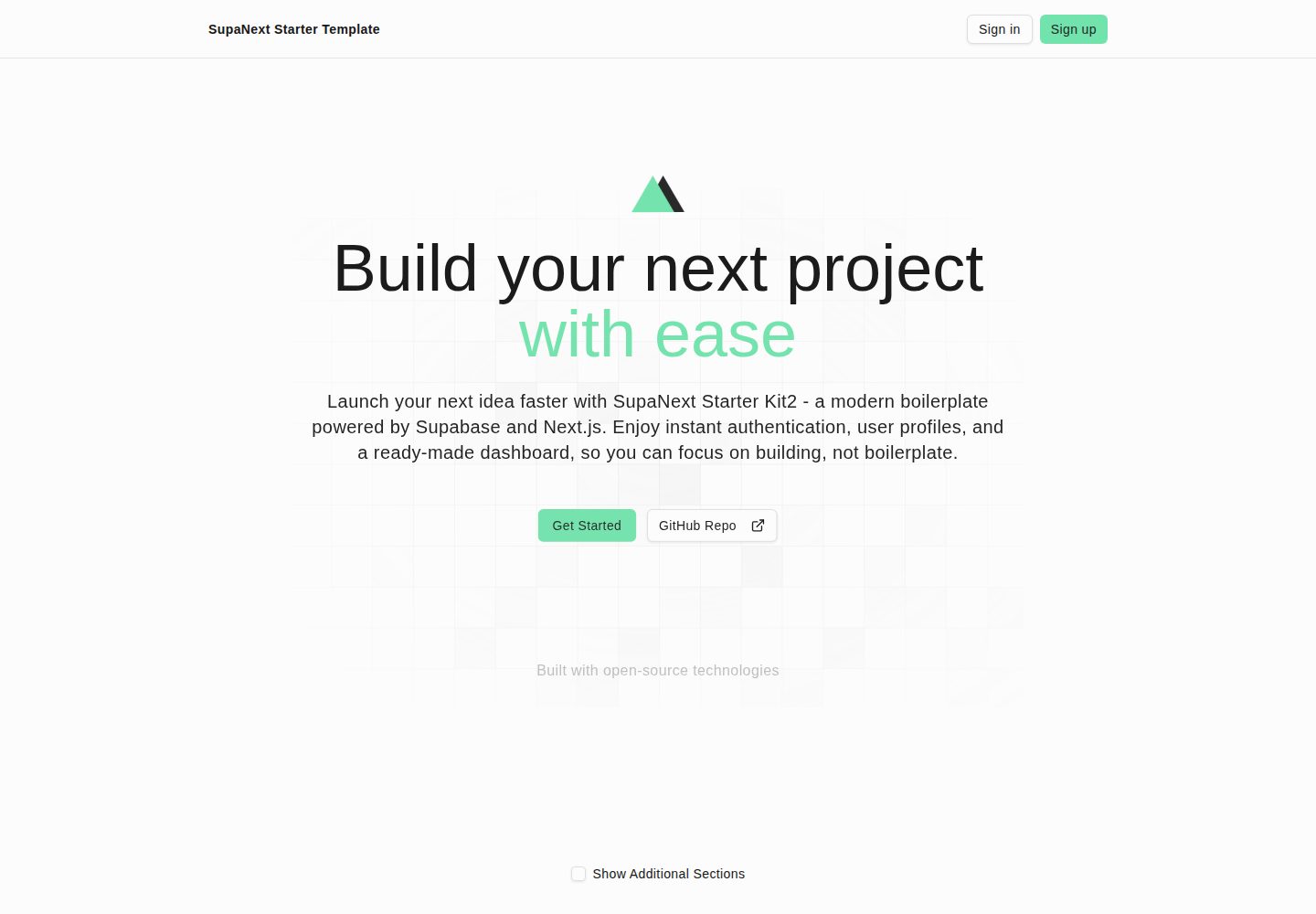
看看你的网站会是什么样
浏览真实页面截图,比较内容排版与手机效果。点击下方缩略图切换,放大查看整页细节。
全部页面与视图 2
截图用于了解视觉与布局,交互效果请以实际项目为准。
采集于 2026-10-14查看来源
值得关注的模板亮点
从已有项目资料中,快速了解它的特点。
middleware 路由保护:未登录跳转 /login,已登录离开 /login 与 /sign-up
受保护仪表盘,含侧边栏与导航
个人资料设置:更新资料、修改密码、主题与深色模式切换
项目页面提供对数据表的 CRUD 示例
Tailwind CSS v4 + shadcn/ui,可通过 tweakcn 调整主题
模板详细介绍
该模板是一个 Next.js + Supabase 起始项目,README 说明其目标是减少重复配置,让开发者更快进入功能开发。项目采用 App Router,集成 Supabase 认证与 SSR cookie 传递,并通过 middleware 实现路由保护:未登录用户访问受保护路由时跳转到 /login,已登录用户访问 /login 或 /sign-up 时跳转到 /dashboard。公开路由包括登录、注册、忘记密码、更新密码、注册成功、错误页以及 /auth 下的路径,首页也被特殊处理为公开。
功能层面,README 列出完整的用户认证流程(注册、登录、忘记密码、更新密码、确认邮箱)、带侧边栏和导航的仪表盘、个人资料设置(更新资料、修改密码、主题与深色模式切换),以及一个对数据表执行 CRUD 的项目页面作为示例。样式使用 Tailwind CSS v4 与 shadcn/ui 组件,并说明可通过 tweakcn 主题编辑器调整。
数据库方面,supabase/schema.sql 定义了 profiles 和 products 两张表;README 指出 profiles 是应用运行所必需,products 为可选,若移除需同时删除相关代码。项目要求 Node.js 18+ 与 pnpm,环境变量包括 NEXT_PUBLIC_SUPABASE_URL、NEXT_PUBLIC_SUPABASE_PUBLISHABLE_DEFAULT_KEY 和 NEXT_PUBLIC_SITE_URL;若缺少前两个必需变量,界面仍可加载且 middleware 会跳过认证强制。README 还要求使用新版 API keys 与 JWT Signing Keys,并给出确认邮件与重置密码邮件的模板配置步骤。
README 的 TODO 中列出 Resend 与 React Email、Stripe 订阅集成尚未完成,说明这些能力当前不在模板内。部署部分建议使用 Vercel 等平台并配置相同环境变量。
Next.js后台启动器
适合你的项目吗?
适用场景
- 需要快速搭建带 Supabase 认证的 Next.js 应用原型
- 为内部后台或小型产品建立带登录与仪表盘的起点
- 以现有 CRUD 页面为模板扩展自己的数据表管理功能
- 在 Vercel 上部署并接入 Supabase 项目进行开发验证
适合人群
- 熟悉 Next.js App Router 与 TypeScript 的开发者
- 使用 Supabase 作为认证与数据库后端的项目
- 希望减少初始配置、直接进入业务开发的团队
- 需要可自定义主题与 UI 组件的起始项目
上手与定制指南
结合仓库当前版本的说明,按下面的资料检查内容、配置与运行要求。
- 1
要求 Node.js 18+ 与 pnpm,仓库包含 pnpm-lock.yaml
- 2
在 .env.local 配置 NEXT_PUBLIC_SUPABASE_URL、NEXT_PUBLIC_SUPABASE_PUBLISHABLE_DEFAULT_KEY、NEXT_PUBLIC_SITE_URL
- 3
Supabase 项目需使用新版 API keys 与 JWT Signing Keys,并在 SQL Editor 运行 supabase/schema.sql
- 4
在 Supabase 控制台 Authentication -> Email 中替换确认注册与重置密码邮件模板
- 5
部署到 Vercel 等平台时需设置相同的环境变量,NEXT_PUBLIC_SITE_URL 指向生产域名
授权与来源资料
使用条件与限制
免费使用 · 保留许可声明本次收录的是公开仓库中采用 MIT 许可的免费版本;免费范围为该版本代码,不代表外部服务或第三方素材免费。
使用时需要遵守
- 允许免费使用、修改、商用和分发该版本代码。
- 分发代码副本或实质性部分时,保留原作者版权声明和完整 MIT 许可声明。
- 代码按现状提供;担保与责任限制以原许可证及适用法律为准。
额外费用与待核对事项
- 演示图片、字体、图标及其他第三方素材需按各自许可核对,不能仅凭代码的 MIT 许可判断。
- 域名、托管、数据库、支付或 AI 等外部服务可能另外收费。
- 需要自行创建并配置 Supabase 项目(用于认证),属于外部服务依赖。
- 必须拥有使用新版 API keys 与 JWT Signing Keys 的 Supabase 项目,免费套餐即可。
- 若使用旧版 JWT 密钥,需按官方教程迁移到新版密钥方式。
- profiles 与 products 表为应用运行所需,可按需增加更多表。
- profiles 表为必需;products 为可选,移除时需同时删除相关代码。
- 使用邮箱认证功能需在 Supabase 控制台配置邮件提供商。
- 使用邮件重置密码功能需在 Supabase 控制台配置邮件提供商。
- 部署到 Vercel 等平台时需在主机环境设置相同的环境变量。
查看原文依据
Permission is hereby granted, free of charge
许可证原文
- A Supabase project (for auth)
README 原文
You must have a Supabase project with the new API keys and JWT Signing Keys. (free tier is fine).
README 原文
NOTE: This project is using the new API keys and the new JWT Signing Key. If you're using the legacy JWT-based API keys (anon, service role secrete) and the legacy JWT secret, watch the Supabase official video tutorial to learn how to change to these new way to work with Supabase.
README 原文
These tables are required for the app to work. But you can add more tables as you need.
README 原文
Only the `profiles` table is required for the app to work. Products is optional. but keep in mind that you will have to remove the code related to it.
README 原文
In order to use the email authentication feature, you need to configure the email provider in the Supabase dashboard.
README 原文
In order to use the email reset password feature, you need to configure the email provider in the Supabase dashboard.
README 原文
https://github.com/vito8916/supabase-nextjs-starter-template/blob/master/LICENSE.txthttps://github.com/vito8916/supabase-nextjs-starter-template/blob/master/README.md- Works well on platforms like Vercel. Ensure the same env vars are set in the host environment:
README 原文
DeepSeek 根据仓库许可证和 README 整理 ·2026-10-14。结果仅覆盖已读取资料,依赖、图片、字体及后续条款变更以各自原文为准。
项目核对记录与介绍依据
模板资料
- 来源平台
- GitHub
- 资料与维护参考分
- 资料较完整 · 88 / 100
- 技术栈
- Next.js · React
- 网站类型
- 后台 · 启动器
这个分数如何计算
本站按许可资料(最高30分)、演示链接(12分)、预览图(10分)、Star数(15分)、记录的维护时间(15分)、描述完整度(8分)、功能记录(5分)和分类资料(5分)计算。它不是代码、安全或性能测试,也不是 Google 评分;有链接不代表已实测可用。
这个项目需要核对什么
- 记录的仓库更新时间
- 2026-09-10
- 截图检查日期
- 2026-10-14
已收录演示链接。请用你的内容与屏幕尺寸检查;有演示不代表表单、认证或支付已经可用。
目录记录的主要技术栈是 Next.js。请通过依赖清单和锁文件核对实际版本与托管要求。这些说明基于收录资料,不代表代码审计或部署实测。
查看具体选型方法 →介绍的制作与核对状态
介绍由 AI 辅助整理目录与仓库资料。仓库作者不等于这篇介绍的审核者。
审核声明: codex-user-requested-batch-review-20261015 · 2026-10-15
查看当时使用的来源资料
SHA-256: d429f96d6f07dc58784775ea81b99e929a3d5eaf7502bd494cc9957f3287625b
2026-10-14T11:40:23.620Z
来源文件 / 仓库# SupaNext Starter Kit 2
Welcome to SupaNext kit 2! This documentation will help you understand the project structure, components, and how to use them effectively.
## Overview
A Next.js + Supabase starter focused on shipping productivity. It includes a production-ready App Router setup, Supabase auth integration, middleware-based route protection, a dashboard shell, and Tailwind v4 + shadcn/ui components.
<!-- image cover -->
<p align="center">
<img src="public/assets/images/bento-features.png" alt="Bento Features Preview" style="max-width: 100%; border-radius: 0.75rem; box-shadow: 0 4px 24px rgba(0,0,0,.07)">
</p>
## Motivation
I work at a small company with only three engineers, so efficiency is key. In early 2025, I had to launch two new projects while also developing Rulesforai.app. They all shared a similar stack, and at the same time, one of my colleagues needed to create a back office for each one.
That's when I thought, "Why repeat the same thing over and over again?"
From that idea, Supanext Kit 2 was born: a ready-to-use template that reduces configurations, installations, and headaches. The goal is simple: to help you get started faster and focus on building, not configuring.
## Features
- Complete user authentication flow (sign up, sign in, forgot password, update password, confirm email)
- Landing page with additional sections.
- Dashboard with sidebar and nav.
- Profile settings (update profile info, update password, theme toggle, dark mode toggle)
- Project page (CRUD operations on a table) to use as a template for your own.
- Next.js Cache Components.
- Experimental staleTimes (dynamic, static) for Improving caching and navigation.
- Easy to Customise using https://tweakcn.com/editor/theme
## Tech Stack
- Next.js 16 (App Router) + CacheComponents + React 19.2 + TypeScript
- Supabase auth with SSR cookie pass-through (`@supabase/ssr`) + JWT signing keys
- Tailwind CSS v4 via `@tailwindcss/postcss`; global styles in `app/globals.css`
- ESLint flat config extending `next/core-web-vitals` and `next/typescript`
- Vitest for unit tests
- Path alias `@/*` (see `tsconfig.json`)
## Requirements
- Node.js 18+ (LTS recommended)
- pnpm (repository includes `pnpm-lock.yaml`)
- A Supabase project (for auth)
## Setup
1) Clone the repository
```bash
git clone https://github.com/vito8916/supabase-nextjs-starter-template.git
```
1.1) Install dependencies
```bash
pnpm install
```
2) Environment variables
Create `.env.local` in the project root:
```bash
NEXT_PUBLIC_SUPABASE_URL=your_supabase_project_url
NEXT_PUBLIC_SUPABASE_PUBLISHABLE_DEFAULT_KEY=your_supabase_anon_key
NEXT_PUBLIC_SITE_URL=http://localhost:3000
```
Notes:
- The app intentionally gates Supabase-dependent behavior behind env checks. If the two required vars are not present, the UI will still load and middleware will skip auth enforcement.
3) Supabase set up. [See how](#supabase-setup)
4) Supabase Auth Emails Configuration. See how [See how](#supabase-auth-email-configuration)
5) Run the dev server
```bash
pnpm dev
```
The app starts on http://localhost:3000 (Turbopack).
## Scripts
Defined in `package.json`:
- `pnpm dev` – Next dev with Turbopack on port 3000
- `pnpm build` – Production build
- `pnpm start` – Start the production server
- `pnpm lint` – Lint with ESLint (flat config)
- `pnpm test` – Run Vitest once
- `pnpm test:watch` – Run Vitest in watch mode
## Environment Variables
Required at runtime when enabling Supabase auth:
- `NEXT_PUBLIC_SUPABASE_URL`
- `NEXT_PUBLIC_SUPABASE_PUBLISHABLE_DEFAULT_KEY`
- `NEXT_PUBLIC_SITE_URL`
## Auth & Middleware
- Entry: `middleware.ts` delegates to `lib/supabase/middleware.updateSession()`.
- Behavior when env vars are present:
- Unauthenticated users are redirected from protected routes to `/login`.
- Authenticated users are redirected away from `/login` and `/sign-up` to `/dashboard`.
- Public routes (current list): `/login`, `/sign-up`, `/forgot-password`, `/update-password`, `/sign-up-success`, `/error`, any path under `/auth`. The home route `/` (served by `app/(landing)/page.tsx`) is also treated as public by a special-case check.
- Matcher excludes: `_next/static`, `_next/image`, `favicon.ico`, and common image extensions.
See:
- `middleware.ts`
- `lib/supabase/middleware.ts`
- `lib/utils.ts`
## Supabase Setup
You must have a Supabase project with the new API keys and JWT Signing Keys. (free tier is fine).
Go to https://supabase.com/ and create a new project.
NOTE: This project is using the new API keys and the new JWT Signing Key. If you're using the legacy JWT-based API keys (anon, service role secrete) and the legacy JWT secret, watch the Supabase official video tutorial to learn how to change to these new way to work with Supabase.
[How to roll your Supabase project's keys over to JWT Signing Keys](https://youtu.be/rwnOal_xRtM?si=TV35LfHDBcbhW4C5)
## Database Schema
You can find the database schema in `supabase/schema.sql`
We have three tables:
- profiles
- products
These tables are required for the app to work. But you can add more tables as you need.
Only the `profiles` table is required for the app to work. Products is optional. but keep in mind that you will have to remove the code related to it.
I Highly recommend you to run the `supabase/schema.sql` into the SQL Editor in Supabase Dashboard.
## Supabase Auth Email Configuration
### Confirmation Email Configuration
In order to use the email authentication feature, you need to configure the email provider in the Supabase dashboard.
In Supabase dashboard, go to Authentication -> Email -> Confirm sign up.
Replace the email content with:
```aiignore
<h2>Confirm your signup</h2>
<p>Follow this link to confirm your user:</p>
<p><a href="{{ .SiteURL }}/auth/confirm?token_hash={{ .TokenHash }}&type=email">Confirm your mail</a></p>
```
### Reset Password Email Configuration
In order to use the email reset password feature, you need to configure the email provider in the Supabase dashboard.
In Supabase dashboard, go to Authentication -> Email -> Reset password.
Replace the email content with:
```aiignore
<h2>Reset Password</h2>
<p>Follow this link to reset the password for your user:</p>
<p><a href="{{ .SiteURL }}/auth/confirm?token_hash={{ .TokenHash }}&type=recovery&next=/update-password">Reset Password</a></p>
```
## Project Structure
High-level folders:
```
app/
(landing)/ # Public marketing pages — Navbar + Footer layout
layout.tsx # Landing layout (Navbar, main, Footer)
page.tsx # Home / landing page
(auth)/ # Auth pages — minimal centered layout
(protected)/ # Authenticated-only layouts and pages (e.g., dashboard)
actions/ # Server Actions (auth, settings, etc.)
layout.tsx # Root layout (html, body, ThemeProvider, Toaster)
globals.css # Tailwind v4 global styles and CSS variables
components/
landing/ # Landing page sections (Navbar, Hero, Features, Pricing, Footer, …)
auth/ # Auth forms
dashboard/ # Sidebar, nav, etc.
settings/ # Profile / password forms
ui/ # shadcn/ui components
hooks/
lib/
supabase/ # SSR/CSR clients, middleware integration
validations-schemas/ # Zod schemas
utils.ts
middleware.ts # Next.js middleware entry
postcss.config.mjs # Tailwind v4 via @tailwindcss/postcss
eslint.config.mjs # ESLint flat config
next.config.ts
public/
types/ # TypeScript types
```
## Entry Points
- Landing page: `app/(landing)/page.tsx`
- Protected area example: `app/(protected)/dashboard/page.tsx`
## Development Notes
- Path alias: `@/*` and `@/public/*` (see `tsconfig.json`)
- Tailwind v4: Utilities-first; configure via `postcss.config.mjs`; global styles in `app/globals.css`
- Prefer Server Components by default; add `"use client"` only when needed
## Deployment
- Works well on platforms like Vercel. Ensure the same env vars are set in the host environment:
- `NEXT_PUBLIC_SUPABASE_URL`
- `NEXT_PUBLIC_SUPABASE_PUBLISHABLE_DEFAULT_KEY`
- `NEXT_PUBLIC_SITE_URL` (set to your production origin)
[](https://vercel.com/new/clone?repository-url=https%3A%2F%2Fgithub.com%2Fvito8916%2Fsupabase-nextjs-starter-template)
## License
MIT — see `LICENSE.txt`.
## TODOs
- Update to Next.js 16 and React 19.2 👍
- Implement Cache Components 👍
- Implement Resend and React Email
- Stripe Subscription Integration
看看同类模板
对比同技术栈与用途的模板,找到更适合的视觉与内容结构。

ai-website-cloner-template
Clone any website with one command using AI coding agents
Next.js · 启动器

Next.js SaaS Starter
Next.js SaaS Starter 是 Next.js 官方维护的 SaaS 起点模板,定位介于学习资源和可直接部署的脚手架之间。
Next.js · SaaS

Next.js Commerce
Next.js Commerce 是 Vercel 团队维护的电商启动模板,基于 Next.js App Router 构建,采用服务端渲染、React Server Components、Server Actions …
Next.js · 电商

Next-js-Boilerplate
Next-js-Boilerplate 是一个面向 Next.js 16、Tailwind CSS 4 和 TypeScript 的启动器,核心定位是开发者体验优先。
Next.js · 启动器

tailwind-nextjs-starter-blog
tailwind-nextjs-starter-blog 是一个面向个人技术博客的 Next.js 与 Tailwind CSS 启动模板,其 v2 版本基于 App Router 与 React Server Comp…
Next.js · 博客

next-forge
Production-grade Turborepo template for Next.js apps.
Next.js · 启动器