Complete authentication flow: sign-up, login, forgot password, update password, email confirmation
Next.jsReactAdmin dashboardStarter
supabase-nextjs-starter-template — Next.js Admin dashboard Template
By vito8916
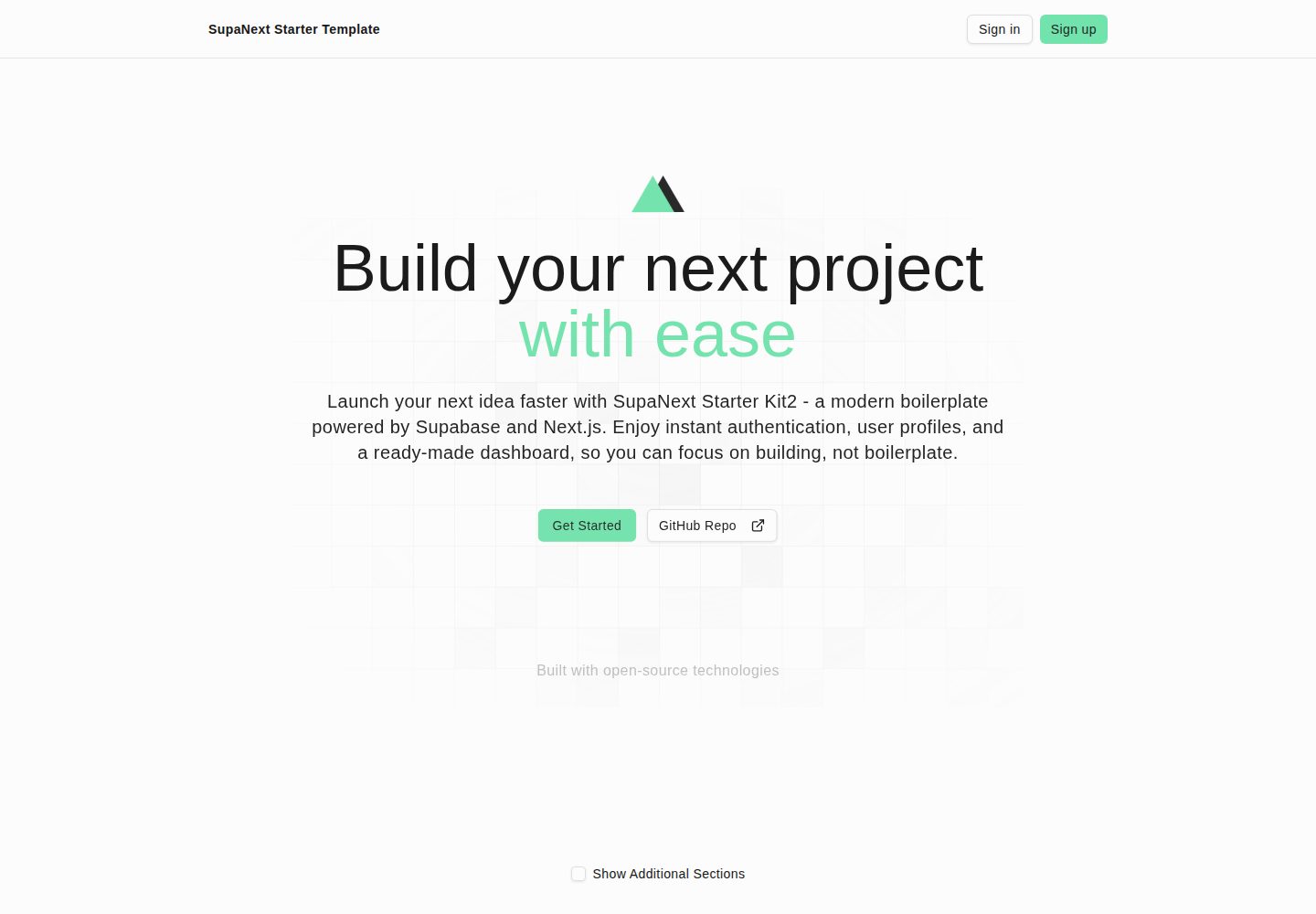
A starter template based on Next.js App Router and Supabase, including authentication flows, a protected dashboard, profile settings, and a product CRUD example page.
Explore the design
Compare the page layouts and mobile experience. Open any screenshot for a closer look.
Desktop homepage1 / 2
Desktop captureTop of page
Actual screenshot captured by the server browser.
All pages & views 2
Screenshots show visual appearance; interactive behavior may differ.
Recorded 2026-10-14View source
What stands out
A quick read of the recorded project description.
Middleware route protection: unauthenticated users are redirected to /login; authenticated users are redirected away from /login and /sign-up
Protected dashboard with sidebar and navigation
Profile settings: update profile, change password, theme and dark mode toggle
Projects page provides a CRUD example on a data table
Tailwind CSS v4 + shadcn/ui, with theme adjustments via tweakcn
Template Details
This template is a Next.js + Supabase starter project. The README states its goal is to reduce repetitive configuration so developers can get to feature development faster. The project uses the App Router, integrates Supabase authentication with SSR cookie passing, and implements route protection via middleware: unauthenticated users accessing protected routes are redirected to /login, and authenticated users accessing /login or /sign-up are redirected to /dashboard. Public routes include login, sign-up, forgot password, update password, sign-up success, error pages, and paths under /auth; the home page is also specially treated as public.
At the feature level, the README lists a complete user authentication flow (sign-up, login, forgot password, update password, email confirmation), a dashboard with sidebar and navigation, profile settings (update profile, change password, theme and dark mode toggle), and a projects page that performs CRUD on a data table as an example. Styling uses Tailwind CSS v4 and shadcn/ui components, and notes that themes can be adjusted via the tweakcn theme editor.
For the database, supabase/schema.sql defines two tables: profiles and products. The README notes that profiles is required for the app to run, while products is optional; if removed, the related code must also be deleted. The project requires Node.js 18+ and pnpm. Environment variables include NEXT_PUBLIC_SUPABASE_URL, NEXT_PUBLIC_SUPABASE_PUBLISHABLE_DEFAULT_KEY, and NEXT_PUBLIC_SITE_URL; if the first two required variables are missing, the UI still loads and middleware skips authentication enforcement. The README also requires using the new API keys and JWT Signing Keys, and provides steps to configure confirmation email and password reset email templates.
The README's TODO lists Resend and React Email, and Stripe subscription integration as not yet completed, indicating these capabilities are not currently in the template. The deployment section recommends platforms such as Vercel and configuring the same environment variables.
Next.jsBackendStarter
Is it right for your project?
Use Cases
- Quickly building a Next.js app prototype with Supabase authentication
- Establishing a starting point with login and dashboard for an internal admin panel or small product
- Extending your own data table management features using the existing CRUD page as a template
- Deploying on Vercel and connecting a Supabase project for development verification
Suitable For
- Developers familiar with Next.js App Router and TypeScript
- Projects using Supabase as the authentication and database backend
- Teams that want to reduce initial configuration and move directly into business development
- Starter projects that need customizable themes and UI components
Getting started & customization
Use these recorded setup notes alongside the repository instructions for your chosen version.
- 1
Requires Node.js 18+ and pnpm; the repository includes pnpm-lock.yaml
- 2
Configure NEXT_PUBLIC_SUPABASE_URL, NEXT_PUBLIC_SUPABASE_PUBLISHABLE_DEFAULT_KEY, and NEXT_PUBLIC_SITE_URL in .env.local
- 3
The Supabase project must use the new API keys and JWT Signing Keys, and run supabase/schema.sql in the SQL Editor
- 4
In the Supabase console under Authentication -> Email, replace the confirmation sign-up and password reset email templates
- 5
When deploying to platforms such as Vercel, set the same environment variables, with NEXT_PUBLIC_SITE_URL pointing to the production domain
License & source material
Usage conditions & limitations
Free to use · keep license noticeThis entry covers the free version under the MIT license in the public repository; the free scope is the code of this version and does not mean external services or third-party assets are free.
Must comply with when using
- Free use, modification, commercial use, and distribution of this version's code are permitted.
- When distributing copies or substantial portions of the code, retain the original author's copyright notice and the full MIT license notice.
- The code is provided as is; warranties and limitations of liability are governed by the original license and applicable law.
Additional costs & items to verify
- Demo images, fonts, icons, and other third-party assets must be checked against their respective licenses and cannot be judged solely by the code's MIT license.
- External services such as domains, hosting, databases, payments, or AI may incur additional charges.
- You need to create and configure a Supabase project (for authentication) yourself, which is an external service dependency.
- You must have a Supabase project that uses the new API keys and JWT Signing Keys; the free tier is sufficient.
- If using legacy JWT keys, you need to migrate to the new key method according to the official tutorial.
- The profiles and products tables are required for the app to run; more tables can be added as needed.
- The profiles table is required; products is optional, and removing it requires also deleting the related code.
- Using email authentication features requires configuring an email provider in the Supabase console.
- Using the email password reset feature requires configuring an email provider in the Supabase console.
- When deploying to platforms such as Vercel, set the same environment variables in the host environment.
View Original Text Basis
Permission is hereby granted, free of charge
Original License Text
- A Supabase project (for auth)
Original README
You must have a Supabase project with the new API keys and JWT Signing Keys. (free tier is fine).
Original README
NOTE: This project is using the new API keys and the new JWT Signing Key. If you're using the legacy JWT-based API keys (anon, service role secrete) and the legacy JWT secret, watch the Supabase official video tutorial to learn how to change to these new way to work with Supabase.
Original README
These tables are required for the app to work. But you can add more tables as you need.
Original README
Only the `profiles` table is required for the app to work. Products is optional. but keep in mind that you will have to remove the code related to it.
Original README
In order to use the email authentication feature, you need to configure the email provider in the Supabase dashboard.
Original README
In order to use the email reset password feature, you need to configure the email provider in the Supabase dashboard.
Original README
https://github.com/vito8916/supabase-nextjs-starter-template/blob/master/LICENSE.txthttps://github.com/vito8916/supabase-nextjs-starter-template/blob/master/README.md- Works well on platforms like Vercel. Ensure the same env vars are set in the host environment:
Original README
Compiled by DeepSeek based on repository license and README ·2026-10-14. Results only cover the materials read; dependencies, images, fonts, and subsequent term changes are subject to their respective original texts.
Project checks & description sources
Template Information
- Source platforms
- GitHub
- Documentation and maintenance reference score
- More documented · 88 / 100
- Technologies
- Next.js · React
- Website type
- Admin dashboard · Starter
How this score is calculated
Our heuristic uses license records (up to 30), a demo link (12), a preview (10), stars (15), recorded maintenance (15), description completeness (8), feature records (5) and classification data (5). It is not a code, security or performance test, or a Google score. A link does not establish tested functionality.
What to verify for this project
- Repository update recorded
- 2026-09-10
- Screenshot last checked
- 2026-10-14
A demo link is listed. Check it with your own content and viewport sizes; its presence does not confirm that forms, authentication or payments work.
The catalog identifies Next.js as the primary stack. Check the actual dependency manifest and lockfile for versions and hosting requirements. These notes use recorded metadata, not a code audit or a deployment test.
Use a selection guide →How this description was prepared
AI-assisted description based on catalog records and repository material. Repository authors are not automatically the reviewers of this description.
Review declaration: codex-user-requested-batch-review-20261015 · 2026-10-15
Inspect the recorded source material
SHA-256: d429f96d6f07dc58784775ea81b99e929a3d5eaf7502bd494cc9957f3287625b
2026-10-14T11:40:23.620Z
Source file / repository# SupaNext Starter Kit 2
Welcome to SupaNext kit 2! This documentation will help you understand the project structure, components, and how to use them effectively.
## Overview
A Next.js + Supabase starter focused on shipping productivity. It includes a production-ready App Router setup, Supabase auth integration, middleware-based route protection, a dashboard shell, and Tailwind v4 + shadcn/ui components.
<!-- image cover -->
<p align="center">
<img src="public/assets/images/bento-features.png" alt="Bento Features Preview" style="max-width: 100%; border-radius: 0.75rem; box-shadow: 0 4px 24px rgba(0,0,0,.07)">
</p>
## Motivation
I work at a small company with only three engineers, so efficiency is key. In early 2025, I had to launch two new projects while also developing Rulesforai.app. They all shared a similar stack, and at the same time, one of my colleagues needed to create a back office for each one.
That's when I thought, "Why repeat the same thing over and over again?"
From that idea, Supanext Kit 2 was born: a ready-to-use template that reduces configurations, installations, and headaches. The goal is simple: to help you get started faster and focus on building, not configuring.
## Features
- Complete user authentication flow (sign up, sign in, forgot password, update password, confirm email)
- Landing page with additional sections.
- Dashboard with sidebar and nav.
- Profile settings (update profile info, update password, theme toggle, dark mode toggle)
- Project page (CRUD operations on a table) to use as a template for your own.
- Next.js Cache Components.
- Experimental staleTimes (dynamic, static) for Improving caching and navigation.
- Easy to Customise using https://tweakcn.com/editor/theme
## Tech Stack
- Next.js 16 (App Router) + CacheComponents + React 19.2 + TypeScript
- Supabase auth with SSR cookie pass-through (`@supabase/ssr`) + JWT signing keys
- Tailwind CSS v4 via `@tailwindcss/postcss`; global styles in `app/globals.css`
- ESLint flat config extending `next/core-web-vitals` and `next/typescript`
- Vitest for unit tests
- Path alias `@/*` (see `tsconfig.json`)
## Requirements
- Node.js 18+ (LTS recommended)
- pnpm (repository includes `pnpm-lock.yaml`)
- A Supabase project (for auth)
## Setup
1) Clone the repository
```bash
git clone https://github.com/vito8916/supabase-nextjs-starter-template.git
```
1.1) Install dependencies
```bash
pnpm install
```
2) Environment variables
Create `.env.local` in the project root:
```bash
NEXT_PUBLIC_SUPABASE_URL=your_supabase_project_url
NEXT_PUBLIC_SUPABASE_PUBLISHABLE_DEFAULT_KEY=your_supabase_anon_key
NEXT_PUBLIC_SITE_URL=http://localhost:3000
```
Notes:
- The app intentionally gates Supabase-dependent behavior behind env checks. If the two required vars are not present, the UI will still load and middleware will skip auth enforcement.
3) Supabase set up. [See how](#supabase-setup)
4) Supabase Auth Emails Configuration. See how [See how](#supabase-auth-email-configuration)
5) Run the dev server
```bash
pnpm dev
```
The app starts on http://localhost:3000 (Turbopack).
## Scripts
Defined in `package.json`:
- `pnpm dev` – Next dev with Turbopack on port 3000
- `pnpm build` – Production build
- `pnpm start` – Start the production server
- `pnpm lint` – Lint with ESLint (flat config)
- `pnpm test` – Run Vitest once
- `pnpm test:watch` – Run Vitest in watch mode
## Environment Variables
Required at runtime when enabling Supabase auth:
- `NEXT_PUBLIC_SUPABASE_URL`
- `NEXT_PUBLIC_SUPABASE_PUBLISHABLE_DEFAULT_KEY`
- `NEXT_PUBLIC_SITE_URL`
## Auth & Middleware
- Entry: `middleware.ts` delegates to `lib/supabase/middleware.updateSession()`.
- Behavior when env vars are present:
- Unauthenticated users are redirected from protected routes to `/login`.
- Authenticated users are redirected away from `/login` and `/sign-up` to `/dashboard`.
- Public routes (current list): `/login`, `/sign-up`, `/forgot-password`, `/update-password`, `/sign-up-success`, `/error`, any path under `/auth`. The home route `/` (served by `app/(landing)/page.tsx`) is also treated as public by a special-case check.
- Matcher excludes: `_next/static`, `_next/image`, `favicon.ico`, and common image extensions.
See:
- `middleware.ts`
- `lib/supabase/middleware.ts`
- `lib/utils.ts`
## Supabase Setup
You must have a Supabase project with the new API keys and JWT Signing Keys. (free tier is fine).
Go to https://supabase.com/ and create a new project.
NOTE: This project is using the new API keys and the new JWT Signing Key. If you're using the legacy JWT-based API keys (anon, service role secrete) and the legacy JWT secret, watch the Supabase official video tutorial to learn how to change to these new way to work with Supabase.
[How to roll your Supabase project's keys over to JWT Signing Keys](https://youtu.be/rwnOal_xRtM?si=TV35LfHDBcbhW4C5)
## Database Schema
You can find the database schema in `supabase/schema.sql`
We have three tables:
- profiles
- products
These tables are required for the app to work. But you can add more tables as you need.
Only the `profiles` table is required for the app to work. Products is optional. but keep in mind that you will have to remove the code related to it.
I Highly recommend you to run the `supabase/schema.sql` into the SQL Editor in Supabase Dashboard.
## Supabase Auth Email Configuration
### Confirmation Email Configuration
In order to use the email authentication feature, you need to configure the email provider in the Supabase dashboard.
In Supabase dashboard, go to Authentication -> Email -> Confirm sign up.
Replace the email content with:
```aiignore
<h2>Confirm your signup</h2>
<p>Follow this link to confirm your user:</p>
<p><a href="{{ .SiteURL }}/auth/confirm?token_hash={{ .TokenHash }}&type=email">Confirm your mail</a></p>
```
### Reset Password Email Configuration
In order to use the email reset password feature, you need to configure the email provider in the Supabase dashboard.
In Supabase dashboard, go to Authentication -> Email -> Reset password.
Replace the email content with:
```aiignore
<h2>Reset Password</h2>
<p>Follow this link to reset the password for your user:</p>
<p><a href="{{ .SiteURL }}/auth/confirm?token_hash={{ .TokenHash }}&type=recovery&next=/update-password">Reset Password</a></p>
```
## Project Structure
High-level folders:
```
app/
(landing)/ # Public marketing pages — Navbar + Footer layout
layout.tsx # Landing layout (Navbar, main, Footer)
page.tsx # Home / landing page
(auth)/ # Auth pages — minimal centered layout
(protected)/ # Authenticated-only layouts and pages (e.g., dashboard)
actions/ # Server Actions (auth, settings, etc.)
layout.tsx # Root layout (html, body, ThemeProvider, Toaster)
globals.css # Tailwind v4 global styles and CSS variables
components/
landing/ # Landing page sections (Navbar, Hero, Features, Pricing, Footer, …)
auth/ # Auth forms
dashboard/ # Sidebar, nav, etc.
settings/ # Profile / password forms
ui/ # shadcn/ui components
hooks/
lib/
supabase/ # SSR/CSR clients, middleware integration
validations-schemas/ # Zod schemas
utils.ts
middleware.ts # Next.js middleware entry
postcss.config.mjs # Tailwind v4 via @tailwindcss/postcss
eslint.config.mjs # ESLint flat config
next.config.ts
public/
types/ # TypeScript types
```
## Entry Points
- Landing page: `app/(landing)/page.tsx`
- Protected area example: `app/(protected)/dashboard/page.tsx`
## Development Notes
- Path alias: `@/*` and `@/public/*` (see `tsconfig.json`)
- Tailwind v4: Utilities-first; configure via `postcss.config.mjs`; global styles in `app/globals.css`
- Prefer Server Components by default; add `"use client"` only when needed
## Deployment
- Works well on platforms like Vercel. Ensure the same env vars are set in the host environment:
- `NEXT_PUBLIC_SUPABASE_URL`
- `NEXT_PUBLIC_SUPABASE_PUBLISHABLE_DEFAULT_KEY`
- `NEXT_PUBLIC_SITE_URL` (set to your production origin)
[](https://vercel.com/new/clone?repository-url=https%3A%2F%2Fgithub.com%2Fvito8916%2Fsupabase-nextjs-starter-template)
## License
MIT — see `LICENSE.txt`.
## TODOs
- Update to Next.js 16 and React 19.2 👍
- Implement Cache Components 👍
- Implement Resend and React Email
- Stripe Subscription Integration
Explore similar templates
Compare previews and descriptions within the same stack and category.

Next.js SaaS Starter
The official Next.js SaaS starter template, integrating email/password authentication, Stripe Checkout subscriptions, a dashboard with user/team CRUD, basic Owner/Member RBAC, and activity logging.
Next.js · SaaS

Next.js Commerce
Vercel's officially maintained Next.js App Router ecommerce starter with deep Shopify integration, offering a complete product catalog, cart, and checkout flow. Core logic is modular for swapping backends, and community provider versions exist for BigCommerce, Medusa, and Saleor.
Next.js · E-commerce

Next-js-Boilerplate
A developer-first Next.js 16 starter with Tailwind CSS 4 and TypeScript, supporting both App Router and Page Router.
Next.js · Starter

tailwind-nextjs-starter-blog
A Next.js and Tailwind CSS blog starter template using Contentlayer for Markdown/MDX, with built-in SEO, code highlighting, and tags. It targets personal technical blogs and migration from Jekyll/Hugo to React, and supports one-click Vercel deployment.
Next.js · Blog

next-forge
next-forge is a Turborepo-based Next.js template maintained by Vercel, positioned as a starting point for SaaS products.
Next.js · Starter

SaaS-Boilerplate
SaaS-Boilerplate is an open-source SaaS starter template built with Next.js App Router, React 19, TypeScript, Tailwind CSS, and Shadcn UI.
Next.js · SaaS