组合 Knex.js、NestJS、Next.js 与 TypeScript 的全栈启动器
Next.jsHTMLReact启动器
knests_template — Next.js 启动器模板
作者 waheedkhan0
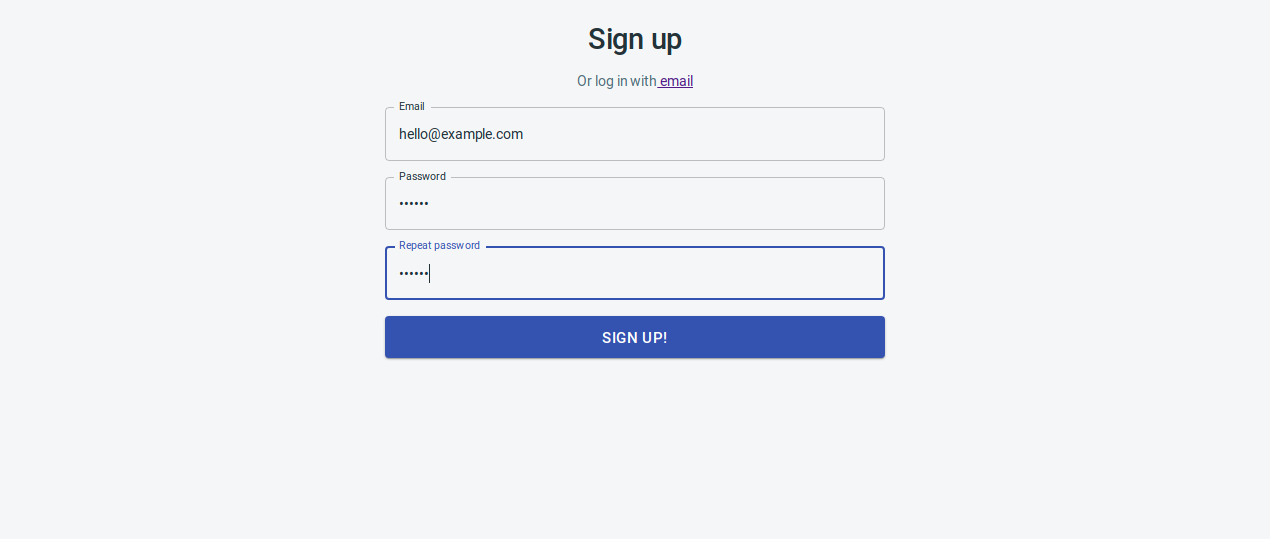
KNESTS 是一个基于 Next.js、NestJS、Knex.js 与 TypeScript 的全栈启动器,集成 GraphQL 与 Docker,附带登录、注册和后台仪表盘页面。
看看你的网站会是什么样
浏览真实页面截图,比较内容排版与手机效果。点击下方缩略图切换,放大查看整页细节。
目前有 1 张原始预览,可打开完整图片查看设计细节。
截图用于了解视觉与布局,交互效果请以实际项目为准。
采集于 2026-10-13查看来源
值得关注的模板亮点
从已有项目资料中,快速了解它的特点。
集成 GraphQL 与 Docker,使用 docker-compose 组织开发环境
自带 /signup、/login 页面及 /admin/dashboard 基础后台页面
后台界面采用 devias.io 的免费 Material React Dashboard 主题
仓库提供前端与后端文档,以及 Docker 调试与缓存清理说明
采用 MIT 许可,允许免费使用、修改、商用和分发该版本代码
模板详细介绍
KNESTS 模板是一个用于搭建 Next.js 应用的全栈启动器,仓库名为 knests_template,采用 MIT 许可。它把 Knex.js、NestJS、Next.js、TypeScript、GraphQL 和 Docker 组合在一起,目标是提供一套基于 Node.js 与 TypeScript 的开发起点。
模板自带可运行的页面与功能:/signup 注册页及其逻辑、/login 登录页及其逻辑,以及 /admin/dashboard 基础后台页面。后台界面取自 devias.io 的免费 Material React Dashboard 主题,README 中提供了登录、注册、大屏仪表盘和响应式仪表盘的截图。
使用方式以 Docker 为主:先创建 traefik-public 与 knests-dev 两个 Docker 网络,再用 docker-compose 配合开发配置文件构建并启动服务,随后访问 /api/migrate 应用数据库迁移,再通过 /signup 创建第一个用户。README 提到需要先删除 client/dist 目录以清除 Next.js 生成的文件。
模板还包含前端与后端各自的文档,以及若干调试与 Docker 缓存清理的说明。README 中列出了路线图条目,包括 Playwright 全栈端到端测试与代码覆盖率、开发流程教程、从 GitLab CI/CD 迁移到 GitHub Actions 与 Docker Hub、Kubernetes 部署、国际化等,这些均标注为待办,不代表已实现。
Next.jsHTML启动器
适合你的项目吗?
适用场景
- 以 TypeScript 全栈方式启动一个带登录注册的 Next.js 应用
- 在 Docker 环境中搭建包含前端、后端与数据库的开发栈
- 需要 GraphQL 接口与 Knex.js 数据库迁移的 Node.js 项目起步
- 基于现成后台仪表盘页面快速搭建管理界面原型
适合人群
- 熟悉 Docker 与 docker-compose 的全栈开发者
- 使用 TypeScript 并希望前后端同栈的团队
- 需要登录、注册与后台仪表盘作为起点的项目
- 愿意按 README 步骤自行配置数据库迁移与用户创建的开发者
上手与定制指南
结合仓库当前版本的说明,按下面的资料检查内容、配置与运行要求。
- 1
首次使用需创建 traefik-public 与 knests-dev 两个 Docker 网络
- 2
使用 docker-compose 同时加载 docker-compose.yml 与 docker-compose.dev.yml 构建启动
- 3
启动前需删除 client/dist 目录,以清除 Next.js 生成的文件
- 4
启动后访问 /api/migrate 应用数据库迁移,再访问 /signup 创建第一个用户
- 5
可将代码中的 knests 替换为自己的项目名称
授权与来源资料
使用条件与限制
免费使用 · 保留许可声明本次收录的是公开仓库中采用 MIT 许可的免费版本;免费范围为该版本代码,不代表外部服务或第三方素材免费。
使用时需要遵守
- 允许免费使用、修改、商用和分发该版本代码。
- 分发代码副本或实质性部分时,保留原作者版权声明和完整 MIT 许可声明。
- 代码按现状提供;担保与责任限制以原许可证及适用法律为准。
额外费用与待核对事项
- 演示图片、字体、图标及其他第三方素材需按各自许可核对,不能仅凭代码的 MIT 许可判断。
- 域名、托管、数据库、支付或 AI 等外部服务可能另外收费。
- 后台仪表盘界面取自 devias.io 的免费主题,该主题为第三方资源,其许可与代码库的 MIT 许可相互独立,使用前需自行确认该主题的授权条款。
- admin/dashboard 页面来自 devias.io 的 Material React Dashboard 产品,属于单独授权的第三方演示资源,其使用条件不受本仓库 MIT 许可覆盖。
- 首次使用需先创建 traefik-public 与 knests-dev 两个 Docker 网络,属于项目特定的环境前置要求。
- 启动前必须删除 client/dist 目录以清除 Next.js 生成的文件,这是当前版本的必要操作步骤。
- 使用前需访问 /api/migrate 应用数据库迁移,否则数据库结构不完整。
- 需通过 /signup 页面手动创建第一个用户后才能使用系统。
- 需将代码中的 knests 全局替换为自己的项目名称,才能作为独立项目使用。
查看原文依据
Permission is hereby granted, free of charge
许可证原文
It contains the [free admin dashboard theme from devias.io](https://react-material-dashboard.devias.io/dashboard).
README 原文
`/admin/dashboard` basic page, taken from [devias.io](https://devias.io/products/material-react-dashboard)
README 原文
Only needed to be run first time:
README 原文
Note: The `rm -rf client/dist` part is needed (for now, until we have a better solution) for deleting the files nextjs generates.
README 原文
Go to http://localhost:8080/api/migrate to have the latest migrations applied.
README 原文
Go to http://localhost:8080/signup and create your first user.
README 原文
https://github.com/waheedkhan0/knests_template/blob/master/LICENSEhttps://github.com/waheedkhan0/knests_template/blob/master/README.mdSearch and replace `knests` with **your own project name** and you'll have a project with:
README 原文
DeepSeek 根据仓库许可证和 README 整理 ·2026-10-13。结果仅覆盖已读取资料,依赖、图片、字体及后续条款变更以各自原文为准。
项目核对记录与介绍依据
模板资料
- 来源平台
- GitHub
- 资料与维护参考分
- 资料一般 · 58 / 100
- 技术栈
- Next.js · HTML · React
- 网站类型
- 启动器
这个分数如何计算
本站按许可资料(最高30分)、演示链接(12分)、预览图(10分)、Star数(15分)、记录的维护时间(15分)、描述完整度(8分)、功能记录(5分)和分类资料(5分)计算。它不是代码、安全或性能测试,也不是 Google 评分;有链接不代表已实测可用。
这个项目需要核对什么
- 记录的仓库更新时间
- 2021-03-09
- 截图检查日期
- 2026-10-13
目前没有记录演示链接。请依据仓库说明在本地评估;仅凭截图无法确认交互行为。
目录记录的主要技术栈是 Next.js。请通过依赖清单和锁文件核对实际版本与托管要求。这些说明基于收录资料,不代表代码审计或部署实测。
查看具体选型方法 →介绍的制作与核对状态
介绍由 AI 辅助整理目录与仓库资料。仓库作者不等于这篇介绍的审核者。
审核声明: [email protected] · 2026-10-13
查看当时使用的来源资料
SHA-256: 345e6ab590a60cad096eae34f2a2cd8b9100bd87d8644025e38b01f6a57cfabc
2026-10-13T01:18:44.024Z
来源文件 / 仓库# The KNESTS Stack * [KNEx.js](http://knexjs.org/) * [NEST.js](https://nestjs.com/) * [NExT.js](https://nextjs.org/) * [TS](https://www.typescriptlang.org/) * [GraphQL](https://graphql.org/) * [Docker](https://www.docker.com/) The above libraries and frameworks are the best ones (in my opinion, of course) regarding my desires at the moment of starting this project. It's just a simple (albeit huge) coincidence that 3 of them sound NEX-ish. It would've been a shame not to name the stack similarly. I wanted a NodeJS/Typescript based stack that would: * Help me develop web apps as fast as possible * With the cool javascript technologies of the moment (the "moment" is 2020 - most probably a small part of 2020): Typescript, React with typescript and hooks, GraphQL, Material-UI. * While following as much as possible the good ideas from the [NodeJS best practices](https://github.com/goldbergyoni/nodebestpractices). ## About If interested, read about the [whys and the objectives of the Knests Stack on my blog.](https://programming.tudorconstantin.com/2020/05/the-knests-stack.html) ## How it looks It contains the [free admin dashboard theme from devias.io](https://react-material-dashboard.devias.io/dashboard).     ## Getting started * Clone this repo and `cd` into it Only needed to be run first time: ```bash $ docker network create traefik-public $ docker network create knests-dev ``` ```bash `rm -rf client/dist && docker-compose -f docker-compose.yml -f docker-compose.dev.yml up --build -V --force-recreate` ``` Note: The `rm -rf client/dist` part is needed (for now, until we have a better solution) for deleting the files nextjs generates. Go to http://localhost:8080/api/migrate to have the latest migrations applied. Go to http://localhost:8080/signup and create your first user. ## Make it yours Search and replace `knests` with **your own project name** and you'll have a project with: * `/signup` page and functionality * `/login` page and functionality * `/admin/dashboard` basic page, taken from [devias.io](https://devias.io/products/material-react-dashboard) ## Debugging tips & tricks * You can run just a service from the stack (for example if you want to connect to DB from some external GUI client), you can do it like this: `rm -rf client/dist/ && docker-compose -f docker-compose.yml -f docker-compose.dev.yml run --service-ports postgres` - make sure you expose the service ports to the host using the [ports directive](https://docs.docker.com/compose/compose-file/#ports) ## Docker & docker-compose cheatsheet ### Docker image re-building from scratch There are moments in the dev/test flow when the docker images need to be rebuilt (after installing new packages for example). AAdding the `--build` parameter to the docker-compose command will usually be enough. For example: `rm -rf client/dist/ && time docker-compose -f docker-compose.yml -f docker-compose.test.yml up --build --abort-on-container-exit --renew-anon-volumes --force-recreate` When that's not enough, try one of the things below. ### Docker caching Docker can be surprising at caching stuff. Caching anonymous volumes was totally unexpected for me. Read the docs of all the commands that you intend to run on your systems, because these **can and will have side effects** on your systems! Here are some commands that clear all kind of caches: * `docker system prune` - this might take a while, because it says it clears everything. * `docker rmi $(docker image ls -a)` - tries to remove all the local images. ### Documentation There is some [frontend](https://github.com/tudorconstantin/knests/tree/master/client) / [backend](https://github.com/tudorconstantin/knests/tree/master/server) documentation written so you can debug things more thoroughly when they don't go as expected. ## Road map [] Fullstack e2e testing using Playwright and code coverage generating for both UI and server. [] Create tutorials documenting the development flow using the Knests stack. [] Since this is hosted on Github, migrate the Gitlab CI/CD pipeline to Github actions and dockerhub registry. [] Deployment and hosting on Kubernetes (?) [] Internationalization (?) [] Other good ideas ## Wanna Help? - Pick any task from the road map, develop it, document it and submit a Pull Request - Clone the repo, build something, see how it goes, come up with ideas on how to improve the overall development experience. - Review the code, send suggestions, fixes, etc. - Star the repo, share the articles, write yourself about it :)
看看同类模板
对比同技术栈与用途的模板,找到更适合的视觉与内容结构。

ai-website-cloner-template
Clone any website with one command using AI coding agents
Next.js · 启动器

Next.js SaaS Starter
Next.js SaaS Starter 是 Next.js 官方维护的 SaaS 起点模板,定位介于学习资源和可直接部署的脚手架之间。
Next.js · SaaS

Next.js Commerce
Next.js Commerce 是 Vercel 团队维护的电商启动模板,基于 Next.js App Router 构建,采用服务端渲染、React Server Components、Server Actions …
Next.js · 电商

Next-js-Boilerplate
Next-js-Boilerplate 是一个面向 Next.js 16、Tailwind CSS 4 和 TypeScript 的启动器,核心定位是开发者体验优先。
Next.js · 启动器

tailwind-nextjs-starter-blog
tailwind-nextjs-starter-blog 是一个面向个人技术博客的 Next.js 与 Tailwind CSS 启动模板,其 v2 版本基于 App Router 与 React Server Comp…
Next.js · 博客

next-forge
Production-grade Turborepo template for Next.js apps.
Next.js · 启动器