Full-stack launcher combining Knex.js, NestJS, Next.js, and TypeScript
Next.jsHTMLReactStarter
knests_template — Next.js Starter Template
By waheedkhan0
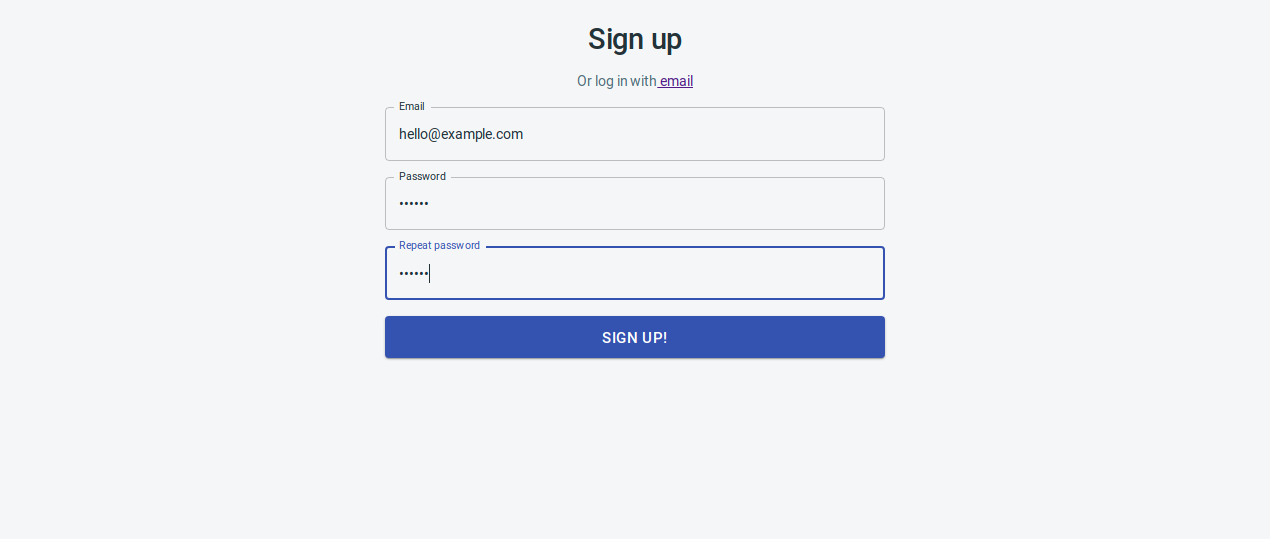
KNESTS is a full-stack launcher based on Next.js, NestJS, Knex.js, and TypeScript, integrating GraphQL and Docker, with login, registration, and admin dashboard pages.
Explore the design
Compare the page layouts and mobile experience. Open any screenshot for a closer look.
Author preview
Author-provided preview
Preview provided in the project README.
One original preview is available. Open the full image to inspect the design.
Screenshots show visual appearance; interactive behavior may differ.
Recorded 2026-10-13View source
What stands out
A quick read of the recorded project description.
Integrates GraphQL and Docker, using docker-compose to organize the development environment
Includes /signup and /login pages and a basic /admin/dashboard admin page
Admin interface uses the free Material React Dashboard theme from devias.io
Repository provides frontend and backend documentation, as well as Docker debugging and cache cleanup instructions
Licensed under MIT, allowing free use, modification, commercial use, and distribution of this version of the code
Template Details
The KNESTS template is a full-stack launcher for building Next.js applications, with the repository named knests_template and licensed under MIT. It combines Knex.js, NestJS, Next.js, TypeScript, GraphQL, and Docker, aiming to provide a starting point for development based on Node.js and TypeScript.
The template includes runnable pages and features: a /signup registration page and its logic, a /login login page and its logic, and a basic /admin/dashboard admin page. The admin interface is taken from the free Material React Dashboard theme by devias.io, and the README provides screenshots of login, registration, a large-screen dashboard, and a responsive dashboard.
Usage is primarily Docker-based: first create two Docker networks, traefik-public and knests-dev, then use docker-compose with the development configuration file to build and start the services, then visit /api/migrate to apply database migrations, and then create the first user via /signup. The README mentions that the client/dist directory must be deleted first to clear Next.js generated files.
The template also includes separate frontend and backend documentation, as well as several debugging and Docker cache cleanup instructions. The README lists roadmap items, including Playwright full-stack end-to-end testing and code coverage, development workflow tutorials, migration from GitLab CI/CD to GitHub Actions and Docker Hub, Kubernetes deployment, internationalization, etc. These are marked as to-dos and do not represent implemented features.
Next.jsHTMLLauncher
Is it right for your project?
Use Cases
- Start a Next.js application with login and registration in a TypeScript full-stack manner
- Set up a development stack including frontend, backend, and database in a Docker environment
- Start a Node.js project that requires GraphQL APIs and Knex.js database migrations
- Quickly build an admin interface prototype based on existing admin dashboard pages
Suitable For
- Full-stack developers familiar with Docker and docker-compose
- Teams using TypeScript and wanting a unified stack for frontend and backend
- Projects that need login, registration, and an admin dashboard as a starting point
- Developers willing to follow the README steps to configure database migrations and user creation themselves
Getting started & customization
Use these recorded setup notes alongside the repository instructions for your chosen version.
- 1
First use requires creating two Docker networks: traefik-public and knests-dev
- 2
Use docker-compose with both docker-compose.yml and docker-compose.dev.yml to build and start
- 3
Before starting, delete the client/dist directory to clear Next.js generated files
- 4
After starting, visit /api/migrate to apply database migrations, then visit /signup to create the first user
- 5
You can replace knests in the code with your own project name
License & source material
Usage conditions & limitations
Free to use · keep license noticeThis entry covers the free version under the MIT license in the public repository; the free scope is the code of this version and does not mean external services or third-party assets are free.
Must comply with when using
- Free use, modification, commercial use, and distribution of this version of the code are allowed.
- When distributing copies or substantial portions of the code, retain the original author's copyright notice and the full MIT license notice.
- The code is provided as is; warranties and limitations of liability are governed by the original license and applicable law.
Additional costs & items to verify
- Demo images, fonts, icons, and other third-party assets must be checked against their respective licenses; they cannot be judged solely by the code's MIT license.
- External services such as domains, hosting, databases, payments, or AI may incur additional charges.
- The admin dashboard interface is taken from a free theme by devias.io; this theme is a third-party resource, and its license is independent of the repository's MIT license. You must confirm the theme's authorization terms before use.
- The admin/dashboard page comes from the Material React Dashboard product by devias.io, which is a separately licensed third-party demo resource, and its usage conditions are not covered by this repository's MIT license.
- First use requires creating two Docker networks, traefik-public and knests-dev, which are project-specific environment prerequisites.
- Before starting, the client/dist directory must be deleted to clear Next.js generated files; this is a necessary step for the current version.
- Before use, visit /api/migrate to apply database migrations; otherwise, the database structure will be incomplete.
- The first user must be manually created via the /signup page before the system can be used.
- You need to globally replace knests in the code with your own project name to use it as an independent project.
View Original Text Basis
Permission is hereby granted, free of charge
Original License Text
It contains the [free admin dashboard theme from devias.io](https://react-material-dashboard.devias.io/dashboard).
Original README
`/admin/dashboard` basic page, taken from [devias.io](https://devias.io/products/material-react-dashboard)
Original README
Only needed to be run first time:
Original README
Note: The `rm -rf client/dist` part is needed (for now, until we have a better solution) for deleting the files nextjs generates.
Original README
Go to http://localhost:8080/api/migrate to have the latest migrations applied.
Original README
Go to http://localhost:8080/signup and create your first user.
Original README
https://github.com/waheedkhan0/knests_template/blob/master/LICENSEhttps://github.com/waheedkhan0/knests_template/blob/master/README.mdSearch and replace `knests` with **your own project name** and you'll have a project with:
Original README
Compiled by DeepSeek based on repository license and README ·2026-10-13. Results only cover the materials read; dependencies, images, fonts, and subsequent term changes are subject to their respective original texts.
Project checks & description sources
Template Information
- Source platforms
- GitHub
- Documentation and maintenance reference score
- Partly documented · 58 / 100
- Technologies
- Next.js · HTML · React
- Website type
- Starter
How this score is calculated
Our heuristic uses license records (up to 30), a demo link (12), a preview (10), stars (15), recorded maintenance (15), description completeness (8), feature records (5) and classification data (5). It is not a code, security or performance test, or a Google score. A link does not establish tested functionality.
What to verify for this project
- Repository update recorded
- 2021-03-09
- Screenshot last checked
- 2026-10-13
No demo link is recorded. Use the repository instructions to evaluate the project locally; the screenshot alone cannot establish interactive behavior.
The catalog identifies Next.js as the primary stack. Check the actual dependency manifest and lockfile for versions and hosting requirements. These notes use recorded metadata, not a code audit or a deployment test.
Use a selection guide →How this description was prepared
AI-assisted description based on catalog records and repository material. Repository authors are not automatically the reviewers of this description.
Review declaration: [email protected] · 2026-10-13
Inspect the recorded source material
SHA-256: 345e6ab590a60cad096eae34f2a2cd8b9100bd87d8644025e38b01f6a57cfabc
2026-10-13T01:18:44.024Z
Source file / repository# The KNESTS Stack * [KNEx.js](http://knexjs.org/) * [NEST.js](https://nestjs.com/) * [NExT.js](https://nextjs.org/) * [TS](https://www.typescriptlang.org/) * [GraphQL](https://graphql.org/) * [Docker](https://www.docker.com/) The above libraries and frameworks are the best ones (in my opinion, of course) regarding my desires at the moment of starting this project. It's just a simple (albeit huge) coincidence that 3 of them sound NEX-ish. It would've been a shame not to name the stack similarly. I wanted a NodeJS/Typescript based stack that would: * Help me develop web apps as fast as possible * With the cool javascript technologies of the moment (the "moment" is 2020 - most probably a small part of 2020): Typescript, React with typescript and hooks, GraphQL, Material-UI. * While following as much as possible the good ideas from the [NodeJS best practices](https://github.com/goldbergyoni/nodebestpractices). ## About If interested, read about the [whys and the objectives of the Knests Stack on my blog.](https://programming.tudorconstantin.com/2020/05/the-knests-stack.html) ## How it looks It contains the [free admin dashboard theme from devias.io](https://react-material-dashboard.devias.io/dashboard).     ## Getting started * Clone this repo and `cd` into it Only needed to be run first time: ```bash $ docker network create traefik-public $ docker network create knests-dev ``` ```bash `rm -rf client/dist && docker-compose -f docker-compose.yml -f docker-compose.dev.yml up --build -V --force-recreate` ``` Note: The `rm -rf client/dist` part is needed (for now, until we have a better solution) for deleting the files nextjs generates. Go to http://localhost:8080/api/migrate to have the latest migrations applied. Go to http://localhost:8080/signup and create your first user. ## Make it yours Search and replace `knests` with **your own project name** and you'll have a project with: * `/signup` page and functionality * `/login` page and functionality * `/admin/dashboard` basic page, taken from [devias.io](https://devias.io/products/material-react-dashboard) ## Debugging tips & tricks * You can run just a service from the stack (for example if you want to connect to DB from some external GUI client), you can do it like this: `rm -rf client/dist/ && docker-compose -f docker-compose.yml -f docker-compose.dev.yml run --service-ports postgres` - make sure you expose the service ports to the host using the [ports directive](https://docs.docker.com/compose/compose-file/#ports) ## Docker & docker-compose cheatsheet ### Docker image re-building from scratch There are moments in the dev/test flow when the docker images need to be rebuilt (after installing new packages for example). AAdding the `--build` parameter to the docker-compose command will usually be enough. For example: `rm -rf client/dist/ && time docker-compose -f docker-compose.yml -f docker-compose.test.yml up --build --abort-on-container-exit --renew-anon-volumes --force-recreate` When that's not enough, try one of the things below. ### Docker caching Docker can be surprising at caching stuff. Caching anonymous volumes was totally unexpected for me. Read the docs of all the commands that you intend to run on your systems, because these **can and will have side effects** on your systems! Here are some commands that clear all kind of caches: * `docker system prune` - this might take a while, because it says it clears everything. * `docker rmi $(docker image ls -a)` - tries to remove all the local images. ### Documentation There is some [frontend](https://github.com/tudorconstantin/knests/tree/master/client) / [backend](https://github.com/tudorconstantin/knests/tree/master/server) documentation written so you can debug things more thoroughly when they don't go as expected. ## Road map [] Fullstack e2e testing using Playwright and code coverage generating for both UI and server. [] Create tutorials documenting the development flow using the Knests stack. [] Since this is hosted on Github, migrate the Gitlab CI/CD pipeline to Github actions and dockerhub registry. [] Deployment and hosting on Kubernetes (?) [] Internationalization (?) [] Other good ideas ## Wanna Help? - Pick any task from the road map, develop it, document it and submit a Pull Request - Clone the repo, build something, see how it goes, come up with ideas on how to improve the overall development experience. - Review the code, send suggestions, fixes, etc. - Star the repo, share the articles, write yourself about it :)
Explore similar templates
Compare previews and descriptions within the same stack and category.

Next.js SaaS Starter
The official Next.js SaaS starter template, integrating email/password authentication, Stripe Checkout subscriptions, a dashboard with user/team CRUD, basic Owner/Member RBAC, and activity logging.
Next.js · SaaS

Next.js Commerce
Vercel's officially maintained Next.js App Router ecommerce starter with deep Shopify integration, offering a complete product catalog, cart, and checkout flow. Core logic is modular for swapping backends, and community provider versions exist for BigCommerce, Medusa, and Saleor.
Next.js · E-commerce

Next-js-Boilerplate
A developer-first Next.js 16 starter with Tailwind CSS 4 and TypeScript, supporting both App Router and Page Router.
Next.js · Starter

tailwind-nextjs-starter-blog
A Next.js and Tailwind CSS blog starter template using Contentlayer for Markdown/MDX, with built-in SEO, code highlighting, and tags. It targets personal technical blogs and migration from Jekyll/Hugo to React, and supports one-click Vercel deployment.
Next.js · Blog

next-forge
next-forge is a Turborepo-based Next.js template maintained by Vercel, positioned as a starting point for SaaS products.
Next.js · Starter

SaaS-Boilerplate
SaaS-Boilerplate is an open-source SaaS starter template built with Next.js App Router, React 19, TypeScript, Tailwind CSS, and Shadcn UI.
Next.js · SaaS